
Squarespace Templates for Restaurants: 12 Picks, Segmented by What You Serve
The short answer: choose on how the template builds the menu, not on how the homepage looks. Every Squarespace 7.1 template runs the same engine, so any aesthetic is reachable from any starting point in an afternoon of Site Styles work. What differs is the page set and, above all, whether the menu is crawlable text on a page or a PDF a phone has to pinch-zoom.
Below are 12 templates sorted into seven kinds of food business, scored against one rubric, plus the three integration decisions that matter more than the template does.

How these Squarespace restaurant templates were scored
Every template was judged on five weighted criteria, scored out of 5.
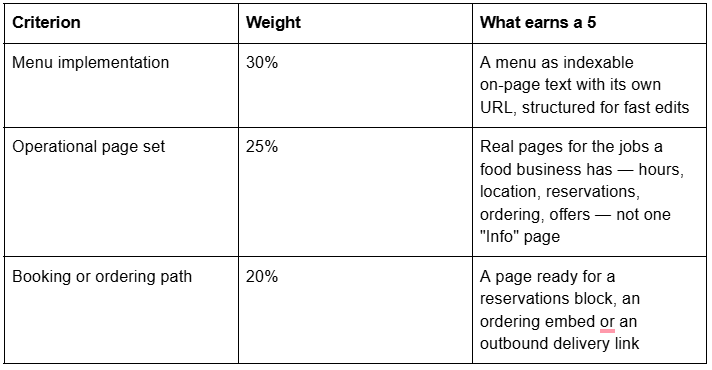
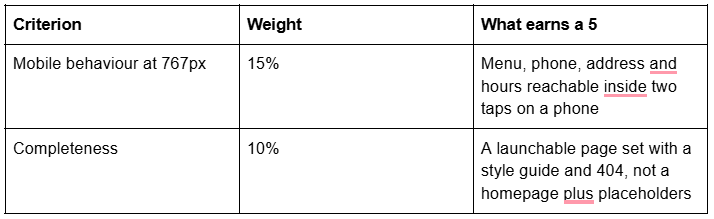
What this scoring is and is not. It is a structural assessment built from each template's live demo navigation and the page objects each demo actually uses, checked in page source in August 2026. It is not a lab benchmark of demo sites — demos ship placeholder photography unrelated to the food images you are about to upload.
Disclosure: Squareko sells four of the templates below, marked Squareko, $249. Squarespace's own templates are included with a subscription and are the right answer for several segments here — I have said so where it is true.
Quick pick by kind of food business
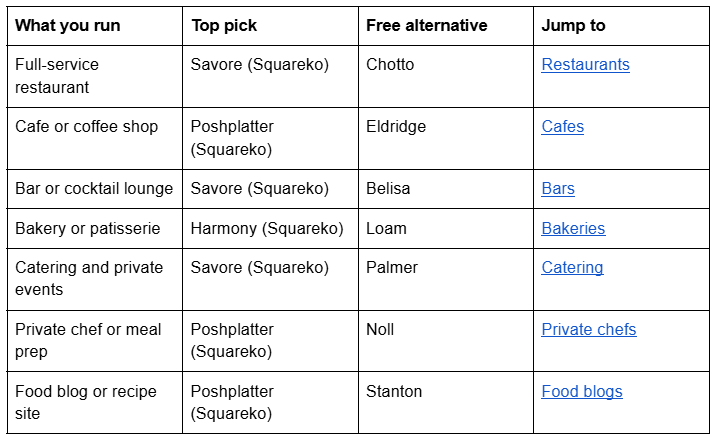
The decision that comes before the template: how your menu is built
On Squarespace 7.1 there are four ways to put a menu on a page and they are not interchangeable.
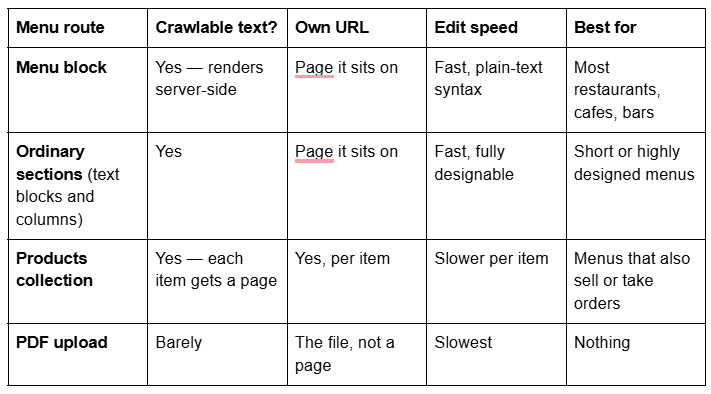
The Menu block is still a native Squarespace block, and it is the default answer. Despite a widely repeated claim that it was removed, it is live and documented as of 29 July 2026 on the Basic, Core, Plus and Advanced plans and on legacy Business and Commerce plans. Add it from the block menu, then type the menu in plain text: menu name followed by three or more =, section name followed by three or more -, then item, description and price on successive lines. A / between two prices gives glass/bottle or half/full pricing, and $MKT renders as market price.
I verified the crawlability claim rather than repeating it: fetching the raw HTML of Squarespace's Chotto demo menu page in August 2026 returns every item name, description and price as plain text inside <div class="menu-block sqs-block-menu">, no JavaScript needed. Squarespace's own documentation calls the Menu block "a great alternative to embedding .pdf menus, which aren't always as SEO-friendly as text directly on the page."
Two quirks: the first menu category sets the block's minimum height, so a long breakfast menu followed by a short lunch menu leaves empty space under the short one; and column alignment is browser-driven, with a <br/> at the end of a section being Squarespace's documented fix for an odd number of items.
Use a Products collection instead when the menu has to take money — online ordering, meal kits, pre-orders. Each dish then gets its own URL, image and description. Squarespace products have no draft state: an item is Public, Hidden or Scheduled, so a dish you are still testing goes Hidden.
Never use a PDF as your only menu. Search engines extract from it poorly, a phone renders it as a zoomable document rather than a page, and updating a price means re-exporting a file. If you want a printable PDF, offer it in addition to the on-page menu.
Reservations and online ordering: what actually integrates in 2026
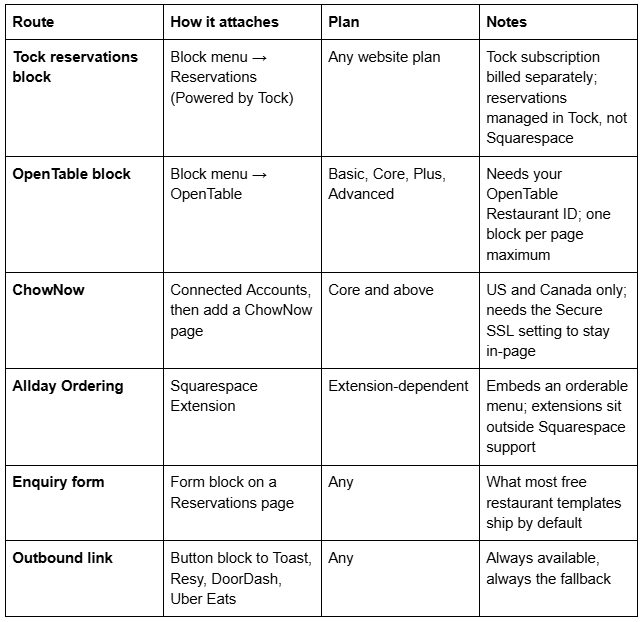
Two things surprise people. First, the Tock block is what Squarespace itself ships: checking page source on Squarespace's Atlantic, Auburn, Palmer, Pine and Tantillo restaurant demos in August 2026, each Reservations page carries a tock-block. Tock was acquired by American Express in 2024; Squarespace states existing blocks were unaffected. Second, the OpenTable block is not gone — documentation last updated 29 July 2026, supporting seven OpenTable domains (US/Canada, UK, Ireland, Germany, Australia/New Zealand, Japan, Mexico) and five languages, and switching its button to Join Waitlist automatically if you run a waitlist. Outside those domains, Squarespace's advice is to link out or paste OpenTable's embed code into a Code Block. Neither block works while you are logged into your own site — test in a private window before concluding it is broken.
Squarespace templates for full-service restaurants
A full-service restaurant site has three urgent jobs: show the menu, show tonight's hours, take the booking. Everything else is decoration.

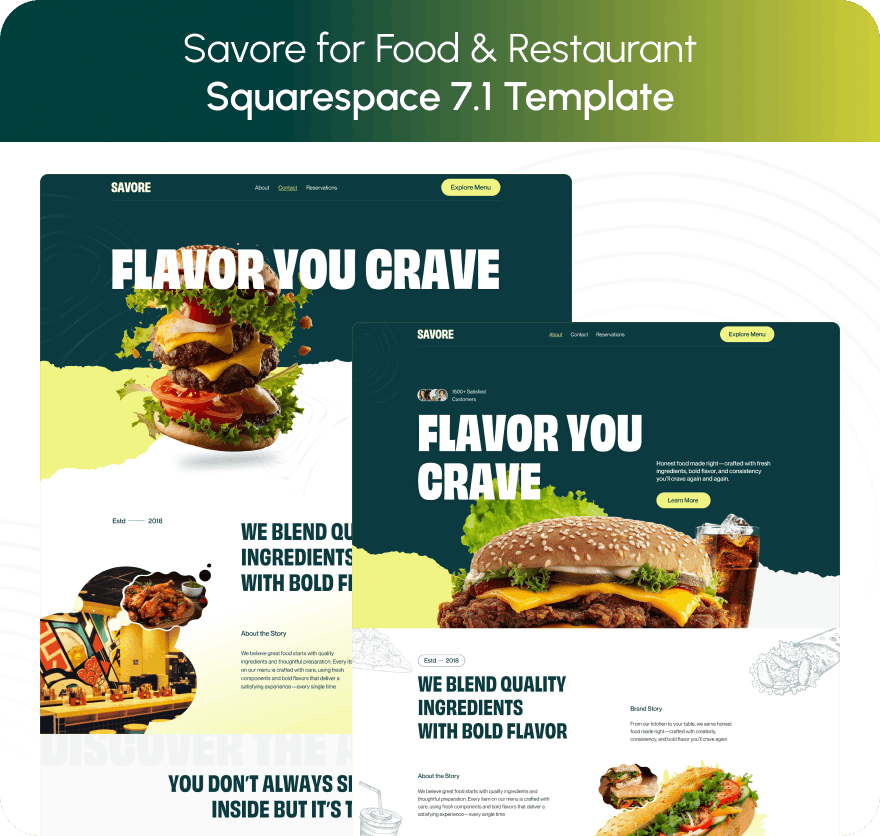
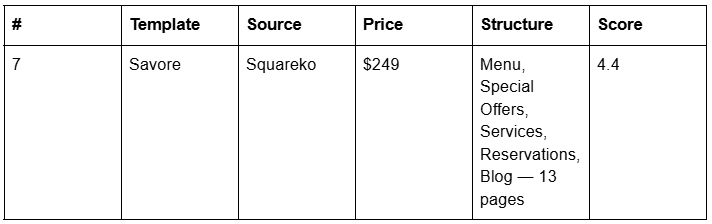
Savore (demo) is the most complete food-service page set in the Squareko range: 13 pages including Menu, Services, Special Offers, Reservations, FAQs, About, Contact and a Blog, plus a Style Guide and a 404. The Services page is built for private dining and events — anniversary parties, wedding receptions, corporate dinners, holiday banquets — which is where a restaurant's margin lives, and almost no template ships a page for it. The FAQs page arrives pre-written; rebuild it with the native Accordion block so answers render server-side.
Verified from the live demo rather than the product page: Savore's Menu page is a Squarespace Products collection with category filters, not a Menu block. Every dish gets its own indexable URL, price and image, but adding a seasonal special takes longer than typing a line into a Menu block. Swap it for a Menu block if you want the fast-edit path; the rest of the template is unaffected.

Poshplatter (demo) is the lighter option at 10 published pages — Menu, About, Recipes, How It Works, Location, Contact, a second homepage, a Style Guide and a 404. The live demo also carries Online Ordering, Book a Table and Freebie pages linked from buttons and the footer rather than the navigation. Its Menu page is ordinary Fluid Engine sections; its Recipes page is a real blog collection.
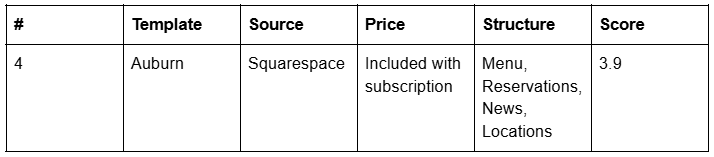
Chotto and Auburn are Squarespace's own restaurant designs and both are strong. Chotto ships Home, Menu, Chef, Reservations and Location with a working Menu block; Auburn adds a Locations page, the right structure for a group with more than one site.
Squarespace templates for cafes and coffee shops
A cafe is not a small restaurant. It takes no bookings, sells at high frequency to a local crowd, and its site answers one question — are you open right now — plus a second, can I buy your beans.

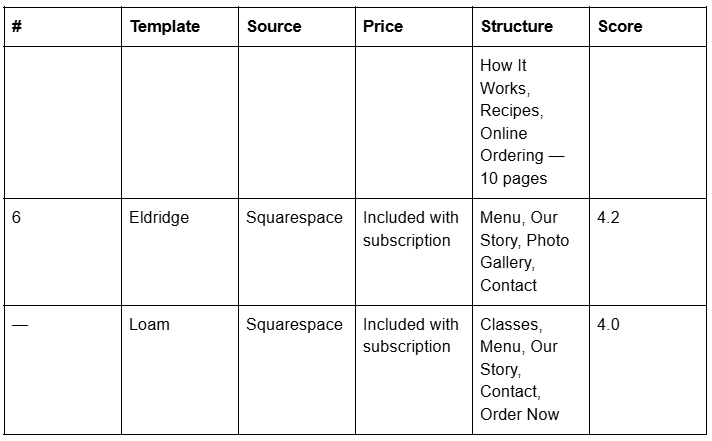
Eldridge is Squarespace's coffee-shop design and the one to beat: a Menu page built on a Menu block, an Our Story page, a Photo Gallery and a Contact page. It is deliberately small, which for a cafe is correct. Poshplatter wins the segment only on what sits beside the menu — a Location page, an Online Ordering products page and a Recipes blog, supporting beans, merch and a reason to return. Full build in the cafe template guide.
Squarespace templates for bars and cocktail lounges
Bars have the menu problem in its hardest form: the list changes weekly and it carries variant pricing by measure.

The Menu block earns its keep in a bar more than anywhere else: the / price-variant syntax was built for exactly this — 12 / 45 for glass and bottle — and $MKT covers anything priced on the day. Its currency selector offers only dollar, euro, pound and yen, so other currencies need the symbol typed into the item line. For beer-led venues, Squarespace documents a BeerMenus integration that keeps a draft list current automatically; it needs a Code Block plus footer Code Injection, so a Core plan or above. More in the bar and cocktail lounge guide.
Squarespace templates for bakeries and patisseries
A bakery is a shop with a counter attached: cakes to order, boxes shipped nationally, classes, wholesale.
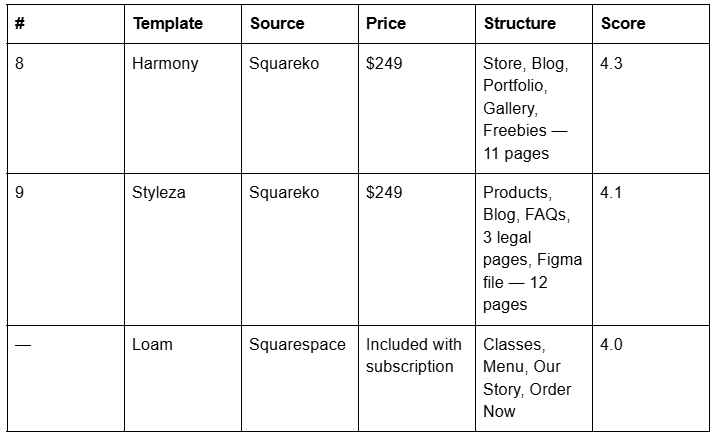

Harmony (demo) pairs a Store with a Portfolio and Gallery across 11 pages — the right shape for a bakery whose wedding-cake work is the portfolio and whose boxes are the shop.
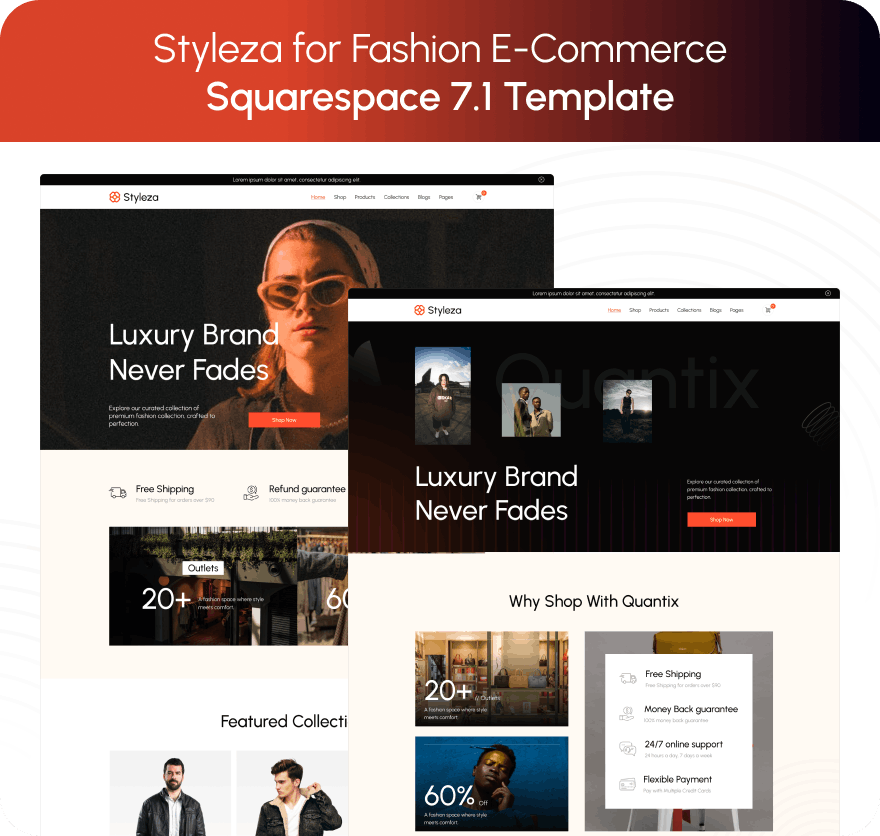
Styleza (demo) is more commerce-first, with a Products page, an FAQs page, three legal pages already written and a Figma file. If you ship food those legal pages are not filler — allergen statements and delivery terms have to live somewhere. See the bakery guide.
Squarespace templates for catering, private chefs and food blogs
Three sub-audiences, three structural needs, each with its own guide in this cluster.

Catering is a quote business, not a transaction business, so the site qualifies an enquiry: occasion, headcount, date, budget. Savore carries more of that pre-built than anything else in the range. Click Crafter (demo) is the alternative when past events are the pitch.
A private chef sells a person, a process and a price, and the objection is unfamiliarity rather than cost — which makes Poshplatter's numbered How It Works page the highest-value page in the segment. Luminary (demo) suits a chef whose second income is teaching, but ships no Contact page, verified from its live demo, and no blog.
A food blog is a publishing operation, not a hospitality one, scored on entirely different criteria — recipe structure, Recipe structured data and how a heavy image archive behaves. Poshplatter's Recipes page is a genuine blog collection; Stanton is Squarespace's own free food-and-recipes design. Full treatment in the catering, private chef and food blog guides.
Free Squarespace restaurant templates, honestly assessed
This is the segment where free wins most often. Squarespace's food-category designs, verified live in August 2026, include Chotto, Eldridge, Auburn, Atlantic, Vance, Hill, Palmer, Héron, Pine, Tantillo, Loam, Belisa and Stanton. Several ship a working Menu block and a Tock reservations block already wired up — a better starting point than free templates offer in photography or coaching.
What a premium template buys here is the other eight pages — offers, services, FAQs, location, ordering — plus a style guide page that keeps the site consistent after handover. Opening in a fortnight with no budget, start with Chotto or Eldridge. If the site has to carry private dining, catering enquiries and a blog, the page set is what you are paying for.
Google Business Profile is your actual front door
Most of a restaurant's discovery traffic never reaches its website. Someone searching "brunch near me" sees a map pack, hours, photos and a menu link inside Google before any site loads. Three consequences follow.
Hours must be identical on the site and the profile, with special hours set for holidays. Google allows special hours for temporary changes of up to six days in a row, and recommends confirming hours for official holidays even when unchanged.
Your menu link should point at an HTML page, not a PDF. Restaurant categories can surface offerings on the profile; in the Google Maps app customers view them under "Services". A PDF cannot feed that.
One profile per location, name matching your signage. Google's guidelines require representing the business as it is recognised in the real world, using the fewest categories that describe it.
Restaurant schema on your own site is worth adding — a LocalBusiness subtype carrying openingHoursSpecification, servesCuisine, acceptsReservations and hasMenu. Set expectations honestly: Google's supported-features list, updated 15 June 2026, includes Local business and Recipe but no standalone menu rich result, and FAQ rich results were deprecated on 7 May 2026. Schema here aids machine understanding, not a guaranteed SERP feature.
Page weight is the constraint food sites actually hit
Food sites are image-led and usually opened on a phone on cellular data by someone standing outside the door. The Squarespace CDN serves WebP unconditionally regardless of source format, but does not help with count. Squarespace's guidance is to keep each page to 5 MB or less, adding that 1 MB is the safest size for cellular connections and that a page should hold no more than 60 blocks. For calibration: across 54 Squareko-built client sites measured in August 2026 — Playwright/Chromium, cloud datacentre, unthrottled, single run per site, load-only CLS, so lab data rather than field data — median page weight was 3.0 MB across 93 requests, median mobile LCP was 2.01s with 74% under Google's 2.5s "good" threshold, and 86% of images were served as WebP.
Upload at 1500–2500px on the long edge with the filename set before upload, because it cannot be changed afterwards. Keep the homepage to one hero plus six to eight dish images — the Largest Contentful Paint element is almost always that hero.
Where to go next in this restaurant cluster
The build — architecture, menu, hours, mobile: restaurant Squarespace template
One verdict, scored: best Squarespace template for restaurants
Cafes — hours, Google Business Profile, wholesale: Squarespace template for a cafe
Food blogs — Recipe schema and monetisation: Squarespace template for a food blog
Catering — the enquiry-to-quote pipeline: Squarespace template for a catering business
Bakeries — shipping food and allergens: Squarespace template for a bakery
Fine dining — tasting menus: fine dining Squarespace template
Private chefs — how-it-works and pricing: Squarespace template for a private chef
Bars — weekly lists, variant pricing: Squarespace template for a bar
If you are still between two templates, the deciding question is never the homepage. It is whether the menu is text you can edit in thirty seconds, and whether the reservation route matches what your front of house already uses.
That is worth checking before you commit, which is why the premium Squarespace templates in our shop are listed with their full page structure rather than a homepage screenshot. Most restaurant owners will pick correctly from the tables above without help — and in this category, more than most, the free option is a legitimate answer.
FAQ
-
Yes. Squarespace's template store has a Restaurants category, and food-focused designs verified live in August 2026 include Chotto, Eldridge, Auburn, Atlantic, Palmer, Pine, Tantillo, Hill, Vance, Héron and Loam. All Squarespace 7.1 templates run the same engine, so the real difference between them is the page set they ship with.
-
Use the native Menu block, added from the block menu on any page. You type the menu in plain text: menu name plus three or more equals signs, section name plus three or more hyphens, then item, description and price. The text renders server-side, so search engines can read every dish and price.
-
Yes. The OpenTable block is documented as available on the Basic, Core, Plus and Advanced plans, with documentation last updated 29 July 2026. It needs your OpenTable Restaurant ID, supports seven OpenTable country domains and five languages, and only one block should be placed per page.
-
Yes, through a Tock reservations block or an OpenTable block, both native. Tock requires a separate Tock subscription and reservations are managed in Tock rather than Squarespace. Squarespace's own restaurant demos ship the Tock block on their Reservations pages. Neither block works while you are logged in.
-
No. A PDF is poorly extracted by search engines, renders as a pinch-zoom document on a phone, and takes a re-export to change a price. Squarespace itself describes the Menu block as a better alternative to embedding PDF menus. If you want a printable PDF, offer it alongside the on-page menu, never instead of it.
-
Three routes. ChowNow connects through Connected Accounts and adds an ordering page to your navigation on Core plans and above in the US and Canada. The Allday Ordering extension embeds an orderable menu. Or you link out to Toast, Square, DoorDash or Uber Eats with a button block, which works on any plan.

Author Bio
I'm Walid Hasan, a Certified Squarespace Expert and Squarespace Circle Platinum Partner with over 12 years of hands-on experience designing and optimizing high-performing websites. Over the years, I've had the privilege of building more than 2,000 Squarespace websites for clients around the world, always focusing on clean design, strong user experience, and conversion-driven results.
