Squarespace Template for a Bar: Solve the What's-On Page First
The short answer: a bar website is an events board with a drinks list attached, and Squarespace 7.1 has no object for a recurring event. Calendar pages state it plainly — "it's not possible to set up recurring or repeating events" — they cap at 350 events per month, and they cannot take bookings. So the weekly quiz, the Friday DJ and the Sunday session either get duplicated by hand, written as static text, or maintained somewhere else and embedded. Choose a template on whether it gives you a blog and a place for what's-on, not on whether it has a Reservations page.
Of the Squareko range, Savore is the nearest base at 13 pages — the only food template with a blog.
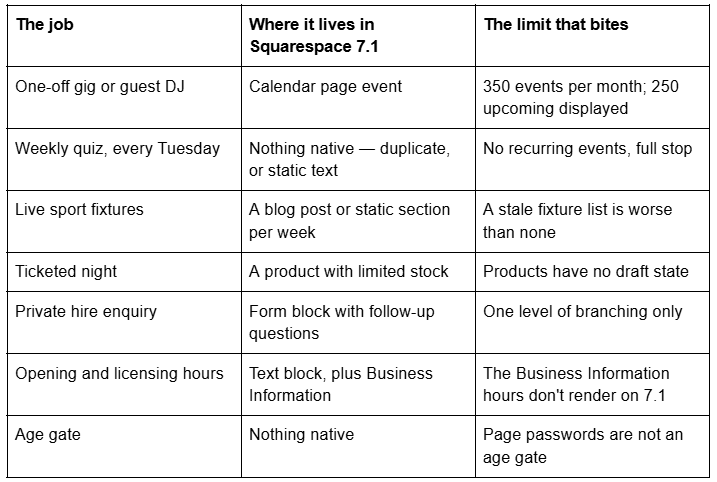
Seven things a bar puts on its site, and where each one lives
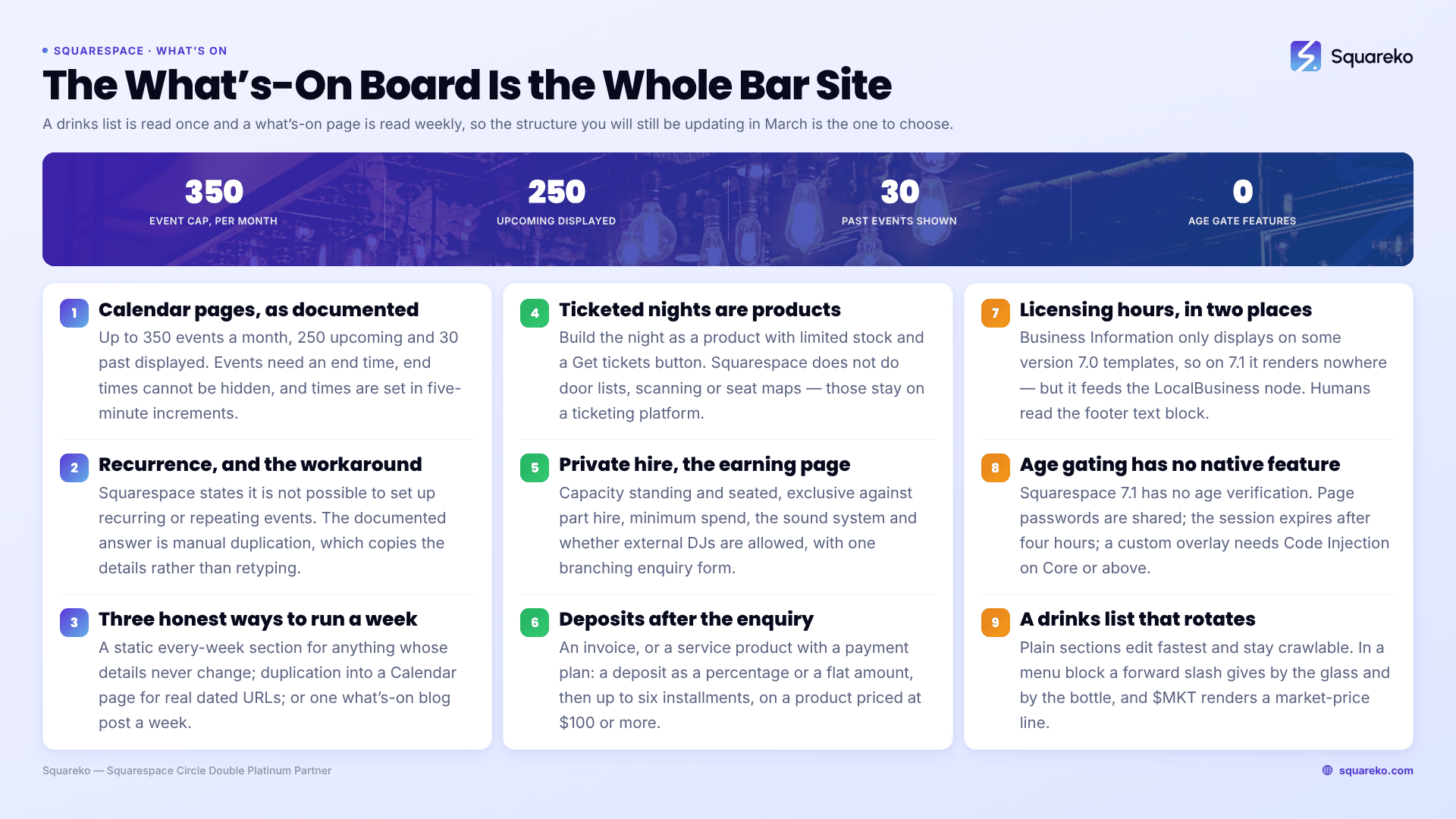
The what's-on layer is the whole site
A bar's homepage answers one question: what is happening here, and when. Not "our story", not "our philosophy" — what is on this Thursday.
That means the events layer sits above the fold and gets updated more often than everything else combined. It is also what brings people back: a drinks list is read once, a what's-on page is read weekly. If the site makes it hard to publish "Thursday: Ska night, free entry, 9pm", it will not get published, and the site will quietly rot. So the decision that matters is not which template looks most like a cocktail bar. It is which structure you will still be updating in March.
Squarespace Calendar pages: what they actually do
Squarespace 7.1 calls them Calendar pages; on 7.0 sites the same thing is an Events page. Before planning around one, read the constraints, all of which Squarespace documents:
"Calendar pages don't support booking." For scheduling or taking bookings, Squarespace points you at Acuity Scheduling instead.
"It's not possible to set up recurring or repeating events." The documented workaround is to manually duplicate events, which at least copies the details rather than making you retype them.
Each calendar page supports up to 350 events per month, and displays up to 250 upcoming and 30 past events.
Events need an end time, end times cannot be hidden, and start and end times are set in five-minute increments.
In 7.1 you cannot add blocks to the calendar section itself — block sections go above or below it.
To display events as a month grid rather than a list, use a calendar block.
None of that makes calendar pages useless. A bar with six or eight one-off gigs a month is well served: each event gets its own URL, description and image, and the page maintains itself as dates pass. What breaks is the weekly fixture.
How a recurring weekly schedule is actually maintained
There are three honest options, and the right one depends on how often the details change, not how often the event happens.
Option 1 — a static "every week" section. A plain section built from text blocks: Tuesday — Quiz, 8pm, teams of six, £2pp. Thursday — Vinyl night, 8pm, free. Sunday — Open mic from 6pm. Crawlable text, ten seconds to edit, and the correct answer for anything whose details do not change. Most bars over-engineer this and should not.
Option 2 — manual duplication into a Calendar page. Squarespace's own workaround: create the event once, then duplicate it for each occurrence. Every instance gets a real date, its own URL and its own listing, which is better for search and for anyone browsing forward. The cost is your time — duplicating four recurring nights twelve weeks ahead is 48 duplications a quarter. Put a reminder in your diary to extend it, because a calendar page that runs out is worse than one that never existed.
Option 3 — a blog post per week. One post titled "What's on at [bar], week of 12 January", listing every night. This is the option most bars should choose if they post on social media at all, because it is a URL you can share and it accumulates into an archive — and Savore ships a blog for exactly this. The tradeoff is that a blog post is not a structured event, so it will not appear in event-style listings.
A fourth route exists if you already run something else. Ticketing and listings platforms provide embeddable widgets, which go in a Code Block — but JavaScript and iframes inside Code Blocks require the Core plan or above, so an entry-level plan cannot embed one at all. Decide that before you buy a plan.
Ticketed nights and private hire are two different mechanisms
They get built on the same page and they are nothing alike.
Ticketed nights are products. Build the event as a Squarespace product with limited stock and set the button text to "Get tickets". Products have no draft state — Public, Hidden or Scheduled — so build it Hidden while you write the copy, then set it Scheduled to go live at announcement time. If a night sells fast, quantity limits stop one buyer taking the whole allocation (Core plans and higher, 7.1 only), and a reserved cart and timer holds stock during checkout with a countdown under the header (Plus and Advanced only). Squarespace does not do door lists, scanning or seat maps — if your nights need those, run a ticketing platform and keep Squarespace for the pages.
Private hire is an enquiry, and usually the most valuable page on a bar's site. It needs its own page — capacity standing and seated, exclusive versus part hire, minimum spend, what is included, the sound system, whether you allow external DJs — and one form.
Build the form with follow-up questions, which stay hidden until the matching option is chosen on a dropdown, checkbox, radio or survey field: pick Birthday and you get guest numbers, pick Corporate and you get invoicing and AV. The limit is one level — "it's not possible to create a follow-up to a follow-up question" — so branch on the first field. Take a deposit afterwards by invoice, or with a service product with a payment plan (a deposit as a percentage or flat amount, then up to six installments, on a product priced at $100 or more).
Licensing hours, and the hours field that doesn't render
Bars have more hours problems than any other hospitality business: bar hours, kitchen hours, last entry, last orders, bank holidays, and different hours when there is football on. Two settings do different jobs here.
Settings → Selling → Business Information holds your physical location and business hours. Fill it in — but know what it does. Squarespace notes that although every site has this panel, the information "only displays on some templates in version 7.0", so on a 7.1 site it will not render anywhere on the page. What it does feed is the LocalBusiness JSON-LD node Squarespace emits, which carries address and openingHours. Leave the panel blank and those ship as empty strings — a wasted signal.
A text block in the footer is what humans read. Put the hours there in plain text, split into bar and kitchen if they differ, with a line for last entry and last orders. Handle exceptions with the announcement bar — "Closed 25 December, open from 4pm on the 26th" — which is site-wide and comes off in one click.
Your Google Business Profile does the heavier lifting for hours in search results and maps, and it is a separate system from the website. Keep the name, address, phone number and hours identical across the profile, the footer and the Business Information panel; inconsistency is one of the commonest reasons the wrong hours show to somebody standing outside your door.
Age-gating: Squarespace has no age verification feature
This comes up on every bar build, so here is the honest position. Squarespace 7.1 has no age verification. There is no date-of-birth gate, no "are you over 18" interstitial, and nothing in the Help Center that provides one.
What exists, and what each thing is for:
Page passwords hide a page behind a single shared password of 30 characters or fewer. Sessions expire after four hours and there is no way to log out. This is a trade price list mechanism, not an age gate.
A site-wide password with a customisable lock screen hides everything, including from search engines — right for a site under construction, wrong for a business that wants to be found.
A promotional pop-up can be styled to look like an age gate but is dismissible and restricts nothing.
A custom overlay via Code Injection is what most agencies build. It requires the Core plan or above, because site-wide Code Injection and JavaScript in Code Blocks are gated at that tier.
Before building any of them, ask whether you need one. A bar's website is usually information about premises rather than a regulated sale, and age gates are typically expected of sites that sell alcohol. If you do sell online, the binding constraint is not Squarespace's: Squarespace's own guidance is to review the policies of Squarespace Payments, Stripe, PayPal or Square before selling anything restricted, and your shipping carrier's rules after that.
And weigh the cost. Anything sitting between a visitor and your content is friction on a page most people reach from a phone, outside, deciding where to go.
The drinks list changes more often than a food menu
Cocktail lists rotate seasonally and guest beers change weekly, so build for editing. Plain sections built from text blocks are the most editable format and fully crawlable — for a rotating guest tap list, that is the right answer. Accordion blocks render server-side, so collapsed text stays indexable, and a long wine or whisky list becomes six rows on a short page.
The menu block still exists, contrary to a lot of older advice — its Help Center article was last edited in July 2026 — and one of its features is made for bars: a forward slash between two prices produces pricing variants, which Squarespace's own documentation gives as by the glass and by the bottle. $MKT or $Market Price gives a market-price line. Its quirks matter on long lists: only four currency symbols are available ($, €, £, ¥), and the content of your first menu sets the minimum height of the whole block, so a long cocktail list followed by a short spirits list leaves white space.
A PDF loses. Squarespace's documentation describes menu blocks as "a great alternative to embedding .pdf menus, which aren't always as SEO-friendly as text directly on the page". On a phone, in a dark bar, a PDF is a pinch-and-zoom document.
One setting worth checking while you are in the panels: Settings → Crawlers contains a checkbox marked Block known artificial intelligence crawlers. If you want an assistant answering "cocktail bar near me with live music on Thursdays" to describe yours, that box needs to be unchecked.
Atmosphere without a heavy page
Bars sell atmosphere: dark photography, video of a room full of people, and a soundtrack the site is trying to imply.
Two constraints. Gallery sections offer six layouts, cap at 250 images and cannot hold video — video needs a separate video block or a section background. And weight is real: across 54 Squareko-built client sites measured in August 2026 (Playwright/Chromium lab test, cloud datacentre, unthrottled, single run per site — lab data, not field data), the median page weighed 3.0 MB across 93 requests and median mobile LCP was 2.01s, with 74% under Google's 2.5s threshold.
Use one heavy element per page, not three. Upload at 1500–2500px, since 2500px is the maximum Squarespace serves, and let the CDN convert — it serves WebP unconditionally regardless of source format.
Savore and Poshplatter, by their actual pages
Both re-tested live in August 2026.
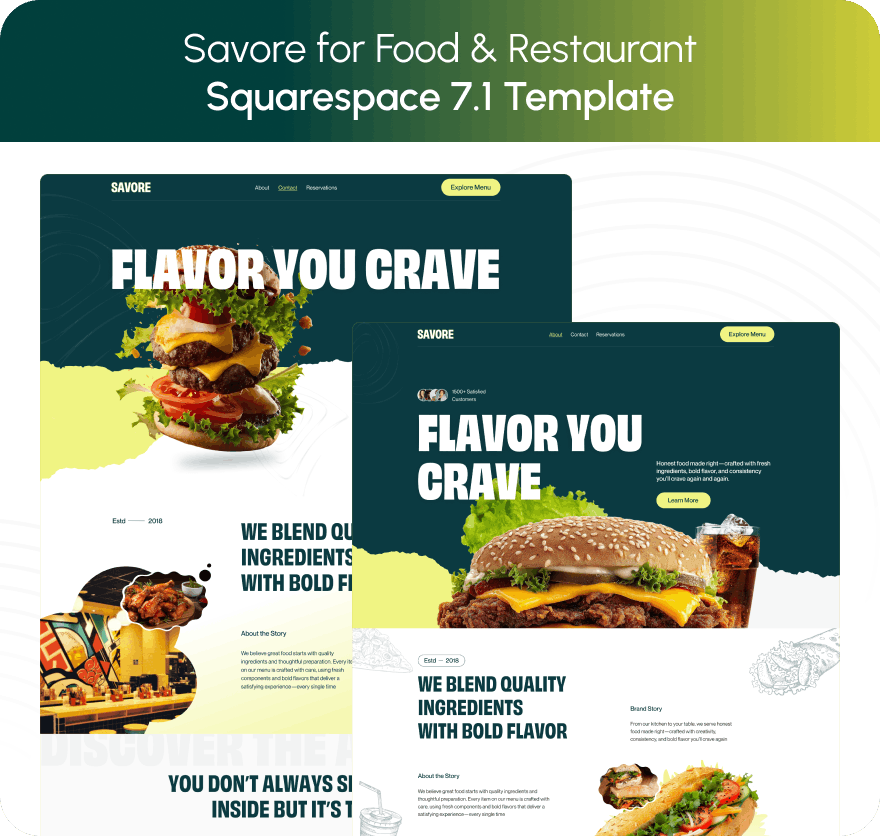
Savore — 13 pages: Home, a second homepage layout, Services, Menu, Blog, About, Contact, Special Offers, Reservations, FAQs, Privacy Policy, a Style Guide page and a 404 page. For a bar the blog is decisive: it is where the weekly what's-on posts live, and it is the only structure in either food template that suits a schedule. Special Offers handles happy hour, Reservations converts into private hire enquiry, and the Menu page is a filterable grid with prices and category filters — good for a drinks list split into cocktails, beer and wine.

Poshplatter — 10 pages: Home, a second homepage, Menu, About, Recipes, How It Works, Location, Contact, Style Guide and 404. Location suits a single venue, and its Menu page is plain sections with name, description and price. It ships no blog, which for a bar is the significant gap — every what's-on update becomes a static page edit.
Both are $249, delivered as a Squarespace contributor invitation rather than a file download, with 60 days of email support. Customisation is not included, all sales are final, and the demo images are not licensed for live use — you replace every one. Every template ships 150+ pre-designed sections, a Style Guide page and a 404 page.
Choosing a template for a bar
Run any demo against the seven-row table at the top of this post on a phone, at night, at the brightness you actually use. If the what's-on layer, the private hire page, the drinks list and the hours each have an obvious home, the template will hold.
Then decide the one thing that determines whether the site stays alive: who updates the what's-on layer, in what format, and on what day of the week. A bar website does not fail because of its design. It fails because in March it still says what was on in November.
If you would rather not spend an evening choosing between calendar duplication and a weekly blog post, the premium Squarespace templates at Squareko are installed for you, onto a new site or an existing one, with the pages ready for your content. Plenty of bars do this themselves with the structure above — it is published because the schedule problem is the hard part.
For a room where the menu and the reservation platform carry the site instead of the events board, see fine dining Squarespace templates. The cluster hub, Squarespace templates for restaurants, covers cafés, bakeries and casual dining as a whole.
FAQ
-
No. Squarespace states plainly that it's not possible to set up recurring or repeating events on a calendar page. The documented workaround is to duplicate an event manually for each occurrence, which copies the details rather than making you retype them. For a weekly fixture, static text or a weekly blog post is usually better.
-
Each calendar page supports up to 350 events per month, and displays up to 250 upcoming events and 30 past ones. Events need an end time, end times can't be hidden, and start and end times are set in five-minute increments. Calendar pages also can't take bookings.
-
Build the event as a product with limited stock and change the button text to "Get tickets". Products have no draft state, so build it Hidden and switch to Scheduled for the announcement. Quantity limits, which stop one buyer clearing the allocation, require Core plans or higher on 7.1 sites.
-
No. Squarespace 7.1 has no age verification feature. Page passwords use a single shared password with a four-hour session and are not an age gate. A custom overlay via Code Injection is the usual route, and site-wide Code Injection requires the Core plan or above.
-
In two places. Put them in a text block in the footer, split into bar and kitchen hours, because Business Information hours only display on some version 7.0 templates and won't render on 7.1. Also fill the Business Information panel, since it feeds the openingHours field in the LocalBusiness schema Squarespace emits.
-
Savore is the stronger of the two food templates in the Squareko range, at 13 pages, because it is the one that ships a blog — which is where a weekly what's-on post lives. Poshplatter, at 10 pages, has a useful Location page but no blog, which makes schedule updates static page edits.

Author Bio
I'm Walid Hasan, a Certified Squarespace Expert and Squarespace Circle Platinum Partner with over 12 years of hands-on experience designing and optimizing high-performing websites. Over the years, I've had the privilege of building more than 2,000 Squarespace websites for clients around the world, always focusing on clean design, strong user experience, and conversion-driven results.