Squarespace Template for a Food Blog: Recipe Schema Comes First
The short answer: for a food blog the template barely matters and the markup decides everything. Recipe structured data is what makes a post eligible for Google's recipe results; without it a food blog is competing on ordinary blue links against sites that are not. Choose a template with a real blog collection and a category-led archive, then spend your first day on the schema, not on the fonts.
Here is the whole build, in the order that determines whether the archive earns anything.
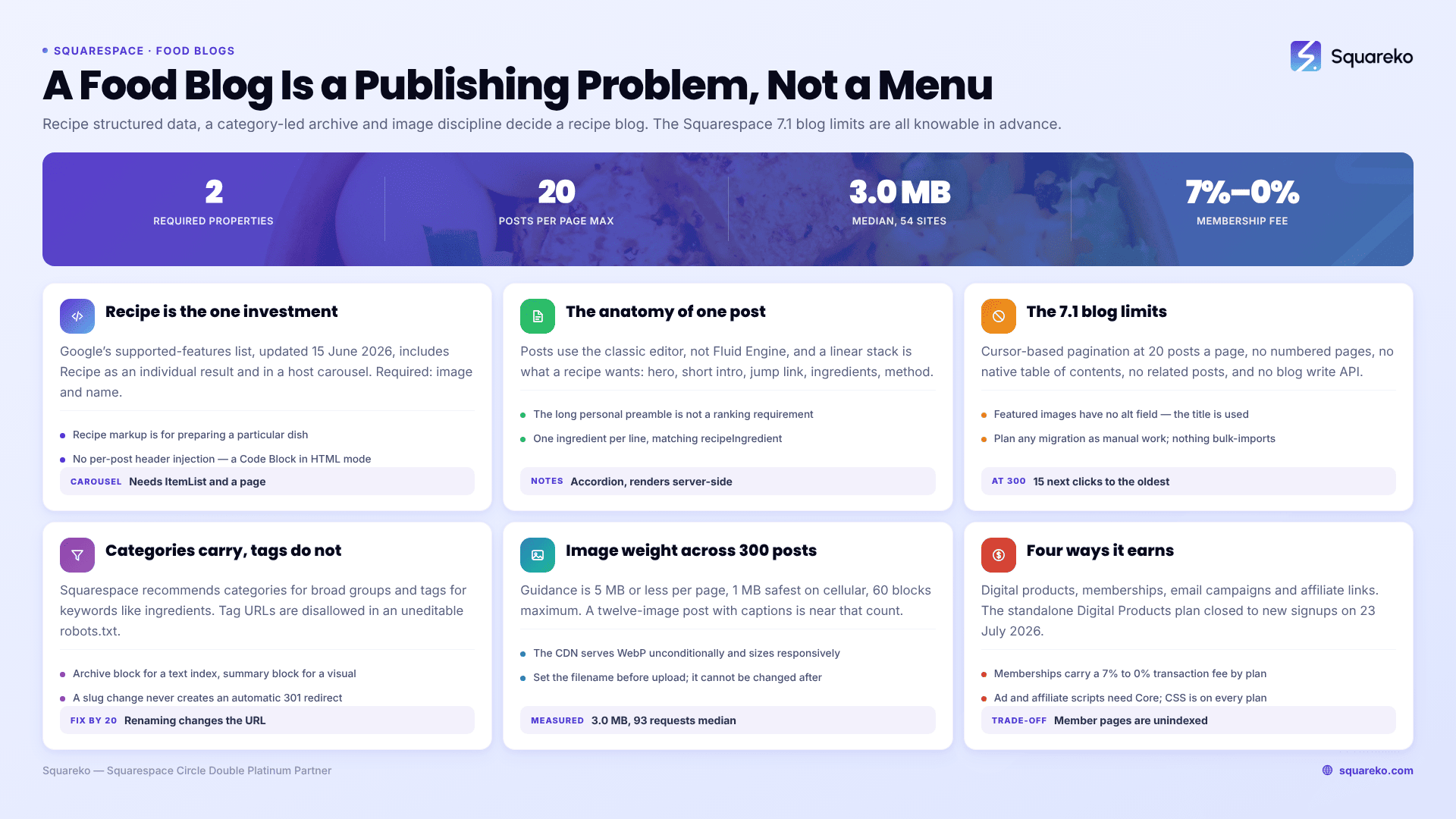
What actually wins food SERPs: Recipe structured data
Google's supported-features list, updated 15 June 2026, includes Recipe as a rich result — both as an individual result and as part of a host carousel. It also no longer includes FAQ: FAQ rich results were deprecated on 7 May 2026. For a food blog that makes Recipe the only structured-data investment that reliably returns anything.
Squarespace has no schema field, so Recipe markup goes in a Code Block in the post body in HTML mode — the routine is in how to add schema to Squarespace. Google's required properties are surprisingly small: image and name. That is the eligibility floor. What separates a thin implementation from a competitive one is the recommended set, and food blogs that rank use nearly all of it.
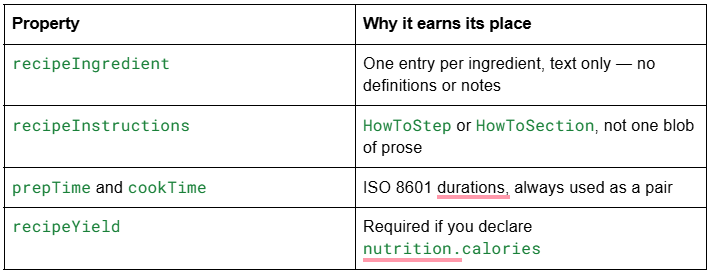
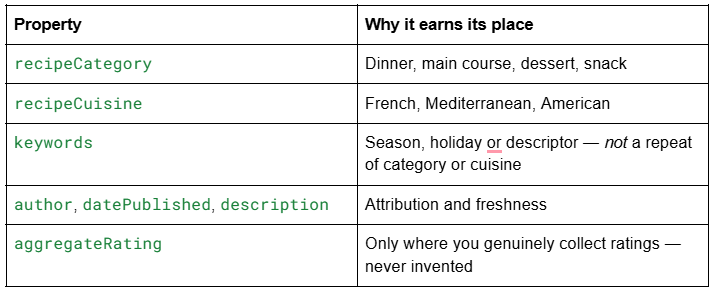
Two things people get wrong. Google's guidance is explicit that Recipe markup is for content about preparing a particular dish — "party ideas" and "facial scrub" are not valid dish names. And to appear in a recipe carousel, you need ItemList structured data summarising the recipes and a real summary page on your site listing every recipe in that collection, which a user lands on when they click through.
On Squarespace specifically: there is no per-post header injection in 7.1, so the JSON-LD goes into a Code Block in the post body, set to HTML mode. Squarespace already auto-emits an Article block for every post, so add Recipe alongside it rather than re-declaring Article. Be aware that a script-bearing Code Block is disabled while you are logged in and editing — you will see "This block contains embedded scripts. Embedded scripts are disabled while you're logged in and editing your site." That is not an error. Verify logged out, then run the Rich Results Test.
The anatomy of a recipe post on Squarespace 7.1
Blog posts in Squarespace 7.1 use the classic editor, not Fluid Engine. You get a linear stack of blocks, no drag-anywhere grid. That is a constraint worth accepting rather than fighting, because a linear stack is exactly what a recipe wants.
The order that works:
Hero image, 1500–2500px on the long edge.
Two or three paragraphs, not two thousand words. The long personal preamble is a habit inherited from ad-funded US food blogs; it is not a ranking requirement and it costs you on mobile.
A jump link to the recipe. Squarespace has no native table of contents, so build it manually: an anchor link block or a text link pointing at an #recipe anchor set on a code block or a section further down.
Ingredients as a single text block with a list. One ingredient per line, matching recipeIngredient exactly.
Method as a numbered list, matching recipeInstructions step for step.
Notes, substitutions and storage in a native Accordion block, which renders server-side in 7.1 so the text stays crawlable.
The Code Block with your Recipe JSON-LD, at the bottom.
Keeping the visible ingredients and steps identical to the markup is not pedantry — mismatched markup is the most common reason a Rich Results Test passes and the rich result never appears.
The Squarespace 7.1 blog limits a recipe archive will hit
Every one of these is knowable now and none of them is a reason not to use Squarespace. They are reasons to plan.
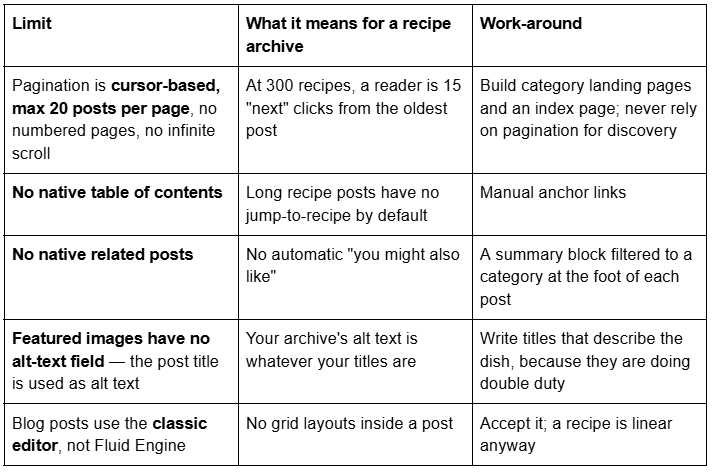
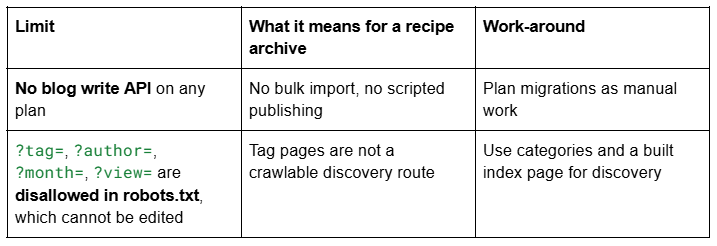
That last row is the one that quietly decides your architecture, and it leads directly into taxonomy.
Category and tag architecture for recipes
Squarespace's own guidance for recipe blogs is exactly right and almost nobody follows it: categories for broad groups — Dinner, Snacks, Dessert — and tags for general keywords such as ingredients.
The reason that split matters on Squarespace is the robots.txt rule above. Tag URLs are query strings and are disallowed by default; category pages are the durable, crawlable structure. So:
Keep categories few and stable. Course (Breakfast, Dinner, Dessert), or diet (Vegan, Gluten-free), or both — but pick a scheme before post 20, because renaming categories later changes URLs and Squarespace creates no automatic 301 when a slug changes, ever.
Use tags freely for ingredients and occasions. They are useful for internal search and for your own organisation. Do not build navigation on them.
Build a real index page. Squarespace documents two routes: an archive block set to the Index layout, grouped by category or tag, with "Break Into Multiple Columns" for a large archive; or a summary block, which unlike the archive block can display featured images and excerpts, in Wall, Carousel, List or Grid. Use the summary block for a visual recipe index and the archive block for a complete text index — and remember that a summary page listing every recipe in a collection is also what Google requires for a recipe carousel.
Image weight is the constraint a recipe archive actually hits
A recipe post is structurally one of the heaviest pages on the web: a hero, six to twelve process shots, and a final plated image. Multiply that by 300 posts and image discipline stops being an optimisation and becomes the difference between a site that ranks and one that does not.
Squarespace helps in two ways. The CDN serves WebP unconditionally, regardless of your source format or the browser's Accept header, and it generates responsive sizes automatically. It does not help with count or with dimensions.
Squarespace's own guidance is to keep each page to 5 MB or less, states plainly that 1 MB is the safest size for cellular connections, and recommends no more than 60 blocks per page. A twelve-image recipe post with captions is already close to that block count.
For calibration, across 54 Squareko-built client sites measured in August 2026 — Playwright/Chromium, cloud datacentre, unthrottled network and CPU, single run per site, load-only CLS, so lab data rather than field data — median page weight was 3.0 MB across 93 requests, median mobile LCP was 2.01s with 74% under Google's 2.5s "good" threshold, and 86% of images were served as WebP. Those numbers are achievable on image-led sites, and they come from three habits:
Upload at 1500–2500px on the long edge. 2500px is the maximum Squarespace will serve; Squarespace image size for fast loading covers how that interacts with the CDN's responsive sizes.
Set the filename before upload. Filenames cannot be changed after upload, and on a food blog the filename is doing real work in Google Images.
Cut the process shots to the ones that show something. Six purposeful images beat fourteen that show a bowl at different angles.
Monetising a Squarespace food blog
Four routes, with the platform realities attached.
Digital products. Ebooks, meal plans and printables sell as Squarespace Products or as downloads. The standalone Digital Products plan closed to new signups on 23 July 2026, so this now runs on a normal website plan.
Memberships. Member Areas is now Member Sites / Content & Memberships. It is not a flat add-on: it carries a Digital Content and Memberships transaction fee of 7% / 5% / 1% / 0% from Basic through Commerce Advanced. Two constraints matter for a food blog: member-site pages have no SEO options and are not in the sitemap, so a paid recipe library is invisible to search by design; and subscription products do not work with Member Areas. Confirm current fees against Squarespace's live pricing page — they change.
Email. Squarespace Email Campaigns and a newsletter block. For a recipe blog this is the most durable asset you own, because it does not depend on a ranking.
Affiliate and display advertising. Affiliate links are ordinary links and work on any plan. Ad networks and most affiliate widgets need JavaScript, and JavaScript or iframes inside Code Blocks, plus site-wide Code Injection, require a Core plan or above — Custom CSS is available on every plan, including Basic, but scripts are not.
The templates worth starting from
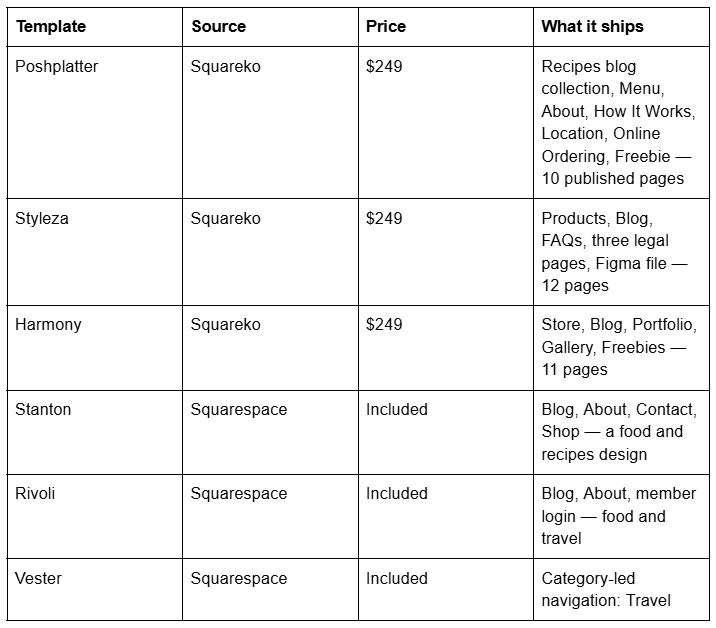


Poshplatter is the pick in the Squareko range because its Recipes page is a real blog collection, verified from the live demo in August 2026, sitting alongside an Online Ordering products page and a Freebie page with a newsletter block. That combination — archive, shop, lead magnet — is the whole food-blog business model already laid out.

Styleza is the better choice if the products come first: a Products page, a Blog, an FAQs page, three legal pages already written and a Figma file. If you sell an ebook, those legal pages are not decoration.
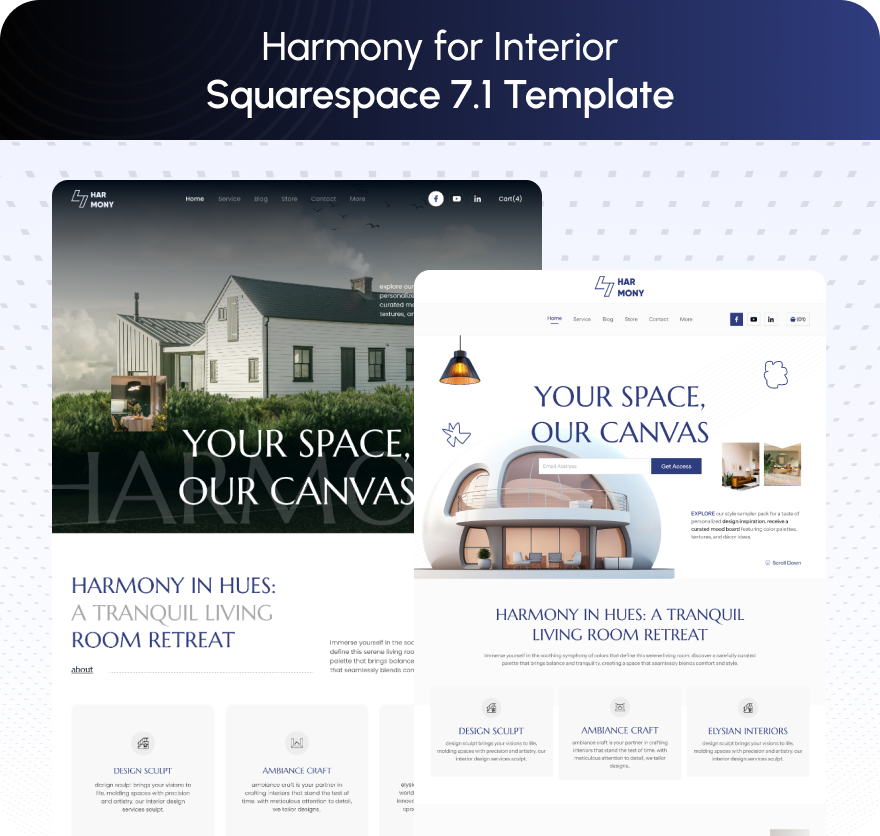
Harmony pairs a Store with a Blog and a Gallery.
Stanton is Squarespace's own food-and-recipes design and is genuinely good: a blog, an About page, a Contact page and a Shop, included with a subscription. Vester is worth a look for its category-led navigation, which is the architecture this post argues for. Both are free, and for a food blog the honest position is that the template is the least important decision on the page — see the full segmented roundup for the rest of the food category.
Get the Recipe markup right on post one, pick a category scheme before post 20, and hold your images to 1500–2500px. Those three decisions outweigh every design choice you will make.
Where this stops being a solo job is a migration — several hundred existing recipes moving onto Squarespace, with no blog write API and no automatic redirects when a slug changes. That is what our premium Squarespace templates and build service exist for. A new food blog starting from zero needs none of it: start with Stanton, write the schema by hand, and publish.
FAQ
-
Not natively, but you can add it. Squarespace 7.1 has no per-post header injection, so the Recipe JSON-LD goes into a Code Block in the post body set to HTML mode. Google requires only image and name, but a competitive implementation uses ingredients, instructions, times, yield, category and cuisine.
-
Yes, with three known limits: pagination is cursor-based at a maximum of 20 posts per page, there is no native table of contents or related-posts feature, and blog featured images have no alt-text field, so the post title is used instead. All three have straightforward work-arounds.
-
A maximum of 20. Squarespace 7.1 pagination is cursor-based with no numbered pages and no infinite scroll, so a large recipe archive needs category landing pages and a built index page for discovery rather than relying on next-page clicks.
-
Both, for different jobs. Squarespace recommends categories for broad groups like Dinner, Snacks and Dessert, and tags for general keywords such as ingredients. Categories are the durable, crawlable structure; tag URLs are query strings disallowed in Squarespace's robots.txt, which cannot be edited.
-
No. There is no native table of contents in Squarespace 7.1, so a jump-to-recipe link has to be built manually with an anchor link pointing at an anchor set further down the post. There is also no native related-posts feature; a summary block filtered by category does that job.
-
Digital products such as ebooks and meal plans, memberships through Member Sites, email campaigns, and affiliate links. Memberships carry a Digital Content and Memberships transaction fee of 7% to 0% depending on plan, and member-site pages have no SEO options and are not in the sitemap.

Author Bio
I'm Walid Hasan, a Certified Squarespace Expert and Squarespace Circle Platinum Partner with over 12 years of hands-on experience designing and optimizing high-performing websites. Over the years, I've had the privilege of building more than 2,000 Squarespace websites for clients around the world, always focusing on clean design, strong user experience, and conversion-driven results.