
Squarespace Template for a Real Estate Agency: Building for a Team
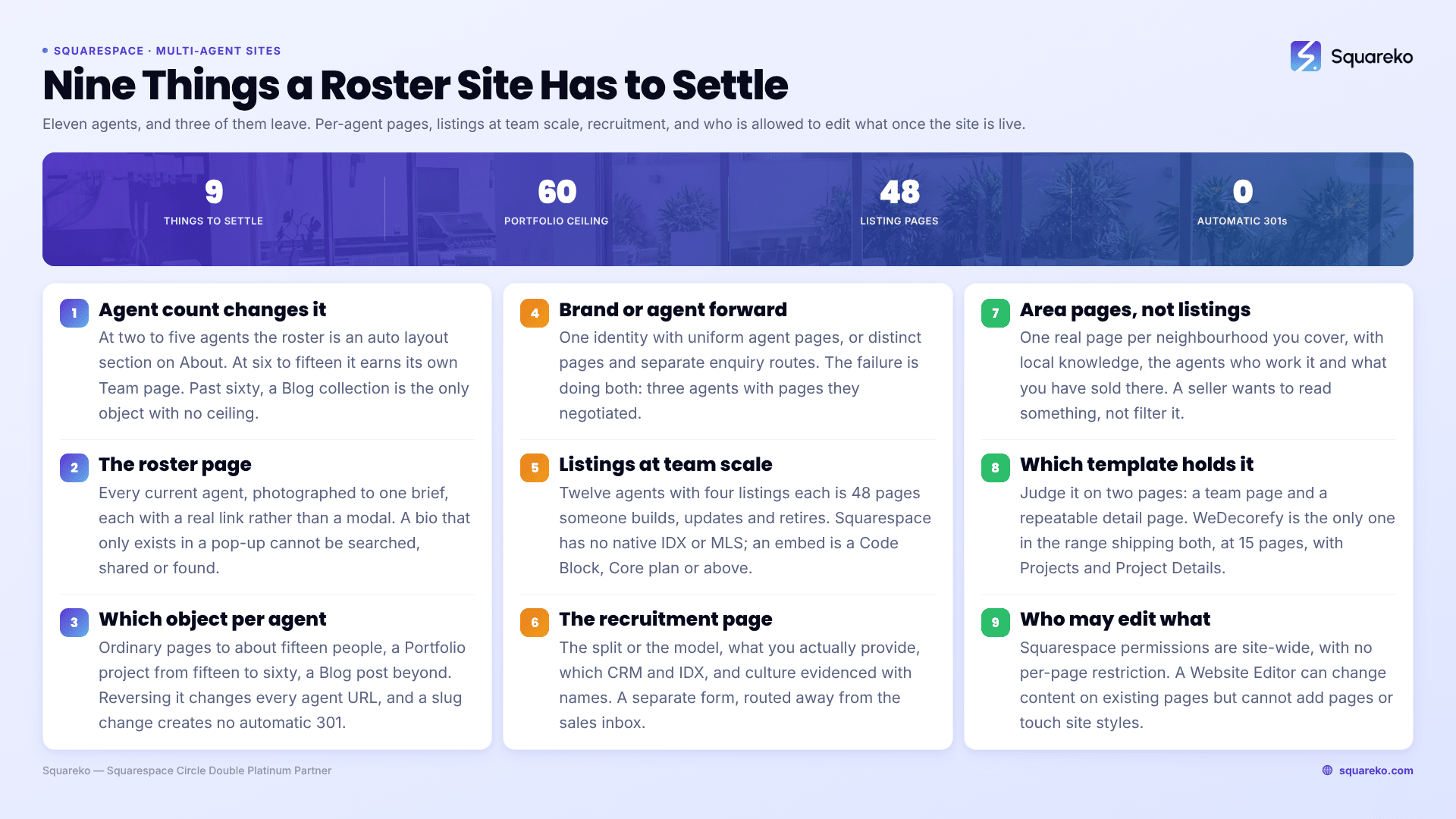
The short answer: a brokerage website is a roster problem, not a design problem. The pages that decide whether it works are the agent directory, the individual agent page, and the recruitment page — and all three have to survive people joining and leaving. Choose the template on whether it ships a team page and a detail page, and settle how agent pages are built before you build the first one.
The architecture changes at specific agent counts
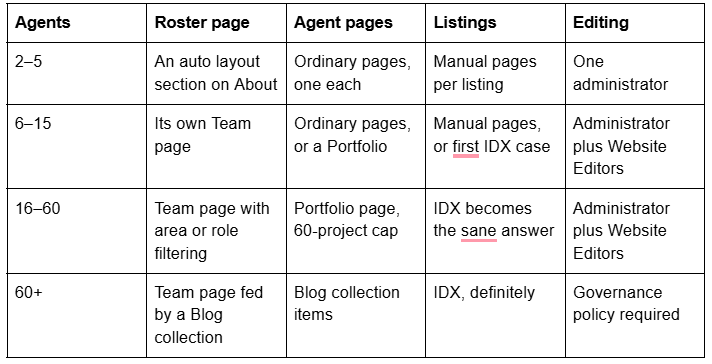
The 60 in that table is not arbitrary. A Squarespace 7.1 Portfolio page caps at 60 projects, so a portfolio-based roster has a hard ceiling. A Blog collection has no post limit, which is why very large brokerages end up using one as a directory despite it being a slightly odd fit.
The roster page is the highest-value page on a brokerage site
Buyers and sellers do not hire brokerages. They hire people who happen to work at one. The roster page is where a visitor who arrived through the brand converts into a visitor who wants a specific person, and it is the page most brokerage sites treat as an afterthought.
What it has to do:
Show every current agent, with a photograph that was taken in the same session or at least to the same brief. Mixed headshot styles are the single most visible signal of a brokerage that does not manage its own brand.
Give each agent a real link, not a modal. If the only way to read an agent's bio is a pop-up, that bio does not exist in search and cannot be shared.
Support the way people search. Most visitors are looking for an agent by area, by language, or by specialism. If your roster is more than a dozen people, group it.
Never break when someone leaves. Removing an agent should be deleting one item, not editing four pages.
On Squarespace 7.1, the tool for the grid itself is an auto layout section. Auto layouts present sets of items as a simple list, a carousel or a banner slideshow, and each item carries an image, a title, a description and a button link. That button is the important part — it is how the roster grid links out to real agent pages.
Two limits to plan around. Auto layout settings apply uniformly to every item in the section, so you cannot give one agent a longer bio or an extra badge without changing all of them. And Squarespace's guidance puts auto layouts at around 250 items per page, so the grid itself is not what constrains you — the agent pages behind it are.
Per-agent pages: pick the object before you build the first one
This is the decision that costs money to reverse, because changing it later means changing every agent URL, and changing a slug on Squarespace creates no automatic 301, ever.

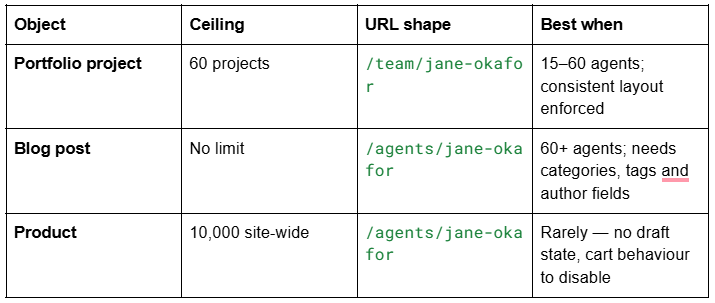
For most independent brokerages the answer is ordinary pages inside a Team folder, up to about fifteen people. It gives each agent a real page they can be proud of, full section control, and a clean URL. Beyond that the manual work compounds and a Portfolio page is worth the loss of flexibility, because it enforces one layout and one process.
What belongs on an agent page, in order: photograph, name, role, licence or registration details where your regulator requires them, direct contact, areas covered, languages, a real biography rather than a paragraph of adjectives, current and recent listings, and testimonials attributed to a transaction. A phone number that is actually theirs matters more than any of the design.
Brand versus agent: decide it explicitly, because the site will decide it for you
Every multi-agent site sits somewhere on a line between two poles, and the position has to be a decision rather than an accident.
Brand-forward. One visual identity, one voice, agents presented consistently. Agent pages are uniform. The brokerage owns the enquiry and routes it. This is the right choice when the brand is what wins instructions, when you have high agent turnover, or when you are building something saleable — a brand-forward site keeps its value when an individual leaves.
Agent-forward. Individual agents have distinct pages, their own imagery and their own enquiry routes. The brokerage is the container. Right when your agents are the draw, when you recruit on the promise of personal profile, and when your top producers would otherwise build their own sites anyway.
The failure mode is doing both badly: a uniform template with three agents who negotiated custom pages. It reads as favouritism internally and as disorganisation externally.
There is a practical corollary. If your model is agent-forward, expect agents to want their own domain pointing at their page. Squarespace supports multiple domains on a site, but they resolve to the same site with the primary domain canonical — you cannot give an agent a genuinely separate site inside your site. If an agent needs their own site, they need their own site, and that is the solo-agent build covered in Squarespace template for realtors.
Listings at team scale: where the IDX line actually falls
Squarespace has no native IDX or MLS integration. No connector, no feed importer, no listings collection type. Live MLS data reaches the site only through a third-party IDX product embedded as a script or an iframe in a Code Block, and JavaScript and iframes inside Code Blocks require the Core plan or above.
The routes, and what each costs a team:
Manual listing pages. One page per listing. Full control, no monthly cost, and the pages are genuinely yours — your URLs, your headings, your images, indexable. The cost is labour that scales linearly with your team. Twelve agents with four active listings each is 48 pages that someone has to create, update and retire. At a realistic 20–30 minutes per listing plus retirement, that is a part-time job.
Portfolio for sold and represented properties. The 60-project cap makes this a showcase rather than an inventory, but "recently sold by our team" is a strong page for winning instructions and it is cheap to maintain.
Third-party IDX. An IDX subscription connects to your MLS feed and renders search and listing pages inside your site. It removes the labour entirely. What it costs you: a monthly fee per office or per agent; control of the markup, since the vendor's templates generate the pages; and — depending on the vendor — the pages themselves, because some products render listings on a vendor-controlled subdomain rather than on your domain, which means those pages build search equity for the vendor's hostname and not yours. Ask that question before you sign anything.
There are also rules above the technology. Displaying MLS listings requires participation in the MLS and compliance with its IDX policy; NAR's Handbook on Multiple Listing Policy carries an Internet Data Exchange policy section governing what participants may display and how. Modern feeds are delivered through the RESO Web API, which has replaced the deprecated RETS standard. Your MLS, not your web designer, decides what you are allowed to show.
The practical line: below roughly ten active listings across the whole office, manual pages win on quality and cost. Above thirty, IDX wins on labour. Between the two, it depends on whether your listings are marketing assets you want to art-direct or inventory you want to display.
Recruitment: the page most brokerages never build
Brokerages compete for agents at least as hard as they compete for sellers, and a good agent evaluating a move researches the brokerage exactly the way a seller does — by reading the website. Most brokerage sites have nothing for them.
A recruitment page — usually "Join Us" or "Careers" — should answer what an agent actually wants to know:
The split, or at least the model. Named percentages, capped plans, desk fees. If you cannot publish numbers, publish the structure and say a conversation sets the rest.
What you provide. Leads, marketing, photography, transaction coordination, CRM, training, admin support. Be specific; every brokerage claims "support".
Technology. Which CRM, which IDX, whether agents get their own page on the site. Agents care about this more than principals expect.
Culture, evidenced. Not a stock photograph. Tenure numbers, agent testimonials with names, what a Monday looks like.
A separate enquiry form, routed to whoever handles recruitment. A recruitment enquiry landing in the general sales inbox is how you lose it.
Two structural notes. Put recruitment in the main navigation, not just the footer — agents look for it and burying it signals that you are not really hiring. And keep it out of the same form as seller enquiries, because the follow-up is completely different.
Areas, and the pages that actually rank
For a brokerage, the pages that earn search traffic are usually not the listings. They are area pages: a real page for each neighbourhood, suburb or town you cover, with genuine local knowledge, current market context, the agents who cover it, and the properties you have sold there
Build them as ordinary pages, one per area, linked from a parent page and from each relevant agent page. Ten well-written area pages will outperform three hundred templated IDX listing pages for the queries that bring instructions, because a seller searching for their area wants to read something, not filter something.
Which templates hold a roster
Judge a brokerage template on two pages: does it ship a team page, and does it ship a detail page you can repurpose for an agent or a property?

WeDecorefy (demo) is the largest Squareko template at 15 pages and the only one that ships both — a Team page and a Project Details page, alongside Projects, Portfolio, Gallery, Shop, Blog, Services, Service detail, About and Contact. For a multi-agent office that is the closest starting structure available, even though the template is tagged for interiors.

Vogue (demo) is an 11-page template running Home, Services, About and Shop, with Home 2, Portfolio, Gallery, Contact, Freebie, a Style Guide and a 404 page. No dedicated team page, but the Portfolio and Gallery pairing is the property-showcase structure and a roster is an auto layout section you add to About.
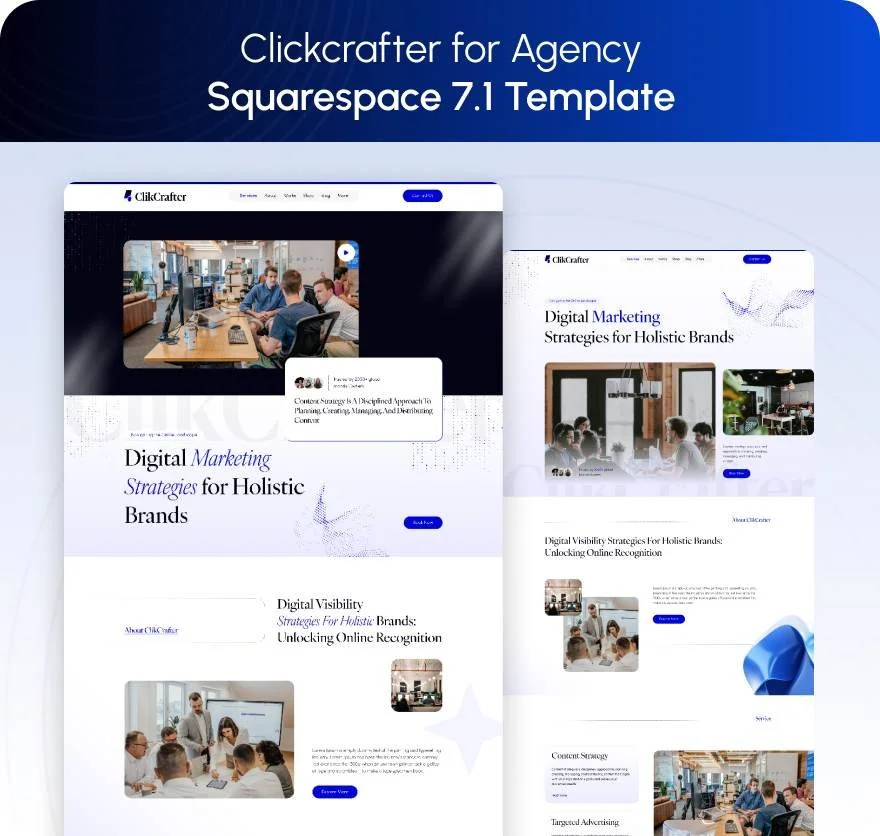
Click Crafter (demo) is a 12-page service-business template with Home, About, Services, Portfolio, Gallery, Shop, Blog, Freebie and Contact — the right shape if your content programme and area pages matter more than property presentation.
All Squareko templates are $249 with the Squarespace subscription separate, ship a Style Guide page and 150+ pre-designed sections, and arrive as a Squarespace contributor invitation rather than a file to upload. Demo images are not licensed for live use.
Governance: who is allowed to edit what
Multi-agent sites decay because everyone can change everything. Squarespace's answer is contributor permissions, and its important limitation is that permissions are site-wide — there is no per-page or per-section restriction. You cannot give an agent edit rights to only their own page.
The workable arrangement:
Owner and Administrator: the principal and the marketing lead only.
Website Editor for agents who need to update their own content. A Website Editor can add blocks and content to existing pages but cannot add new pages or change site styles, which is exactly the boundary you want — they can refresh their bio, they cannot restructure the site.
Store Manager or Email Campaigns Editor where those functions are delegated.
A written rule that agent pages follow the same section structure, because permissions will not enforce it for you.
Also decide, in advance, what happens when an agent leaves: the page comes down, and the URL either 301s to the roster or is deliberately retained. Squarespace does not create redirects automatically, so a deleted agent page is a 404 unless someone adds a redirect in Settings → Developer Tools → URL Mappings.
Before you choose a template
Settle four things: how many agent pages you will have and which object holds them, whether you are brand-forward or agent-forward, where your listings come from, and who holds Administrator. Those decide the site. The template then has to supply a team page, a detail page, and a structure that does not fall apart when the roster changes.
If you would rather start from a page set that already includes a team page and a detail page, our premium Squarespace templates are installed onto your site for you, so the build time goes into the agent pages and area pages that actually win instructions. Plenty of brokerages run this themselves — the four decisions above are the part worth getting right either way.
FAQ
-
Use an auto layout section for the grid — each item carries an image, title, description and a button link. Point that button at a real page per agent, not a pop-up, so the bio is indexable and shareable. Auto layout settings apply uniformly to every item, so all agents get the same treatment.
-
Squarespace 7.1 allows up to 1,000 pages and recommends staying under 400, so ordinary pages work for most brokerages. A Portfolio page caps at 60 projects. A Blog collection has no post limit, which is why very large rosters end up using one as an agent directory.
-
Yes, through contributor permissions — but they are site-wide. There is no per-page or per-section restriction, so you cannot limit an agent to their own page. Website Editor is the usual compromise: they can edit content on existing pages but cannot add pages or change site styles.
-
There is no native IDX or MLS integration. A third-party IDX product embeds as a script or iframe in a Code Block, which requires the Core plan or above. Check whether the vendor renders listings on your domain or on their own subdomain, because that decides whether the pages build search equity for you.
-
Yes. Agents research a brokerage the same way sellers do, and most brokerage sites offer them nothing. Publish the commission model or its structure, what you provide, which technology agents get, evidenced culture, and a separate enquiry form routed to whoever handles recruitment.
-
Nothing automatic. Squarespace creates no redirect when a page is deleted or a slug changes, so the URL becomes a 404 until someone adds a rule in Settings → Developer Tools → URL Mappings. Decide the policy before the first departure: take down, redirect to the roster, or retain.

Author Bio
I'm Walid Hasan, a Certified Squarespace Expert and Squarespace Circle Platinum Partner with over 12 years of hands-on experience designing and optimizing high-performing websites. Over the years, I've had the privilege of building more than 2,000 Squarespace websites for clients around the world, always focusing on clean design, strong user experience, and conversion-driven results.
