
Luxury Real Estate Squarespace Template: The Build Rules
The short answer: a luxury property site is a marketing-standards problem before it is a design problem. Your images are print assets, your video is the pitch, and your listing count is small — which removes the constraint that shapes every other real estate site on Squarespace. Build for twelve properties presented properly, not twelve thousand presented automatically. The two things that break the build are video placement and page weight.
What luxury actually changes about the build
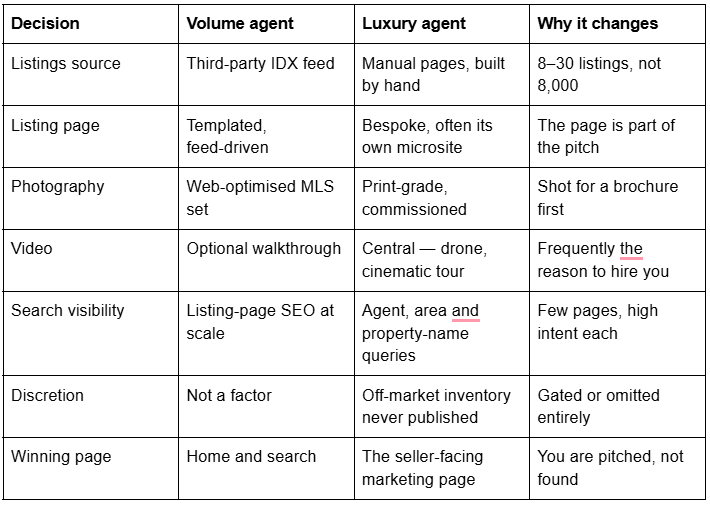
The last row is the one most luxury sites get wrong. A high-end agent's website is read by two audiences with opposite needs: buyers browsing property, and sellers deciding who lists their home. The seller is the higher-value visitor, and the site's job for that visitor is to prove that their property will be marketed better by you than by the other agent in the pitch. That is a portfolio argument, not a search argument.
Squarespace has no native IDX — and for luxury, that mostly does not matter
Squarespace has no native IDX or MLS integration. There is no built-in connector, no official feed importer, and no listings collection type. Live MLS data reaches a Squarespace site only through a third-party IDX product, embedded as a script or iframe in a Code Block — and JavaScript and iframes inside Code Blocks require the Core plan or above. That is a real monthly cost on top of the Squarespace plan, plus MLS participation and whatever display rules your MLS applies.
For a luxury practice with a small, curated inventory, the honest answer is that an IDX feed is usually the wrong tool. A feed gives you thousands of identical templated pages you did not write, cannot art-direct, and often cannot control the URLs of. It works against the entire premise of a luxury brand.
The routes that fit, in order of how often they are the right one:
Manual property pages. One Squarespace page per listing. Squarespace 7.1 allows up to 1,000 pages per site and recommends staying under 400, so a dozen live listings plus an archive of sold properties is nowhere near a limit. You art-direct every one.
Portfolio pages. A portfolio page gives you five layouts and a 60-project cap, with each project rendering as its own page built from sections. That suits "recent sales" or "represented properties" very well, and it is the fastest way to get a grid that looks intentional.
Products as pseudo-listings. Store pages support up to 10,000 products site-wide with tags, categories and filtering, which is the only native Squarespace object that behaves like a searchable inventory. It is a real option for a large curated portfolio, with one caveat: products have no draft state — only Public, Hidden and Scheduled — so an unfinished listing is either live or hidden, never "in progress".
Third-party IDX. Correct only when a buyer genuinely expects full-market search on your site.
Maintenance is what separates these. A manual page costs 20–40 minutes to build well and must be retired by hand when the property sells. A portfolio project is faster but less flexible. An IDX embed maintains itself and costs you control, money and, when the vendor renders listings on their own subdomain, the search value of those pages entirely.
Where video actually goes in Squarespace 7.1
This is the single most common thing that derails a luxury build, because the assumption is wrong in a specific way.
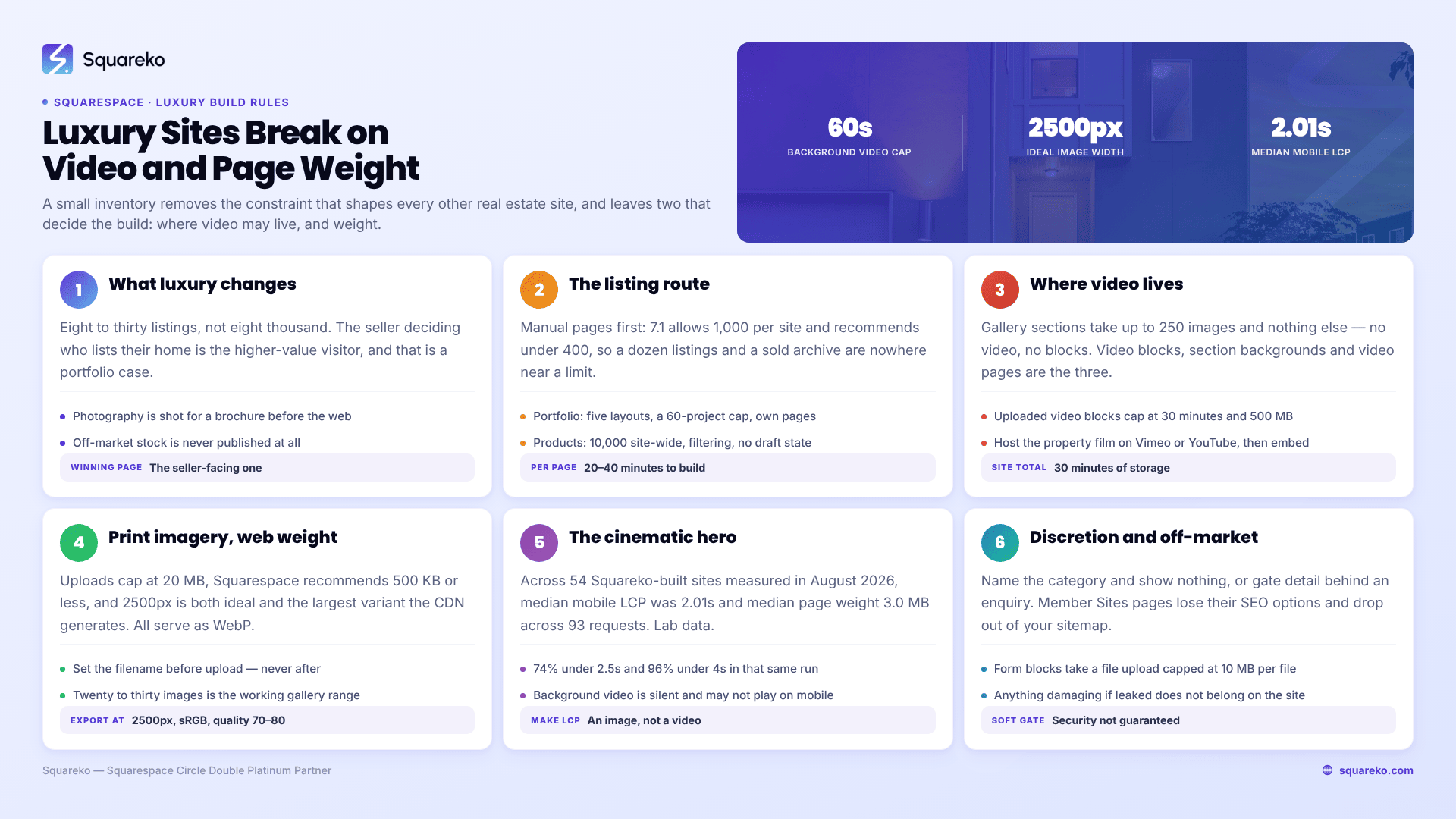
Gallery sections cannot hold video. A gallery section takes up to 250 images and nothing else — Squarespace's documentation states plainly that it is not possible to upload videos or add blocks to a gallery section. If your plan was "drop the drone reel into the property gallery", it does not work.
Video on Squarespace 7.1 lives in exactly three places:
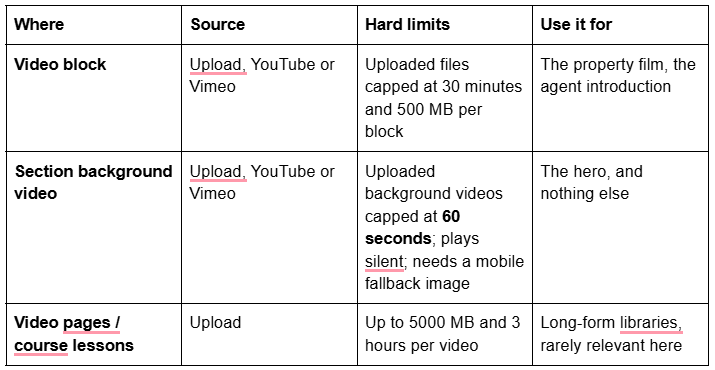
Two limits deserve to be planned around rather than discovered. First, every Squarespace site includes 30 minutes of video storage in total, across the whole site — additional storage requires a plan change. A practice publishing a five-minute film per listing exhausts that inside a year, which is why most luxury sites host property films on Vimeo or YouTube and embed them.
Second, background videos are silent and may not play at all on mobile. Squarespace's own guidance is to add two or fewer background videos per page, keep them under 40 seconds, and always set a mobile fallback image, because a device in low-power mode will not render one. A hero that only exists as video is a hero that is blank for a meaningful share of your visitors.
Drone footage specifically: it belongs in a video block on the property page, sourced from Vimeo or YouTube so it is not consuming site storage, with a still frame from the same footage doing the hero work above it.
Print-grade imagery against page weight
Luxury property photography arrives as 40–80 MB TIFFs or full-resolution JPEGs shot for a brochure. Squarespace will not take them, and should not.
The concrete numbers: image uploads are capped at 20 MB, Squarespace recommends 500 KB or less per image, a 2500px width is ideal, and 2500px is also the largest resized version the CDN generates — it produces seven variants (100, 300, 500, 750, 1000, 1500, 2500px) and serves them responsively. All images display as WebP automatically. Uploading a 6000px original buys you nothing; it is downsampled to 2500px before anyone sees it.
The practical export recipe for property photography:
2500px on the long edge, sRGB, quality 70–80. That lands most interiors between 300 KB and 700 KB.
Filename set before upload. Squarespace filenames cannot be changed afterwards, and the filename is one of the few descriptive signals a property image carries. chelsea-townhouse-drawing-room.jpg beats DSC_4471.jpg permanently.
Cap the gallery. Squarespace allows 250 images in a gallery section, but the platform's own recommendation for practical use is far lower, and a buyer does not look at 60 photographs of one house. Twenty to thirty is the working range for a listing gallery; the rest belong in a downloadable brochure PDF.
Alt text on every image. Property images are one of the few places where descriptive alt text does real work, because "six-bedroom Georgian townhouse, Chelsea" is genuinely what the image shows.
The cinematic hero versus Core Web Vitals
The tension is real and it is worth naming rather than pretending away. A slow full-bleed cinematic hero — a 20-second aerial that fades up over a serif wordmark — is exactly the aesthetic the category wants, and it is also the single heaviest element you can put above the fold. Largest Contentful Paint is usually measured on that hero.
It is manageable, and the measurements say so. Across 54 Squareko-built client sites measured in August 2026 — Playwright and Chromium, cloud datacentre, unthrottled, single run per site, load-only CLS, so lab data rather than field data — median mobile LCP was 2.01s, with 74% under Google's 2.5s "good" threshold and 96% under 4s. Median mobile CLS was 0.000, and 31 of the 54 recorded exactly zero layout shift. Median page weight was 3.0 MB across 93 requests.
Two things follow from that. Media-heavy Squarespace sites can hit good LCP, so a cinematic hero is not automatically disqualifying. But 3.0 MB is the median for ordinary business sites — a property gallery of thirty 600 KB images sits well above it, and the desktop CLS figure in the same run was weaker (median 0.029, 80% good), so nothing here supports a blanket claim that heavy sites are safe.
What actually keeps a cinematic hero fast:
Make the LCP element an image, not a video. Set a still frame as the section background image with the video layered over it. The image paints; the video arrives when it arrives.
One background video per page, at most two.
Never autoplay a video block above the fold. Background video is the supported route for autoplay; a video block that autoplays is a different and heavier thing.
Fixed-height hero sections. Layout shift on a luxury site nearly always comes from a hero that resizes once the web font loads.
Discretion: off-market listings and what never goes on the site
Luxury practices carry inventory that is not publicly marketed — pocket listings, pre-market properties, sellers who have asked for no signage and no portal presence. The website has to handle that without either leaking it or pretending it does not exist.
Three patterns work on Squarespace 7.1:
Say the category exists, show nothing. A short "Private and off-market representation" section explaining that a portion of inventory is never published, with a contact route. This does the marketing job for sellers without publishing a single address.
Gate the detail behind an enquiry. A form block that collects the enquiry, then a manual reply with the particulars. Squarespace form blocks support a file upload field capped at 10 MB per file, which is enough to return a brochure — though the sensible pattern is to send documents by a route you control, not to attach them to a website workflow.
Member Sites for a genuinely private area. Squarespace's Member Sites (Content and Memberships) will put pages behind a paywall or a free member signup. Be precise about the trade: pages inside a member site have no SEO options and are removed from your sitemap, member sites do not support dropdown navigation, and Squarespace states plainly that content security cannot be guaranteed once a member has access. It is a soft gate, appropriate for "registered buyers only", not a confidentiality mechanism. Anything that would genuinely damage a seller if it leaked does not belong on the website at all.
Which templates suit a luxury property practice
Judge a template by whether its page list already contains a property-detail page, because that is the page you will build most often and the one worst served by bolting onto a template that never planned for it.

Vogue (demo) is an 11-page template whose navigation runs Home, Services, About and Shop, with Home 2, Portfolio, Gallery, Contact, Freebie, a Style Guide and a 404 page behind a More folder. The Portfolio plus Gallery pairing is the property-showcase structure, and the Shop page is the closest native object to a curated inventory.

Horizon (demo) — the live demo navigation is Home, Services, About and Contact, with Home 2, Portfolio, Gallery, Freebie, Style Guide and a 404 page in a More folder. It is a services-and-showcase structure built around completed work rather than a listings site. Note that Squareko's own tagging for this template is broader than what the demo pages actually show; judge it on the page list above.

WeDecorefy (demo) is the largest of the three at 15 pages and the only one that ships a Project Details page alongside Projects, plus a Team page. That Project Details page is the single-property template you would otherwise design from scratch, which is why it is worth looking at even though the template is tagged for interiors.
Every Squareko template also ships a Style Guide page, 150+ pre-designed sections and a 404 page, and all 24 are $249 with the Squarespace subscription paid separately. Demo images are not licensed for live use — every one has to be replaced, which for a property site you were commissioning photography for anyway is a non-issue.
The enquiry path for a high-value enquiry
Keep it short. A seller considering a nine-figure instruction does not fill in a fourteen-field form; they send four lines and expect a call. Name, email, phone, property location, and one open field. Route it to a real inbox and answer it the same day.
Two things not to do. Do not put a chatbot in front of a luxury enquiry — it reads as a call centre. And do not collect financial qualification data through a website form; form submissions are stored and notified by email, which is not the right channel for it.
Before you choose
Decide the listing route first — manual pages, portfolio, products or IDX — because that decision determines how many pages the site has and therefore which template can hold it. Then plan where each piece of video will live, given that gallery sections cannot hold any. Then export the photography at 2500px before you touch a template. Those three decisions matter more than the design you pick.
If you would rather start from a page set that already includes a portfolio, a gallery and a project-detail page, our premium Squarespace templates are installed onto your site for you, so the build time goes into the property pages rather than the layout. Most agents do this themselves perfectly well — the sequencing above is the part worth getting right either way.
FAQ
-
No. Squarespace 7.1 gallery sections hold up to 250 images and nothing else — the documentation states you cannot upload videos or add blocks to a gallery section. Property video has to go in a video block, a section background video, or a videos page. Plan the layout around that before you build.
-
Uploaded background videos are capped at 60 seconds in Squarespace 7.1, play silently, and should be under 40 seconds in practice. Embedded YouTube or Vimeo backgrounds have no length limit. Always set a mobile fallback image, because background video will not render on devices in low-power mode.
-
Export at 2500px on the long edge in sRGB. That is Squarespace's ideal width and also the largest variant its CDN generates, so anything larger is downsampled. Aim for 500 KB or less per file, and set the filename before uploading — Squarespace filenames cannot be changed afterwards.
-
Not natively. Squarespace has no built-in IDX or MLS integration, so live listing data requires a third-party IDX product embedded as a script or iframe in a Code Block, which needs the Core plan or above. For a small curated luxury inventory, manual property pages or a portfolio page usually serve better than a feed.
-
Usually you do not show them. Name the category — private and off-market representation — and route enquiries to a form, then send particulars directly. Squarespace Member Sites can gate pages, but those pages lose their SEO options, leave your sitemap, and are not a confidentiality mechanism.
-
It can, and the fix is structural. Set a still frame as the section background image so the image is the Largest Contentful Paint element and the video layers over it, use one background video per page, and give hero sections a fixed height so nothing shifts when the web font loads.

Author Bio
I'm Walid Hasan, a Certified Squarespace Expert and Squarespace Circle Platinum Partner with over 12 years of hands-on experience designing and optimizing high-performing websites. Over the years, I've had the privilege of building more than 2,000 Squarespace websites for clients around the world, always focusing on clean design, strong user experience, and conversion-driven results.
