
Squarespace Template for Property Management: What It Can Do
The short answer: a property management website has to serve three audiences, and only one of them is a lead. Prospective owners are being sold to. Prospective tenants are shopping. Existing tenants are users — they want to pay rent, report a leak, and find their lease. Squarespace is an excellent marketing site and it is not a portal. Build the marketing site on Squarespace and link out to whatever software already runs the tenancies.
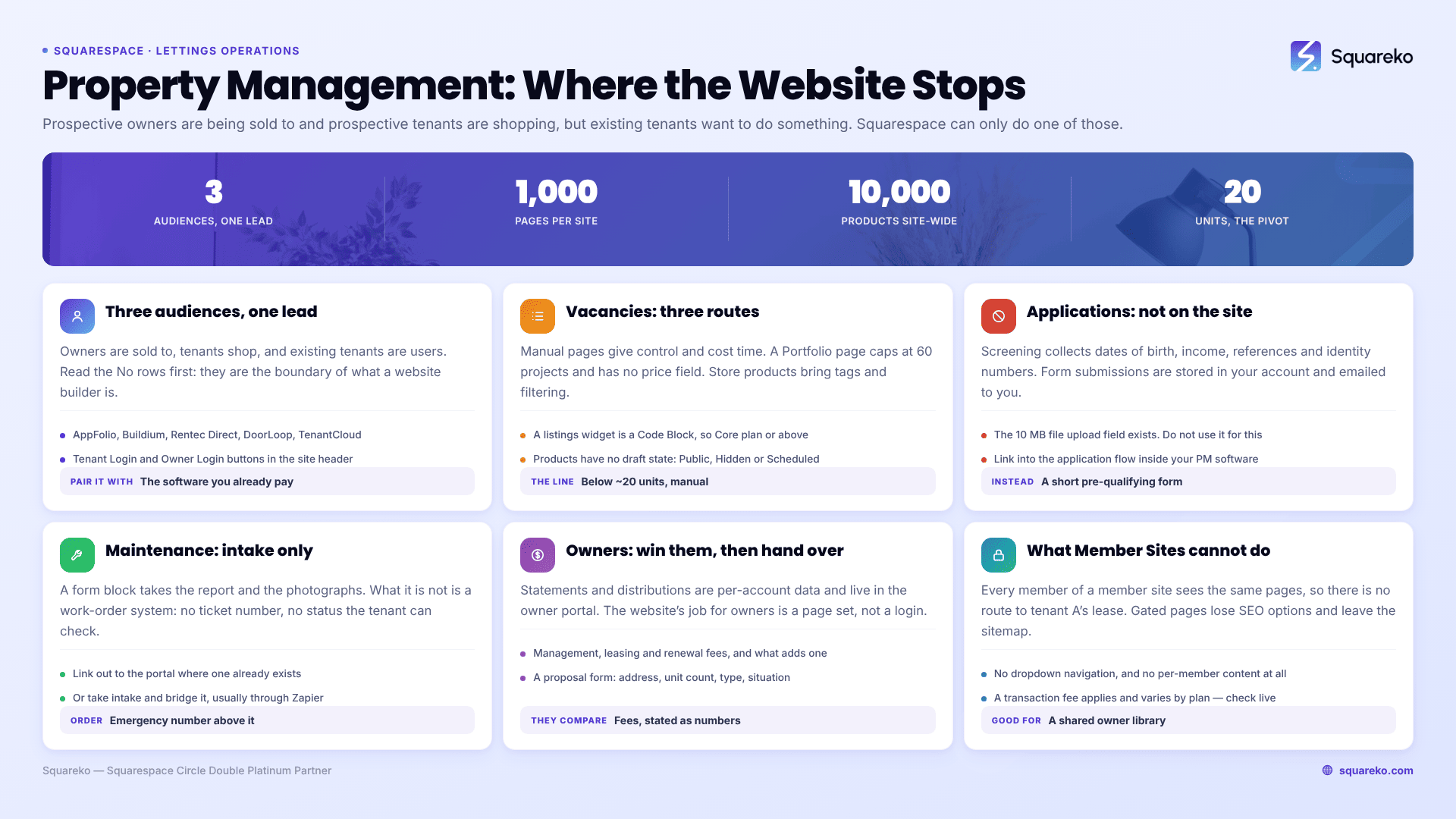
Every surface a property management site needs, and where it actually lives
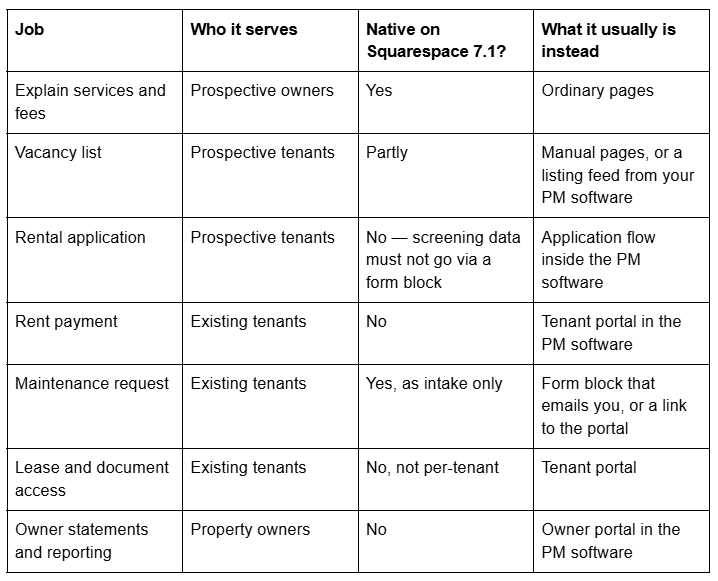

Read the "No" rows first. They are not Squarespace failing at something it claims to do; they are the boundary of what a website builder is. Any per-account view — this tenant's balance, this owner's statement — requires an authenticated database application. Squarespace does not have one, and no template changes that.
The good news is that almost every property management operation already pays for software that does. The website's job is to be the front door, not the building.
Vacancy listings: three routes, very different maintenance
Squarespace has no native IDX or MLS integration, and rental inventory has no native object either. There is no listings collection type. Your options:
Manual pages, one per vacancy. Squarespace 7.1 allows up to 1,000 pages per site and recommends staying under 400. For a manager with six to twenty units turning over a few times a year, hand-built pages are genuinely fine and give you full control of the copy, the photographs and the URL. The cost is discipline: a let property has to be taken down by hand, and a stale vacancy page is the most common complaint tenants make about small management sites.
A Portfolio page. Five layouts, a 60-project cap, and each project renders as its own page built from sections. Good for a managed-property showcase aimed at owners. Less good for vacancies, because there is no price field, no bedroom filter and no availability state.
Store products as pseudo-listings. Store pages support up to 10,000 products site-wide, with categories, tags and filtering — the closest native Squarespace object to a searchable inventory. Price maps to rent, product categories map to areas, tags map to bedrooms. Two caveats: products have no draft state, only Public, Hidden and Scheduled, so a half-finished listing is either live or invisible; and buyers can add them to a cart unless you disable purchasing, which needs configuration rather than being the default.
A feed from your property management software. Most PM platforms publish vacancies and syndicate them to rental portals. Some provide an embeddable listings widget. Where they do, it arrives as a script or an iframe, which goes in a Code Block — and JavaScript and iframes inside Code Blocks require the Core plan or above. It also means the listings markup is not yours, so its headings, URLs and structured data are outside your control.
The maintenance calculus: manual pages cost you time per vacancy but nothing per month. An embedded feed costs nothing per vacancy and removes your control of the pages. Below roughly twenty units, manual usually wins. Above it, the feed does.
Rental applications: the one thing not to build on your website
A rental application collects date of birth, employment details, income, previous addresses, references, and in many markets a national identity or social security number for screening. None of that should pass through a Squarespace form block.
The mechanics are the reason. Form block submissions are stored in your Squarespace account and notified to you by email. Email is not an appropriate channel for identity or financial data, and the retention question — who can read the stored submissions, for how long, and how they are deleted — is one you do not want to answer for a screening dataset.
Squarespace form blocks do include a file upload field, capped at 10 MB per file and available only in form blocks, which is technically enough to receive a payslip PDF. Do not use it for that.
The correct pattern: a short pre-qualification form on the website — name, contact, which property, desired move-in date, and any hard criteria you screen on — and then a link into the application flow inside your property management software, which is built for it and generally handles screening, consent and payment of the application fee in one place.
Maintenance requests: intake is a website job, tracking is not
This is the one operational surface Squarespace handles honestly, provided you are clear about what it is.
A maintenance request form on the website works. A form block gives you the fields that matter — text, dropdown, radio, phone, address, date, and the 10 MB file upload for photographs of the problem. A tenant reports a leak, attaches two photos, and it lands in your inbox.
What it is not is a work-order system. There is no ticket number, no status the tenant can check, no assignment to a contractor, no history. The tenant's next question — "has anyone looked at this?" — has no answer on your website.
Two workable designs:
Link out. If your PM software has a tenant portal with maintenance requests, the website's maintenance page is a short explanation plus a button to the portal, with an emergency phone number above it. Simplest, and the one to choose if the portal exists.
Intake on site, tracking elsewhere. A form block collects the request and a rule in your email or automation tool creates the ticket. Squarespace form blocks integrate with Zapier, which is the usual bridge. The tenant still cannot check status, so the auto-response has to set that expectation: what happens next, and by when.
Whichever you choose, put the emergency procedure above the form, not below it. A tenant with a burst pipe should not be filling in a form, and the page has to say so before it presents one.
Owner portals and what property owners actually expect
Owners expect statements, distributions, tax documents and occupancy reporting. All of that is per-account financial data, and it lives in the PM software's owner portal. Squarespace cannot produce it and should not try.
What the website does for owners is win them. That is a different job and it is a page set:
Services and what is included — leasing only, full management, or tiers.
Fees, stated as numbers. Management percentage, leasing fee, renewal fee, and what triggers an extra charge. Owners compare managers on fees and most manager websites hide them, so publishing them is the strongest differentiator available.
Reporting and communication — what you send, how often, and how they see it.
Owner login button in the header, pointing at the portal. Owners use it constantly and it signals that the operation is real.
A management proposal or valuation request form. Address, unit count, property type, current situation. Five fields.
What Member Sites can and cannot do here
Squarespace's membership product — now Member Sites, part of Content and Memberships — comes up in every property management conversation, so it is worth being precise.
What it does: it puts a set of pages behind a paywall or a free member signup. Visitors create an account, are granted access to that member site, and can then read pages that are otherwise inaccessible. It is included on paid plans rather than being a flat add-on, carrying a Digital Content and Memberships transaction fee of 7% / 5% / 1% / 0% from Basic through Commerce Advanced — check the live pricing page before quoting a figure, because these change.
What it does not do, and this is the part that matters:
No per-member content. Every member of a member site sees the same pages. There is no mechanism to show tenant A their lease and tenant B theirs. This alone disqualifies it as a tenant document store.
No SEO options, and not in your sitemap. Squarespace states that pages in a member site do not have SEO options and are not indexed in your sitemap; adding a page to a member site deactivates its SEO options and removes its URL from the sitemap. Any page you gate stops working as a search asset.
No dropdown navigation inside a member site.
Security is not guaranteed after access. Squarespace says plainly that it cannot fully guarantee content security once a member has accessed it. A member can save and share anything they can see.
Subscription products do not work with Member Areas, and deleted member sites and memberships cannot be restored.
Where it is genuinely useful for a property manager: a gated resource library for owners — market reports, a landlord compliance guide, template documents. Shared content, same for everyone, worth an email address. That is the use case it was built for.
Also worth knowing while planning: the standalone Digital Products plan closed to new signups on 23 July 2026, so any advice written before that date about buying it separately is out of date.
What people actually pair Squarespace with
The standard architecture is a Squarespace marketing site plus a property management platform that owns the tenancies. Platforms in common use include AppFolio, Buildium, Rentec Direct, DoorLoop, TenantCloud and Rent Manager. Between them they cover the operational set — online rent payment, tenant and owner portals, maintenance requests, online applications, tenant screening and syndication of vacancies to rental portals. Rentec Direct, for example, describes receiving rent payments and maintenance requests through its tenant portal and automatically publishing listings to 20+ rental websites.
Which one you use is a decision about your accounting and your unit count, not about your website. Choose it first. Then wire the website to it with three things:
A Tenant Login and an Owner Login button in the site header, pointing at the portal URLs.
A vacancy route — either the platform's listings widget in a Code Block, or manual pages you maintain.
A maintenance page that either links to the portal or takes intake and routes it.
That is the whole integration. It is deliberately shallow, and shallow is correct: the website should survive a change of PM software without a rebuild.
The page set, and which templates already have it
A property management site needs: Home, Services for owners, Fees, Vacancies, Tenants (with maintenance and payment routes), Owners, Areas served, About and team, FAQs, Contact, plus the legal set. That is a services business with two logged-out audiences, which is why the templates that fit best are recurring-service templates rather than property showcases.
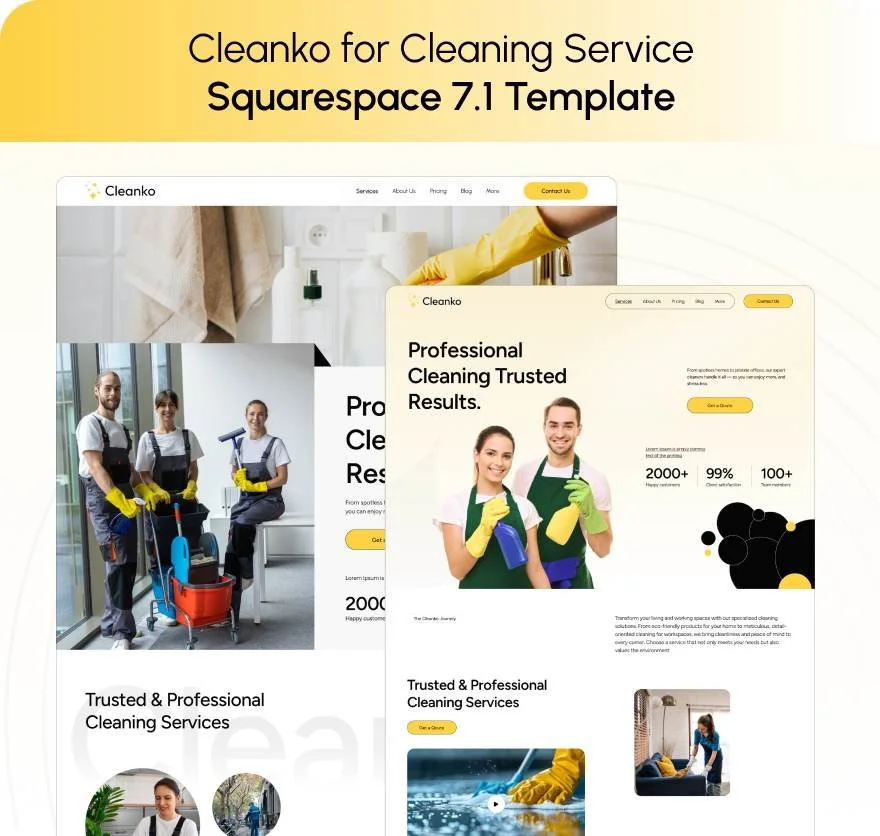
Cleanko (demo) is a 12-page template whose navigation runs Home, About, Services, Service Details, Portfolio, Pricing, Blog, FAQs and Contact, with a Style Guide and 404 page. The Service Details and Pricing pages are the two a management site most often has to build from scratch, and FAQs is where the tenant questions go.

Click Crafter (demo) runs to 12 pages with Home, About, Services, Portfolio, Gallery, Shop, Blog, Freebie and Contact — a larger structure for a manager publishing regularly and running an area-by-area content programme.

Vogue (demo) is an 11-page template with Home, Services, About, Shop, Portfolio, Gallery, Contact and Freebie. Its Portfolio and Gallery pairing is the better choice if managed-property presentation matters more to your owners than service-page depth.
All Squareko templates are $249 with the Squarespace subscription paid separately, ship a Style Guide page and 150+ pre-designed sections, and are delivered as a Squarespace contributor invitation rather than a file download. Demo images are not licensed for live use and must all be replaced.
Before you choose a template
Pick the property management platform first, then the template. The platform determines whether your vacancies are manual pages or an embed, whether the header carries one login button or two, and whether your maintenance page is a form or a link. Get that wrong and you rebuild the site; get it right and the template choice is genuinely just about design.
If you would rather start from a page set that already includes services, service detail, pricing and FAQ pages, our premium Squarespace templates are installed onto your site for you, so the build time goes into the owner-facing copy that wins management contracts. Plenty of managers do this themselves — the boundary between the site and the software is the part worth getting right either way.
FAQ
-
No. A tenant portal needs per-account data — balances, lease documents, work-order status — and Squarespace has no authenticated database application. Member Sites gates pages, but every member sees the same pages. Use your property management software's tenant portal and link to it from the site header.
-
Not in any way you should use. Squarespace commerce is built for products and one-off checkouts, not rent ledgers, part payments, late fees or arrears tracking. Rent collection belongs in property management software with a tenant portal; the website links to it.
-
No. Squarespace states that pages in a member site have no SEO options and are not indexed in your sitemap — adding a page to a member site deactivates its SEO options and removes its URL from the sitemap. Never gate a page you want found in search.
-
Three routes: manual pages, one per vacancy, which is fine under roughly twenty units; Store products as pseudo-listings with categories and tags for filtering; or a listings widget from your property management software, embedded as a script or iframe in a Code Block, which requires the Core plan or above.
-
No. Applications collect dates of birth, income and identity numbers for screening, and Squarespace form submissions are stored in your account and notified by email. Use a short pre-qualification form on the site, then link into the application flow inside your property management software.
-
Home, Services for owners, Fees, Vacancies, a Tenants page carrying maintenance and payment routes, an Owners page, Areas served, About, FAQs, Contact and the legal set. Publishing your management fees as actual numbers is the single strongest differentiator, because most competitors hide them.

Author Bio
I'm Walid Hasan, a Certified Squarespace Expert and Squarespace Circle Platinum Partner with over 12 years of hands-on experience designing and optimizing high-performing websites. Over the years, I've had the privilege of building more than 2,000 Squarespace websites for clients around the world, always focusing on clean design, strong user experience, and conversion-driven results.
