Squarespace Template for a Catering Business: Build the Enquiry Path First
The short answer: a catering website is a quote engine, not a shop. Nothing on it gets bought. Its only job is to turn a stranger into a structured brief — event type, date, headcount, venue, service style, dietary requirements, budget — and hand that brief to you in a form you can price without a phone call. Choose a Squarespace template on whether it gives you a serious enquiry page, package pages and somewhere to show past events, not on whether it has a Reservations page.
Of the Squareko range, Savore is the closest base: 13 pages including Services, Menu, Special Offers, FAQs and a Reservations page that becomes your Enquiry page.
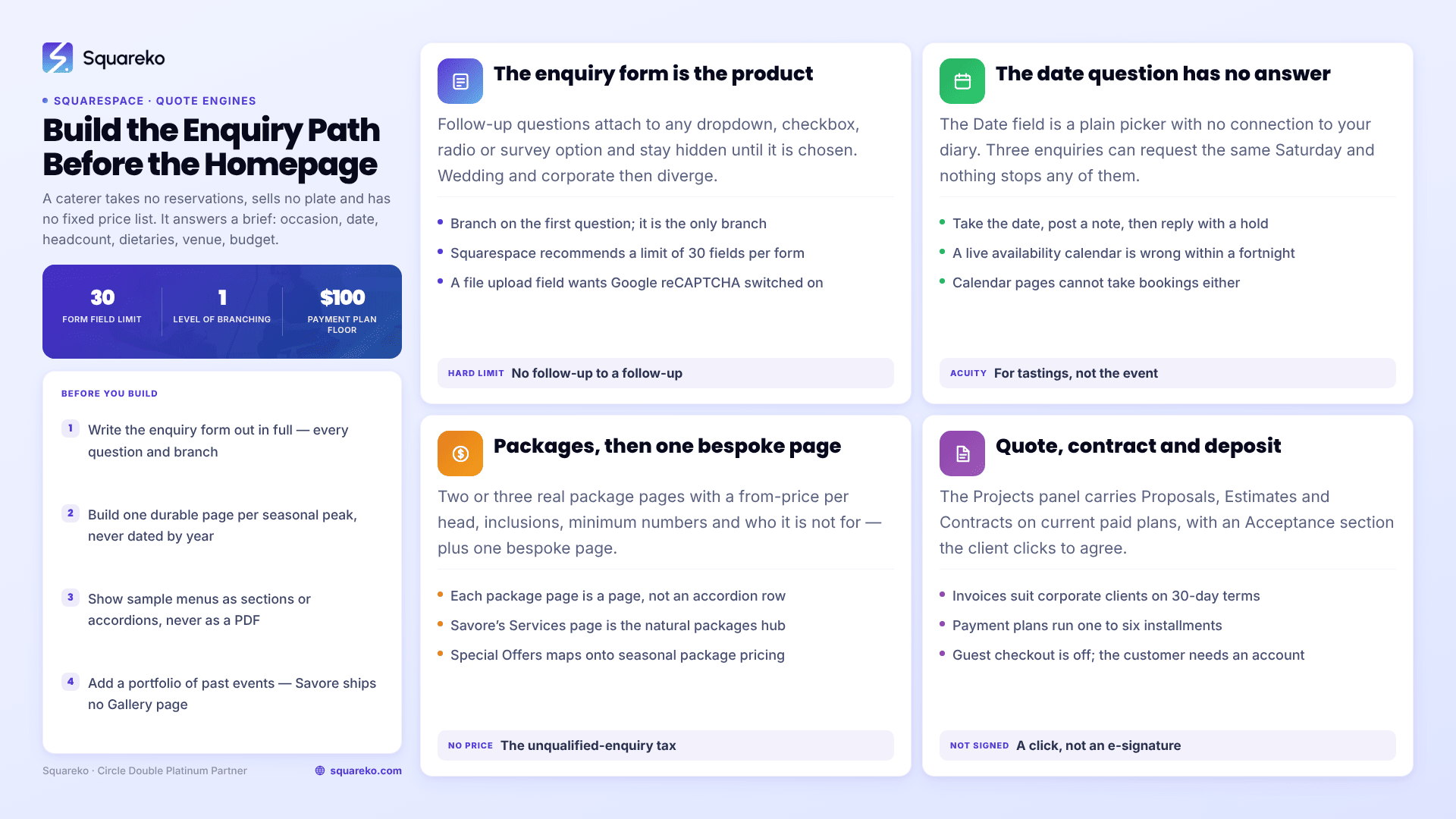
What a catering enquiry has to capture, and where each part lives
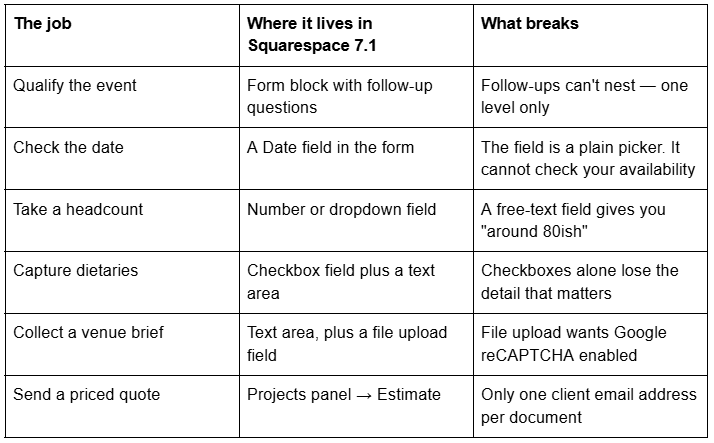
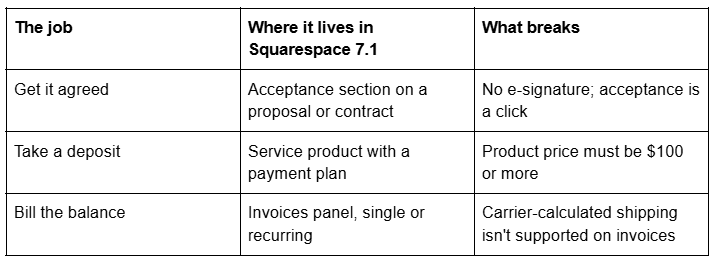
A catering site is a quote engine, not a checkout
Every generic restaurant template on Squarespace 7.1 is built around three actions: read the menu, book a table, order food. A catering business does none of them. What it does is answer a brief. Someone has 90 people, a marquee, a Saturday in June and a vegan sister-in-law, and the site's entire commercial function is to collect those facts accurately enough that your first reply is a price rather than four clarifying questions.
So the architecture inverts. On a restaurant site the menu is the hero and the contact page is an afterthought. On a catering site the enquiry page is the product, and the menus exist to make the enquiry more confident.
The enquiry form is the product — and Squarespace form blocks can do more than most people use
Squarespace form blocks are better than their reputation, and the feature that matters for catering is the one almost nobody switches on.
Follow-up questions. On any multiple-choice field — dropdown, checkbox, radio or survey — you can attach follow-up questions to individual answer options. Squarespace's documentation is explicit that "follow-up questions won't be visible until they choose the corresponding response." That gives you a genuine branching brief: pick Wedding and you get guest count, ceremony time and marquee questions; pick Corporate and you get invoice contact, PO number and dietary policy questions.
The limit is equally explicit: "Each option can have multiple follow-up questions, but it's not possible to create a follow-up to a follow-up question." One level of branching, no more. Design your form so the branch happens on the first question — event type — because that is the only branch you get.
The field types cover almost everything a caterer needs: name, email, text, text area, dropdown, checkbox, radio, survey, address, phone number, date, time and file upload. Squarespace recommends a limit of 30 fields per form, and 30 is a hard cap if you connect the form to Mailchimp. If you add a file upload field so clients can send a venue plan or a mood board, enable Google reCAPTCHA as well — an unprotected upload field attracts junk.
Finally, storage. Every Squarespace form needs at least one storage option, and only one email address can connect to each form — so a sales inbox and a kitchen inbox means a shared mailbox or a forwarding rule, not two connections. The other routes are the Contacts panel (submissions appear under Lists & Segments → Form submitters), Google Drive, Mailchimp and Zapier. Connect Google Drive as well as email: a spreadsheet with headcount and date in columns is the closest thing to a free CRM a caterer gets.
Date availability is the one question Squarespace cannot answer
This is where catering sites quietly break, so decide it early.
The Date field in a Squarespace 7.1 form block is a plain date picker. It does not know your diary. Three separate enquiries can pick the same Saturday in December, and nothing stops someone requesting a date you are already fully committed on. There is no native availability check for events.
Acuity Scheduling — which Squarespace's Help Center now states is "officially Acuity Scheduling" again, and which is billed separately from your website plan — solves a different problem. Acuity is right for the consultation: a discovery call, a tasting, a venue visit. It is the wrong tool for the event, because a catering job is not a 90-minute slot; it is a day with a load-in, a crew and a van.
The pattern that works: take the requested date as a form field, publish an availability note beside it ("Saturdays in December are usually full by August"), and reply with a hold. Do not build a live availability calendar out of Squarespace 7.1 — it will be wrong within a fortnight, and a wrong calendar costs more enquiries than no calendar.
Package pages versus bespoke, and how to price without publishing a price list
Caterers resist publishing prices for a reasonable reason: every job differs. Publishing nothing is worse. A page with no number at all is the single biggest source of unqualified enquiries, because it invites everyone including the person with £8 a head.
The structure that solves both: two or three package pages plus one bespoke page. Each package page is a real page, not an accordion row — Drinks Receptions, Corporate Lunch Delivery, Wedding Breakfast — with a from-price per head, what is and is not included, minimum numbers, service style, and one honest paragraph about who it is not for. Packages give search engines something specific to rank and give buyers a reference point. The bespoke page does the opposite job: it explains the process, shows the range of past work, and sends everyone to the same enquiry form.
Savore's Services page is the natural home for the package overview, with each package as its own child page beneath it. Its Special Offers page maps onto seasonal package pricing without needing a new page type.
From enquiry to signed quote, inside Squarespace
Most catering sites stop at the form and move the rest to email. Squarespace 7.1 carries it further than people realise, and keeping it in one system means the deposit and the contract sit on the same client record.
In the Projects panel you create a project per enquiry, then attach documents. Three templates ship: Proposals (an overview of your business and services), Estimates (the services and costs for a specific job) and Contracts (your terms), on all current paid plans. An Acceptance section prompts the client to review and accept, which is what makes a document binding — though it is a click, not an e-signature, and Squarespace states plainly that it cannot advise on contract formation in your jurisdiction. One constraint bites: a document sends to one client email address, and "it's not possible to add additional recipients". Where a PA books and finance pays, you duplicate the document and send it twice.
For money there are two routes. Invoices, single or recurring, suit corporate clients who want a PO reference and 30-day terms. For consumer events, a service product with a payment plan is closer to how catering gets paid: an initial deposit as a percentage or a flat amount, then between one and six installments on a weekly, biweekly, monthly or custom schedule, with the last one timed to land before the event. The requirements are specific — the product must be priced at $100 or more, payment plans are 7.1 only on Basic and above, guest checkout is disabled because the customer needs an account, and installments cannot be paid with Apple Pay, Google Pay, Link, Klarna or Afterpay.
A portfolio of past events is the credibility layer, and Savore does not ship one
Nobody hands you 120 covers on the strength of your typography. They hand it over because they saw a marquee that looked like theirs.
That means a real portfolio: eight to twelve past events, each with a headline (140 guests, barn wedding, Somerset), six to ten photographs, the menu served, and one line about a constraint you solved. Written that way, each event page also ranks for the venue name — the most reliably converting long-tail traffic a caterer gets.
Savore ships no Portfolio or Gallery page. That is a genuine gap and you build it with gallery sections, which offer six layouts and cap at 250 images — though Squarespace's own recommendation is nearer 50 — and cannot hold video.
Weight is the thing to watch. Across 54 Squareko-built client sites measured in August 2026 (Playwright/Chromium lab test, cloud datacentre, unthrottled, single run per site — lab data, not field data), the median page weighed 3.0 MB across 93 requests and median mobile LCP was 2.01s. Event galleries are where that budget gets spent. Upload at 1500–2500px, since 2500px is the maximum Squarespace serves, and let the CDN handle the rest — it serves WebP unconditionally regardless of source format.
The corporate calendar is seasonal, and the site should be too
Catering demand is not flat. Christmas party catering is searched from August, summer wedding enquiries land in January, and corporate away-day catering spikes at the start of financial quarters.
Build one durable landing page per seasonal peak rather than rewriting the homepage four times a year. A page at /christmas-party-catering that exists all year, gets updated each August with this year's menu and cut-off date, and accumulates links and history will out-rank a page you publish in October. Note that changing a page slug creates no automatic 301 redirect, ever, so name seasonal pages generically the first time and never renumber them by year. The announcement bar handles the one time-sensitive message — "Christmas orders close 8 December" — site-wide, and comes off in a click.
Menus for a caterer are sample menus, not a price list
A caterer's menu page has a different job from a restaurant's: it demonstrates range and standard, and it must not read as a fixed offer.
Squarespace 7.1 still ships a menu block — its Help Center article was last edited in July 2026, despite a lot of older advice implying it was retired. It uses a plain-text syntax: the menu name with at least three equals signs beneath it, a section name with at least three hyphens beneath it, then each item as name, description and price on consecutive lines. A forward slash gives you pricing variants (half portion / full portion), and $MKT or $Market Price produces a market-price line. Its quirks: only four currency symbols ($, €, £, ¥), and the content of your first menu sets the minimum height of the whole block, so a long canapé list followed by a short dessert list leaves white space under the desserts.
For sample catering menus, plain sections built from text blocks usually beat the menu block, because you want prose between courses and a "menus change with the season" caveat. Accordion blocks are the third good option — they render server-side, so the collapsed text is fully crawlable, and six seasonal menus become six rows.
What loses every time is a PDF menu. Squarespace's own documentation calls menu blocks "a great alternative to embedding .pdf menus, which aren't always as SEO-friendly as text directly on the page". On a phone a PDF is a pinch-and-zoom document, and no AI answer engine will quote it.
Savore and Poshplatter, by their actual pages
Two templates in the Squareko range are built for food businesses. Judge them on what they contain, both re-tested live in August 2026.
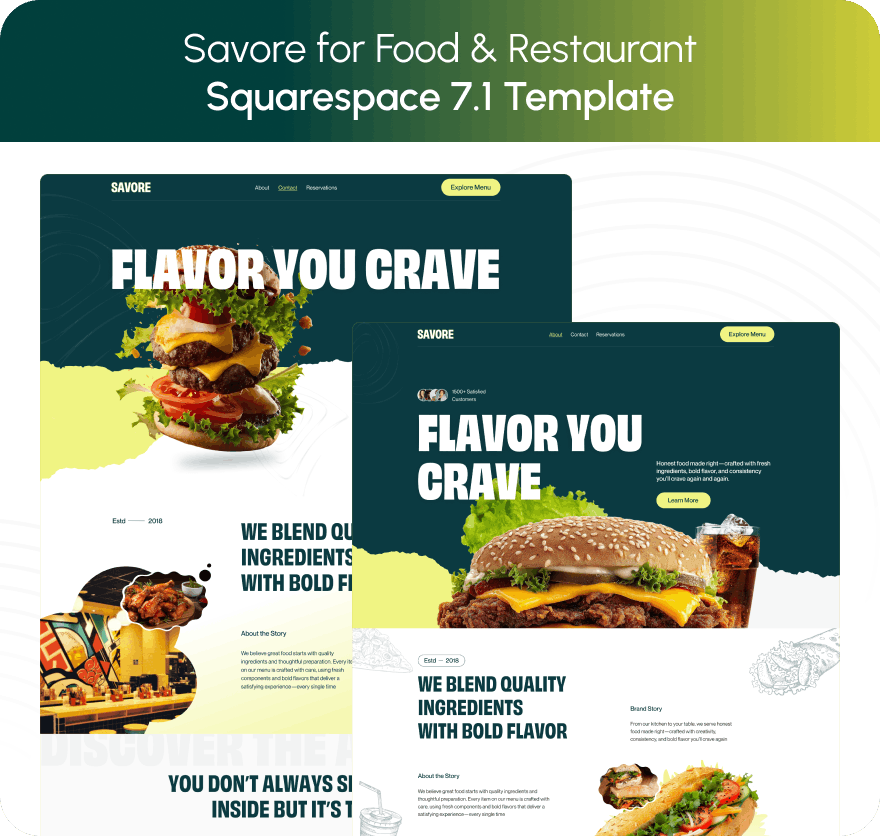
Savore — 13 pages: Home, a second homepage layout, Services, Menu, Blog, About, Contact, Special Offers, Reservations, FAQs, Privacy Policy, a Style Guide page and a 404 page. For a caterer the mapping is clean: Services becomes the packages hub, Reservations becomes Enquiry, Special Offers becomes seasonal pricing, and the Blog carries the seasonal landing pages. Its Menu page is built as a filterable grid of dishes with prices and category filters — useful for showing canapés, mains and desserts separately. Its gaps are a Portfolio or Gallery page and any ecommerce.

Poshplatter — 10 pages: Home, a second homepage, Menu, About, Recipes, How It Works, Location, Contact, Style Guide and 404. How It Works is the interesting page for catering: the demo content covers group and event ordering, in-person workshops and at-home recipes. It ships no blog and no shop, so seasonal landing pages have to be static pages.
Both are $249, delivered as a Squarespace contributor invitation rather than a file download, with 60 days of email support. Customisation is not included, all sales are final, and the demo images are not licensed for live use — you replace every one. Every template also ships 150+ pre-designed sections, a Style Guide page and a 404 page.
Choosing a template for a catering business
Open any demo on a phone and run it against the nine-row table at the top of this post. If the enquiry brief, the packages, the past events and the seasonal pages each have an obvious home, the template will hold. If three of them would land on one page called Contact, you are buying a colour palette.
Then do the thing that decides the project: write your enquiry form out in full — every question, every branch, every dropdown option — before you build anything. It is the hardest document in a catering website and no template supplies it.
If you would rather not spend three evenings wiring forms, projects and payment plans together, the premium Squarespace templates at Squareko are installed for you, onto a new site or an existing one, with the pages ready for your content. Most caterers manage perfectly well themselves with the structure above — it is published because the structure is the hard part, not the design.
For a one-person operation cooking in a client's own kitchen, the trust problem dominates and the architecture is different: see Squarespace templates for private chefs. The cluster hub, Squarespace templates for restaurants, covers dining rooms, cafés and bars as a whole.
FAQ
-
Event type first, because that is the only branch Squarespace supports. Then date, headcount, venue and postcode, service style, dietary requirements, budget range and how they found you. Use follow-up questions on the event-type dropdown so a wedding enquiry and a corporate enquiry see different second-level questions.
-
Yes, using follow-up questions on dropdown, checkbox, radio and survey fields. Follow-ups stay hidden until the matching option is chosen. The limit is that you cannot create a follow-up to a follow-up, so all branching has to happen at one level — put it on the first question.
-
No. The Date field in a form block is a plain picker with no connection to your diary, and Calendar pages don't support bookings. Acuity Scheduling handles consultations and tastings but not multi-day event commitments. Take the date as a field and confirm availability manually.
-
Two routes. Send an invoice from the Invoices panel for corporate clients, or sell the job as a service product with a payment plan: an initial deposit as a percentage or flat amount, then up to six installments. The product must be priced at $100 or more and the customer needs an account.
-
Publish from-prices per head on two or three package pages, and keep bespoke work quote-only. A site with no number at all attracts every enquiry including the ones you cannot serve profitably, and a from-price is the cheapest qualification filter a catering website has.
-
Savore is the closest fit in the Squareko range at 13 pages, including Services, Menu, Special Offers, FAQs and a Reservations page that converts into an enquiry page. Its gap is a portfolio of past events, which you build with gallery sections. Poshplatter suits process-led operations.

Author Bio
I'm Walid Hasan, a Certified Squarespace Expert and Squarespace Circle Platinum Partner with over 12 years of hands-on experience designing and optimizing high-performing websites. Over the years, I've had the privilege of building more than 2,000 Squarespace websites for clients around the world, always focusing on clean design, strong user experience, and conversion-driven results.