Squarespace Template for a Cafe: Hours, Menu and a Second Revenue Line
The short answer: a cafe needs a small site with perfect hours, not a big site with a booking system. Choose the template on whether it gives you a one-tap route to hours and location, a menu you can change from your phone in thirty seconds, and somewhere to sell beans, merch and wholesale. Squarespace's Eldridge does the first two for nothing; Poshplatter adds the third.
Here is the whole build, and why it is a different build from a restaurant's.
A cafe site and a restaurant site are different objects
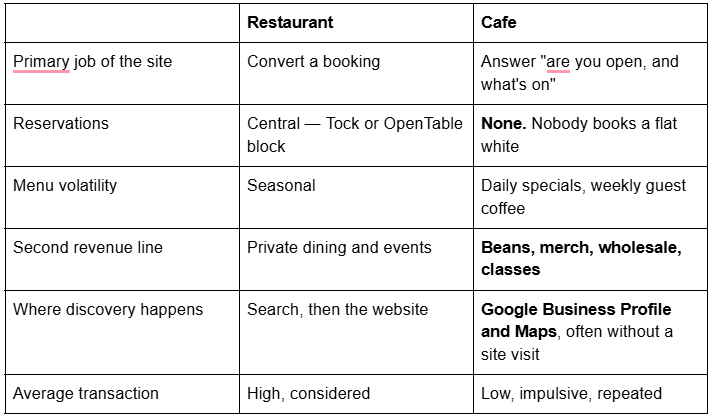
If you run a dining room, stop here and read the restaurant Squarespace template guide instead — the reservations, private dining and covers architecture in that post does not apply to a cafe, and building it wastes a fortnight.
The five pages a cafe actually needs: Home, Menu, Visit (hours, address, map, parking, accessibility), Shop and About. A blog is a strong sixth. Everything else is optional.
Hours are the product, so treat them as the product
The single most valuable string of text a cafe publishes is its opening hours, and the most common failure in the category is hours that are wrong somewhere. Someone standing on the pavement checking whether you are open, finding "Open now" on Google and a locked door in front of them, leaves a one-star review that outlives three years of good coffee.
Publish hours in four places and keep them identical.
In the site footer, so they appear on every page.
On a Visit page with a map block, in the main navigation.
In a contact section on the homepage, visible without scrolling on mobile.
In your Google Business Profile, which is where most people will actually read them.
Special hours are the part people skip. Google lets you set special hours for temporary changes of up to six days in a row — bank holidays, a refurbishment, a staff day — and recommends confirming your hours for official holidays even when they have not changed, so customers can see the information is current. Put a recurring reminder in a calendar for the week before every public holiday; it takes two minutes and prevents the single most damaging review a cafe gets.
Then make the site match. Squarespace's own restaurant guidance lists four placements for hours and location, and there is no clever automation here: it is one string of text, written once, pasted consistently. The same applies to the business name, address and phone number. Inconsistent name, address and phone strings across a site, a Business Profile and a delivery listing are the most common fixable local SEO problem in hospitality.
Add Restaurant schema — a LocalBusiness subtype — to the homepage in a Code Block, with openingHoursSpecification, address, telephone and servesCuisine. Set expectations honestly: Google's supported-features list, updated 15 June 2026, includes Local business, and FAQ rich results were deprecated on 7 May 2026. Schema here supports knowledge-panel and AI-answer comprehension, not a guaranteed SERP feature.
Build the "are you open now" pattern into the mobile layout. Squarespace has no dynamic open/closed indicator, so do not fake one with a script that will eventually lie. What works is static and reliable: hours as plain text in the first screen on mobile, the address as a tappable map link, and the phone number as a tel: link so one tap dials. Check all three at 767px, which is Squarespace 7.1's mobile breakpoint, and check the Fluid Engine mobile layout separately — it is a distinct layout from desktop, not a reflow of it.
Google Business Profile is doing more work than your website
For most cafes, the majority of discovery happens before anyone reaches the site. "Coffee near me", "cafe open now", "best flat white [neighbourhood]" all resolve into a map pack with hours, photos, reviews and a menu link.
Three practical consequences for how you build the site.
Your menu link must point at an HTML page, not a PDF. Business Profile categories in food and drink can surface offerings directly on the profile, and in the Google Maps app customers view them under "Services". A PDF gives Google nothing to read and gives a phone a pinch-zoom document.
One profile per location, named as your signage is. Google's guidelines require representing the business as it is consistently recognised in the real world, with the fewest categories that describe it, and only one profile per business location.
Photos and posts are website work. The images you upload to your site — hero, interior, drinks, the counter — are the same images that belong on the profile. Shoot once, use in both places, at 1500–2500px with the filename set before upload, because Squarespace cannot rename an image after it is uploaded.
None of this means the website is optional. It means the website's job is narrower than a restaurant's: hold the things a Business Profile cannot hold. That is the menu in full, the story, the beans, the wholesale form, the events, and a blog that can rank for the neighbourhood searches a profile never will. A cafe with a perfect profile and no site loses every wholesale enquiry and every bag of beans.
A menu you can change from behind the counter
Cafe menus move. Guest coffee changes weekly, the specials board changes daily, and the person who has to change it is usually holding a phone with one hand.
Use the native Menu block. It is still a native Squarespace 7.1 block — available on the Basic, Core, Plus and Advanced plans, documentation last updated 29 July 2026 — despite the persistent claim that it was removed. You type the menu in plain text: menu name plus three or more =, section name plus three or more -, then item, description and price on successive lines. Changing a price is editing one line.
The text is genuinely crawlable, which I verified rather than assumed: the raw HTML of Squarespace's Eldridge and Chotto demo menu pages in August 2026 contains every item name, description and price as plain text inside <div class="menu-block sqs-block-menu">, with no JavaScript needed. Squarespace's own documentation calls the Menu block "a great alternative to embedding .pdf menus, which aren't always as SEO-friendly as text directly on the page."
Two behaviours to expect: the first menu category sets the block's minimum height, so a long all-day menu followed by a short specials list leaves empty space under the short one; and column alignment is browser-driven, with a <br/> at the end of a section being Squarespace's documented fix for an odd number of items.
For the specials board specifically, a single text block near the top of the Menu page beats anything clever. One heading, three lines, a date. It takes ten seconds to edit and it is the reason someone opens your site twice a week.
The second revenue line: beans, merch and wholesale
This is the part free coffee-shop templates have no room for, and it is where a cafe website stops being a cost.
Retail. Beans, filters, tote bags and mugs are Squarespace Products. Two constraints to plan around: products have no draft state — Public, Hidden or Scheduled only — so a single-origin you are not ready to list goes Hidden; and variants (grind, bag size, subscription interval) need deciding before you build the product, not after. Squarespace supports local pickup and delivery options on the store, which for a cafe is often more useful than shipping: order online, collect at the counter.
Wholesale is a form, not a shop. Cafes and roasteries lose wholesale enquiries by making people email an address buried on a Contact page. Build a Wholesale page with a form block that asks the four qualifying questions — business name, location, estimated weekly volume, current supplier — and you will convert enquiries you currently never see.
Classes and cuppings are bookings, and bookings on Squarespace mean Acuity. The scheduling product is officially Acuity Scheduling again, and it is billed separately from the website plan. Two things to know before you promise a class calendar: Acuity's native waitlist is gated to its higher tiers and does not cover classes — for a class the only route is the manual duplicate-calendar workaround its older documentation describes — and there is no class roster or check-in. If waitlists matter to you, budget for a third-party tool or handle them by hand.
Community and events, and the object Squarespace does not have
Cafes retain customers with events: a monthly cupping, a Tuesday life-drawing session, a supper club, a local maker's pop-up. Squarespace has a genuine gap here and it is better to know about it now.
Calendar pages cannot do what you probably want. They do not support recurring events, they cap at 350 events per month, and they cannot take bookings. A weekly cupping session has no native object on the platform — you either create 52 individual events, or you stop trying to use the calendar for it.
What works instead:
A single Events page with a section per upcoming event, edited manually. For a cafe running two things a month, this is less work than a calendar and looks better.
A blog collection for recaps and announcements, which also feeds local SEO — "life drawing [neighbourhood]" is a search almost nobody competes for.
Products with scheduled availability if the event is ticketed, or an Acuity class if it is a booking.
The templates, compared honestly
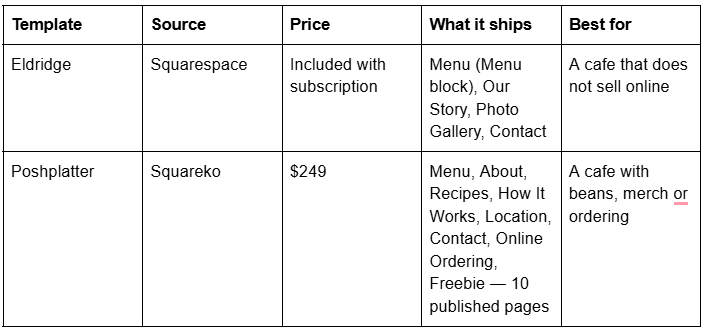
Eldridge is Squarespace's coffee-shop design and it is the honest starting point: a Menu page built on a working Menu block, an Our Story page, a Photo Gallery and a Contact page. It is small on purpose, and for a cafe that sells only across the counter, small is correct. What it has no room for is retail, wholesale or events.

Poshplatter is the pick once there is a second revenue line. Its Location page is a real page rather than a footer line, its Online Ordering page is a configured Products collection, and its Recipes page is a genuine blog collection — verified from the live demo in August 2026, along with Book a Table and Freebie pages linked from buttons and the footer rather than the navigation. Its Menu page is built from ordinary Fluid Engine sections, so edits are fast; swap in a Menu block if you prefer the plain-text syntax.
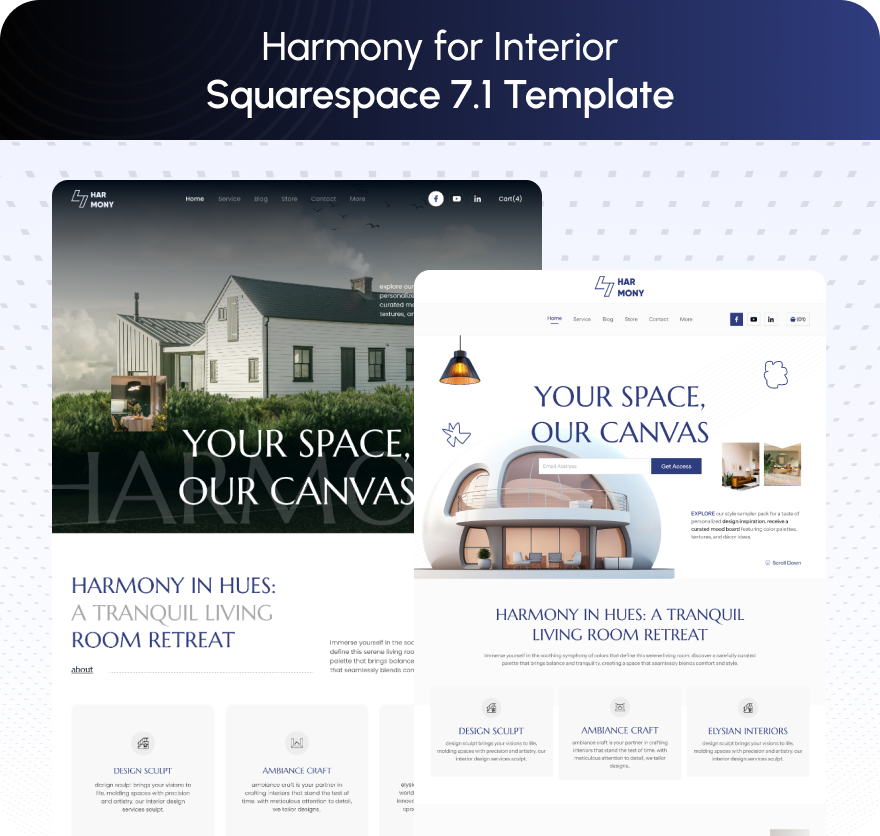
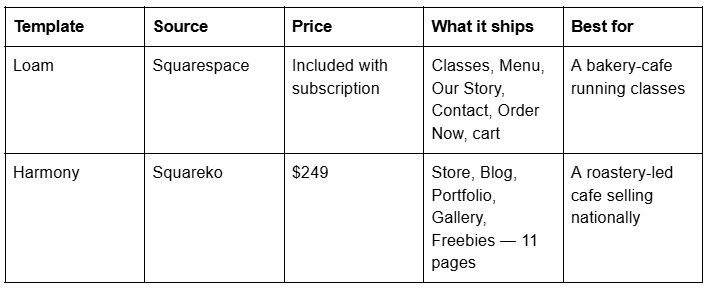
Harmony is the choice if the coffee is the business and the cafe is the shopfront — a Store, a Blog, a Portfolio and Gallery across 11 pages.
Loam is Squarespace's bakery design and is worth a look for a cafe running classes: Classes, Menu, Our Story, Contact and an Order Now route, with commerce already configured.
On page weight, keep the homepage to one hero plus six to eight images. Squarespace's guidance is 5 MB or less per page, and it states plainly that 1 MB is the safest size for cellular connections — which is the connection your customer is on, standing outside, at 8.40am.
The cafe build is genuinely small: five pages, hours in four places, a Menu block, a Products page for beans and a form for wholesale. Most of the value is in the hours and the Business Profile, neither of which any template can do for you.
The point where it stops being a weekend job is multi-site — two or three locations with different hours, different menus and a wholesale arm behind them. That is what our premium Squarespace templates and installation service exist for. A single cafe should start with Eldridge, get the hours right, and spend the saved money on photography.
FAQ
-
Eldridge, free with a subscription, if you sell only across the counter — it ships a Menu page built on a working Menu block, Our Story, a Photo Gallery and Contact. Poshplatter at $249 is the pick once you sell beans, merch or online orders, because it adds a Location page, a products collection and a blog.
-
Put them in four places and keep them identical: the site footer, a Visit page with a map block, a contact section on the homepage above the mobile fold, and your Google Business Profile. Set special hours on the profile for holidays — Google supports temporary changes of up to six days in a row.
-
Yes, as Squarespace Products, with grind and bag size as variants. Squarespace also supports local pickup and delivery, which for a cafe is often more useful than shipping. Note that products have no draft state — an item is Public, Hidden or Scheduled — so plan variants before you build.
-
Not on a Calendar page. Calendar pages do not support recurring events, cap at 350 events per month and cannot take bookings, so a weekly cupping has no native object. Use a single Events page edited manually, a blog for announcements, and Acuity Scheduling for anything that is a booking.
-
Yes, but a small one. Most discovery happens on Google Business Profile and Maps, so the site's job is to hold accurate hours, a readable menu, a location, and anything you sell that a profile cannot carry — beans, merch, wholesale, classes and events.
-
No. A PDF is poorly extracted by search engines, renders as a pinch-zoom document on a phone, and cannot feed the menu link on your Google Business Profile. Use the native Menu block, which renders as crawlable server-side text and takes seconds to edit when the guest coffee changes.

Author Bio
I'm Walid Hasan, a Certified Squarespace Expert and Squarespace Circle Platinum Partner with over 12 years of hands-on experience designing and optimizing high-performing websites. Over the years, I've had the privilege of building more than 2,000 Squarespace websites for clients around the world, always focusing on clean design, strong user experience, and conversion-driven results.