Restaurant Squarespace Template: The Build, Page by Page
The short answer: a restaurant Squarespace template is worth what its page set and its menu object are worth, and nothing else. Every Squarespace 7.1 template runs the same engine, so the look is configurable in an afternoon. What is not configurable in an afternoon is the decision you make about how the menu is built — Menu block, ordinary sections, Products collection or PDF — because that decision determines whether Google can read your dishes at all.
Here is the whole build, in the order you should make the decisions.
The page architecture a restaurant site actually needs
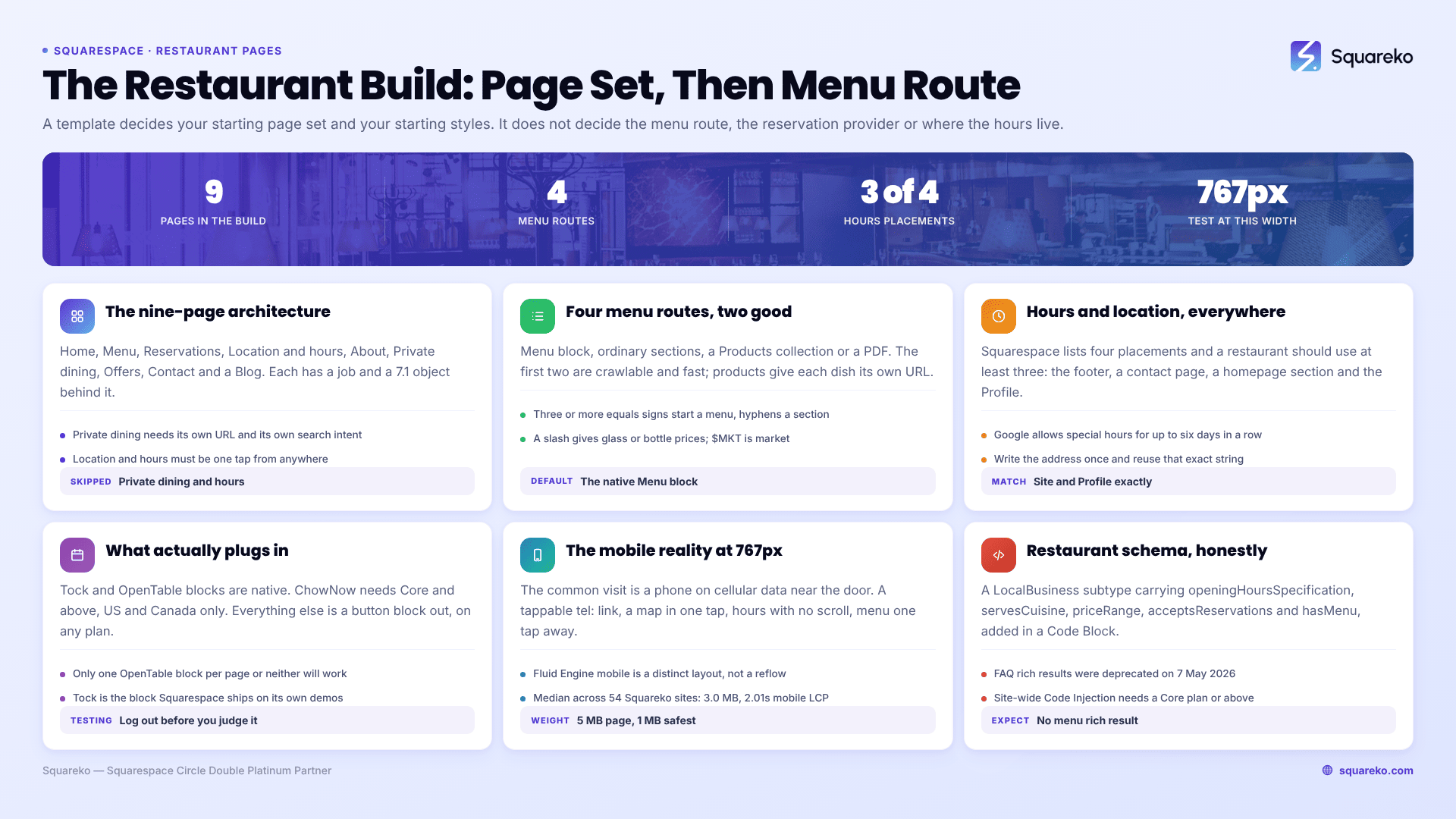
Nine pages. Not five, not twenty. Each one has a job and a specific Squarespace 7.1 object behind it.
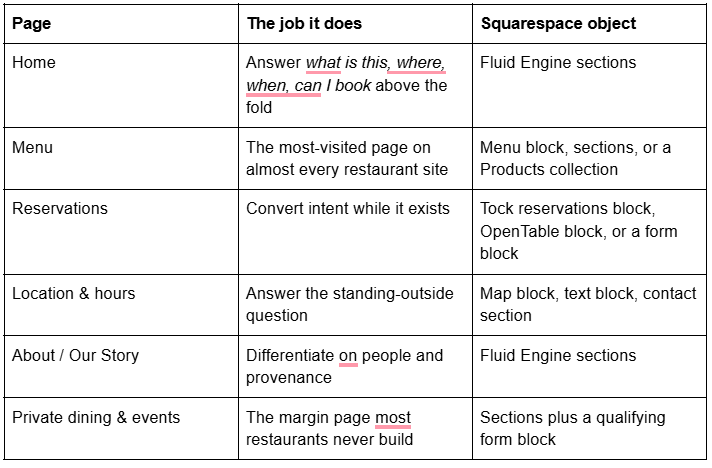
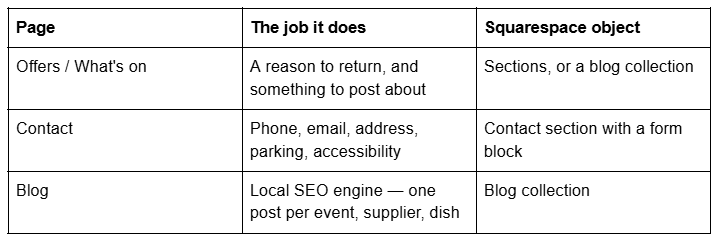
Two of those are the ones restaurants routinely skip and then regret. Private dining and events is where a mid-sized restaurant's profit sits, and it needs its own URL because "private dining room [city]" is a real search with real intent. Location and hours needs to be reachable in one tap from anywhere on the site, not buried in a Contact page footer.
Everything else — a photo gallery, a press page, a careers page — is optional and can wait until after launch
The menu decision: four routes, only two of them good
This is the decision that matters most and the one nobody explains.
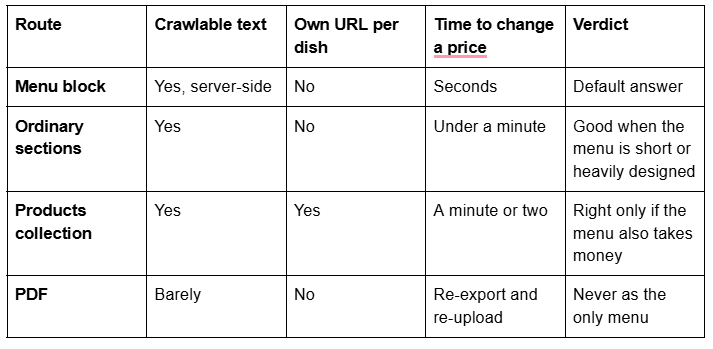
Route 1 — the Menu block. Still a native block in Squarespace 7.1, documented as available on the Basic, Core, Plus and Advanced plans as of 29 July 2026, despite a persistent rumour that it was removed. Add it from the block menu on any page, then type the menu in plain text:
Dinner
===
Small Plates
---
Served from 5pm
Charred hispi cabbage
Anchovy butter, hazelnut
9.50
Cured sea trout
Cucumber, dill, buttermilk
11 / 19
Three or more = under a name creates a menu; three or more - creates a section; then item, description and price on successive lines. A / between prices gives you glass/bottle or half/full portions, $MKT renders as market price, and a + on a new line under the price adds options.
The reason to prefer it is verifiable rather than theoretical. I fetched the raw HTML of Squarespace's Chotto restaurant demo menu page in August 2026: every item name, description and price is present as plain text inside <div class="menu-block sqs-block-menu">, with no JavaScript required to render it. Squarespace's own documentation makes the same argument, describing the Menu block as "a great alternative to embedding .pdf menus, which aren't always as SEO-friendly as text directly on the page."
Two Menu block behaviours will confuse you if nobody warns you. The first menu category sets the block's minimum height, so a long brunch menu followed by a short dessert menu leaves visible empty space under the short one. And column alignment is browser-driven — items flow top to bottom, left to right, so titles will not always line up. Squarespace's documented fix for an odd number of items is a <br/> tag at the end of the section.
Route 2 — ordinary sections. Text blocks in columns inside a Fluid Engine section. Fully designable, fully crawlable, no formatting syntax to learn. This is what Poshplatter's Menu page uses, verified from its live demo. It is the right call for a short, highly art-directed menu, and the wrong call for a 60-item list you edit weekly.
Route 3 — a Products collection. Build the menu as a Squarespace store and every dish gets its own URL, image, description and price. This is what Savore's Menu page uses — verified from the live demo rather than the product description. Choose it when the menu also has to take money: online ordering, meal kits, pre-orders, gift vouchers. Be aware that Squarespace products have no draft state — Public, Hidden or Scheduled only — so a dish you are still trialling goes Hidden.
Route 4 — a PDF. Don't. Search engines extract from PDFs poorly, phones render them as pinch-zoom documents rather than pages, and changing one price means re-exporting a file. If diners genuinely want something printable, publish the PDF alongside the on-page menu, never instead of it.
Hours and location: the two facts your site exists to deliver
Squarespace's own restaurant guidance lists four placements for hours and location, and a restaurant should use at least three of them.
In the footer, so they appear on every page of the site.
On a contact-layout page in the main navigation, with a map block.
In a contact section on the homepage, above the fold on mobile.
In your Google Business Profile, which is where most people will actually read them.
That last one is not optional and it is not a website task you can skip. Hours on the site and hours on the profile must match exactly, including holiday closures — Google lets you set special hours for temporary changes of up to six days in a row and recommends confirming hours for official holidays even when they are unchanged. A restaurant showing "Open now" on Google while the door is locked generates a one-star review, not a visit.
Write the address once, in one format, and use that exact string everywhere: site footer, Contact page, Business Profile, delivery platforms. Inconsistent name, address and phone strings are the most common and most fixable local SEO problem in hospitality.
Reservations and ordering: what actually plugs in
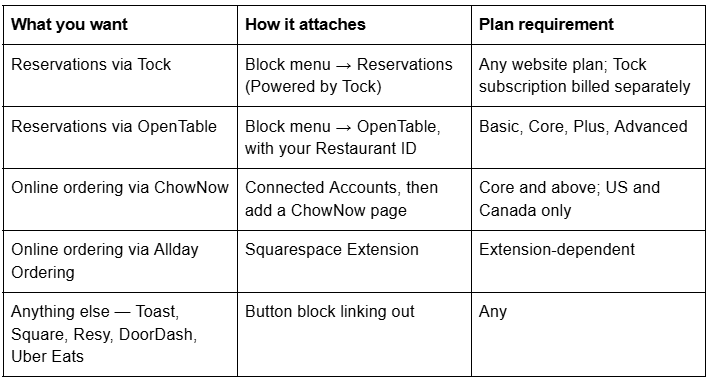
Three practical notes. Tock is Squarespace's house choice: checking page source on Squarespace's own Atlantic, Auburn, Palmer, Pine and Tantillo restaurant demos in August 2026, each Reservations page carries a tock-block. Only one OpenTable block per page — Squarespace states that adding two to the same page stops both working. And neither reservations block works while you are logged in, so test in a private window before you decide something is broken.
If you use a delivery platform, put the link in the main navigation as a button, not in a paragraph. The people who want it are looking for it.
The mobile reality: someone is standing outside on a phone
This is the section that separates a restaurant site that works from one that photographs well. The single most common visit to a restaurant website is a phone, on cellular data, within 200 metres of the door, asking three questions: are you open, what's on, can I get a table.
Build for that.
The phone number must be a tappable link. tel: on the number, in the header or a sticky element, not an image of a phone number.
The address must open a map. A map block or a maps link, one tap, no copy-paste.
Hours must be visible without scrolling on mobile. Not inside an accordion, not in a footer four screens down.
The menu must be one tap from the homepage and must not be a PDF, for the same reason.
Test at 767px, which is Squarespace 7.1's mobile breakpoint, and check the Fluid Engine mobile layout separately — it is a distinct layout from desktop, not a reflow of it.
Weight matters here more than on any other kind of site. Squarespace's guidance is to keep each page to 5 MB or less, and it states plainly that 1 MB is the safest size for cellular connections, with no more than 60 blocks per page. Across 54 Squareko-built client sites measured in August 2026 — Playwright/Chromium, cloud datacentre, unthrottled, single run per site, load-only CLS, so lab data rather than field data — median page weight was 3.0 MB across 93 requests and median mobile LCP was 2.01s, with 74% under Google's 2.5s "good" threshold. Those numbers come from image discipline: upload at 1500–2500px on the long edge, set the filename before upload because it cannot be changed afterwards, and let the Squarespace CDN serve WebP, which it does unconditionally.
Structured data worth adding to a restaurant site
Restaurant is a LocalBusiness subtype and it is genuinely appropriate here, unlike most schema advice aimed at small businesses. Useful properties: address, telephone, openingHoursSpecification, servesCuisine, priceRange, acceptsReservations, hasMenu and menu. Add it in a Code Block in HTML mode on the homepage — Squarespace 7.1 has no per-page header injection on regular pages below the site level, and site-wide Code Injection requires a Core plan or above.
Be honest with yourself about what it buys. Google's supported-features list, updated 15 June 2026, includes Local business and Recipe; there is no menu rich result, and FAQ rich results were deprecated on 7 May 2026. Restaurant markup helps machines understand your hours, cuisine and reservation policy, and it feeds knowledge-panel and AI-answer extraction. It does not conjure a SERP feature.
What the template decides, and what it does not
A template decides your starting page set and your starting styles. It does not decide your menu route, your reservation provider or your hours. Two Squareko templates are built for this niche and they resolve the architecture differently:
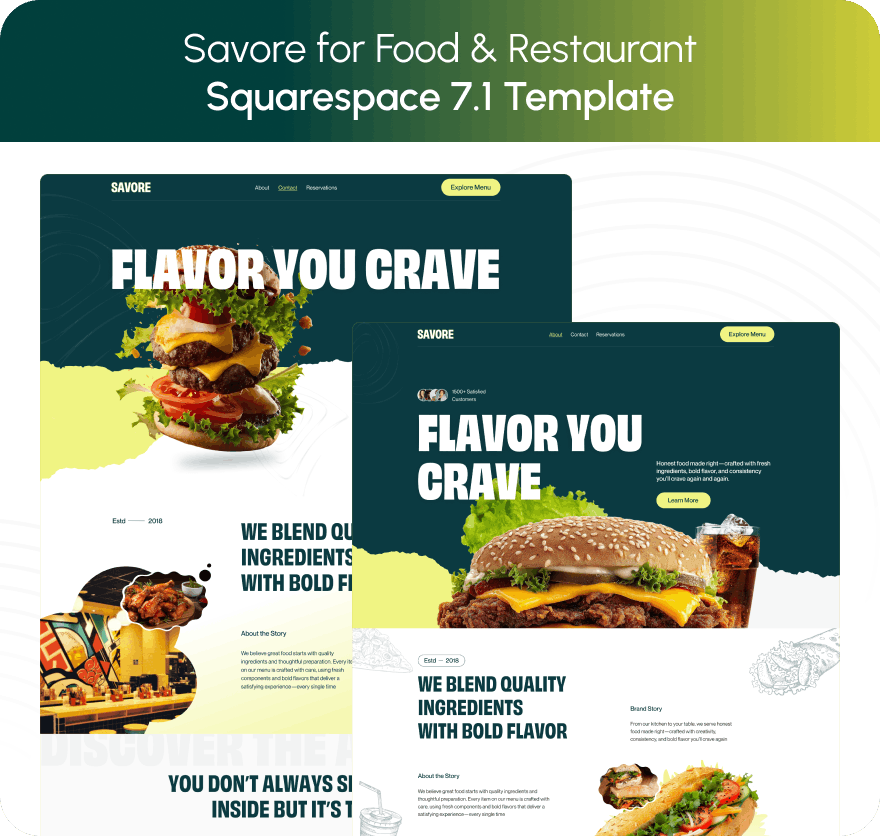
Savore (demo, $249) ships 13 pages — Menu, Services, Special Offers, Reservations, FAQs, About, Contact, Blog, a second homepage, Privacy Policy, a Style Guide and a 404. Its Services page is built for private dining and events, which is the page most restaurants are missing. Its Menu page arrives as a Products collection, so swap it for a Menu block if you would rather edit prices in seconds than manage products.

Poshplatter (demo, $249) ships 10 published pages — Menu, About, Recipes, How It Works, Location, Contact, a second homepage, a Style Guide and a 404 — with Online Ordering, Book a Table and Freebie pages present in the live demo but linked from buttons and the footer rather than the navigation. Its Menu page is ordinary sections and its Recipes page is a real blog collection.
Squarespace's own Chotto, Auburn, Atlantic and Palmer designs are included with a subscription and ship working Menu blocks and, in several cases, a Tock block already placed. For a first restaurant site they are a legitimate answer. The comparison, scored, is in best Squarespace template for restaurants; the full segmented roundup by kind of food business is in Squarespace templates for restaurants. If you run a cafe rather than a restaurant, the architecture genuinely differs — no reservations, hours accuracy above everything — and that build is in the cafe template guide.
Work the order above and a restaurant site takes a weekend: page set, menu route, hours everywhere, reservations block, mobile pass, schema. The two mistakes that cost real covers are a PDF menu and hours that disagree with Google.
If your restaurant has more than one location, a private events business that needs its own funnel, or an ordering system that has to sit inside the site rather than beside it, that is the point where a build stops being a weekend job. That is what our premium Squarespace templates and installation service exist for — though most single-site restaurants will get everything above done themselves without any help.
FAQ
-
Nine: Home, Menu, Reservations, Location and hours, About, Private dining and events, Offers, Contact and a Blog. The two most commonly skipped are private dining, which is where the margin sits, and a location page reachable in one tap. Everything else can wait until after launch.
-
Use the native Menu block. Add it from the block menu, then type the menu in plain text: menu name plus three or more equals signs, section name plus three or more hyphens, then item, description and price. A slash between prices gives variant pricing, and $MKT renders as market price.
-
A web page. Search engines extract poorly from PDFs, phones render them as pinch-zoom documents rather than pages, and changing one price means re-exporting a file. Squarespace itself describes the Menu block as a better alternative to embedded PDF menus. Publish a PDF alongside the page if you want, never instead of it.
-
Yes. A Tock reservations block or an OpenTable block, both native to Squarespace 7.1. Tock needs a separate Tock subscription and reservations are managed in Tock. OpenTable needs your Restaurant ID and allows only one block per page. Neither works while you are logged into your own site.
-
Use at least three placements: the footer, so hours appear on every page; a contact-layout page with a map block; and a contact section on the homepage above the mobile fold. Then make them match your Google Business Profile exactly, including holiday special hours.
-
Restaurant, a LocalBusiness subtype, with address, telephone, openingHoursSpecification, servesCuisine, priceRange, acceptsReservations and hasMenu. Add it in a Code Block in HTML mode. There is no menu rich result and FAQ rich results were deprecated on 7 May 2026, so treat it as machine comprehension rather than a SERP feature.

Author Bio
I'm Walid Hasan, a Certified Squarespace Expert and Squarespace Circle Platinum Partner with over 12 years of hands-on experience designing and optimizing high-performing websites. Over the years, I've had the privilege of building more than 2,000 Squarespace websites for clients around the world, always focusing on clean design, strong user experience, and conversion-driven results.