
Squarespace Templates for Course Creators: Sales Page to Portal
The short answer: A course business on Squarespace is four separate things, and a template only supplies one of them. You need a sales page, a checkout, a delivery mechanism, and an email capture route. The template gives you the sales page and the email capture. The checkout and the delivery come from Squarespace's own Courses and Member Sites features, which are real, usable, and more limited than most template shops admit.
This post covers all four layers, states the platform's verified limits, and marks the point where a dedicated learning platform becomes the better answer.
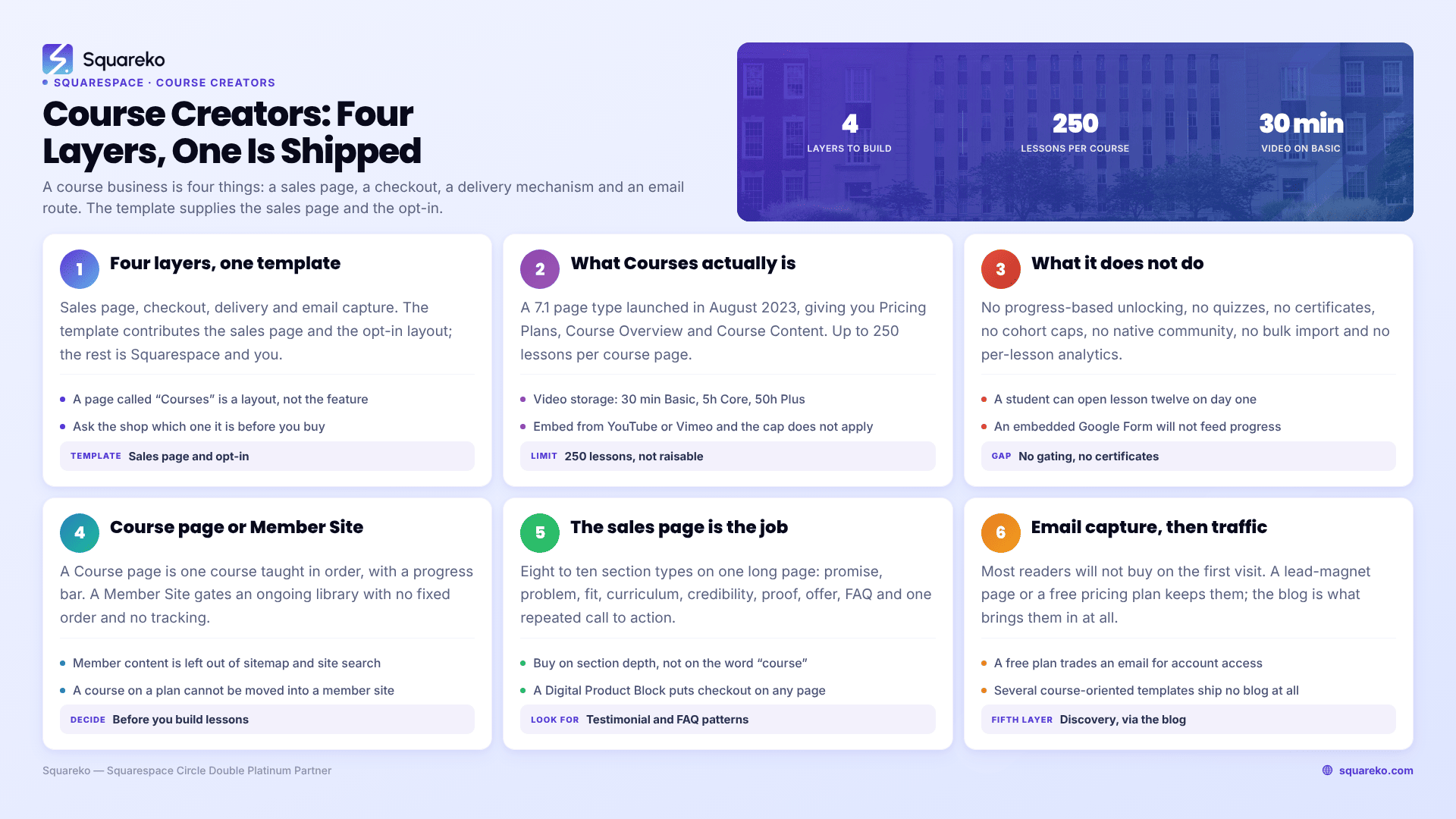
The four layers of a Squarespace course business
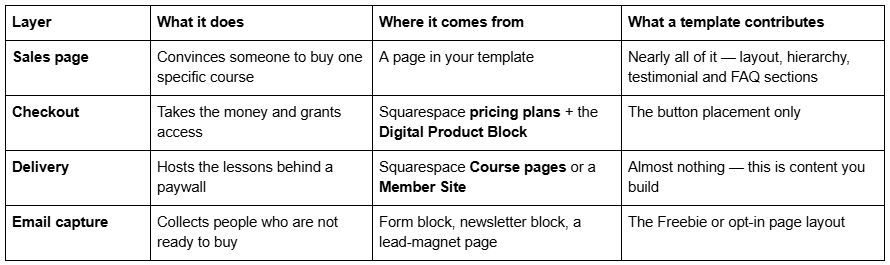
The common mistake is buying a template that advertises a "Courses page" and assuming the delivery layer is handled. It is not. A Squarespace template can ship a beautifully designed course overview page and still leave you to build every lesson, upload every video, and configure every pricing plan yourself. That work is the same whichever template you buy.
Squarespace Courses: what it actually is, and its verified limits
Squarespace launched Courses in August 2023. It is a page type — a Course collection — available on Squarespace 7.1 only. When you add one, it gives you three areas to work in: Pricing Plans, Course Overview, and Course Content. Course Content is where you build chapters and lessons; Course Overview is the public-facing syllabus page; Pricing Plans is where the paywall is defined.
These are the limits, taken from Squarespace's own documentation and pricing page rather than from template marketing.
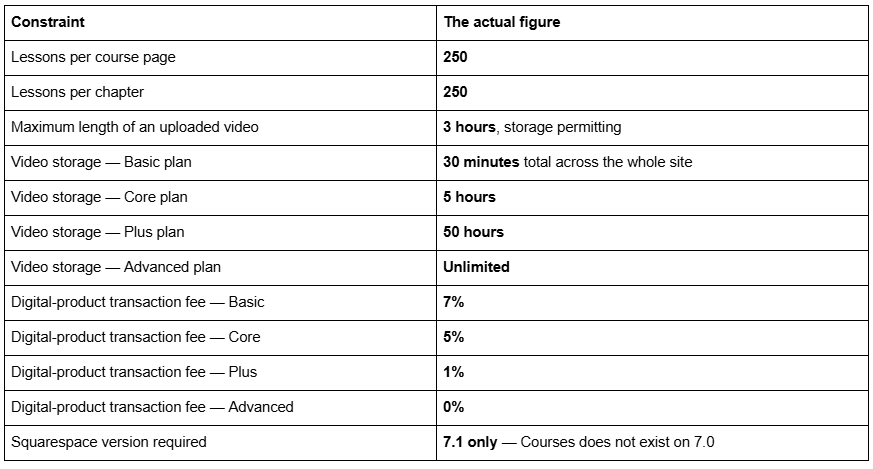
Two of those numbers decide your plan for you.
The 30-minute video allowance on Basic is not a course plan. A single introductory lesson can consume it. If you are hosting video on Squarespace at all, Core is the practical floor and Plus is where most course businesses land. The alternative is to host video on YouTube or Vimeo and embed it in the lesson, which Course pages support — that sidesteps the storage limit entirely and is what a large number of Squarespace course creators actually do.
The transaction fee compounds. Seven per cent on Basic against zero on Advanced is a difference that pays for the plan upgrade at a fairly modest revenue level. Work out your own crossover before you pick a plan, because Squarespace does not prompt you to.
The 250-lesson ceiling is generous for a single course and has caught out exactly one kind of buyer: people migrating a large multi-course library from Teachable, where a Squarespace representative confirmed on the forum that the figure cannot currently be increased. If you are running one course, or five separate courses of thirty lessons each, this limit will never touch you.
What Squarespace Courses does not do
This is the section the template shops leave out, and it matters more than any design decision you will make.
Squarespace Courses does not include:
Progress-based unlocking. Students can open lesson twelve without watching lesson one. Nothing gates on completion.
Quizzes, assessments or assignments. You can embed a Google Form, but it will not talk to the course's progress tracking.
Certificates of completion. There is no automated issuance.
Cohort controls. No enrolment caps, no start dates, no closing an intake.
A native community. No forums, no direct messaging, no per-lesson comments or questions.
Student segmentation or bulk import. You cannot tag learners, group them into paths, or upload a member list.
Granular analytics. You get a progress bar per student, not a dashboard showing which lesson everyone abandons.
What it does give you is genuinely solid: a paywalled, well-designed course with chapters and lessons, video hosted natively or embedded from YouTube or Vimeo, downloadable materials, a visible progress bar, and the ability to mark selected lessons as free public previews so prospective buyers can sample the teaching before paying.
If your course is "watch these videos in roughly this order, download these worksheets", Squarespace Courses is a complete answer. If your course is "complete module one, pass the quiz, unlock module two, submit an assignment, receive a certificate", it is not, and no template changes that.
Course pages versus Member Sites: which one you need
These are two different Squarespace features and course creators routinely conflate them.
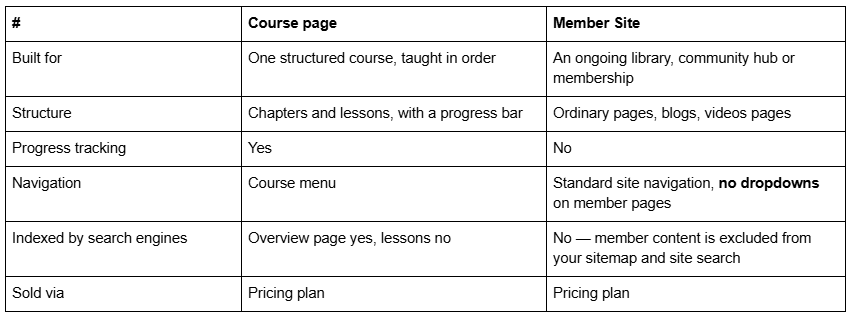
Both are sold through the same mechanism: a pricing plan, which can be free (visitor gives an email and creates an account), a fixed amount (one payment or instalments), or a subscription billed weekly, monthly or annually.
One structural detail worth knowing before you plan: a course page that is already attached to a pricing plan cannot be dragged into a member site. If you want a course to live inside a broader membership, you duplicate the course page rather than move it. Plan the architecture before you build 200 lessons in the wrong place.
If you sell one course, use a Course page. If you sell access to a growing body of material with no fixed order — a resource library, a monthly membership — use a Member Site. If you sell both, you will use both.
The sales page is the part the template actually solves
Everything above is platform. The template's real job is the sales page, and a course sales page has a well-established anatomy that generic templates handle badly.
A course sales page needs, in roughly this order: a promise specific enough to be falsifiable, the problem stated in the buyer's own words, who it is and is not for, a curriculum breakdown, the instructor's credibility, proof from people who took it, what is included at what price, the objections answered as an FAQ, and a single repeated call to action. That is eight to ten distinct section types on one long page.
This is why course creators tend to be badly served by minimal, gallery-led templates. A photography template gives you beautiful full-bleed images and no natural home for a 900-word curriculum breakdown. What you want is a template with a deep, section-rich long-page layout, a testimonial pattern, an FAQ pattern, and a pricing or comparison block that can hold two or three tiers.
The checkout itself goes on that page as a Digital Product Block, which you point at the pricing plan you created. It replaces an ordinary button and takes payment inline. That block is available on any page, which means your sales page can live wherever you want in the site structure — it does not have to be the course overview page.
For a fuller treatment of long-form sales page structure, see our guide to Squarespace landing page templates.
Email capture is the layer people skip
Most people who read a course sales page will not buy on that visit. If the page has no route other than "buy now", you lose them entirely.
The standard answer is a lead magnet — a workbook, a short video, a checklist — behind a form, which is why several templates in this market ship a dedicated Freebie page. It is a small thing that saves a genuinely awkward build, because a lead-magnet page has its own layout requirements: one offer, one form, no navigation distractions.
A second option specific to Squarespace: a free pricing plan. A pricing plan set to free requires the visitor to supply an email address and create an account to access the content. That turns a free mini-course into a list-building mechanism and puts the person inside your member system rather than only in your mailing list.
The fifth layer nobody budgets for: being found
Strictly speaking a course business needs four layers. In practice it needs a fifth, and the fifth is the one that decides whether the other four ever get used.
A course sales page is a poor organic search target. It is commercial, it is thin on the informational queries your buyers actually type, and it competes with every other course in your subject. What ranks is the material around the course — the posts that answer the question your course exists to solve. That means a blog, and it is worth checking whether the template you are about to buy has one, because several of the strongest course-oriented templates do not.
Two Squarespace specifics shape how that blog behaves. Blog post URLs take the form /blog-page-slug/post-slug, and changing a slug creates no automatic 301 redirect, ever — so decide your blog page slug before you publish anything. And 7.1 blog pagination is cursor-based with a maximum of 20 posts per page, no numbered pages and no infinite scroll, which is a platform constraint no template escapes.
The other half of discovery is your own list, which is why the email capture layer above is not optional. A course launch to an existing list outperforms a course launch to a search engine by a margin that makes the comparison uninteresting.
Which Squarespace templates suit course creators
A note first, because it is the single most misleading thing in this category. No template supplies the Courses feature. Where a template ships a page called "Courses", that page may be a Squarespace Course collection or it may be an ordinary page laid out to look like one — and in most shops, including ours, nothing published states which. Treat any Courses page in a template as a layout, ask the shop directly before you buy, and budget your own time for building lessons and pricing plans regardless of the answer.
Luminary — 11 pages, tagged service-based, course and speaker. Ships Courses pages, a Shop, a Portfolio and Gallery, and a Freebie page. The Shop plus Courses combination fits the coach who sells a course alongside one-to-one work or a digital product. Its weakness is the absence of a blog, which matters if organic search is how you expect people to find the course in the first place. Luminary demo.
Scholar — 11 pages, tagged fashion, course and shop. Home, Home 2, About, Services, Portfolio, Shop, Contact, Freebie, Gallery, 404 and a Style Guide page. The two homepage variants are useful here in a way they are not in most niches: one can serve as the site homepage and the other as a dedicated long-form sales page without you building the whole section stack from scratch. Also no blog. Scholar demo.
Navigate — 10 pages with a Course page, a Podcast page and a Speaking page, plus a blog. The leanest option, aimed at the author-coach who teaches, speaks and publishes. Its published demo link currently returns a 401 because it omits the required password parameter, so ask for a working link before you buy anything on the strength of screenshots. Navigate demo
Storyline — 13 pages with Podcast, Speaking, Testimonial and Booking pages plus a blog. The most complete option for a course creator whose business also runs on a public profile. Same caveat: its published demo link returns a 401. Storyline demo
If none of those fit, the honest advice is to buy on section depth rather than on the word "course" appearing in the page list. A template with a rich services page, a testimonial pattern and an FAQ page will make a better course sales page than a thin template that happens to ship a page called Courses.
Every template in the Squareko range is $249, delivered as a Squarespace contributor invitation rather than as files to download, with 60 days of email support. Sales are final, and the demo images are not licensed for live use — you replace every one of them before launch. That makes the demo the entire decision, which is why a template you cannot preview is not a template you should buy. More on that in our template buying guide.
Where Squarespace stops and a dedicated LMS starts
Squarespace is a real course platform for a specific shape of business. It is a bad one outside that shape. Here is the line, stated plainly.
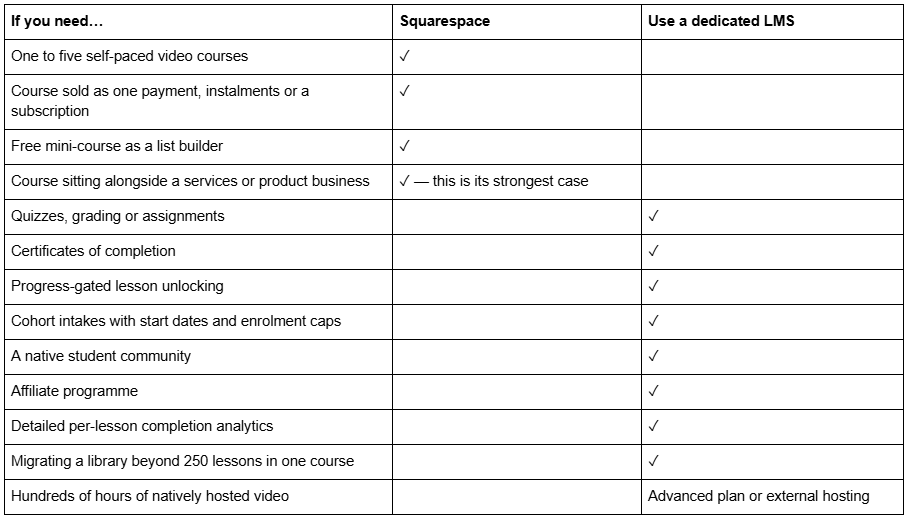
The genuinely useful framing: Squarespace is excellent when the course is part of a business that also has a website, and weaker when the course is the business. A consultant with a $400 self-study course, a marketing site, a blog and an enquiry form is better served by one Squarespace site than by a marketing site plus a Kajabi subscription. A full-time course creator running cohorts, quizzes, certificates and an affiliate programme is paying a Squarespace subscription to do a job it was not built for.
There is also a middle route people forget: keep the marketing site on Squarespace, put the course on a dedicated platform, and link between them. You lose a single login and gain everything on the right-hand column above. For many people that is the correct answer, and no template shop will tell you so.
The rest of this cluster
This post is the architecture. The other posts in the Education and Kids cluster go narrower:
Squarespace templates for online courses — the course product page itself, section by section, and how the checkout is wired
Squarespace templates for daycares and childcare centres — trust, ratios, fees and enrolment enquiries
Squarespace templates for preschools and nurseries — curriculum, learning philosophy, school readiness and term dates
Squarespace templates for schools and learning centres — where a school outgrows Squarespace, stated plainly
Deciding before you buy anything
Write down your lesson count, your total video hours, and whether you need a quiz or a certificate. Those three numbers answer the platform question in about ninety seconds, and the platform question has to be settled before the template question, because a template you bought for a course that ends up on Kajabi is a marketing site you overpaid for.
If the answer is Squarespace, buy on sales-page depth rather than on the word "course". Open the demo on a phone, find the longest page in it, and ask whether you could tell your whole course story in that layout without inventing sections.
If you would rather not settle the architecture yourself — particularly the choice between a Course page and a Member Site, which is genuinely awkward to reverse once lessons exist — that is the sort of thing we work through at the start of a build. The premium Squarespace templates at Squareko are installed for you, including onto an existing site, and the architecture conversation happens before the install rather than after it. Most people reading this will get there on their own with the tables above, which is the point of publishing them.
FAQ
-
Yes. Squarespace Courses is a native page type on version 7.1 that hosts chapters and lessons behind a paywall, sold through a pricing plan set as a one-off payment, instalments, a subscription or free. Video can be uploaded to Squarespace or embedded from YouTube or Vimeo, and students see a progress bar.
-
Up to 250 lessons per course page, and up to 250 lessons within a single chapter. Squarespace has confirmed on its forum that this ceiling cannot currently be raised. It is comfortable for one course or several separate courses, and restrictive only when migrating a very large library from a platform with no limit.
-
It depends on the website plan: 30 minutes on Basic, 5 hours on Core, 50 hours on Plus and unlimited on Advanced, counted across the whole site. Individual videos can run up to three hours. Embedding video from YouTube or Vimeo instead of uploading avoids the storage limit entirely.
-
A Course page is built for one structured course taught in order, with chapters, lessons and progress tracking. A Member Site gates ordinary pages, blogs and video pages with no fixed order and no progress tracking. Both are sold through pricing plans. Member content is excluded from your sitemap and site search.
-
No template supplies the Courses feature itself — that is part of your Squarespace plan. A template's "Courses" page may be a real Course collection or an ordinary page styled to look like one, and most shops do not state which. Ask before buying, and expect to build every lesson and pricing plan yourself either way.
-
Use Squarespace when the course sits alongside a wider business with a marketing site, and the course is self-paced video and downloads. Move to a dedicated platform when you need quizzes, certificates, progress-gated unlocking, cohort intakes with enrolment caps, an affiliate programme or detailed per-lesson analytics — Squarespace has none of those.

Author Bio
I'm Walid Hasan, a Certified Squarespace Expert and Squarespace Circle Platinum Partner with over 12 years of hands-on experience designing and optimizing high-performing websites. Over the years, I've had the privilege of building more than 2,000 Squarespace websites for clients around the world, always focusing on clean design, strong user experience, and conversion-driven results.
