
Squarespace Templates for Schools and Learning Centres
The short answer: Squarespace is an excellent website for a small independent school, a tutoring centre, a music or language academy, or a learning centre with under about a dozen staff. It is the wrong tool for a school that needs a staff directory of eighty people, a term calendar with recurring events, a genuine parent portal, and a dozen teachers publishing news independently. That boundary is real, it arrives sooner than most people expect, and no template moves it.
This post sets out where the line sits, requirement by requirement, so you can work out which side of it you are on before you buy anything.
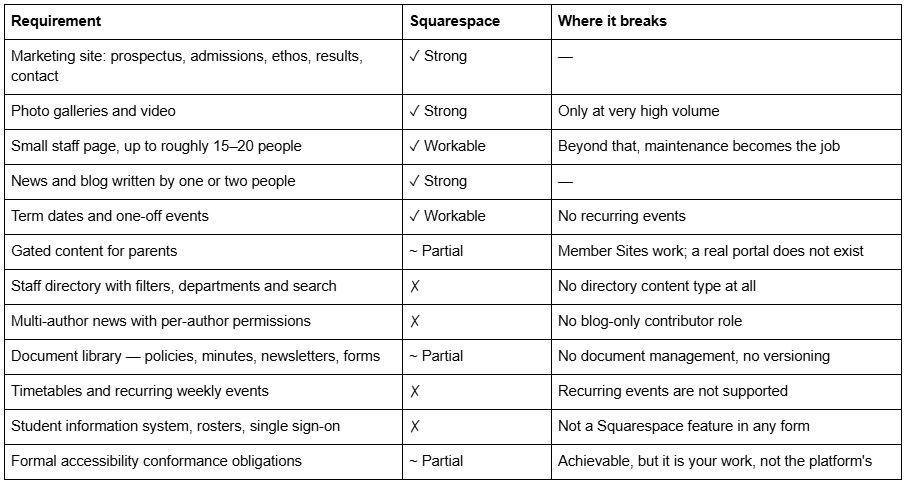
Where the line is
The parent portal question, answered properly
This is the first thing every school asks and it is worth being precise, because the honest answer is "sort of, and probably not in the way you mean".
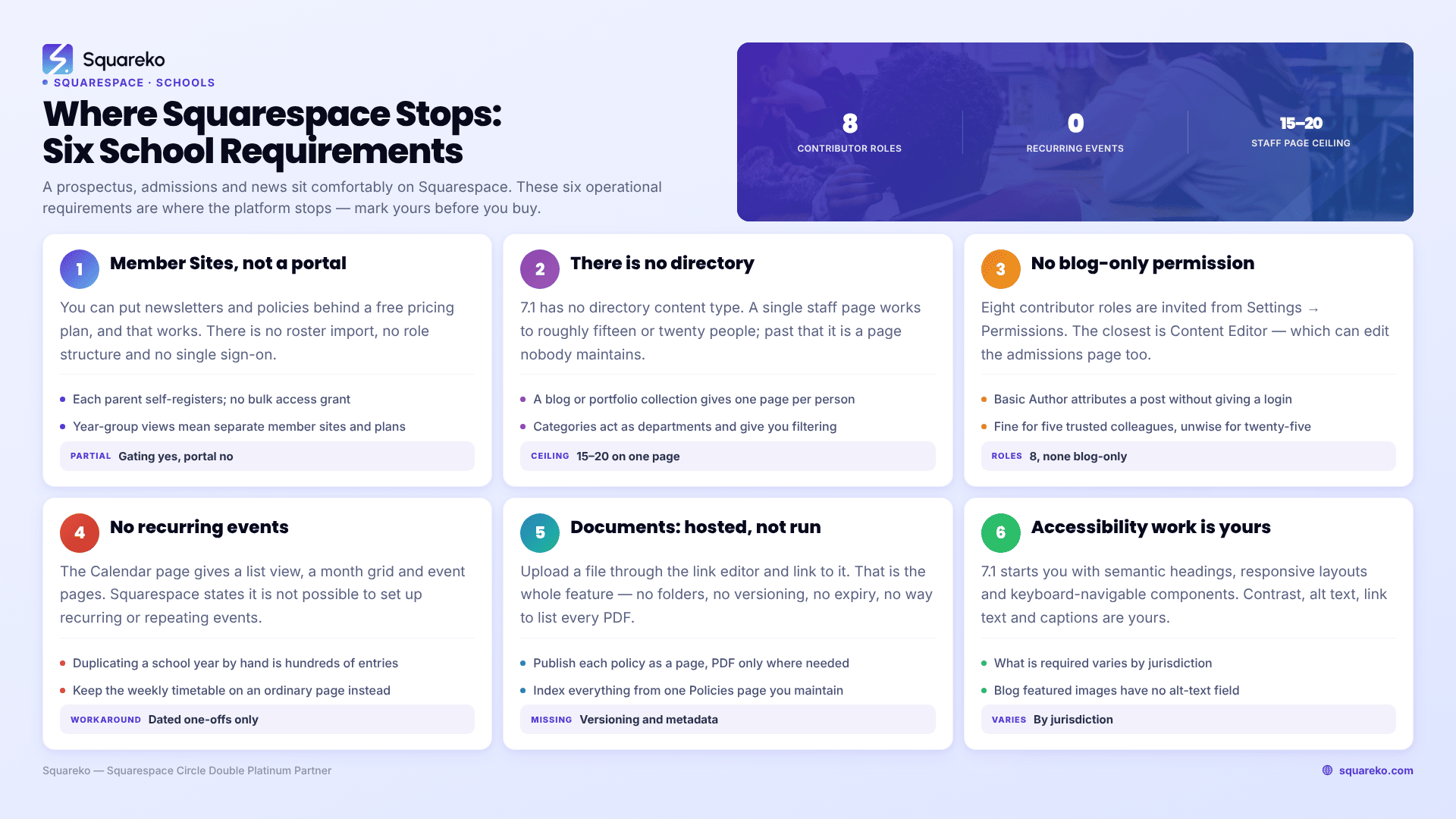
Squarespace has Member Sites: you create pages, put them behind a pricing plan set to free, and a visitor supplies an email address and creates an account to get in. That is real gating and it works. A school could use it to publish parent newsletters, policy documents and year-group updates behind a login.
Here is what it is not. There is no roster import, so you cannot upload a list of 400 parents and grant access in bulk — each person self-registers. There is no role structure, so you cannot show Year 7 parents one thing and Year 11 parents another without building separate member sites and separate free plans. There is no single sign-on with your school systems. There is no per-pupil data of any kind — Squarespace is a website, not a student information system. And member pages do not support dropdown navigation, which becomes awkward quickly once you have more than a handful of gated pages.
One more constraint worth knowing early: member-only content is excluded from your sitemap and from site search. That is correct behaviour for gated content, but it means anything you put behind the login is invisible to the parent who searches your own site for it.
If "parent portal" means a login page in front of some documents, Squarespace Member Sites will do it. If it means anything that touches attendance, grades, timetables or pupil records, it will not, and no amount of template shopping changes that.
Staff directories: there is no directory
Squarespace 7.1 has no directory content type. There is no built-in way to list eighty staff with a photograph, department, subject, role and email, filterable by department, searchable by name.
The workarounds are:
A single long page. Fine up to roughly fifteen or twenty people. Beyond that it becomes a page nobody reads and nobody maintains, and stale staff pages are worse than absent ones.
A blog or portfolio collection, one entry per person, with categories acting as departments. This gets you filtering by category and individual pages per member of staff. It works, and it has one wrinkle worth knowing: blog featured images have no alt-text field in Squarespace — the post title is used as the alt text instead — so the entry title needs to double as an image description.
A third-party directory embed. Solves it properly and adds a subscription plus a dependency.
For a school of ten teachers, option one takes an afternoon. For a school of eighty across six departments with annual turnover, this single requirement is a reasonable argument for a platform built for schools.
Multi-author news: the permissions problem
Schools want the sports coach to post match reports, the art department to post exhibitions, and the head to post the weekly letter — without any of them being able to redesign the homepage.
Squarespace offers eight contributor permission roles, invited from Settings → Permissions: Administrator, Billing, Content Editor, Analytics, Comment Moderator, Trusted Commenter, Store Manager and Scheduling Editor. There is also a Basic Author, which is a name you can attribute a post to without giving anyone a login.
There is no blog-only role. The closest is Content Editor, which allows editing content across the whole website, not just a blog. So a teacher you invite to write match reports can also edit the admissions page. In practice that is usually managed with a rule rather than a permission — which is fine for five trusted colleagues and unwise for twenty-five.
Two related constraints. There is no blog write API on any Squarespace plan, so you cannot push posts in from another system. And 7.1 blog pagination is cursor-based with a maximum of 20 posts per page, with no numbered pages and no infinite scroll — a school news blog three years deep becomes tedious to navigate back through.
The calendar problem
Schools run on recurring events, and Squarespace does not do recurring events.
Squarespace 7.1's Calendar page — called an Events page on legacy 7.0 — offers a list layout and a month-grid layout with clickable dates, individual event pages, and "add to Google Calendar" and "add to iCloud Calendar" links for visitors. All useful. But Squarespace's documentation is explicit: "It's not possible to set up recurring or repeating events. You can manually duplicate events to create identical events without reentering the same information."
A school year with weekly clubs, fortnightly assemblies, termly parents' evenings and fixture lists is hundreds of manually created entries. The pragmatic pattern is the same one preschools use, at larger scale: the Calendar page holds dated one-offs — term dates, closures, open evenings, concerts — and the recurring timetable lives on an ordinary page as a table. Tables update once a term, read well on a phone, and are quoted readily by search engines.
The preschool template guide covers the same mechanics for a smaller setting.
Document libraries: possible, unmanaged
Schools publish a lot of documents — policies, governor minutes, newsletters, admissions forms, exam timetables. Squarespace will host all of them. It will not manage any of them.
You upload a file through the link editor and link to it from a page. That is the whole feature. There is no folder structure, no versioning, no expiry, no metadata, no bulk upload, and no way to list every PDF on the site to see what is there. Two years in, a school with 150 documents has no reliable way to find the ones that are out of date.
The workable pattern is to treat documents as content rather than as files: publish each policy as a web page, keep a downloadable PDF alongside it only where a signature or a printed copy is genuinely needed, and index everything from one Policies page you maintain by hand. That is more work up front and considerably less work in year three — and web pages, unlike PDFs, are readable on a phone and findable in Google.
Accessibility is your obligation, and it is real work
Schools — particularly publicly funded ones, and increasingly private ones too — carry accessibility obligations that a commercial business does not. Depending on jurisdiction that may mean WCAG conformance, Section 508, an equivalent national standard, or a published accessibility statement.
Squarespace 7.1 gives you a reasonable starting point: semantic heading structure, responsive layouts, and keyboard-navigable core components. It does not give you conformance. The things that determine whether your site is actually usable are all yours: colour contrast in Site Styles, alt text on every image, meaningful link text rather than "click here", captions on video, heading order that is not chosen for visual size, and forms with real labels.
Two Squarespace specifics to plan around. Blog featured images have no alt-text field, so the post title carries that job. And overlay text on full-bleed background images — which almost every template demo uses on its hero section, including the ones marketed to schools — is where contrast failures cluster. Check it with a contrast tool rather than by eye.
None of this makes Squarespace unsuitable. It makes accessibility a workstream in your build rather than a checkbox, and it is worth saying plainly that a template will not deliver it for you.
Who Squarespace is genuinely right for
Strip out the requirements above and a clear profile remains. Squarespace is a strong choice for:
Small independent and specialist schools — roughly under 200 pupils and 20 staff — where the website's job is admissions and reputation rather than operations
Tutoring centres and learning centres, where the site sells services and books enquiries
Music, dance, language and art academies, which need a timetable, a fees page, a gallery and an enquiry form
Adult education providers and training companies, especially where courses are sold online
Nurseries and preschools attached to a school, covered in the preschool guide and, for care-led settings, the daycare guide
If your learning centre sells courses online rather than in a room, the cluster hub — Squarespace templates for course creators — covers the paywall, checkout and delivery architecture in full.
For all of these, the site is a marketing site with a small operational component, and Squarespace's genuine strengths — design quality without a designer, no server to maintain, no plugin update cycle — outweigh everything in the "where it breaks" column.
Across 54 Squareko-built client sites measured in August 2026 (Playwright and Chromium lab test, cloud datacentre, unthrottled, single run per site, load-only CLS — lab data, not field data), median mobile LCP was 2.01s with 74% under Google's 2.5s threshold, and median TTFB was 514ms. For a school site that is comfortably fast enough, and it is achieved without anybody maintaining a server.
Which templates fit
Judge on structure, not on whether a template is labelled "education".
Kiddo — 12 pages tagged kids, education and childcare, with a Services page, Gallery, Pricing page, blog, two legal pages and a Style Guide page. The best fit in the Squareko range for a learning centre or a small school with an early years element. Note that its published Live Demo link currently returns HTTP 401 because it omits the required password parameter, so no link appears here; ask for a working preview before buying anything on the strength of screenshots. Kiddo demo
Scholar — 11 pages: Home, Home 2, About, Services, Portfolio, Shop, Contact, Freebie, Gallery, 404 and Style Guide. Tagged fashion, course and shop, but structurally it suits a tutoring or training centre well — Services carries the programmes, the second homepage layout becomes a course or programme landing page, and the Shop covers materials. No blog, which is a real gap for a school. Scholar demo.
Luminary — 11 pages with Courses pages, a Shop, a Portfolio and Gallery and a Freebie page. Suits an adult training provider selling courses online more than a school. Also no blog. Luminary demo.
Squarespace's own free templates are the baseline worth checking first. Lusaka and Comet are the two named consistently for education across independent roundups, and both are included with any Squarespace subscription at no extra cost. For a small learning centre with five pages, a free template plus a considered afternoon in Site Styles is a legitimate answer — see our free versus premium comparison.
Every Squareko template is $249, delivered as a Squarespace contributor invitation rather than as files, with 60 days of email support. Sales are final and demo images are not licensed for live use, which means the demo is the entire purchasing decision.
Decide the platform before you decide the template
Take the twelve-row table at the top of this post and mark each row. If everything you marked sits in the first six rows, buy a Squarespace template and get on with it. If you marked staff directory, multi-author permissions, recurring timetables or a genuine parent portal, price a dedicated school website platform before you spend anything on Squarespace — the annual cost difference is usually smaller than the cost of discovering the gap after launch.
There is also a split that works well and gets overlooked: the public marketing site on Squarespace, and the operational systems — portal, timetables, pupil records — on the specialist platform you already pay for, linked from the navigation. Schools do this more often than the website industry admits, and it is frequently the right answer.
If you land on Squarespace and would rather not run the build, the premium Squarespace templates at Squareko are installed for you onto a new site or an existing one. But the honest closing note for this particular post is that a meaningful share of schools reading it should not buy a template at all, and knowing which group you are in is worth more than any template recommendation.
FAQ
-
Yes, for a small independent school, tutoring centre or learning academy where the site's job is admissions and reputation. It becomes the wrong tool once you need a filterable staff directory, recurring calendar events, per-author blog permissions or a genuine parent portal, because Squarespace supports none of those.
-
Not in the sense schools mean. Squarespace Member Sites can gate pages behind a free login, which works for newsletters and documents. There is no roster import, no role structure, no single sign-on and no pupil data of any kind, and member-only content is excluded from your sitemap and site search.
-
There is no directory content type. For up to fifteen or twenty people, a single page works. Beyond that, use a blog or portfolio collection with one entry per person and categories acting as departments, which gives you filtering and individual staff pages. Larger schools usually need a third-party embed or a different platform.
-
Yes, but not safely at scale. Squarespace has eight contributor roles and none of them is blog-only — the closest, Content Editor, can edit content across the whole site. There is also no blog write API on any plan. Five trusted colleagues is manageable; twenty-five is not.
-
Use a Calendar page, which offers list and month-grid layouts plus add-to-Google-Calendar and add-to-iCloud-Calendar links. Squarespace does not support recurring events, so use the calendar for dated one-offs — term dates, closures, concerts — and publish the recurring weekly timetable as a table on an ordinary page.
-
Squarespace 7.1 provides semantic headings, responsive layouts and keyboard-navigable components, but conformance is your responsibility. Colour contrast, alt text, link text, video captions and heading order are all decisions you make. Note that blog featured images have no alt-text field, so the post title is used instead.

Author Bio
I'm Walid Hasan, a Certified Squarespace Expert and Squarespace Circle Platinum Partner with over 12 years of hands-on experience designing and optimizing high-performing websites. Over the years, I've had the privilege of building more than 2,000 Squarespace websites for clients around the world, always focusing on clean design, strong user experience, and conversion-driven results.
