
Squarespace Templates for Preschools and Nurseries
The short answer: A preschool website is not a daycare website with different photographs. A parent choosing a daycare is buying safe, reliable care. A parent choosing a preschool is buying an early education, and they will judge you on your curriculum, your teaching philosophy, and whether children leave you ready for school. That means your site needs an approach page, a day-in-the-life page, stated learning outcomes and a term calendar — none of which a general kids-themed template supplies.
Kiddo is the closest fit in the Squareko range: 12 pages tagged kids, education and childcare, with a Services page, a Gallery, a Pricing page, a blog and two legal pages. The education-specific pages you build yourself, and this post covers what goes in them.
If your setting is primarily care rather than education — full daycare, wraparound, holiday club — start with Squarespace templates for daycares and childcare centres instead, which covers ratios, fees and enrolment enquiries in detail. This post assumes you have read that and are now asking the education question.
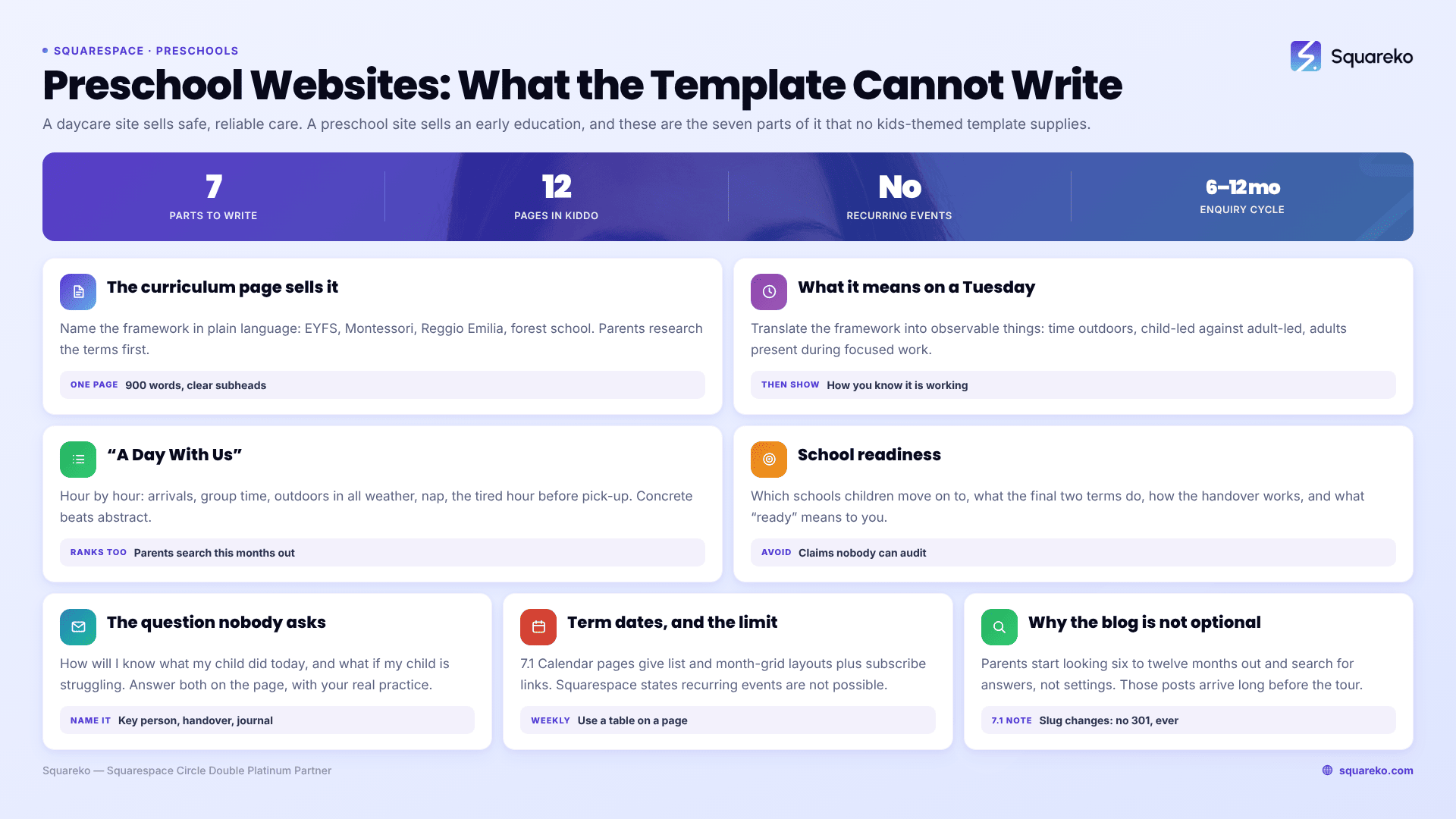
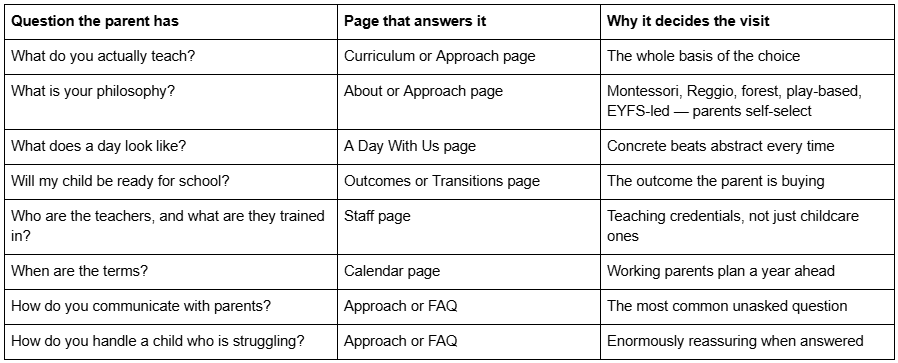
What a preschool site has to communicate that a daycare site does not
The curriculum page is the page that sells the preschool
Most preschool websites have an About page that describes the building and a Services page that lists session times. Neither answers the question the parent came with.
A curriculum page needs three things, in this order.
First, the framework, named. If you follow a recognised framework — EYFS, Montessori, Reggio Emilia, HighScope, a forest-school model, a state early learning standard — name it explicitly and say so in plain language. Parents research these terms before they visit. A page that says "we follow a play-based approach informed by the EYFS" is findable and comparable; a page that says "we believe every child is unique" is neither.
Second, what that means on an ordinary Tuesday. This is the part almost every preschool skips and the part parents read twice. Translate the framework into observable things: how long children spend outdoors, whether activities are child-led or adult-led and in what proportion, how many adults are in a room during focused work, what happens to a child who does not want to join in.
Third, how you know it is working. Observation records, learning journals, termly summaries, parent meetings — whatever your actual practice is. Parents want to know that someone is paying attention to their specific child, and this is where you demonstrate it.
Write this as one substantial page rather than four thin ones. A single 900-word curriculum page with clear subheadings performs better in search and reads better on a phone than the same content split across a four-item dropdown, and Squarespace 7.1's section-based page building handles a long page comfortably.
"A Day With Us" is the highest-converting page you are not building
Ask any preschool manager what parents ask on a tour and the answers are always concrete: what time do they eat, do they go outside if it rains, what happens at nap, who changes nappies, what if my child cries at drop-off.
Build a page that walks through the day hour by hour and answers all of it. 8:00 arrivals and free play. 9:15 group time. 9:45 outdoors, in all weather except lightning, waterproofs provided. And so on. Include the awkward parts — the separation at drop-off, the tired hour before pick-up — because a setting that describes those honestly reads as one that has thought about them.
This page does two jobs. It converts, because it removes the unknowns that stop a parent booking a visit. And it ranks, because "what happens at preschool" style queries are exactly the informational searches parents type months before they enquire.
School readiness is the outcome you are selling
The reason a parent pays for preschool rather than childminding is almost always the transition to school. Say something specific about it.
That means: which schools your children typically move on to, what you do in the final two terms to prepare them, how you handle the handover — some settings share learning summaries with the receiving school — and what "ready" means to you. If your view is that school readiness is about self-regulation and independence rather than letters and numbers, say that clearly. It is a real position and parents who agree with it will choose you for it.
Avoid unverifiable claims. "100% of our children are school-ready" is the kind of statement that invites scrutiny and cannot be substantiated. A description of what you actually do is more persuasive than a statistic nobody audits.
Answer the question no parent asks out loud
Two questions come up on every tour and appear on almost no preschool website: how will I know what my child did today, and what happens if my child is struggling.
Answer both on the page. For the first, describe your actual practice — a key person assigned to each child, a daily handover at pick-up, a learning journal shared termly, whatever app or notebook you use. Name it. A parent who has just left a full-time job or reduced their hours wants to know that someone specific is watching their specific child.
For the second, describe what you do when a child is not settling, not speaking, not joining in, or not coping. Settings avoid this topic because it sounds negative. It reads as the opposite: a preschool that has clearly thought about the difficult cases is a preschool that has thought about children.
Term dates on Squarespace: use the Calendar page, and know its limits
Preschools run on terms, and term dates are one of the most-visited pieces of content on any early years website. Squarespace 7.1 handles this with a Calendar page — called an Events page on the legacy 7.0 platform — and it is worth knowing exactly what it does and does not do before you plan around it.
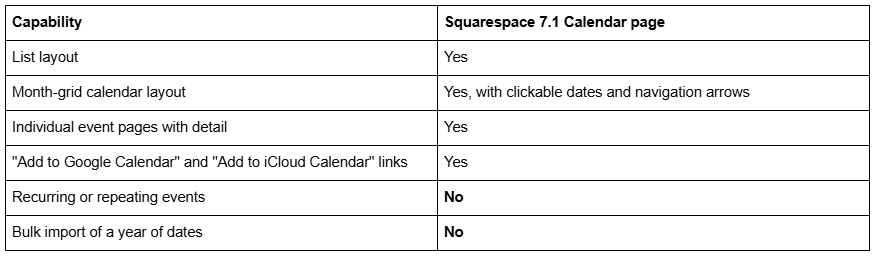
The absence of recurring events is the one that bites. Squarespace's own documentation is direct about it: "It's not possible to set up recurring or repeating events. You can manually duplicate events to create identical events without reentering the same information." A weekly forest session across three terms is thirty-odd manually duplicated entries.
For most preschools, the pragmatic answer is to use the Calendar page for the handful of dated things parents genuinely need — term start and end dates, inset or closure days, open mornings, the nativity — and put the weekly timetable on an ordinary page as a table. A table on a page is easier to scan, easier to update once a term, and easier to read on a phone than thirty calendar entries.
Do enable the calendar-subscription links. A parent who adds your term dates to their own phone calendar in one tap is a parent who does not ring you in August.
Photographs, policies and fees
These three are shared with daycare settings and are covered in full in the daycare template guide, so the short version here.
Photographs of the real rooms, real outdoor space and real activities beat stock images by a distance, and you have to replace the demo images anyway — demo images are not licensed for live use in any template shop. Photographs of identifiable children need documented parental consent for web use specifically. Kiddo's Gallery page is where this lives.
Policies belong on web pages, not in an emailed A4 PDF that nobody can read on a phone. Split the handbook into a page per policy, index them, and keep the PDF as an optional download. Kiddo ships two legal pages already built, which covers your privacy notice and terms — and a preschool holding children's learning records has a genuine data-protection story to tell, not a boilerplate one.
Fees should be published. Preschool fees are frequently entangled with funded hours, which makes them complicated, which makes the temptation to hide them stronger — and hiding them costs enquiries anyway. Publish the structure and a clear explanation of how funded hours interact with your sessions. That explanation is itself a page that ranks, because it is the single most searched question in this category. Kiddo ships a Pricing page for it.
Should a preschool have a blog?
Yes, and for a more specific reason than "content marketing".
A preschool's enquiry cycle is long. A parent starts looking six to twelve months before a place is needed, and at that stage they are not searching for your setting — they are searching for answers. When should my child start preschool. How do I choose between preschools. What is the difference between nursery and preschool. What should my child be able to do before school. Every one of those is a post you can write from experience in an hour, and every one puts you in front of a parent months before they visit a single website's contact page.
Kiddo includes a blog. Two Squarespace 7.1 specifics to settle before you publish anything in it: blog post URLs take the form /blog-page-slug/post-slug, and changing a slug creates no automatic 301 redirect, ever, so pick the blog page slug on day one. And blog featured images have no alt-text field — Squarespace uses the post title as alt text — so write titles that also work as a description of the image.
Kiddo for a preschool, and the honest caveats
Kiddo — 12 pages: Home, a second homepage layout, About Us, Services, Blog, Pricing, Gallery, Contact, two legal pages, a 404 page and a Style Guide page. Tagged kids, education and childcare.
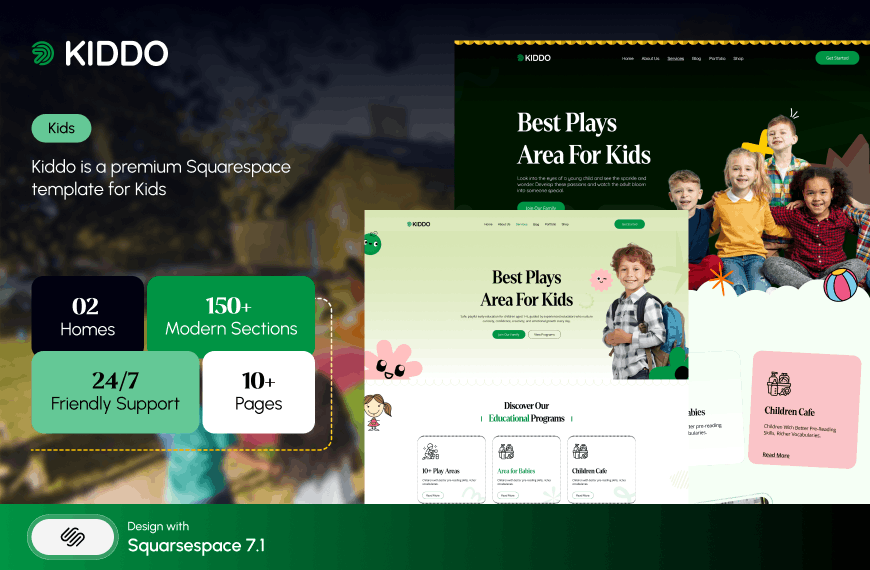
Mapped against a preschool's needs, it covers the commercial pages well and leaves you to build the educational ones. About Us becomes your philosophy page. Services becomes sessions and age groups. The second homepage layout is a good candidate to convert into either the Curriculum page or "A Day With Us", because those want a long, section-rich layout rather than a standard content page. You add a Calendar page for term dates and a staff page — Kiddo does not ship a dedicated one, and teaching credentials matter enough here to justify building it properly.
Two things to be straight about. Kiddo's published Live Demo link currently returns HTTP 401 because it omits the required password parameter, so no link to it appears in this post. Ask for a working preview before buying — from us or anyone else. In a market where sales are final, a template you cannot open is a template you should not buy.
And Kiddo, like every Squareko template, is $249 delivered as a Squarespace contributor invitation rather than as files, with 60 days of email support and no customisation included. What you are buying is a structure and a visual system, not a finished preschool website. The curriculum page, the day-in-the-life page and the school-readiness page are yours to write, and they are the pages that will actually fill your places.
The order to do this in
Write the curriculum page first, before you look at a single template. It is the hardest page, it is the one that determines your tone, and if you can write it clearly you can build the rest of the site around it. Then write "A Day With Us". Then everything else is comparatively easy.
Only then compare templates, and compare them against the eight-row table at the top of this post rather than against how appealing the illustrations are.
If your setting is part of a larger school, or you are weighing whether Squarespace can carry the whole institution, Squarespace templates for schools and learning centres sets out where the platform stops. The cluster hub, Squarespace templates for course creators, covers the education category as a whole.
If the writing is the part you can do and the building is the part you cannot — which is the usual split for preschool managers — the premium Squarespace templates at Squareko are installed for you onto a new site or an existing one, with the page structure in place and ready for your content. Plenty of settings do this themselves in a few evenings, which is exactly why the structure above is published rather than held back.
FAQ
-
A curriculum or approach page naming your framework, a day-in-the-life page, stated school-readiness outcomes, a staff page with teaching qualifications, a gallery of your real space, term dates, published fees including how funded hours work, your policies as web pages, and one clear route to booking a visit.
-
Name the framework explicitly — EYFS, Montessori, Reggio Emilia, HighScope, forest school — then translate it into what happens on an ordinary day: time outdoors, the balance of child-led and adult-led activity, adult presence during focused work. Finish with how you record and share each child's progress. One substantial page, not four thin ones.
-
Use a Calendar page in Squarespace 7.1, which offers both a list and a month-grid layout and can show "add to Google Calendar" and "add to iCloud Calendar" links. Use it for term starts and ends, closure days and events, and put the recurring weekly timetable on an ordinary page as a table instead.
-
No. Squarespace states that it is not possible to set up recurring or repeating events, and suggests manually duplicating an event to create identical copies. For a preschool this means a weekly session across a year is dozens of duplicated entries, which is why a plain timetable table is usually the better answer.
-
A daycare site sells safe, reliable care and is judged on ratios, hours, safety and fees. A preschool site sells early education and is judged on curriculum, teaching philosophy, staff qualifications and school readiness. The commercial pages overlap almost completely; the persuasive pages do not overlap at all.
-
Yes, because the enquiry cycle is long. Parents search six to twelve months ahead for answers rather than for settings — when to start preschool, how to choose one, what school readiness means. Posts answering those questions reach parents well before they visit any preschool's contact page.

Author Bio
I'm Walid Hasan, a Certified Squarespace Expert and Squarespace Circle Platinum Partner with over 12 years of hands-on experience designing and optimizing high-performing websites. Over the years, I've had the privilege of building more than 2,000 Squarespace websites for clients around the world, always focusing on clean design, strong user experience, and conversion-driven results.
