
Squarespace Templates for Daycares and Childcare Centres
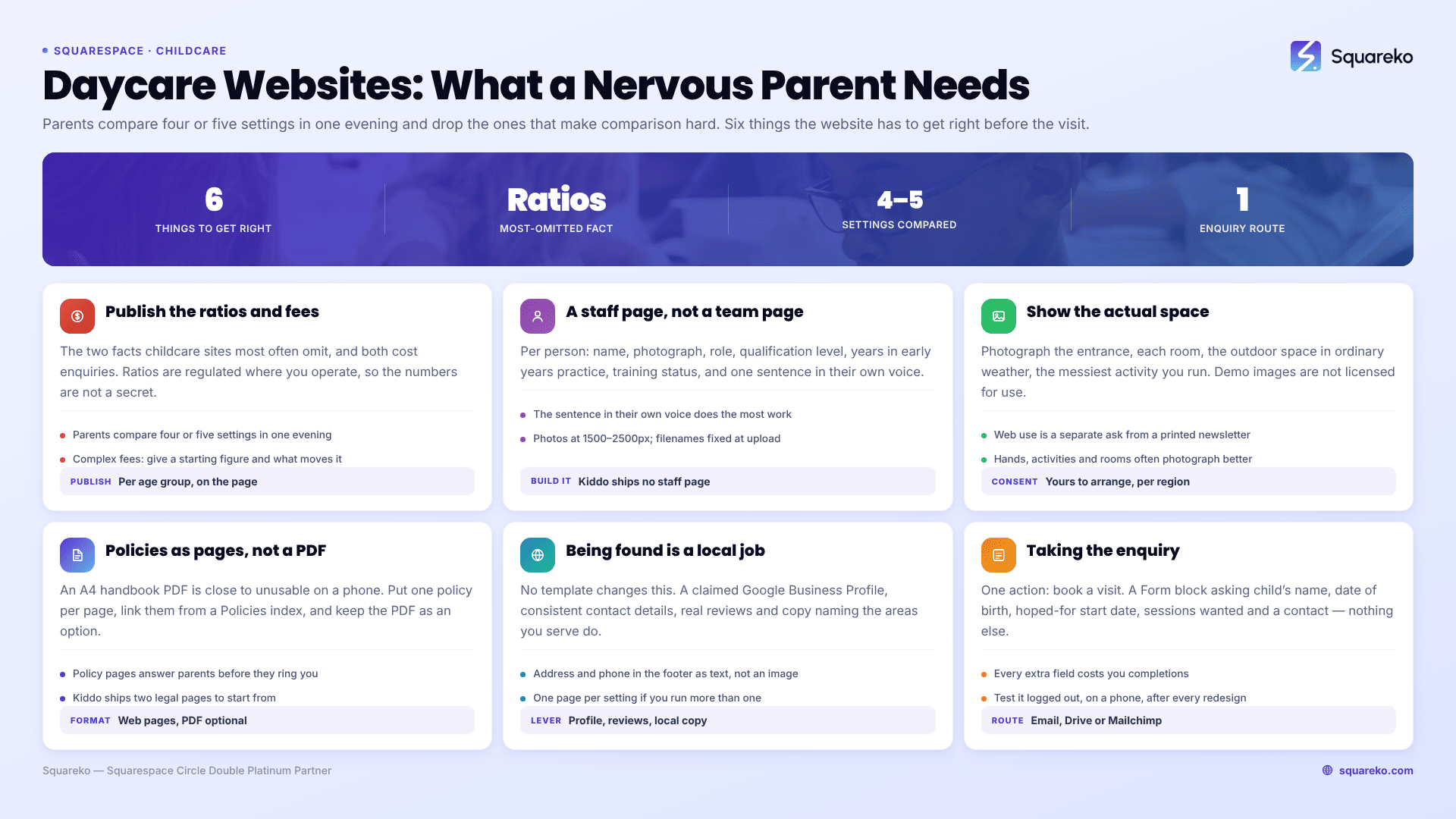
The short answer: A childcare website has one job before every other job, which is to make a nervous parent feel safe enough to book a visit. That means the site has to answer four questions above the fold and five more before the enquiry form: who looks after my child, what are their qualifications, how many children per adult, what does the room look like, and what does it cost. Pick a template on whether it has a Gallery, a Pricing page and somewhere to put policies — not on whether the illustrations are cute.
Of the Squareko range, Kiddo is the fit: 12 pages tagged kids, education and childcare, with a Gallery, a Pricing page, a blog and two legal pages.
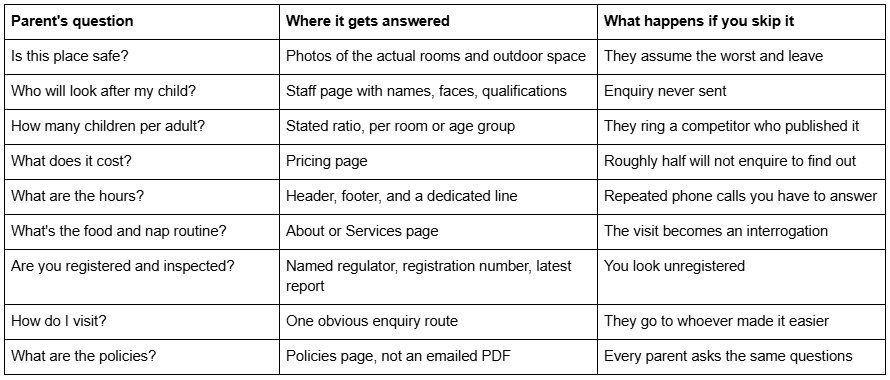
What a parent is actually doing on your site
Publish the ratios and the fees. Both of them.
These are the two things childcare websites most often omit, and both omissions cost enquiries.
Ratios. Adult-to-child ratios are the single most concrete safety signal you can publish, and they are regulated where you operate, so the numbers are not a trade secret. Put them on the page next to each age group: under-twos, two-year-olds, three and over. A parent who has visited four nursery websites and found one number on one of them will remember which one.
Fees. The instinct is to withhold price and force a conversation. In childcare this backfires more than it works, because the parent is comparing four or five settings on a single evening and will simply drop the ones that make comparison hard. Publishing a fee structure — full day, half day, sessions, what is included, what is extra — filters out the people who were never going to afford it and pre-qualifies everyone else.
This is why Kiddo's Pricing page matters more here than in most niches. Most childcare templates do not ship one, and building a pricing table that handles three age bands, two session lengths and a funded-hours note is a genuinely annoying afternoon in Fluid Engine if you are starting from an empty page.
If your fees are complicated, publish a starting figure and a clear "what affects the price" list rather than nothing. Vagueness reads as expensive.
Staff credentials are the page people actually read
A childcare staff page is not a team page. A team page has three smiling headshots and a job title. A staff page for a nursery needs, per person: name, photograph, role, qualification level, years in early years practice, first-aid and safeguarding training status, and a sentence in their own voice.
That last item does more work than the rest combined. "I've worked in early years for eleven years and I still think the best part of the day is the first ten minutes" tells a parent something no credential list can.
Two practical notes on building it in Squarespace 7.1. Staff photographs should be uploaded at 1500–2500px wide — 2500px is the maximum Squarespace serves — and filenames cannot be changed after upload, so name them properly before you drag them in. And if you use a blog or portfolio collection to hold staff profiles rather than a single page, note that blog featured images have no alt-text field; Squarespace uses the post title as the alt text instead.
Show the actual space, not stock photography
Every childcare template demo ships with stock images of tidy, sunlit, empty rooms. None of them are your rooms, and demo images are not licensed for live use — you have to replace all of them before launch anyway. Treat that as an opportunity rather than a chore.
Photograph: the entrance and how drop-off works, each room your age groups use, the outdoor space in ordinary weather, where children sleep, where they eat, and the messiest activity you run. A parent looking at a real photograph of a real paint-covered table learns more about your setting than they will from six paragraphs of copy about your ethos.
Kiddo ships a Gallery page for exactly this. Two things to get right when you fill it:
Consent. Photographs of children need documented parental consent, and consent given for a printed newsletter is not consent for a public website. Many settings solve this by photographing hands, activities, rooms and backs of heads, which is both safer and often better photography. If you do publish identifiable images, keep the consent records and be prepared to remove an image within a day of a request.
Image weight. Galleries are where childcare sites get slow. Across 54 Squareko-built client sites measured in August 2026 (Playwright and Chromium lab test, cloud datacentre, unthrottled, single run per site, load-only CLS — lab data, not field data), median page weight was 3.0 MB across 93 requests, and the sites at the heavy end were almost always the image-led ones. The Squarespace CDN serves WebP unconditionally regardless of your source format, which helps, but it does not rescue forty 4000px photographs on one page.
Policies belong on pages, not in an emailed PDF
A childcare setting has a parent handbook, a safeguarding policy, a sickness and exclusion policy, a complaints procedure, a fees and notice policy, and usually several more. The default is to email a PDF, and the default is wrong.
A childcare operator put the problem well on the Squarespace forum: "Parents at child care centres often get a Parent Handbook emailed to them as a PDF. Most parents read this information on their phones and a A4 PDF, even with links and larger text, it isn't very user friendly on mobile."
That is exactly right, and the fix is straightforward. Put each policy on its own page or blog post, link them from a single Policies index, and keep the PDF as a download for the people who want one. You get mobile-readable policies, you get pages that answer parents' questions in Google before they call you, and you get a version you can update without re-emailing anything.
Kiddo ships two legal pages already built. In most niches those are a nicety. In childcare they are load-bearing, because a setting that handles children's data needs a genuine privacy notice covering what you collect, why, how long you keep it and who you share it with — and if you run a photo gallery, that notice has to cover images too. Starting from a built page rather than a blank one is a real saving.
Kiddo, and what to do about its demo
Kiddo — 12 pages, tagged kids, education and childcare: Home, a second homepage layout, About Us, Services, Blog, Pricing, Gallery, Contact, two legal pages, a 404 page and a Style Guide page.
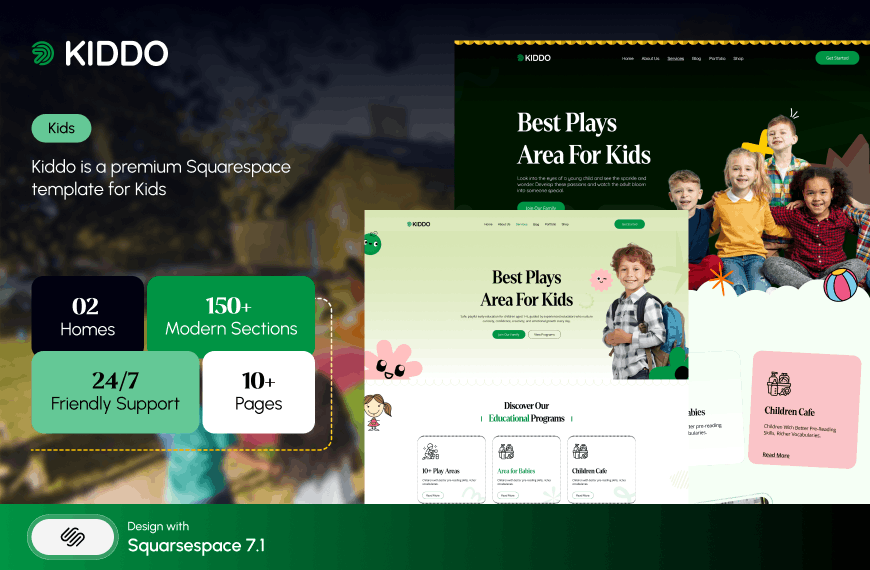
Mapped against the checklist above, it covers more of a childcare site's requirements than anything else in the range. The Pricing page handles fees. The Gallery handles the space. Services covers age groups and sessions. The two legal pages cover privacy and terms. The blog is where policies, term news and settling-in guidance live. The second homepage layout is useful if you run two sites and want them visually distinguished. The Style Guide page is the one people underrate — it records your fonts, colours and button styles so that whoever updates the site in a year does not quietly drift away from your branding.
What it lacks: a dedicated staff page. You build that from the About Us page or as a blog collection. Given how important staff credentials are here, budget for it rather than assuming it exists.
On the demo. Kiddo's published Live Demo link currently returns HTTP 401 because it omits the required password parameter, so we are not publishing a link to it here. Ask for a working preview link before you buy — from us or from anyone. This applies well beyond one template: buying a website template from screenshots is how people end up with a design that does not survive contact with their own content, and in a market where sales are final, the demo is the entire decision. Our template buying guide covers what else to check before you pay.
Kiddo is $249, like every Squareko template, delivered as a Squarespace contributor invitation rather than as files to download, with 60 days of email support. Customisation is not included, and sales are final.
Being found is a local problem, not a template problem
Almost nobody finds a nursery by browsing. They search a place name, they look at a map, and they open three results. That makes a childcare website an unusually local piece of work, and it is worth being clear that no template affects this. A premium Squarespace template and a free Squarespace template emit the same underlying markup; what moves a childcare setting up the local results is a claimed and complete Google Business Profile, consistent name, address and phone details wherever they appear, real reviews, and page copy that names the neighbourhoods you actually serve.
Three things to do on the site itself. Put your full address and phone number in the footer as text, not inside an image — footers appear on every page and are the easiest place for the address to be read consistently. Give each setting its own page if you run more than one, rather than listing three addresses on one contact page, because a parent searching for one neighbourhood should land on that neighbourhood's page. And write the blog posts a local parent actually searches for: settling-in advice, what to pack, how funded hours work in your area, what happens on the first day. Those posts bring people to the site months before they are ready to enquire, and they are the reason to care that Kiddo ships a blog.
One thing not to do: do not stuff a list of twelve surrounding towns into the footer. It reads as spam to a parent and does nothing for search.
Taking the enquiry
The end of a childcare website is one action: book a visit. Not "contact us". Not a phone number in the footer. A named, dated thing a parent can do in thirty seconds at nine in the evening when the children are asleep.
Build it as a Form block with the fields you actually need — child's name, date of birth, hoped-for start date, sessions wanted, parent contact — and nothing else. Every additional field costs you completions. Squarespace form submissions can be routed to email, to a Google Drive spreadsheet, or to Mailchimp; set that up on day one rather than discovering three weeks later that enquiries went to an address nobody reads.
One reliability note that matters more than it sounds: check the form works from a logged-out browser on a phone before you launch, and check it again after any redesign. A childcare enquiry form that silently fails is worse than no form, because the parent believes they have contacted you.
Choosing a template for a childcare setting
Open any template demo on a phone and run it against the nine-row table at the top of this post. If seven rows have an obvious home, the template will work. If four do, you are buying a colour scheme.
Then do the thing that actually decides it: write your fees and your ratios into a document before you buy anything. Those two pieces of content are the ones that most often stop a childcare website launching, and no template supplies them.
If you would rather not run the build yourself — and childcare operators are, as a group, extremely short of the evening hours a first Squarespace build takes — the premium Squarespace templates at Squareko are installed for you, onto a new site or onto an existing one, with the pages set up ready for your content. Most settings will do this perfectly well themselves with the structure above; it is published because the structure is the hard part, not the software.
For preschools and nurseries where the pitch is education rather than care, see Squarespace templates for preschools and nurseries, which covers curriculum, philosophy and term dates instead. The wider cluster hub, Squarespace templates for course creators, covers the education and kids category as a whole, including the paywall and member-access features a setting might use for a parents' area.
FAQ
-
Photographs of the actual rooms and outdoor space, a staff page with qualifications and training status, your adult-to-child ratios per age group, opening hours, a fee structure, your regulator registration details, your policies as readable web pages, and one obvious way to book a visit. Everything else is secondary.
-
In most cases yes. Parents compare four or five settings in one evening and drop the ones that make comparison difficult, so withholding price loses more enquiries than it protects. If your fees are complex, publish a starting figure plus a clear list of what changes the price rather than publishing nothing at all.
-
Give each member of staff a name, photograph, role, qualification level, years in early years practice, and their first-aid and safeguarding training status — then one sentence in their own voice. The personal sentence does more to reassure a parent than the credential list, but the credentials have to be there first.
-
Yes. A setting that collects children's and parents' details needs a genuine privacy notice covering what you collect, why, how long you keep it and who you share it with. If you publish a photo gallery, the notice must cover images too, and photographs of identifiable children need documented parental consent for web use specifically.
-
Kiddo is the closest fit in the Squareko range — 12 pages tagged kids, education and childcare, with a Gallery, a Pricing page, a blog and two legal pages already built. Its gap is a dedicated staff page, which you build from the About Us page or as a blog collection.
-
Split it into one page or blog post per policy, link them from a single Policies index page, and keep the PDF as an optional download. Parents read on phones, where an A4 PDF is close to unusable, and separate pages also answer parents' questions in Google before they need to ring you.

Author Bio
I'm Walid Hasan, a Certified Squarespace Expert and Squarespace Circle Platinum Partner with over 12 years of hands-on experience designing and optimizing high-performing websites. Over the years, I've had the privilege of building more than 2,000 Squarespace websites for clients around the world, always focusing on clean design, strong user experience, and conversion-driven results.
