
Squarespace Templates for Online Courses
The short answer: An online course is sold from a long single page with roughly nine distinct section types, and most Squarespace templates ship three of them. Judge a template on whether its section library can carry a curriculum breakdown, a testimonial pattern, a tiered pricing block and an FAQ — not on whether one of its pages is called "Courses". The payment itself comes from a Squarespace pricing plan and a Digital Product Block, which work on any page in any template.
This post covers one course and the page that sells it. If you are working out the wider architecture — delivery, member access, email capture, where Squarespace stops — start with Squarespace templates for course creators instead.
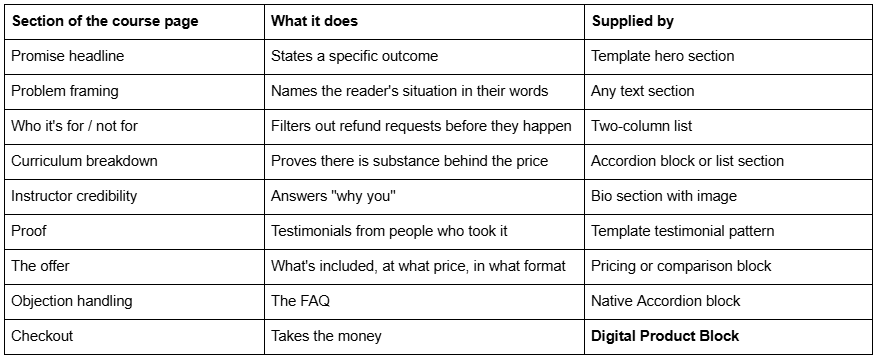
Quick reference: what the page needs and where it comes from
Why a course needs its own page, separate from the course overview
Squarespace gives a Course page its own Course Overview page automatically. That overview reflects the chapters and lessons you have built and functions as a syllabus. It is not a sales page, and using it as one is the most common structural mistake in Squarespace course builds.
The reason is straightforward. An overview page's job is to orient someone who has already bought. A sales page's job is to convince someone who has not. They want different content in a different order, and they are visited by different people. The overview leads with structure; the sales page leads with outcome and does not mention module numbering until well past the halfway point.
Build the sales page as an ordinary page in your template, put the checkout on it, and let the Course Overview do its own job. This is why the Digital Product Block matters more than any template feature — it puts a working course checkout on any page you like, which means your sales page can sit anywhere in the site structure and can look like anything your template supports.
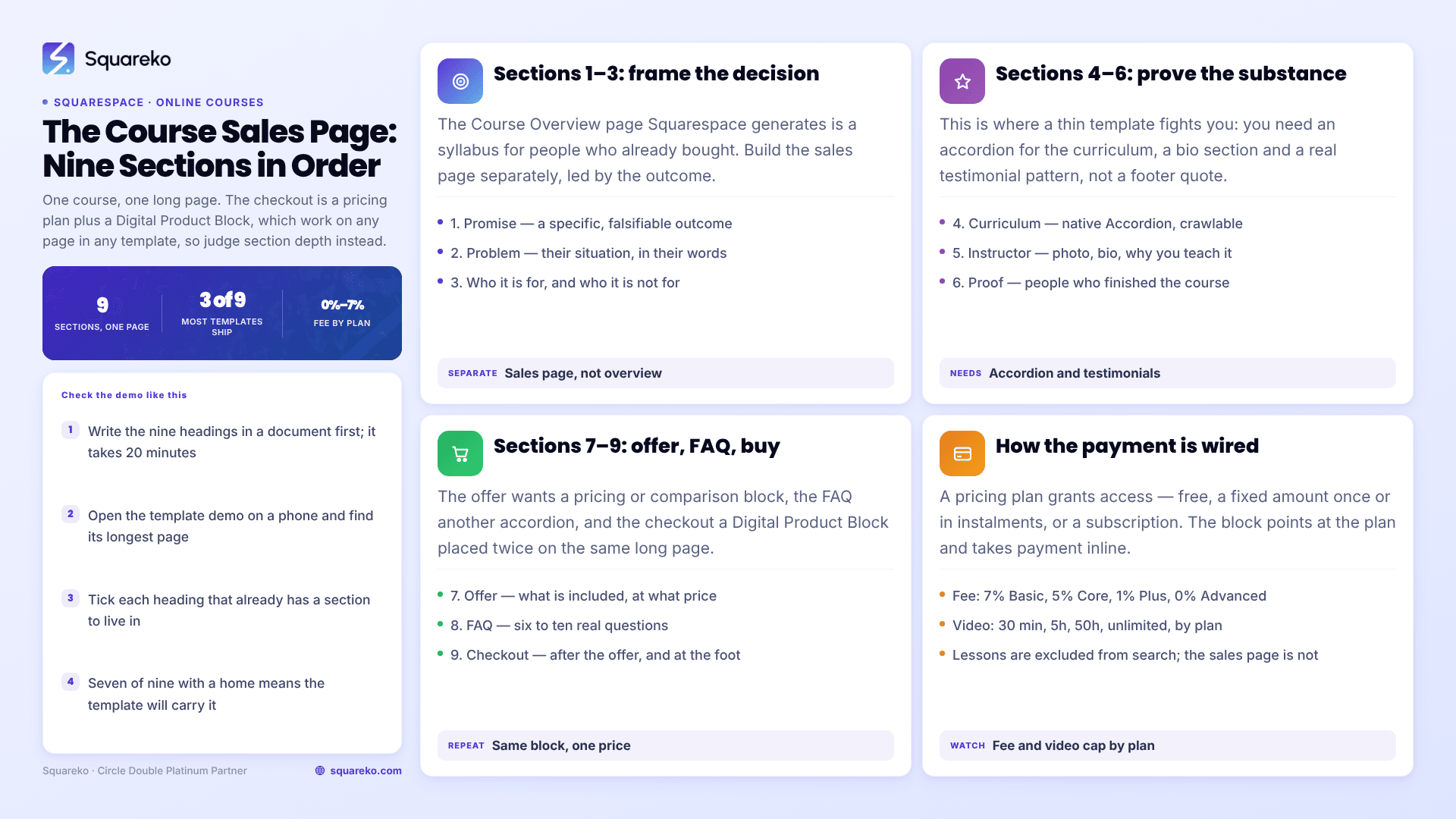
The nine sections, in order, with what actually goes in them
1. The promise. One sentence naming a specific, falsifiable outcome. "Learn watercolour" is not a promise. "Paint a finished landscape you would hang up, in six weeks, starting from nothing" is. Most templates give you a hero section with a headline, a sub-headline and a button; that is exactly the right shape.
2. The problem. Two or three short paragraphs describing where the reader is now, using the words they would use. This section exists to make the reader feel recognised before you have asked for anything.
3. Who it is for, and who it is not for. Two lists side by side. The "not for" list is the one that does work — it prevents the wrong buyer, and the wrong buyer is where refund requests and bad reviews come from. Squarespace template shops, including ours, sell on a strictly no-refund basis, and so do most course creators; being explicit about fit is the ethical version of that policy.
4. The curriculum. Module by module, with what the student can do at the end of each. Build this as a native Accordion block — it renders server-side in Squarespace 7.1, so the question and answer text is fully crawlable, and it keeps a long curriculum from swamping the page. Do not build it as a raw <details> code block.
5. Instructor credibility. A photograph, a short bio, and the specific reason you are qualified to teach this. Credentials, years, numbers. Vagueness here reads as evasion.
6. Proof. Testimonials from people who completed the course, with names and, where you can get them, results. This is the single hardest section to fill for a first launch, which is an argument for running a free or heavily discounted beta cohort before you build the sales page rather than after.
7. The offer. What is included — number of lessons, total video hours, downloadable materials, any live element — and the price. If you have tiers, use a comparison table. Tables are read more reliably than prose by humans and by AI answer engines both.
8. The FAQ. Six to ten questions, drawn from what people actually ask you, not what you wish they would. "How long do I have access?", "Is this for beginners?", "What if I can't keep up?" Answer them plainly. Again, native Accordion block.
9. The checkout. A Digital Product Block pointed at your pricing plan. Repeat it — once after the offer section, once at the very bottom. Two instances of the same block, not two different prices.
How the payment works in Squarespace
The mechanics are simpler than most people expect and are worth understanding before you shop for a template, because none of it is template-dependent.
You create a pricing plan, which is what actually grants access. A pricing plan can be:
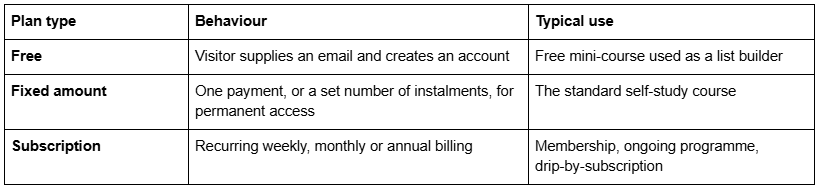
You then attach the course page to that plan and place a Digital Product Block on your sales page pointing at it. The block replaces an ordinary button and handles checkout inline.
Two numbers to check before you commit. Squarespace charges a digital-product transaction fee that varies by website plan — 7% on Basic, 5% on Core, 1% on Plus and 0% on Advanced — on top of the payment processor's own fee. And video storage is capped by plan: 30 minutes on Basic, 5 hours on Core, 50 hours on Plus, unlimited on Advanced, with any single uploaded video allowed to run up to three hours. A ten-hour course does not fit on Core unless you embed the video from YouTube or Vimeo instead of uploading it, which Course pages fully support.
One feature worth using and frequently overlooked: you can mark selected lessons as free public previews. A prospective buyer watches a real lesson before paying. On a page where you are asking for several hundred pounds on the strength of testimonials, a genuine sample is worth more than another paragraph of copy.
Two things to be aware of about what happens after the payment. First, the buyer gets a Squarespace account on your site and logs in to reach the lessons — there is no separate portal to build, but there is also no way to hand someone a private link instead. Second, the lessons themselves are not indexed by search engines; Squarespace excludes paywalled content from your sitemap and from site search. Only the Course Overview page and your sales page are visible to Google, which is another reason not to collapse the two into one.
There is one promise your sales page should not make, because Squarespace cannot keep it: lessons do not unlock on completion. Squarespace Courses has no progress-based gating, so a student can open the final lesson on day one. If your marketing says "unlock module two when you finish module one", the platform will make a liar of you.
What to look for in the template
Judged against the nine sections above, here is what separates a template that will carry a course page from one that will fight you.
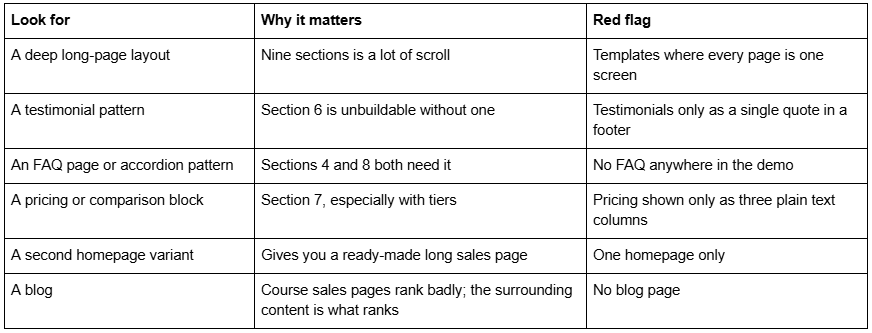
The last two are the ones people regret. A second homepage layout is the cheapest possible long-form sales page — you duplicate it, strip the navigation-style sections and rebuild it as the course page, and you have inherited a full section stack rather than assembling one. And a template with no blog quietly removes your best route to organic traffic. Squarespace 7.1 blog URLs take the form /blog-page-slug/post-slug, and changing a slug creates no automatic 301 redirect, so pick that blog page slug carefully on day one.
The Squareko templates that fit a single online course
Scholar — 11 pages: Home, Home 2, About, Services, Portfolio, Shop, Contact, Freebie, Gallery, a 404 page and a Style Guide. Tagged fashion, course and shop. The two homepage variants are the reason to look at it for a single course: Home 2 becomes your sales page with almost no structural work. The Shop covers a workbook or a companion product, and the Freebie page is a ready-made lead magnet landing page for the opt-in that feeds the launch. Its weakness for this use is the absence of a blog. Scholar demo.
Luminary — 11 pages, tagged service-based, course and speaker, with Courses pages, a Shop, a Portfolio and Gallery and a Freebie page. Suits the practitioner who sells one course alongside one-to-one work, because the Services and Portfolio pages carry the consulting side while the course page carries the product. Also no blog. Luminary demo.
Navigate — 10 pages with a Course page, a Podcast page, a Speaking page and a blog. Leaner, and the blog is the reason to prefer it if search traffic is part of the plan. Its published demo link currently returns a 401 because it omits the required password parameter; ask for a working link rather than buying from screenshots. Navigate demo
Fit Foundry — 11 pages with a Shop, a blog, an FAQs page and a Freebie page. Tagged fitness and coaching rather than courses, but on the criteria above it scores well: the FAQs page and the Freebie page cover two of the nine sections outright, and the blog covers discovery. Fit Foundry demo
A caution that applies to all of them. A template's "Courses" page is a layout, not the Squarespace Courses feature. Nothing published by most shops, ours included, states whether such a page is a real Course collection or an ordinary page styled to resemble one. Ask before you buy, and assume you are building the lessons, the pricing plan and the checkout yourself either way — because you are.
Every Squareko template is $249, delivered as a Squarespace contributor invitation rather than as files, with 60 days of email support. Sales are final and demo images are not licensed for live use, so every image on the demo has to be replaced before launch. That makes the demo the whole decision. For the wider comparison, see our best Squarespace templates roundup and the free versus premium analysis.
Before you buy a template for your course
Write your nine sections as nine headings in a document first. It takes twenty minutes. Then open the template demo, find its longest page, and check each heading against a section that already exists in it. If seven of the nine have a home, the template will carry your course. If four do, you are buying a design and building a sales page from scratch, which is fine as long as you know that is the deal.
Where this genuinely gets awkward is the join between the sales page and the delivery — deciding whether the course lives as a Course page or inside a Member Site, and getting the pricing plan structure right the first time, because it is unpleasant to unpick once lessons exist. That is the part we tend to set up at the start of a build. The premium Squarespace templates at Squareko are installed for you, onto a new site or an existing one, with that structure agreed before the install rather than discovered after it. Most people will get there unaided with the section list above, which is why it is published rather than gated.
FAQ
-
Build it as an ordinary page in your template, not as the Course Overview page. It needs roughly nine sections: promise, problem, who it's for and not for, curriculum, instructor bio, testimonials, the offer, an FAQ and the checkout. The checkout is a Digital Product Block pointed at your pricing plan.
-
You create a pricing plan — free, a fixed amount paid once or in instalments, or a recurring subscription — attach the course page to it, then place a Digital Product Block on any page pointing at that plan. Squarespace charges a digital-product transaction fee of 7% on Basic, 5% on Core, 1% on Plus and 0% on Advanced.
-
Yes, in almost every case. The Course Overview page Squarespace generates is a syllabus for people who have already bought. A sales page addresses people who have not, leads with the outcome rather than the structure, and carries testimonials, pricing and an FAQ that would clutter an overview page.
-
Yes. Individual lessons within a Squarespace Course page can be marked as free public previews, so a prospective buyer can watch real teaching before paying. On a high-priced course this converts better than additional sales copy, because it removes the main unanswered question about quality.
-
Choose on section depth rather than on a page named "Courses". You want a deep long-page layout, a testimonial pattern, an FAQ or accordion pattern, a pricing block, and ideally a second homepage variant to convert into the sales page. A blog matters too, because sales pages rank poorly and surrounding content is what brings traffic.
-
No. Squarespace Courses is part of your website plan, not part of any template. A template page named "Courses" may be a genuine Course collection or an ordinary page styled to look like one, and most shops do not state which. Either way you build the lessons, the pricing plan and the checkout yourself.

Author Bio
I'm Walid Hasan, a Certified Squarespace Expert and Squarespace Circle Platinum Partner with over 12 years of hands-on experience designing and optimizing high-performing websites. Over the years, I've had the privilege of building more than 2,000 Squarespace websites for clients around the world, always focusing on clean design, strong user experience, and conversion-driven results.
