
Free vs Premium Squarespace Templates: The Real Difference
The short answer: Every Squarespace 7.1 site runs the same software, so a premium template is not a different or better version of Squarespace. What you buy is a pre-built arrangement — sections, pages, style settings and demo content already assembled — plus the labour of installing it and someone to ask when it breaks. No features are added. Nothing is unlocked.
That sentence contradicts most of what is written about this comparison, so the rest of this post shows the mechanism.
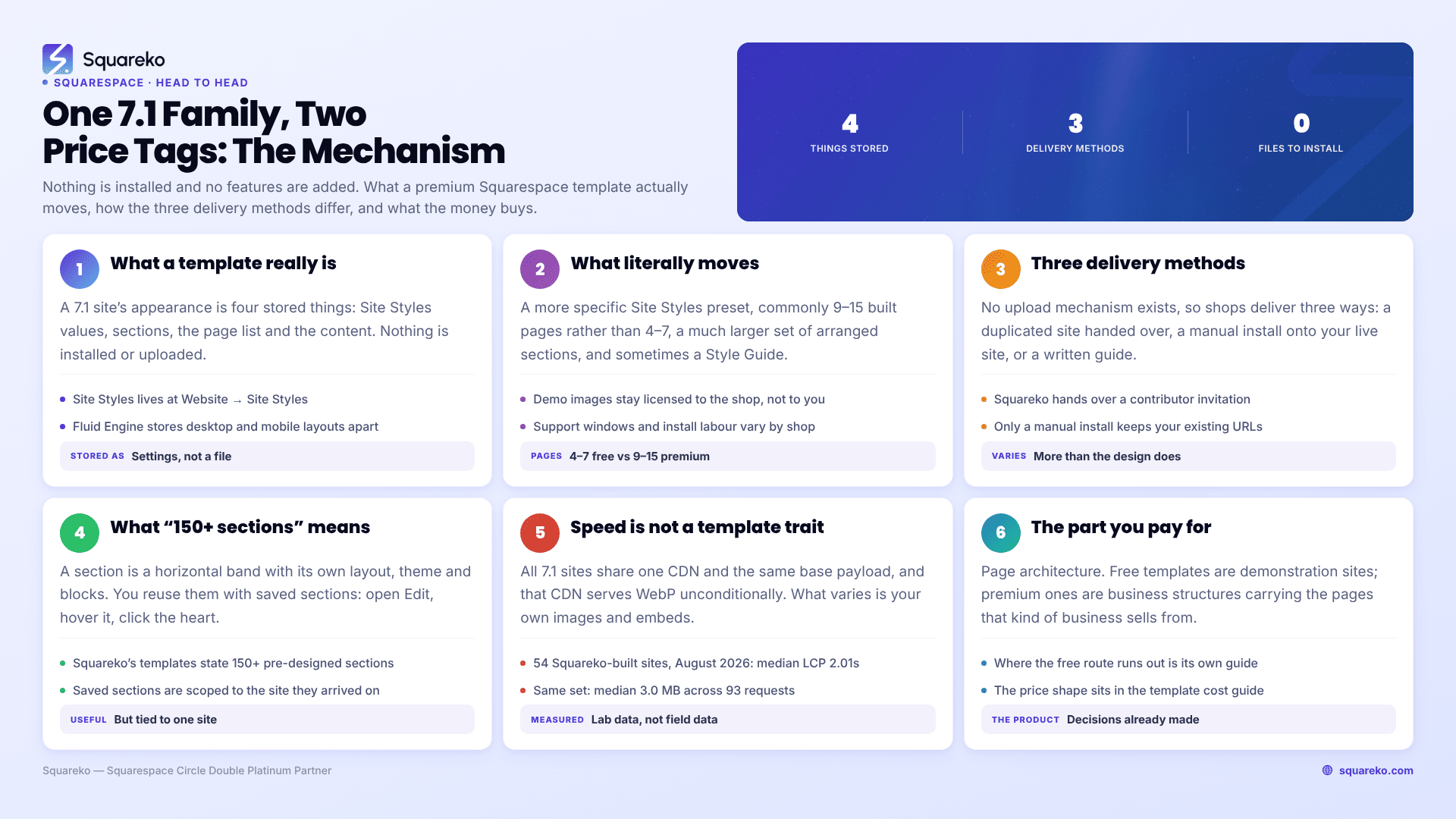
What the two options actually are, at a glance
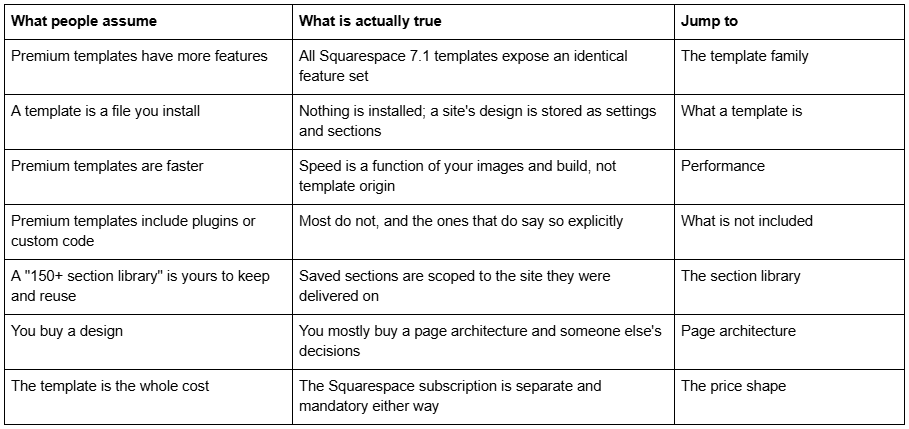
All Squarespace 7.1 sites are one template family
This is the fact the entire comparison rests on, and it comes from Squarespace, not from a template shop.
In Squarespace 7.0, templates were genuinely different products. Bedford, Brine, York and the rest were separate codebases with different features, different style controls and different layout capabilities. Choosing the wrong 7.0 family could lock you out of a feature permanently, and switching families meant rebuilding.
Squarespace 7.1 abolished that. Squarespace's own documentation puts it this way: "All version 7.1 sites are part of the same template family, so every site has the same features and style options." The same article notes that in 7.1 you will not change templates to gain access to new features or styles, because there are no new features to gain.
The practical consequences are worth stating individually, because each one kills a common assumption:
A free Squarespace 7.1 template and a $249 premium 7.1 template have identical capabilities. Ecommerce, Portfolio pages, Member Sites, Courses, Blog, Scheduling, Fluid Engine, Site Styles — availability is determined by your subscription plan, never by your template.
There is no "install template" action in Squarespace 7.1. You cannot upload a template to an existing site. This is not a limitation of premium templates; the platform simply has no such function.
Choosing a template at signup is not a lock-in. Because every 7.1 site shares one engine, a site started on a free template can be rebuilt into any other design later without migrating platforms or losing content.
Anyone telling you a premium Squarespace template unlocks functionality is describing Squarespace 7.0, or describing WordPress.
So what is a Squarespace template, technically?
If templates are not separate software, what are they?
A Squarespace 7.1 site's appearance is the sum of four stored things:
Site Styles values. Fonts, type scale, colour palettes, button shapes, spacing constants, image treatments. These live in Website → Site Styles and apply site-wide.
Sections. Every page in 7.1 is a stack of sections. Each section carries a layout, a background, a colour theme, and its blocks. Fluid Engine sections additionally store an explicit grid position for each block, and store separate desktop and mobile layouts.
Pages and their arrangement. The page list itself, the navigation structure, folders, and which pages sit in Not Linked rather than main navigation.
Content. Text, images, products, blog posts, form fields.
That is the whole of it. A "template" — free or premium — is a particular set of values across those four buckets. Nothing else is transferred, because nothing else exists to transfer.
A free template is Squarespace applying a curated set of those values to a brand new site at signup. Squarespace publishes around 200 of them.
A premium template is a third party having assembled a much larger and more specific set of those values, on a site they control, and then giving you access to that site.
What literally moves when you buy a premium template
Here is the same comparison as a table, mapped to where each item lives in Squarespace 7.1.
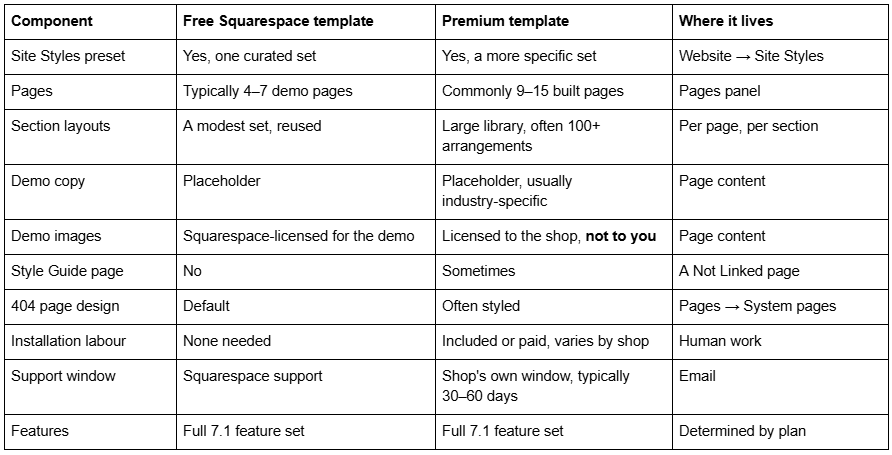
Read the last row again. It is the row that decides whether the rest of the table is worth money to you.
How a premium template is delivered — and why that varies more than the design
Because there is no upload mechanism, every premium Squarespace template shop has to solve delivery some other way. There are three real methods in the market, and they produce very different amounts of work for you.
Method 1 — a duplicated site, handed over. The shop builds the template on a Squarespace site they own, then transfers access to you, usually via a contributor invitation followed by an ownership change. You get a working site immediately. This is how Squareko delivers: the template arrives as a contributor invitation on a new trial site, with no files to download or upload. Your existing site, if you have one, stays live throughout.
Method 2 — the shop installs it onto your existing site. A person rebuilds your live site's pages to match the template. This is manual work, priced as an add-on, and it is the only route that preserves an existing site's URLs and content. Our Squarespace template installation service explains what that process involves and what it excludes.
Method 3 — a written guide and a demo to copy. The cheapest end of the market. You receive PDF or video instructions and rebuild the design section by section yourself. This is legitimate, and it is also the reason some templates are $47 and others are $299.
None of these is "installing a template" in the WordPress sense, because that action does not exist on Squarespace. Anyone who has used both platforms should reset their expectations here: there is no theme file, no FTP, no .zip, and no theme directory.
What "150+ sections" actually means
Almost every premium Squarespace template advertises a section library — Squareko's templates state 150+ pre-designed sections, and competitors publish similar numbers. This is the least-understood line on any product page, so here is the mechanism.
A section in Squarespace 7.1 is a horizontal band of a page with its own layout, background, colour theme and blocks. When a shop says a template includes 150 sections, it means the delivered site contains that many distinct arranged bands across its pages, styled to match — hero variants, testimonial rows, pricing grids, image-and-text pairs, contact blocks, and so on.
You reuse them with Squarespace's saved sections feature: open the page in Edit, hover the section, click the heart icon, and save it. From there you can add it to any other page. That is a genuinely useful library, and it is a fair thing to charge for.
The mechanical limit worth knowing before you buy: saved sections are scoped to one site. A standard Squarespace account can save up to 250 sections, but only for reuse within that same site. Squarespace Circle partners can save sections to an account-level catalogue usable across any 7.1 site they have editing permissions on; a normal buyer cannot. Squarespace also notes that editing an original section does not update copies you have already placed.
So a template's section library is an asset attached to the site the template was delivered on. It does not travel to a second site you own, and it is not a file you keep.
What premium templates do not add
This section exists because these four claims circulate constantly and none of them is a property of a template.
They do not add features. Covered above. Ecommerce, Courses, Member Sites, Scheduling and Video Studio are plan-gated, not template-gated.
They do not add plugins. Squarespace has no plugin architecture. What the market calls a "plugin" is a block of JavaScript or CSS injected into your site. Some shops sell those separately; most templates do not include any. If custom code matters to you, look for it named explicitly on the product page, and note that the Custom CSS panel (Website → Website Tools → Custom CSS) requires a Core plan or above regardless of which template you use.
They do not add mobile responsiveness. Every Squarespace 7.1 site is responsive by default, at a 767px breakpoint. What a well-built premium template adds is that someone has already adjusted the Fluid Engine mobile layout on every section — a real saving in hours, but not a capability.
They do not add SEO. Title tags, meta descriptions, sitemap generation, canonical handling and URL structure are platform-level in Squarespace 7.1 and identical across templates. A template can influence heading hierarchy and page speed. It cannot influence anything else.
Performance is not a template property
"Premium templates load faster" is the most persistent myth in this comparison, and it is mechanically false. All Squarespace 7.1 sites are served from the same CDN, with the same base CSS and JavaScript payload. The Squarespace CDN serves WebP unconditionally, regardless of the format you uploaded or the template you chose.
What varies is what you put on the page. Across 54 Squareko-built client sites measured in August 2026 — Playwright and Chromium, cloud datacentre, unthrottled, single run per site, so lab data rather than field data — median mobile LCP was 2.01s and median page weight was 3.0 MB across 93 requests, with a median of 86% of images served as WebP. The spread between the fastest and slowest sites in that set tracked image weight and third-party embeds, not design origin. Fifty-three of the 54 run Squarespace 7.1.
The practical version: a premium template with your unoptimised 6 MB hero photograph will lose to a free template with a properly sized one, every time.
The thing you are genuinely paying for: page architecture
Strip out everything that is not real, and one substantial difference remains.
Squarespace's free templates are demonstration sites. They exist to show what the platform can look like, typically across a homepage, an about page, a contact page and one or two examples of whatever the template is showcasing. They are designed to be beautiful in a screenshot.
Premium templates are business site structures. A restaurant template that ships with Menu, Reservations and Special Offers pages, or a law template with a Case Study page, is not offering a nicer font. It is offering a decision about which pages a business of that type sells from, and in what order — made by someone who has built that kind of site before, with the sections on each page already arranged to support it.
That is the part which takes a competent person a fortnight to work out from scratch, and it is the only part of the free-versus-premium gap that reliably survives scrutiny. The design is the visible part. The structure is the part that saves the time.
The corollary is uncomfortable for the premium market and worth stating: if your site is four pages, that advantage barely exists. A homepage, an about page, a services page and a contact page is exactly the shape a free template already demonstrates.
The price shape, briefly
Free templates cost nothing beyond the Squarespace subscription. Premium templates from third-party shops generally sit between $95 and $400, with the common band around $200–$300; Squareko's 24 templates are a flat $249.
The Squarespace subscription is separate and mandatory in both cases. No template purchase from any shop includes hosting. On annual billing, Squarespace plans run Basic $19/mo, Core $29/mo, Plus $49/mo and Advanced $99/mo; monthly billing costs meaningfully more. Verify current pricing directly, because it changes.
The full breakdown, including the costs people forget, is in our Squarespace template price guide and the short version in how much Squarespace templates cost.
Two obligations that apply to premium templates and are easy to miss: demo images are almost never licensed for your live site and must be replaced before launch, and digital products in this market are typically non-refundable — Squareko's own policy is that templates cannot be returned, exchanged or refunded under any circumstances. That makes the demo the entire purchase decision.
Where this leaves the decision
The difference between a free and a premium Squarespace template is not software, features, speed or SEO. It is a pre-built page architecture, a large library of arranged sections, someone else's design decisions already made, and — depending on the shop — the labour of putting it on a site and a window of support afterwards. That is a real product. It is just not the product most of the marketing describes.
Whether it is worth paying for depends on how many pages you need and how much of your own time the alternative costs, which is a different question and one we answer properly in our free Squarespace templates guide.
If you have already decided the architecture is worth buying and the part you would rather not own is the build itself, that is what our premium Squarespace templates are structured around — delivery by contributor invitation rather than files, installation onto an existing site where you need it, and 60 days of email support afterwards. For a small brochure site, a free template and a careful afternoon in Site Styles remains a genuinely good answer.
FAQ
-
No. Squarespace states that all version 7.1 sites belong to the same template family and share the same features and style options. Ecommerce, Courses, Member Sites and Scheduling are unlocked by your subscription plan, never by your template. A premium template changes arrangement, pages and styling only.
-
Technically, yes — they run identical software and expose identical capabilities. They differ in Site Styles values, how many pages they include, how sections are arranged on each page, and what demo content ships with them. In Squarespace 7.0 templates were genuinely different products; in 7.1 they are not.
-
Access to a pre-built Squarespace site, not a file. Typically 9 to 15 assembled pages, a styled section library, a Site Styles preset, demo copy, and depending on the shop, installation labour and a support window. There is no download, because Squarespace has no mechanism for uploading a template.
-
No. All Squarespace 7.1 sites use the same CDN, base stylesheet and script payload, and the CDN serves WebP regardless of template. Load speed is determined by image weight and third-party embeds. An unoptimised hero image will slow a premium template far more than a free template ever costs you.
-
There is no template-switching function, and none is needed, because all 7.1 sites share one engine and one feature set. Changing your site's appearance means changing Site Styles and rebuilding sections, on either a free or a premium design. Content is not lost by redesigning.
-
Usually not. Squarespace has no plugin architecture; what the market calls plugins are injected CSS or JavaScript, sold separately by specialist shops. If custom code matters, check the product page names explicitly. The Custom CSS panel also requires a Core plan or above, regardless of template.

Author Bio
I'm Walid Hasan, a Certified Squarespace Expert and Squarespace Circle Platinum Partner with over 12 years of hands-on experience designing and optimizing high-performing websites. Over the years, I've had the privilege of building more than 2,000 Squarespace websites for clients around the world, always focusing on clean design, strong user experience, and conversion-driven results.
