
Squarespace Website Templates by Business Type (Full Index)
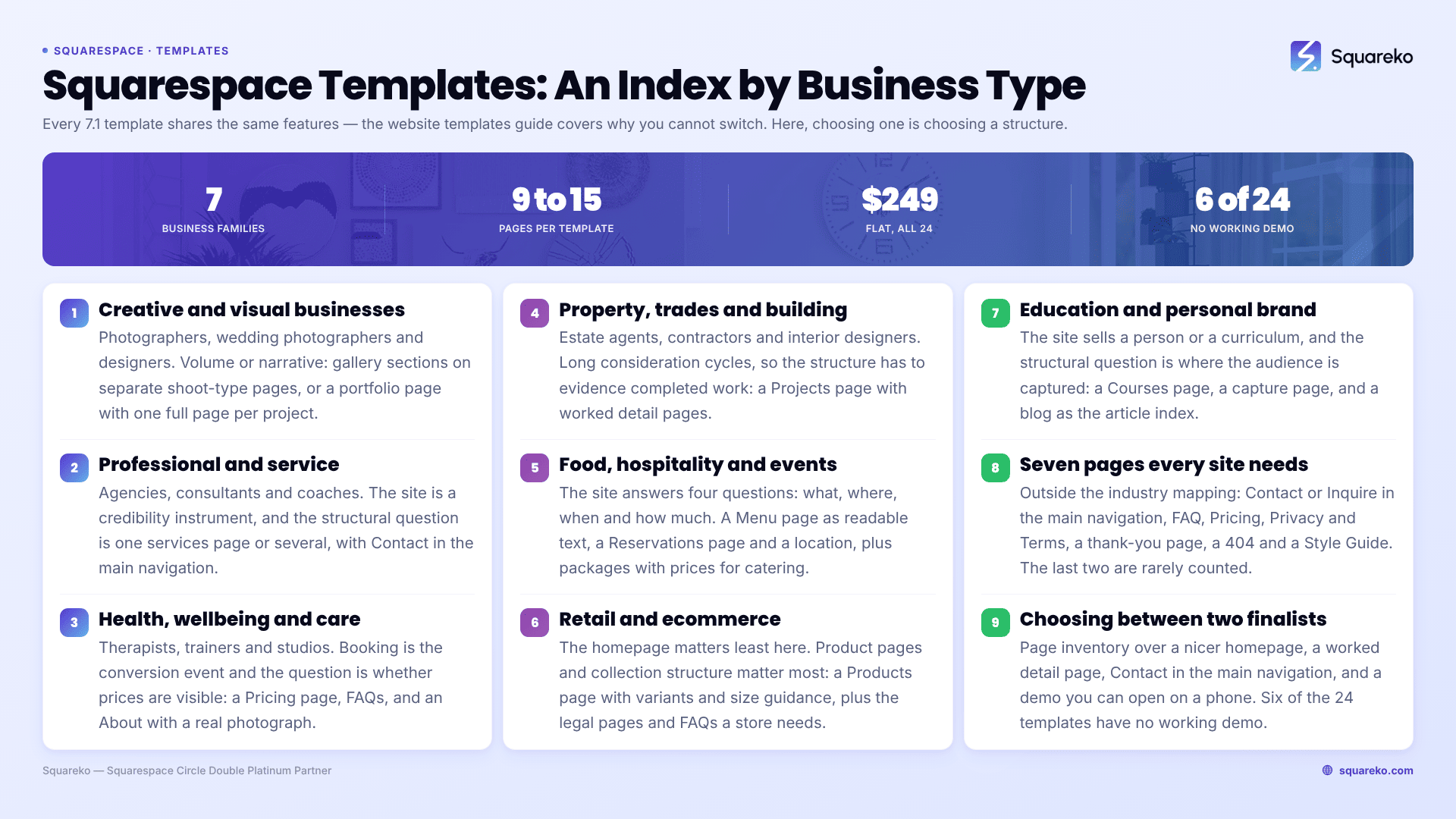
Start from what your website has to do, not from what it looks like. In Squarespace 7.1 every template shares the same features — Squarespace states that all 7.1 sites are in one template family with identical capabilities — so choosing a template is choosing a structure and a page inventory, not a feature set. This index maps business types to the structures that serve them, and routes each to a full guide.
Use the family tables below. Every row gives you the job the site has to do, the Squarespace 7.1 structure that does it, a template in the Squareko range that already ships it, and the detailed guide.
The four structures everything is built from
Before the index, the vocabulary. Four Squarespace 7.1 structures decide almost every template question.
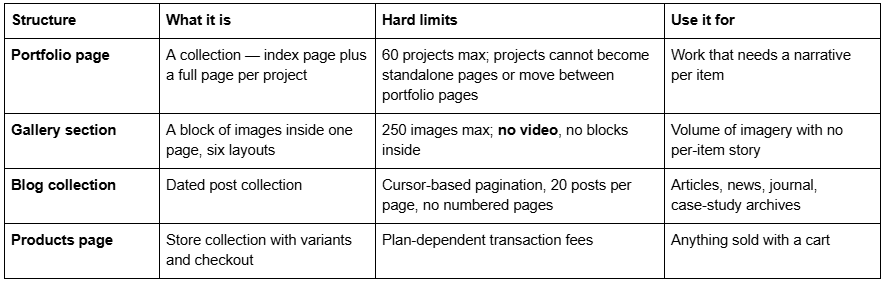
Gallery section layouts are Grid: Simple, Grid: Strips, Grid: Masonry, Slideshow: Simple, Slideshow: Full and Slideshow: Reel. Portfolio index layouts are Grid: Simple, Grid: Overlay, Hover: Background, Hover: Fixed and Hover: Follow Cursor.
Everything else — services pages, pricing pages, FAQ pages, booking pages — is built from ordinary page sections. Which is why page inventory matters more than template styling: the pages a template ships are the pages you do not have to build.
Creative and visual businesses
Work is the product. The structural question is always volume versus narrative.
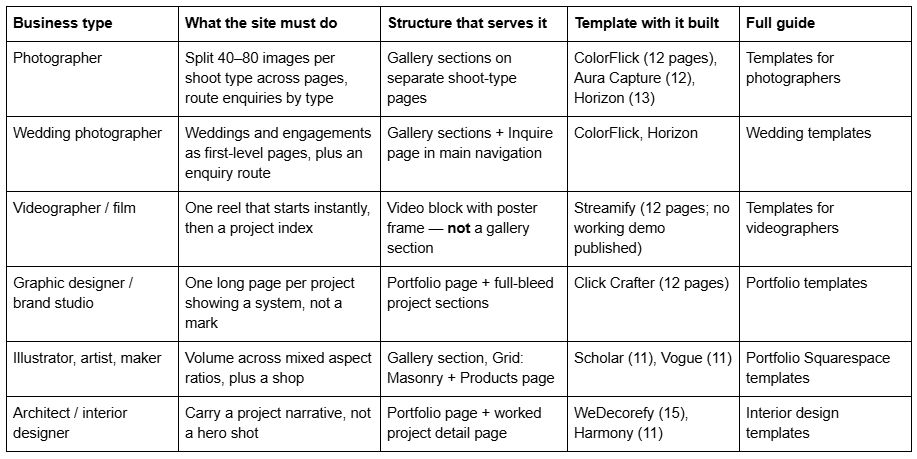
Note the video row: gallery sections cannot hold video at all. Squarespace's documentation states it is not possible to upload videos or add blocks to a gallery section, so a reel goes in a Video block on an ordinary page section.
Professional and service businesses
The site is a credibility instrument. The structural question is one services page or many.
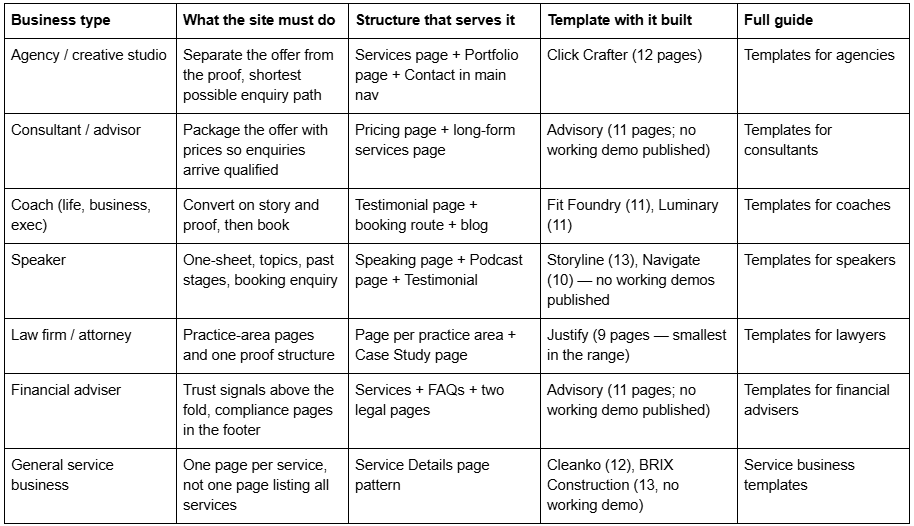
The single most common structural mistake in this family is one services page carrying five services. Each service that people search for separately deserves its own page, which is why a template shipping a Service Details page is worth more than one shipping a nicer homepage.
Health, wellbeing and personal care
Booking is the conversion event. The structural question is whether prices are visible.
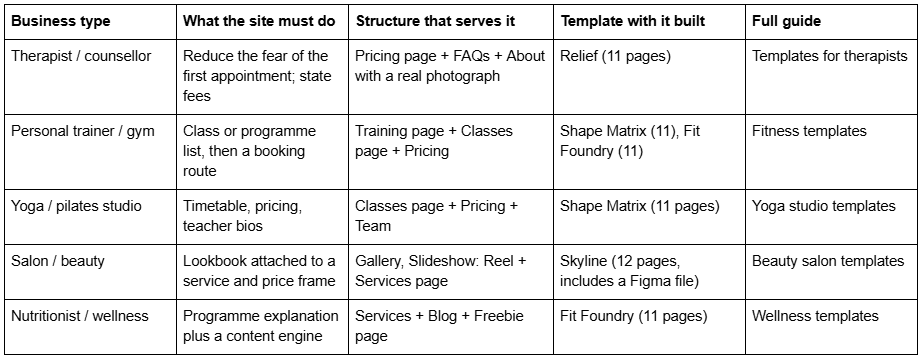
One caution that applies across this family: a page called "Booking" or "Course" in a template's page list tells you a page exists, not what powers it. Nothing published about these templates states whether such pages use Squarespace Member Areas, Acuity Scheduling or a plain form. Ask before you assume.
Property, trades and the built environment
Long consideration cycles. The structural question is how completed work is evidenced.
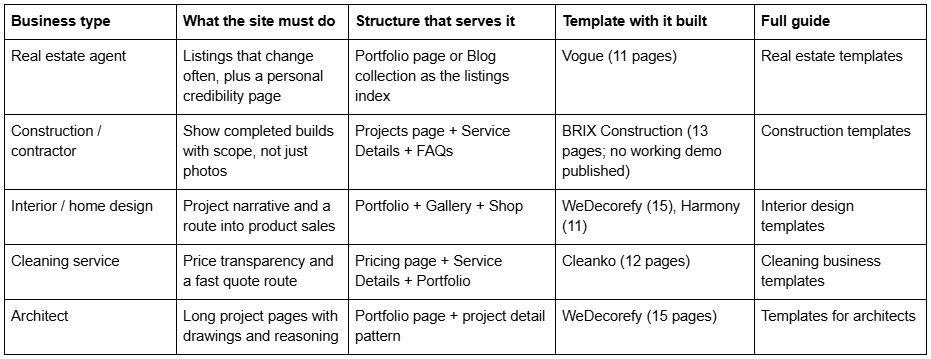
Remember the portfolio limits before loading forty projects: 60 projects per portfolio page, and projects cannot be moved between portfolio pages. If residential and commercial should be separate indexes, decide that before you start, because reorganising later is a rebuild.
Food, hospitality and events
The site answers four questions: what, where, when, how much.
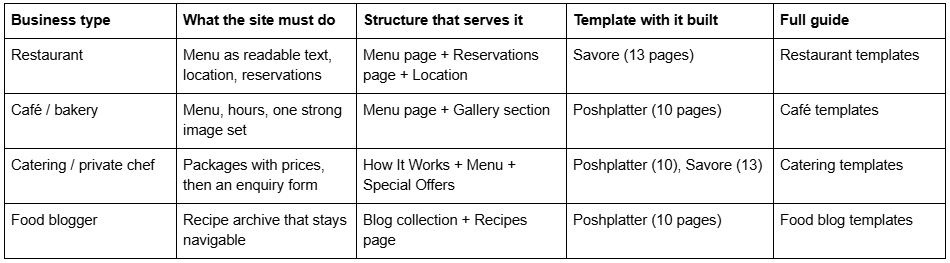
Put menus on the page as text. A PDF menu is invisible to search, unreadable on a phone, and the most common single failure on restaurant sites.
Retail, ecommerce and product businesses
The homepage matters least here. Product pages and collection structure matter most.
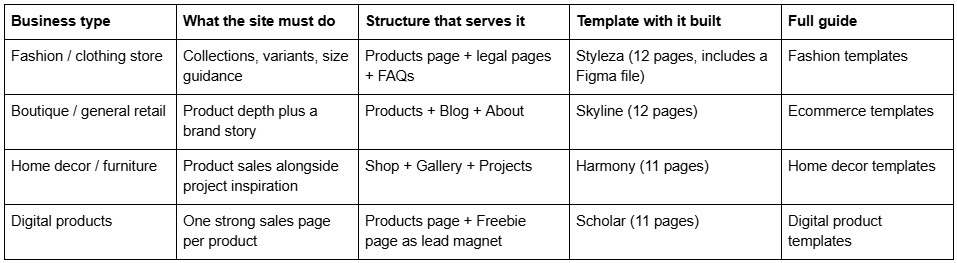
Three legal pages and an FAQ page are not decoration for a store — they are where returns, shipping and sizing questions get answered before they become support email. Styleza ships them.
Education, courses and personal brand
The site sells a person or a curriculum. The structural question is where the audience is captured.
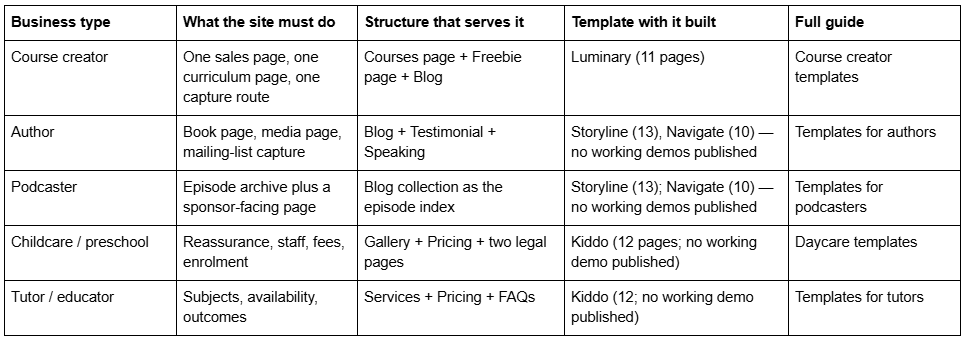
Podcast and course pages are the two places where a template's page list most often overstates what you are getting. A "Course" page is a designed page. Whether it gates content is a separate question with a separate answer.
Pages every business type needs, whatever the row above says
Seven pages sit outside the industry mapping. They are the ones people build late, badly, or not at all, and they are worth checking against any template's page list before you buy.
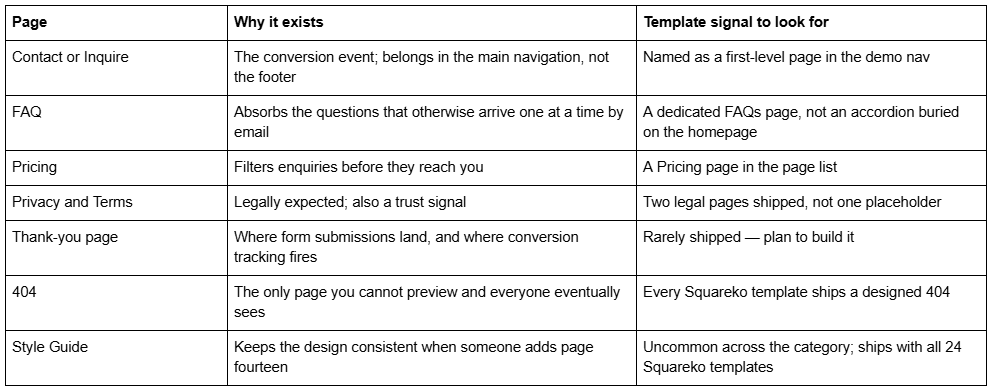
Two of those seven — the thank-you page and the 404 — are almost never in a template's marketed page count, and both matter. A form that submits to a page reload rather than a thank-you page loses you conversion tracking entirely.
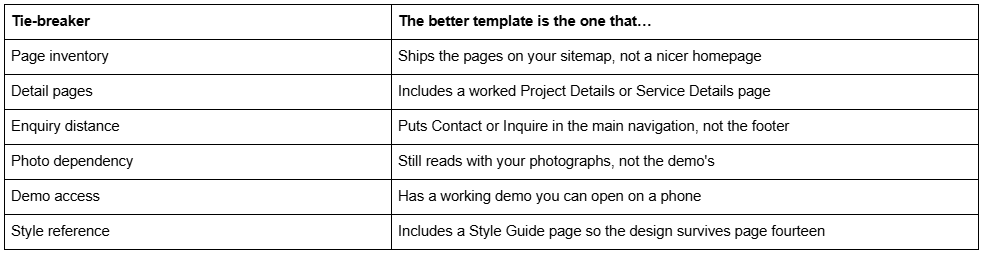
How to choose between two finalists
Six of Squareko's 24 templates — Advisory, BRIX Construction, Kiddo, Navigate, Storyline and Streamify — currently have published demo buttons that omit the required password parameter and return an authentication error. They are named in this index without demo links for that reason. Ask for a walkthrough before buying any template you cannot see.
Using this index
Three steps, in order. Write your sitemap first — the actual pages, on paper. Find your row above and note the structure that serves it. Then compare page inventories, not homepages.
Across the Squareko range page counts run from 9 (Justify) to 15 (WeDecorefy), all at $249, all on Squarespace 7.1 with Fluid Engine, all delivered as a Squarespace contributor invitation rather than a file download. A Squarespace subscription is separate and required, and every demo image has to be replaced before launch because demo photography is not licensed for live use.
If your row above says a structure Squarespace does not ship — a filterable listings index that updates from a feed, gated course content with real access control, a booking system that writes to your own calendar logic — that is a build rather than a template, and hiring makes sense. If it is a starting point you need, the premium Squarespace template range publishes real page lists and working demos for exactly this comparison. For the full decision framework rather than the index, start with the Squarespace website templates buyer's guide.
FAQ
-
Choose by page inventory, not appearance. Write your sitemap first, then pick the template that already ships those pages. In Squarespace 7.1 all templates share the same features, so styling can be changed later — the pages a template ships are the part that saves you real work.
-
A Portfolio page is a collection: the page is an index and each project is a full page you can write into, capped at 60 projects. A Gallery section is a block of images inside one page, capped at 250 images, with six layouts and no ability to hold video or other blocks.
-
Most service businesses need seven to twelve: home, about, one page per service, pricing or FAQs, contact, plus privacy and terms. The common mistake is one services page covering five services. Anything people search for separately should have its own page.
-
No. Commerce is a plan feature, not a template feature — every Squarespace 7.1 template can carry a Products page. An ecommerce-oriented template is worth buying for the product page, collection and legal page structures it ships, not for unlocking the ability to sell.
-
No. Squarespace's documentation states it is not possible to upload videos or add blocks to a gallery section. Video goes in a Video block inside an ordinary page section, embedded from YouTube or Vimeo, with a poster frame set so the page does not look broken while the player loads.
-
Compare page inventories against your sitemap, check whether either includes a worked project or service detail page, check how many clicks separate a piece of work from an enquiry form, and open both demos on a phone. If one has no working demo, that is the tie-breaker.

Author Bio
I'm Walid Hasan, a Certified Squarespace Expert and Squarespace Circle Platinum Partner with over 12 years of hands-on experience designing and optimizing high-performing websites. Over the years, I've had the privilege of building more than 2,000 Squarespace websites for clients around the world, always focusing on clean design, strong user experience, and conversion-driven results.
