
How to Judge a Squarespace Template Before You Buy (7 Tests)
The short answer: Premium Squarespace templates are almost never refundable, so the live demo is the entire purchase decision. Run seven tests on it — mobile at 766px, images degraded, sections counted, page list checked against your own site map, load measured, licence read, support window confirmed. All seven take about twenty minutes and catch nearly every regret in this market.
Nobody can review a template for you, because the question is never "is this a good template" but "is this a good template for the site I need". What follows is the procedure, not a verdict.
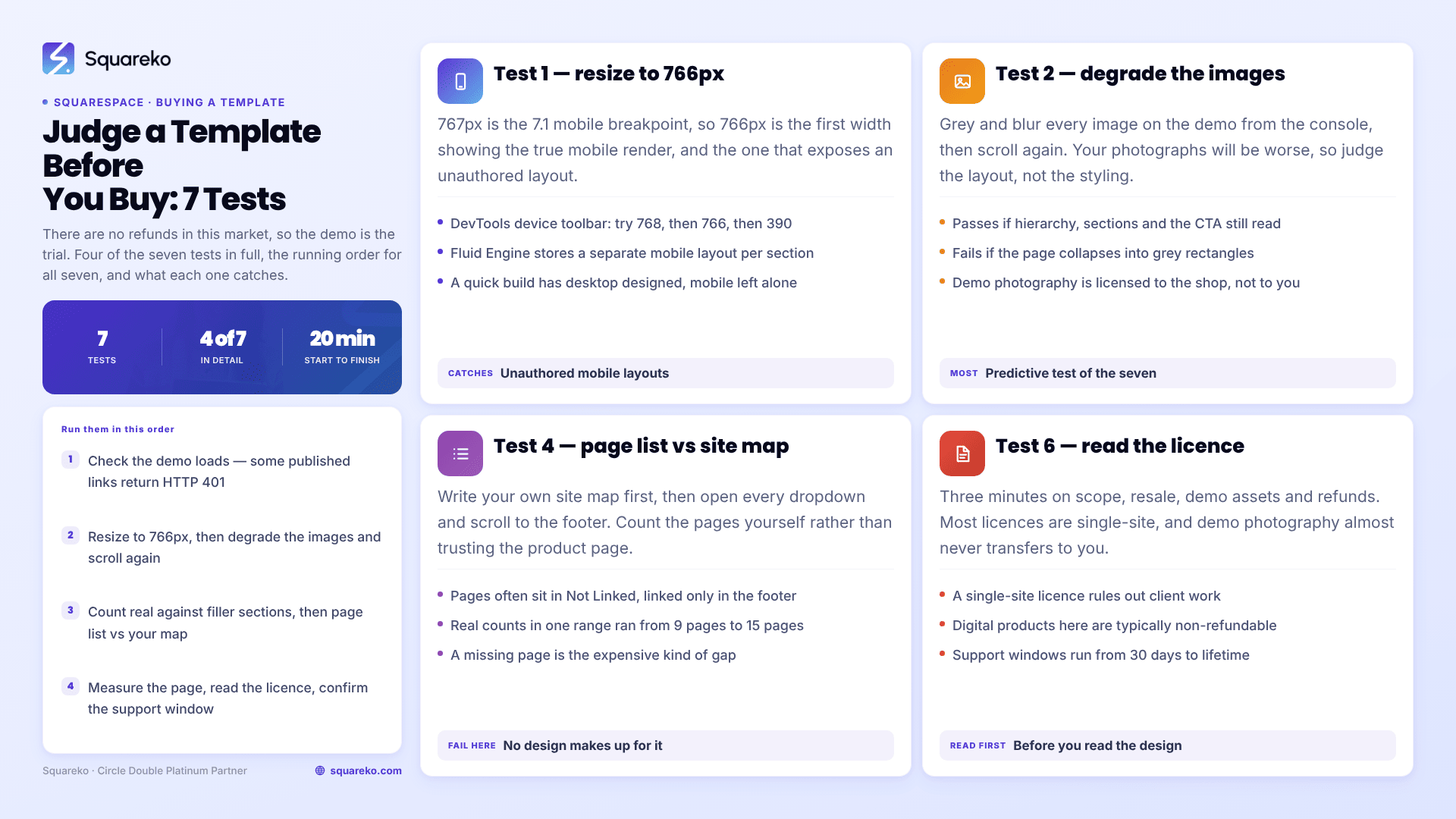
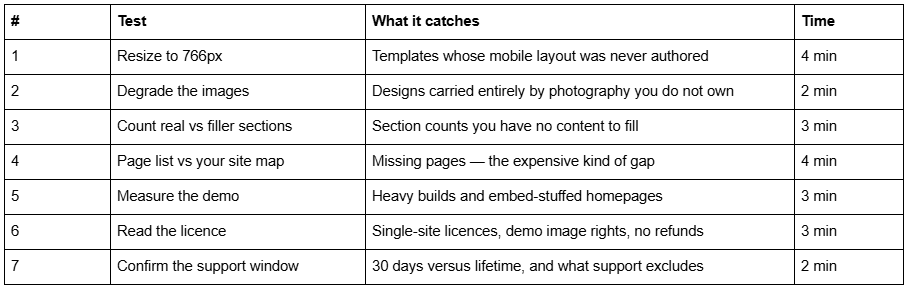
The seven tests, at a glance
Before any of them: the demo has to load. A surprising number of published demo links in this market omit the password parameter and return HTTP 401. If you cannot see a template, do not buy it — email the shop for a working link and treat the delay as data about their support.
Test 1 — Resize the demo to 766px
Squarespace 7.1's main mobile breakpoint is 767px. So 766px is the first width at which you see the true mobile render, and it is the width most likely to expose a template whose mobile layout nobody bothered to author.
Do this:
Open the demo in Chrome. Open DevTools — Cmd + Opt + I on macOS, Ctrl + Shift + I on Windows.
Toggle the device toolbar — Cmd + Shift + M or Ctrl + Shift + M.
Set the width to 768, then to 766. Watch what changes at the boundary.
Then set it to 390 — a common phone width — and scroll the whole homepage.
Why this catches more than it looks like it should. Fluid Engine sections in Squarespace 7.1 store separate desktop and mobile layouts. The mobile arrangement is authored by a human, not derived automatically. A template built quickly will have had its desktop layouts designed carefully and its mobile layouts left to fall where they fall.
It passes if: every section is legible at 766px with no horizontal scrolling, headline sizes actually drop, text never lands on the busy part of a background image, and the stacking order still tells the story in the right sequence.
It fails if: a hero headline stays desktop-sized and runs to six lines, blocks overlap, the primary call to action disappears behind a hamburger menu with nothing above the fold, or a two-column section stacks image-first when the text was the point.
Test 2 — Degrade the images and see what is left
Every demo is photographed to sell the template. Your photographs will be worse. This test simulates that in advance, and it is the single most predictive test in the list.
Do this: open the browser Console in DevTools on the demo page and paste:
/* Greyscale and blur every image on the demo, so you judge the layout rather than the photography. */
document.querySelectorAll('img').forEach(el => {
  el.style.filter = 'grayscale(1) blur(6px)';
});
document.querySelectorAll('[style*="background-image"]').forEach(el => {
  el.style.filter = 'grayscale(1) blur(6px)';
});
Then scroll the homepage again.
It passes if: the page still has visible structure — headings that establish hierarchy, sections that are distinguishable from one another, a call to action you can find without reading. The typography and spacing are doing work.
It fails if: the page collapses into grey rectangles with captions. That template is a photography frame, and it will look like a different product once your images are in it. That is not automatically a reason to walk away — but it means the real cost of that template includes a photographer, and you should price that in before you buy rather than after.
Related obligation people miss: demo images are licensed to the shop, not to you. Every stock photograph in every demo has to be replaced before you launch. This applies across essentially the whole premium Squarespace template market, and almost no product page says it.
Test 3 — Count real sections against filler sections
Premium Squarespace templates advertise large section libraries — Squareko's state 150+ pre-designed sections, and competitors publish similar figures. A section library is only an asset if you have content to put in it.
Do this: scroll the demo homepage once, tallying every section into three buckets.
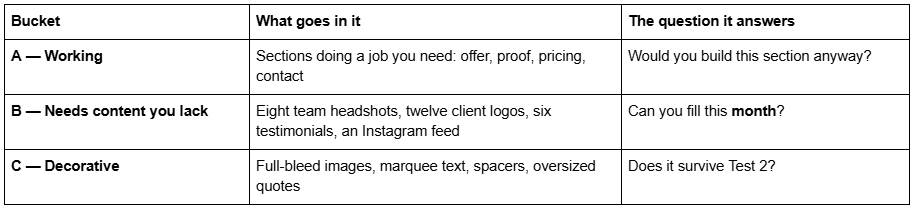
It passes if: roughly half or more of the homepage sits in bucket A, and you can name real content for every bucket B section today.
It fails if: the homepage is mostly bucket B. A template built around social proof you do not have yet will either ship with empty sections or ship with the sections deleted — and once you delete four sections the design you bought is not the design you saw.
Most small businesses have about a dozen sections' worth of genuine content at launch. Judge the library against that number, not against the headline count.
Test 4 — Check the page list against your own site map
This is the test that catches expensive mistakes, and it only works if you do the first step before you look at any demos.
Do this:
Write your site map first. List the pages your business actually sells from — not aspirational pages, the ones you need at launch.
Open the demo's navigation. Open every dropdown folder.
Scroll to the footer. Templates routinely park pages in the Not Linked area of the Squarespace Pages panel and surface them only in the footer: legal pages, FAQs, style guides, service-detail pages.
Count the pages yourself. Do not use the number on the product page.
On that last point, an example against our own marketing. Shops routinely advertise one round page count across a whole range. The actual counts run from 9 pages (Justify, the smallest) to 15 pages (WeDecorefy, the largest). The demo is accurate; the product-page line is not. This pattern is common across the market, and counting takes ninety seconds.
One method that does not work: loading /sitemap.xml on the demo. Password-protected Squarespace sites return an empty sitemap, so there is nothing to count. Use the navigation and the footer.
It passes if: every page in your site map exists in the demo, or the missing ones are simple enough for you to build as new sections.
It fails if: three pages you need are absent. Those pages are where the time goes, and building them yourself means designing sections from scratch — which is the labour you were paying to avoid.
Test 5 — Measure the demo instead of trusting the word "fast"
Almost every Squarespace template shop describes its templates as fast. All Squarespace 7.1 sites run on the same CDN with the same base payload, so "fast" is not a property of the template — it is a property of what has been put on the page.
Do this:
DevTools → Network tab → tick Disable cache.
Hard reload the demo — Cmd + Shift + R or Ctrl + Shift + R.
Read the two numbers in the status bar at the bottom: requests and transferred.
A yardstick to compare against. Across 54 Squareko-built client sites measured in August 2026 — Playwright and Chromium, cloud datacentre, unthrottled, single run per site, load-only CLS, so lab data rather than field data — median page weight was 3.0 MB across 93 requests, with median mobile LCP at 2.01s. Those are complete live business sites, not demos.
It passes if: the demo homepage is broadly in that territory. It is worth a second look if: the homepage is materially heavier, which usually means either a very long page or third-party embeds — video backgrounds, Instagram feeds, review widgets, map embeds — that will follow you onto your own site.
Two caveats, so this test is not overweighted. First, the demo images are not the images you will ship, so a heavy demo is a signal about section count and embeds, not a verdict on speed. Second, the Squarespace CDN serves WebP unconditionally regardless of what was uploaded, so image format is never the variable — dimensions and quantity are. Also note that PageSpeed Insights frequently cannot audit a password-gated demo, which is why this test uses your own browser.
Test 6 — Read the licence before you read the design
Three minutes, and it is the test people skip.
Find and read the licence or terms link on the product page or in checkout. Look for four things:
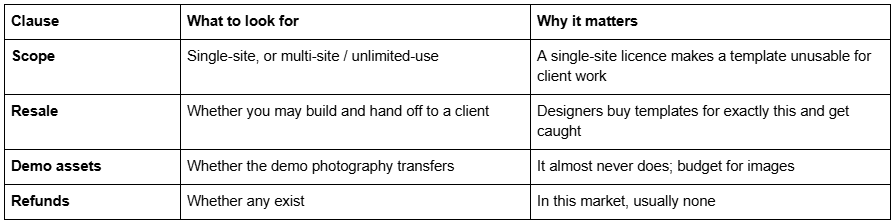
On refunds specifically: digital products in the premium Squarespace template market are typically non-refundable, and Squareko is no exception — our stated policy is that templates cannot be returned, exchanged or refunded under any circumstances. That is standard for the category, and it is exactly why the other six tests exist.
If you cannot find a licence in two minutes, email the shop and ask for it in writing before you pay. Keep the reply.
Test 7 — Confirm the support window and what "support" excludes
Published support windows in this market run from 30 days to lifetime. The number is easy to find; what it covers is not.
Do this: find the published duration, then send the shop one specific pre-sales question — something like "does this template's Services page use Fluid Engine sections or classic sections?" — and time the reply. You are testing responsiveness, not the answer.
What to establish before you buy:
How many days, from purchase or from install.
Whether installation is included or paid. Some shops deliver a whole site, some deliver a guide.
Whether customisation is included. It almost never is. Squareko publishes 60 days of email support alongside a 5-day course, a private community and video tutorials, and states plainly that customisation is not part of the template price. Big Cat Creative publishes lifetime support, which is the longest window in this category.
It passes if: you can state the number of days and the exclusions from memory. It fails if: the product page says "support included" and nothing else.
Running all seven
Twenty minutes, in this order: check the demo loads, resize to 766px, degrade the images, count the sections, check the page list against your site map, measure the page, read the licence, confirm support. A template that survives all seven is very unlikely to disappoint you, and one that fails Test 4 will disappoint you no matter how good the design is.
If you would rather not own the build at all — and for a lot of people the honest answer is that the twenty minutes of testing is fine but the fortnight of assembly is not — that is what our premium Squarespace templates are structured around: 9 to 15 real pages, delivery by contributor invitation rather than files, installation onto an existing site where you need it, and 60 days of email support afterwards. Run the seven tests on our demos first. They are the same seven we would want you to run on anyone else's.
FAQ
-
Open the demo in Chrome, open DevTools with Cmd/Ctrl + Shift + I, toggle the device toolbar with Cmd/Ctrl + Shift + M, and set the viewport to 766px. Squarespace 7.1's mobile breakpoint is 767px, so 766px is the first true mobile render. Then check 390px as well.
-
Premium templates from third-party shops are usually not. Several shops, Squareko included, state that digital products cannot be returned, exchanged or refunded under any circumstances. Always read the refund clause before paying, and treat the live demo as the entire purchase decision rather than a preview.
-
Enough to match the site map you wrote before shopping. Premium templates commonly ship 9 to 15 pages. The number on a product page is often wrong, so count the demo's navigation and footer yourself — pages parked in the Not Linked area frequently appear only in the footer.
-
Almost never. Demo photography is licensed to the template shop, not passed to buyers, and must be replaced before you launch. Budget for photography or stock licensing as part of the template cost. Very few product pages mention this obligation, and it catches out most first-time buyers.
-
Only if the licence says so. Most premium Squarespace template licences are single-site, which makes them unusable for agency or freelance client work. A small number of shops sell unlimited-use or extended licences specifically for designers. Check the scope clause before buying, not after.
-
Published windows range from 30 days to lifetime. Squareko provides 60 days of email support plus a 5-day course, private community and video tutorials. Support almost never includes customisation on any shop — read what is excluded, because that exclusion is where the disagreements happen.

Author Bio
I'm Walid Hasan, a Certified Squarespace Expert and Squarespace Circle Platinum Partner with over 12 years of hands-on experience designing and optimizing high-performing websites. Over the years, I've had the privilege of building more than 2,000 Squarespace websites for clients around the world, always focusing on clean design, strong user experience, and conversion-driven results.
