
Squarespace Template Installation Service: Done in 48 Hours
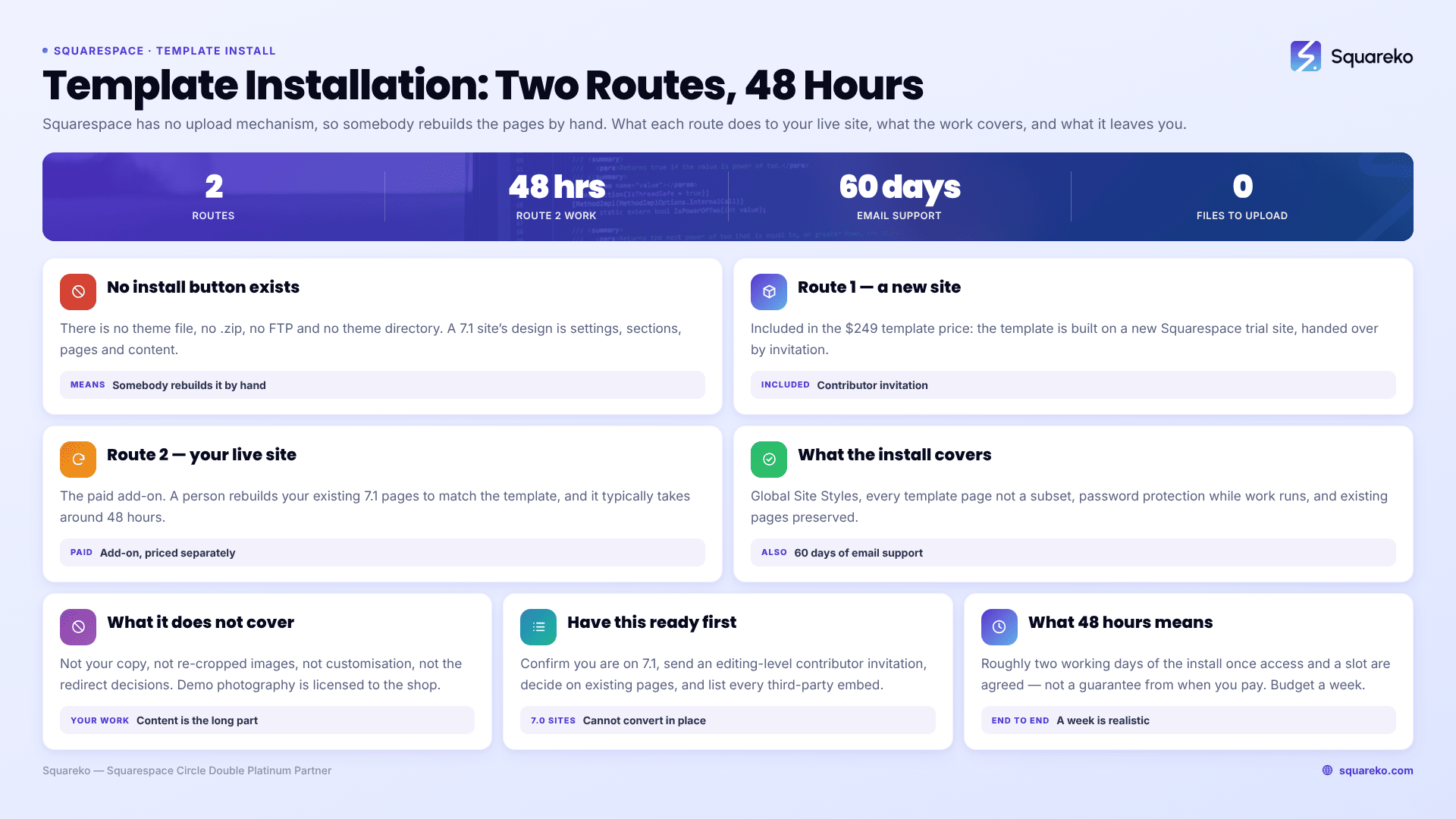
The short answer: Squarespace has no "install template" button, so installation is human work. There are two routes — a new trial site built and handed to you, which is included, or a manual install onto your existing live site, which is a paid add-on and takes around 48 hours. Your existing site stays live throughout either one.
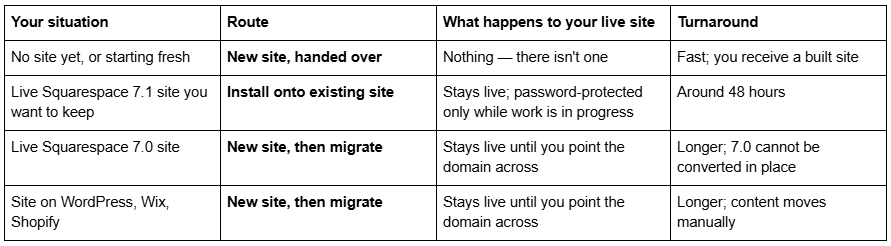
Which route applies to you
Why installation is a service at all
Squarespace 7.1 has no mechanism for uploading or applying a template to an existing site. There is no theme file, no .zip, no FTP and no theme directory. A Squarespace site's design is not a file — it is the sum of its Site Styles values, its sections, its page list and its content.
That means every premium Squarespace template has to be delivered as access to a site that already has those values set. Squareko's own wording: there are no external files to download or upload, unlike WordPress themes. The template arrives as a Squarespace contributor invitation.
It also means that putting a template on an existing site is genuinely manual work. Somebody rebuilds the pages. There is no shortcut, at any shop, at any price.
Route 1 — a new site, built and transferred to you
This is the default and it is included in the $249 template price.
You buy the template.
Squareko builds it on a new Squarespace trial site, with a 12-month trial window, so there is no subscription pressure while you work on it.
You receive a contributor invitation by email. Accepting it gives you access to the site.
Ownership is transferred to you.
You replace the demo content with your own, then subscribe and connect a domain when you are ready to launch.
Your existing website, if you have one, is untouched and stays live the whole time. The new site is a separate Squarespace site. Nothing is switched over until you choose to point a domain at it.
The Squarespace subscription is separate and required — the template price covers the design and use of the template only. Squareko passes on 20% off the first year as a Squarespace Circle partner.
Route 2 — installation onto your existing Squarespace site
This is the paid add-on, and the one people mean when they search for an installation service. It is a fully manual process and typically takes around 48 hours.
Here is the sequence.
You send access. A contributor invitation to your existing Squarespace site, at a permission level that allows editing.
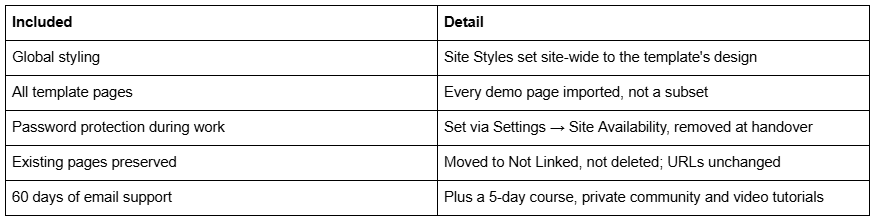
The site is password-protected while work is in progress. This is set in Settings → Site Availability → Password Protected. Visitors see a lock screen rather than a half-built page. Your domain, hosting and email are unaffected.
Global styling is applied. Fonts, type scale, colour palettes, button styles and spacing constants are set in Website → Site Styles to match the template. This is site-wide and it is the step that makes everything else look like the template rather than like a patchwork.
All demo pages are imported. Every page from the template is built on your site — not a homepage and a promise, the full 9 to 15 pages the template ships with.
Your existing pages are moved to Not Linked. They are not deleted. In the Squarespace 7.1 Pages panel, Not Linked removes a page from navigation while leaving it live at its original URL. Nothing 404s and nothing is lost.
The password is removed and the site is handed back.
What you get back is your site, with the template's design and page structure on it, and your old pages parked safely out of the navigation.
What is included
What is not included
This list matters more than the one above, because it is where expectations break.
Rewriting or adjusting your existing content. The installation puts the template's structure and styling on your site. It does not move your copy into the new pages, rewrite it to fit the new layout, or re-crop your images to the new aspect ratios. That is your work, or a separate piece of paid work.
Customisation. Changing the template's layout, adding sections that are not in it, or building new page types is not part of installation and is not part of the template price at any shop I know of.
Demo images. Template demo photography is licensed to the shop, not passed to you. Every demo image has to be replaced with your own before you launch. This applies across the whole premium template market and almost no product page mentions it.
Redirects and URL decisions. Your old pages remain live at their original URLs in Not Linked. At some point you will decide whether to keep or delete them. If you delete one, Squarespace creates no automatic 301 redirect, ever — you build the redirect yourself in Settings → Developer Tools → URL Mappings. Decide this deliberately rather than discovering it in Search Console.
The Squarespace subscription. Separate, required, and not included in any template price anywhere.
What to have ready before you hand over access
Installs stall on missing information far more often than on technical problems. Five things, gathered in advance, remove almost all of that.
Confirmation you are on Squarespace 7.1. See the version check below — this determines whether an install is possible at all.
A contributor invitation at an editing permission level, sent to the installer's email address.
A decision on your existing pages. Which ones you want kept, and which you are happy to retire once the new structure is live. Nothing is deleted during the install, but knowing this early saves a second pass.
Your logo files and brand colours, if you want your own palette applied rather than the template's. The global styling step is the cheapest moment to make that change.
A list of every third-party embed currently on the site — booking widgets, review feeds, forms wired to external tools, tracking snippets. Pages get rebuilt during an install, and an embed nobody knew about is the classic thing to lose.
What "around 48 hours" actually means
It is roughly two working days of the install itself, once access and scheduling are sorted. It is not a two-day guarantee from the moment you pay, and no honest shop offers one — The Denizen Co, for comparison, quotes a lead time of a few hours for the work but schedules installs four to five business days after the inquiry.
The realistic sequence is: buy, send access, agree a slot, then about 48 hours of work. Budget a week end to end and you will not be disappointed.
The longer part is always yours. Installation ends with a styled site full of demo content. Replacing that content with your own copy and photography is the part that takes people weeks, and no installation service shortens it.
One thing to check before you buy: your Squarespace version
Premium templates in this market are built for Squarespace 7.1. If your existing site is on Squarespace 7.0, it cannot be converted to 7.1 in place — 7.0 and 7.1 are separate architectures. The route in that case is a new 7.1 site with content migrated across and a redirect map built before the domain moves, which is a bigger project than a template install.
You can check your version quickly: 7.1 sites build pages from sections and have a Site Styles panel that applies globally. 7.0 sites have template-specific style options and a named template family such as Brine or Bedford.
Whether to hand this over
If you have no existing site, installation is a non-issue — every premium template comes as a built site you receive by contributor invitation, and there is nothing to install.
If you have a live site with traffic, content and rankings that you want to keep, the install is real work with real ways to get it wrong, and the URL decisions afterwards matter more than the design does.
That second case is what Squareko's premium Squarespace templates and the installation add-on are built for: your site stays live, it is password-protected only while the work happens, your existing pages are preserved rather than deleted, and you get it back in about 48 hours with 60 days of email support behind it. If you are comfortable in Fluid Engine and have a free weekend, doing it yourself is a perfectly reasonable alternative — the template is the same either way.
FAQ
-
Yes, but only as manual work — Squarespace 7.1 has no upload or apply-template function. A person applies the template's Site Styles globally and rebuilds every page. Squareko offers this as a paid add-on taking around 48 hours, with your existing pages moved to Not Linked rather than deleted.
-
No. Existing pages are moved to the Not Linked area of the Squarespace 7.1 Pages panel, which removes them from navigation while leaving them live at their original URLs. Nothing is deleted and nothing 404s. Your copy is not moved into the new template pages automatically, though — that part stays with you.
-
Not offline, but it is password-protected while the work happens, using Settings → Site Availability → Password Protected. Visitors see a lock screen instead of a half-built page. Your domain, DNS and email keep working throughout, and the password is removed at handover.
-
About 48 hours of work for an install onto an existing site, once access and a slot are agreed. Budget roughly a week end to end. Replacing demo content with your own copy and photography takes considerably longer and is not part of the installation.
-
It depends on the route. Delivery as a new trial site, built and transferred to you by contributor invitation, is included in Squareko's $249 price. Installation onto an existing live site is a separate paid add-on because it is manual rebuilding work rather than a handover.
-
No. Premium templates are built for Squarespace 7.1, and a 7.0 site cannot be converted to 7.1 in place — they are separate architectures. The route is a new 7.1 site with content migrated across and redirects mapped before the domain moves.

Author Bio
I'm Walid Hasan, a Certified Squarespace Expert and Squarespace Circle Platinum Partner with over 12 years of hands-on experience designing and optimizing high-performing websites. Over the years, I've had the privilege of building more than 2,000 Squarespace websites for clients around the world, always focusing on clean design, strong user experience, and conversion-driven results.
