
Where to Buy Squarespace Templates (And What to Check Before You Do)
You cannot buy a template from Squarespace. Squarespace's own templates are included with a plan, at no extra cost, and there is no Squarespace store selling third-party designs. Every paid Squarespace template comes from an independent designer or shop, sold either direct from that shop's own site or through a marketplace like Creative Market or Etsy. That distinction drives everything else, because it means there is no platform-level refund policy, no platform-level quality bar, and no platform holding your money in escrow.
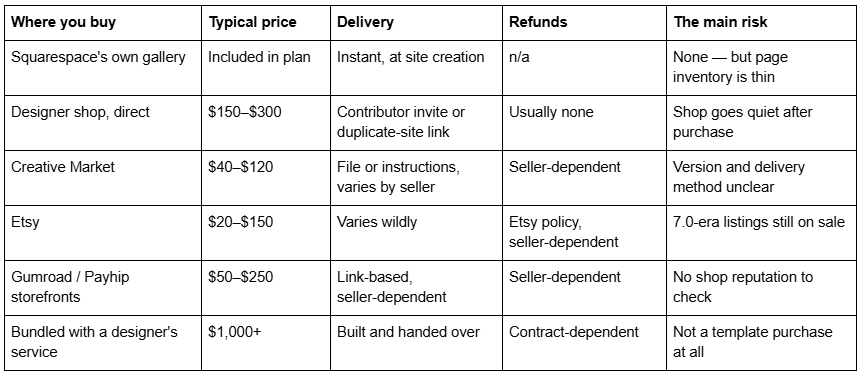
Here is where the credible channels are, and the twelve things to check before you pay.
Quick channel table
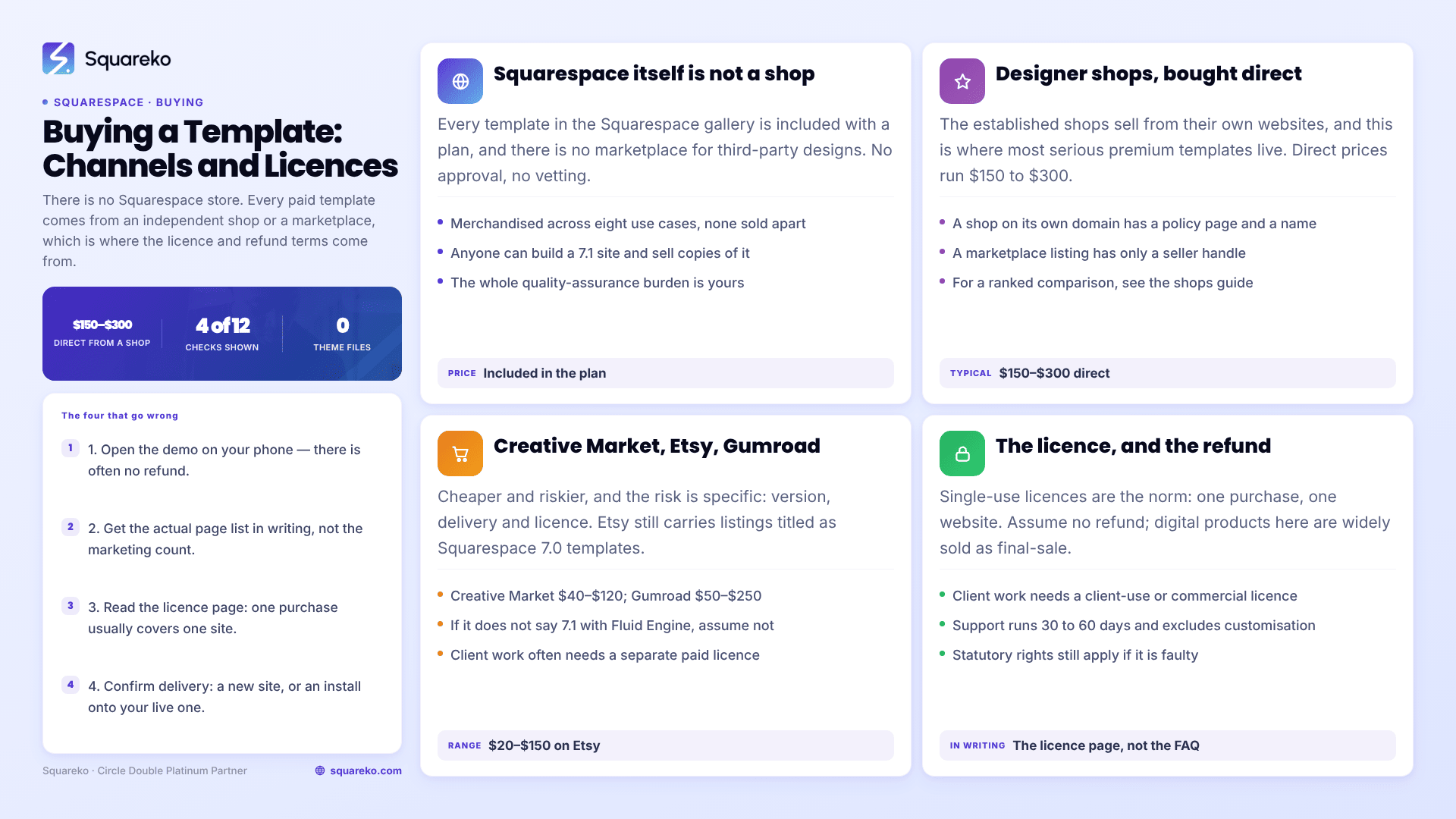
Channel 1 — Squarespace itself: not a shop
Start here because it removes a common misconception. Squarespace's template gallery is not a store. Every template on it is included with any plan, and Squarespace's designer-templates page merchandises them across eight use cases — blogs, portfolios, online stores, restaurants, photography, personal and CV, weddings, professional services — without selling any of them separately.
Squarespace also does not resell third-party templates. There is no official marketplace, no approval process, no vetting. Anyone can build a Squarespace 7.1 site and sell copies of it. That is not a criticism of the category — some of the best work in the Squarespace ecosystem is sold this way — but it does mean the entire quality assurance burden is on you.
Channel 2 — Designer shops, direct: where the good work is
The established shops sell from their own websites, and this is where most serious premium Squarespace templates live. The ones with a genuine track record include Big Cat Creative (the largest catalogue and the fullest industry taxonomy), Applet Studio (around 30 templates at roughly $225, with dedicated industry landing pages), Station Seven, Paper Moon Websites, Go Live HQ, Ink and Mortar, SQSPThemes, Square Stylist and Golden Coast Design. Squareko's own range sits in this group at 24 templates, all $249.
Buying direct is generally the safer route, for a reason that has nothing to do with quality: a shop selling from its own domain has a support page, a policy page and a reputation attached to a name. A marketplace listing has a seller handle.
For a ranked comparison of the shops themselves — catalogue size, pricing, what each is genuinely best at — see the best Squarespace template shops. This post assumes you have picked a shop and are about to pay.
Channel 3 — Creative Market, Etsy and the marketplaces
Marketplaces are cheaper and riskier, and the risk is specific rather than general.
Version risk is the big one. Squarespace has discontinued a long list of version 7.0 templates, and while existing 7.0 sites stay online — Squarespace says such a site "will stay online, and you can continue to use and edit the template as you've always been able to", though new features and fixes are "not guaranteed" — you should not be starting a new business site on 7.0 in 2026. Etsy still carries listings explicitly titled as Squarespace 7.0 templates. Read the title, and if the listing does not say 7.1 with Fluid Engine, assume it is not.
Delivery risk is the second. Marketplace sellers deliver in every conceivable way: a PDF of instructions, a set of section screenshots to rebuild manually, a duplicate-site link, a contributor invite. Squarespace has no theme-file format, so anything sold as a "download" is either instructions, a Figma file, or something that is not a working site.
Licence risk is the third, and it is the one that catches designers. Marketplace licences are often single-use, and using a template on a client site can require a separate commercial or client-use licence — Etsy sellers list these as paid add-ons.
Marketplaces are a reasonable place to buy a section pack, a Figma kit or a low-stakes personal site. They are a poor place to buy the foundation of a business you intend to run for five years.
How a Squarespace template is actually delivered
This is the part almost nobody explains, and it changes what "buying" means.
There is no theme file. Squarespace has no equivalent of a WordPress theme zip. You cannot download a Squarespace template and upload it to your site. What a shop sells is a copy of a site, and there are only two mechanisms for moving one.
Mechanism A — duplicate site plus contributor invite. The shop duplicates its template site inside its own account, invites you as a contributor with Administrator access, and then transfers ownership once you accept. Big Cat Creative documents this five-step process publicly, and notes the practical catch: a duplicated site starts as a trial — 14 days for a standard account, longer for Circle members — and that trial clock transfers with the site. You need to subscribe before it expires. It also means the shop needs the email address associated with your Squarespace account, not the one you paid with.
Mechanism B — installation onto an existing site. If you already have a live Squarespace site with content, ranking pages and a domain, mechanism A does not help you: it gives you a second, separate site. Installing a template onto an existing site is a manual rebuild. At Squareko it is a paid add-on and "a fully manual process" that typically takes around 48 hours, with your existing site staying live throughout. Not every shop offers it at all.
The practical consequence: ask which mechanism you are buying before you pay, and if you have an existing site, ask specifically. "Instant delivery" almost always means mechanism A.
The twelve checks to run before you pay
Run these in order. The first four are the ones that actually go wrong.
1. Does the demo link work, and does it work on your phone? Open it. Scroll it. A surprising number of published demo links are broken — of the 24 templates in Squareko's own range, six currently have demo buttons that omit the required password parameter and return an HTTP 401, and those are not linked anywhere on this site for exactly that reason. If a shop cannot keep its demo links alive, ask what else is unattended. If there is no working demo, ask for a screen-share walkthrough before buying.
2. What is the actual page list? Not the marketing count — the list. Many shops publish a boilerplate page count that does not match the template. Across Squareko's own range the published line says "10 pages" on every product page while real counts run from 9 to 15, which is why this site publishes per-template page lists instead. Ask for the list, and check it against the sitemap you wrote before you started shopping.
3. What does the licence permit? Single-use licences are the norm: one purchase, one website. Candor's published policy is representative — "a limited, non-exclusive, non-transferable, single-use licence to use the template for one Squarespace website only." If you are a designer buying for a client, you usually need a separate client-use or commercial licence, and using a single-use licence across three client sites is a breach whether or not anyone notices.
4. What is the refund policy, in writing? Assume none. Digital products are widely sold as final-sale across this category, and Squareko's own policy is explicit: digital products "cannot be returned, exchanged, or refunded under any circumstances." Statutory rights for faulty or misdescribed goods still apply in most jurisdictions, but "it didn't suit my business" is not a fault. This is why check 1 matters more than any other check.
5. How long does support last, and what does it cover? Support windows in this category run from 30 days to 60 days of email support. Squareko's is 60 days. Candor's is 30. Read what is excluded — almost universally, customisation is not included, and neither is anything that is a Squarespace platform issue rather than a template issue.
6. Is it Squarespace 7.1 with Fluid Engine? Say it out loud. A template built in the Classic Editor will fight you every time you edit a section. Any 7.0 listing is a non-starter for a new business site.
7. Are the demo images licensed to you? They are not, at any shop. Squarespace's own Terms of Service state that demo content is for inspiration only with no licence for live use, and third-party shops carry the same restriction on their photography. Budget for replacing every image. This is the single largest hidden cost of a template purchase.
8. What Squarespace plan does it require? Templates work on the entry plans, but individual features do not. Anything requiring the Custom CSS panel (Website → Website Tools → Custom CSS) needs a Core plan or above. Commerce features and code injection sit at higher tiers. If a shop is vague about plan requirements, that is a signal.
9. Is the shop still active? Check the blog date, the Instagram date, the copyright year in the footer, and whether the last new template was this year. Shops in this category rebrand and go quiet regularly — one of the most-cited "60+ shops" listicles still names a shop that has since rebranded entirely. A dormant shop will not answer a support email in month two.
10. How is it installed, and by whom? Mechanism A or mechanism B (above). If you have an existing site, get the answer in writing, along with the timeframe and whether your current site stays live during the process.
11. Does it include a style reference? A Style Guide page — one page holding the heading scale, button styles, colour themes and image treatment — is uncommon and disproportionately useful. It is what stops a site drifting when someone adds page fourteen. Every template in the Squareko range includes one; most shops do not mention it either way.
12. Are the trust signals sourced? Be sceptical of unsourced aggregates. A five-star badge with no named review platform, no dates and no per-template breakdown is decoration, not evidence — including when it appears on Squareko's own product pages, which is why no figure of that kind is quoted anywhere in this article. Look for dated reviews on a named platform, or named clients with live URLs.
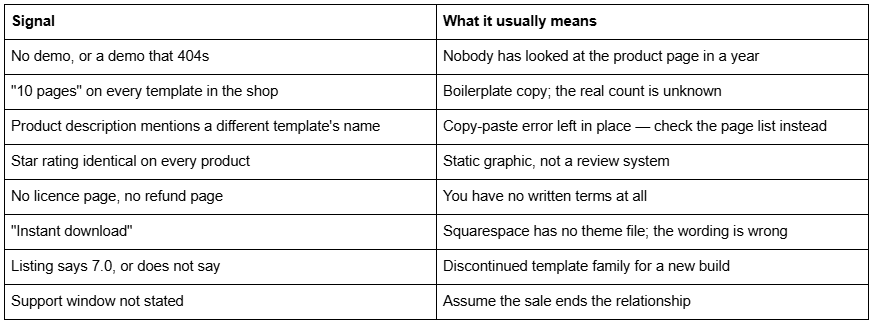
Red flags
What a fair price looks like in 2026
Premium Squarespace templates cluster between $150 and $300 when bought direct from a designer shop. Applet Studio sits around $225. Squareko's 24 templates are all $249, with no sale price and no variants. Marketplace listings go lower, sometimes far lower, and the price difference is usually explained by page count, delivery method and whether support exists.
Two costs that are not in the sticker price:
The Squarespace subscription is separate and required. A template price covers the design and its use, not hosting. Squareko recommends the Business plan and passes on 20% off the first year.
Installation onto an existing site is generally a paid add-on wherever it is offered at all.
Below roughly $80, you are usually buying either a section pack, a Figma file, or a template with no support attached. That can be a perfectly rational purchase — just know which one it is.
Buying a Squarespace template for a client
Designers buying on a client's behalf have three extra checks, and all three are contractual rather than aesthetic.
Whose account does it land in? Delivery is a transfer of site ownership, so the email address you supply determines who owns the site. Supply the client's Squarespace account email if the client is paying the subscription; supply your own only if you intend to transfer again later, which means doing the handover twice.
Does the licence cover client work? A single-use licence covers one website. Whether that website may be a client's is a separate question and is answered on the licence page, not in the FAQ. Some shops sell an explicit client-use or extended licence; others prohibit resale outright. Buying one template and deploying it across four client sites is the most common licence breach in this category.
What happens to support? Support windows are typically tied to the purchase, not to the site. If you buy in March and hand over in June, a 60-day window has already closed. Where support is the reason you are paying, buy close to the build date.
One more thing worth agreeing in writing before the project starts: the template is the starting point, not the deliverable. Clients who have seen the demo will expect the demo, and the demo's photography is not licensed to anyone. Set that expectation early or it becomes an argument in week three.
Buying well is mostly checking two things
If you do nothing else from this article: open the demo on your phone, and get the page list in writing. Almost every regret in this category traces back to one of those two. The refund policy will not save you, because there usually is not one.
After that, the ordering is straightforward. Buy direct from a shop with a name and a policy page rather than from a marketplace listing, unless price is the binding constraint. Confirm 7.1 and Fluid Engine. Confirm which delivery mechanism applies to your situation — a fresh site or an install onto an existing one. Confirm the support window. And budget properly for photography, because the images that sold you the template are not coming with it.
If you would rather compare the shops themselves before choosing, the ranked list of Squarespace template shops does that in one table. If your sitemap has already outgrown what any template ships — a filterable index, gated content, a multi-step enquiry flow — then this is a build rather than a purchase, and no $249 product will close that gap. And if a template is what you need, the Squareko premium template range is $249 with a working demo, a published page list, 60 days of support and installation included. Most people reading this will buy from somewhere else, and that is fine; the checklist above works the same whoever you buy from.
FAQ
-
No. Squarespace's own templates are included with any plan at no extra cost, and Squarespace does not operate a marketplace for third-party designs. Every paid Squarespace template is sold by an independent designer or shop, either from their own website or through a marketplace such as Creative Market or Etsy.
-
Not as a file — Squarespace has no theme file format. The shop duplicates its template site, invites you as a contributor with Administrator access, then transfers ownership. A duplicated site arrives on a trial clock, so subscribe before it expires. Installing onto an existing live site is a separate, manual process.
-
Usually not. Most shops sell a single-use licence covering one Squarespace website only, non-transferable. Designers building client sites generally need a separate client-use or commercial licence, sold as an add-on. Read the licence page before buying, not after.
-
Assume not. Digital products in this category are widely final-sale, and Squareko's published policy states they cannot be returned, exchanged or refunded under any circumstances. Statutory rights apply if a product is faulty or not as described. Use the demo thoroughly first — that is your only real due diligence.
-
Direct from a designer shop, typically $150 to $300. Applet Studio sits around $225 and all 24 Squareko templates are $249. Marketplace listings run lower. The Squarespace subscription is always separate and required, and installation onto an existing site is usually a paid add-on.
-
Some are. The risks are specific: listings still advertise discontinued Squarespace 7.0 templates, delivery methods vary from contributor invites to PDFs of instructions, and licences are frequently single-use with client work sold as a separate add-on. Check for 7.1 and Fluid Engine in the listing title before anything else.

Author Bio
I'm Walid Hasan, a Certified Squarespace Expert and Squarespace Circle Platinum Partner with over 12 years of hands-on experience designing and optimizing high-performing websites. Over the years, I've had the privilege of building more than 2,000 Squarespace websites for clients around the world, always focusing on clean design, strong user experience, and conversion-driven results.
