
Childcare Squarespace Website Templates: Getting the Enrolment Form Right
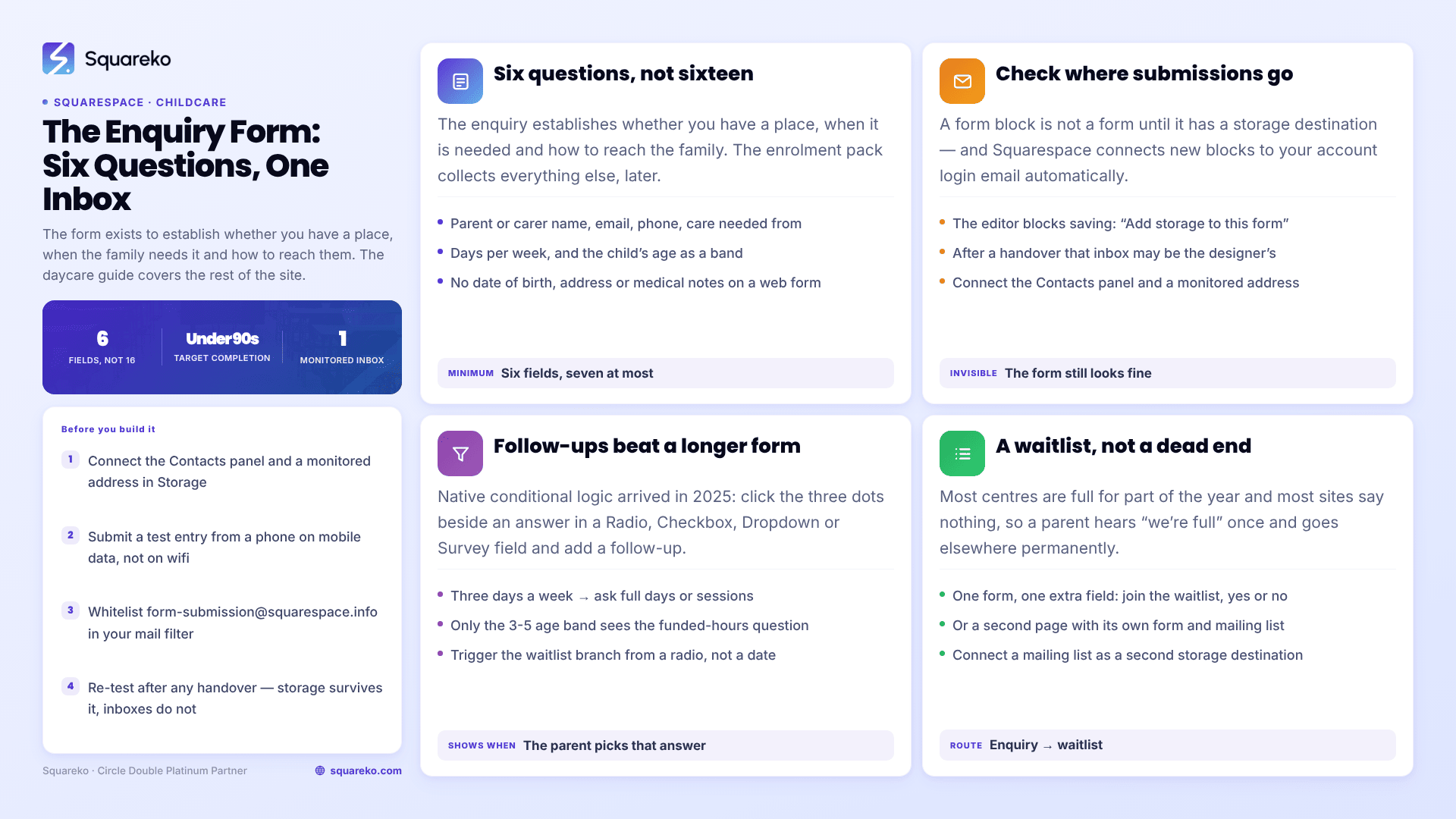
The short answer: An a childcare website the enrolment enquiry form is the conversion point, and it is the part templates get least right. A Squarespace form block connects to your account login email by default, which is often the wrong inbox after handover. Ask six questions, not sixteen. Leave the child's date of birth, medical notes and full address to the enrolment pack, not the website.
Everything else on a childcare Squarespace website — the gallery, the staff page, the pricing table — exists to get a parent to that form. This guide covers the form itself: what to ask, where submissions go, how to run a waitlist, and what collecting children's details actually obliges you to do.
For the broader question of how to structure the whole site, see our guide to Squarespace templates for daycares and childcare centres. This page assumes you have the site and are now building the form.
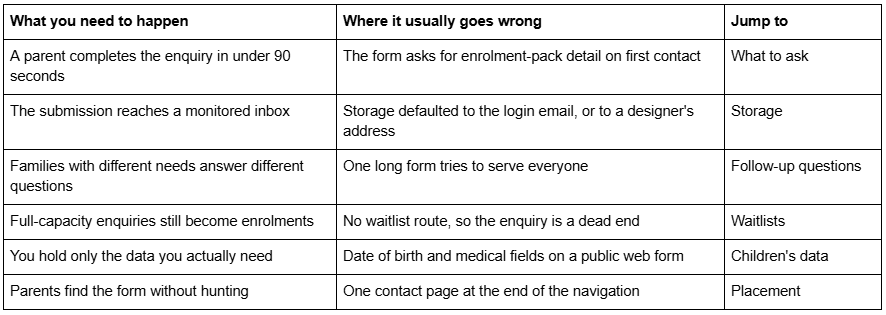
What you need the form to do, and where it usually breaks
What a childcare enrolment enquiry form should ask
There are two documents in a childcare enrolment and people conflate them. The enquiry form on your website exists to establish whether you have a place, when the family needs it, and how to reach them. The enrolment pack — the one that collects allergies, immunisation records, emergency contacts and authorised collection persons — happens after you have spoken to the family, and it does not belong on a public web page.
A childcare enquiry form needs six fields. Seven if you charge differently by age band.
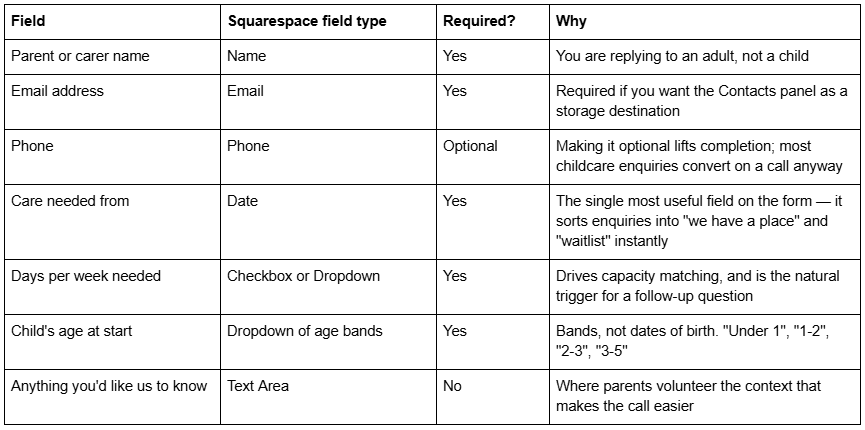
Notice what is not there: the child's name, the child's date of birth, the home address, medical information, and any question about funding status. All of those are enrolment-pack fields. Asking them on a public enquiry form lengthens the form, lowers completion, and puts you in possession of information about a child before you have any relationship with the family.
Squarespace recommends a limit of 30 fields per form block, and that is also the hard cap for forms connected to Mailchimp. You should be nowhere near it. Seven fields is a complete childcare enquiry form.
Set the form's storage destination — and check what it defaulted to
This is the failure that costs childcare centres real enrolments, and it is invisible from the front end.
A Squarespace form block is not a form until it has a storage destination. Squarespace's documentation is unambiguous: "At least one storage option is required per form. If you don't select a storage option, the form won't have a place to send submissions, and visitors won't be able to submit the form." The editor blocks you with the message "Add storage to this form" when you try to save without one.
The subtler problem is that Squarespace connects new form blocks to your account login email automatically. That default is convenient and quietly dangerous. If a designer built the site, the login email may be theirs. If the site was set up by an owner who has since delegated enquiries to a manager, submissions are still landing in an inbox nobody reads. The form works perfectly. The enquiries evaporate.
Open the form block, click the Storage tab, and confirm what is actually connected.
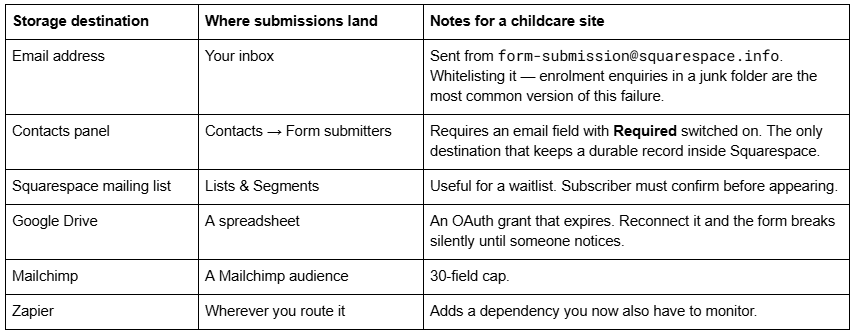
Squarespace states that mailing lists and the Contacts panel are the only options that store submissions within your Squarespace site; email, Google Drive, Mailchimp and Zapier pass data straight through without retention. On a childcare site, connect the Contacts panel plus an email address. Native storage does not expire; third-party connections do. When one fails, the visitor sees "Form not fully sent. Error communicating with X of Y storage services" — and a parent who sees that message does not try again.
If a form has genuinely stopped working rather than gone to the wrong inbox, our Squarespace form not submitting walkthrough covers the six causes in diagnostic order.
Use follow-up questions instead of one long form
Squarespace added native conditional logic to form blocks in 2025, and it is the feature that lets a childcare enquiry form stay short while still capturing the detail you need.
In the form editor, open a Radio, Checkbox, Dropdown or Survey field, click the three dots next to an individual answer option, and choose Add follow-up question. The field you configure there appears only when a parent picks that answer.
Three childcare uses that earn their place:
Days per week → session type. A parent selecting three days sees a follow-up asking whether they need full days or sessions. A parent selecting five does not.
Age band → funded hours. Only the 3-5 band sees the question about government-funded hours, because only that band can claim them.
Care needed from → waitlist consent. A start date is a text answer, so trigger the waitlist branch from a separate "Is your start date flexible?" radio instead.
One constraint to design around: Squarespace allows multiple follow-ups per answer option but explicitly does not allow a follow-up to a follow-up. Conditional logic is one level deep. If your enquiry genuinely needs two levels of branching, that is a signal it belongs in a phone call rather than a web form.
Handling a waitlist on a childcare Squarespace website
Most childcare centres are at or near capacity for at least part of the year, and most childcare websites treat that as a reason to say nothing. The result is that a parent enquires, hears "we're full", and goes elsewhere permanently.
Two workable patterns on Squarespace 7.1.
One form, one extra field. Keep a single enquiry form and add a required Radio field: "If we don't have a place for your start date, would you like to join our waitlist?" — Yes / No. Connect a Squarespace mailing list as a second storage destination alongside the Contacts panel. Everyone who says yes becomes a contactable list you can email when a place opens, using Email Campaigns.
Two forms, two pages. A separate waitlist page with its own form and its own mailing list. Cleaner reporting, and it lets you write honestly on the page about typical waiting times. The cost is a second form to maintain and a second storage configuration to check.
Either way, publish your actual position. "We currently have limited availability in our 2-3 room from January" outperforms an unqualified "Enquire now" because it tells a parent whether to bother. Childcare buyers are planning six to twelve months out; a site that acknowledges the timeline reads as a business that knows its own capacity.
Collecting children's details: what you are actually obliged to do
A useful distinction that most childcare website advice gets backwards.
COPPA — the US Children's Online Privacy Protection Rule — governs personal information collected from children under 13, on services directed to children. A childcare enrolment enquiry completed by a parent is not a child providing information about themselves; it is an adult providing information to a business. The FTC's amended COPPA Rule, whose compliance date was 22 April 2026, applies to "operators of websites or online services directed to, or with actual knowledge of the collection of personal information from, children under 13 years of age". A nursery website aimed at parents is not the target of that rule.
That does not mean there is nothing to think about. Three things genuinely apply to a childcare enquiry form:
Data minimisation. Under UK and EU GDPR, and as a matter of straightforward practice everywhere, collect only what you need for the stated purpose. The stated purpose of an enquiry form is arranging a conversation. An age band serves that purpose. A date of birth does not.
A visible privacy notice. Add a Checkbox field set to Required with a short consent line and a link to your privacy policy: "I'm happy for [Setting] to contact me about this enquiry. See our privacy policy." Squarespace templates in this category typically ship with two legal pages already built — Kiddo includes them — so there is somewhere for that link to point on day one.
Who can see the data. If you use the File Upload field, note that Squarespace restricts downloads to site owners, administrators, and contributors holding both Email Campaigns Editor and Website Editor permissions. The field also requires Google reCAPTCHA to be switched on in the form block's Storage tab before you can add it, caps files at 10 MB, and allows a maximum of five files per submission. For most childcare sites the honest answer is not to accept uploads through the website at all.
Photographs deserve the same discipline. A gallery of children on a childcare website needs written parental consent per child, kept current, and a documented process for removing an image when a family leaves. That is a policy question, not a template question, but it is the one that turns into a complaint most often.
Where the enrolment form belongs in a childcare template
Childcare templates almost always put a form on a contact page at the end of the navigation. That is where a form goes on a site nobody has thought about.
On a childcare site, put an enquiry route in three places:
A short form or a single prominent button in the homepage's final section, after the parent has seen the rooms, the staff and the hours.
On the pricing or fees page, immediately below the rates. This is the page where a parent has just made a budget decision, and it is where the intent is highest.
On the contact page, in full, alongside your address, opening hours and a map.
Kiddo — the Kids, Education and Childcare template in the Squareko range — ships as 12 pages with a dedicated Pricing page, a Gallery, a Blog and two legal pages, which is the right shape for this. The Pricing page is the one worth building the second form on.
Whichever template you buy, from any shop, check one thing before you commit: does it include a real pricing or fees page, or does it assume you will hide your rates behind an enquiry? Childcare is one of the few sectors where publishing a rate consistently increases enquiry quality, because it removes the families who were never going to proceed.
Before you build the form
Do these four checks in order, and the form will work on the day you launch: connect the Contacts panel and a monitored email address in the Storage tab; submit a test entry from a phone on mobile data and confirm it arrives in both; whitelist form-submission@squarespace.info; and re-test after any handover, because storage destinations survive a change of ownership and inboxes do not.
Most childcare owners can build this themselves in an afternoon. Where it usually makes sense to bring someone in is the handover case — you inherited a site, enquiries have dropped, and nobody knows which email address the form is pointing at. That is a 20-minute diagnosis for someone who has seen it before and a genuinely frustrating afternoon otherwise.
If you would rather start from a childcare-shaped site than build the structure yourself, Squareko's templates are $249, 9 to 15 pages depending on the template, delivered as a Squarespace contributor invitation rather than a file download, with a Style Guide page and 60 days of email support. The range is on the premium Squarespace templates page. Note that Kiddo's live demo is currently unavailable, so judge it on the page list rather than a walkthrough — and whatever you buy, expect to replace every demo photograph before launch, because demo images are never licensed for live use.
FAQ
-
Six or seven fields: parent name, email, optional phone, the date care is needed from, days per week, the child's age band, and an open text box. Leave the child's name, date of birth, address and medical details to the enrolment pack after you have spoken to the family.
-
Wherever the form block's Storage tab points. Squarespace connects new forms to your account login email by default, which is frequently the wrong inbox after a handover. Connect the Contacts panel plus a monitored email address — those are the only two destinations that keep a record inside Squarespace.
-
Yes. Open a Radio, Checkbox, Dropdown or Survey field, click the three dots beside an answer option and choose "add follow-up question". The extra field appears only for that answer. Squarespace allows multiple follow-ups per option but does not allow a follow-up to a follow-up.
-
Add a required Yes/No field asking whether the family wants to join the waitlist, and connect a Squarespace mailing list as a second storage destination alongside the Contacts panel. Everyone who answers yes becomes a segment you can email through Email Campaigns when a place opens.
-
Generally not to an enquiry form. The amended COPPA Rule, effective for compliance on 22 April 2026, governs personal information collected from children under 13 on services directed to children. A form completed by a parent is an adult giving information to a business. Data minimisation and a clear privacy notice still apply.
-
Usually yes. Childcare is one of the sectors where a published rate raises enquiry quality rather than lowering enquiry volume, because it removes families the price was never going to suit. Put a second enquiry form directly below the rates on the fees page.

Author Bio
I'm Walid Hasan, a Certified Squarespace Expert and Squarespace Circle Platinum Partner with over 12 years of hands-on experience designing and optimizing high-performing websites. Over the years, I've had the privilege of building more than 2,000 Squarespace websites for clients around the world, always focusing on clean design, strong user experience, and conversion-driven results.
