
Squarespace Templates for Tutors and Test-Prep Businesses
The short answer: A tutoring website is a personal brand, not an institution, and the template matters far less than the page structure. You need a subject page per thing you teach, a credentials block that a parent can verify, results stated in a form you can defend, and a booking route that does not require an email exchange. Any Squarespace 7.1 template can be shaped into that. Most tutors pick the wrong shape, not the wrong template.
The accepted answer on the Squarespace Forum thread about tutoring templates is worth repeating because it is correct and nobody selling templates says it: in Squarespace 7.1 every template shares the same settings and the same block library. What you are buying is a set of page layouts and a design system, not a feature set. So choose on structure.
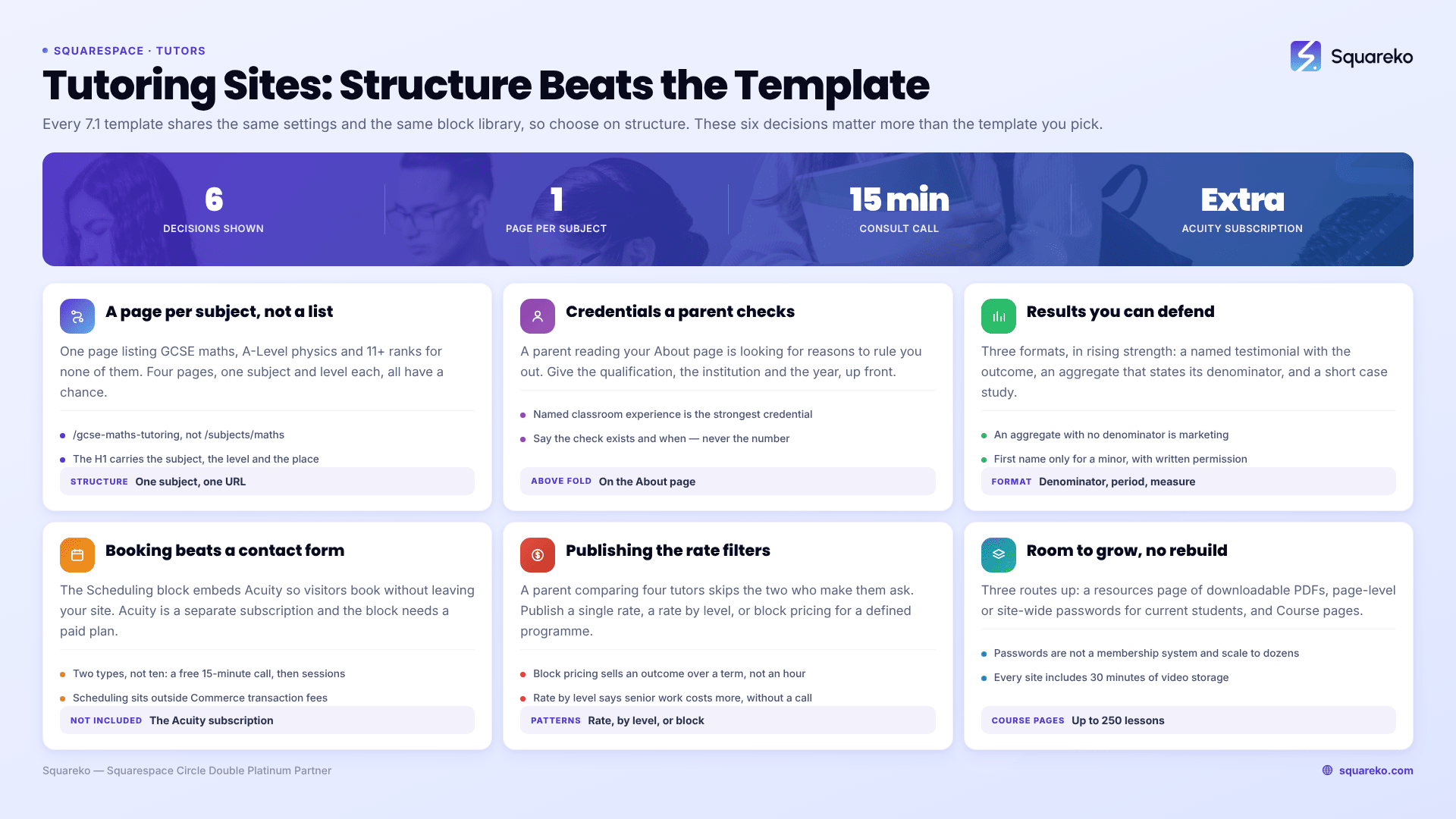
What a tutoring site has to do, and where tutors usually get it wrong
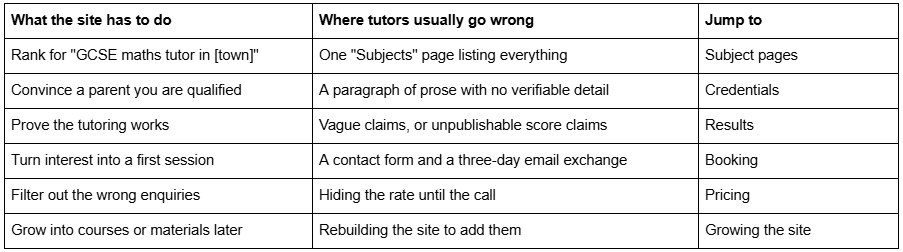
A tutoring site needs a page per subject, not a subjects page
This is the single highest-value structural decision on a tutoring website, and it is the one that a template will not make for you.
A page titled "Subjects" that lists GCSE Maths, A-Level Physics, 11+ preparation and SAT tutoring will rank for none of them. Four separate pages, each about one subject at one level, will each have a fighting chance — because each one can carry the exam board, the syllabus, the typical session structure, the common sticking points, and the outcome a parent is buying.
The pattern that works:
URL: /gcse-maths-tutoring, not /subjects/maths
H1: the subject, the level and, if you work locally, the place
First 60 words: who this is for and what changes — "This is one-to-one GCSE maths tuition for students working at grade 4-5 who need to reach 6-7. Most students take 20-24 weekly sessions across two terms."
Body: exam boards covered, what a session looks like, what happens between sessions, how progress is reported to parents
One testimonial from that subject, not a general one
The same booking or enquiry route as every other page
Four subject pages is not four times the work. The session structure and reporting sections are largely shared; only the syllabus specifics change. And for a solo tutor, subject pages are the only realistic route to search traffic, because you will not out-rank an agency on "maths tutor" and you do not need to.
Test-prep businesses have an extra layer worth using. A page per test — SAT, ACT, GMAT, 11+, UCAT — and, where the test has distinct sections, a page per section. "SAT Maths tutoring" and "SAT Reading and Writing tutoring" are separately searched and separately bought.
Credentials: specific, verifiable, and above the fold on the About page
A parent choosing a tutor is doing risk assessment. They are not reading your About page for your journey; they are looking for reasons to rule you out.
What works, in rough order of weight:
The qualification, the institution and the year. "BSc Mathematics, University of Manchester, 2014" carries more than "maths graduate".
Current or recent classroom experience, named. "Head of Maths, [School], 2018-2024" is the strongest single credential a private tutor can hold, and most tutors bury it.
Registration and checks, stated plainly. DBS status in the UK, state teaching licence in the US, whatever your jurisdiction's equivalent is. Say the check exists and when it was issued. Do not publish the certificate number.
Examining experience. If you have marked for an exam board, that is the highest-trust credential in test prep and it should be in the first two lines of the page.
Years and volume. "Eleven years, around 180 students" is credible. "Thousands of hours" is not.
Two things to avoid. A row of institution logos reads as an agency, not a person — and using a school or university logo without permission is a trademark problem you do not need. And a long personal narrative before the qualifications pushes the evidence below the fold on a phone, where most parents are reading.
Squarespace 7.1 handles this well without custom code: an image block with your photograph beside a text block of qualifications, in a two-column Fluid Engine section, holds its shape on mobile if you set the mobile layout deliberately rather than letting it stack by default.
Publishing results honestly is the hardest page and the most valuable
Everyone in tutoring claims results. Almost nobody publishes them in a form that means anything, which is exactly why doing it properly is a competitive advantage.
Three formats, in increasing order of strength and difficulty:
Named testimonials with the specific outcome. "Sofia moved from a grade 5 to a grade 8 in GCSE maths across two terms — parent, [Town], 2025." Requires written permission, ideally from the parent, and a first name only for a minor. This is the realistic floor for most tutors.
An aggregate you can actually defend. "Of the 34 students I prepared for GCSE maths higher tier between 2023 and 2025, 29 improved by at least one grade." State the denominator, the period and the measure. An aggregate without a denominator is marketing; with one it is evidence.
A short case study. One student, 300 words: where they started, what the actual problem was, what you changed, what happened. This is the format that converts parents of struggling students, because it is the only one that shows diagnosis rather than delivery.
What not to publish: score guarantees, comparative claims about other tutors, and anything identifying a minor beyond a first name. And if you have not tutored enough students to have results yet, say what you do instead — "I report progress to parents after every fourth session with a written summary" is a real differentiator and it is verifiable on day one.
Squarespace's Gallery and Portfolio sections are not the right home for this. Results belong in plain text blocks on the relevant subject page and a summary on the homepage, because that is where the retrieval value sits.
Booking: a scheduler beats a contact form for tutors
A tutoring enquiry that turns into three emails about availability is a tutoring enquiry that goes to whoever replied first.
Squarespace's answer is the Scheduling block, which embeds an Acuity Scheduling page directly into your site so visitors "book appointments without leaving your site". Two things to know before you build around it. Acuity Scheduling is a separate subscription from your Squarespace plan — it is not included, and the legacy free plan does not support embedded schedulers, so you need a paid Acuity plan for the block to work. And scheduling purchases sit outside Squarespace Commerce, so they are not subject to Squarespace Commerce transaction fees.
For a tutor, the practical setup is two appointment types, not ten:
A free 15-minute consultation call. This is the one to promote. It converts far better than "book a session" because it commits the parent to nothing.
A paid session, bookable only after the consultation, with your actual availability behind it.
If you would rather not pay for a scheduler in year one, the honest alternative is a short enquiry form with a Date field for preferred start and a Checkbox field for available days, connected to the Contacts panel plus a monitored email address. That gets you to a decision in one reply instead of three. What does not work is a bare "Contact" page with name, email and message.
Publishing your rate filters better than hiding it
Tutors are told to hide prices so they can "sell the value on the call". In practice, a parent comparing four tutors will simply skip the two who make them ask.
Publish either a rate or a band. Three patterns that work on a Squarespace 7.1 pricing section:

Block pricing is the underused one. "24 sessions across two terms, weekly, with a written progress report every fourth session" is a different product from "£45 an hour", and it is easier to justify at a higher number because the parent is buying a plan rather than a slot.
Whichever you choose, put the rate on the subject pages as well as the pricing page. A parent who lands on your A-Level physics page from search should not have to navigate to find out what it costs.
Growing into materials, courses or a student area
Most tutoring sites start as five pages and stay that way for a year. Build so the sixth page does not require a rebuild.
Squarespace 7.1 gives you three routes, in ascending order of commitment:
A resources page with downloadable PDFs. Past-paper walkthroughs, formula sheets, a revision timetable template. Free, gated behind a form if you want the email address. This is the highest-return addition for most tutors because it earns links and search traffic that a service page cannot.
Password-protected pages. Squarespace 7.1 supports page-level and site-wide passwords with a customisable Lock Screen panel, which is enough for a small shared-resources area for current students. It is not a membership system and it does not scale past a couple of dozen people, but it costs nothing extra.
Course pages. Squarespace 7.1 Course pages support chapters and lessons, up to 250 lessons per course, with a "Complete and continue" button and access sold through pricing plans. Worth knowing: every Squarespace site includes 30 minutes of video storage across all pages, and beyond that you need a Digital Products plan. If a course is genuinely where you are heading, start with our guide to Squarespace templates for online courses before you buy a template, because the sales-page structure differs.
Which template features actually matter for a tutor
Since 7.1 templates share the same functionality, judge on pages and on how the design reads.
Look for: an About page built for one person rather than a team grid; a pricing page; a testimonial or results layout that is text-led rather than image-led; enough inner-page depth that you can duplicate a service page four times for four subjects; and a blog, because subject-adjacent writing is how a solo tutor gets found.
Be wary of: heavily illustrated templates aimed at children, which read as childcare rather than academic and put off exactly the parent of a sixteen-year-old you are trying to reach; and gallery-led templates, where the design collapses if you do not have photography.
In the Squareko range, Scholar is the closest fit — 11 pages tagged Fashion, Course and Shop, with a Portfolio, Gallery and Shop, which gives you both a service-page structure and a route to selling materials later. You can inspect it at the Scholar demo. Luminary is worth comparing if the course side is the point: 11 pages with a Courses page, a Portfolio and a Shop, viewable at the Luminary demo. Neither was designed specifically for tutors, and that is fine — the structural fit matters more than the label, and a template sold as "for tutors" at any shop is a labelling decision, not an engineering one.
Big Cat Creative and Applet Studio both carry education-adjacent templates worth looking at alongside these, and Squarespace's own free 7.1 templates will do the job if your budget is zero and you are prepared to build the subject pages yourself.
What to do first
If you have an afternoon, do this in order: write one subject page properly, put your strongest credential in the first two lines of your About page, and set up a free 15-minute consultation as a bookable appointment type. Those three changes move more enquiries than any template swap will.
The point at which hiring someone makes sense is narrower than most agencies suggest. If you are a solo tutor with four subject pages, you do not need a designer. If you are running a test-prep business with several tutors, published programmes, block pricing and a resources library that has to stay organised as it grows, the structure starts to matter more than the design and it is worth having someone build it once rather than three times.
Squareko's templates are $249, 9 to 15 pages depending on the template, delivered as a Squarespace contributor invitation rather than a file download, with a Style Guide page and 60 days of email support. Installation onto an existing site is a paid add-on and takes around 48 hours. The full range, including Scholar, is on the premium Squarespace templates page — and as at every shop, every demo image needs replacing before you launch.
FAQ
-
A homepage, one page per subject and level you teach, an About page leading with credentials, a pricing page, and a booking or enquiry page. A blog is worth adding sixth. The subject pages are the ones that earn search traffic; a single combined "Subjects" page will rank for nothing.
-
Yes. A page per subject at a specific level can carry the exam board, session structure and outcome that a combined subjects page cannot, and each one competes for its own search. For test prep, go further and build a page per test, plus a page per test section where the sections are separately bought.
-
Specifically and verifiably: degree, institution and year; named classroom or examining experience; background-check status stated without publishing certificate numbers; and student volume with a real denominator. Put the strongest credential in the first two lines of the About page, above any personal narrative.
-
You can publish outcomes if you have written permission and you do not identify a minor beyond a first name. State a defensible denominator — "29 of 34 students improved by at least one grade" — rather than an unqualified claim. Avoid score guarantees and comparisons with other tutors entirely.
-
Use the Scheduling block, which embeds an Acuity Scheduling page in your site. Acuity is a separate subscription from your Squarespace plan and the legacy free Acuity plan does not support embedded schedulers. Set up two appointment types: a free 15-minute consultation and a paid session.
-
Usually yes. A parent comparing several tutors tends to skip the ones who require an enquiry to find out the price. Publish a single rate, a rate by level, or block pricing for a defined programme — and repeat it on each subject page, not only on the pricing page.

Author Bio
I'm Walid Hasan, a Certified Squarespace Expert and Squarespace Circle Platinum Partner with over 12 years of hands-on experience designing and optimizing high-performing websites. Over the years, I've had the privilege of building more than 2,000 Squarespace websites for clients around the world, always focusing on clean design, strong user experience, and conversion-driven results.
