
Squarespace Wells Template: The Gallery and the Sidebar
Wells is a Squarespace version 7.0 template that stands alone — it is not part of a template family, and it has no index pages. We verified it in August 2026: wells-demo.squarespace.com reports "templateVersion":"7" and template ID 4f9adc1524ac5df956fdf98f, an ID no other 7.0 template shares. Everything people describe as Wells' "portfolio index" is really two separate features — a slideshow Gallery page and a navigation sidebar — and only one of them survives a move to Squarespace 7.1.
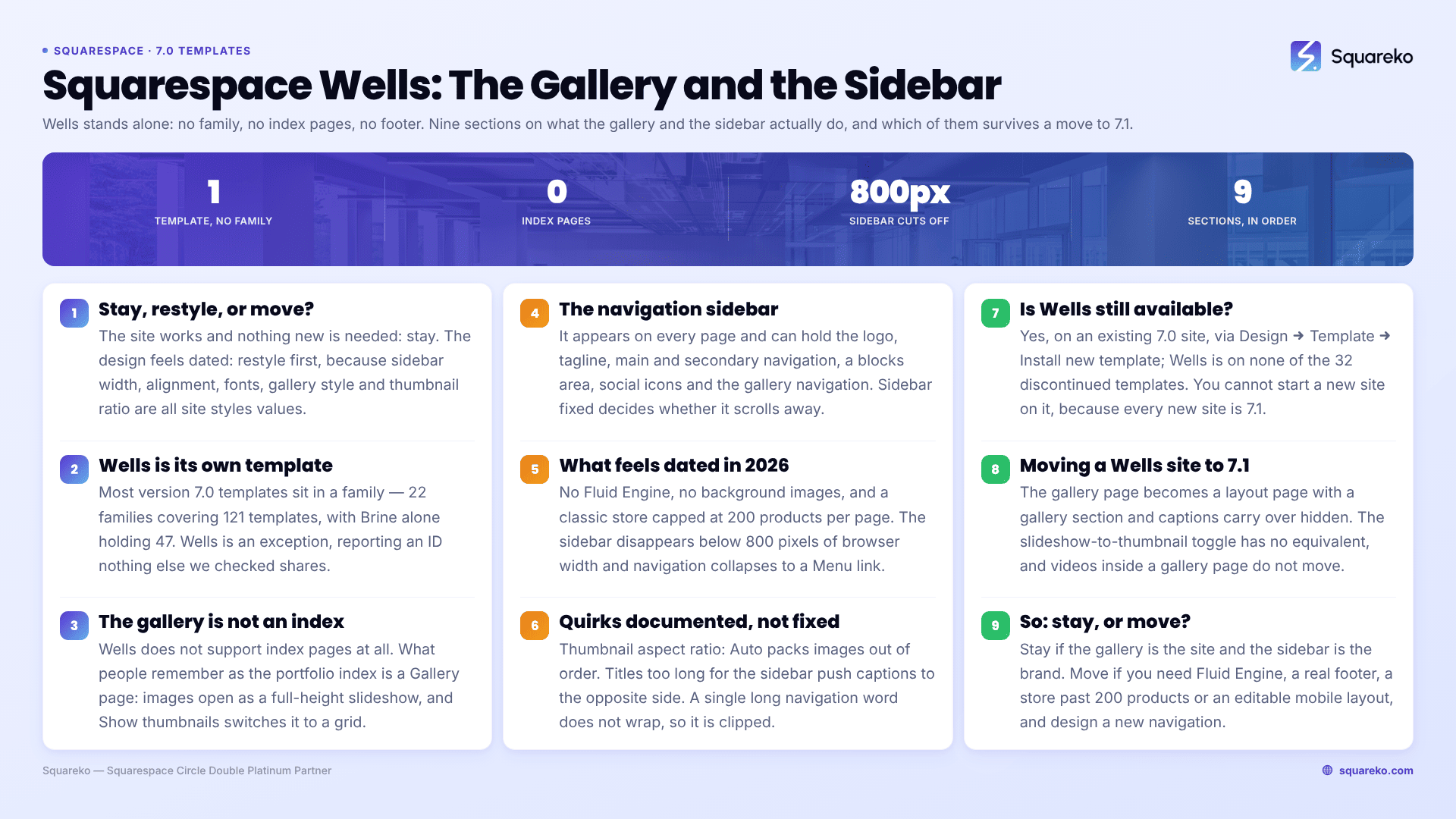
Should you stay on Wells, restyle it, or move to 7.1?
Wells is its own template, not part of a family
Most Squarespace version 7.0 templates belong to a family — 22 families covering 121 templates, with Brine alone accounting for 47 of them. Wells is one of the exceptions. Squarespace's own documentation is a single-template guide called "Wells template", not a family guide, and the template ID confirms it: wells-demo.squarespace.com returned HTTP 200 in August 2026 reporting 4f9adc1524ac5df956fdf98f, which is not the Brine ID (55f0aac0e4b0f0a5b7e0b22e), not the Bedford ID, and not shared with anything else we have checked.
Three practical consequences for a Wells owner:
Brine CSS will not work on your site. This matters because most of the freely available Squarespace 7.0 CSS on the internet is Brine CSS, written against class names Wells does not have. If a snippet does nothing when you paste it, that is usually the reason rather than a syntax error.
A template detector will report "Wells" and be exactly right. templateId normally identifies the family rather than the individual template, which is why a Mojave site reports as Brine. On Wells there is no ambiguity, because the family has one member.
There is no sibling to switch to. Where a Brine owner can switch to any of 46 relatives and keep the same code, a Wells owner switching templates is changing platforms inside 7.0.
The full roster is in the list of Squarespace 7.0 templates, and the Squarespace 7.0 template comparison chart shows where Wells sits against the other families on features.
The Wells gallery page is not an index page
This is the most common error on this SERP. Wells does not support index pages. The page types it supports are album, blog (list layout), cover, events, gallery (slideshow/grid), layout, and store (classic). No index.
What people remember as the Wells "portfolio index" is a Gallery page, and it behaves unlike any other Squarespace version 7.0 gallery:
Images and videos open as a full-height slideshow. Hover over the left or right of an image and the cursor becomes an arrow.
A Show thumbnails control in the bottom-left switches the same page to a thumbnail grid. Clicking a thumbnail returns to the slideshow at that image.
Gallery navigation lives in the site-wide sidebar, not on the image — set to text, bullets or hidden with the Gallery controls tweak.
Image captions display in the sidebar in slideshow mode, and not at all in thumbnail mode.
The tweaks worth knowing, all under Gallery options in site styles:
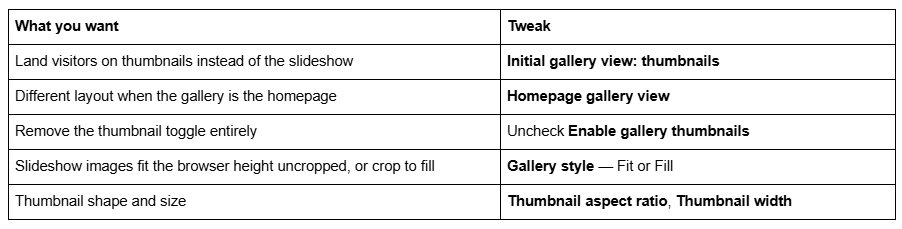
Two documented limits catch people out: Wells galleries do not support clickthrough URLs or a lightbox, and on mobile the slideshow is abandoned entirely — images stack vertically with captions below them.
The Wells navigation sidebar
The second half of the Wells design is a navigation sidebar that appears on every page. It can hold the site title or logo and tagline, main navigation and secondary navigation, a blocks content area, built-in social icons, and the gallery page navigation described above. Width, alignment and position are set with the Sidebar options tweaks, and Sidebar fixed decides whether the links stay put or scroll away with the page.
Wells is one of only two Squarespace 7.0 families — the other is Supply — that place secondary navigation below the main navigation in a sidebar. Brine, Farro and York put their secondary navigation in the site header instead.
Wells has no footer. Not a hidden one, not a stylable one: the template does not offer a footer, which is why every "add a footer to Wells" snippet you find is really building a fake one out of the sidebar content area or a layout page.
What breaks or feels dated on a Wells site in 2026
No Fluid Engine. Squarespace version 7.0 editing is the classic block editor — a 12-column grid, no drag-anywhere canvas, no overlapping blocks without CSS. Fluid Engine is 7.1-only.
No background images. Wells supports a Site background colour and nothing else. Full-bleed imagery on a Wells site comes from gallery pages, not from backgrounds.
The sidebar disappears on mobile. The sidebar content area does not display on mobile at all, and navigation collapses behind a Menu link in the top-right. Squarespace documents the threshold plainly: you see the navigation sidebar on browsers wider than 800 pixels. For comparison, Squarespace 7.1's mobile breakpoint is 767px, and 7.1 keeps a genuinely separate mobile layout per section in Fluid Engine.
Classic store pages only. Wells uses the classic store layout, which caps at 200 products per page — a version 7.0 limit rather than a Wells one. Squarespace 7.1 raises it to 10,000.
Blog is list-only. No grid layout, no card thumbnails. Wells blog landing pages stack posts vertically, with a second sidebar of their own.
Wells quirks Squarespace documents and is not going to fix
Squarespace maintains a Troubleshooting Wells section, prefaced with its actual position on version 7.0: "Although we still support Squarespace version 7.0, fixing bugs or issues is a lower priority for us while we focus on our current platform, version 7.1."
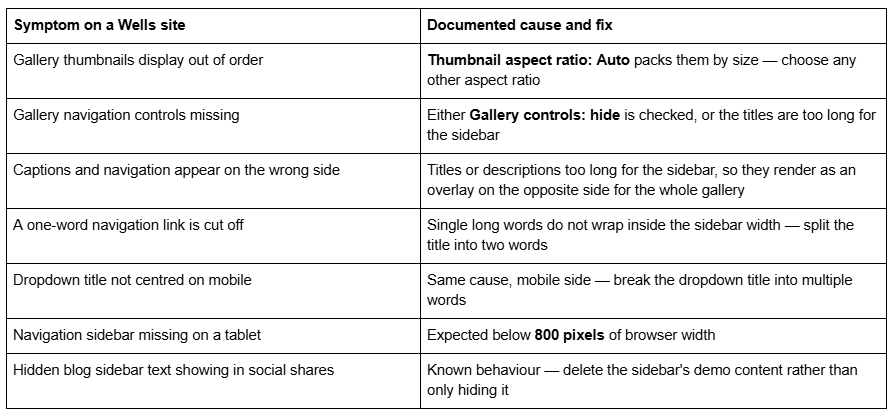
None of these is a fault in your setup. All are Wells behaving as documented.
Is the Squarespace Wells template still available?
Yes — on an existing version 7.0 site, via Design → Template → Install new template. Wells is not on Squarespace's discontinued list, which covers 32 retired templates including Bryler, Fulton, Jones, Taylor, Lincoln and the whole Marquee family. Wells is on none of them.
You cannot start a new site on Wells. Every new Squarespace site is 7.1, and the live gallery at squarespace.com/templates returned 198 templates in August 2026, all of them 7.1. The old squarespace.com/templates/wells-demo URL that still ranks for this keyword now serves that generic gallery — we fetched it and it reports the marketing site's own template ID, not Wells'. Squarespace's demo at wells-demo.squarespace.com is still live and still genuinely Wells.
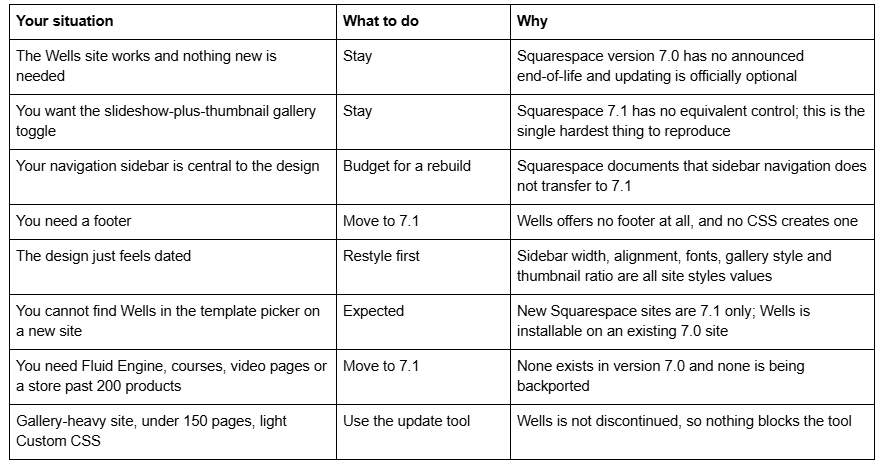
Version 7.0 has no announced end-of-life, and Squarespace states the move is optional: "Updating your site from version 7.0 to 7.1 is optional." Whether old Squarespace templates are still supported covers the support position in full.
Moving a Squarespace Wells site to version 7.1
The tool is at Design → Update to Version 7.1. It is permanent, capped at 150 pages and 200 products, requires developer mode off, and leaves Custom CSS commented out — remove the comment tags in the CSS editor afterwards and expect Wells-specific selectors to match nothing.
What happens to the parts a Wells site is built from:
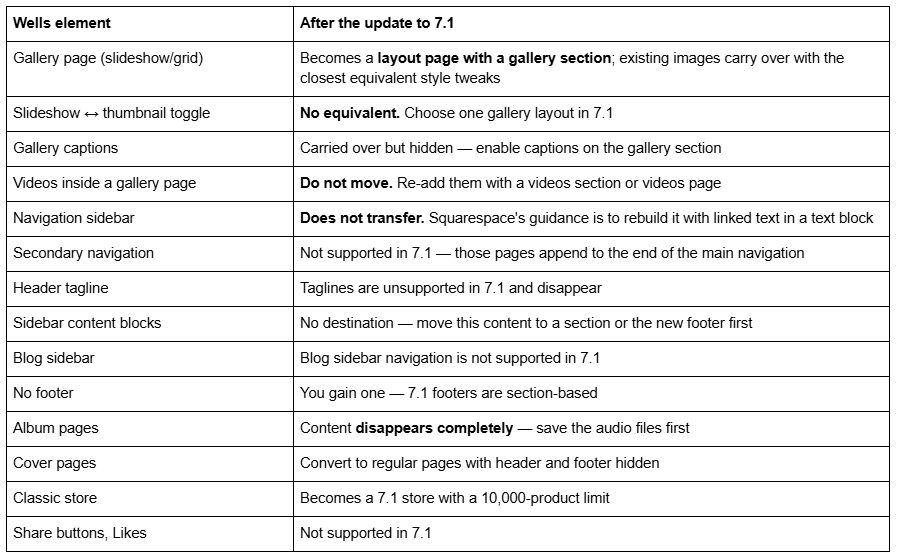
Wells is an unusual migration because the two things that define it pull in opposite directions. The gallery converts reasonably well — a gallery section in 7.1 is a competent replacement for a Wells slideshow, and 7.1's portfolio pages give you something Wells never had for multi-project work. The sidebar does not convert at all, and that is the part clients notice.
Audit before you press the button. Screenshot the Sidebar options, Gallery options and Site navigation options tweaks. Export the sidebar content area's blocks as text. List every gallery page and note which use videos. Count pages and products, and export the Custom CSS.
And the expensive one: changing a page slug on Squarespace creates no automatic 301 redirect, ever. Any URL that shifts during the rebuild needs an entry in Settings → Advanced → URL Mappings in the /old -> /new 301 format.
The screen-by-screen version is in the Squarespace 7.0 to 7.1 guide, and how to change a Squarespace template covers the switch-within-7.0 route if you would rather move sideways than upgrade. The Squarespace Brine template guide works through the same stay-or-move decision for the family most 7.0 sites are actually on.
So: stay on Wells, or move?
Stay if the gallery is the site and the sidebar is the brand. Wells is not discontinued, version 7.0 has no end-of-life date, and the update tool will still be there next year. The forum answer telling people to go back to 7.0 to get Wells is not wrong about the feature gap — it is only wrong as long-term advice.
Restyle if the objection is aesthetic. Sidebar width and alignment, gallery fit-versus-fill, thumbnail ratio, fonts and colours are all site styles values and cost nothing to try.
Move if you need Fluid Engine, a real footer, courses, video pages, a store past 200 products, or an independently editable mobile layout — and go in expecting to design a new navigation, because the sidebar is not coming with you.
For scale: across 54 Squareko-built client sites measured in August 2026 (Playwright/Chromium lab test, cloud datacenter, unthrottled, single run per site), 53 of 54 run Squarespace 7.1. Version 7.0 is the minority case now, but a working Wells site is not an emergency.
Most Wells sites we are sent migrate the galleries in a day and then spend a week on navigation — deciding whether the new site keeps a left-hand menu at all, and rebuilding the sidebar content as a header, a section or a footer. Where the sidebar was doing real work, a premium Squarespace template built for 7.1 is usually a shorter path than reconstructing a 7.0 layout the platform no longer supports. The table at the top of this page settles it for most people without spending anything.
FAQ
-
None. Wells is a standalone Squarespace version 7.0 template with its own guide rather than a family guide. We fetched wells-demo.squarespace.com in August 2026 and it reports "templateVersion":"7" and template ID 4f9adc1524ac5df956fdf98f, which is not shared with Brine, Bedford or any other family we have verified.
-
No. Wells supports album, blog (list), cover, events, gallery (slideshow/grid), layout and store (classic) pages only. What is often called the Wells "portfolio index" is a Gallery page in slideshow mode, with its navigation and captions rendered in the site-wide sidebar.
-
Yes, on an existing version 7.0 site via Design → Template → Install new template. Wells is not on Squarespace's discontinued list. You cannot start a new site on Wells — the live template gallery returned 198 templates in August 2026, all version 7.1, and squarespace.com/templates/wells-demo now serves that generic gallery.
-
Because Thumbnail aspect ratio is set to Auto under Gallery options in site styles. Auto packs thumbnails by their natural proportions rather than sequence. Choose any other aspect ratio and the images display in order at a uniform size.
-
Partly. A Wells gallery page becomes a 7.1 gallery section and converts well. The navigation sidebar does not transfer — Squarespace's documented workaround is to rebuild it with linked text in a text block. The slideshow-to-thumbnail toggle has no 7.1 equivalent at all.
-
By design. Wells collapses navigation to a Menu link in the top-right below 800 pixels of browser width, and the sidebar content area does not display on mobile at any width. Dropdowns are automatically expanded in that mobile menu.

Author Bio
I'm Walid Hasan, a Certified Squarespace Expert and Squarespace Circle Platinum Partner with over 12 years of hands-on experience designing and optimizing high-performing websites. Over the years, I've had the privilege of building more than 2,000 Squarespace websites for clients around the world, always focusing on clean design, strong user experience, and conversion-driven results.
