
The Squarespace Brine Template in 2026: Stay or Move?
The Squarespace Brine template is version 7.0, it still works, and Squarespace has announced no end-of-life date for it. What changed is the trade. Brine's two-part header, intro area and site-wide parallax are still the most configurable layout system version 7.0 ever shipped — but every feature Squarespace has built since 2020, starting with Fluid Engine, exists only in version 7.1. Staying on Brine is a legitimate decision. Staying by default is not.
Here is the whole decision in one table.
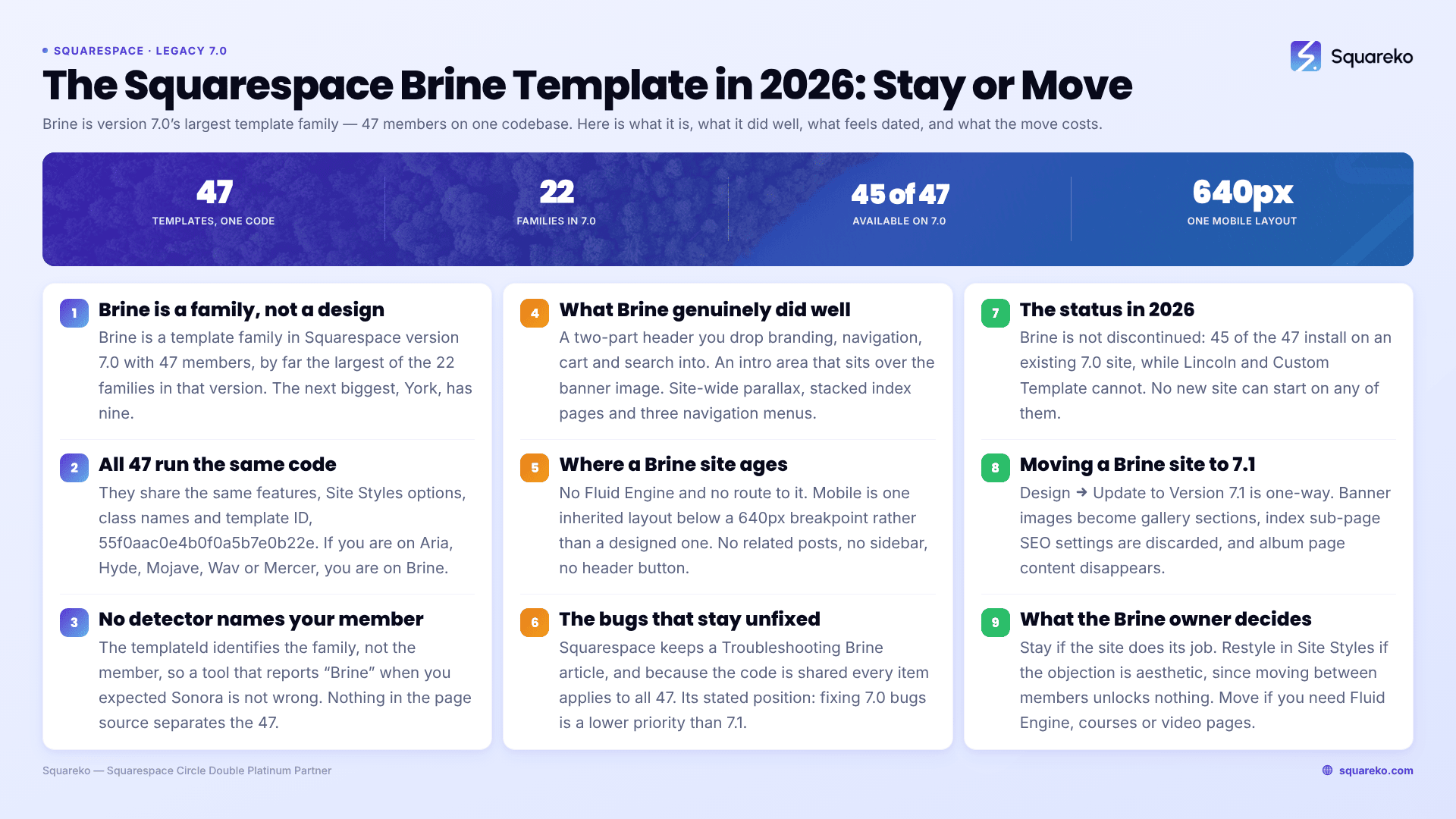
Should you stay on the Brine template, restyle it, or rebuild in 7.1?
What the Squarespace Brine template actually is
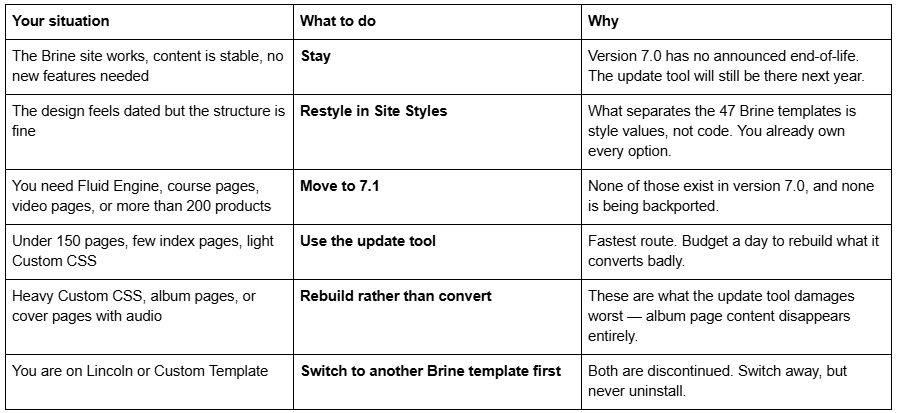
Brine is a template family in Squarespace version 7.0, not a single design. The family has 47 members, which makes it by far the largest of the 22 families in version 7.0 — the next biggest, York, has nine. Two Brine members are discontinued: Lincoln (retired April 2017) and Custom Template (retired December 2019). The other 45 remain installable on an existing 7.0 site.
All 47 run the same code. They share the same features, the same Site Styles options, the same class names and the same template ID, 55f0aac0e4b0f0a5b7e0b22e. We confirmed this in August 2026 by reading the page source of Squarespace's own demo sites: brine-demo.squarespace.com and rally-demo.squarespace.com both report "templateVersion":"7" and that identical template ID.
Two consequences follow, and both matter more than people expect:
If you are on Aria, Hyde, Mojave, Wav, Margot, Mercer or any of the other 44, you are on Brine. Every Brine tutorial and every brine template squarespace CSS snippet applies to your site unchanged.
No detector tool can tell one Brine template from another, because templateId identifies the family, not the member. If a tool tells you your site is "Brine" and you were expecting "Sonora", the tool is not wrong.
The full Brine family roster with all 47 names is worth checking before you assume — several names that look like Brine members belong to Pacific or York.
Who the Brine template suited, and what it did genuinely well
Brine suited people who wanted a custom-looking site without a developer. That is the whole pitch, and for a long stretch of Squarespace's history nothing else came close. Because the 47 members are one codebase in 47 paint jobs, Brine also became the default base for almost every third-party 7.0 template shop — buy a template from anyone between 2016 and 2020 and it was probably Brine underneath.
The demo sites Squarespace still hosts show the range it was pitched at. brine-demo.squarespace.com is a retail site with a shop, stockists, FAQ and legal pages. rally-demo.squarespace.com, another member, is a publication: long scrolling homepage, blog, subscribe. Same code, entirely different businesses.
Where Brine genuinely earned it, and where version 7.1 still does not fully match:
The two-part header. Brine splits the site header into a top header and a bottom header, and you drop elements — branding, primary navigation, secondary navigation, cart, search, social icons, sign-in — into either. Positions are set under Site styles → Header: layout, padding under Header: top and Header: bottom. Nothing in 7.1 gives you that much header control without code.
The intro area. A block-editable region that sits over the banner image. You can drop text blocks, buttons, forms and embeds directly onto a full-bleed photograph, per page. Squarespace describes it as "a page-specific header area that you can edit with text, images, and other content". No other version 7.0 family has it. It is not available on layout pages without banners, or on index pages themselves.
Site-wide parallax. Brine and the discontinued Marquee family are the only two version 7.0 families with parallax scrolling. It is switched on at Site styles → Main: overlay → Enable parallax, with Parallax smart crop in the same section to stop images cropping badly. It applies to every banner on the site; there is no per-page control.
Stacked index pages. A Brine index accepts layout pages and gallery pages as sub-pages and stacks them into one scrolling page, each section with its own background image and overlay colour. Minimum heights are set under Index: page → Apply minimum height.
Three navigation menus. Brine and Farro are the only version 7.0 families with primary, secondary and footer navigation.
An Advanced store. Brine supports Advanced store pages, which is why so many small retail sites ended up on it.
Squarespace's own description of Rally, one of the 47, captures the family's pitch precisely: "Its long, scrolling homepage engages visitors by letting you weave various blog post collections with full-bleed banner images."
What feels dated about the Brine template in 2026
Some of this is age. Most of it is the gap that opened when Fluid Engine shipped in 2022 and version 7.0 did not get it.
No Fluid Engine, and no route to it. Version 7.0 editing is the classic block editor: blocks snap to a 12-column grid, drag targets are narrow, and overlapping elements are impossible without CSS. Fluid Engine's drag-anywhere grid is a 7.1-only feature and will not come to Brine.
Mobile is inherited, not designed. Brine has a mobile breakpoint that defaults to 640px, adjustable under Site styles → Mobile → Mobile breakpoint. Below it, layouts stack in source order, social icons and taglines stop displaying, and you get one shared layout rather than a separately editable mobile version. Fluid Engine in 7.1 maintains a genuinely separate mobile layout per section. On a Brine site, "fix it on mobile" usually means a media query.
Index pages are a structure, not a page. Every section in a Brine index is a real sub-page with its own URL, its own SEO fields and its own settings. That is powerful and it is also why index pages are the single most fragile thing to migrate.
Missing blog features that are now standard. Brine has no related posts, no infinite scroll, no author profile block and no content sidebar. Squarespace's guidance for Brine sites that want sidebar-style content is blunt: "Sidebars aren't supported for Brine. Instead, add extra content to the footer, intro area, and layout pages."
No header button. Brine never shipped a header call-to-action button. The documented workaround is to put a single link in the secondary navigation and style that menu as a button, or add a button block to the intro area page by page.
Blog comments are off site-wide by default, even when enabled on an individual post. They are turned on under Blog preferences → Comments settings → Enable comments globally.
Features are not portable between version 7.0 families. This is the part that frustrates people most. A Squarespace forum answer to a Brine user asking for another template's gallery behaviour put it exactly right: the two templates "work entirely differently and so you can't lift a feature from one easily and use it in the other." In version 7.0 the template is the feature set. In 7.1, every site has every feature and the template is only a starting design.
None of these are faults in your setup. They are what the Brine template is.
The Brine bugs Squarespace documents and is not going to fix
Squarespace maintains a Troubleshooting Brine article. Because all 47 members share code, every item on it applies to every member. The useful ones:
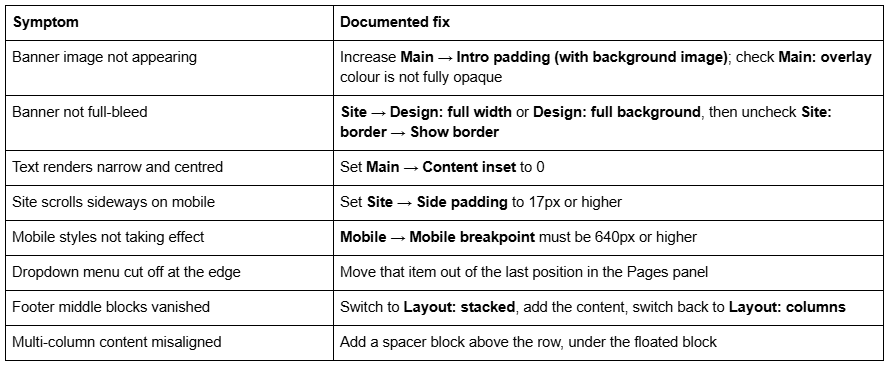
Banners are also unsupported on individual blog post, product and event detail pages, and on cover pages. That is by design, not a bug, and it catches people constantly.
Squarespace's framing of all of this is worth reading as written: "fixing bugs or issues is a lower priority for us while we focus on version 7.1." Brine is supported. It is not being improved.
The status of the Brine template in 2026
Brine is not discontinued. Forty-five of its 47 members can still be installed on an existing version 7.0 site through Design → Template → Install new template. Lincoln and Custom Template cannot.
You cannot start a new site on Brine. In August 2026 we checked the live template gallery at squarespace.com/templates and it returns 198 templates, every one of them version 7.1. Brine, Rally, Bedford, Hayden, Anya and Bryant are all absent. The old per-template demo URLs — squarespace.com/templates/brine-demo and the rest — now serve that same generic gallery page, which is why so many older blog posts appear to link to a Brine demo and land you somewhere else. Squarespace's own demo site, brine-demo.squarespace.com, is still up.
There is no announced end-of-life for version 7.0. Squarespace's position is that updating is optional. For scale on how long "supported but not developed" can run at this company: Squarespace 5, released in 2008, is still online and still supported.
Uninstalling a discontinued template is the irreversible act. Switching away from Lincoln or Custom Template is fine and reversible. Uninstalling it is permanent — it cannot be reinstalled. Four version 7.0 templates (Encore, Lincoln, Bryler and Taylor) are not offered as options to switch to; you can still switch away from them. Whether old Squarespace templates are still supported goes through the support position line by line.
Moving a Brine site to Squarespace 7.1
Squarespace's update tool lives at Design → Update to Version 7.1. Before you touch it, three facts:
It is permanent. Squarespace states plainly: "you can't revert to version 7.0."
It has a 150-page limit, and it will error if a store page holds more than 200 products.
Your Custom CSS survives, commented out. You remove the comment tags in the CSS editor afterwards and save. Selectors written for Brine's class names will mostly not match 7.1 markup, so expect to rewrite rather than uncomment.
What the tool does to Brine's distinctive parts, per Squarespace's own documentation:
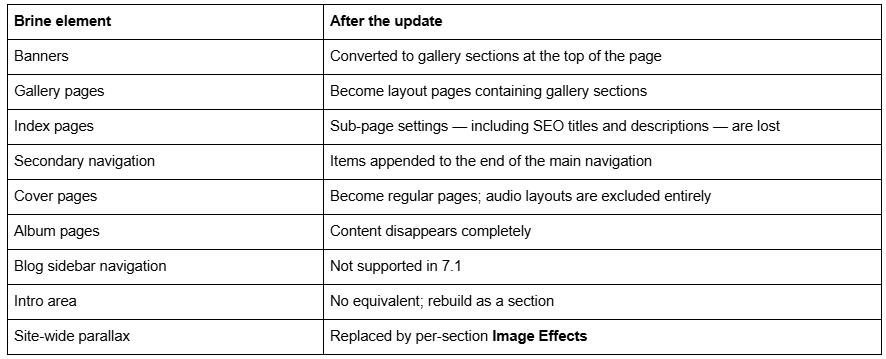
Audit before you press the button, because there is no undo. Count the pages. Count the products on the largest store page. Open the Pages panel and list every index, album and cover page. Export the Custom CSS to a text file. Screenshot the header layout settings under Header: layout, because the arrangement is not recoverable from the converted site. Then decide whether the tool is doing the job or whether a clean 7.1 build is less work than repairing its output — on an index-heavy Brine site it usually is.
One more thing that is easy to miss and expensive later: changing a page slug creates no automatic 301 redirect on Squarespace, ever. If the update or the rebuild changes any URL, you write the redirect yourself.
The mechanics, screen by screen, are in the Squarespace 7.0 to 7.1 guide. If you are only switching between version 7.0 templates rather than versions, how to change a Squarespace template is the one to read instead.
Reproducing Brine's signature features in Squarespace 7.1
The short version, feature by feature:
Two-part header → 7.1 has one header with layout presets. Secondary navigation becomes a button or a folder. Some of it needs CSS.
Intro area → a Fluid Engine section with a background image. This is the closest match and in practice it is better, because you can position blocks freely.
Site-wide parallax → per-section Image Effects in section settings, with adjustable angle and intensity. Per-section control is a gain; the site-wide toggle is gone.
Stacked index → a single page of Fluid Engine sections. You lose the per-section URLs, which is usually a relief.
Advanced store → 7.1 store pages, with more merchandising options than Brine ever had.
Reproducing Brine's capabilities in 7.1 works through each one with the settings. For the wider view, the Squarespace 7.0 template comparison chart shows how Brine sits against the other 21 families, and the full list of Squarespace 7.0 templates covers all 121 templates and the 32 that are discontinued.
Individual Brine members get their own write-ups where the search demand justifies it — the Rally template is the most-searched single member. Outside the family, the Bedford template is the other 7.0 design people still ask about, and Paloma is worth reading if only because it is not a version 7.0 template at all, despite regularly being treated as one.
So: stay on Brine, or move?
Stay if the site does its job, the content is stable, and nothing on your list requires 7.1. A working Brine site is not a liability, and the update tool is not going anywhere.
Restyle if the objection is aesthetic. Fonts, colours, header layout, spacing and banner treatment are all Site Styles values, and moving between Brine members unlocks nothing — they are the same template with different paint.
Move if you need Fluid Engine, courses, video pages, a store past 200 products, or genuinely separate mobile layouts. And move deliberately rather than through the tool alone if your site is index-heavy, CSS-heavy, or built on album and cover pages.
For context on how much of a minority position version 7.0 now is: across 54 Squareko-built client sites measured in August 2026 (Playwright/Chromium lab test, cloud datacenter, unthrottled, single run per site), 53 of 54 run Squarespace 7.1.
Most Brine sites we are asked about do not need a rebuild. They need two hours in Site Styles and a decision, in writing, to stay. Where a rebuild genuinely is the answer — usually a Brine site with a heavily customised index structure and years of accumulated CSS — starting from a premium Squarespace template built for 7.1 and Fluid Engine removes most of the work the update tool would have left you with. No obligation either way; the table at the top of this page settles it for most people without spending anything.
FAQ
-
Yes. Forty-five of the 47 Brine family templates can still be installed on an existing version 7.0 site through Design → Template → Install new template. You cannot start a new site on Brine — the live template gallery returns 198 templates, all version 7.1.
-
Squarespace has announced no end-of-life date for version 7.0 or for Brine. Two individual members, Lincoln and Custom Template, are discontinued. Squarespace's stated position is that fixing version 7.0 bugs is a lower priority while it focuses on 7.1, not that 7.0 is ending.
-
Version 7.0. Brine sites report "templateVersion":"7" in the page source, not "7.0". Every Brine family template also reports the template ID 55f0aac0e4b0f0a5b7e0b22e, because that identifier marks the family rather than the individual template.
-
Open Design → Template and look for the template marked Live, or check the page source for template ID 55f0aac0e4b0f0a5b7e0b22e. Because the ID is family-level, it confirms Brine but cannot tell you which of the 47 members you are running.
-
Yes, via Design → Update to Version 7.1. The update is permanent, limited to 150 pages and 200 products per store page, and leaves your Custom CSS commented out. Album page content disappears, banners become gallery sections, and index sub-page SEO settings are lost.
-
Per-section Image Effects, set in section settings, with adjustable angle and intensity. Brine's parallax was a single site-wide toggle under Main: overlay; 7.1 gives per-section control instead, which is more precise but has to be applied section by section.

Author Bio
I'm Walid Hasan, a Certified Squarespace Expert and Squarespace Circle Platinum Partner with over 12 years of hands-on experience designing and optimizing high-performing websites. Over the years, I've had the privilege of building more than 2,000 Squarespace websites for clients around the world, always focusing on clean design, strong user experience, and conversion-driven results.
