
Squarespace Skye Template: What It Does on a Phone
Skye is a Squarespace version 7.0 template, one of five in the Skye family, and its defining behaviour in 2026 is on mobile: navigation, search and the cart sit in a bar at the bottom of the screen, and you cannot turn Skye's mobile styles off. We verified the family in August 2026 — skye-demo, foundry-demo, indigo-demo, ready-demo and tudor-demo all report "templateVersion":"7" and template ID 54d3906fe4b04c1c9981b00e. Most Skye questions that reach us are really mobile questions, so that is where this starts.
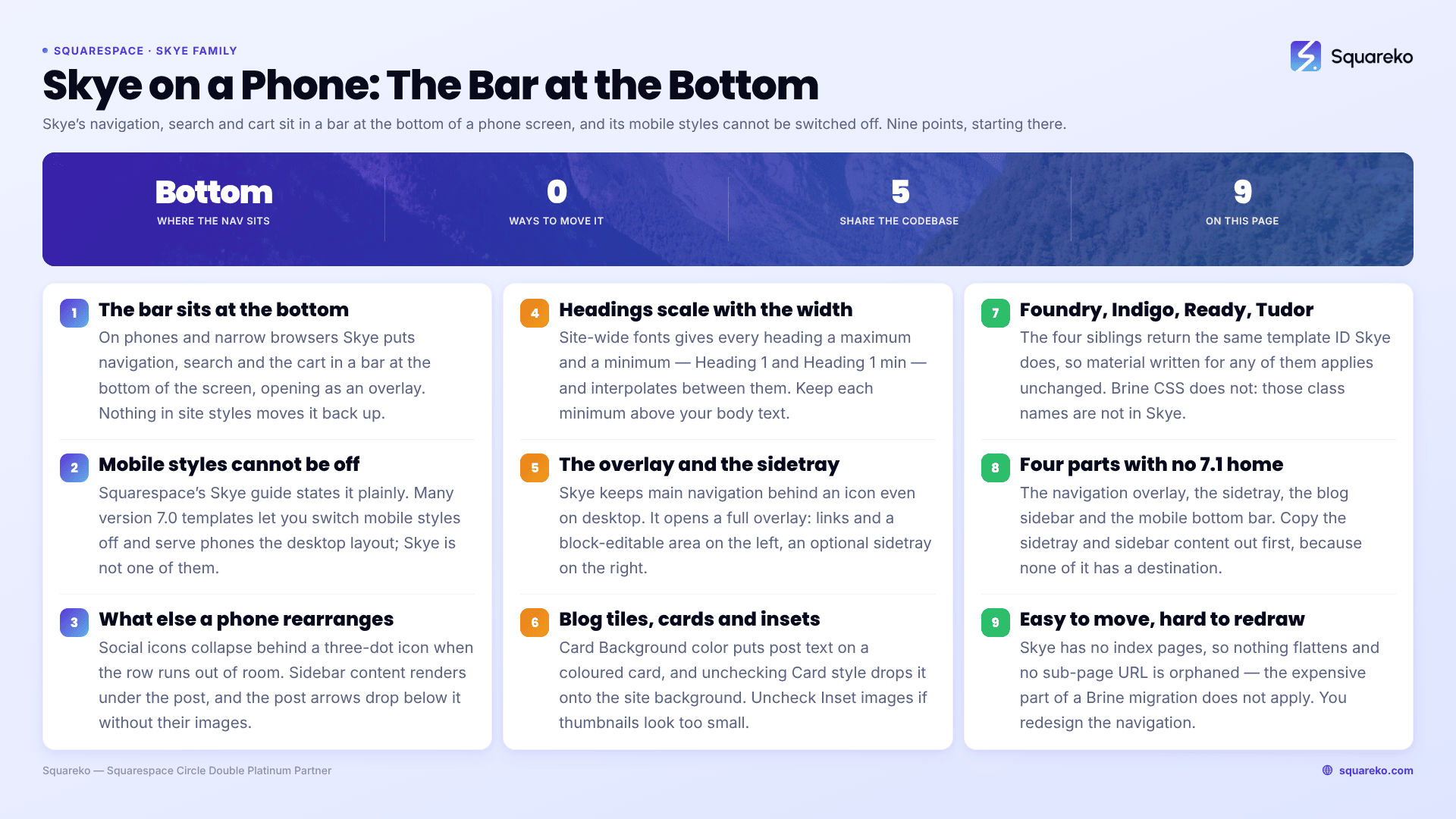
Should you stay on Skye, restyle it, or move to 7.1?
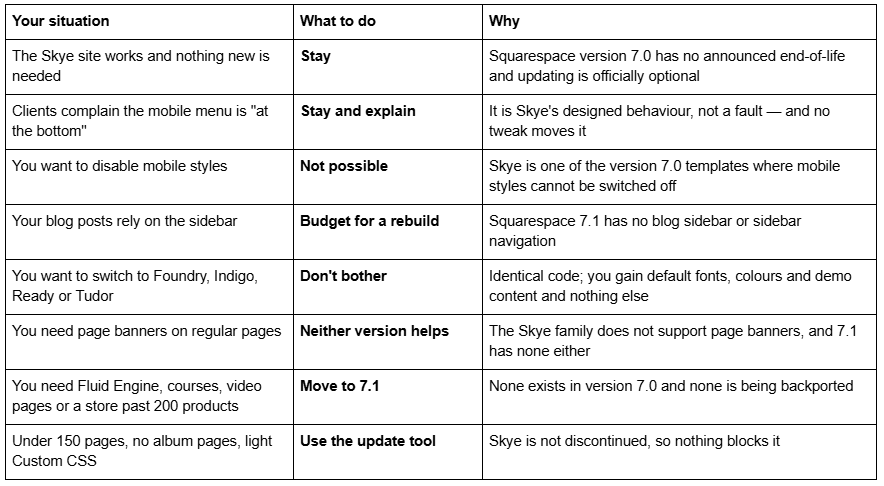
Skye is one of five templates sharing one codebase
Squarespace's family guide names them: "The Skye template family (Foundry, Indigo, Ready, Skye, Tudor)…". Five templates, one codebase.
We confirmed it directly rather than relying on the list. All five demos returned HTTP 200 in August 2026 and all five report template ID 54d3906fe4b04c1c9981b00e. For comparison, Brine's family ID is 55f0aac0e4b0f0a5b7e0b22e and Farro's is 5630efcfe4b076f55fe4837f — different numbers, different code.
Three practical consequences:
Foundry, Indigo, Ready and Tudor material applies to your Skye site unchanged. Class names and tweak names are family-level. When you cannot find help for "Skye", search the sibling names.
Brine CSS will not work. Most freely available Squarespace 7.0 CSS is Brine CSS, written against class names Skye does not have. A snippet that silently does nothing is usually the wrong family rather than a syntax error.
A template detector will report your site as "Skye" whichever of the five you installed, because templateId identifies the family and never the individual template.
Switching between the five unlocks nothing — you get a different palette, font pairing and placeholder content, all site styles values.
The full 121-template roster is in the list of Squarespace 7.0 templates, and the Squarespace 7.0 template comparison chart shows where the Skye family sits against the other 21.
How the Squarespace Skye template behaves on mobile
This is the section most Skye owners need, and it is documented behaviour rather than bugs.
Navigation moves to a bottom bar. On phones and narrow browsers, Skye's navigation, search icon and shopping cart display in a bar at the bottom of the screen and open as an overlay when tapped. On desktop those same elements sit in a fixed transparent header at the top. Nothing in site styles moves the mobile bar back to the top.
Social icons collapse into a three-dot "more" icon whenever there is not enough room for the full row — on desktop in a narrow browser as well as on mobile.
Sidebar content drops below the page content. Skye blog posts support a site-wide sidebar, and on mobile it renders underneath the post rather than beside it. If your sidebar carries a call to action, on a phone it is at the very bottom of the page.
Blog post navigation arrows move below the content, and featured images vanish from them. On desktop, hovering a next/previous arrow reveals the post's date, title and featured image. On mobile the arrows sit below the post content and the featured images do not appear.
You cannot disable mobile styles. Squarespace's Skye guide states it plainly. Many version 7.0 templates — Wells and Native among them — let you switch mobile styles off and serve the desktop layout to phones. Skye does not offer the option.
Fonts scale with browser width. Skye's Site-wide fonts section gives each heading a maximum and a minimum — Heading 1 and Heading 1 min — and interpolates between them. Squarespace recommends keeping each minimum above your body text size.
For comparison, Squarespace 7.1 handles all of this differently. There are no mobile-specific style settings in 7.1 at all; sites simply reflow. The one exception is Fluid Engine, where each section keeps a genuinely separate mobile layout you drag by hand, at a 767px breakpoint.
What the Squarespace Skye template does well
Everything below is Skye family behaviour, so it is equally true of Foundry, Indigo, Ready and Tudor.
The navigation overlay. Skye's main navigation always lives behind a ☰ icon, even on desktop. Clicking it opens a full overlay split in two: navigation links on the left, with a blocks-editable area beneath them, and an optional sidetray on the right that you fill with blocks. The overlay background follows the Site background colour, and Hide right column under Site navigation removes the sidetray.
A fixed transparent header. The desktop header stays over the content as you scroll. Header background when Scrolled under Site adds a solid colour once scrolling starts, set with Header background color.
Blog thumbnail grids with card styling. Post tiles can display their text over a coloured card — Card Background color sets it, unchecking Card style drops the text onto the site background. Image cropping sets the shape of every featured image, and Minimum column width under Blog grid layout controls tiles per row.
A blog sidebar and a flexible author profile. The sidebar is site-wide and block-editable, and Author profile under Blog post options puts profiles either in the sidebar or below the post.
Content inset with selective full-bleed. Content inset under Site sets the margin, and Full bleed images, Video and Gallery checkboxes let those blocks break out of it while everything else stays indented.
A reading progress pie in blog posts, coloured with Progress indicator fill color, and an Advanced store page — the newest version 7.0 commerce layout, shared with Brine, Farro, Tremont and York.
What breaks or feels dated on a Skye site in 2026
No Fluid Engine. Squarespace version 7.0 editing is the classic block editor — a 12-column grid, no drag-anywhere canvas, no overlapping blocks without CSS. Fluid Engine is 7.1-only.
No page banners. Squarespace states it directly: the Skye family does not support page banners. Featured images create banners on individual blog posts and nowhere else. If a Skye site has a full-width hero on a regular page, it was built out of blocks or CSS, not a banner.
No background images. Skye supports a Site background colour only.
Store pages cap at 200 products. That is a version 7.0 limit rather than a Skye one. Squarespace 7.1 raises it to 10,000 per page and per site.
Long words break tiles. Text wraps between words in blog thumbnail tiles, but individual words do not break, so a long word can be clipped or overflow the tile edge.
Skye quirks Squarespace documents and is not going to fix
Squarespace maintains a Troubleshooting Skye section, prefaced with its actual position on version 7.0: "Although we still support Squarespace version 7.0, fixing bugs or issues is a lower priority for us while we focus on our current platform, version 7.1."
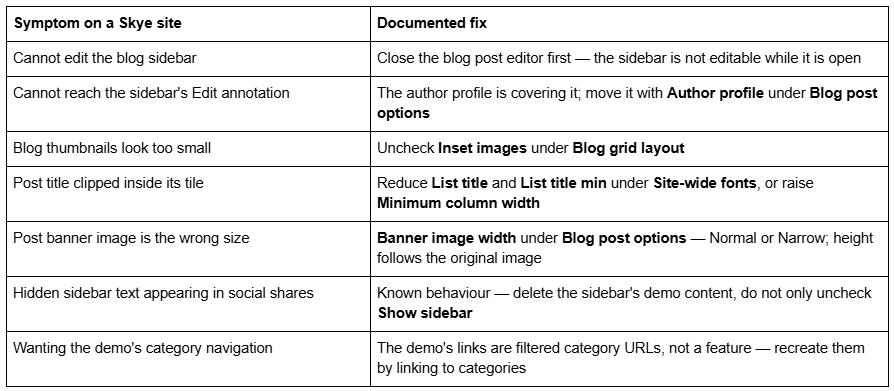
None of these is a fault in your setup. All are Skye behaving as documented, on all five templates.
Is the Squarespace Skye template still available?
Yes — on an existing version 7.0 site, via Design → Template → Install new template. Skye is not on Squarespace's discontinued list, which covers 32 retired templates including Bryler, Fulton, Jones, Taylor, Lincoln and the whole Marquee family. None of the five Skye family members appears on it.
You cannot start a new site on Skye. Every new Squarespace site is 7.1, and the live gallery at squarespace.com/templates returned 198 templates in August 2026, all 7.1. The old squarespace.com/templates/skye-demo URL that still ranks for this keyword now serves that generic gallery. Squarespace's demo at skye-demo.squarespace.com is still live and still genuinely Skye.
Watch for the name collision — it is on this SERP twice. A shop called Skye Studio sells unrelated 7.1 products on Creative Market. If you are troubleshooting a 7.0 Skye site and land on a page about sections and Fluid Engine, you are on the wrong Skye. Check your own page source: version 7.0 reports "templateVersion":"7" — not "7.0" — and the Skye family ID. Version 7.1 reports the universal ID 5c5a519771c10ba3470d8101.
Version 7.0 has no announced end-of-life, and Squarespace states the move is optional: "Updating your site from version 7.0 to 7.1 is optional." Whether old Squarespace templates are still supported covers the support position in full.
Moving a Squarespace Skye site to version 7.1
The tool is at Design → Update to Version 7.1. It is permanent, capped at 150 pages and 200 products, requires developer mode off, and leaves Custom CSS commented out — remove the comment tags in the CSS editor afterwards and expect Skye-specific selectors to match nothing.
What happens to the parts a Skye site is built from:
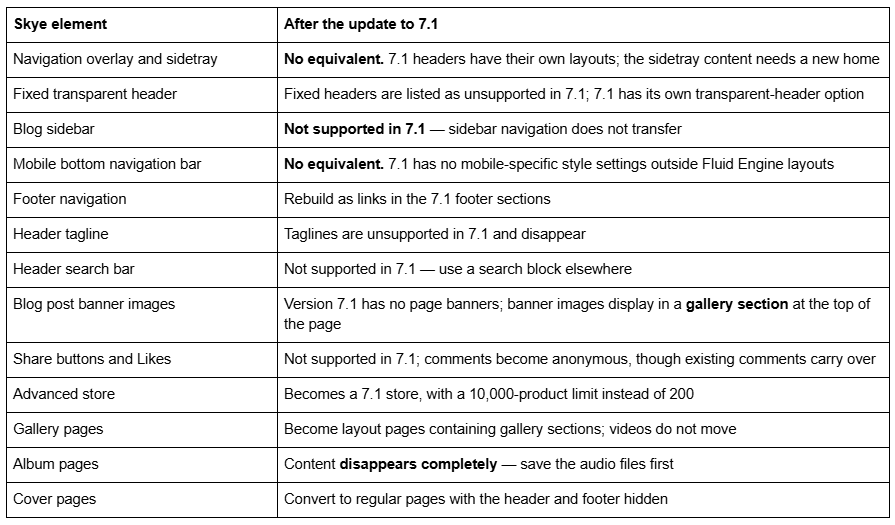
Skye is a structurally easy migration and a presentationally awkward one. It has no index pages, so nothing flattens and no sub-page URLs are orphaned — the most expensive part of a Brine migration does not apply. What you lose is the navigation model: the overlay, the sidetray, the blog sidebar and the mobile bottom bar have no direct 7.1 counterpart, and together they are most of what makes a Skye site feel like Skye.
Audit before you press the button. Copy the sidetray and blog sidebar content into a document — that content has no automatic destination. Screenshot the Site navigation, Blog grid layout, Blog options and Blog post options tweaks. Count pages and products, and export the Custom CSS.
And the one that costs money later: changing a page slug on Squarespace creates no automatic 301 redirect, ever. Any URL that shifts during the rebuild needs an entry in Settings → Advanced → URL Mappings in the /old -> /new 301 format.
The screen-by-screen version is in the Squarespace 7.0 to 7.1 guide, and how to change a Squarespace template covers switching within version 7.0 if you would rather move sideways than upgrade. The Squarespace Brine template guide works through the same decision for the largest 7.0 family.
So: stay on Skye, or move?
Stay if the navigation overlay and the blog sidebar are doing real work and nothing on your list requires 7.1. Skye is not discontinued, version 7.0 has no end-of-life date, and the update tool will still be there next year.
Restyle if the objection is aesthetic. Card style, image cropping, column width, font scaling minimums, header scroll colour and the sidetray contents are all site styles or block changes. Switching to Foundry, Indigo, Ready or Tudor unlocks nothing.
Move if you need Fluid Engine, courses, video pages, a store past 200 products, or an independently editable mobile layout — and accept that you are redesigning the navigation rather than migrating it.
For scale: across 54 Squareko-built client sites measured in August 2026 (Playwright/Chromium lab test, cloud datacenter, unthrottled, single run per site), 53 of 54 run Squarespace 7.1. Version 7.0 is the minority case now, but a working Skye site is not an emergency.
Most Skye sites we are sent move their posts and pages across in a day, then spend a week on navigation and mobile — what replaces the overlay, where the sidetray content goes, how the sidebar's calls to action become sections. Where the sidebar and overlay were carrying the conversion path, starting from a premium Squarespace template built for 7.1 and Fluid Engine is usually shorter than reconstructing a 7.0 navigation the platform no longer offers. The table at the top of this page settles it for most people without spending anything.
FAQ
-
Five: Foundry, Indigo, Ready, Skye and Tudor. We fetched all five demos in August 2026 and every one reports "templateVersion":"7" and template ID 54d3906fe4b04c1c9981b00e. They share one codebase and differ only in default fonts, colours and demo content, so switching between them unlocks no features.
-
Because that is Skye's designed mobile behaviour. On phones and narrow browsers, the navigation, search icon and shopping cart display in a bottom navigation bar and open as an overlay when tapped. Social icons collapse into a three-dot "more" icon. No site styles tweak moves the bar to the top.
-
No. Squarespace documents that Skye family mobile styles cannot be switched off, unlike several other version 7.0 templates such as Wells and Native. Squarespace 7.1 removes mobile-specific settings entirely — the only per-device control there is Fluid Engine's separate mobile layout per section.
-
Yes, on an existing version 7.0 site via Design → Template → Install new template. No Skye family member is on Squarespace's discontinued list. You cannot start a new site on Skye — the live template gallery returned 198 templates in August 2026, all 7.1. Note that an unrelated 7.1 product from a shop called Skye Studio also ranks for this name.
-
No. Squarespace states that the Skye family does not support page banners. Featured images create a banner on individual blog posts only, controlled by Show banner image and Banner image width under Blog post options. Squarespace 7.1 has no page banners either; 7.0 banner images become a gallery section.
-
It does not transfer. Squarespace lists sidebar navigation as unsupported in version 7.1 for both blog pages and site headers. Copy the sidebar and sidetray content out before running the update tool, then rebuild it as page sections or footer content in 7.1.

Author Bio
I'm Walid Hasan, a Certified Squarespace Expert and Squarespace Circle Platinum Partner with over 12 years of hands-on experience designing and optimizing high-performing websites. Over the years, I've had the privilege of building more than 2,000 Squarespace websites for clients around the world, always focusing on clean design, strong user experience, and conversion-driven results.
