
Squarespace Native Template: The Background Image Is Not a Banner
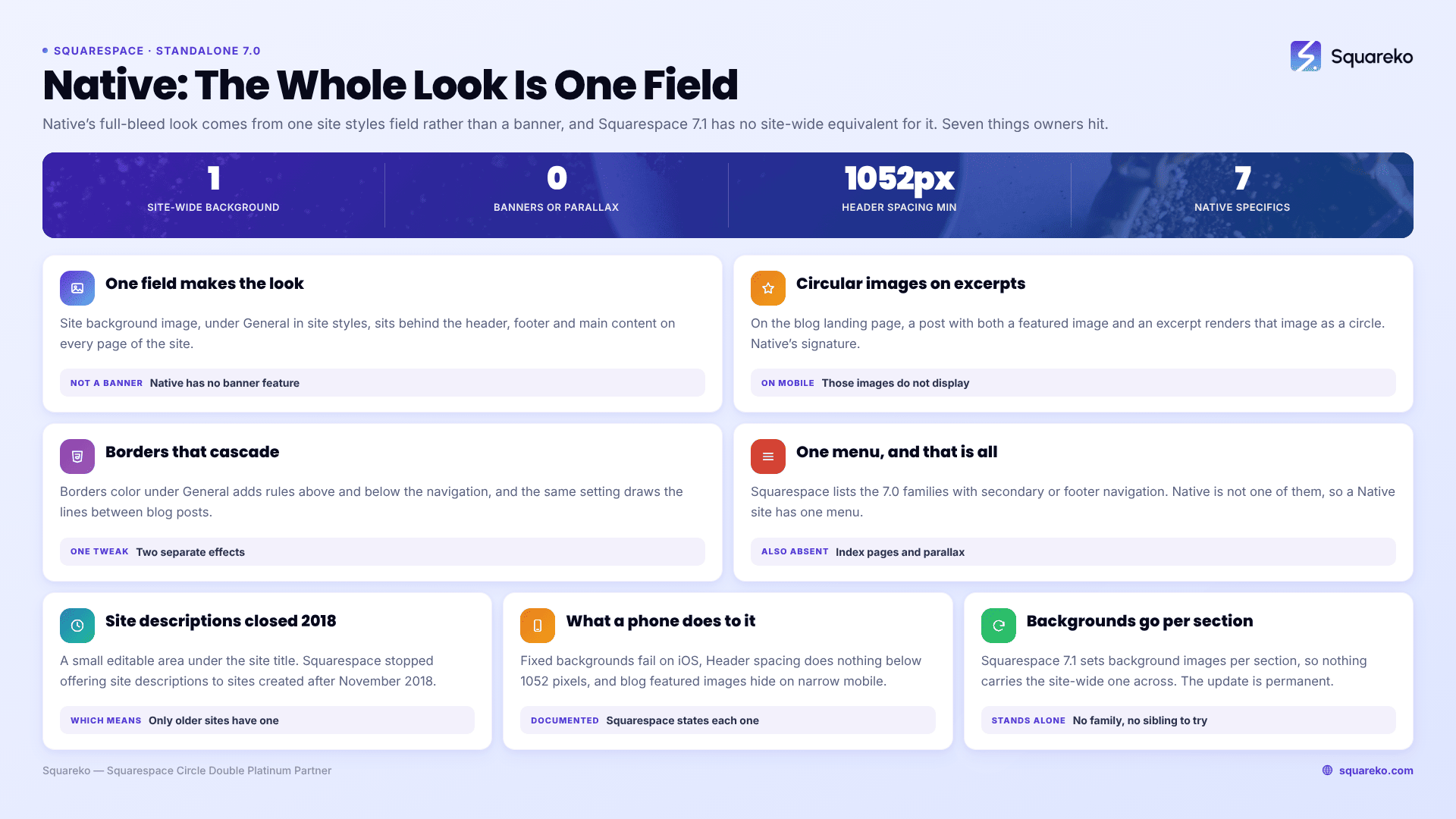
Native is a standalone Squarespace version 7.0 template — not part of a family — and it has no page banners and no parallax scrolling. We verified it in August 2026: native-demo.squarespace.com reports "templateVersion":"7" and template ID 4f6a1392e4b07090d46e7ec9, an ID no other 7.0 template shares. The full-bleed effect people associate with Native comes from a site-wide background image set under General in site styles, and that is a different feature with a different migration path from a banner.
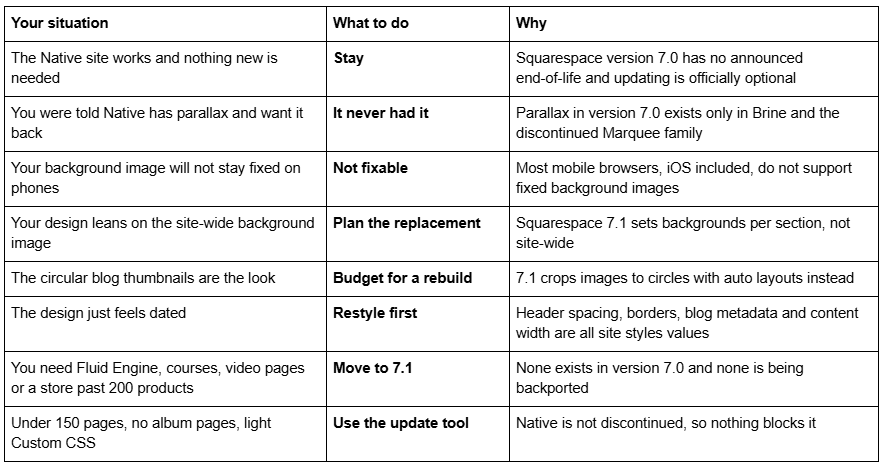
Should you stay on Native, restyle it, or move to 7.1?
Native has no banners and no parallax
This is the correction that matters most, because it is repeated across template round-ups and it changes what a migration costs.
Native does not support page banners. The page types Native supports are album, blog (list layout), cover, events, gallery (standard layout), layout, and products (classic). Squarespace's Native guide describes a header, a background and a footer — there is no banner feature, no intro area, and no index page.
Native does not have parallax. Squarespace documents parallax scrolling in version 7.0 as a feature of exactly two families: Brine and the discontinued Marquee family. Native is neither.
What Native actually has is a site-wide background image. In the General section of site styles, Site background sets a colour and Site background image sets an image that displays behind the header, footer and main content area on every page. Combined with a fixed attachment, that reads as a full-bleed hero on a desktop browser, and that is what people remember.
And that background does not stay fixed on phones. Squarespace states the cause plainly: "Many mobile browsers, including iOS, don't support fixed background images." The documented workaround is the Size: cover and Size: contain background options — which apply to computers and mobile alike, so you choose one compromise for every device.
If you are looking for a genuinely Brine-like parallax experience on version 7.0, the Squarespace Brine family templates guide covers the 47 templates that have it. The list of Squarespace 7.0 templates covers all 121 templates across the 22 families, and shows where the standalone templates like Native sit.
Native is its own template, not part of a family
Most Squarespace version 7.0 templates belong to a family — 22 families covering 121 templates, with Brine alone accounting for 47. Native is one of the exceptions. Squarespace's documentation is a single-template guide called "Native template", not a family guide, and the ID confirms it: native-demo.squarespace.com returned HTTP 200 in August 2026 reporting 4f6a1392e4b07090d46e7ec9, which is not the Brine ID (55f0aac0e4b0f0a5b7e0b22e), not the Farro ID (5630efcfe4b076f55fe4837f), and not the Skye ID (54d3906fe4b04c1c9981b00e).
Two practical consequences:
Brine CSS will not work on a Native site. Most freely available Squarespace 7.0 CSS is Brine CSS, written against class names Native does not have. A snippet that silently does nothing is usually the wrong family rather than a syntax error.
A template detector will report "Native" and be exactly right. templateId normally identifies the family rather than the individual template — which is why a Mojave site reports as Brine — but with a one-member family there is no ambiguity.
What the Squarespace Native template does well
A centred header. Site title or logo, tagline, site description and main navigation all sit centred at the top. Header spacing under Site header controls the gap between the navigation and the page content. Dropdown menus open on hover, with a background matching the site background.
A site description — a small editable area below the site title. Squarespace stopped offering site descriptions to sites created after November 2018, so this only exists on older Native sites.
Border lines that cascade. Changing the transparency of Borders color under General adds rules above and below the navigation, and the same setting draws the lines between posts on a blog landing page. One tweak, two effects.
Circular featured images on excerpted posts. Native's signature. On the blog landing page, any post that has both a featured image and an excerpt renders that image as a circle above the title. Posts without excerpts show their promoted image, gallery or video block instead.
A location tag from your business details. The Business name field on the Location tab displays as a location tag on blog posts.
Blog metadata you can actually control. Blog meta data puts dates and categories above or below the post, Hide author and Hide tags categories switch those off, Hide icons removes the metadata icons, and Blog content width sets the post width.
A footer with built-in social icons and a block-editable content area, styled with the Footer tweaks.
What breaks or feels dated on a Native site in 2026
No Fluid Engine. Squarespace version 7.0 editing is the classic block editor — a 12-column grid, no drag-anywhere canvas, no overlapping blocks without CSS. Fluid Engine is 7.1-only.
No index pages. Native has never had them, which is why Native homepages are usually layout pages with a background image doing the heavy lifting.
No secondary or footer navigation. Squarespace's version 7.0 navigation guide lists the families that offer extra menus — Adirondack, Bedford, Brine, Farro, Galapagos, Pacific, Skye, Supply, Wells and York. Native is not among them, so a Native site has exactly one menu.
Circular featured images vanish on mobile. Squarespace documents it twice: focal points do not apply to those images, and "on narrow mobile browsers, such as smartphones, blog post featured images don't display." If your blog landing page looks empty on a phone, that is why.
Header spacing disappears below 1052 pixels. Squarespace documents the exact threshold: if the browser is narrower than 1052 pixels, the Header spacing tweak has no effect. Widen past 1052 and it returns. For comparison, Squarespace 7.1's mobile breakpoint is 767px.
Classic products pages cap at 200 products. That is a version 7.0 limit rather than a Native one. Squarespace 7.1 raises it to 10,000 per page and per site.
Native quirks Squarespace documents and is not going to fix
Squarespace maintains a Troubleshooting Native section, prefaced with its actual position on version 7.0: "Although we still support Squarespace version 7.0, fixing bugs or issues is a lower priority for us while we focus on our current platform, version 7.1."
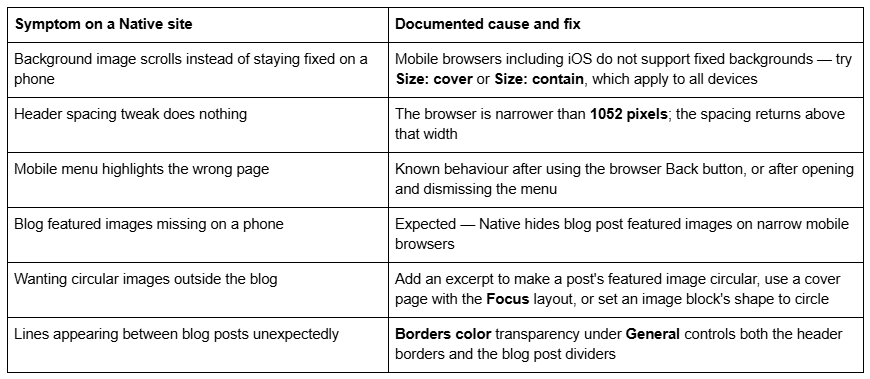
None of these is a fault in your setup. All are Native behaving as documented.
Is the Squarespace Native template still available?
Yes — on an existing version 7.0 site, via Design → Template → Install new template. Native is not on Squarespace's discontinued list, which covers 32 retired templates including Bryler, Fulton, Jones, Taylor, Lincoln and the whole Marquee family.
You cannot start a new site on Native, which is what the forum thread "How to Use Native Template on new site?" is really about. Every new Squarespace site is 7.1, and the live gallery at squarespace.com/templates returned 198 templates in August 2026, all 7.1. The old squarespace.com/templates/native-demo URL that several competitors still link to now serves that generic gallery — we fetched it and it reports the marketing site's own template ID, not Native's. Squarespace's demo at native-demo.squarespace.com is still live and still genuinely Native.
Version 7.0 has no announced end-of-life, and Squarespace states the move is optional: "Updating your site from version 7.0 to 7.1 is optional." Whether old Squarespace templates are still supported covers the support position in full.
Moving a Squarespace Native site to version 7.1
The tool is at Design → Update to Version 7.1. It is permanent — "After you click Publish update, your site will update to version 7.1 permanently" — capped at 150 pages and 200 products, requires developer mode off, and leaves Custom CSS commented out. Remove the comment tags in the CSS editor afterwards and expect Native-specific selectors to match nothing in 7.1 markup.
What survives, and what does not:
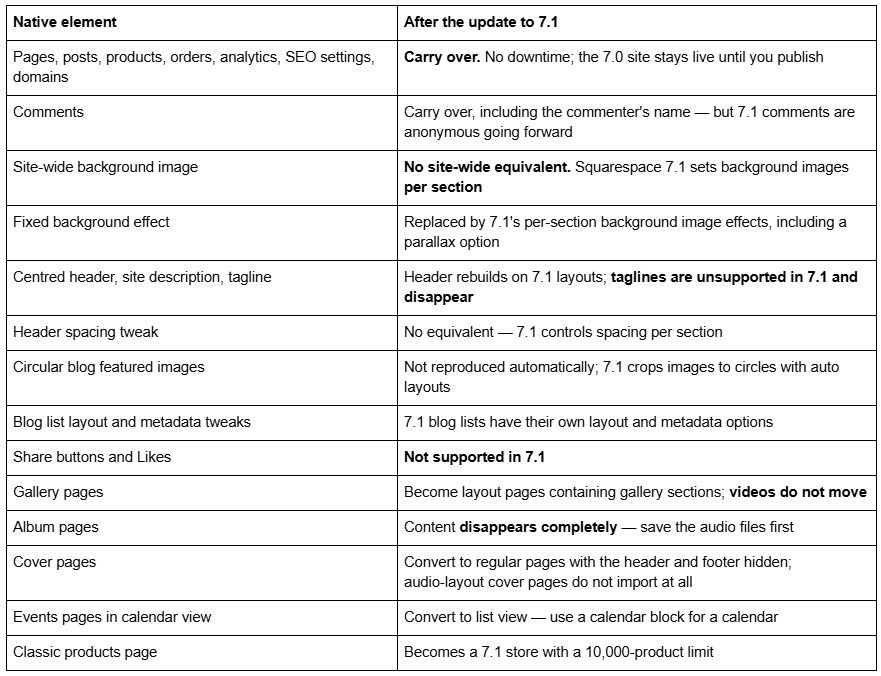
Native is one of the easier version 7.0 migrations, and it is worth saying plainly because the pages calling it a parallax banner template imply otherwise. Native has no index pages, so nothing flattens and no sub-page URLs are orphaned — the most expensive part of a Brine migration does not apply. It has no secondary or footer navigation and no banners, so nothing gets shuffled into the main menu and nothing has to be reconstituted as a gallery section.
What you rebuild instead is one thing: the background. A Native homepage leaning on a full-bleed site-wide image becomes a 7.1 page whose sections each carry their own background — a design decision rather than a data-recovery exercise. Squarespace 7.1's per-section background images include a parallax effect, so a Native site can end up with more motion after the update than before.
Audit before you press the button. Download the site background image at full resolution — it is a style setting, not a content asset, and it is easy to lose. Screenshot the General, Site header, Blog and Footer tweaks. List which posts rely on circular featured images. Check for audio-layout cover pages. Count pages and products, and export the Custom CSS.
And the one that costs money later: changing a page slug on Squarespace creates no automatic 301 redirect, ever. Any URL that shifts during the rebuild needs an entry in Settings → Advanced → URL Mappings in the /old -> /new 301 format. Note also that products moving from the classic product editor gain a /p/ segment in their URLs on 7.1, which is a redirect job on its own.
The screen-by-screen version is in the Squarespace 7.0 to 7.1 guide, and how to change a Squarespace template covers switching within version 7.0. The Squarespace Brine template guide works through the same stay-or-move decision for the family that genuinely does have parallax.
So: stay on Native, or move?
Stay if the Native site does its job. It is not discontinued, and version 7.0 has no end-of-life date.
Restyle if the objection is aesthetic. Header spacing, border transparency, blog metadata, content width, fonts and colours are all site styles values, and swapping the background image changes the character of the whole site in about a minute.
Move if you need Fluid Engine, courses, video pages, a store past 200 products, or an independently editable mobile layout. Native is a good candidate: the structural work is minimal and the visual work is concentrated in one place.
For scale: across 54 Squareko-built client sites measured in August 2026 (Playwright/Chromium lab test, cloud datacenter, unthrottled, single run per site), 53 of 54 run Squarespace 7.1. Version 7.0 is the minority case now, but a working Native site is not an emergency.
Most Native sites we are sent come through the update tool intact and then need two or three days of design work — rebuilding the homepage as sections with their own backgrounds, and deciding what replaces the circular blog thumbnails. Where the site was already being redesigned rather than merely moved, starting from a premium Squarespace template built for 7.1 and Fluid Engine is usually the shorter path than restyling a converted 7.0 layout. The table at the top of this page settles it for most people without spending anything.
FAQ
-
No. Squarespace documents parallax scrolling in version 7.0 as a feature of two families only: Brine and the discontinued Marquee family. Native has neither parallax nor page banners. What people mistake for parallax is Native's site-wide Site background image under General, rendered with a fixed attachment on desktop browsers.
-
None. Native is a standalone version 7.0 template with its own guide rather than a family guide. We fetched native-demo.squarespace.com in August 2026 and it reports "templateVersion":"7" and template ID 4f6a1392e4b07090d46e7ec9, which is not the Brine, Farro or Skye family ID.
-
Because most mobile browsers, including iOS, do not support fixed background images. This is a browser limitation rather than a Squarespace bug. Squarespace's documented workaround is to try the Size: cover and Size: contain background image options, which apply to computers and mobile alike.
-
Yes, on an existing version 7.0 site via Design → Template → Install new template. Native is not on Squarespace's discontinued list. You cannot start a new site on Native — the live template gallery returned 198 templates in August 2026, all version 7.1, and squarespace.com/templates/native-demo now serves that generic gallery.
-
Because the browser window is narrower than 1052 pixels. Squarespace documents this as responsive behaviour: the Header spacing tweak under Site header has no effect below that width and reappears above it. For comparison, Squarespace 7.1's mobile breakpoint is 767px.
-
There is no site-wide equivalent. Squarespace 7.1 builds pages from sections and applies background images per section, with their own effects including parallax. Download the original image at full resolution before running the update tool — it is a style setting rather than a content asset, so it is easy to lose.

Author Bio
I'm Walid Hasan, a Certified Squarespace Expert and Squarespace Circle Platinum Partner with over 12 years of hands-on experience designing and optimizing high-performing websites. Over the years, I've had the privilege of building more than 2,000 Squarespace websites for clients around the world, always focusing on clean design, strong user experience, and conversion-driven results.
