
Squarespace Mobile Responsive Issues: The 10 Most Common Fixes
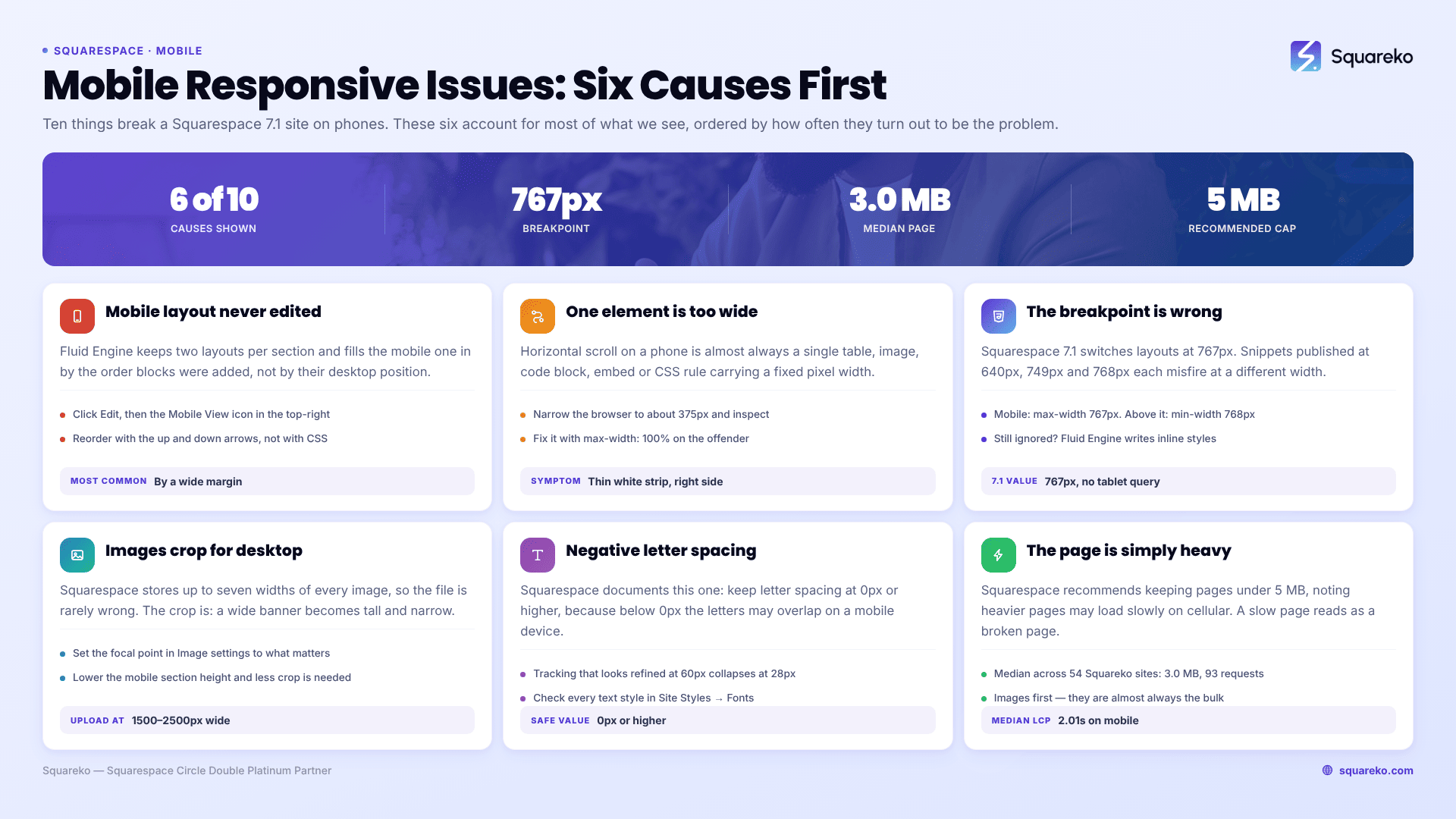
In Squarespace 7.1 the most common cause by a wide margin is that the Fluid Engine mobile layout was never edited. Fluid Engine stores a separate mobile layout per section and fills it in approximately from your desktop arrangement. Until someone opens Mobile View and fixes it, blocks land in the order they were added, not where they belong. Second most common is horizontal scroll caused by one fixed-width element. Third is a media query written at the wrong breakpoint.
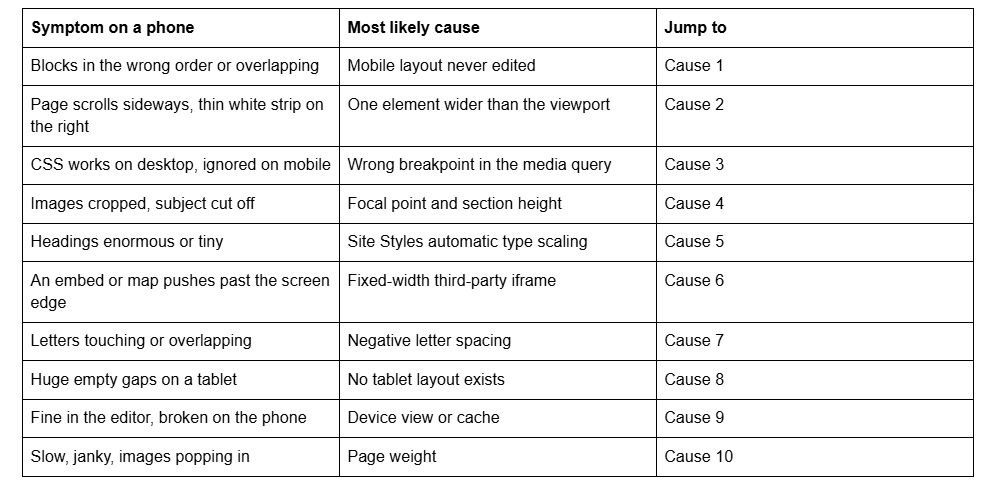
Here are the ten causes, ordered by how often they turn out to be the problem.
Quick diagnostic table
Cause 1 — The Fluid Engine mobile layout was never edited
Squarespace 7.1 keeps two layouts per Fluid Engine section: desktop on a 24-column grid, mobile on an 8-column grid. Squarespace generates the mobile one automatically, and its default ordering follows the order in which blocks were added to the section, not their desktop position.
Confirm it in ten seconds: click Edit, then the Mobile View icon in the top-right. If the mobile arrangement looks unconsidered, it is because nobody considered it.
Fix it in the editor rather than with CSS. Select a block and use the ↑ / ↓ arrows in the block toolbar to reorder, and resize blocks against the 8-column grid. Full detail in the Fluid Engine mobile editing rules.
Cause 2 — Something is wider than the viewport
Horizontal scroll on mobile is almost always a single element: a table, a wide image, a code block, an embed, or a custom CSS rule using a fixed pixel width or a negative margin.
Find it fast. Open the page on desktop, narrow the browser to about 375px, then run this in the browser console:
[...document.querySelectorAll('*')].filter(el =>
  el.getBoundingClientRect().right > document.documentElement.clientWidth
);
Every element returned is overflowing. Usually there is exactly one, and everything else in the list is its parent.
The general fix is max-width: 100% on the offending element, or making the wrapper scrollable rather than the page.
Cause 3 — The media query uses the wrong breakpoint
Squarespace 7.1's mobile breakpoint is 767px. Snippets circulating online use 640px, 749px and 768px, and each one misfires somewhere.
@media screen and (max-width: 767px) {
  /* mobile-only rules for Squarespace 7.1 */
}
There is no tablet breakpoint in 7.1. Use max-width: 767px for mobile and min-width: 768px for everything above it. If your rule is correct and still ignored, the next thing to check is Fluid Engine's inline styles — see Squarespace custom CSS not working.
Cause 4 — Images crop badly because the focal point is set for desktop
Squarespace stores up to seven widths of every uploaded image and picks the best fit for the visitor's screen, so the file is rarely the problem. The crop is.
A banner that is wide and short on desktop becomes tall and narrow on mobile, and the crop happens around the image's focal point. Set the focal point in Image settings to the part of the image that must survive — a face, a product, not the middle of the sky. For hero sections, reducing section height on mobile often removes the need to crop at all.
Upload at 1500–2500px wide; 2500px is the largest Squarespace serves.
Cause 5 — Type scaling makes headings the wrong size
Squarespace 7.1 scales text automatically for smaller screens, and the scaling is proportional — a heading set very large on desktop shrinks by the same ratio as body text, which is often not what you want. Squarespace 7.1's Site Styles has no separate mobile font-size control.
Reduce the desktop heading size first, since that is what mobile is scaled from. Where that is not acceptable, set mobile sizes explicitly at the 767px breakpoint. Full method, including clamp() and the 16px input minimum, in fixing text that's too small on mobile.
Cause 6 — A third-party embed has a fixed pixel width
Maps, calendars, booking widgets, video players and social feeds frequently ship with width="600" baked into the iframe. Squarespace's responsive rules cannot resize what the third party has hard-coded.
.sqs-block-embed iframe,
.sqs-block-code iframe {
  max-width: 100% !important;
  height: auto;
}
Where the provider offers a responsive embed code, use that instead of patching it. Embedded scripts are also disabled while you are logged in and editing, so always confirm embed behaviour logged out.
Cause 7 — Negative letter spacing makes letters overlap
This one is documented by Squarespace and still catches people. Their guidance is explicit: set letter spacing to 0px or higher, because "if the letter spacing of a font is set to less than 0px, the letters may overlap on a mobile device."
Tight tracking that looks refined on a 60px desktop heading collapses at 28px on a phone. Check every text style in Site Styles → Fonts where you have pulled letter spacing negative.
Cause 8 — Tablets get the desktop layout, not a tablet layout
Squarespace 7.1 has exactly two Fluid Engine layouts. Anything 768px and wider renders the desktop layout, squeezed. That is why an iPad shows large vertical gaps: text blocks that needed three lines at 1440px need two at 900px, and the grid row they were assigned stays put.
There is no setting for this. The practical fix is to build desktop sections that tolerate a squeeze — avoid tall single-line text blocks and rely on section padding rather than precise block positions for spacing.
Cause 9 — You are looking at Device view, not a device
Squarespace states plainly that Device view "is not 100% accurate for every phone or tablet." It does not reproduce a phone's browser chrome, dynamic viewport height, or touch behaviour.
Always confirm on a real handset, loaded logged out, after a hard refresh. If the live site looks stale, that is a caching question rather than a responsive one — see Squarespace changes not showing on the live site.
Cause 10 — The page is simply too heavy
Squarespace recommends keeping pages under 5 MB, noting that heavier pages "may load slowly on cellular connections." A page that loads slowly reads as broken on a phone: images pop in late, layout shifts, taps miss.
Across 54 Squareko-built sites measured in August 2026 — Playwright/Chromium lab test, cloud datacenter, unthrottled, single run per site, load-only CLS — median page weight was 3.0 MB across 93 requests and median mobile LCP was 2.01s, with 74% under Google's 2.5s threshold. Lab numbers, not field data, but they show what a normally built 7.1 page costs. If yours is well above 3 MB, the images are the place to look first.
Still broken on mobile?
Work the list in order: mobile layout, overflow, breakpoint, image crop, type scale, embeds, letter spacing, tablet width, testing method, page weight. The first three account for most of what we see.
If the problem persists across every page and every section rather than in one place, the cause is more likely template-level than page-level — that is covered separately in Squarespace mobile template not responsive.
When a site needs a full mobile pass rather than a single fix — dozens of sections, an inherited build, custom CSS nobody documented — that is what our Squarespace website support plans are for. Most of what is on this page you can do yourself in an afternoon, and should.
FAQ

Author Bio
I'm Walid Hasan, a Certified Squarespace Expert and Squarespace Circle Platinum Partner with over 12 years of hands-on experience designing and optimizing high-performing websites. Over the years, I've had the privilege of building more than 2,000 Squarespace websites for clients around the world, always focusing on clean design, strong user experience, and conversion-driven results.
