
Squarespace Website Support: Official Help vs a Dedicated Team
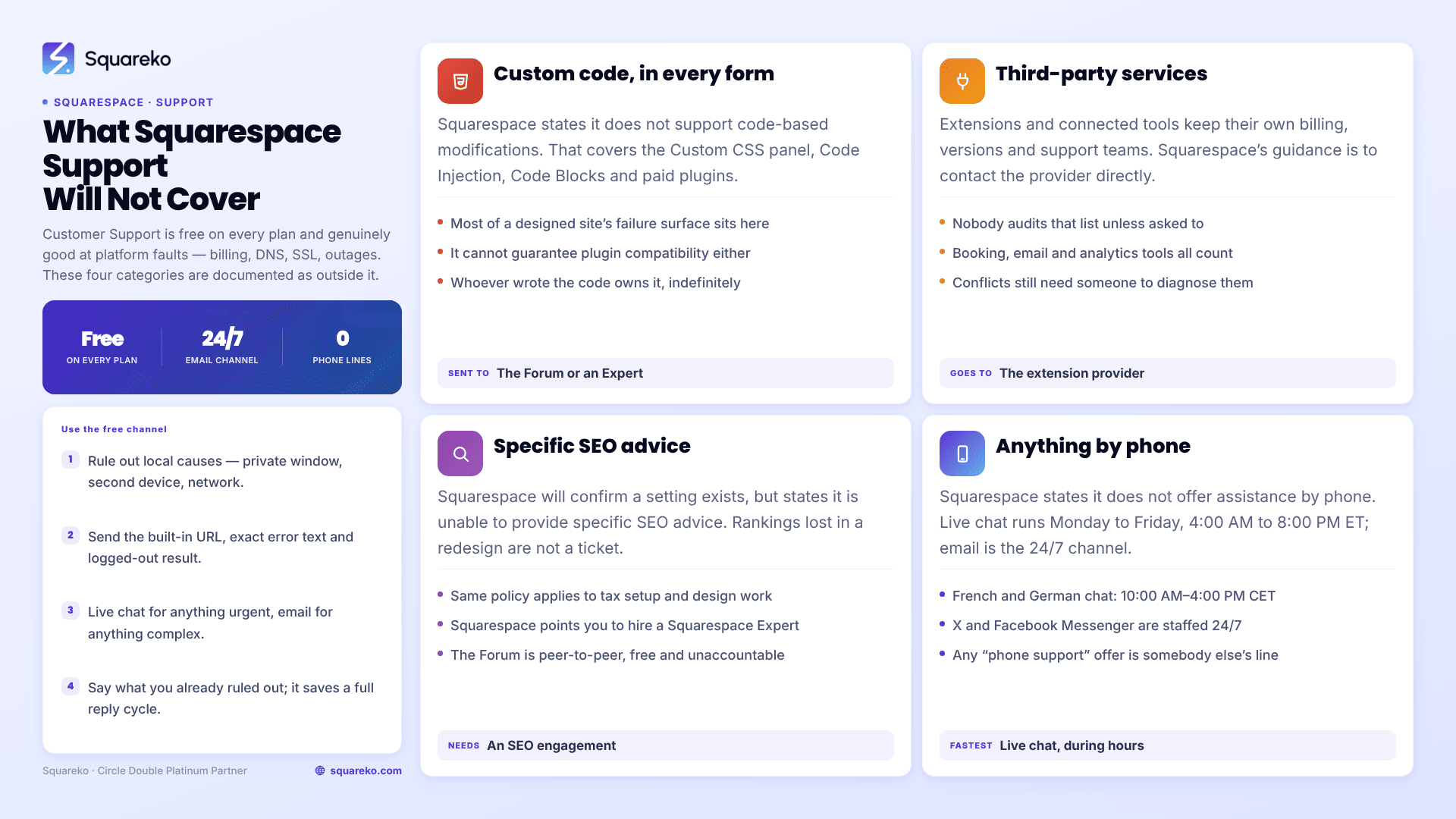
Squarespace Customer Support is free on every plan, available 24/7 by email, and genuinely good at platform problems — billing, DNS, SSL, account access, outages, and anything with a server-side cause you cannot see. It is documented as not covering three things: code-based customisations, specific SEO advice, and third-party services. There is also no phone support at all. Whether you need anything beyond it depends entirely on whether your site relies on those three excluded categories.
This page is the comparison, not a pitch. Most Squarespace owners never need more than the official channel.
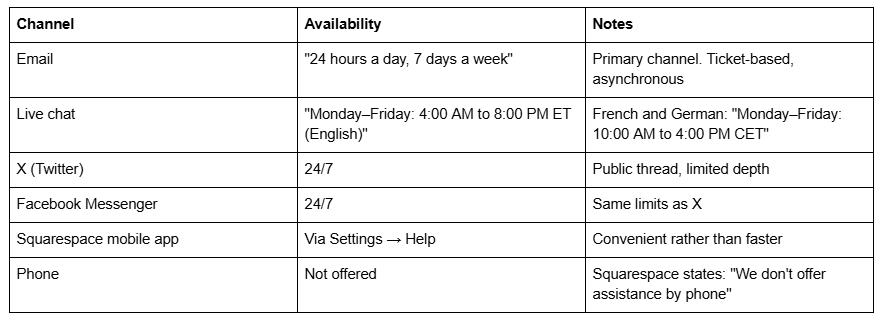
What Squarespace Customer Support actually offers
Three things are worth saying plainly because competing content tends to skip them.
It is free on every plan. There is no premium support tier on Squarespace. A Basic-plan site gets the same Customer Support access as an Advanced-plan site. Whatever else changes between the Basic, Core, Plus and Advanced plans, support access does not.
The people are competent. TechRadar's hands-on test found roughly a fifteen-minute wait to reach a live chat agent, but concluded that once connected, "the well-informed experts give clear instructions and help you out with your query well," and that "unless you are in a real rush, Squarespace support is more than well equipped to help you overcome any issues." That matches what I see: platform questions get accurate answers.
They can see things you cannot. Customer Support can confirm platform incidents, verify subscription and domain registration status from the inside, check DNS resolution from Squarespace's side, re-trigger SSL provisioning, and read server-side errors that never surface in the interface. On those problems they are not just adequate, they are the only correct destination.
What Squarespace Customer Support does not cover
This is the argument, and it is Squarespace's own documentation rather than my opinion.
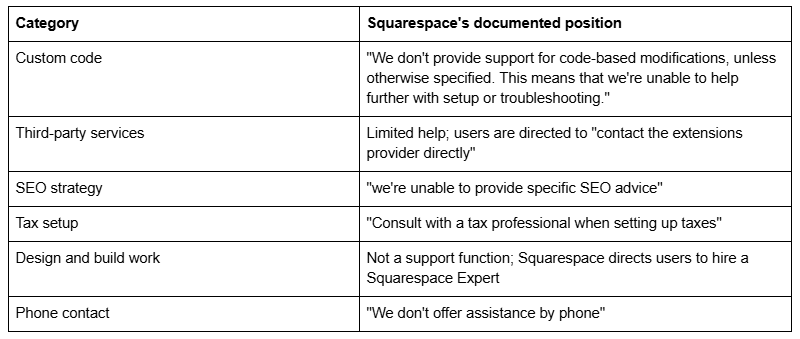
The custom-code exclusion is the one that matters most, because of what "custom code" covers in practice on Squarespace 7.1. It is not only bespoke JavaScript. It includes anything in the Custom CSS panel, anything in Code Injection, anything inside a Code Block, and any third-party plugin — the paid Squarespace plugins sold by independent developers are code-based customisations by this definition. Squarespace states that code-based customisations fall outside the scope of support and that it "can't guarantee their functionality or full compatibility with Squarespace."
So on a typical designed Squarespace site — one with a custom CSS file of a few hundred lines, a booking integration and a plugin or two — a meaningful share of everything that can break sits outside the free channel by design. Squarespace's own answer to that is the Squarespace Forum, which is peer-to-peer and unpaid, or hiring a Squarespace Expert.
That is not a criticism of Squarespace. A platform serving millions of sites cannot debug arbitrary code written by third parties. But it does mean the free channel has a shape, and it is worth knowing the shape before something breaks at 9am on a Monday.
Where the boundary falls in practice
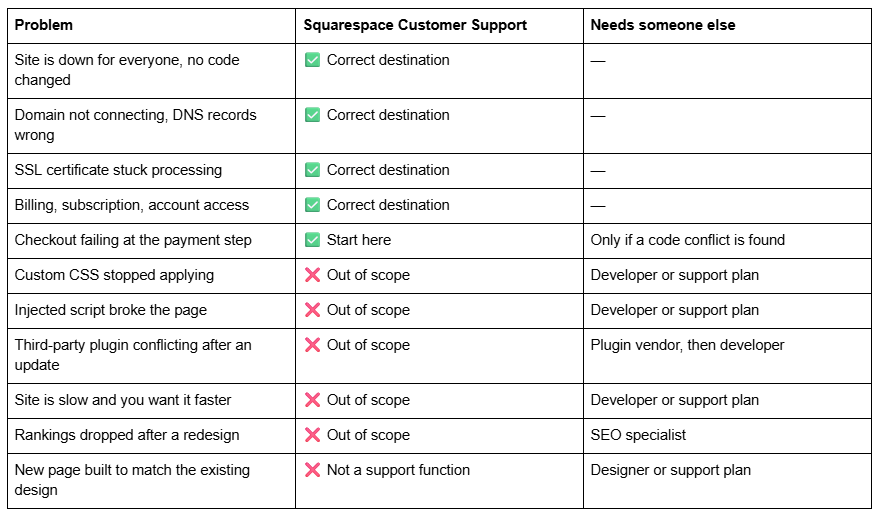
The pattern is consistent: Squarespace supports Squarespace. Anything you or a previous designer added on top is yours.
How to use official Squarespace support well
Most bad experiences with Customer Support are avoidable, and they come down to the same three things.
Rule out the local causes first. Load the site in a private window on a different device and network before reporting anything. A surprising share of "the site is broken" reports are browser cache or an extension, and the round trip to establish that costs a day of ticket time.
Send the three facts that matter. Your built-in yoursite.squarespace.com URL, the exact error text copied rather than described, and whether the problem reproduces logged out in a private window. Those three answers eliminate most of the back-and-forth in a support thread.
Use live chat for anything urgent, email for anything complex. Live chat runs Monday to Friday, 4:00 AM to 8:00 PM ET, and is the faster route to a human. Email is 24/7 but asynchronous, and each reply cycle costs hours. For a problem that needs screenshots, logs and a considered answer, email is the better tool. For a problem costing money right now, chat is the only real option — and if it is outside chat hours, escalating in parallel rather than sequentially is the pragmatic move.
Say what you have already ruled out. Support agents work through a standard diagnostic sequence, and if you have already tried the first four steps without saying so, you will be asked to try them again. Listing what you tested and what the result was moves the ticket forward by a full cycle. On a 24/7 email channel where each cycle costs hours, that is the single highest-return thing you can do.
There is one category where none of this helps: a genuine platform incident. If status.squarespace.com shows an active incident affecting your region or feature, waiting is the fix. Opening a ticket adds you to a queue that already knows, and changes made to the site during an outage are harder to unpick afterwards than the outage itself.
One more thing worth knowing before you open a ticket about disappeared code: Squarespace disables embedded scripts in code blocks whenever you are logged in and editing, and shows the message "This block contains embedded scripts. Embedded scripts are disabled while you're logged in and editing your site." That is not a fault, and it generates support tickets constantly. Check logged out first.
The third option: Squarespace Experts and Circle
Between free Customer Support and a monthly retainer sits a route Squarespace itself points you towards. When a question falls into the code-based category, Squarespace's documented answer is to "Visit the Squarespace Forum or hire a Squarespace Expert."
Those are two very different things, and they get conflated constantly.
The Squarespace Forum is peer-to-peer. Independent designers and developers answer questions there voluntarily, and the quality is genuinely high on common problems — a Squarespace 7.1 CSS question that hundreds of people have hit will usually have a working answer already posted. It is free, it is unaccountable, and nobody there has seen your site. For a well-defined, self-contained question it is excellent. For "something on my site is broken and I don't know what", it is not a diagnostic service.
Squarespace Experts is the paid marketplace of vetted independent designers and developers. Engagements there are typically project-shaped: a build, a redesign, a defined piece of work with a start and an end. That fits a redesign well and fits ongoing maintenance badly, because every new problem restarts the procurement conversation.
Squarespace Circle is the separate partner programme for professionals working on multiple client sites, with tiers that reflect volume of sites built — Platinum and Double Platinum sit at the top. Circle membership is a signal about experience with the platform rather than a support product you can buy.
The practical read: the Forum is the right first stop for a specific technical question, the Expert marketplace is right for defined projects, and a retainer only earns its place when the work is recurring and the response time matters.
What a dedicated support team adds
Not a better version of Customer Support. A different function.
Coverage of the excluded categories. Custom CSS, code injections, plugin conflicts, integration debugging, performance work and design changes are the four-fifths of a mature Squarespace site's problem surface that Squarespace declines by policy. A dedicated team's entire value is that it takes those.
Continuity. Customer Support is ticket-based and stateless — each conversation starts fresh, with no knowledge of your site's history. A team that has worked on the site knows why the header has a !important on it, which block ID the pricing table depends on, and what the last redesign changed. On a site with accumulated custom work, that context is the difference between a twenty-minute fix and a two-day investigation.
Someone who does the work. Customer Support tells you how to do something. That is the correct model for a platform, and it is useless if the problem is that nobody in your business has time to do it. A retainer is largely a purchase of execution rather than advice.
A change log. Most of what breaks a Squarespace site is self-inflicted — a code injection added three weeks ago, a plugin updated last Tuesday. A maintained record of every change turns an open-ended hunt into a short list, and almost nobody keeps one for themselves.
What it costs, and when it isn't worth it
Squarespace support retainers in this market run from about $99/month for one hour of work to $1,000–$1,250/month for eight to ten hours. Squareko's own plans are $350/month for 2 hours, $750/month for 6 hours and $1,250/month for 10 hours, published rather than quoted on a call.
Against a free official channel, that only makes sense in specific circumstances. It does not make sense if your site is a straightforward brochure site with no custom code, no shop, no bookings and no integrations, and you are comfortable in the Squarespace editor. In that case Customer Support plus the maintenance checklist covers you completely, and paying a retainer buys reassurance rather than work. The decision is worked through properly, including who should not buy, in do you need a Squarespace maintenance plan.
It does make sense when the site carries the custom code Squarespace will not touch, when downtime has a revenue number attached, when nobody in-house can confidently edit it, or when the person who built it is no longer available and you are changing settings without knowing what depends on them.
If that is your situation, our Squarespace website support plans are built for exactly the categories Squarespace Customer Support documents as out of scope — code, integrations, performance and design changes — with the platform problems still going to Squarespace, because that is where they belong and it costs you nothing. Most people reading this will not need more than the free channel, and that is a fine outcome.
FAQ
-
No. Squarespace states plainly: "We don't offer assistance by phone." Support runs through email 24/7, live chat Monday to Friday 4:00 AM to 8:00 PM ET, X, Facebook Messenger and the mobile app. Any agency offering "phone support for Squarespace" is offering their own phone line, not Squarespace's.
-
Yes. There is no paid support tier on Squarespace, and no plan-based restriction on channel access. A Basic-plan site and an Advanced-plan site get the same Customer Support. Response speed depends on queue and channel, not on what you pay for the platform.
-
No. Squarespace's documentation states: "We don't provide support for code-based modifications, unless otherwise specified." That covers the Custom CSS panel, Code Injection, Code Blocks and third-party plugins. Squarespace directs users to the Squarespace Forum or to hire a Squarespace Expert instead.
-
Email is asynchronous and unpublished, so treat it as hours rather than minutes. TechRadar's hands-on test reported roughly a fifteen-minute wait to reach a live chat agent, and rated email "quite slow". For anything revenue-affecting, live chat during its Monday–Friday hours is the faster route.
-
A vetted independent designer or developer listed in Squarespace's marketplace. Squarespace refers users to Experts for the work Customer Support excludes — code-based customisations, design and build. Squarespace Circle is the separate partner programme, with Platinum and Double Platinum tiers reflecting volume of sites built.
-
Whoever wrote the code that broke, or a Squarespace developer if that person is gone. The excluded categories — custom CSS, injected scripts, plugin conflicts, third-party integrations — are exactly what a support retainer covers. Platform-level faults should still go to Squarespace Customer Support, free.

Author Bio
I'm Walid Hasan, a Certified Squarespace Expert and Squarespace Circle Platinum Partner with over 12 years of hands-on experience designing and optimizing high-performing websites. Over the years, I've had the privilege of building more than 2,000 Squarespace websites for clients around the world, always focusing on clean design, strong user experience, and conversion-driven results.
