
Squarespace Maintenance Packages Compared: Hours vs Outcomes
The short answer: there are two entirely different products sold under the same name, and most buyers do not realise which one they are purchasing. Hours packages sell you a block of a specialist's time — two hours, six hours, ten hours — and you decide what to spend it on. Outcomes packages sell you deliverables — "one blog post formatted and published", "monthly SEO check-up" — and the hours behind them are the vendor's problem, not yours. Comparing a $300 outcomes package to a $350 hours package as though they are the same thing is the single most common mistake on this purchase.
Below is the real market, priced from vendors' own pages, with the effective hourly rate worked out where it can be.
The two products
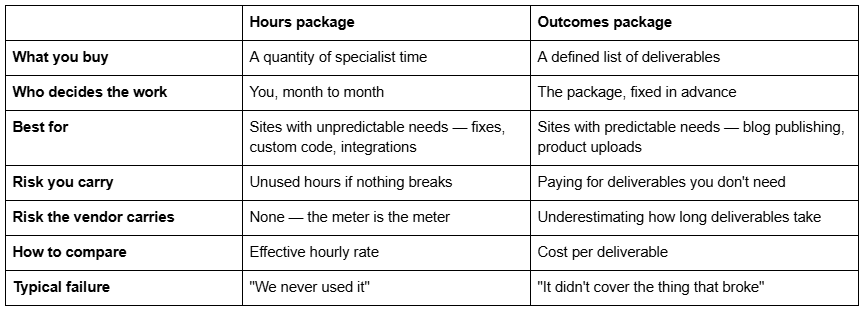
The failure modes are the useful part of that table. An hours package fails quietly — you pay for capacity you did not use and cancel in month five. An outcomes package fails loudly — something breaks that is not on the list, and you discover the package never covered fixes at all.
A third model exists and deserves naming: unlimited-requests, sold as a queue where you submit as many tasks as you like and one is worked at a time. It is common in the wider web-design subscription market and rarer on Squarespace specifically. It is genuinely unlimited in requests and strictly limited in throughput, which is a reasonable trade if your work is a steady trickle of small tasks and a poor one if you need three things done this week.
What Squarespace maintenance actually costs
Every figure below is quoted from the vendor's own published page. Where hours are not published, that is itself the finding.
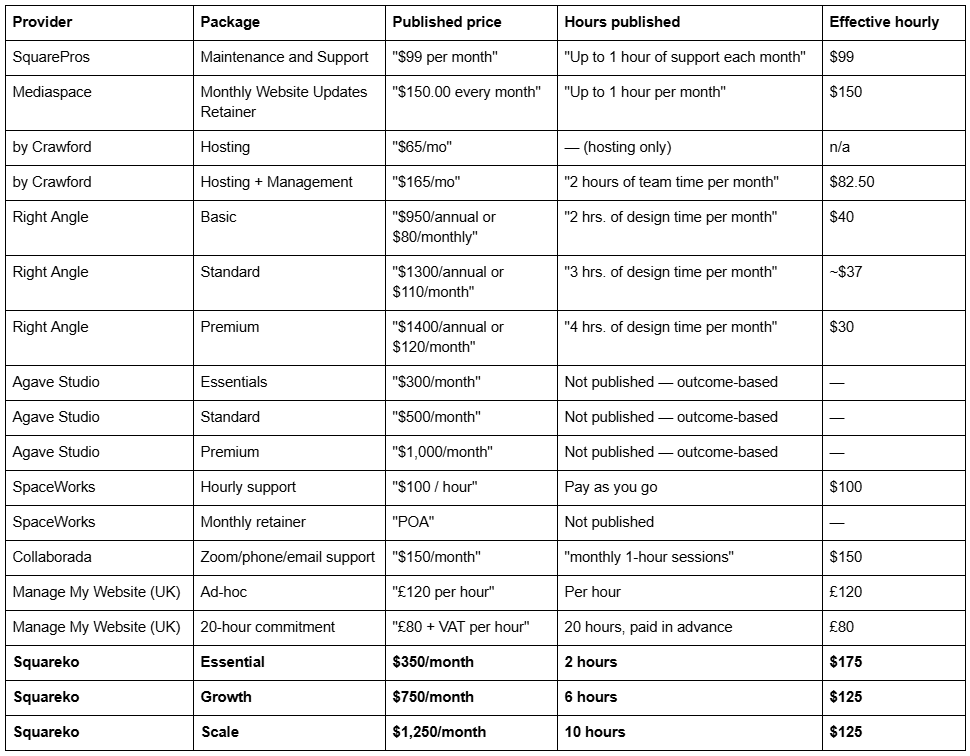
Prices verified from vendors' published pages in August 2026. Vendors change pricing; check before relying on any figure here.
Reading that table properly
Three things are going on in it, and they explain almost all of the variance.
1. A "maintenance hour" is not a standard unit
Right Angle's Premium plan works out at $30 an hour. SquarePros is $99. Squareko is $125–$175. That is a four-to-six-fold spread for something described identically, and it is not primarily a quality judgement — it is a scope judgement.
The cheap end is generally content-edit time: swapping text, uploading images, publishing supplied blog posts, adjusting a layout. It is real work, it is genuinely useful, and it does not require someone who can read a stack trace.
The expensive end is specialist time: debugging custom CSS that stopped applying after a Fluid Engine change, reconnecting a broken Instagram or Google Drive integration, diagnosing why a checkout fails at the payment step, fixing conversion problems. That work sits in the exact categories Squarespace Customer Support declines — "We don't provide support for code-based modifications, unless otherwise specified" — and it is priced accordingly.
The question to ask a vendor is not "how many hours" but "whose hours". A package with four hours of junior content-edit time and a package with two hours of senior development time are not comparable products at any price.
2. Hosting is not a Squarespace line item
Several packages in this market bundle "hosting" into the monthly fee. On Squarespace this needs scrutiny, because hosting is included in your Squarespace subscription and cannot be provided by anyone else. by Crawford is explicit that its $65/mo Hosting tier covers "All hosting costs" — that is a reseller arrangement, where the agency holds the Squarespace subscription and bills you for it. That is a legitimate and sometimes convenient model, but it is not additional service, and you should know whether you are buying management or repackaging your own platform bill.
The same applies to any package advertising "SSL certificates" or "security monitoring" as a benefit. Squarespace issues and renews SSL automatically via Let's Encrypt on a 90-day cycle, and patches its own platform. Charging for it is charging for something that happens whether or not anyone is paid.
3. The commitment is part of the price
Agave Studio's packages "require a 6 or 12-month commitment". Right Angle's annual pricing is materially cheaper than its monthly pricing — $950 a year against $80 a month, which is $960. Manage My Website's hourly rate drops from £120 ad-hoc to £80 at a twenty-hour commitment paid in advance.
None of that is unreasonable; committed capacity should cost less than on-demand capacity. But it means the headline monthly figure is not the number you are agreeing to. The number you are agreeing to is monthly price multiplied by minimum term, and that is the figure to compare.
How many hours does a Squarespace site actually need
The arithmetic that makes the table above usable.
A straightforward Squarespace 7.1 brochure site — native blocks, no shop, no bookings, one or two integrations — needs roughly one to two hours a month of genuine maintenance: form delivery tests, integration checks, content accuracy review, and a quarterly broken-link crawl and site duplication. The full task list and cadence is in Squarespace website maintenance.
Add a shop, an active blog or a booking system and it rises to four to eight hours, mostly in content operations rather than fixes. Add several custom-code dependencies and it rises again, because each one is roughly one predictable interruption a year and interruptions are not evenly spaced.
Two practical warnings from actually running this work.
Small requests are rarely small. "Just move the button" on a Fluid Engine section with separate desktop and mobile layouts and an existing CSS override is not a five-minute job. A two-hour plan absorbs six to ten small tasks a month, not twenty.
Hours almost never roll over. Mediaspace states it plainly — "Unused time does not roll over month to month" — and that is the market convention, because the retainer reserves capacity whether or not you use it. SquarePros is a rare exception, allowing carry-over within its one-hour plan. Assume no rollover unless it is written down.
What should be in a Squarespace maintenance package
Independent of price, this is the line-item list worth checking a package against. It is short, because Squarespace does most of the platform work itself.
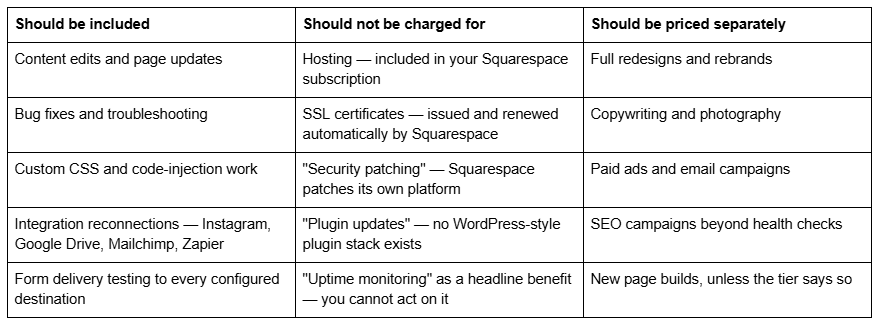
The middle column is the one to read carefully. Three of those four items appear routinely on Squarespace maintenance pricing pages, and all three describe work the platform performs regardless of whether anyone is paid. That is not always deliberate — a lot of this copy is adapted from WordPress maintenance templates, where every item in that column is real. On Squarespace it is not.
Where Squareko's tiers sit
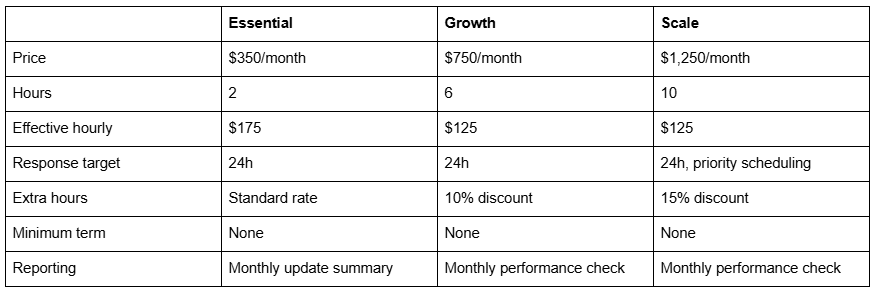
Placed honestly against the table above: Squareko is at the expensive end per hour, and the hours are specialist hours. Essential is the most expensive per hour of anything listed here, because a two-hour retainer carries the same account overhead as a ten-hour one. If you consistently need more than two hours, Growth is cheaper per hour than buying extra hours on Essential.
Where this is the wrong purchase: if what you need is somebody to publish blog posts you have written and swap out product photos, an outcomes package at $300–$500 a month will do it better and cheaper, and Agave's model is a good example of that product done properly. Content operations do not need senior Squarespace time.
Where it is the right purchase: when the work is fixes, custom code, integrations and performance — the categories Squarespace Customer Support explicitly excludes — and when response time matters because the site takes bookings or payments.
Whether you need any plan at all is a separate question and often answered "no"; the five-factor test is in do you need a Squarespace maintenance plan, and the mechanics of hours, SLAs and scope are in Squarespace maintenance service.
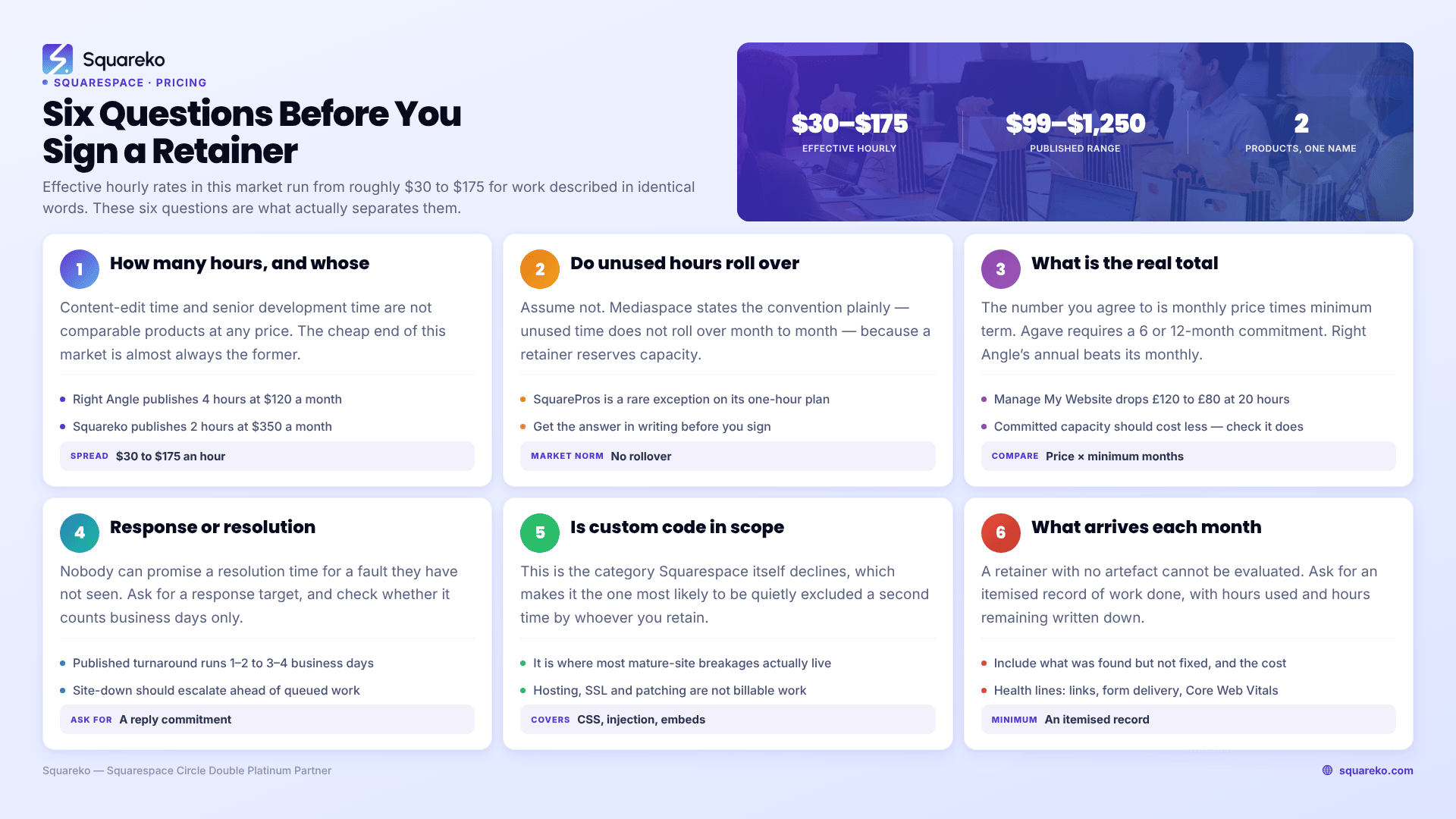
Six questions to ask before you sign
Use these on any vendor, including us.
How many hours, and whose hours? Content editor or developer. If they will not say, you cannot compare their price to anyone else's.
Do unused hours roll over? Assume no. Get the answer in writing.
What is the minimum term, and what is the total commitment? Monthly price times minimum months.
What is the response target, and is it a response or a resolution? Nobody can promise a resolution time for a fault they have not seen.
Is custom code in scope? This is the category Squarespace itself declines, so it is the category most likely to be quietly excluded twice.
What do I receive each month? An itemised record of work done, hours used and hours remaining. A retainer with no artefact cannot be evaluated.
Choosing
If your needs are predictable and content-shaped, buy outcomes and compare cost per deliverable. If they are unpredictable and technical, buy hours and compare effective hourly rate. If they are neither — a low-change site that occasionally breaks — buy nothing monthly, and buy hours ad hoc at the $100–$175 rate this market charges. That last option is the correct answer more often than any page selling packages will tell you.
If the technical case applies to you, our three tiers are on the Squarespace website support page at the prices above, published so you can run the effective-hourly comparison against everything in the table without a sales call. The table is more useful than the pitch, which is why it comes first.
FAQ
-
Published prices in August 2026 run from $99/month for one hour of support up to $1,250/month for ten hours. Outcome-based packages sit around $300–$1,000/month without publishing hours. UK hourly rates run around £80–£120. Effective hourly rates across the market range from roughly $30 to $175.
-
An hours package sells you a quantity of specialist time and you choose what to spend it on. An outcomes package sells defined deliverables — blog posts published, monthly SEO check — and the time behind them is the vendor's problem. Compare hours packages on effective hourly rate and outcomes packages on cost per deliverable.
-
Because a "maintenance hour" is not a standard unit. Cheap packages are usually content-edit time; expensive ones are developer time for custom CSS, integrations and performance work. Some packages also bundle hosting, which on Squarespace is already included in your platform subscription and is being resold rather than added.
-
Usually not. Mediaspace states the convention plainly: "Unused time does not roll over month to month." The retainer reserves capacity whether or not you use it. A few small plans allow carry-over — SquarePros does within its one-hour plan — so ask, and get the answer in writing.
-
A straightforward brochure site needs one to two hours a month. Add a shop, an active blog or a booking system and it rises to four to eight, mostly content operations. Several custom-code dependencies push it higher, because each one is roughly one unpredictable interruption a year.
-
They are unlimited in requests and strictly limited in throughput — one task worked at a time, queued. That is a good trade for a steady trickle of small tasks and a poor one if you need three things done in the same week. They are common in the wider web-design subscription market and rare on Squarespace specifically.

Author Bio
I'm Walid Hasan, a Certified Squarespace Expert and Squarespace Circle Platinum Partner with over 12 years of hands-on experience designing and optimizing high-performing websites. Over the years, I've had the privilege of building more than 2,000 Squarespace websites for clients around the world, always focusing on clean design, strong user experience, and conversion-driven results.
