
No Phone Support on Squarespace? Here's the Faster Alternative
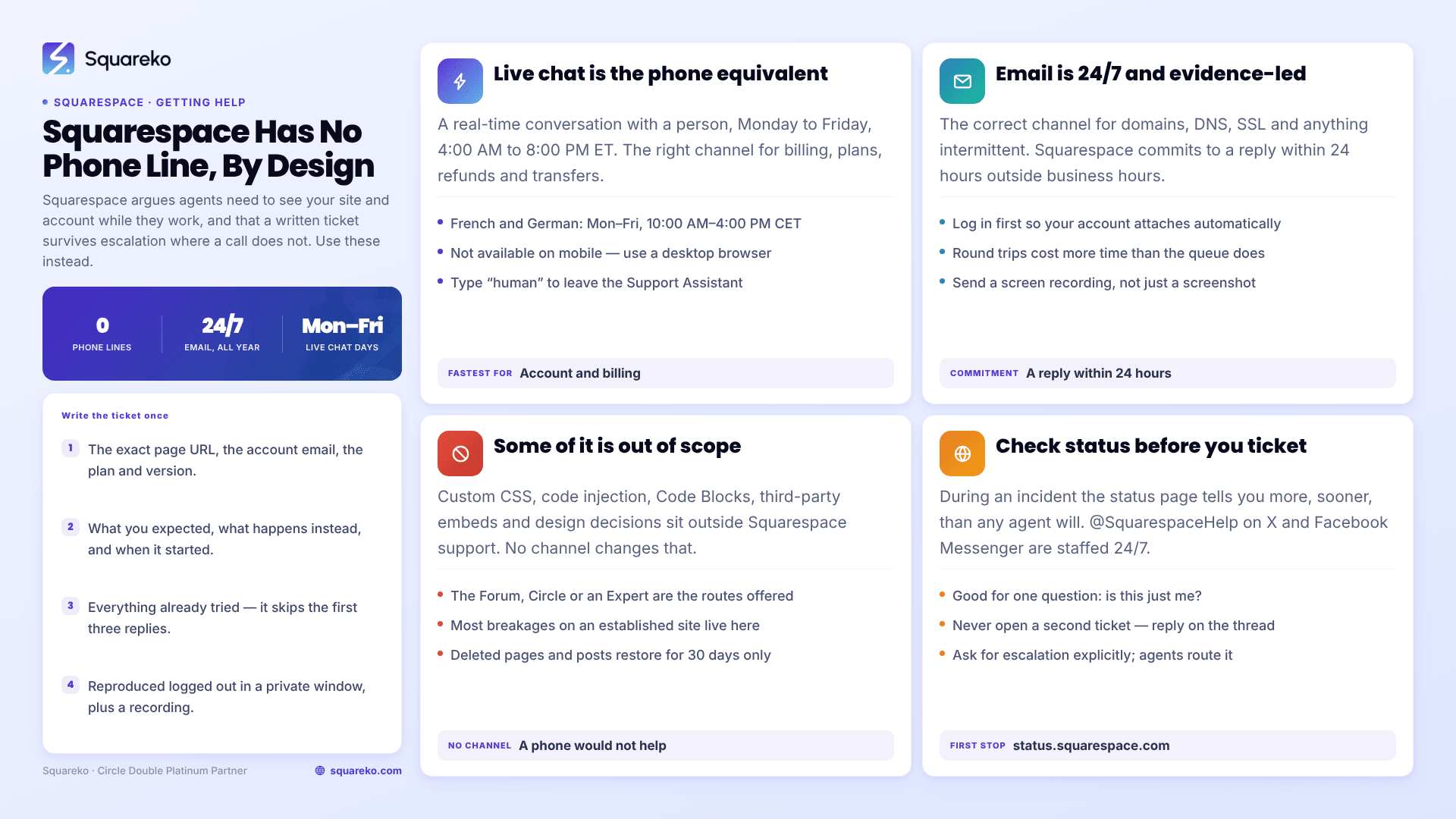
The short answer: Squarespace has no phone number and never has. Support is available via live chat (Monday to Friday, 4:00 AM–8:00 PM ET, in English) and email (24/7, usually answered within 24 hours). For most account, billing, domain, and platform faults, that is genuinely fast — often faster than a phone queue. The real gap is not speed. It is scope: Squarespace will not touch custom code, third-party embeds, or design decisions on your site.
Which means the useful question is not "how do I get someone on the phone?". It is "which of my problems is Squarespace's, and which one is mine".
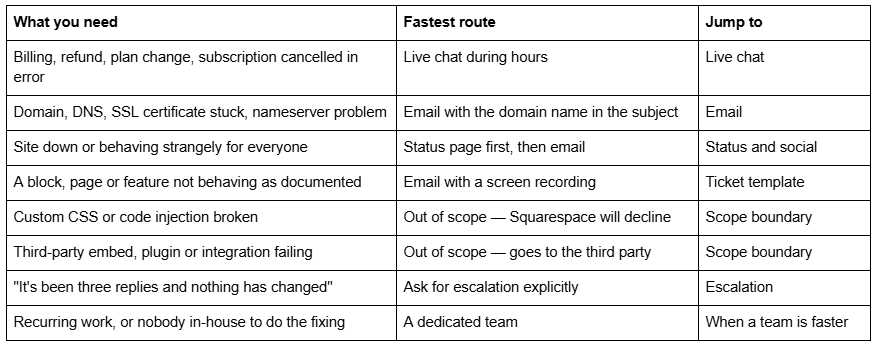
What you need vs where to take it
Why Squarespace has no phone support, and why that is defensible
Squarespace states its reasoning plainly: "We don't offer phone support because we truly believe it wouldn't be possible to provide the same effective help over the phone." Their four arguments are that agents need to see your site and account state while they work, that screenshots and screen recordings travel in both directions, that written queues remove hold time, and that a ticket history survives escalation where a phone call does not.
That last one matters more than it sounds. When a Squarespace ticket moves from a first-line agent to an engineering team, the entire thread moves with it — every URL, every screenshot, every account note. Nothing has to be re-explained. On a phone system, escalation usually means starting the story again with a second person.
Squarespace's own framing is that live chat "is similar to talking on the phone, as it involves real-time conversation." That is broadly fair. If you want a human responding to you within minutes, chat is the phone equivalent, and it works.
Squarespace live chat: hours, languages, and how to skip the Support Assistant
Live chat is the closest thing Squarespace has to a phone line, and it is the right channel for anything account-shaped: billing, refunds, plan changes, subscription errors, transfers.
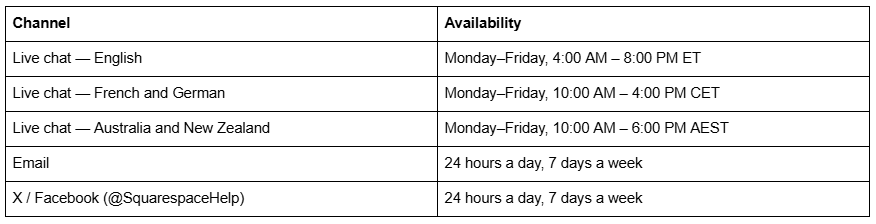
Three operational details that are not obvious:
Live chat is not available on mobile devices. You need a desktop browser. People frequently conclude chat is "gone" when they are simply on a phone.
The Support Assistant answers first. Squarespace routes every contact through an AI assistant before a human. It is a genuinely decent triage layer for documented questions, and if your problem is documented it will resolve faster than a queue. If it is not, type "talk to support" or "human" and you will be moved into the queue for a person.
Log in before you start. You can contact Squarespace as a guest, but a logged-in session attaches your account and site list to the conversation automatically. Guest tickets spend their first exchange on identity verification.
Queue behaviour in practice: a few minutes at ordinary times, considerably longer at the start of the US business day and after any platform-wide incident. If chat shows a long queue and your problem is not time-critical, email is often the better trade.
Squarespace email support: 24/7, and what actually determines the reply time
Email support runs around the clock and in nine languages — English, French, German, Italian, Japanese, Korean, Portuguese (Brazil), Spanish and Turkish. Squarespace's stated commitment is a response within 24 hours for messages sent outside business hours; in practice replies frequently arrive faster than that.
Email is the correct channel for anything that needs evidence attached: domain and DNS problems, SSL certificates stuck on provisioning, a feature that behaves differently from the documentation, anything intermittent.
The variable you control is not the queue. It is how many round trips your ticket takes. A ticket that arrives with the URL, the account email, the browser, a screenshot and a clear statement of expected-vs-actual behaviour can be resolved in one reply. A ticket that says "my site is broken, please help" takes four replies to reach the same point, and each of those replies costs a queue cycle.
This is the single largest lever available to you, and it is entirely in your hands.
The Squarespace support ticket template that removes three round trips
Include all of this in the first message. It is the difference between a same-day resolution and a four-day thread.
Site URL: https://www.example.com/the-exact-page-affected
Account email: name@example.com
Squarespace version: 7.1
Plan: Business
What I expected to happen:
The contact form on /contact should send a confirmation email to the visitor.
What actually happens:
The form submits and shows the success message, but no confirmation
email arrives. Storage is set to Email, and the address is correct.
When it started: 14 August, after I edited the form fields.
Who it affects: Every submission, tested from three addresses.
Environment: Chrome 128, macOS 15, also reproduced in Safari and
in a private window (so not cache).
Already tried:
- Re-saved the storage setting
- Checked spam folders on all three test addresses
- Tested with a new form block on a blank page (same result)
Screen recording: [link]
Four things in there do disproportionate work:
"Already tried" stops the agent sending you the first three steps of the Help Center article you have already worked through.
"Also reproduced in a private window" pre-empts the cache question, which otherwise costs a full round trip on almost every visual or styling ticket.
A screen recording rather than a screenshot. Loom, or the built-in recorder on macOS and Windows. Anything intermittent, anything involving a sequence of clicks, anything the agent cannot reproduce on their own account — a thirty-second recording ends the ambiguity. Squarespace explicitly asks for these.
The exact page URL, not the homepage. Agents have to find the affected element themselves otherwise, and on a forty-page site that is not trivial.
What Squarespace support will and will not fix
This is the part the round-up articles leave out, and it is the actual answer to "why can't I get help with this".
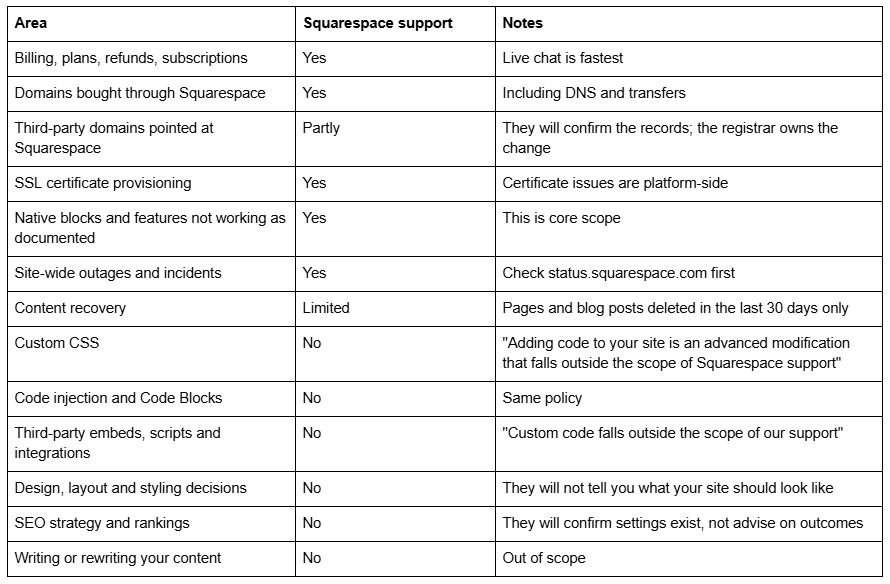
The custom-code boundary is the one that generates the most frustration, and it is worth understanding why it exists rather than treating it as obstruction. Squarespace cannot guarantee behaviour it did not write, across templates it cannot predict, on devices it cannot test. Their documented alternative is the Squarespace Forum, Squarespace Circle, or hiring a Squarespace Expert.
Notice how much of your "the site is broken" list falls on the No side of that table once you look honestly. On most established sites, the majority of day-to-day breakages involve custom CSS, an embed, or a layout decision — none of which any support channel, phone or otherwise, was ever going to fix.
The status page and @SquarespaceHelp: two channels people forget
Before you open any ticket, check status.squarespace.com. If Squarespace is having an incident, your ticket will join a queue of thousands of identical tickets and the status page will tell you more, sooner, than any agent will.
@SquarespaceHelp on X is staffed 24/7, as is Facebook Messenger. Neither is the right place for account details, but both are excellent for one specific question: "is this just me?" A public reply confirming a known issue saves you an afternoon of debugging something that is not yours to fix.
The Squarespace Forum is not an official support channel, but for anything code-adjacent — the exact category Squarespace support declines — it is frequently the fastest place to get a correct answer, because the people answering are the ones who have hit the same thing.
How to escalate a Squarespace support ticket
If the first reply does not resolve it, the mistake is to open a new ticket. That resets you to the back of the queue with no history. Reply on the existing thread instead — the ticket history is the asset.
What actually moves a ticket forward:
Reply with new evidence, not repetition. "Still broken" adds nothing. "Tried the suggested fix, here is a recording of the result, same behaviour on a second account" gives the agent something to act on.
State the business impact once, plainly. "Checkout has been failing for four days and we take orders daily" is legitimate and useful context. Escalating in tone rarely helps; escalating in specificity always does.
Ask for escalation explicitly. "Could this be escalated to the relevant specialist team?" is a normal request and first-line agents route it routinely.
Accept the boundary when you reach it. If the answer is that your custom code is out of scope, no amount of persistence changes that. At that point the ticket is closed and the problem is yours to solve or delegate.
Point 4 is where most long, unhappy threads should have ended days earlier.
Where a dedicated team is genuinely faster — and where it isn't
Be honest about the comparison. For billing, domains, SSL and platform faults, nobody beats Squarespace's own support, because only they can act on the account. Paying a third party to open that ticket for you is paying for an errand.
The difference shows up in three specific places:
Work that is out of scope by definition. Custom CSS, embeds, integrations, layout, performance, anything involving judgement about your site. There is no official channel for this. The only routes are the Forum, doing it yourself, or someone you retain.
Context. A support agent starts from zero every time. Someone who has worked on your site for eight months knows the CSS panel is 400 lines long, knows which block IDs are load-bearing, and knows the header was customised. That context is the whole reason the second fix is faster than the first.
Ownership of the outcome. Squarespace's job ends when the platform behaves as documented. If the platform is fine and your site still doesn't do what your business needs, that is not a support ticket — it is work.
Timezone is the other honest factor. English live chat runs on US business hours, Monday to Friday. If your working day is European evening or Asian morning, chat is effectively unavailable to you and email is your only real channel.
The practical version
Use live chat for account and billing during its hours. Use email for anything needing evidence, and write the ticket properly the first time — the template above removes most of the delay people blame on the queue. Check the status page before assuming a problem is yours. And recognise the scope boundary early rather than spending four days arguing across it.
Most Squarespace problems are resolved by one of those four steps, and none of them costs anything.
The remaining category — custom code, embeds, layout, performance, anything requiring judgement about your specific site — has no official support channel by design, and that is where an ongoing arrangement earns its keep. Our Squarespace website support plans start at $350 a month for two hours of work, which is the tier that suits a business with a handful of out-of-scope fixes a month rather than a standing workload. If your problems are billing and domains, ignore all of that and use chat; it is free and it is good.
FAQ
-
No. Squarespace has never offered phone support and states it "wouldn't be possible to provide the same effective help over the phone." Support runs through live chat, email, X and Facebook Messenger. Live chat is the closest equivalent, since it is a real-time conversation with a person.
-
English live chat runs Monday to Friday, 4:00 AM to 8:00 PM ET. French and German chat runs Monday to Friday, 10:00 AM to 4:00 PM CET, and Australia and New Zealand chat runs 10:00 AM to 6:00 PM AEST. Live chat is unavailable on mobile devices; you need a desktop browser.
-
Start a contact request and, when the Support Assistant chatbot responds, type "talk to support" or "human" to join the queue for an agent. Log in first so your account and site list attach automatically, which removes an identity-verification round trip from the conversation.
-
Email support is available 24/7 and Squarespace commits to responding within 24 hours for messages sent outside business hours. Replies are often faster. The bigger variable is how many round trips your ticket needs, which depends on how completely you describe the problem first time.
-
Squarespace documents that "adding code to your site is an advanced modification that falls outside the scope of Squarespace support," and the same applies to code injection, Code Blocks and third-party embeds. They cannot guarantee behaviour they did not write. Their suggested routes are the Squarespace Forum, Squarespace Circle, or a Squarespace Expert
-
Only partly. Pages and blog posts deleted within the last 30 days can be restored. Text, blocks, page sections, most collection items, and anything in the Custom CSS or code injection panels cannot be recovered once the editor is closed, so keep your own copy of custom code.

Author Bio
I'm Walid Hasan, a Certified Squarespace Expert and Squarespace Circle Platinum Partner with over 12 years of hands-on experience designing and optimizing high-performing websites. Over the years, I've had the privilege of building more than 2,000 Squarespace websites for clients around the world, always focusing on clean design, strong user experience, and conversion-driven results.
