
What Belongs in a Squarespace Website Care Plan
The short answer: "Care plan" is WordPress vocabulary, and roughly half of a standard WordPress care plan is meaningless on Squarespace. Core updates, plugin updates, security patching, malware scanning, uptime monitoring and SSL renewal are all handled by the platform, included in your subscription, and not something an agency can meaningfully charge you for. A Squarespace care plan that lists those items is selling you the platform back to you.
What is left is real, and worth paying for — but it is a different list.
WordPress care plan line item → what it means on Squarespace
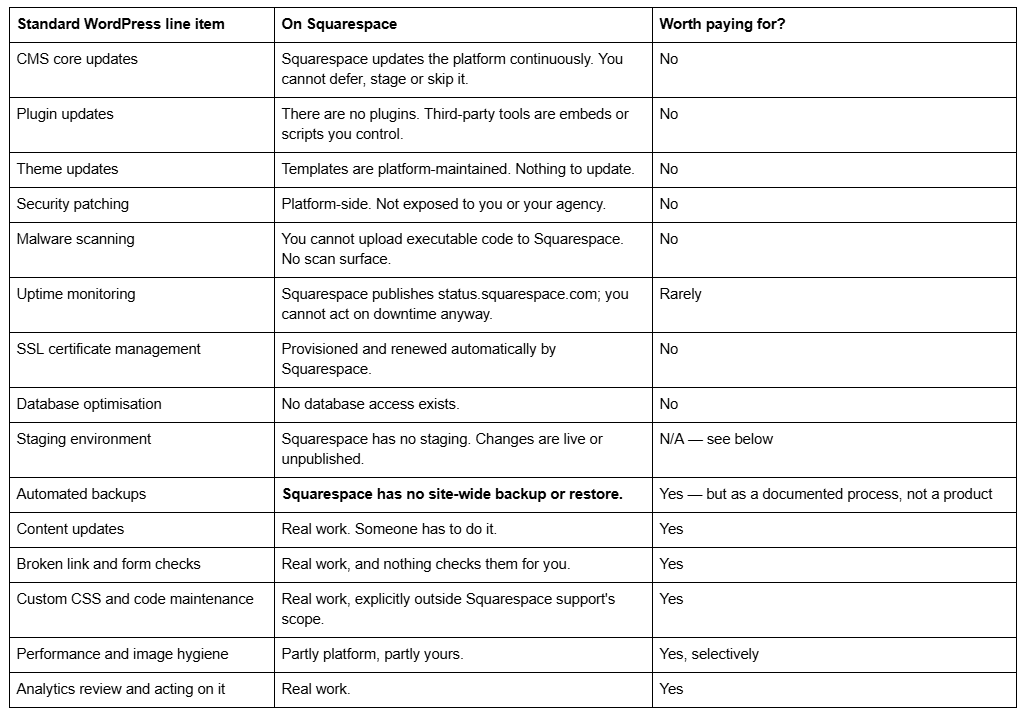
If a proposal in front of you lists more than two items from the top half of that table, it was written for WordPress and lightly renamed.
What Squarespace genuinely handles for you
Being precise about this matters, because it is the reason a Squarespace care plan should cost less than a WordPress one and cover different ground.
Squarespace ships platform updates continuously with no version for you to manage. It provisions and renews SSL certificates automatically. It serves every image through its own CDN — and it converts to WebP unconditionally, regardless of the source format you uploaded or what the browser asked for. Across 54 Squareko-built client sites measured in August 2026 (Playwright/Chromium lab test, cloud datacenter, unthrottled, single run per site), a median of 86% of images were served as WebP with no work by anyone. There is no server to patch, no database to optimise, no plugin conflict to resolve, because there are no plugins.
This is the honest case for Squarespace, and it is also the honest case against most of what gets sold as a Squarespace care plan.
The three genuine gaps a Squarespace care plan should close
Gap one: there is no backup. This is the item people are most surprised by. Squarespace can restore pages and blog posts deleted within the last 30 days, and nothing else. Text and blocks, page sections, most collection items — products, events, gallery images — and anything in the Custom CSS or Code Injection panels cannot be recovered once the editor is closed. There is no site-wide restore point and no version history.
No agency can build a real backup on Squarespace either, because the platform does not expose one. What a competent care plan provides is a documented process: an exported copy of the Custom CSS panel and all code injection kept outside Squarespace, a record of Site Styles settings, and a periodic content export. That is not a backup in the WordPress sense. It is the difference between an afternoon's rebuild and a fortnight's.
Be sceptical of anyone selling "automated Squarespace backups" as a feature. Ask what exactly is being captured.
Gap two: nothing checks whether your site still works. Squarespace will not tell you that your contact form stopped delivering because a notification address bounced, that an embedded booking widget broke when the third party changed its script, that a page links to a URL you renamed six months ago, or that your Custom CSS started fighting a platform change. None of that produces an error. It just quietly stops working, and you find out from a customer.
Recurring checks — forms actually delivering to a real inbox, checkout completing a live test transaction, internal links resolving, embeds still rendering logged out — are the highest-value item in any Squarespace care plan, and almost nobody lists them.
Gap three: custom code is nobody else's problem. Squarespace documents that "adding code to your site is an advanced modification that falls outside the scope of Squarespace support," and the same applies to third-party embeds. If your site has custom CSS — and most sites past their first year do — there is no official support channel for it at all. That work is yours, or it belongs to whoever you retain.
Squarespace has no staging environment, and that changes how care work is done
On WordPress, "staging" is a care-plan line item because updates can break a site and need testing somewhere safe first. Squarespace has no staging. There is no copy of your live site to experiment on, no branch to merge, no sandbox. A page can be left unpublished, and a section can be worked on before you save, but anything site-wide — Custom CSS, Site Styles, code injection, header and footer changes — takes effect on the live site the moment it is saved.
That absence is not a problem to be solved with a product; it is a working method. In practice it means risky changes get made in the quietest traffic window rather than mid-morning, that the previous state of the Custom CSS panel is copied out before it is edited so it can be pasted straight back, and that anything structural gets built on an unpublished duplicate page and swapped in rather than edited in place.
If a Squarespace proposal offers you a staging environment, ask precisely what they mean. Usually it means a second Squarespace site on a separate subscription, which you are paying for.
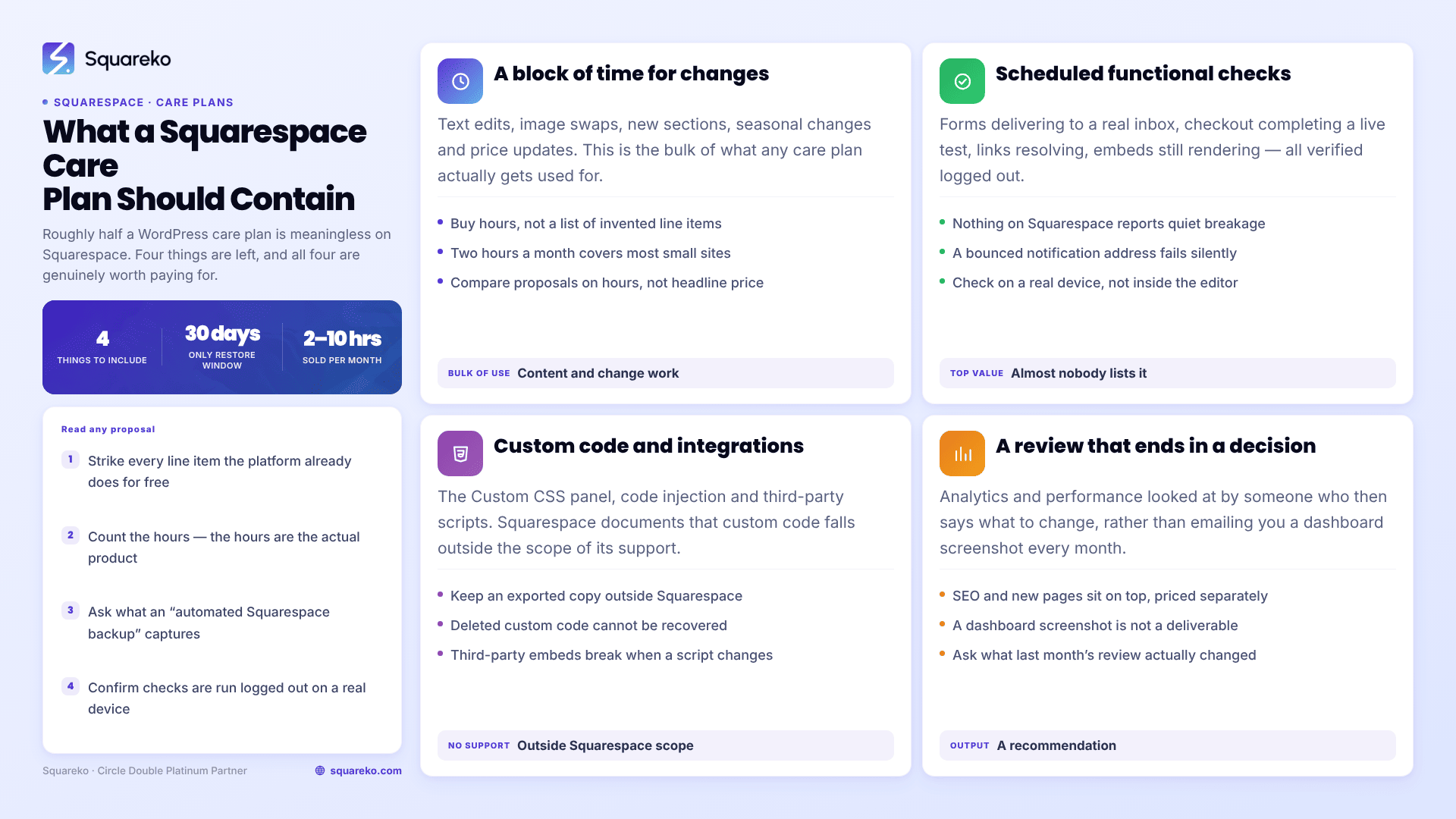
What a Squarespace care plan should actually contain
A plan worth the money covers four things:
A block of time for content and change work. Text edits, image swaps, new sections, seasonal changes, price updates. This is the bulk of what gets used.
Scheduled functional checks. Forms, checkout, embeds, links, verified logged out on a real device — not glanced at in the editor.
Custom code and integration maintenance. The CSS panel, code injection, third-party scripts. Kept documented and kept outside Squarespace as well as in it.
A periodic review that produces a decision. Analytics and performance looked at by someone who then says what to change, rather than emailing you a dashboard screenshot.
Anything beyond that — SEO work, new page builds, conversion changes — is genuinely valuable but is a different service sitting on top of care, not part of it. It should be priced as such.
What a Squarespace care plan costs
Squarespace care plans are usually sold as a block of hours per month plus a set of recurring checks. The market runs from roughly $99 a month for one hour of task time at the entry end up to $500–$1,250 a month for five to ten hours with review work included.
Our own plans are published at three tiers: Essential at $350/month for two hours of support with a monthly update summary and priority email response; Growth at $750/month for six hours plus UX and SEO refinements and a monthly performance check; and Scale at $1,250/month for ten hours with ongoing optimisation, new page builds and conversion work.
The number that matters is the hours, not the headline price. A "$149 care plan" covering security scanning and plugin updates on a Squarespace site is charging you for work the platform does for free. Two real hours at $350 is a different product from four imaginary ones at $149.
Read every proposal against the translation table above before you compare prices.
Do you need one at all?
Plenty of Squarespace sites do not. A five-page brochure site that changes twice a year, has no custom CSS, no embeds and no store genuinely is close to zero-maintenance, and a monthly plan on top of that is money spent on reassurance.
The sites that need one share three traits: they change regularly, they carry custom code or third-party integrations, and something on them takes money or captures leads. That combination is where quiet breakage costs real revenue, and where a monthly block of time is cheaper than the emergency.
If that describes your site, our Squarespace website support plans are structured as above — hours plus checks, no invented line items. If it doesn't, spend the money on something that grows the business instead; the platform will take care of itself for another year.
FAQ
-
Not always. A small brochure site with no custom code, no integrations and no store is close to zero-maintenance, because Squarespace handles updates, security and SSL. Care plans earn their keep on sites that change regularly, carry custom CSS or embeds, and take money or capture leads.
-
Yes. Squarespace updates the platform continuously and you cannot defer, stage or skip it. There is no server to patch, no database to optimise and no plugins to update. Any care plan charging separately for core updates, security patching or malware scanning is describing WordPress, not Squarespace.
-
No, not in any meaningful sense. Pages and blog posts deleted in the last 30 days can be restored. Text, blocks, page sections, products, events, gallery images and everything in the Custom CSS and Code Injection panels cannot be recovered. Keep your own copy of custom code.
-
Four things: a monthly block of time for content and change work, scheduled functional checks on forms, checkout, embeds and links verified logged out, maintenance of custom CSS and third-party integrations, and a periodic review that ends in a recommendation rather than a dashboard screenshot.
-
The market runs from around $99 a month for one hour of task time up to $1,250 a month for ten hours including optimisation work. Squareko publishes three tiers: $350, $750 and $1,250 a month for two, six and ten hours respectively. Compare hours, not headline prices.
-
Roughly half the WordPress list — core updates, plugin updates, theme updates, security patching, malware scanning, database optimisation, SSL management — does not exist on Squarespace because the platform owns it. What remains is content work, functional checks, custom code maintenance and review. That makes a Squarespace plan narrower and it should be cheaper.

Author Bio
I'm Walid Hasan, a Certified Squarespace Expert and Squarespace Circle Platinum Partner with over 12 years of hands-on experience designing and optimizing high-performing websites. Over the years, I've had the privilege of building more than 2,000 Squarespace websites for clients around the world, always focusing on clean design, strong user experience, and conversion-driven results.
