
Hiring Someone to Manage Your Squarespace Site: Scope and Cost
The short answer: the thing that most often goes wrong is not who you hire, it is what you handed them. Grant Administrator access to a Squarespace site and that person can change your subscription, alter your domain settings and invite other contributors. Most day-to-day site management does not need any of that — but Squarespace's Website Editor role cannot add new pages, which is why so many people over-grant. Decide which side of that line your hire sits on before the invite goes out.
Everything else — scope, cost, contracts — is easier to fix later than access is.
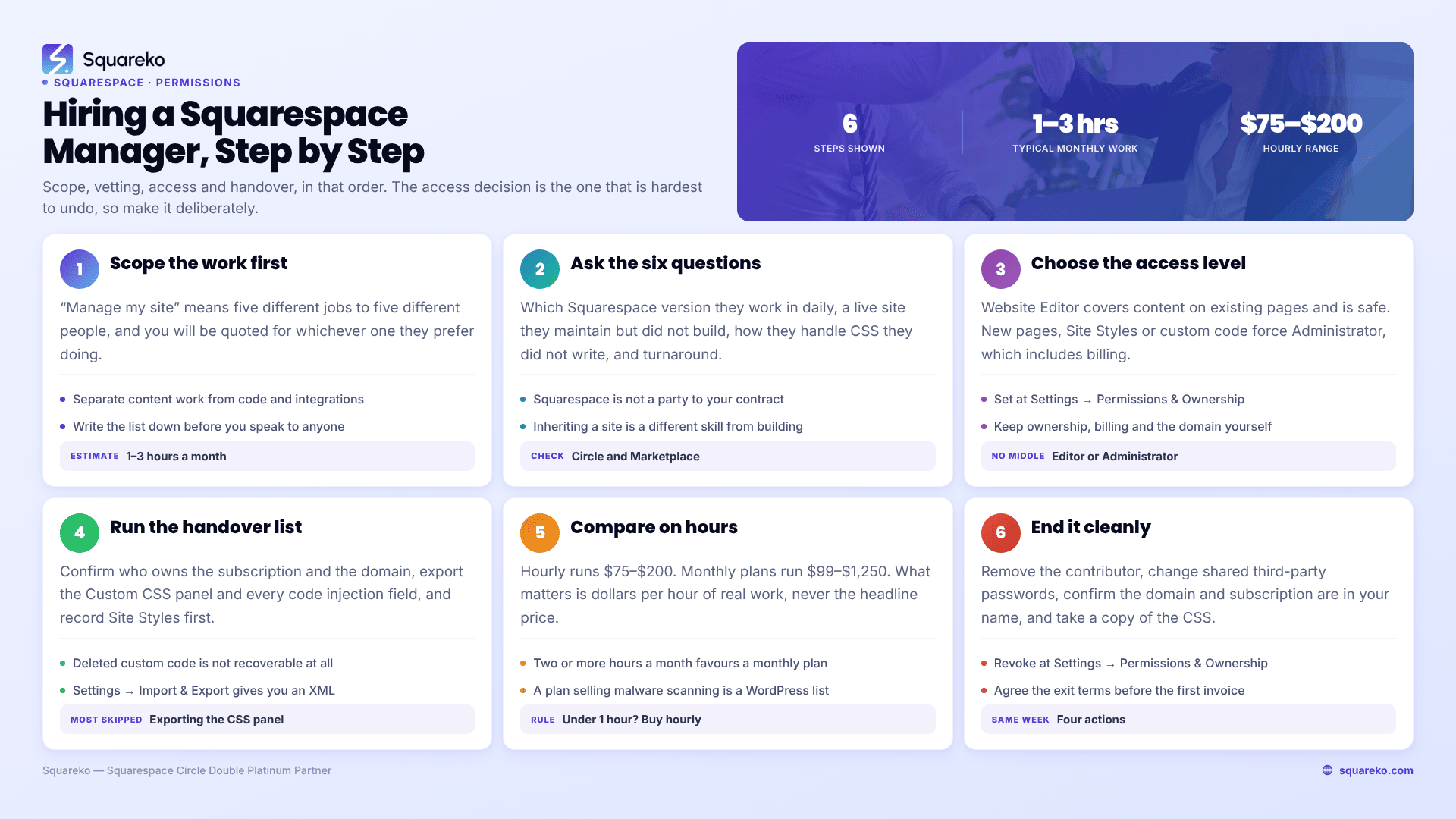
Where to start, depending on what you actually need
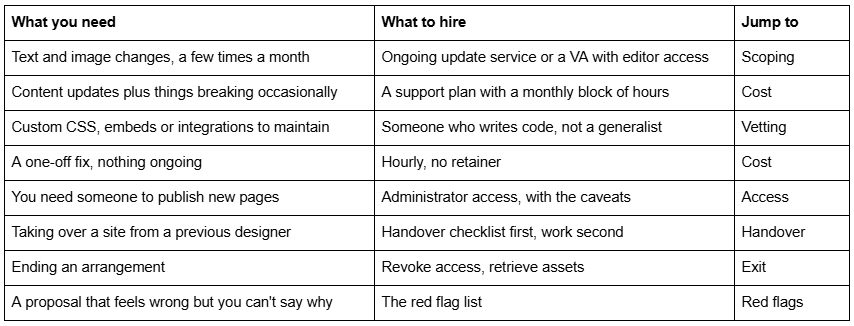
Step 1: Scope the work before you talk to anyone
Almost every bad Squarespace arrangement starts with a vague brief. "Manage my site" means five different jobs to five different people, and you will be quoted for whichever one they prefer doing.
Write down which of these you actually need, with a rough frequency:
Content changes — text edits, image swaps, new blog posts, price and hours updates. High volume, low skill, cheapest to buy.
Structural changes — new pages, new sections, layout changes in Fluid Engine, navigation edits. Medium volume, needs design judgement.
Code and integrations — Custom CSS, code injection, third-party embeds, booking and CRM tools. Low volume, high skill, and explicitly outside Squarespace's own support scope.
Commerce — products, inventory, discounts, checkout, shipping. Its own discipline.
Checks and monitoring — forms actually delivering, checkout completing, links resolving, embeds still rendering.
Growth work — SEO, performance, conversion changes. A different service that sits on top of maintenance.
Then estimate hours. Be blunt with yourself: most small business sites generate one to three hours of genuine work a month. If you write a brief that implies twenty, you will be quoted for twenty.
Bring that list to the conversation. It changes the quality of everything that follows, and it is the single best defence against being sold a package you don't use.
Step 2: What to ask before you hire a Squarespace manager
Six questions, in rough order of how much they tell you:
"Which Squarespace version do you work in day to day?" Squarespace 7.1 and the legacy 7.0 templates are genuinely different platforms. Someone whose portfolio is 7.0 will be slower on Fluid Engine. Across the 54 Squareko client sites we measured in August 2026, 53 were on 7.1 — that is the platform in practice now.
"Show me a site you didn't build but currently maintain." Building is a different skill from inheriting. Anyone can work in their own CSS. The question is whether they can read someone else's 600-line Custom CSS panel without breaking it.
"How do you handle custom CSS you didn't write?" The right answer involves copying the panel out before touching it, working in one area at a time, and testing logged out. The wrong answer is "I'd probably rewrite it."
"What's your turnaround, and what counts as urgent?" Get a number. Anything vaguer than "small changes within X business days" is not a commitment.
"Who actually does the work?" Relevant for agencies. Not a problem if it is a team — it is a problem if nobody tells you and the person on the call never touches the site.
"What happens to my access and my files if we stop working together?" Ask this at the start, not the end. The answer tells you a lot about how the relationship is built.
Two credentials worth checking, neither decisive on its own: Squarespace Circle membership indicates someone works on Squarespace professionally, and the tiers (Silver through Double Platinum) track volume of sites built. The Squarespace Marketplace vets for work quality and technical skill, but note Squarespace's own caveat: "Any arrangement to work on your site will be between you and the Expert." Squarespace is not a party to the contract and does not adjudicate disputes.
Step 3: What Squarespace access to grant — and what each level can do
This is the part people get wrong, and it is the part that is hardest to undo.
Squarespace permissions are set at Settings → Permissions & Ownership → Invite Contributor. Only the owner and administrators can invite contributors. On Basic and Personal plans you get one contributor; other paid plans are unlimited.
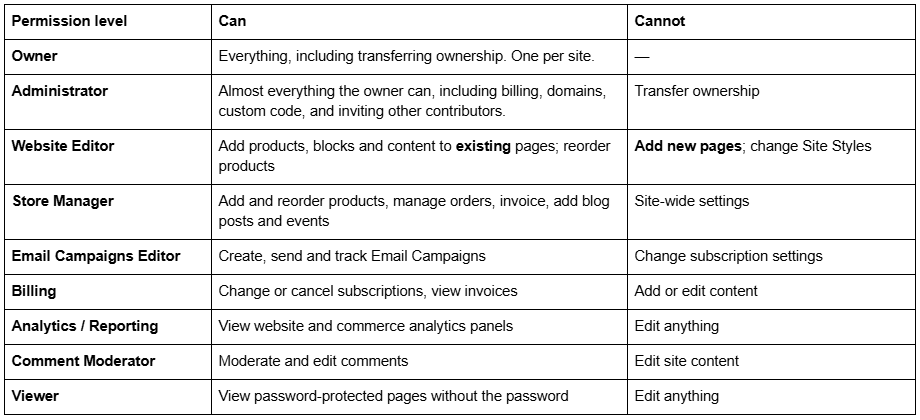
Here is the awkward truth that drives most over-granting: Website Editor cannot create new pages, and Administrator includes billing and domain control. There is no middle role. Squarespace forum threads on this are years old and blunt about it — one long-running thread describes having to hand over admin because "contributors can't add new pages; they need full admin access, which includes billing privileges."
So decide honestly:
If the work is content only — text, images, blog posts, products on existing pages — grant Website Editor. It is sufficient and it is safe.
If the work requires new pages, Site Styles or custom code — and most real site management does — you will have to grant Administrator. Do it deliberately, with three safeguards: keep ownership yourself and never transfer it, keep the billing card and domain in your own account, and check the contributor list quarterly at Settings → Permissions & Ownership.
Never share your own login. It defeats the audit trail, it breaks two-factor authentication, and it makes revoking access mean changing your own password. Squarespace gives you contributor invites specifically so you don't have to.
One more: keep the domain in your own Squarespace or registrar account, whatever else you delegate. Domain control is the one thing that makes a difficult separation genuinely expensive.
Step 4: Handing over a Squarespace site safely
Whether you are onboarding someone new or taking a site back from a previous designer, run the same checklist. It takes half an hour and prevents most of the arguments.
Confirm who owns the Squarespace subscription. If the site was built inside a designer's account and billed through them, you do not own it. Transferring ownership is a specific action in Settings, not something that happens automatically.
Confirm who owns the domain. Check the registrar, not just where the site is hosted. These are frequently different companies and frequently different account holders.
Export the Custom CSS panel and every code injection field to a text file before anyone starts work. Squarespace cannot restore these — deleted custom code is not recoverable at all.
Record the Site Styles configuration. Fonts, colours, spacing. Screenshots are fine. There is no version history to fall back on.
Export the content. Settings → Import & Export gives you a WordPress-format XML of pages and blog posts. It is imperfect and it is much better than nothing.
List every third-party integration and who holds each account: booking tool, email platform, analytics, payment processor, any embedded script.
Then grant access, at the level decided above.
Agree what "done" looks like for the first month, in writing.
Step 3 is the one people skip and the one that costs the most. Squarespace has no site-wide backup or restore, and code deleted from the Custom CSS panel is gone permanently.
What it costs to have someone manage a Squarespace site
Three structures exist, and the right one depends entirely on frequency.

At the entry end of the monthly market, roughly $99 buys about one hour of task time. Our own published tiers are $350/month for two hours (Essential), $750/month for six hours (Growth, which adds UX and SEO refinements and a monthly performance check), and $1,250/month for ten hours (Scale, which adds new page builds, conversion work and priority scheduling).
The comparison that matters is dollars per hour of actual work, not headline price. A $149 plan advertising "security monitoring and platform updates" on a Squarespace site is billing you for work the platform already does — the translation of WordPress care-plan vocabulary covers exactly which line items are real.
A rough rule: if you generate under an hour of work most months, buy hourly. If you generate two or more, or if you need someone to respond quickly when something breaks, a monthly arrangement is cheaper and considerably less stressful. How retainers are structured — rollover, minimum terms, what priority actually buys — is worth reading before you commit to one.
Red flags when hiring a Squarespace manager
They want your Squarespace login rather than a contributor invite. No legitimate reason exists in 2026.
The site would be built or hosted in their account. You are renting your own website.
They register your domain in their own name. The single most expensive mistake on this list.
A care plan listing plugin updates, malware scanning or security patching for a Squarespace site. That is a WordPress template with the names swapped.
No written scope, no hours, no turnaround. "We'll look after you" is not a service level.
No answer on what happens at the end. Access, exports and files should be defined before the first invoice.
Unwilling to work with your existing custom CSS and pushing an immediate rebuild instead. Sometimes a rebuild is right; on the first call it is a sales position.
Nobody asks to see the site before quoting. A quote given without looking is a guess.
Ending the arrangement cleanly
When it stops, do these four things the same week: remove the contributor at Settings → Permissions & Ownership, change the passwords on any third-party tools you shared, confirm the domain and Squarespace subscription are still in your name, and get a copy of the current Custom CSS panel and any code injection.
If you are not ready to hire a replacement immediately, that last item is what keeps the site maintainable in the meantime.
The short version
Scope the work before you talk to anyone. Grant Website Editor if the work is content-only, Administrator if it genuinely needs new pages or code — and keep ownership, billing and the domain yourself either way. Export the Custom CSS before anyone touches it, because Squarespace cannot get it back. Then compare quotes on hours, not headline price.
Most of that applies whoever you hire, including us. If your site generates a couple of hours of real work a month and something on it takes money or captures leads, our Squarespace website support plans are built around exactly that shape — hours plus checks, with the access model described above. If it generates twenty minutes a month, hire someone hourly and spend the difference elsewhere.
FAQ
-
Website Editor if the work is content-only — it allows adding blocks, products and content to existing pages. Administrator if they need to create new pages, change Site Styles or edit custom code, because Website Editor cannot do those. Keep ownership, billing and the domain in your own name regardless.
-
Administrators can do almost everything the owner can, including billing, domain settings, custom code and inviting other contributors — everything except transferring ownership. Website Editors can add blocks, products and content to existing pages but cannot create new pages or change Site Styles.
-
Hourly work typically runs $75–$200 an hour. Monthly plans run from around $99 for roughly an hour of task time up to $1,250 for ten hours. Squareko publishes tiers at $350, $750 and $1,250 a month. Compare on hours included, not headline price.
-
Go to Settings → Permissions & Ownership → Invite Contributor, enter their name and email, and toggle the permission levels you want. Only owners and administrators can invite contributors. Basic and Personal plans allow one contributor; other paid plans are unlimited. Never share your own login.
-
Confirm whose account holds the subscription and whose name is on the domain — these are often different. Ownership must be transferred deliberately in Settings; it does not move automatically. Export the Custom CSS and code injection to a text file, then remove their contributor access.
-
Freelancers are usually cheaper and give you direct contact with the person doing the work; the risk is availability when they are ill or busy. Agencies cost more and provide cover and broader skills. Ask either one who actually touches the site and what the turnaround commitment is.

Author Bio
I'm Walid Hasan, a Certified Squarespace Expert and Squarespace Circle Platinum Partner with over 12 years of hands-on experience designing and optimizing high-performing websites. Over the years, I've had the privilege of building more than 2,000 Squarespace websites for clients around the world, always focusing on clean design, strong user experience, and conversion-driven results.
