
Squarespace Maintenance Service: SLAs, Hours and What's Covered
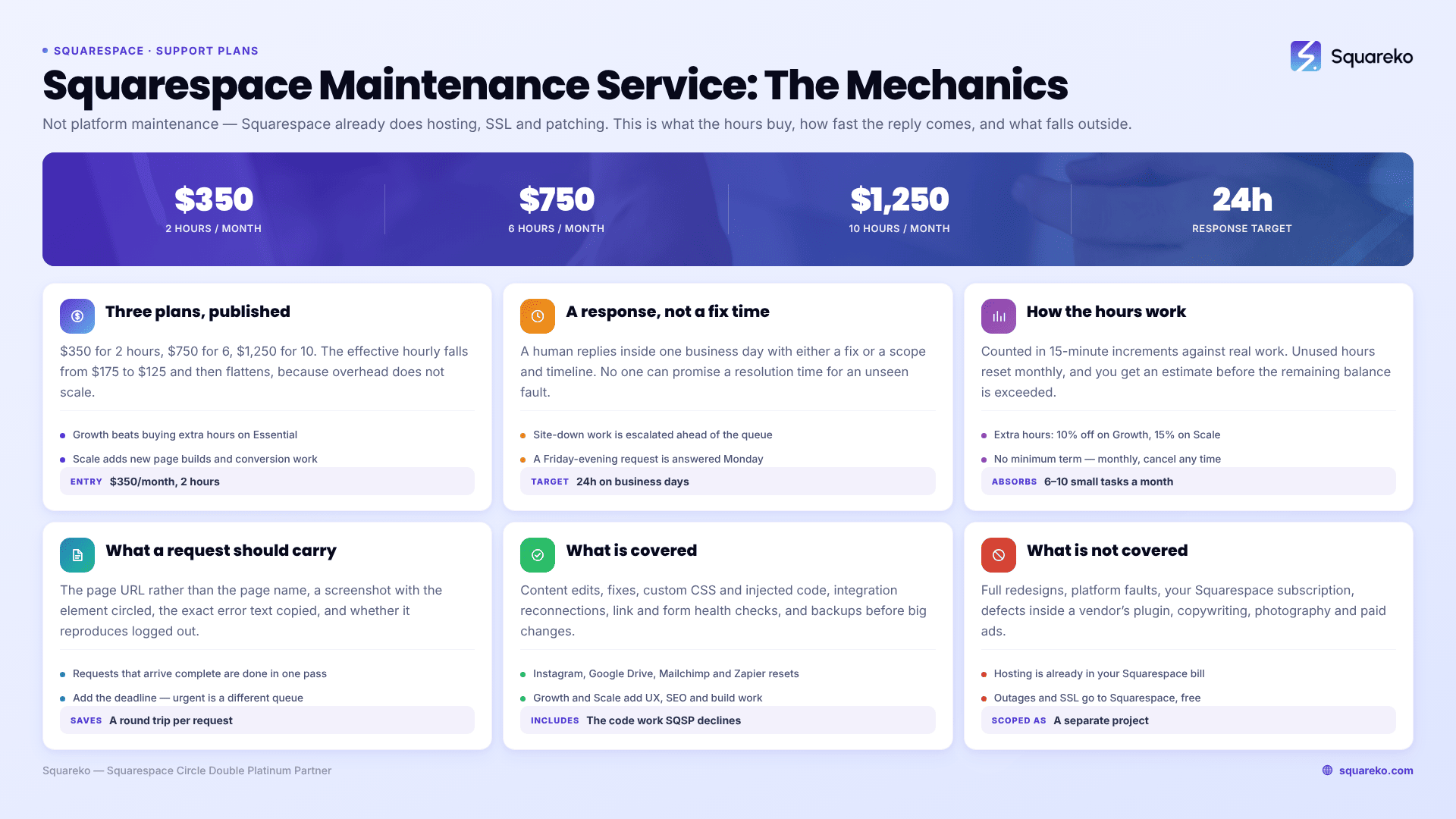
The short answer: A Squarespace maintenance service is a monthly block of a specialist's time plus a response-time commitment. Squareko's plans are $350/month for 2 hours, $750/month for 6 hours and $1,250/month for 10 hours, with a 24-hour response target on the first two and priority scheduling on the third. What it is not is platform maintenance — Squarespace already handles hosting, SSL and security patching, so nobody should be charging you for those.
Everything below is the specific mechanics: what the hours buy, how fast we reply, and what falls outside.
The three plans
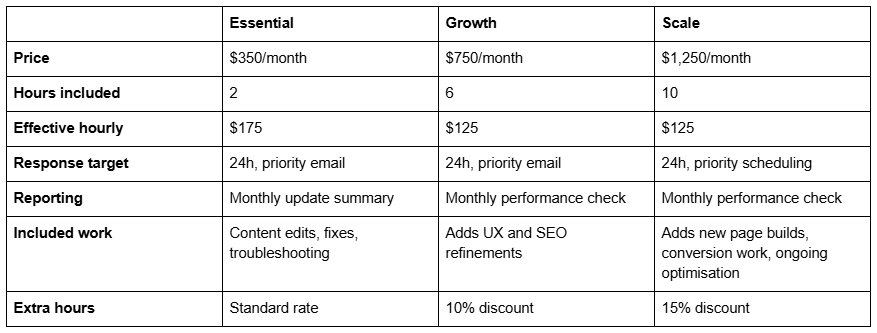
Two things about that table are worth naming rather than glossing over.
The effective hourly rate falls as hours rise, then flattens. Essential costs $175 an hour because a two-hour retainer carries the same context-switching and account overhead as a ten-hour one. Growth and Scale both land at $125. If you consistently need more than two hours, Growth is cheaper per hour than buying extra hours on Essential, and the plan comparison in Squarespace maintenance packages compared works that arithmetic across the market.
Scale is a different product, not just more of the same one. Essential and Growth are maintenance — keeping an existing site correct. Scale includes new page builds and conversion work, which is development on a retainer. Buying Scale for pure maintenance is over-buying.
How response times work
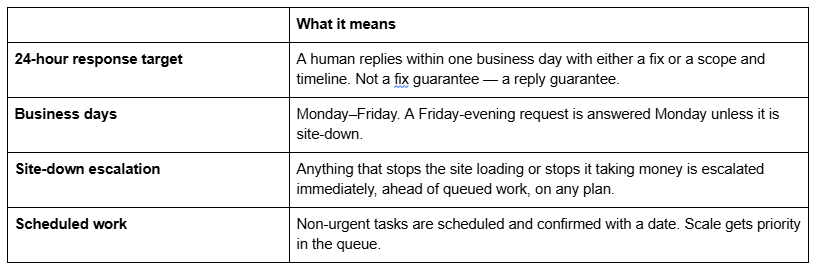
The distinction between a response time and a resolution time is where most maintenance services are quietly vague, and it is worth being direct about. Nobody can promise a resolution time for a fault they have not seen yet. A CSS conflict might take twenty minutes; a broken third-party integration might depend on a vendor who replies in three days. What can be committed to is that you hear back inside 24 hours with a real assessment rather than an acknowledgement.
For comparison, published turnaround across the Squarespace maintenance market ranges from "1-2 business days" on premium tiers to "3-4 business days" on entry tiers, and one UK provider commits to "within 48 hours on working days". Ours is faster than most of that, which is a scheduling decision rather than a claim about heroics.
How the hours work
Hours are counted in 15-minute increments against actual work, not against elapsed time or email length.
Unused hours do not roll over. They reset monthly. This is standard across the market — Mediaspace states it plainly as "Unused time does not roll over month to month" — and it exists because the retainer reserves capacity whether or not you use it.
Extra hours are available at the standard rate, discounted 10% on Growth and 15% on Scale.
You are told before the meter runs out, not after. If a request is going to exceed the remaining balance, you get the estimate first and decide.
No minimum term. Monthly, cancel any time. Several providers in this market require a 6 or 12-month commitment; that is a reasonable model, but it should be visible before you sign rather than after.
The one thing that consistently surprises people: small requests are rarely small. "Just change the phone number" is genuinely five minutes. "Just move the button" on a Fluid Engine section with separate desktop and mobile layouts and an existing CSS override is not. A two-hour plan absorbs roughly six to ten small tasks a month, not twenty.
What to send with a request
Requests that arrive complete get done in the first pass. Requests that need clarification cost a round trip, and on a two-hour plan a round trip is a meaningful share of the month.
The page URL, not the page name. Squarespace sites often have two pages with similar titles.
A screenshot with the element circled, if it is visual. "The button under the heading" is ambiguous on a page with four.
The exact error text, copied rather than described.
Whether it reproduces logged out in a private window. Squarespace disables embedded scripts while you are logged in and editing, so a code block that looks broken in the editor is frequently working fine on the live site.
The deadline, if there is one. Urgent and non-urgent go into different queues, and we cannot infer which is which.
What's covered
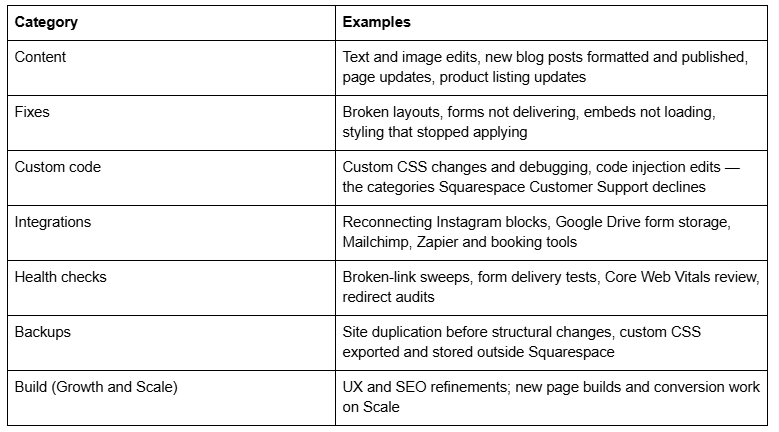
The full task-by-task rationale for each of these — why integration tokens need a monthly check, why Squarespace has no native backup — is in Squarespace website maintenance: what it should cover.
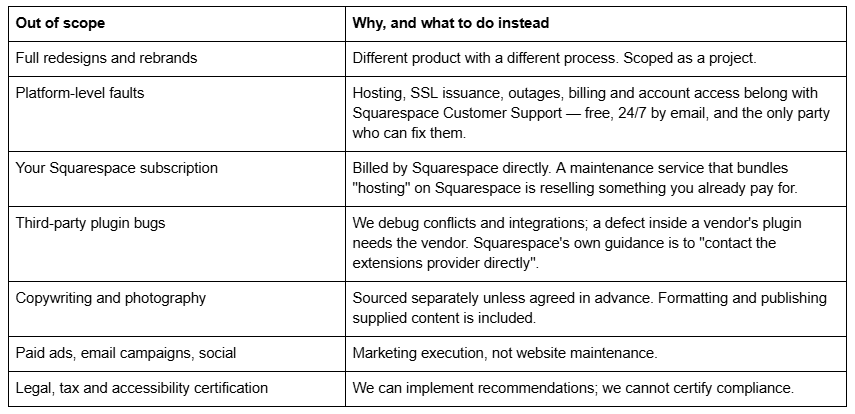
What's not covered
Being specific here is the point. Vague scope is how maintenance retainers turn sour in month four.
What you should get every month
A maintenance service that produces no artefact is impossible to evaluate. On any plan you should expect, in writing:
What was done, itemised, with time against each item.
Hours used and hours remaining.
What we found but didn't fix, and what it would take — so nothing is quietly deferred.
A performance and health line on Growth and Scale: Core Web Vitals movement, form delivery status, broken links found.
For reference on what healthy looks like: across 54 Squareko-built Squarespace sites measured in August 2026, median mobile Largest Contentful Paint was 2.01 seconds and median TTFB was 514ms. Those are lab figures — single-run Playwright/Chromium tests from a cloud datacentre, unthrottled — so treat them as a benchmark shape rather than a target your own field data must hit.
Whether you need one
Plenty of Squarespace sites do not. A brochure site with no shop, no bookings, no custom code and an owner who is comfortable in the editor can run the whole maintenance cadence in an afternoon each quarter, and a retainer would be buying reassurance rather than work. That case — including who should not buy — is set out in do you need a Squarespace maintenance plan.
Where a plan earns its cost is when the site takes bookings or payments, when it carries custom code that Squarespace support will not touch, when nobody in-house can confidently edit it, or when the work keeps not happening. If that is the situation, the three plans above are on the Squarespace website support page with the same numbers and no sales call required to see them.
FAQ
-
Content edits, bug fixes, custom CSS and code work, integration reconnections, broken-link and form-delivery checks, backups before structural changes, and monthly reporting. It does not include hosting, SSL or security patching, because Squarespace handles those itself on every plan at no extra cost.
-
No, on Squareko's plans hours reset monthly. This is standard across the Squarespace maintenance market — the retainer reserves capacity whether or not you use it. Some providers do allow carry-over on very small plans, so it is worth asking rather than assuming either way.
-
Ask for a response target, not a resolution promise. Squareko commits to a reply within 24 hours on business days, with immediate escalation for anything site-down or revenue-affecting. Published market turnaround elsewhere ranges from 1–2 business days on premium tiers to 3–4 on entry tiers.
-
Squareko's plans are $350 for 2 hours, $750 for 6 hours and $1,250 for 10 hours. Across the wider market, retainers run from roughly $99/month for one hour to $1,000+/month for eight or more. Compare hours included rather than headline price — effective hourly rates vary widely.
-
Yes. Extra hours are charged at the standard rate, discounted 10% on Growth and 15% on Scale. You are given an estimate before the remaining balance is exceeded, so extra hours are always a decision you make rather than an invoice that arrives.
-
No. Squareko's plans are monthly and can be cancelled at any time. Several providers in this market require a six or twelve-month commitment, which is a legitimate model — but check for it before signing, because it is frequently disclosed only in the contract rather than on the pricing page.

Author Bio
I'm Walid Hasan, a Certified Squarespace Expert and Squarespace Circle Platinum Partner with over 12 years of hands-on experience designing and optimizing high-performing websites. Over the years, I've had the privilege of building more than 2,000 Squarespace websites for clients around the world, always focusing on clean design, strong user experience, and conversion-driven results.
