
Squarespace Website Maintenance: What It Should Actually Cover
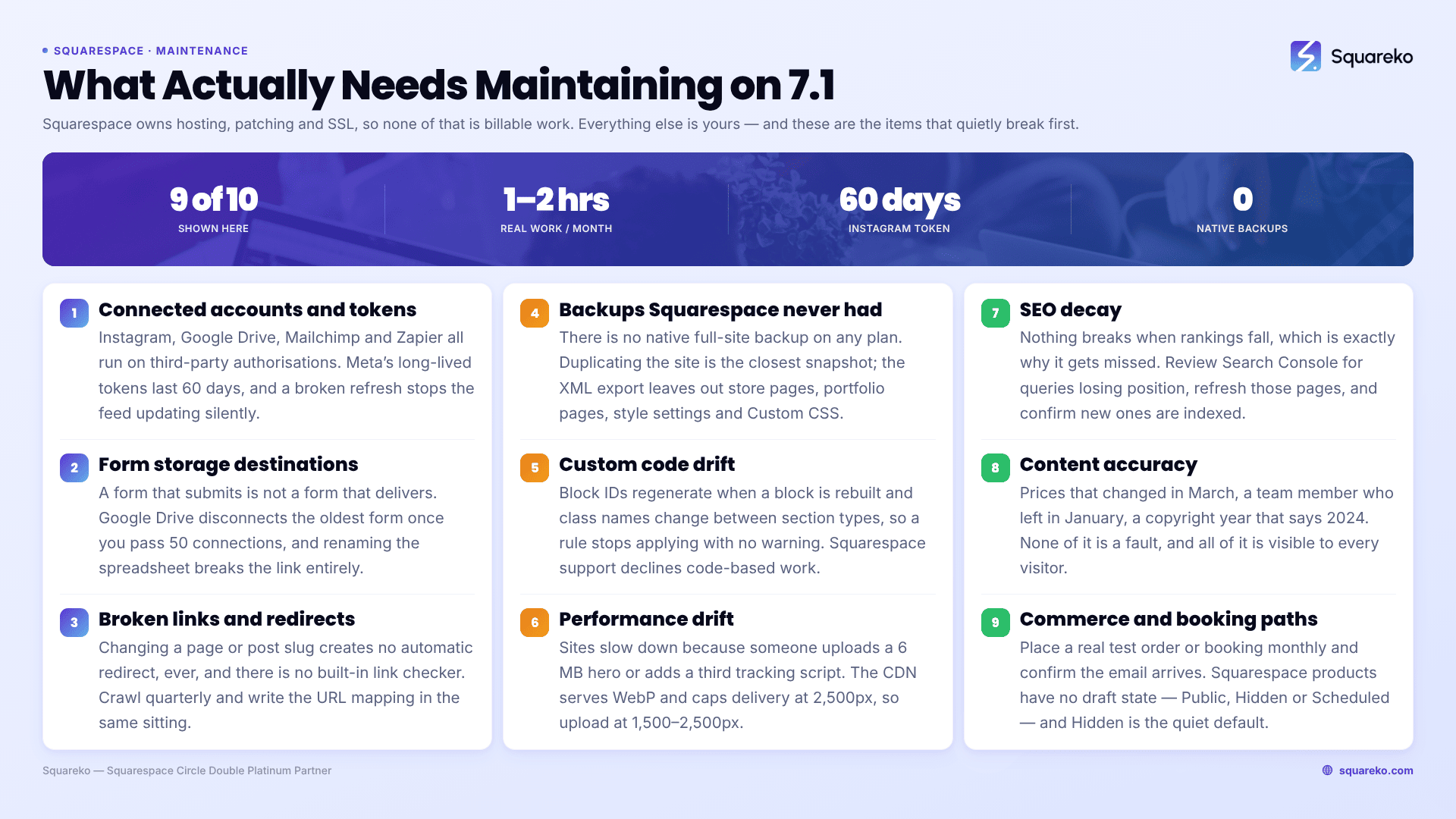
The short answer: Squarespace maintains the platform for you. Hosting, security patching, SSL renewal, CDN delivery and version upgrades all happen without you touching anything, which means most maintenance advice written for WordPress does not apply. What genuinely needs ongoing attention on a Squarespace 7.1 site is everything Squarespace does not own — your content, your internal links, your form storage destinations, your connected accounts, your custom code, and the backup Squarespace has never offered.
That distinction is the whole subject. Get it right and Squarespace maintenance becomes a short, cheap, predictable list. Get it wrong and you end up paying someone monthly to "apply updates" that do not exist.
What Squarespace maintains, and what you maintain
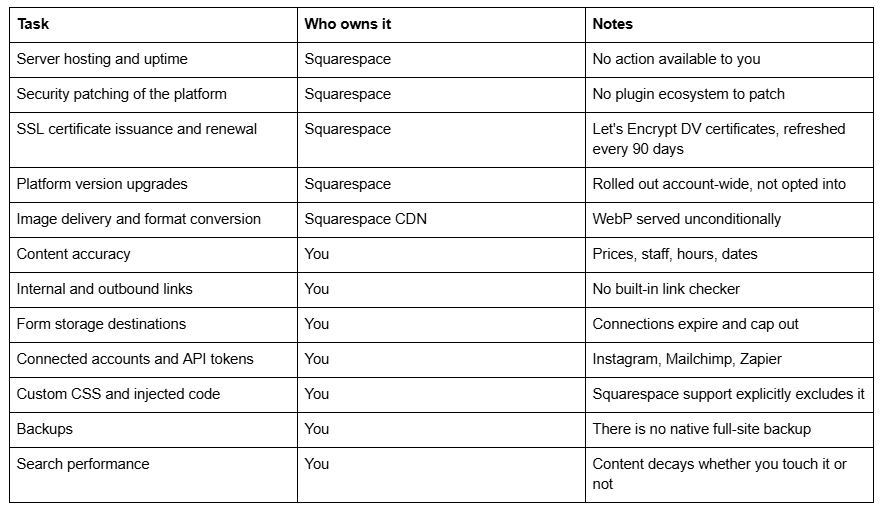
The left column is the reason Squarespace maintenance costs less than WordPress maintenance and should be sold differently. The right column is the reason it is not zero.
Why WordPress maintenance framing is wrong here
A WordPress maintenance retainer exists mostly to manage risk created by the software itself: core updates, theme updates, a plugin stack where any one component can break the site or open a vulnerability, plus server-level patching and malware scanning. That work is real, it is recurring, and it has to happen whether or not the business does anything.
None of it exists on Squarespace. There are no plugins to update in the WordPress sense, no core version you are responsible for, no server to harden, and no certificate to renew — Squarespace states that "SSL is automatically enabled. You don't need to do anything to set it up," and its Let's Encrypt certificates refresh on a 90-day cycle without intervention.
So when a Squarespace maintenance page promises "security updates and plugin updates", it is describing labour that cannot be performed. That is worth saying out loud, because it is the single most common thing wrong with content on this topic — and because the genuine list below is more useful than the invented one.
What genuinely needs maintaining on Squarespace 7.1
Ordered by how often each one turns out to be the thing that has quietly broken.
1. Connected accounts and integration tokens
This is the most common silent failure on Squarespace 7.1, and it is nobody's fault.
Squarespace's Instagram block, Google Drive form storage, Mailchimp connection and Zapier hooks all rely on OAuth authorisations issued by third parties. Those authorisations expire on the third party's schedule, not Squarespace's. Meta's long-lived Instagram access tokens are valid for 60 days and have to be refreshed to stay alive; when the refresh cycle breaks — because a password changed, an account type changed, or the API itself changed — the feed simply stops updating. It does not throw an error. It keeps showing the last posts it successfully fetched, sometimes for months.
The December 2024 Instagram API migration is the clearest example. Squarespace's own guidance is blunt: "Due to recent changes to Instagram's API, to continue pulling new content to your Instagram blocks, you'll need to reconnect your Squarespace site to Instagram." Blocks that were never reconnected stopped pulling new content entirely, and personal Instagram accounts had to be converted to a professional (Business or Creator) account to reconnect at all.
Maintenance action: every month, look at the live site logged out and confirm the Instagram feed shows a recent post. Reconnect via the Connected Accounts panel when it does not. It takes two minutes and it is the highest-frequency item on this list.
2. Form storage destinations
A Squarespace form that visibly submits is not the same as a Squarespace form that delivers. Storage destinations are configured per form, and they fail independently of the form block.
Three failure modes are worth knowing by name, all of them documented by Squarespace:
Google Drive re-authorisation. Google's security changes forced every Squarespace form using Drive storage to be manually reconnected. Sites that missed it kept collecting nothing.
The 50-connection cap. "If you connect an additional form, Google Drive disconnects the oldest form connection to keep the total at 50." On a site with many forms, adding a new one silently kills the oldest.
Renaming the spreadsheet. Squarespace is explicit: "It's not possible to rename the spreadsheet, as this disconnects it from your Squarespace site." A tidy-up in Google Drive breaks the pipe.
There is also a plan-change trap: a Mailchimp connection created on a trial site will not work after upgrading to a Basic plan.
Maintenance action: submit a real test entry through every lead-generating form once a quarter and confirm it arrives at every configured destination — not just the email one. If your forms are failing outright rather than mis-delivering, work through Squarespace form not submitting first.
3. Broken links and missing redirects
Squarespace has no built-in broken-link checker, and one platform behaviour links rot worse here than elsewhere: changing a page or post URL slug creates no automatic redirect, ever. Rename a service page and every existing link to it — from Google, from your own older posts, from a client's email signature — returns a 404.
Redirects are available and free, in Squarespace's URL Mappings panel, using the documented syntax:
/old-url -> /new-url 301
Collection items take a variable, which is how you move a whole blog without writing a line per post:
/blog/[name] -> /journal/[name] 301
The field holds roughly 2,500 redirect lines, so capacity is not the constraint — remembering is.
Maintenance action: run an external crawler over the site quarterly, fix internal 404s at source, and write a URL mapping in the same sitting as any slug change. Never afterwards, because afterwards never comes.
4. Backups — because Squarespace has none
There is no native full-site backup on Squarespace, on any plan, and no restore point to roll back to. This surprises people at the worst possible moment, usually mid-redesign.
The two available substitutes are both partial:
Duplicating the site. Available from the Squarespace dashboard, this creates a full copy of the current state including design settings and custom CSS. It is the closest thing to a snapshot the platform offers. It is not versioned — you get whatever you duplicated, whenever you duplicated it.
Exporting to XML. This is a WordPress-format export, and its exclusions matter more than its contents. Squarespace's documentation lists what does not export: "Other page types (including album pages, cover pages, index pages, info pages, calendar pages, portfolio pages, and store pages)", "Content in page-specific headers, footers, and sidebars", "More than one blog page", "Audio blocks", "Product blocks", "Video blocks", "Drafts", "Style settings", and "Custom CSS". An ecommerce site's products and a designer's portfolio pages are both outside the export.
Maintenance action: duplicate the site before any structural change — template swap, bulk URL edit, navigation restructure — and keep custom CSS and code injections in a plain text file outside Squarespace. Both take under five minutes. Neither is optional if the site earns money.
5. Custom code drift
Custom CSS on Squarespace 7.1 is durable right up until it isn't. Block IDs regenerate when a block is deleted and rebuilt. Class names change between section types and occasionally between platform releases. A rule written against a Fluid Engine section can be silently overridden when Squarespace writes new inline positioning values.
Nothing warns you. The site simply looks slightly wrong on one page, usually a page nobody checks.
This matters more for maintenance than it looks, because Squarespace Customer Support will not help: "We don't provide support for code-based modifications, unless otherwise specified." Whoever wrote the code owns it, forever.
Maintenance action: keep a dated change log of every CSS addition and code injection, and check the pages that carry custom layout after any editing session. When a rule stops applying, Squarespace custom CSS not working covers the nine causes in order of likelihood.
6. Performance drift
Squarespace sites do not slow down on their own. They slow down because someone uploads a 6 MB hero image, adds a third tracking script, or embeds a video player on the homepage.
The platform absorbs some of this for you. Squarespace's CDN serves WebP unconditionally regardless of the source format, and images are capped at 2,500px wide on delivery. Uploads should still be 1,500–2,500px — anything larger is wasted bytes, and filenames cannot be changed after upload.
For context on what a healthy Squarespace site looks like: across 54 Squareko-built Squarespace sites measured in August 2026, median mobile Largest Contentful Paint was 2.01 seconds, with 74% under Google's 2.5s "good" threshold; median page weight was 3.0 MB across 93 requests, and a median of 86% of images were served as WebP. Those are lab measurements — single-run Playwright/Chromium tests from a cloud datacentre, unthrottled — so real-world mobile numbers will be higher. They set the shape, not the guarantee.
Maintenance action: check Core Web Vitals in Search Console quarterly, and treat any new third-party script as a performance decision rather than a marketing one.
7. SEO decay
Nothing on a Squarespace site breaks when its rankings fall, which is exactly why this gets missed. Content ages, competitors publish, search results reshuffle, and a page that ranked third quietly sits eleventh.
The maintenance version of SEO is not a campaign. It is: reviewing Search Console for queries that lost position, refreshing the pages behind them, checking that new pages are actually indexed, and confirming nothing has been accidentally hidden from search. Squarespace's robots.txt cannot be edited, and ?author=, ?tag=, ?month= and ?view= parameters are disallowed by default — so if a page is missing from the index, look at page-level search visibility settings rather than for a file you cannot reach.
8. Content accuracy
The least technical item and the one that costs the most trust. Prices that changed in March. A team member who left in January. Opening hours from before the refurbishment. A copyright year that says 2024.
None of this is a fault. All of it is visible to every visitor, and it is the first thing that makes a site look abandoned.
9. Commerce and booking paths
If the site takes money or takes appointments, the transaction path needs testing on a schedule rather than when a customer complains — because customers do not complain, they leave.
Once a month: place a real test order or booking end to end, confirm the confirmation email arrives, and check that products which should be visible are. Squarespace products have no draft state — they are Public, Hidden or Scheduled, and Hidden is the default that quietly removes them from your shop. When something in that path fails, Squarespace checkout not working and Squarespace products not displaying cover the usual causes.
10. Domain registration, DNS and third-party extensions
Squarespace renews the SSL certificate. It does not renew your domain if the domain lives at an external registrar, and it cannot fix a card that has expired against that registrar's account. A lapsed domain takes a Squarespace site offline just as completely as an outage would, and it is one of the most common causes of "my Squarespace site is down" that turns out to have nothing to do with Squarespace.
The same applies to anything sitting alongside the site in DNS. Email authentication records — SPF, DKIM and DMARC for whichever provider handles your mail — live in the same DNS zone as your Squarespace records, and a provider change made a year ago can leave a stale record that quietly damages deliverability without touching the website at all.
Third-party extensions are a smaller but real category. Squarespace Extensions and any external tool connected to the site have their own billing, their own version changes, and their own support teams — Squarespace's guidance for these is to "contact the extensions provider directly". Nobody audits that list unless someone is asked to.
Maintenance action: once a year, confirm the domain's expiry date and auto-renew status at the registrar, review the DNS zone for records belonging to services you no longer use, and check that every paid extension still earns its subscription. If the domain side is already misbehaving, Squarespace domain not connecting walks through the DNS records in order.
A realistic maintenance cadence
Not everything belongs on a monthly cycle. This is what the list above looks like once it is scheduled.
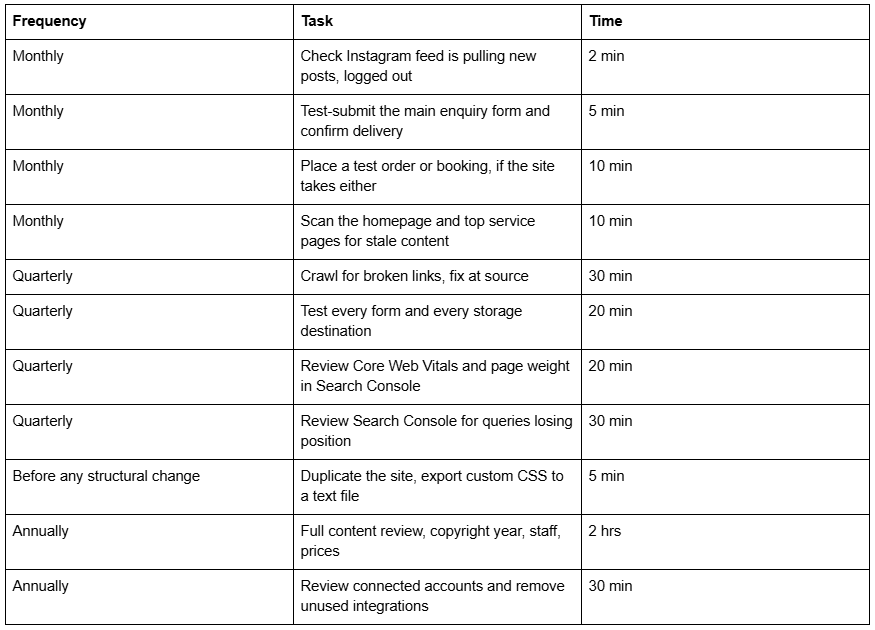
Added up, a straightforward brochure site needs roughly one to two hours a month. A site with an active blog, a shop, or several integrations needs more — not because Squarespace demands it, but because the business does.
That number is the honest basis for pricing maintenance, and it is why Squarespace maintenance packages cluster around two, six and ten hours a month rather than around "security updates".
Where the rest of this cluster goes
This page is the hub. The specific questions are answered in depth elsewhere:
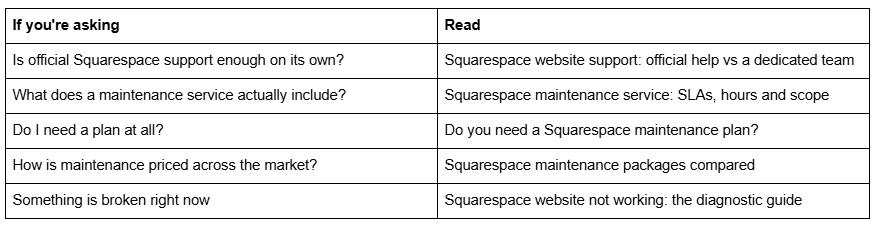
What maintenance costs, and when it's worth buying
Squarespace maintenance is priced two ways: as hours, or as outcomes. Retainers in this market run from around $99/month for one hour of support up to $1,000–$1,250/month for eight to ten hours, and the effective hourly rate varies more than the headline price suggests.
Squareko's own plans are $350/month for 2 hours, $750/month for 6 hours, and $1,250/month for 10 hours — published, because a maintenance retainer you cannot price before a sales call is a maintenance retainer designed to be negotiated.
The honest position: many Squarespace sites do not need a plan. A brochure site that changes twice a year, run by someone comfortable in the editor, can work the cadence table above in an afternoon per quarter and keep the money. That case is worked through properly in do you need a Squarespace maintenance plan, including who should not buy one.
Where a plan earns its cost is narrower and more specific: when the site takes bookings or payments and an outage costs real revenue; when nobody in-house can edit it confidently; when it carries custom code that Squarespace support will not touch; or when the owner's hour is worth more than the retainer's hourly rate and the work keeps not happening.
If that describes your situation, our Squarespace website support plans exist for exactly it — the cadence above, run on schedule, with the code work Squarespace Customer Care declines to cover. If it doesn't, the checklist on this page is the whole job, and you should do it yourself.
FAQ
-
Less than a WordPress site, but not none. Squarespace handles hosting, security patching, SSL renewal and platform upgrades itself. What still needs attention is content accuracy, broken links, form storage destinations, integration tokens, custom code and backups — roughly one to two hours a month on a straightforward site.
-
No. Squarespace has no native full-site backup or restore point on any plan. The closest substitutes are duplicating the site from the dashboard, which copies the current state including custom CSS, and the XML export — which excludes store pages, portfolio pages, product blocks, style settings and Custom CSS.
-
Instagram authorisations are issued by Meta and expire on Meta's schedule; long-lived tokens last 60 days and must be refreshed. Password changes, account type changes and Instagram API changes all break the connection. Squarespace's December 2024 API migration required every Instagram block to be manually reconnected.
-
Squarespace has no built-in link checker, so use an external crawler quarterly. The most common source of internal 404s is a changed URL slug — Squarespace creates no automatic redirect when a slug changes. Add a /old-url -> /new-url 301 line in URL Mappings in the same sitting.
-
Retainers range from about $99/month for one hour of support to $1,250/month for ten hours. Squareko's plans are $350, $750 and $1,250 per month for 2, 6 and 10 hours. Effective hourly rates vary widely, so compare hours included rather than headline price.
-
Server hosting and uptime, platform security patching, version upgrades, CDN image delivery including unconditional WebP conversion, and SSL certificates — Let's Encrypt DV certificates that refresh every 90 days with no action from you. None of these require a maintenance plan.

Author Bio
I'm Walid Hasan, a Certified Squarespace Expert and Squarespace Circle Platinum Partner with over 12 years of hands-on experience designing and optimizing high-performing websites. Over the years, I've had the privilege of building more than 2,000 Squarespace websites for clients around the world, always focusing on clean design, strong user experience, and conversion-driven results.
