
Squarespace Templates for Videographers: 10 Best Showreel Designs
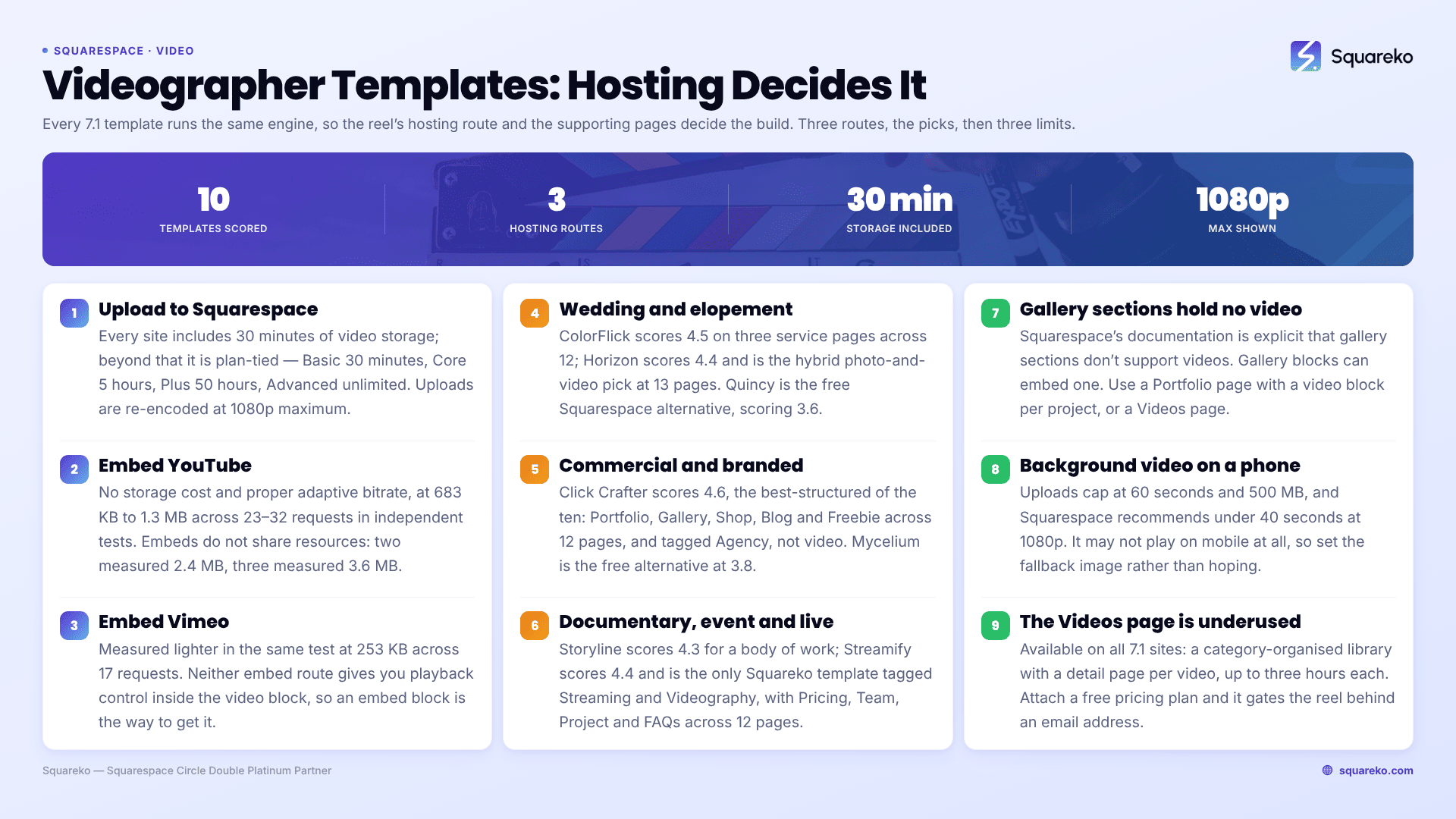
The short answer: Squarespace does not publish a "videographer" template category, and in Squarespace 7.1 it barely matters, because every 7.1 template runs the same engine — any layout one template shows, another can be configured to show. What actually decides whether a video site works is the hosting route you pick for your footage and the supporting pages the template ships with. Choose on those two things and the visual style becomes a Site Styles decision you make in an afternoon.
Below are 10 templates sorted into four kinds of video work, each scored against the same rubric, followed by the video mechanics that decide the outcome.
How these were scored
Every template was judged on five criteria, weighted. Scores are out of 5.
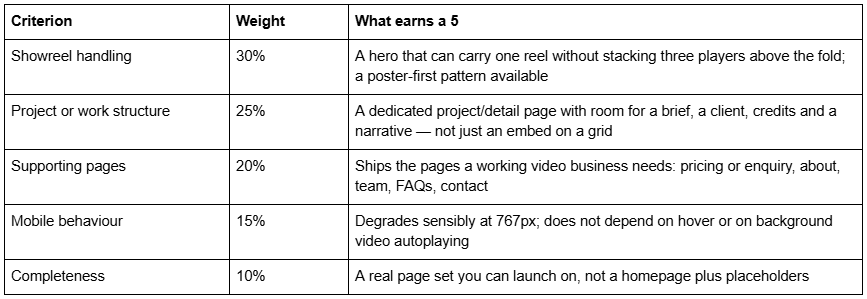
What this scoring is and isn't. It is a structural assessment made from each template's published page list, its live demo where one resolves, and 12 years of building on Squarespace. It is not a lab benchmark of the demos. Demo sites are loaded with placeholder media that bears no relationship to the 4K footage you will upload, so a Lighthouse score against a demo tells a videographer nothing useful. Where performance figures appear below, they are either Squarespace's own published guidance or Squareko's client-site measurements, labelled as lab data.
Disclosure: Squareko sells six of the ten templates below, marked (Squareko, $249). Squarespace's own templates are free with a subscription and are the right answer for two of the four segments here — I have said so where it is true. Two competitor templates are included because they do specific things the Squareko range does not.
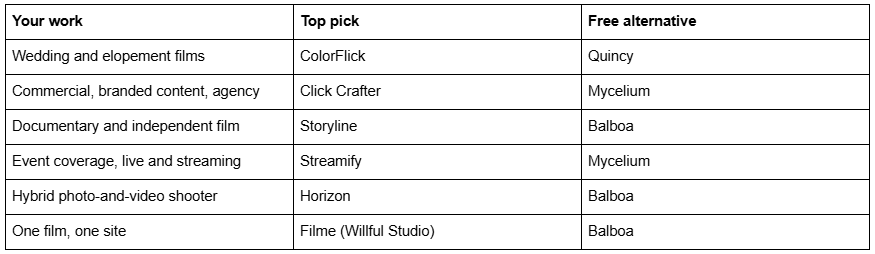
Quick pick by kind of video work
The thing that decides a video site: where the video lives
Read this before you look at a single template. Three routes exist on Squarespace 7.1 and they have completely different costs.
Route 1 — Upload to Squarespace. Every site, on every plan, includes 30 minutes of total video storage for files uploaded to video blocks, section backgrounds, Videos pages and Course pages. Beyond that, storage is tied to plan: Basic 30 minutes, Core 5 hours, Plus 50 hours, Advanced unlimited. Squarespace accepts .mp4, .m4v and .mov, converts everything to .mp4 on upload, and re-encodes at roughly 1.5 Mbps at 360p or 3 Mbps at 1080p, with 1080p as the maximum display resolution even if you upload 4K.
That last number is the one videographers care about. If you shot in 4K and graded it, Squarespace will show it at 1080p at 3 Mbps. For a wedding highlight film that is fine. For a colourist's reel it is not.
Route 2 — Embed YouTube or Vimeo. No storage cost, no upload limit, and the platform handles adaptive bitrate properly. The cost is page weight and requests. Independent measurements put a standard YouTube iframe embed at 683 KB across 23 requests (WP Rocket's player comparison) to 1.3 MB across 32 requests (Frontend Masters), depending on what the player decides to load. Vimeo measured lighter in the same test at 253 KB across 17 requests. Critically, standard YouTube embeds do not share resources between instances — the Frontend Masters test found two embeds weighed 2.4 MB and three weighed 3.6 MB.
Route 3 — Section background video. A different feature with its own rules, covered in the background video below.
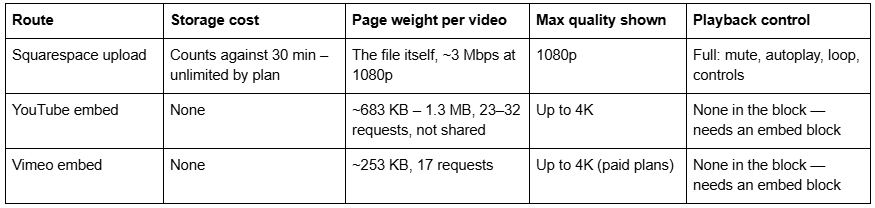
The trade-off in one line: uploads give you playback control and cost you storage; embeds give you quality and cost you page weight. Most working videographers should embed the long stuff and upload only the short hero clip.
Squarespace templates for wedding and elopement videographers
Wedding video is sold on feeling and booked on responsiveness. The site needs one reel that plays instantly, a clear package or pricing signal, and an enquiry route that is never more than one tap away.
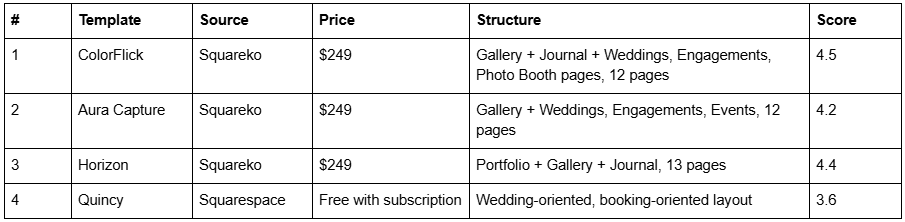
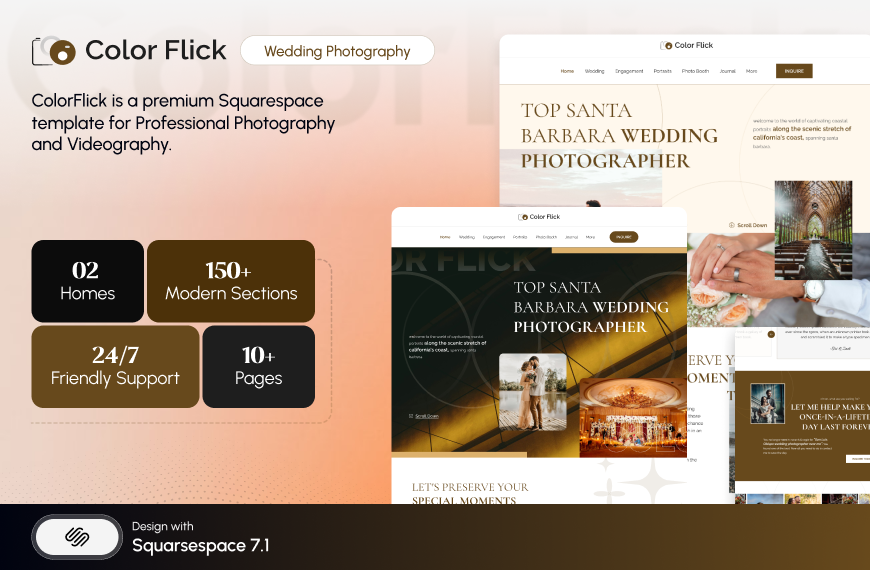
ColorFlick is tagged Photography, not Videography, and it is still the strongest wedding pick in the Squareko range. The reason is its three service pages — Weddings, Engagements and Photo Booth — plus a Gallery and a Journal across 12 pages. Three service URLs means three pages that can each rank for a different intent, instead of one "Portfolio" page trying to rank for all of them. For a wedding videographer, rename Photo Booth to something you actually sell — Elopements, Same-Day Edits — and the structure holds. The honest weakness: because it is drawn around stills, you will be swapping gallery sections for video blocks on the work pages yourself.
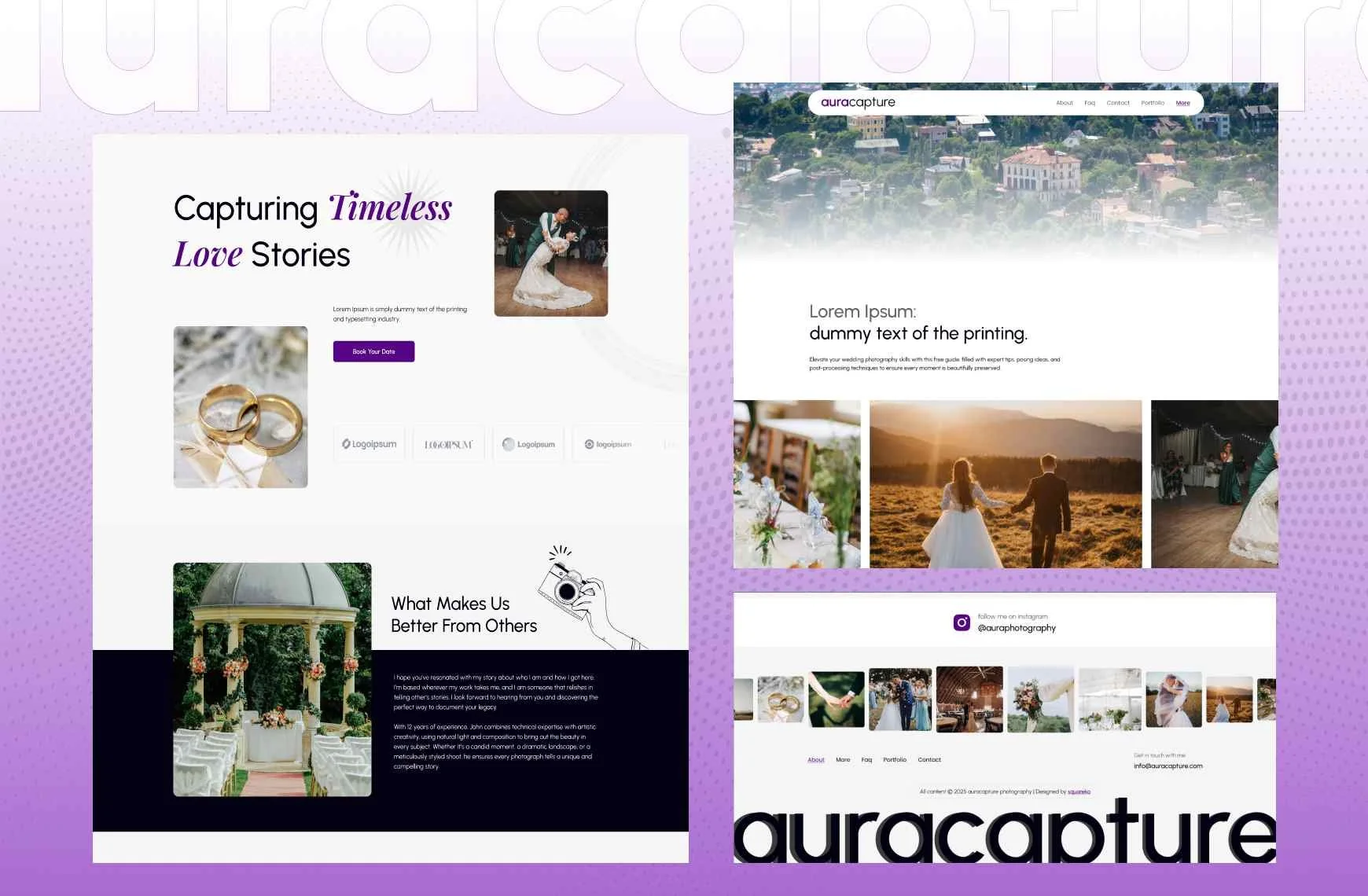
Aura Capture is the quieter option: Gallery, Weddings, Engagements and Events across 12 pages, with no blog. That is a real decision rather than an omission. A videographer with no intention of writing is better off without an empty blog to explain. If you do intend to write, take ColorFlick or Horizon.
Horizon is the pick for hybrid shooters. It is tagged Real Estate and Interior in the shop, but its actual pages are a photography and film site — Wedding, Engagement, Portraits, Photo Booth, Journal and Inquire across 13 pages, with both a Portfolio page and Gallery sections. Judge it by its pages, not its tag. The two-layer structure — a Portfolio collection where each wedding gets its own URL, Gallery sections inside for stills, a video block for the film — is exactly what a photo-and-video shooter needs and the only template here that ships with both already configured.

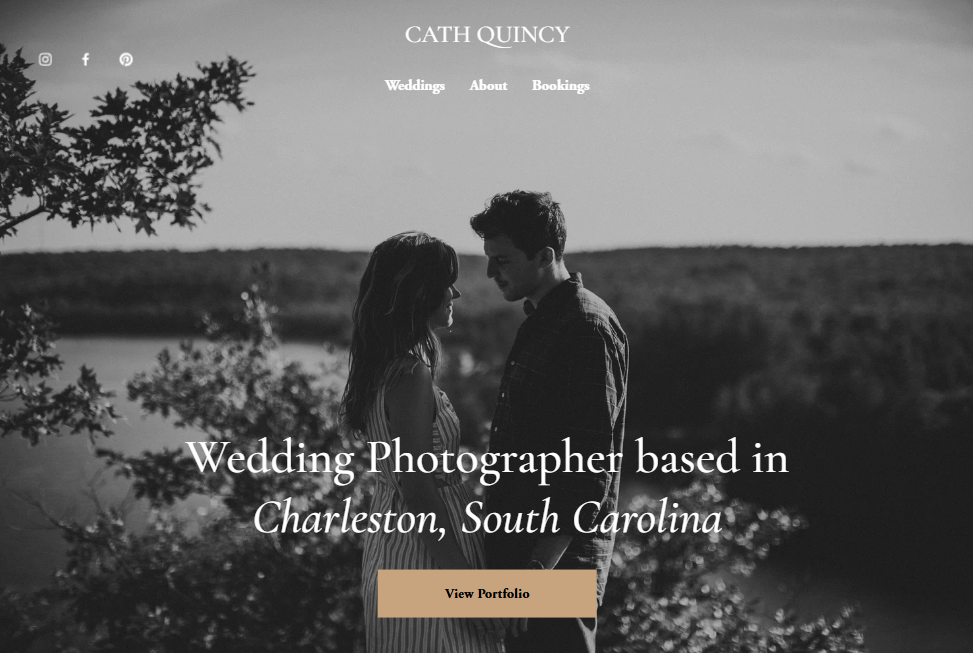
Quincy is Squarespace's free wedding-oriented template and it is genuinely adequate for a first site. No supporting pages, no style guide, no support, but no cost either.
Squarespace templates for commercial and branded content
Commercial video is sold on credibility. Brand clients want to see who else you have worked for, what the process looks like, and whether you can be trusted with a budget. That means a real project page and a real about page, not a wall of embeds.

Click Crafter is the best-structured template in the Squareko range for a video agency, and it is not tagged for video at all — it is tagged Agency and Service-Based. Twelve pages: a Portfolio page for individually rankable projects, Gallery sections, a Shop for productised services or LUT packs, a Blog, and a Freebie page for a lead magnet. Every page is doing a job. It reads as an agency rather than a solo shooter, so a one-person operation will strip the Team section. That is five minutes of work, and it is the template I would put a three-person production company on.

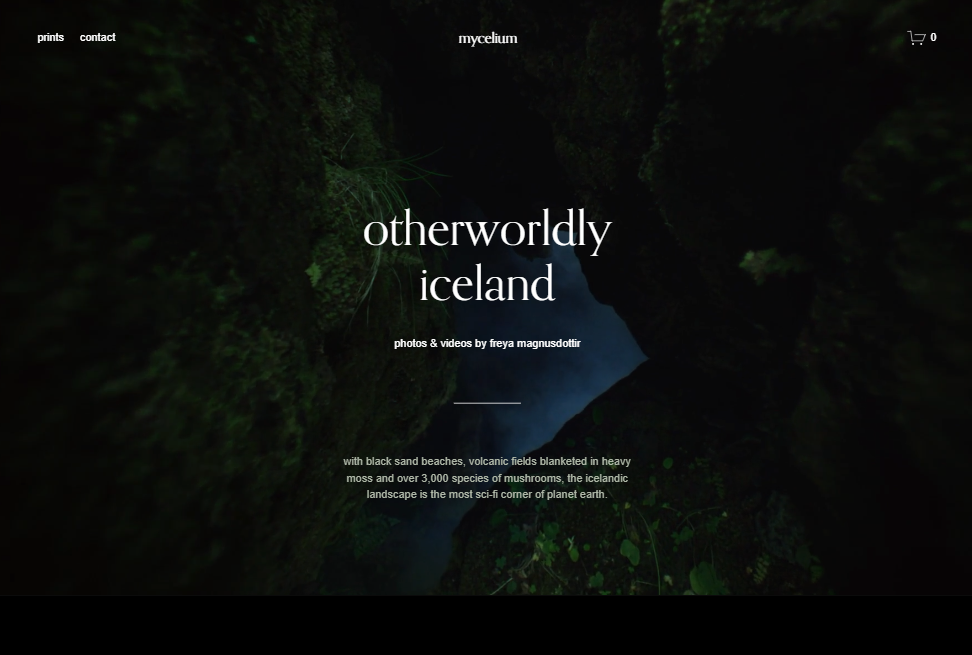
Mycelium is Squarespace's free template most often recommended for video, because it ships with a video background configured on the hero. It is a reasonable starting point and it is free. Understand what you are getting: a configuration of the same 7.1 engine, with no supporting pages and no one to ask when the background video does not play on an iPhone in low power mode. It will not.
The commercial-work structural rule: one reel above the fold, everything else behind a poster image. A brand client who lands on your homepage should see one thing playing, then scroll to a grid of stills that link through to project pages. Three players stacked on a homepage is 3.6 MB of YouTube before your own logo loads.
Squarespace templates for documentary and independent film
Documentary and independent film sites sell a body of work and a team, not a service list. They need festival laurels, press quotes, screening dates, cast and crew credits and a distribution link — a page anatomy that almost no template shop addresses. That is covered in depth in the filmmaker and production company guide.
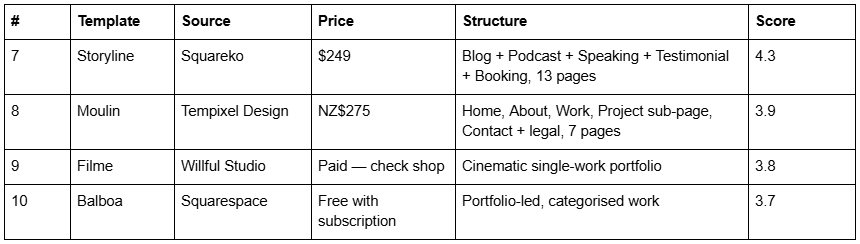
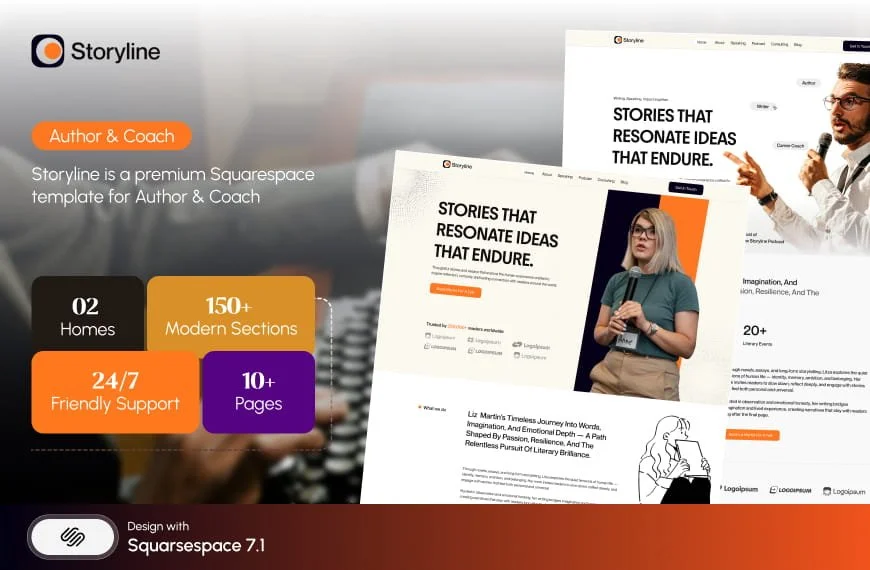
Storyline has no Portfolio page and is still the right answer for most documentary makers. Thirteen pages covering Blog, Podcast, Speaking, Testimonial and Booking — which is the actual anatomy of a documentary career, where the film is the calling card and the income is speaking, teaching and commissions. Build your filmography as a blog with a category per project and it maintains itself. Note that Storyline's published demo link currently returns an authentication error, so you are buying on the page list rather than a walkthrough.
Moulin from Tempixel Design deserves naming because it is one of the very few templates built explicitly for filmmakers and theatre-makers rather than adapted from photography. Seven pages, including a dedicated Project sub-page, at NZ$275. It is smaller than anything in the Squareko range, and it does not advertise laurel, credit or press modules either — nobody does — but its Work → Project structure is drawn for exactly this use.
Filme from Willful Studio is worth a look if you are building a site around a single film rather than a filmography.
Balboa is Squarespace's free option most often pointed at directors and cinematographers, with categorised portfolio work. For a first feature with no budget, it is enough.
Squarespace templates for event, live and streaming work
Event and streaming work is the one segment where a schedule, a pricing table, and an FAQ matter more than the reel. Clients booking a conference stream want to know what you charge, what you bring, and what happens if the venue's internet fails.

Streamify is the only template in the Squareko range tagged Streaming and Videography, and it is shaped like a production company rather than a solo shooter: two homepage variants, a Team page, a Pricing page, a Project page and an FAQs page across 12 pages. That combination — Pricing plus FAQs plus Team — is unusual and it is exactly the objection-handling set an event video business needs. The Project page gives each job its own URL, which is where your case studies live.
Two honest caveats. Streamify has no working public demo — its published demo link does not resolve, so you will be buying on the page list and screenshots. And no template solves hosting; Streamify does not include video storage any more than a free template does.
Mycelium and Sundew are the free Squarespace options here — Mycelium for a video-background hero, Sundew if your work is episodic and podcast-shaped.
Background video: what actually happens on a phone
This catches more videographers than anything else on the platform, so here are the published rules.
Section background videos in Squarespace 7.1 accept an uploaded file with a 60-second limit and a 500 MB cap, a YouTube URL (must be Public or Unlisted with embedding enabled), or a Vimeo URL (requires a paid Vimeo plan, privacy set to Public or Hide from Vimeo). Squarespace recommends keeping them under 40 seconds at 1080p with a minimum 3 Mbps bitrate.
Now the part that matters. Squarespace's own documentation states that background videos "may not always display on mobile devices, depending on the visitor's connection speed and browser version" and that "devices in low-power or power-saving mode won't display background videos." When the video does not play, visitors see your mobile fallback image, or your background colour, or — if you set neither — "a thumbnail from the video and an unresponsive play button."
So: always set a mobile fallback image. An unresponsive play button on the homepage of a videographer's site is the worst possible first impression, and it is the default state for any visitor whose phone is below 20% battery.
Do the arithmetic before you commit. A 30-second 1080p background clip at Squarespace's recommended 3 Mbps is roughly 11 MB of video data (3 Mbps × 30s = 90 megabits ÷ 8 = 11.25 MB). It streams rather than blocking render, but that is still 11 MB of a mobile visitor's bandwidth against Squarespace's published guidance to "keep each page on your site to 5 MB or less." For context, across 54 Squareko-built client sites measured in August 2026 (Playwright/Chromium lab test, cloud datacentre, unthrottled, single run per site, load-only CLS) the median page weight was 3.0 MB across 93 requests. A homepage background video more than doubles a typical page in one decision.
The structural limits nobody mentions
Gallery sections cannot hold video. Squarespace's documentation is explicit: "Gallery sections don't support videos." Gallery blocks can embed video; gallery sections cannot. This single fact makes a videographer's portfolio structurally different from a photographer's, and it is why the generic "best portfolio template" advice fails here. Use a Portfolio page with a video block on each project, or a Videos page.
Videos pages are the underused feature. Available on all 7.1 sites, a Videos page builds a browsable, category-organised library with an individual detail page per video — up to three hours per video, titles capped at 100 characters, related videos showing up to five items. It can also be attached to a pricing plan, and a free pricing plan can require an email address before access. That is a gated showreel that builds your list, using a native feature.
Portfolio pages cap at 60 projects, across five layouts, three of which are hover-dependent and therefore useless on a touchscreen. Gallery sections cap at 250 images, though Squarespace advises limiting galleries to 50 images each for speed.
Demo images are not licensed for live use. Every template you buy — from any shop — ships with placeholder media you must replace. For a video site your reel is the media, so this mostly bites on the About and Contact pages.
A template is a starting configuration. All Squarespace 7.1 templates run one engine. What you pay for is the configuration, the supporting pages, and depending on the shop, someone installing it. Squareko templates arrive as a Squarespace contributor invitation rather than a file download — no upload step at all — and installation onto an existing site is a manual process taking around 48 hours. All sales are final, so use the demos properly first.
Where to go next in this cluster
Performance specifics — hosting routes with real numbers and what actually breaks a video-heavy build: videography Squarespace templates that load fast
Portfolio structure — organising reels, project pages, and the Portfolio-vs-Gallery decision: Squarespace video portfolio templates
Film and production companies — laurels, credits, press and screenings: Squarespace templates for filmmakers
YouTubers — whether you need a site at all, and what it should contain: Squarespace templates for YouTubers
Multi-platform creators — the site as a monetisation hub: Squarespace templates for content creators
If you have worked through the segments and you are still choosing between two templates, the deciding question is almost never the homepage. It is what a client sees on the second click — the project page — and whether the template gives you somewhere sensible to put a brief, a client name and a credit list.
That is the sort of thing worth a second opinion on before committing, and it is why the premium Squarespace templates in our shop are listed with their full page structure rather than a homepage screenshot. Most people reading this will pick correctly from the tables above without any help — the segments exist so you do not need to ask.
FAQ
-
Not as a published category. Squarespace 7.1 templates all run the same engine, so any layout one shows, another can be configured to show. Choose on supporting pages and hosting route instead. Among premium shops, Squareko's Streamify is tagged Streaming and Videography, and Tempixel Design's Moulin is built for filmmakers.
-
Every site includes 30 minutes of total video storage across video blocks, section backgrounds, Videos pages and Course pages. Beyond that it is plan-dependent: Basic 30 minutes, Core 5 hours, Plus 50 hours, Advanced unlimited. Uploads accept .mp4, .m4v and .mov, and display at a maximum of 1080p.
-
Upload short hero clips to Squarespace, because uploads are the only route that gives you mute, autoplay, loop and player-control settings. Embed long-form work from YouTube or Vimeo, because embeds cost no storage and preserve quality. A standard YouTube embed adds roughly 683 KB to 1.3 MB per instance.
-
Squarespace states background videos may not display depending on connection speed and browser version, and that devices in low-power mode will not display them at all. Without a mobile fallback image, visitors see a thumbnail and an unresponsive play button. Always set a fallback image.
-
Gallery sections cannot — Squarespace's documentation states plainly that gallery sections do not support videos. Gallery blocks can embed video. For a video portfolio, use a Portfolio page with a video block on each project page, or a Videos page, which builds a browsable library with individual detail pages.
-
Mycelium is the one most often recommended, because it ships with a video background configured on the hero. Balboa suits directors and cinematographers, Sundew suits episodic work, and Quincy suits wedding work. All are configurations of the same 7.1 engine, with no supporting pages, style guide or support.

Author Bio
I'm Walid Hasan, a Certified Squarespace Expert and Squarespace Circle Platinum Partner with over 12 years of hands-on experience designing and optimizing high-performing websites. Over the years, I've had the privilege of building more than 2,000 Squarespace websites for clients around the world, always focusing on clean design, strong user experience, and conversion-driven results.
