
Squarespace Video Portfolio Templates (Hosting and Speed Tips)
The short answer: Before you choose a Squarespace video portfolio template, know this — Squarespace gallery sections cannot hold video. Squarespace's documentation says so directly: "Gallery sections don't support videos." Gallery blocks can embed video; gallery sections cannot. That one fact makes a video portfolio structurally different from a photography portfolio, and it invalidates most "best portfolio template" advice for videographers. Build on a Portfolio page or a Videos page instead.
Here is how the three structures actually differ, and how to organise reels inside whichever you pick.
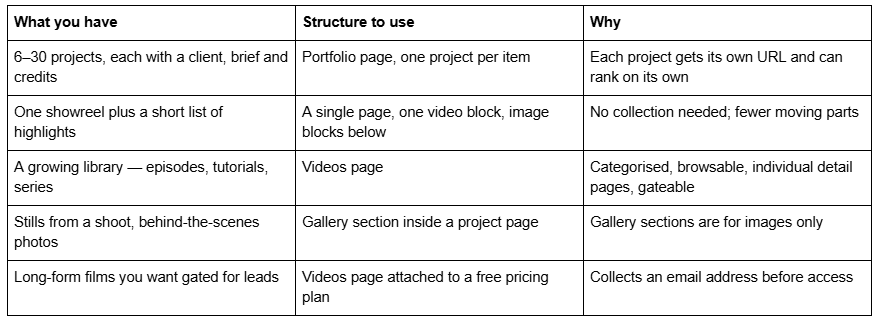
Which structure fits what you have
Portfolio page vs Gallery section vs Videos page
These are three different Squarespace 7.1 features and videographers routinely pick the wrong one.
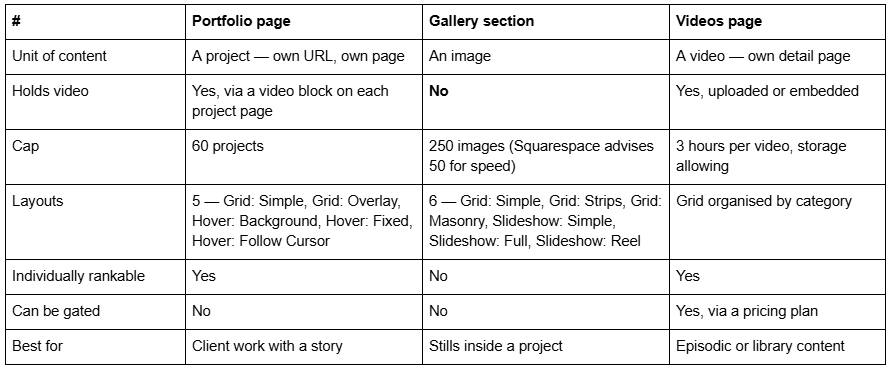
A Portfolio page is a collection, like a blog. Each project is a collection item with its own URL, its own featured image and a full page underneath where the video block lives. The cap is 60 projects, and projects cannot exist outside their parent portfolio page.
A Gallery section holds images inside one page. Six layouts, a 250-image cap, and no video. It is still useful on a video site — as stills, frame grabs and behind-the-scenes inside a project page — just never as the portfolio itself.
A Videos page is the feature almost nobody uses. Available on all 7.1 sites, it builds a browsable library organised by category, with an individual detail page per video. Each video can be up to three hours (storage allowing), titles are capped at 100 characters, embedded YouTube descriptions display up to 160 characters, and a related-videos module shows up to five items. A Videos page can be attached to a pricing plan — and a free pricing plan can require an email address before access.
That last point is worth stopping on. A gated showreel that collects an email address, built with a native feature, no plugin, no third party. For a videographer whose enquiries come from brands and agencies, that is a better lead capture than any contact form.
Four ways to organise a video portfolio
Once you have picked the structure, the organising decision is what visitors actually feel. Four patterns work on Squarespace; pick by how clients think about hiring you.
1 — By service. Weddings / Commercial / Events, each a separate page. Best for anyone whose clients search by job type, which is most wedding and event videographers. Three service pages mean three URLs that can each rank for a different intent, instead of one Portfolio page trying to rank for all of them. This is the highest-converting pattern and the one most videographers skip.
2 — By client. One Portfolio page, one project per brand. Best for commercial and agency work, where the logos are the argument. The featured image should be a frame from the film with the brand recognisable, not a logo lockup.
3 — By format. Reels / Documentary / Music video / Motion. Best for people whose skill varies by format rather than by sector. Works well as Portfolio page categories rather than separate pages.
4 — Single reel, no portfolio. One page, one video, a short credit list, contact. Best for a director or DP whose reel is the entire pitch. It is a legitimate structure and it loads faster than anything else on this list — a single video block against Squarespace's guidance to "keep each page on your site to 5 MB or less" is trivially achievable.
What not to do: a single page with twelve embedded players. Standard YouTube embeds do not share resources between instances — independent testing found two weighed 2.4 MB and three weighed 3.6 MB. Twelve is not a portfolio, it is a denial-of-service attack on your own visitors. The performance breakdown covers the arithmetic in full.
What a video project page should actually contain
This is the second click, and it is where you get hired. A project page that is one embed and no words tells a prospective client nothing about whether you can think.
The anatomy that works, in order:
A one-line description of the job. "60-second brand film for a Manchester coffee roaster." Not "Project 04".
The video itself, one player, below the fold or behind a poster image.
The brief. Two or three sentences on what the client needed. This is the part clients read.
Your decision. What you chose to do about it — the format, the approach, the constraint you worked around. This is what separates a videographer from a camera operator.
Credits. Director, DP, editor, colourist, sound, cast. Crediting collaborators is normal practice in film and it earns you reciprocal links from everyone you credit.
Deliverables. "One 60-second hero, three 15-second cutdowns, nine-by-sixteen versions for Reels." Brand clients are buying a deliverable list.
Stills. A Gallery section of frame grabs — images, which gallery sections do hold — so the page has something to look at without playing anything.
Next project link. Keep them moving.
Naming matters more on Squarespace than elsewhere. Portfolio featured images have no alt-text field — the item title is used as the alt text. So a project titled "Project 04" is also an image described to search engines and screen readers as "Project 04". Title projects the way a person would describe the work.
Two more platform details worth knowing before you upload. Squarespace's CDN serves WebP unconditionally regardless of source format, so export frame grabs as high-quality JPEGs and let the CDN handle conversion. And filenames cannot be changed after upload — name the file coffee-roaster-brand-film-still-01.jpg before it leaves your desktop, because a portfolio full of DSC_4471.jpg is a small, permanent own goal.
Portfolio layouts: the mobile trap
Squarespace Portfolio pages offer five index layouts, and three of them are hover-based: Hover: Background, Hover: Fixed and Hover: Follow Cursor. They are genuinely impressive on a laptop.
There is no hover on a touchscreen. Hover: Follow Cursor collapses to a plain list of project titles on a phone. The 7.1 mobile breakpoint is 767px, and Fluid Engine maintains a separate mobile layout per section with its own inline positioning values, so the desktop arrangement tells you nothing about the phone one.
For a videographer this matters more than for most disciplines, because a large share of your traffic arrives from Instagram and YouTube — in-app browsers, on phones, one-handed. Use Grid: Simple or Grid: Overlay unless your audience is desktop-dominant, and check the mobile layout of every section before launch.
One more layout note specific to video: Grid: Simple crops everything to one aspect ratio. For a video portfolio that is a feature, not a limitation — 16:9 frame grabs cropped to a consistent ratio look deliberate. Grid: Masonry keeps native ratios, which is the right choice for stills and the wrong choice for a wall of frame grabs that are all the same shape anyway.
Templates with the right structure
Judge a Squarespace video portfolio template on whether it ships a project detail page. That is the whole test.
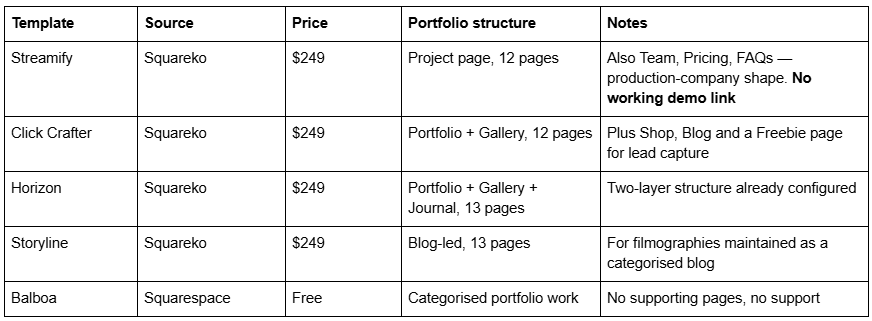

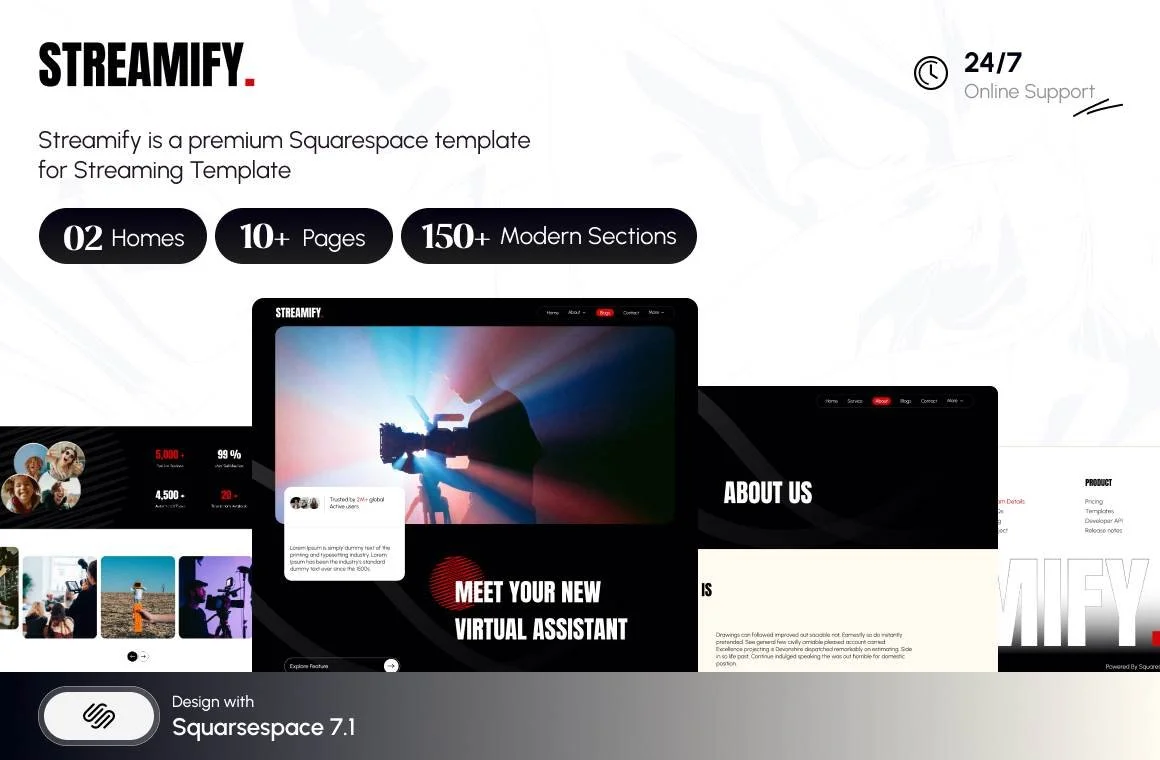

Streamify is the only template in the Squareko range tagged Streaming and Videography. Its Project page is the piece that matters here — it gives each job its own URL and keeps players off the homepage. It also ships Team, Pricing and FAQs pages across 12 pages, which is a production-company shape rather than a solo-shooter shape. Its published demo link does not resolve, so you are buying on the page list.
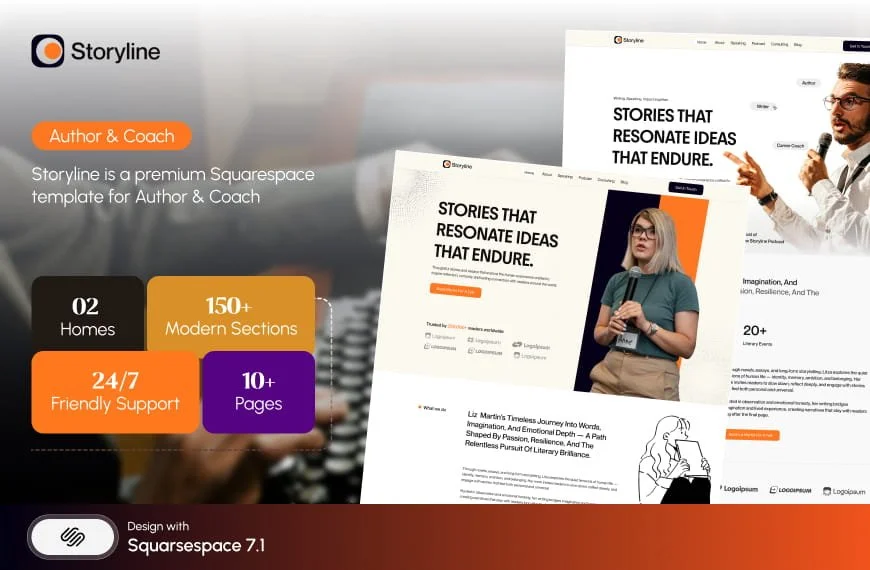
Click Crafter is the better pick if you want a Portfolio page proper plus commerce. Horizon ships both a Portfolio page and Gallery sections already configured, which is the two-layer structure this article recommends. Storyline suits anyone maintaining a filmography rather than a client list.
The full segmented roundup is in the Squarespace templates for videographers guide, and film-specific page anatomy — laurels, press, screening dates — is covered in the filmmaker guide.
The caps you will eventually hit
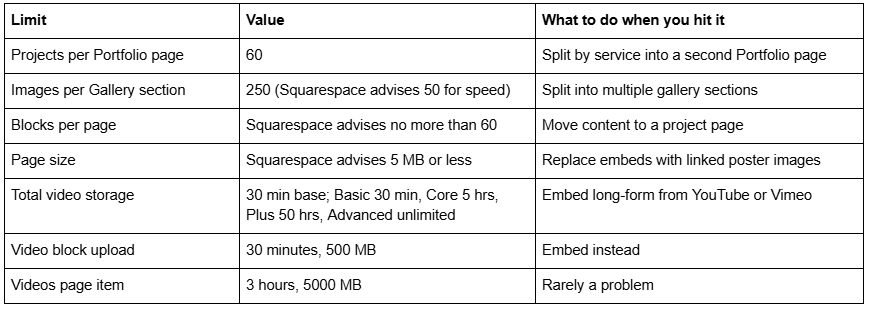
Projects are dependent collection items — they cannot exist outside their parent Portfolio page, so restructuring later means recreating them and losing the URLs. Decide your organising pattern before you build 40 projects, not after.
If your structure is right and the site still feels wrong, it is usually the project pages rather than the index — nine stacked frame grabs and no writing, on every one of them. That is a writing problem, and no template fixes it.
Where a template genuinely helps is in giving you a project page that already has somewhere sensible to put a brief, a credit list and a deliverables list, so you fill blanks instead of designing from nothing. That is why the premium Squarespace templates in our shop are documented by page structure rather than by homepage screenshot. Most videographers reading this will build the right structure from the tables above without buying anything.
FAQ
-
Not in a gallery section. Squarespace's documentation states that gallery sections do not support videos. Gallery blocks can embed video. For a video portfolio, use a Portfolio page with a video block on each project page, or a Videos page — and keep gallery sections for frame grabs and behind-the-scenes stills.
-
Use a Portfolio page for client work where each job needs a brief, credits and a narrative, capped at 60 projects. Use a Videos page for a growing library of episodes or tutorials — it builds a categorised, browsable index with individual detail pages and can be gated behind a pricing plan.
-
Sixty. Projects are collection items dependent on their parent Portfolio page and cannot exist as standalone pages, so restructuring later means recreating them and losing the URLs. If you need more, split the work across a second Portfolio page organised by service.
-
A one-line job description, one video player, the client brief, the decision you made about it, credits for the crew, the deliverables list, a gallery section of frame grabs, and a link to the next project. The brief and the deliverables are the parts brand clients read.
-
No. Hover: Background, Hover: Fixed and Hover: Follow Cursor all depend on a cursor and degrade to a plain list of project titles on a touchscreen. Use Grid: Simple or Grid: Overlay for any audience arriving from Instagram or YouTube, which for videographers is most of them.
-
Build the reel as a Videos page and attach it to a pricing plan. Free pricing plans are supported and can require visitors to provide an email address before access. It is a native 7.1 feature, so no plugin or third-party embed is involved.

Author Bio
I'm Walid Hasan, a Certified Squarespace Expert and Squarespace Circle Platinum Partner with over 12 years of hands-on experience designing and optimizing high-performing websites. Over the years, I've had the privilege of building more than 2,000 Squarespace websites for clients around the world, always focusing on clean design, strong user experience, and conversion-driven results.
