
Squarespace Templates for Filmmakers and Production Companies
The short answer: A film site is not a portfolio. A portfolio sells a service; a film site sells a finished work and the people who made it. That means six components: no Squarespace template ships and no template roundup explains — festival laurels, a synopsis, a cast and crew credit block, press quotes, screening dates and a distribution link. Every one of them maps to a native Squarespace 7.1 feature. Pick a template with a project detail page and a Calendar page, then build the six components yourself.
Here is how each one works on the platform, and which templates give you the fewest blanks to fill.
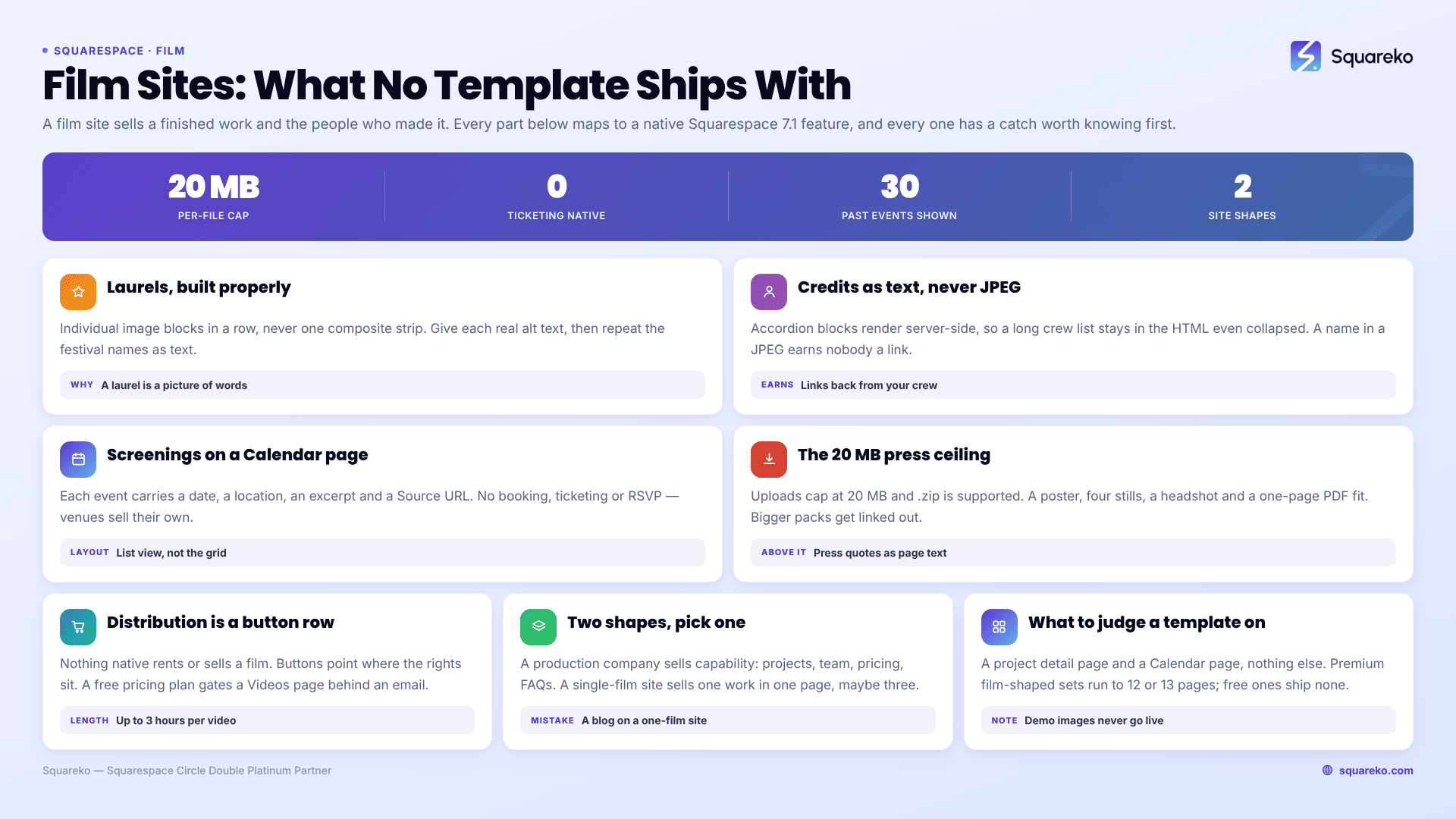
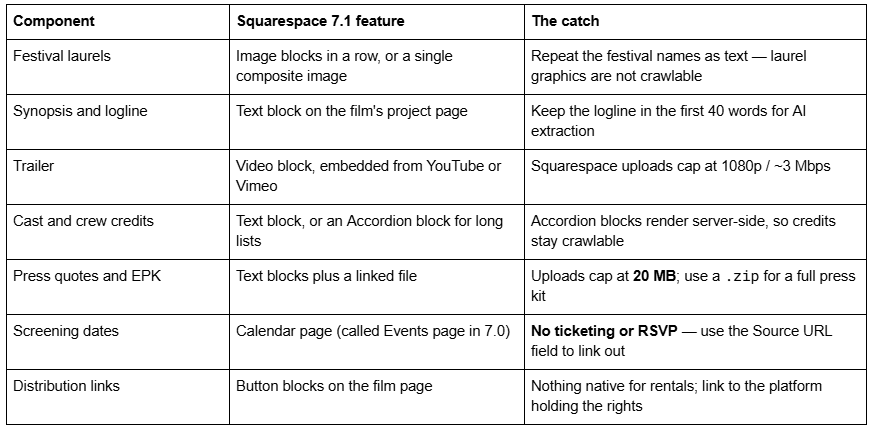
The six film-site components and the Squarespace feature for each
Festival laurels: get them right, or they do nothing
Laurels are the single strongest trust signal on a film site and the one most often built badly.
Build them as individual image blocks in a row, not one wide composite. A composite laurel strip is one image that has to be legible at 360px on a phone, and it never is. Individual image blocks reflow at the 7.1 mobile breakpoint of 767px and stack cleanly.
Give every laurel real alt text. Image blocks have an alt-text field. Use it: "Official Selection, Sheffield DocFest 2026", not "laurel-3". Note the contrast with Portfolio and blog featured images, which have no alt-text field at all — the item title is used instead. Laurels belong in image blocks precisely because image blocks let you describe them.
Then repeat the festival names as visible text underneath. This is the part that gets skipped. A laurel graphic is a picture of words, and neither a search engine nor an AI answer engine can quote a picture. A one-line text list — "Official Selection: Sheffield DocFest 2026 · Full Frame 2026 · Hot Docs 2026" — is what actually gets retrieved when someone asks which festivals your film played.
Keep the file sizes down. Squarespace advises keeping images below 500 KB at 1500–2500px wide, and its CDN serves WebP unconditionally regardless of what you upload, so a transparent PNG laurel is converted for you. Twelve laurels at 800 KB each is 9.6 MB on a page Squarespace recommends keeping under 5 MB.
Cast and crew credits: text, never an image
Filmmakers instinctively export the end-credit roll as an image. Do not.
Credits should be selectable text. Two reasons. First, crediting collaborators is how film websites earn links — your DP, colourist and composer will link back to a page that names them, and none of that works if their name is a JPEG. Second, credits are exactly the kind of structured factual content AI answer engines retrieve, and an image contains nothing retrievable.
For a feature-length crew list, use an Accordion block. Accordion blocks exist in Squarespace 7.1 and render server-side, which means the collapsed text is still in the HTML and still crawlable. One accordion per department — Camera, Grip and Electric, Art, Post — keeps a 90-name crew list from burying the trailer.
Link the names that have sites. Reciprocal crediting between crew members is normal in film and it is one of the few genuinely natural link-building patterns left.
Screening dates: Calendar pages, and what they cannot do
Squarespace 7.1 calls them Calendar pages (they were Events pages in 7.0). Each event carries a start and end date and time in five-minute increments, a location, a featured image, an excerpt, and a Source URL.
The limitation to plan around: Calendar pages do not support booking, ticketing or RSVP. That is fine for a film site — festivals and cinemas sell their own tickets. Put the venue's ticket page in the Source URL field and the event links straight out to it.
Two layouts are available: List view, where events display with descriptions, excerpts and featured images, and Calendar view, which shows an interactive month grid. For screenings, List view is almost always right — a festival run is six dates, not a month of activity, and a calendar grid with four filled squares looks empty.
Turn on past events. Squarespace can display up to 30 past events, with past dates crossed out in List view. On a film site this is not clutter, it is a track record: a screening history of eighteen past dates reads as a film that travelled. Most people leave this off by default and throw away the strongest evidence on the page.
Press kit and EPK: the 20 MB ceiling
Squarespace file uploads are capped at 20 MB per file, and .zip archives are supported. That shapes how you build a press kit.
Do not try to upload a 400 MB press pack. Assemble a .zip under 20 MB containing the poster, three or four stills at print resolution, the director's headshot and a one-page PDF, then link it from a button block. Anything larger — full-resolution stills, the trailer file, a DCP — belongs on Dropbox, Google Drive or WeTransfer, linked out.
Note that Squarespace's CDN assigns file URLs automatically and they cannot be customised, so the download link will not be pretty. That does not matter for a press kit accessed via a button.
Put press quotes on the page as text, above the download. A journalist checking your film wants the pull-quote and the outlet name in two seconds. A quote block per review, attributed, is more useful than a PDF nobody opens.
Distribution and streaming links
There is nothing native on Squarespace for renting or selling a film, and building a paywalled video store on it is the wrong tool for the job.
What works: button blocks linking to wherever the rights actually sit — a streamer, a distributor's page, a Vimeo On Demand listing, a festival platform. One row of buttons under the trailer, labelled by platform.
What is worth knowing: a Videos page in Squarespace 7.1 can be attached to a pricing plan, and free pricing plans can require an email address before access. That is not a distribution model, but it is a legitimate way to gate a full short film, a director's cut or a behind-the-scenes reel and build a list from the people who watch it. Individual videos on a Videos page can run up to three hours, storage allowing.
Storage is the constraint. Every Squarespace site includes 30 minutes of total video storage across video blocks, section backgrounds, Videos pages and Course pages, then it is plan-dependent: Basic 30 minutes, Core 5 hours, Plus 50 hours, Advanced unlimited. A feature film is not going to live on Squarespace. Trailers and clips are.
Two site shapes: production company vs one film
These are genuinely different builds and choosing the wrong one wastes a month.
A production company site sells capability. It needs: a Portfolio page or Projects page where every film has its own URL, a Team page with real bios, a Pricing or capabilities page, an FAQs page for the questions brand and agency clients always ask, and a contact route. The films are evidence; the company is the product.
A single-film site sells one work. It needs: a hero with the trailer, laurels, a synopsis, a credit block, a press section, screening dates and a distribution link. One page, maybe three. Adding a blog and a team page to a single-film site is how it ends up looking abandoned six months after the festival run.
If you are a director building a personal site, you are closer to the second shape than the first, plus a filmography. Maintain the filmography as a blog with one category per project rather than a Portfolio page if the work is mostly self-initiated — a blog updates itself, and Portfolio projects are dependent collection items capped at 60 per portfolio page that cannot be moved without losing their URLs.
Squarespace templates for filmmakers, honestly assessed
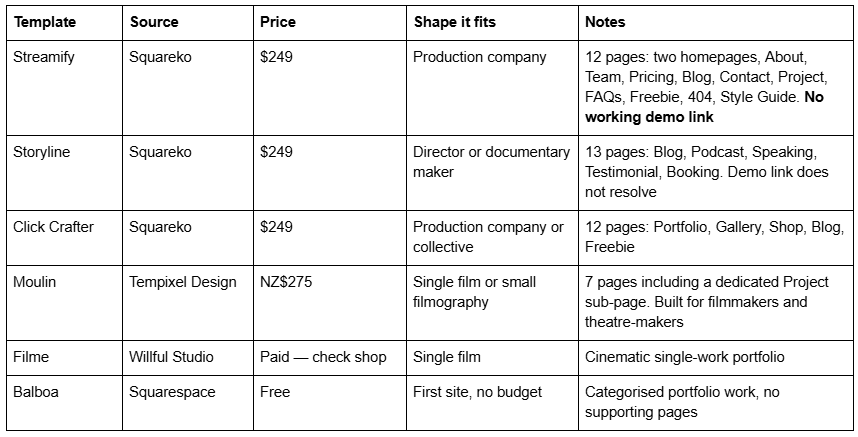
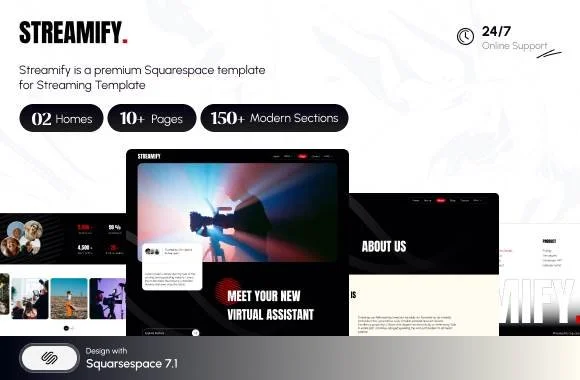

Streamify is the closest fit for a production company in the Squareko range and the only one tagged Streaming and Videography. The combination of Team + Pricing + FAQs + Project is exactly the objection-handling set an agency client works through, and the Project page keeps players off the homepage. Buy it on the page list: Streamify has no working public demo.
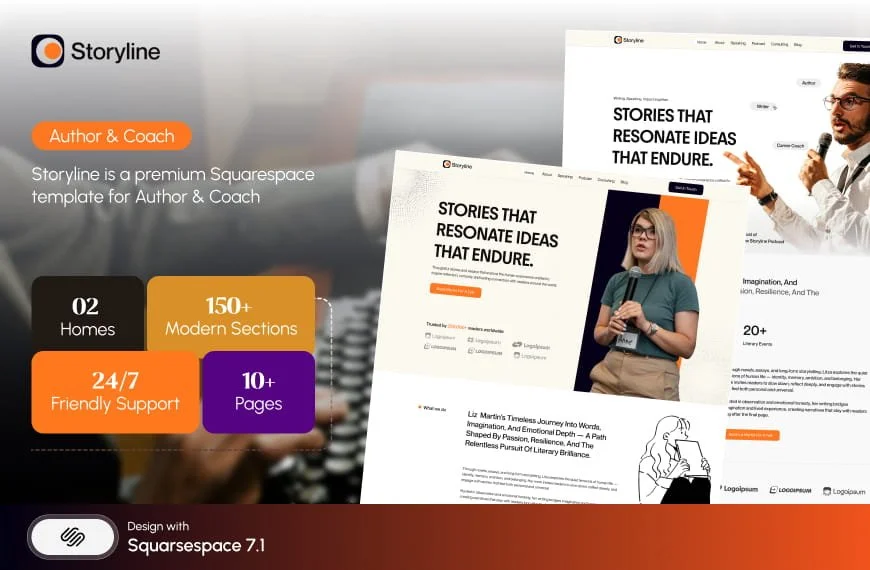
Storyline is the better pick for a documentary maker or director whose income is speaking, teaching and commissions rather than client production. Podcast, Speaking, Testimonial and Booking pages across 13 pages describe that career accurately.
Moulin from Tempixel Design deserves real credit here: it is one of very few Squarespace templates drawn for filmmakers rather than adapted from a photography layout, at seven pages with a proper Project sub-page. It is smaller than anything Squareko sells and it costs less. If you have one film and no plans for a shop, a blog or a team page, it is a better fit than any 12-page template, and I would rather say that than pretend otherwise.
No template ships Laurel, credit, or press modules. Not Moulin, not Streamify, not anything on this SERP. You are building those six components yourself on every template listed. Choose whether the template gives you a project detail page and a Calendar page to build them into.
The limits to know before you start
File uploads cap at 20 MB. Press kits go in a .zip; anything larger is linked out.
Video storage starts at 30 minutes total and is plan-dependent. Trailers on Squarespace, features elsewhere.
Calendar pages have no ticketing. Source URL links out; up to 30 past events can display.
Gallery sections cannot hold video — Squarespace states it plainly. Use gallery sections for stills only. The video portfolio structure guide covers this in full.
Portfolio pages cap at 60 projects and projects cannot exist outside their parent page.
Demo images are not licensed for live use on any template from any shop. Your film stills replace them, which for a film site is barely a constraint.
Squareko templates are delivered as a contributor invitation, not a file download, with installation onto an existing site taking around 48 hours. All sales are final — use the demos properly, where they resolve.
If you have a film, a poster, six laurels and a credit list and you are looking at a blank Squarespace site wondering where any of it goes, the honest answer is that the six components above take a weekend and no template will do them for you.
Where a template saves real time is in giving you a project detail page and a supporting page set that already exist, so you are filling blanks rather than designing sections. That is why the premium Squarespace templates in our shop are listed by page structure rather than by hero screenshot. Most filmmakers reading this will build it themselves from the component list above — that is what the component list is for.
FAQ
-
Use individual image blocks in a row rather than one wide composite, so they reflow at the 767px mobile breakpoint. Give each laurel real alt text naming the festival and year. Then repeat the festival names as visible text underneath — a laurel graphic is a picture of words, and search engines cannot quote it.
-
As selectable text, never as an exported image. For short lists use a text block; for a full feature crew use Accordion blocks, one per department. Accordion blocks in Squarespace 7.1 render server-side, so collapsed credits remain in the HTML and stay crawlable. Link the names that have websites.
-
Yes, using a Calendar page — called an Events page in version 7.0. Each event has a date, time, location, featured image, excerpt and Source URL. Calendar pages do not support ticketing or RSVP, so put the venue's ticket page in Source URL. You can also display up to 30 past events.
-
Squarespace file uploads are capped at 20 MB, and .zip archives are supported. Assemble a press kit under 20 MB — poster, a few stills, a headshot, a one-page PDF — and link it from a button block. Full-resolution assets and trailer files belong on external storage, linked out.
-
Not natively as a rental. Link out to whichever platform holds the rights using button blocks under the trailer. You can gate a short film or director's cut behind a Videos page attached to a free pricing plan, which can require an email address before access — useful for list-building rather than revenue.
-
One with a project detail page, a team page and an FAQs page. In the Squareko range that is Streamify, tagged Streaming and Videography, with 12 pages including Team, Pricing, Project and FAQs — though it has no working public demo. For a single film rather than a company, Tempixel Design's Moulin is a smaller, cheaper and better-shaped fit.

Author Bio
I'm Walid Hasan, a Certified Squarespace Expert and Squarespace Circle Platinum Partner with over 12 years of hands-on experience designing and optimizing high-performing websites. Over the years, I've had the privilege of building more than 2,000 Squarespace websites for clients around the world, always focusing on clean design, strong user experience, and conversion-driven results.
