
Squarespace Templates for YouTubers and Creators
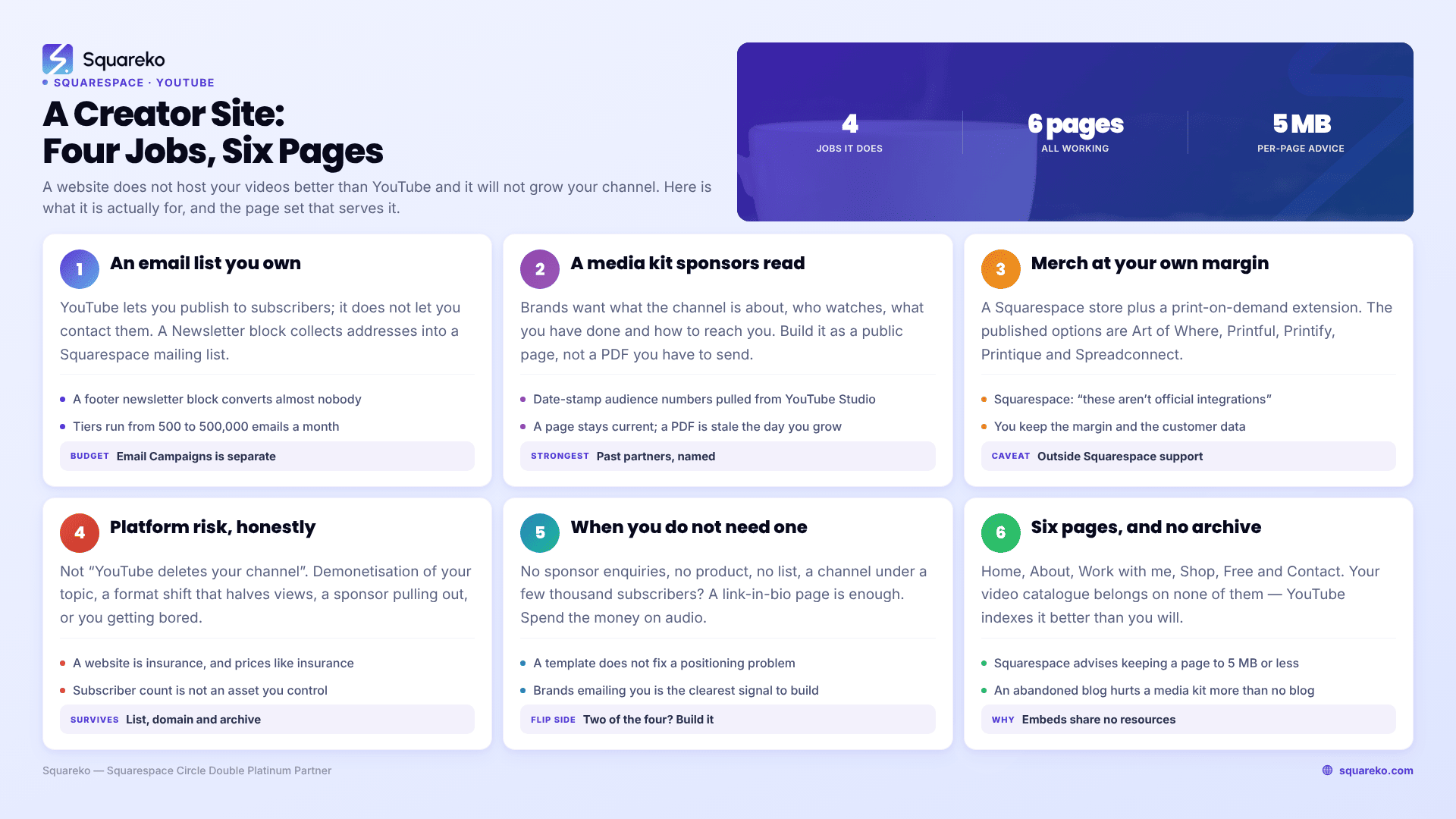
The short answer: A website does not host your videos better than YouTube, and it will not grow your channel. It exists to hold the four things YouTube will not give you — an email list you own, a media kit sponsors can read, a merch margin that is not shared with a platform, and somewhere to stand if the channel stops working. If you have none of those needs yet, you do not need a Squarespace template. If you have two of them, you needed a site six months ago.
Here is what each of the four is actually worth, and the page structure that serves them.
What YouTube gives you, and what it does not
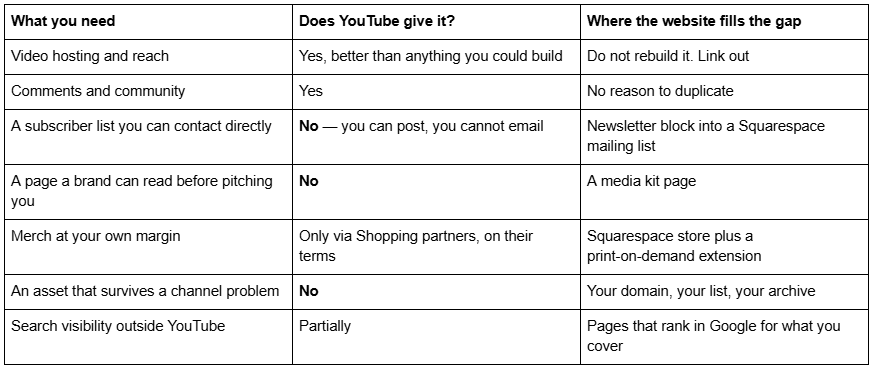
Reason 1 — The email list is the only audience you own
This is the whole argument in one line: YouTube lets you publish to your subscribers; it does not let you contact them. If YouTube changes what it surfaces, your subscriber count stays the same and your reach does not. An email address is the only channel where the delivery decision is yours.
How this works on Squarespace 7.1. A Newsletter block collects addresses into a Squarespace mailing list. That list can stay in Squarespace or connect to Mailchimp. Sending is a separate product: Squarespace Email Campaigns is billed separately from your website plan, with tiers running from 500 emails a month up to 500,000, and unlimited contacts on every tier. Budget for it as a second subscription rather than assuming it is included.
The mechanism that actually converts YouTube viewers into subscribers is a gate, not a form. A newsletter block in a footer converts almost nobody. What works is something behind an email address — a LUT pack, a Notion template, a project file, a bonus cut. Two native ways to build that on Squarespace 7.1:
A Videos page attached to a free pricing plan, which can require an email address before access. Native, no plugin, and it means the gated thing can be a video rather than a PDF.
A file linked after a form submission. Squarespace file uploads cap at 20 MB, and .zip archives are supported, which is enough for most creator freebies.
Then put the link in your video description and pin it. That is the entire funnel.
Reason 2 — Sponsors read a page, not a DM
The second reason is the one that pays for the site fastest. Brands and agencies vetting a creator want, in this order: what the channel is about, who watches it, what you have done before, and how to reach you. If that lives in a PDF you have to send, you are a reply away from being skipped.
Build the media kit as a public page, not a download. A page is searchable, linkable, always current, and it can rank for your own name plus "sponsorship". A PDF is a file that goes stale the day your numbers change.
What belongs on it:
Who watches. Audience geography, age split, and the one or two interests that matter to a buyer. Pull the numbers from YouTube Studio and date-stamp them.
Reach across platforms, not just YouTube. A brand is buying a campaign, not a channel.
Past partners, named, with a link to the integration if you can. This is the single most persuasive element and most creators leave it off.
Formats you offer — pre-roll, integration, dedicated video, short-form cutdowns — described as deliverables.
What you will not do. Naming your exclusions reads as professional rather than difficult.
A contact route that is not a DM. A form block, going to an address you actually check.
A downloadable one-pager as a secondary option, under the 20 MB file cap, for the buyer who needs something to forward internally.
On rate cards: publishing rates filters out time-wasters and caps your upside. Most creators are better off with "packages from £X" or nothing at all. There is no right answer, but decide deliberately rather than by omission.
Reason 3 — Merch margin, and the honest caveat
Selling through your own store rather than a platform's merch shelf means you keep the margin and the customer data. Squarespace supports this natively with a store, and connects to print-on-demand through Squarespace Extensions — the published options are Art of Where, Printful, Printify, Printique and Spreadconnect.
The caveat, in Squarespace's own words:"These aren't official Squarespace integrations. While we work with third-party providers to ensure Squarespace Extensions work properly, extensions fall outside our scope of support." Squarespace will help you connect or disconnect an extension. If Printful's sync breaks, that is Printful's problem and yours.
That is not a reason to avoid print-on-demand — it is the standard model for creator merch and the economics work. It is a reason to expect to do your own troubleshooting, and to not treat "Squarespace has Printful" as equivalent to "Squarespace supports Printful".
Structurally, merch is the easiest of the four. A Shop page, a handful of products, and a link in every video description. Templates in the Squareko range that ship a Shop page include Click Crafter, Luminary, Scholar and Skyline.
Reason 4 — Platform risk, described accurately
Platform risk gets oversold in posts like this, usually as "YouTube could delete your channel tomorrow". That is rare. The realistic risks are duller and far more common:
Demonetisation of a topic you have built a channel around, with no appeal that changes the outcome.
A format shift — the platform pushes a new surface, your existing library stops being served, and views halve without anything happening to you specifically.
A sponsor pulling out because of something a different creator did.
You getting bored of the format you are known for.
In every one of those cases, the thing that survives is the list, the domain and the archive. Not the subscriber count.
The honest framing: a website is insurance, and like insurance it looks like a waste of money right up until it does not. Price it accordingly — a template plus a Squarespace subscription is a low three-figure annual cost against a business you are already running.
When you do not need a website
I would rather say this than sell you a template you will not use.
You probably do not need one yet if: you have no sponsor enquiries, no product, no email list, and your channel is under a few thousand subscribers. A link-in-bio page is enough. Spend the money on audio.
You probably do need one if: brands are emailing you, you sell or are about to sell something, you work across more than one platform, or you have ever thought "I wish I could contact my audience directly".
A template does not fix a positioning problem. If you cannot say in one sentence what your channel is for, a $249 template will render that confusion in a nicer typeface.
The page structure that serves the four jobs
A creator site should be small. Six pages, all working.
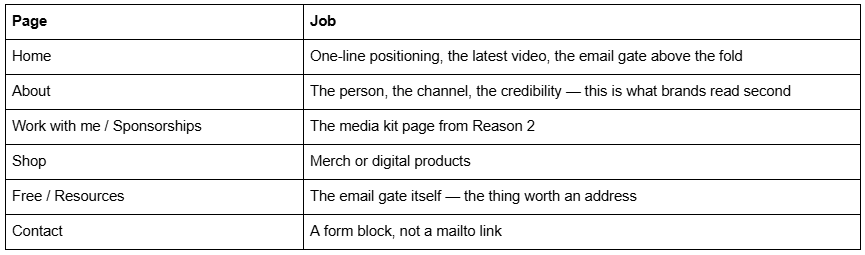
Optional seventh: a blog, only if you will actually write. An abandoned blog dated eighteen months ago damages a media kit page more than having no blog at all.
What does not belong: your video archive. YouTube already has it, indexed better than you will manage, and rebuilding it costs you real page weight. This is the single most common mistake on creator sites.
Do not embed your whole catalogue
The instinct to put twenty videos on a page is understandable and expensive.
Standard YouTube embeds do not share resources between instances. Frontend Masters measured a single embed at 1.3 MB across 32 requests, with two weighing 2.4 MB and three weighing 3.6 MB. WP Rocket's comparison measured a lighter case at 683 KB and 23 requests, with Vimeo at 253 KB and 17 requests. Either way, Squarespace's published guidance is to "keep each page on your site to 5 MB or less" and to "reduce the number of videos".
For context, across 54 Squareko-built client sites measured in August 2026 (Playwright/Chromium lab test, cloud datacentre, unthrottled, single run per site, load-only CLS) the median page weight was 3.0 MB across 93 requests. Three YouTube embeds can therefore exceed an entire typical site before a single frame plays.
What to do instead: one embed on the homepage — the latest or best video. Everything else becomes a linked thumbnail. Export a frame, keep it under 500 KB at 1500–2500px wide, and let Squarespace's CDN serve it as WebP, which it does unconditionally regardless of source format. The full arithmetic is in the performance guide for video-heavy Squarespace sites.
Squarespace templates that fit a creator site
Judge these on whether they ship a Shop, a Freebie page and somewhere to put a media kit — not on how the hero looks.
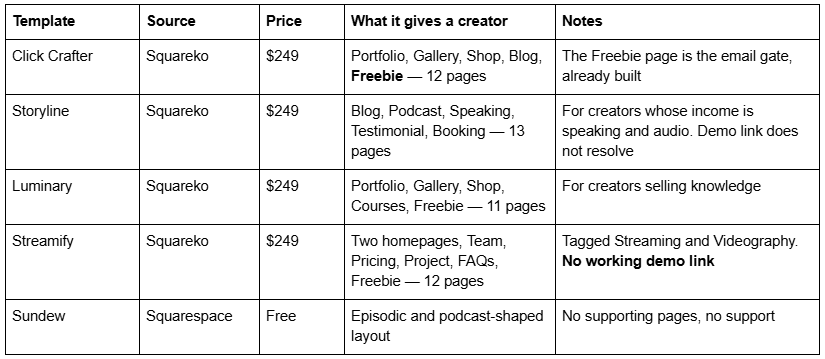

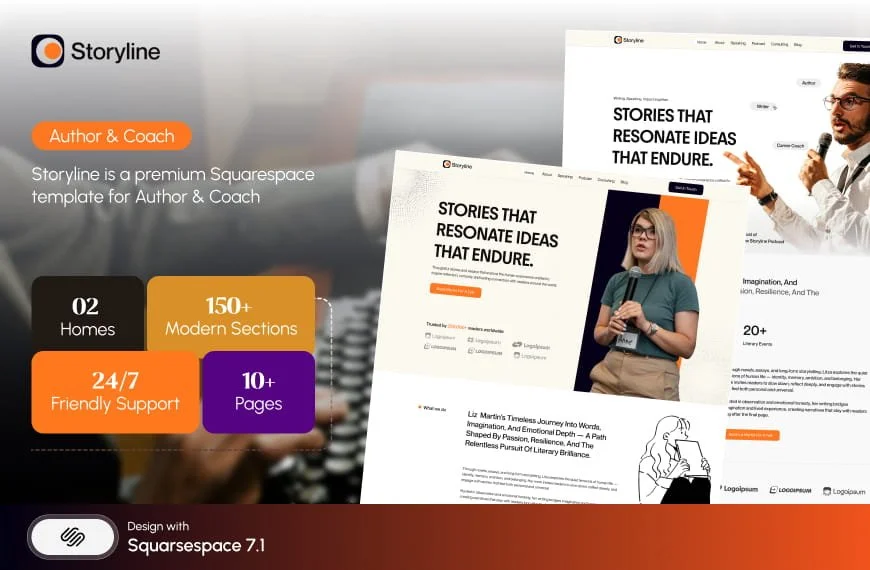

Click Crafter is the best default for a solo creator despite being tagged Agency: a Shop for merch, a Blog if you write, and a Freebie page, which is the email gate this whole article is built around, shipped as a page rather than something you design yourself.
Luminary is the pick if what you sell is knowledge — Courses and a Freebie page across 11 pages. One honest note: neither Squareko nor anyone else publishes whether Luminary's Course pages use Squarespace's own membership tooling or are simply designed pages, so do not assume gated content is included. Ask before buying if that is the deciding factor.
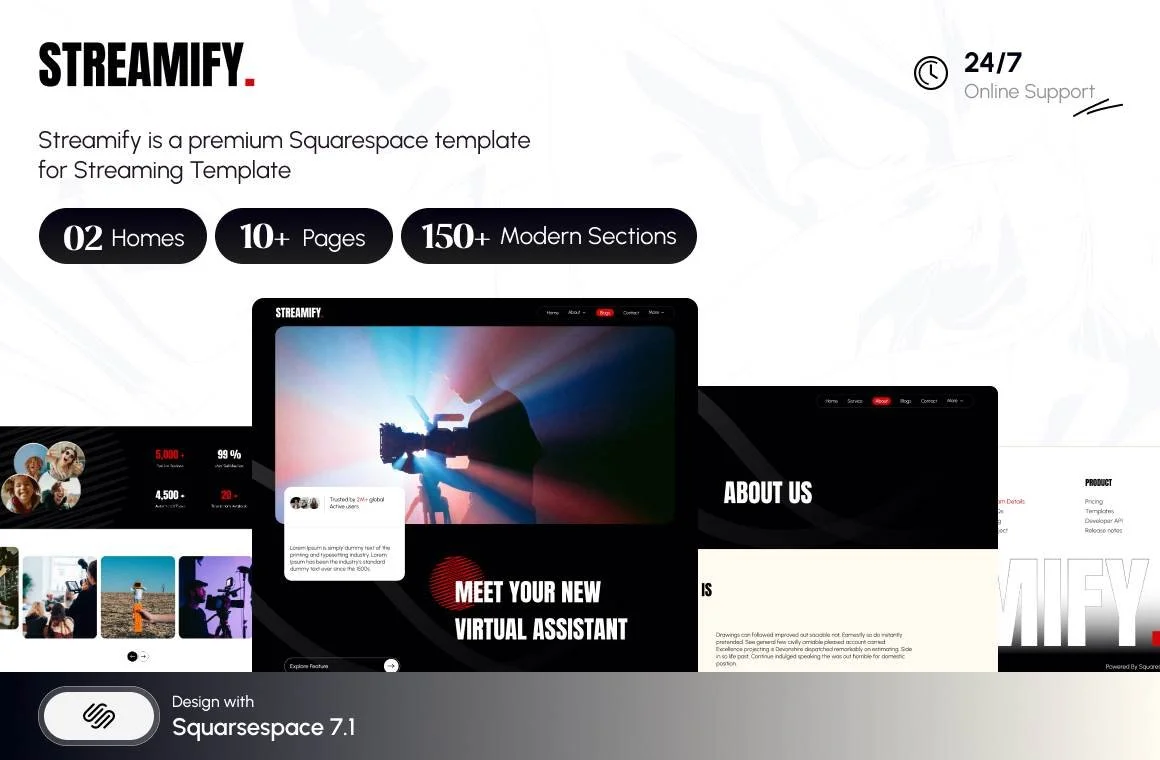
Streamify suits a streamer or a two-person channel operating like a small studio, with Team, Pricing and FAQs pages. Buy it on the page list — it has no working public demo.
If you monetise across several routes at once — sponsorships, digital products, affiliate and memberships — the content creator hub structure is a closer fit than the six-page creator site above.
If you have read this far and concluded you do not need a website yet, that is a legitimate outcome and probably the right one. Come back when a brand asks for a media kit.
When you do build it, the part worth getting right is the email gate — the free thing behind an address — because it is the only element on the site that compounds. That is why the premium Squarespace templates in our shop ship Freebie pages rather than leaving you to design one. Most creators reading this will build the six pages above themselves, and the structure works whichever template you start from.
FAQ
-
Only for four things YouTube does not provide: an email list you own, a media kit sponsors can read, merch at your own margin, and an asset that survives a channel problem. If you have no sponsor enquiries, no product and no list, a link-in-bio page is enough. If brands are emailing you, you needed a site already.
-
Six pages: a home page with the latest video and an email gate, an about page, a sponsorship or media kit page, a shop, a free resource page that collects email addresses, and a contact page with a real form block. Your video archive should not be one of them — YouTube already indexes it better.
-
Put something behind an email address rather than a bare newsletter form. On Squarespace 7.1 you can attach a Videos page to a free pricing plan that requires an email before access, or link a file after a form submission — uploads cap at 20 MB and .zip is supported. Then pin the link in your video descriptions.
-
Audience geography and age, reach across every platform not just YouTube, named past partners with links, the formats you offer described as deliverables, what you will not do, and a contact form. Build it as a public page rather than a PDF so it is searchable, linkable and always current.
-
Add a Shop page and connect a print-on-demand extension. Squarespace publishes five: Art of Where, Printful, Printify, Printique and Spreadconnect. Note Squarespace's own wording that these are not official integrations and fall outside its support scope — it will help you connect one, not fix one.
-
No. Standard YouTube embeds do not share resources between instances — testing found three weighing 3.6 MB, while Squarespace advises keeping pages under 5 MB. Embed one video, then use linked thumbnails under 500 KB for everything else and send visitors back to YouTube, where the watch time counts.

Author Bio
I'm Walid Hasan, a Certified Squarespace Expert and Squarespace Circle Platinum Partner with over 12 years of hands-on experience designing and optimizing high-performing websites. Over the years, I've had the privilege of building more than 2,000 Squarespace websites for clients around the world, always focusing on clean design, strong user experience, and conversion-driven results.
