
Squarespace Templates for Content Creators
The short answer: If you already earn from more than one thing — sponsorships, digital products, affiliate, memberships — your site is not a portfolio, and it is not a link-in-bio page. It is a hub: its only job is to take someone arriving from any platform and route them to the right revenue line in one click. That makes the template decision far less important than two others: which Squarespace plan you are on, and which revenue line the homepage points at first.
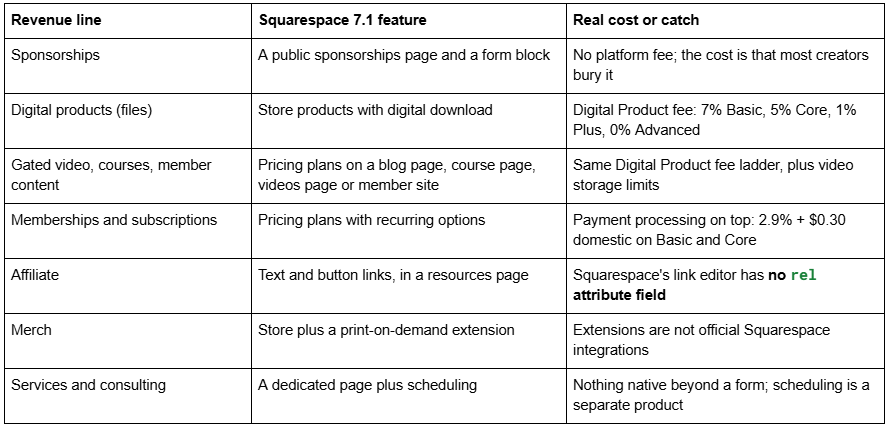
Here is how each revenue line maps to a Squarespace 7.1 feature, what it costs you per sale, and the hub structure that holds them together.
Revenue lines mapped to Squarespace features
The plan decision is the expensive one
Most creators pick a Squarespace plan on price and discover the fees later. For someone selling digital products the plan is not a hosting decision, it is a margin decision.
Squarespace publishes these figures:
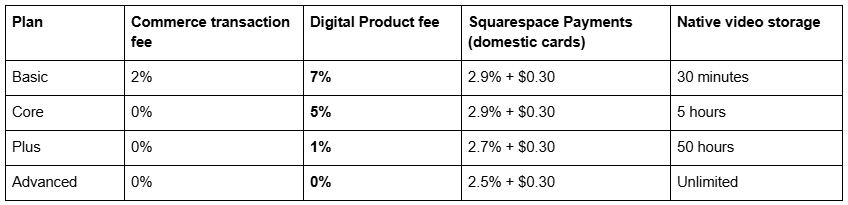
All four plans can sell physical products, digital products, memberships, courses, and subscription products, and all four include video pages. The difference is what Squarespace takes.
Run your own numbers before choosing. On a £40 digital product, the Digital Product fee alone is £2.80 on Basic and £0.40 on Plus — a £2.40 difference per sale. Sell 100 a month, and the plan difference pays for itself several times over. Sell four a month, and it does not; stay on Core.
The second ladder matters if your product is video. Native video storage runs 30 minutes on Basic, 5 hours on Core, 50 hours on Plus, and unlimited on Advanced. A creator selling a gated video course is climbing both ladders at once, and they happen to align — which is convenient, and also means the jump is bigger than it looks on the pricing page.
The alternative worth considering: host the course video on Vimeo and embed it into a gated page. You keep the low plan, you pay Vimeo instead of Squarespace, and you get better playback quality than Squarespace's native re-encode at roughly 3 Mbps at 1080p. The trade-offs are covered in the video performance guide.
The hub architecture: route, do not impress
A creator hub has one job. Someone arrives from TikTok, YouTube, a newsletter forward, or a podcast mention, and within one click they should be on the page that matches why they came.
That means the homepage is a router, not a shop window. Four or five clear destinations above the fold, labelled by what the visitor wants rather than by what you call it internally. "Free templates" beats "Resources". "Work with me" beats "Services".
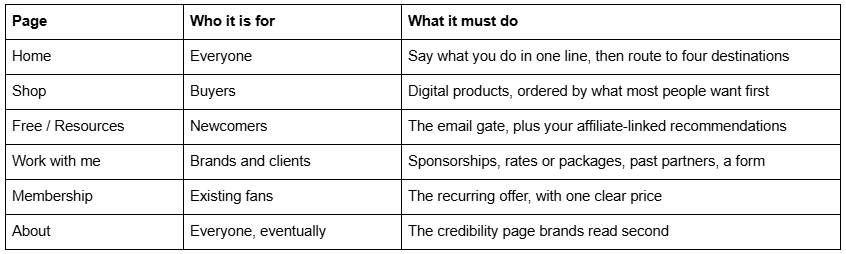
Six pages. That is the whole site. Creator sites fail by accumulation — a page per launch, a page per platform, a page per idea — until the router has thirty destinations and works for nobody.
A hub beats a link-in-bio page for exactly one reason: a link-in-bio page routes traffic away and keeps nothing. A hub captures the email address on the way past. If your only need is routing, keep the link-in-bio tool and save the money.
Digital products and gated content: what can actually be locked
Squarespace's gating mechanism is the pricing plan, sold through pricing plan blocks. Four content types can be attached to one:
a blog page — the archive model, where paying members see posts non-members do not
a course page — structured lessons, up to 3 hours and 5000 MB per lesson, storage allowing
a videos page — a browsable library with individual detail pages
a member site — a whole gated area
Pricing plans support multiple pricing options, so one plan can offer a fixed number of payments or a recurring renewal, with an option picker appearing above the plan title when there is more than one. To take payment you connect Squarespace Payments, Stripe or PayPal.
The under-used move: a free pricing plan. A pricing plan set to free can require an email address before access. That turns a gated videos page into a lead magnet that delivers video rather than a PDF — natively, with no plugin. For a creator whose best asset is footage rather than writing, that is the strongest list-building mechanic on the platform.
On memberships, be realistic. A membership is a promise to publish on a schedule, indefinitely. The Squarespace mechanics are straightforward; the churn is not. Do not build a membership page because the template has one.
Affiliate links: the rel attribute problem
Affiliate income is the revenue line most creators leave on the table, and the one with the specific Squarespace catch.
Squarespace's link editor does not have a rel attribute field. You can set a URL and whether it opens in a new window, and that is all. Links added through the normal editor are plain links with no rel="sponsored" or rel="nofollow".
Google's guidance is to qualify affiliate and paid links with rel="sponsored". On Squarespace 7.1 that means writing the link as HTML in a markdown block or a code block rather than using the link editor:
<a href="https://example.com/product?ref=yourcode" rel="sponsored" target="_blank">
  The mic I actually use
</a>
Build a resources page and treat it as a product. One page, categorised, with a short honest note on each item — why you use it, and where it disappoints. A resources page is the highest-converting affiliate format there is, it ranks for "[creator name] gear" and "best X for Y", and it is the one page on a creator site that keeps earning while you are not posting.
Disclose it plainly and near the top. A visible disclosure line above the first affiliate link is both a legal requirement in most markets and, in practice, a trust signal that increases conversion rather than reducing it.
Sponsorships: what changes when you are multi-platform
The mechanics of a sponsorship page are covered in the YouTuber guide. What changes for a multi-platform creator is the framing.
Sell the audience, not the channel. A brand buying a multi-platform creator is buying a campaign — a YouTube integration, three short-form cutdowns, a newsletter mention, a Story. Present your reach as one audience reached across surfaces, with the numbers per surface underneath, date-stamped.
Name past partners with links. This remains the single most persuasive element on the page and is still the one most often missing.
Give them a way to forward it internally. A downloadable one-pager as a secondary option, under Squarespace's 20 MB file upload cap, in addition to the page. The page is for the person who found you; the PDF is for the person they have to convince.
What breaks a creator hub
Three failure modes, in the order I see them.
1 — Embedding the whole back catalogue. Standard YouTube embeds do not share resources between instances; independent testing found two weighing 2.4 MB and three weighing 3.6 MB. Squarespace's own guidance is to "keep each page on your site to 5 MB or less". Across 54 Squareko-built client sites measured in August 2026 (Playwright/Chromium lab test, cloud datacentre, unthrottled, single run per site, load-only CLS) the median page weight was 3.0 MB across 93 requests. Embed one video; link the rest as thumbnails under 500 KB.
2 — Pages that go stale. A launch page for a product that closed, a blog last updated two years ago, a membership page with a broken join button. Every stale page reduces the credibility of the pages that still work. Audit twice a year and delete rather than archive — and remember that on Squarespace, changing a page slug creates no automatic 301, ever, so plan redirects deliberately in Settings → Advanced → URL Mappings.
3 — A homepage that routes nowhere. A beautiful hero, a full-bleed portrait, and no visible destination above the fold. If a visitor has to scroll to find out where to go, the hub has failed at its only job.
Squarespace templates for content creators
Judge these on whether they ship a Shop, a Freebie page and somewhere for gated content — not on the hero.
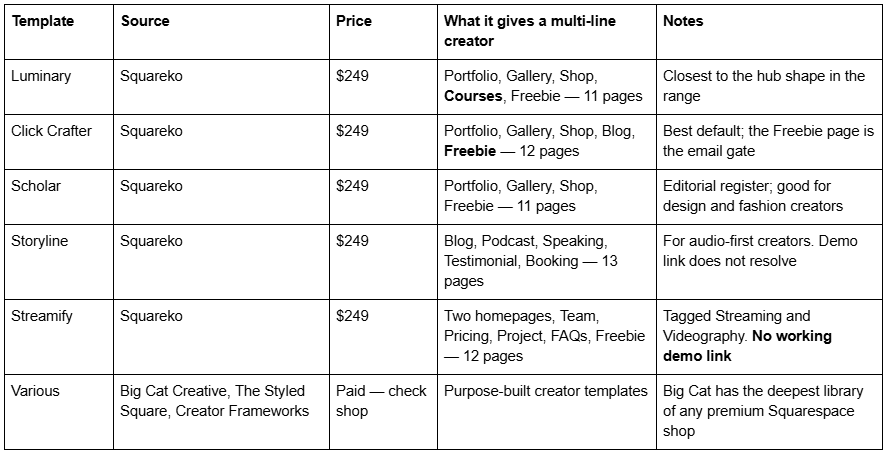
Luminary is the closest structural fit for a creator monetising several ways, because it ships Courses and a Freebie page alongside a Shop, Portfolio and Gallery across 11 pages. One honest note: nobody publishes whether Luminary's Course pages use Squarespace's own pricing-plan gating or are simply designed pages. Do not assume gated content is included — ask before buying if that is the deciding factor.
Click Crafter is the better default if courses are not part of the plan. Scholar suits a creator whose work photographs well and who sells prints or products.
Where competitors are stronger: Big Cat Creative is the largest premium Squarespace shop with the deepest library, and The Styled Square and Creator Frameworks both sell templates drawn specifically for creators rather than adapted from agency layouts. If none of the Squareko options fit the hub shape you have in mind, those are where I would look next.
If you are monetising four ways and your site currently shows one of them, the fix is a homepage that routes rather than a new template. That change costs an afternoon and no money.
Where a template does save real time is in shipping the pages a hub needs — a Shop, a Freebie page for the email gate, somewhere for gated content — so you fill blanks instead of building sections. That is why the premium Squarespace templates in our shop are documented by page structure rather than by homepage screenshot. Most creators reading this already have the pages and only need to reorder them.
FAQ
-
Six pages: a home page that routes to four destinations above the fold, a shop, a free resources page that collects email addresses, a "work with me" page for brands, a membership page if you run one, and an about page. Your video archive should not be one of them — the platform already hosts it better.
-
A Digital Product fee of 7% on Basic, 5% on Core, 1% on Plus and 0% on Advanced, plus payment processing of 2.9% + $0.30 on domestic cards for Basic and Core, 2.7% on Plus and 2.5% on Advanced. Basic also carries a 2% commerce transaction fee; the other three plans do not.
-
Yes. Pricing plans gate four content types: a blog page, a course page, a videos page or a member site. Plans support fixed-payment or recurring options, and you connect Squarespace Payments, Stripe or PayPal to take payment. A free pricing plan can also require an email address before access.
-
Squarespace's link editor has no rel attribute field, so links added through it are plain links. To add rel="sponsored" as Google recommends, write the link as HTML inside a markdown block or a code block. Put a visible disclosure line above the first affiliate link on the page.
-
Only if you capture something. A link-in-bio page routes traffic away and keeps nothing; a hub collects an email address on the way past and hosts a shop, a media kit and gated content. If routing is genuinely all you need, keep the link-in-bio tool and spend the money elsewhere.
-
Two ladders move together. Native video storage is 30 minutes on Basic, 5 hours on Core, 50 hours on Plus and unlimited on Advanced, while the Digital Product fee falls from 7% to 0% across the same range. Alternatively, host course video on Vimeo and embed it into a gated page to stay on a lower plan.

Author Bio
I'm Walid Hasan, a Certified Squarespace Expert and Squarespace Circle Platinum Partner with over 12 years of hands-on experience designing and optimizing high-performing websites. Over the years, I've had the privilege of building more than 2,000 Squarespace websites for clients around the world, always focusing on clean design, strong user experience, and conversion-driven results.
