
Squarespace Templates for Construction Companies: 8 Best Picks
The short answer: A construction website is judged on proof, not design. The template you want is the one that ships a real Projects structure with individual project pages, a Services page you can split by trade, and a quote form you can qualify with. For most general contractors on Squarespace 7.1, that means a 12- to 15-page template, not a five-page brochure.
"Construction company" covers four very different businesses, and they need four different page sets. Work out which one you are before you look at a single screenshot.
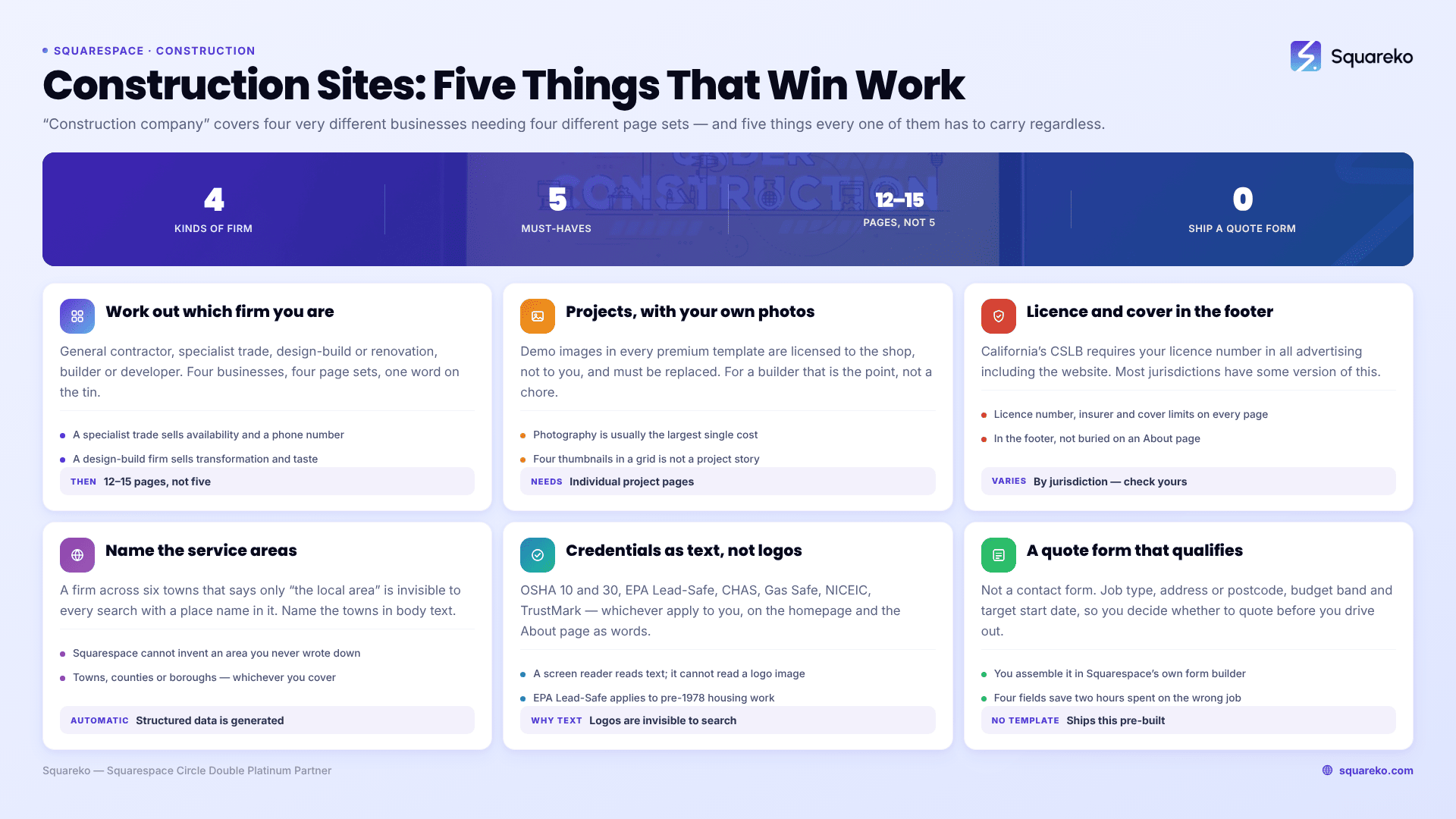
Which kind of construction business are you?
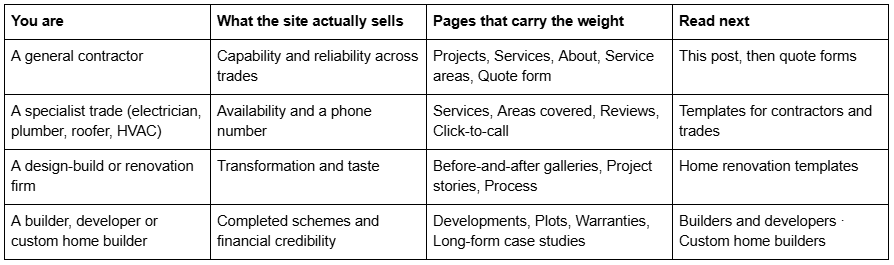
What a construction website has to carry
Before templates, the checklist. A construction company website that fails any of these five loses work regardless of how it looks.
1. Projects with real photography. Demo images in every premium template are licensed to the template shop, not to you, and must be replaced before launch. For a construction firm that is not a chore, it is the entire point — the photographs of your own work are the product. A template with a Projects section and individual project detail pages gives that photography somewhere structured to live.
2. Licensing and insurance, stated plainly. In California, the Contractors State License Board requires your CSLB licence number in all business documents and advertising, including your website, under Business and Professions Code sections 7027, 7029.5 and 7030.5. Most other jurisdictions have some version of this. Put the licence number, the insurer, and the cover limits in the footer where they appear on every page, not buried on an About page.
3. Service areas. A construction firm that works across six towns and says only "serving the local area" is invisible to every search that includes a place name. Name the towns, counties or boroughs in visible body text. Squarespace automatically generates Local business structured data for your site, but it cannot invent a service area you never wrote down.
4. Safety and trade credentials. Whatever applies to you: OSHA 10 and 30, EPA Lead-Safe firm certification for pre-1978 housing, CHAS or Constructionline, Gas Safe Register, NICEIC, TrustMark, Federation of Master Builders. These belong on the homepage and the About page as text, not only as logo images — logos are invisible to search engines and to anyone using a screen reader.
5. A quote request that qualifies the job. Not a contact form. A form that captures job type, property address or postcode, rough budget band and target start date, so you can decide whether to quote before you spend two hours on site. No template ships this pre-built; you assemble it in Squarespace's form builder. The construction quote form guide covers the field set in detail.
How these Squarespace construction templates were scored
This is an editorial rubric, not a lab measurement. It is applied consistently across all eight templates so the scores are comparable, and it is published so you can challenge the weighting rather than guessing.
Five criteria, each scored 1–5, maximum 25:
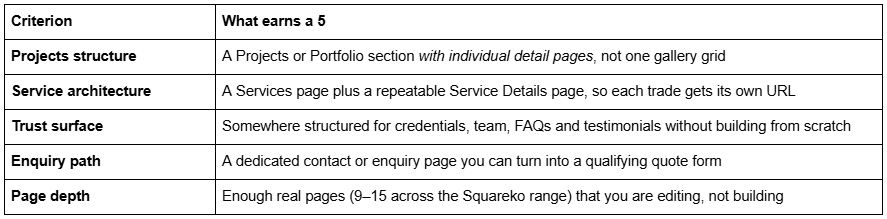
What is not scored: aggregate star ratings, install counts and "trusted by" figures. Those are unverifiable from outside the shop selling them.
Performance context, stated honestly. Construction websites are photograph-heavy, and photographs are what make them slow. Across 54 Squareko-built client sites measured in August 2026 (Playwright/Chromium lab test, cloud datacentre, unthrottled, single run per site, load-only CLS — this is lab data, not field data), median mobile LCP was 2.01s, with 74% under Google's 2.5s "good" threshold. Median page weight was 3.0 MB across 93 requests, and only 48% of sites came in under 3 MB. A construction site with 80 project photographs sits at the heavy end of that unless you resize before upload. No template fixes that for you.
Squarespace templates for general contractors
A general contractor's site has the hardest job in this cluster: it has to look credible across half a dozen trades without looking like a directory. The structure that works is a Services page that branches into individual service pages, and a Projects section deep enough that a homeowner can find something resembling their own job.
BRIX Construction — best overall for a general contractor
Score: 22/25. BRIX Construction is the only template in the Squareko range built for this industry, and its page set shows it: 13 pages covering Home and an alternative Home 2 layout, About, Service, Service Details, Projects, Blog, FAQs, Contact Us, two legal pages, a 404 page and a Style Guide.
The Service Details page is the piece that matters and the piece most construction templates omit. It gives you a repeatable layout to duplicate per trade — groundworks, extensions, roofing, kitchens — so each one gets its own URL, its own headline and its own photographs, instead of six paragraphs stacked on one page. That is also the structure search engines can rank individually.
The FAQs page is the second reason to pick it. Construction buyers ask the same eight questions before they call: are you insured, how long, who supervises, do you handle building control, what happens if it overruns. Answering them in a native Accordion block puts the text on the page server-side, where it is crawlable.
Projects structure 5, service architecture 5, trust surface 5, enquiry path 4, page depth 3.
Worst for: a sole trader who wants a three-page site. Thirteen pages is more structure than a one-van business needs, and you will spend the first week deleting rather than filling.
A note on the demo: BRIX Construction does not currently have a publicly viewable demo link — the published live-demo URL returns a 401. Ask for a walkthrough before buying rather than judging it from thumbnails.
Cleanko — best for a service-led contractor with fixed pricing
Score: 20/25. Cleanko is built for cleaning companies, which structurally means a service business selling repeatable jobs — and that maps onto maintenance contractors, property services firms and trades with published rates far better than the industry tag suggests. Twelve pages including a Pricing page, a Service Details page, a Portfolio and a Blog.
The Pricing page is the differentiator. Most construction templates assume every job is bespoke and quote-only. If you sell anything at a published rate — call-out charges, day rates, maintenance plans, annual servicing — Cleanko gives you a built page for it instead of an awkward table dropped onto a Services page.
Projects structure 4, service architecture 5, trust surface 3, enquiry path 4, page depth 4.
Worst for: high-end design-led work. Cleanko's visual register is clean and functional. If your differentiator is craft, it will undersell you.
Squarespace templates for specialist trades
A single-trade business needs the opposite of a general contractor's site: fewer pages, faster load, and a phone number that is never more than one thumb-reach away. Most of these visitors are on a phone, often standing in the room with the problem.
Harmony — best for finish trades and fit-out
Score: 19/25. Harmony is tagged Interior and Home Design and runs to 11 pages with a Portfolio, a Gallery, a Blog and a Store. For joiners, tilers, plasterers, kitchen fitters and bathroom installers — trades sold on finish quality — the gallery-forward structure does more work than a construction-branded template would.
The Store is genuinely useful to a small number of these trades: a joiner selling made-to-order pieces, a tiler selling surplus stock. If you sell nothing, delete it.
Projects structure 4, service architecture 3, trust surface 4, enquiry path 3, page depth 5.
Worst for: emergency call-out trades. Harmony is a considered, browse-slowly template. A blocked-drain business needs a phone number above the fold, not a portfolio.
Justify — best for a one-trade business that wants a small site
Score: 18/25. Justify is built for law firms and is the smallest template in the Squareko range at nine pages, with a Case Study section and a Blog. Two things make it work for a specialist trade: a nine-page site is genuinely maintainable by one person, and the Case Study structure is exactly the right shape for "here is a job, here is what was wrong, here is what we did".
Projects structure 4, service architecture 3, trust surface 4, enquiry path 4, page depth 3.
Worst for: anyone with a large body of photographic work. Nine pages and no dedicated gallery means a 200-photo archive has nowhere to go.
Squarespace templates for design-build and renovation firms
Design-build sells transformation, which means the before-and-after is the pitch and the project detail page is where the sale happens. Depth matters more here than anywhere else in this cluster.
WeDecorefy — best for design-build and multi-project firms
Score: 22/25. WeDecorefy is the largest template in the Squareko range at 15 pages, with Projects, individual Project Details pages, a Gallery, a Team page, a Blog, a Shop and a Freebie page.
Project Details is the reason to buy it. A design-build firm's strongest asset is a properly told project: the brief, the constraint, the structural decision, the finish, the timeline, the outcome. A repeatable detail page means every completed job becomes an indexable page with its own photographs rather than four thumbnails in a grid. Fifteen pages also means the Team page is already built, which matters when a homeowner is deciding whether to let strangers live in their house for four months.
Projects structure 5, service architecture 4, trust surface 5, enquiry path 4, page depth 4.
Worst for: firms with three completed projects. WeDecorefy is a big template and it looks empty when it is empty.
Vogue — best for developer-facing and property work
Score: 18/25. Vogue is tagged Real Estate and Interior, 11 pages with a Shop, a Portfolio, a Gallery and a Freebie page. Its natural fit is a firm whose clients are property investors, landlords and developers rather than homeowners — the register is property-marketing rather than trade.
Projects structure 4, service architecture 3, trust surface 3, enquiry path 4, page depth 4.
Worst for: domestic renovation. The property-listing feel reads as commercial to a homeowner choosing who to trust with their kitchen.
Squarespace templates for commercial and multi-crew firms
Commercial construction sells to procurement, not to homeowners. The buyer wants prequalification evidence, sector experience, named people and case studies with numbers in them.
Click Crafter — best for commercial and B2B contractors
Score: 20/25. Click Crafter is an agency and service-business template — 12 pages with a Portfolio, a Gallery, a Blog, a Shop and a Freebie page. For a commercial contractor, the agency structure is closer to right than a domestic construction template: it assumes a considered B2B sale with a portfolio of named clients and a downloadable asset.
Use the Freebie page for your capability statement or prequalification pack. That is the single most requested document in commercial construction and most firms email it on request, which loses the enquiries that never ask.
Projects structure 4, service architecture 4, trust surface 4, enquiry path 4, page depth 4.
Worst for: domestic trades. Click Crafter is corporate, and a homeowner comparing three local builders reads corporate as expensive.
Streamify — best for firms leading with team and process
Score: 18/25. Streamify runs to 12 pages with a Team page, a Pricing page, an FAQs page and a Project section. For a mid-sized contractor whose pitch is "we have twelve directly employed tradespeople and a site manager on every job", the Team page is doing real work, and Pricing plus FAQs covers the two objections that stall commercial enquiries.
Projects structure 3, service architecture 3, trust surface 5, enquiry path 4, page depth 3.
Worst for: subcontractors with no direct-employ crew. The Team page is the reason to buy Streamify, and it is a liability if it holds two headshots.
Streamify's published live-demo link also returns a 401 and is not linked here.
Templates outside the Squareko range
Being fair about this earns more trust than pretending there is one option.
Squarespace's own free templates are the honest baseline. They are included with every subscription at no extra cost, and Squarespace maintains a construction category. If your site is five pages and your photography is strong, a free template plus a weekend is a completely reasonable outcome, and the free versus premium comparison sets out where that stops being true.
Purpose-built construction templates from other shops exist and some are good. Stone & Timber from Websites by Elise, Cornerstone Builders from SquareHero, KJRees Builders from PixelHaze Academy and Constructit from Lucrative Studio are all real, current construction templates ranging from roughly $149 to $299. Cornerstone Builders and Stone & Timber are the closest direct competitors to BRIX in structure. Big Cat Creative and Applet Studio carry the broadest general catalogues if you would rather adapt a service template than buy a construction-branded one.
Where the Squareko range differs is delivery rather than design: templates arrive as a Squarespace contributor invitation, not a file download, and installation onto an existing live site is handled manually in around 48 hours.
Cost over the life of the site
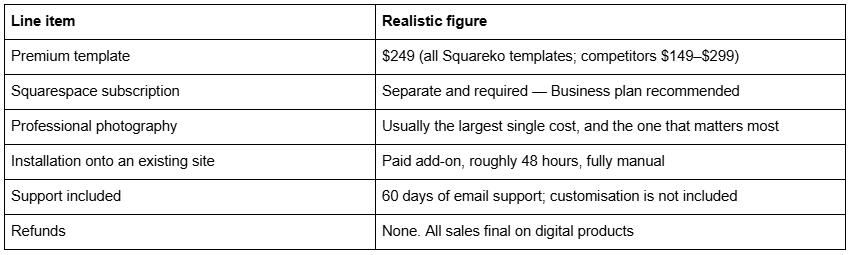
Two things get missed. Demo images are licensed to the template shop and cannot be used on your live site, so a construction firm without a photography budget should sort that before buying a template. And all sales are final — Squareko's policy is that digital products cannot be returned, exchanged or refunded under any circumstances, which is standard across the template market. Use the demo properly first, and where a demo is not viewable, ask for a walkthrough.
Choosing one
Work it in this order. Identify which of the four business types you are. Check the template ships a repeatable Service Details or Project Details page, because that is the structure you cannot easily add later. Then check the enquiry path. Aesthetics are the easiest thing to change in Squarespace 7.1 and page architecture is the hardest.
If you would rather not run the install yourself, the premium Squarespace templates in our range are delivered as a contributor invitation and can be installed onto an existing live site — useful when you have a site producing enquiries that you cannot afford to take down mid-season. Most construction firms reading this will do it themselves in a weekend, and the eight templates above are the shortlist worth starting from.
FAQ
-
At minimum: Home, Services with individual pages per trade, Projects with detail pages, About with credentials and team, Service areas named in text, and a quote request form. Add an FAQs page — construction buyers ask the same questions about insurance, supervision and overruns before they ever call.
-
Yes, though few. BRIX Construction is the construction-tagged template in the Squareko range at 13 pages including Service Details, Projects and FAQs. Other shops sell purpose-built construction templates including Stone & Timber, Cornerstone Builders and Constructit. Squarespace also maintains a free construction template category.
-
In many jurisdictions, yes. California's Contractors State License Board requires the licence number in all advertising including websites, under Business and Professions Code sections 7027, 7029.5 and 7030.5. Regardless of the legal position, publishing licence, insurance and cover limits in the footer removes an objection before it is raised.
-
For a five-page site with strong photography, often yes. Free templates are included with every Squarespace subscription. Premium templates buy you page architecture — repeatable Service Details and Project Details pages — which is the part that is slow and awkward to build yourself in Fluid Engine.
-
Enough that a visitor finds a job resembling their own, which usually means 6 to 12 projects with 6 to 10 photographs each. Upload at 1500–2500px wide; Squarespace's CDN serves WebP automatically, but it will not resize an oversized original for you.
-
The individual project page. It carries the photography, the scope, the timeline and the outcome in one indexable URL, and it is what a homeowner sends to their partner. Templates without a repeatable project detail page force you to build that structure by hand.

Author Bio
I'm Walid Hasan, a Certified Squarespace Expert and Squarespace Circle Platinum Partner with over 12 years of hands-on experience designing and optimizing high-performing websites. Over the years, I've had the privilege of building more than 2,000 Squarespace websites for clients around the world, always focusing on clean design, strong user experience, and conversion-driven results.
