
Construction Squarespace Templates: Projects, Trust and Quote Forms
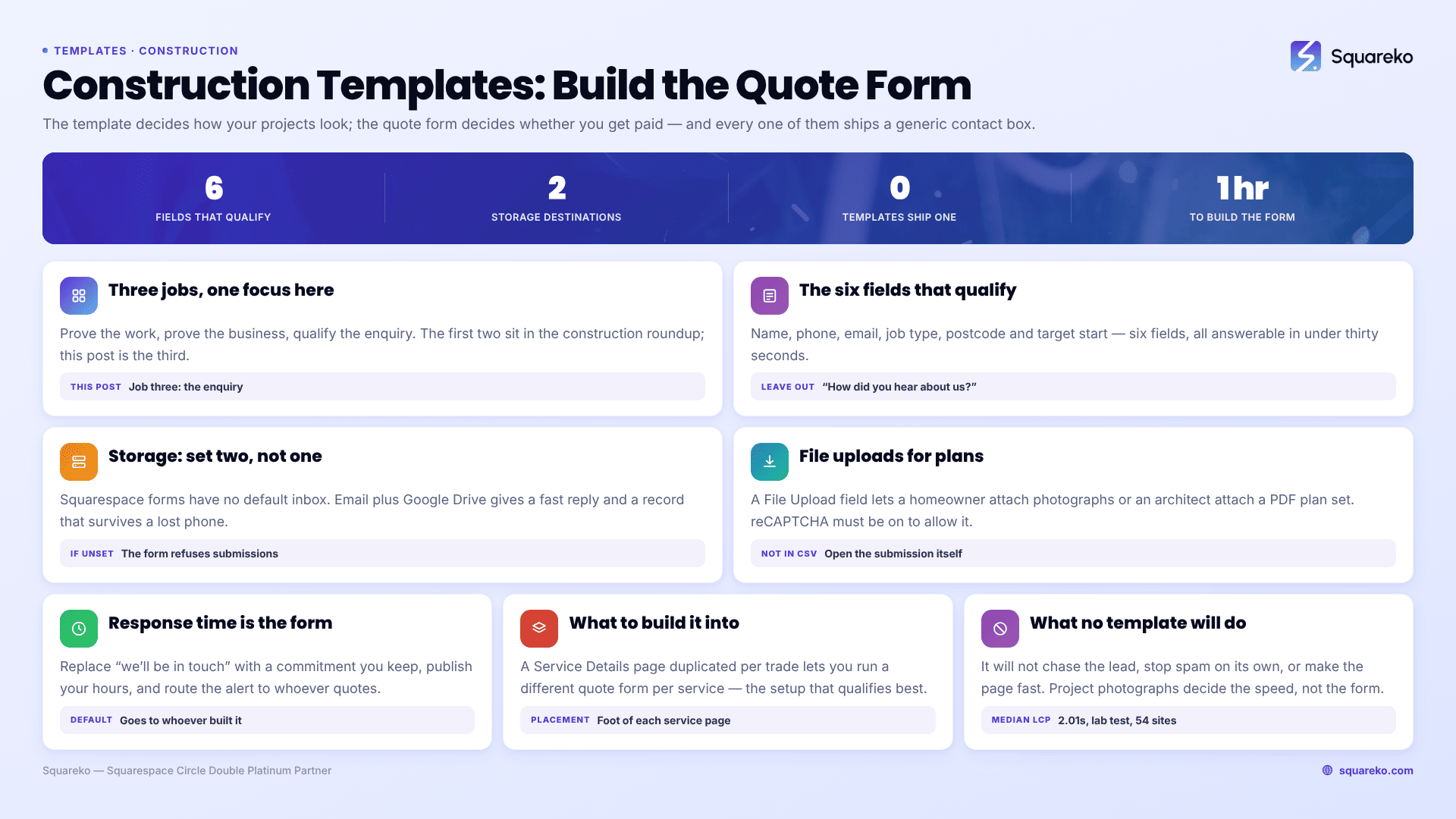
The short answer: The template decides how your projects look; the quote form decides whether you get paid. No construction Squarespace template ships a qualifying quote form — every one of them gives you a generic contact form, and you build the real thing yourself in Squarespace's form builder. Budget an hour for it. It is the highest-return hour you will spend on the site.
There is also a failure mode worth knowing before anything else: a Squarespace form with no storage destination set silently refuses submissions. Squarespace's own documentation is blunt about it — "at least one storage option is required per form. If you don't select a storage option, the form won't have a place to send submissions, and visitors won't be able to submit the form." Every construction site I have been sent that "isn't getting enquiries any more" gets checked for this first.
The three jobs a construction website does
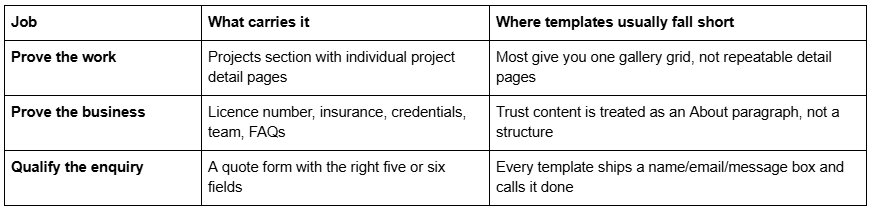
The rest of this post is about the third one. The first two are covered in the construction template roundup.
What a construction quote form should ask
The tension is real and worth naming. Every field you add reduces the number of people who finish the form. Every field you remove increases the number of unqualified enquiries you have to spend an hour on the phone disqualifying. The answer is not "as few fields as possible" — it is "the fewest fields that let you decide whether to quote."
For most construction and trades businesses, that is six fields, all answerable in under thirty seconds.
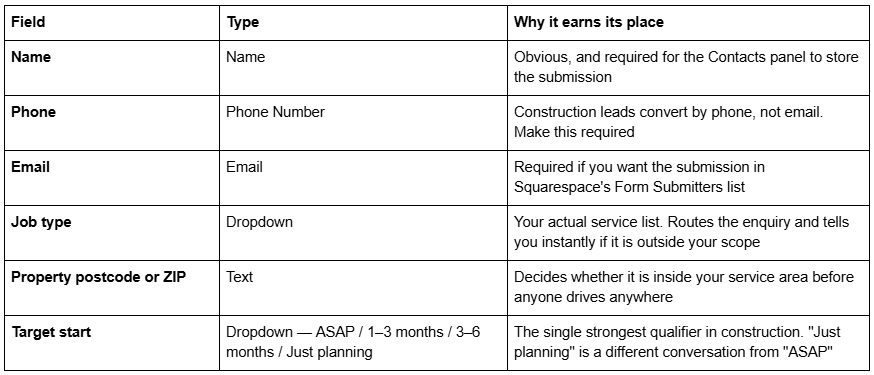
The budget band is the contested one. A dropdown with four or five ranges — rather than a free-text box — costs you some enquiries and saves you a great deal of time. My view: include it on renovation, extension and custom-build forms where the range is wide and mismatched expectations waste days, and leave it off emergency call-out and single-trade forms where the job has a knowable price anyway.
Two fields to avoid. "How did you hear about us?" belongs in your follow-up call, not in the form. And a free-text "tell us about your project" box as the only substantive field produces either three words or a novel, and neither one qualifies anything. Keep a short description box, but put it after the structured fields, and do not make it required.
Form storage: where submissions actually go
Squarespace forms do not have a default inbox. You choose one or more destinations, and if you choose none the form will not accept submissions at all.
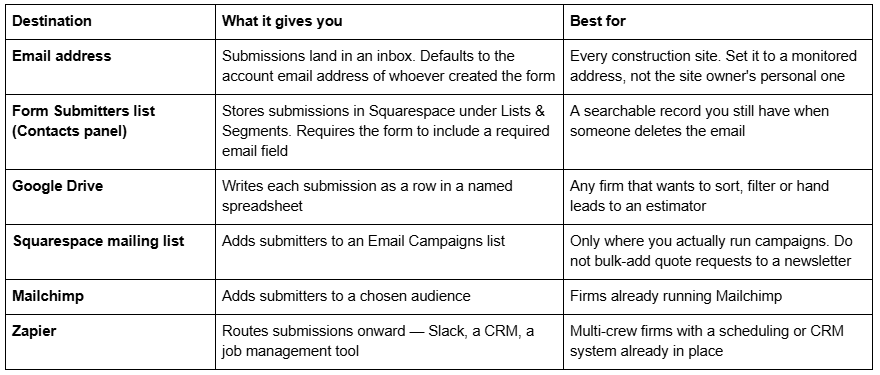
Set two, not one. Email plus Google Drive is the combination I recommend to construction clients: the email gets you a fast response, the spreadsheet gets you a record that survives a full inbox and a lost phone. If you use a job management system, add Zapier as a third.
The diagnostic when enquiries stop. Open the form block, check the storage panel, confirm at least one destination is connected and not merely listed. Google Drive connections in particular can drop and need reconnecting; Squarespace publishes a dedicated help article on reconnecting forms to Google Drive precisely because it happens. Then submit a real test enquiry from a phone on mobile data, logged out, and confirm it arrives everywhere you expect. Do this on the day you launch and again every quarter.
File uploads for plans, drawings and photos
This is the feature most construction firms want and most do not know exists. Squarespace form fields include a File Upload field alongside Name, Email, Text, Text area, Dropdown, Checkbox, Radio, Survey, Address, Phone Number, Date and Time.
For a construction quote form, it changes the economics of an enquiry. A homeowner who can attach four photographs of the wall they want removed, or an architect who can attach a PDF plan set, has given you enough to give a rough number without a site visit. That is an hour of your day back per enquiry.
Three things to know before you add it:
Google reCAPTCHA is required. Squarespace's documentation states plainly that reCAPTCHA must be enabled if you want visitors to upload files. Turn it on in the form's settings when you add the field, not afterwards.
Set the file count and accepted types deliberately. The field lets you control how many files are accepted and what types. For construction, allowing images plus PDF covers photographs and drawing sets; leaving it wide open invites large uploads that fail on a phone signal.
Uploaded files are excluded from CSV exports. They remain accessible via direct download links from the submission, but if your process is "export the spreadsheet weekly", the attachments will not be in it. Plan for someone to open the submission itself.
One realistic caveat: a homeowner standing in their kitchen on 4G will abandon a five-photograph upload. Make the upload field optional, and put it last. The enquiry without photographs is still an enquiry.
Response time is part of the form
The form is not the conversion point. The reply is.
Construction enquiries are almost always sent to more than one firm. A homeowner planning an extension emails three builders on a Sunday evening. The one who replies first is not automatically the one who wins, but the one who replies on Wednesday almost never does.
Three practical things the website can do about it:
Set the confirmation message to a commitment, not a thank-you. Squarespace lets you customise the post-submit message on any form block. "Thanks, we'll be in touch" is wasted space. "Thanks — we reply to every enquiry within one working day, and we'll call the number you gave us" sets an expectation and pre-frames the call. Only write it if it is true.
Publish your working hours and your emergency position. A homeowner with water coming through a ceiling at 9pm needs to know in three seconds whether you are the right call. Put hours in the footer as text. If you do not do out-of-hours, say so — it saves both of you a phone call.
Route the notification somewhere you will see it. Email storage sends to the account email address of whoever built the form by default, which on client sites is very often the web designer rather than the estimator. Change it. If you run Zapier, push new submissions into a Slack channel or your job management tool as well.
Which construction templates give you the best starting point
All of them need the form built. What differs is what you are building it into.
BRIX Construction (13 pages) has a dedicated Contact Us page plus a Service Details page you can duplicate per trade — so you can run a different quote form per service, which is the setup that qualifies best. BRIX does not currently have a publicly viewable demo; its published demo URL returns a 401, so ask for a walkthrough rather than judging it from thumbnails.
Cleanko (12 pages) pairs a Service Details page with a Pricing page. If some of your work has published rates, showing them before the form is the cheapest qualification there is — people who cannot afford you do not fill it in.
WeDecorefy (15 pages) has Projects and individual Project Details pages. The relevance to forms is indirect but real: a quote form placed at the bottom of a project page that resembles the visitor's own job converts far better than the same form on a generic contact page.
Click Crafter (12 pages) includes a Freebie page, which for a commercial contractor is where the capability statement or prequalification pack goes — a lower-commitment form that captures firms not yet ready to request a quote.
A structural note: put a quote form on more than one page. Squarespace form blocks can be placed in any section, and the highest-converting placement on a construction site is the foot of each individual service page, where the visitor has just finished reading about the exact job they want.
What no construction template will do for you
It will not chase. Squarespace forms collect; they do not follow up. A submission that goes unanswered for four days is a lead you paid for and threw away.
It will not stop spam on its own. A public form on a construction site attracts contractor-directory spam within weeks. Enable reCAPTCHA — you need it for file uploads anyway.
It will not make the page fast. Across 54 Squareko-built client sites measured in August 2026 (Playwright/Chromium lab test, cloud datacentre, unthrottled, single run per site, load-only CLS — lab data, not field data), median mobile LCP was 2.01s and median page weight 3.0 MB across 93 requests. The form is a rounding error in that; the project photographs above it are not. A contact page that takes six seconds on a phone is a contact page nobody reaches.
Getting it built
Do it in this order: choose the template for its Projects and Service Details structure, then build the six-field quote form, then connect two storage destinations, then send a real test submission from a phone while logged out. The last step is the one people skip and the one that catches the silent failures.
If you are switching templates on a site that is currently producing enquiries, that is the situation where handing it over makes sense — the premium Squarespace templates in our range are installed onto existing live sites as a manual process taking around 48 hours, so the current site keeps taking quote requests while the new one is built behind it. For a new site with no traffic to protect, none of that applies and you should build it yourself.
FAQ
-
Wherever you tell them to. Squarespace supports email, the Form Submitters list in the Contacts panel, Google Drive, Squarespace mailing lists, Mailchimp and Zapier. At least one storage option is required per form — without one, the form has nowhere to send submissions and visitors cannot submit it at all.
-
The most common cause is no storage destination, or a Google Drive connection that has dropped and needs reconnecting. The second most common is that email storage defaults to the account email of whoever built the form, which is often the web designer. Send a real test submission from a phone, logged out.
-
Yes. Squarespace form fields include a File Upload field. Google reCAPTCHA must be enabled for uploads to work, and you can control how many files and which file types are accepted. Uploaded files are excluded from CSV exports but stay accessible through direct download links.
-
Name, phone, email, job type as a dropdown, property postcode or ZIP, and target start date as a dropdown. That is enough to decide whether to quote. Add a budget band dropdown for renovation and extension work where expectations vary widely; leave it off single-trade call-out forms.
-
Show them where they exist. Published call-out charges, day rates or servicing prices qualify enquiries before anyone fills in a form. For bespoke work, publish typical project ranges instead — a range removes the enquiries you were never going to win and keeps the ones you were.
-
On the contact page and at the foot of every individual service page. A visitor who has just read about the exact job they need is the most likely to complete a form, and Squarespace form blocks can be placed in any section on any page.

Author Bio
I'm Walid Hasan, a Certified Squarespace Expert and Squarespace Circle Platinum Partner with over 12 years of hands-on experience designing and optimizing high-performing websites. Over the years, I've had the privilege of building more than 2,000 Squarespace websites for clients around the world, always focusing on clean design, strong user experience, and conversion-driven results.
