
Squarespace Templates for Contractors and Trades
The short answer: If you are a single trade — electrician, plumber, roofer, HVAC engineer — you need a smaller and faster site than a construction company, not a scaled-down version of one. Five to nine pages, a phone number that is tappable on every screen, your service areas named in visible text, and your credentials stated. Most of the templates sold to "contractors" are built for firms ten times your size.
The visitor decides this. Someone searching for a construction company is researching a project over weeks. Someone searching for a contractor is often standing next to the problem, on a phone, outdoors, with a bad signal. That difference should drive every decision on the site.
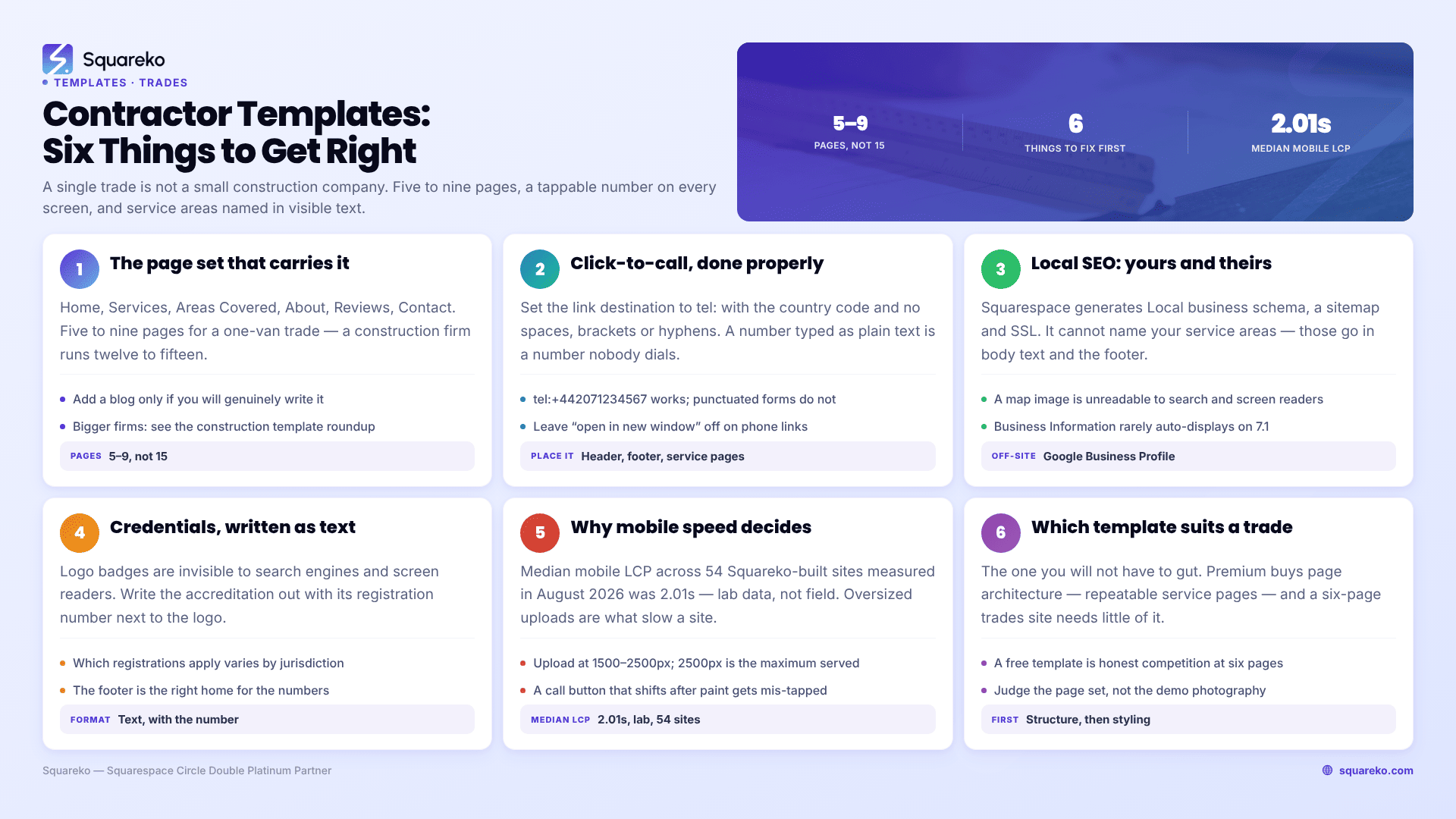
How a trades site differs from a construction company site
If you are the second column, the construction template roundup is the right post. If you are the first, read on.
The page set a trades business actually needs
Squarespace's own guidance for home repair and trades businesses recommends portfolio pages with project sub-pages, an About page carrying qualifications, a blog, contact forms, call-to-action buttons, an announcement bar for seasonal work, and Acuity Scheduling for inspections and appointments. That is a sensible list. For a one- or two-van operation, here is the shorter version that carries the same weight:
Home. Phone number, what you do, where you do it, and one line establishing credentials — all above the fold on a phone. Everything else on the page is secondary.
Services. One page if you do three things. Individual pages if you do six, because each one can then rank for its own search. A repeatable Service Details page in the template makes this a duplicate-and-edit job rather than a build.
Areas covered. The page most trades sites omit and the one that most affects local visibility. Name the towns, boroughs or counties in body text — a list of place names, not a map image. Search engines cannot read a map graphic, and neither can a screen reader.
About. Your qualifications, registration numbers, insurance and how long you have been trading. This is the trust page and it should be specific: "NICEIC approved contractor, registration number, £5m public liability" beats "fully qualified and insured" every time.
Reviews. Real, attributed, with a first name and a town. Screenshot testimonials with no name attached read as invented.
Contact. Phone first, form second. A short form — name, phone, postcode, what's wrong — is enough for a trade. The longer quote form guidance applies to project work, not call-outs.
Add a Blog only if you will write. An empty blog with two 2023 posts is worse than no blog.
Click-to-call: get this right or the site does not work
Most of your visitors will call rather than fill in a form, and most of them are on a phone. A phone number typed as plain text is a phone number nobody dials.
The fix is a tel: link. In Squarespace 7.1 you can put this on any button block or text link — set the link destination to the number in tel: format rather than pasting a URL:
tel:+15551234567
Use the full international format with the country code and no spaces, brackets or hyphens. tel:+442071234567 works on every device. tel:(020) 7123 4567 is unreliable.
The failure that comes up repeatedly on the Squarespace Forum: target="_blank". If you build the call button as a code block and set the link to open in a new window, some Android devices open the tel: link in a new browser tab instead of handing it to the phone's dialler, and nothing happens. Remove the attribute or set it explicitly:
<a href="tel:+15551234567" target="_self">Call now — (555) 123-4567</a>Squarespace's own button link settings have an "open in new window" toggle. Leave it off for phone numbers.
Put the number in three places: the header (visible on mobile, not hidden inside the hamburger menu), the footer, and at the end of every service page. Write it out in full as text as well as linking it — some people still want to read the number and dial it manually, and having it in text also means it appears in search snippets.
Local SEO for a trades business on Squarespace
Squarespace does more of this automatically than people assume, and less than they hope.
What Squarespace does for you. It automatically generates structured data, including a Local business schema type, alongside Blog post, Event, Organization, Product and Website. It generates and links a sitemap.xml. It provides free SSL on connected domains. It adds alt attributes to images, falling back to the filename where no description exists — which is a reason to name image files properly before upload, since filenames cannot be changed after upload.
What you have to do yourself.
Name your service areas in visible body text. Local business schema does not invent a service area. If you cover eleven towns, the eleven names need to be on the page, ideally on a dedicated Areas Covered page and again in the footer.
Set up a Google Business Profile. Squarespace's own SEO checklist recommends creating one to manage your listing for a physical location. For most trades this is the single highest-return hour of local SEO work available, and it happens entirely outside your website.
Fill in Business Information, but do not rely on it to display. The panel lives at Settings → Selling → Business Information and holds a contact phone number, contact email, physical location and business hours. Be aware of the limitation: Squarespace states this information only displays automatically on some version 7.0 templates. On a 7.1 site, put your name, address and phone in the footer manually as text — that is what visitors and search engines actually read.
Write per-page SEO descriptions. Squarespace recommends 50–300 characters and a unique description per page. A service page for "emergency drain unblocking in Bristol" needs its own description, not the site-wide default.
Keep images small. Squarespace's SEO checklist recommends keeping images under 500 KB and using readable filenames. On a trades site with fifteen photographs, that discipline is most of your page speed.
Credentials: state them as text
Logo badges are invisible to search engines and to screen readers. Write the accreditation out, with the registration number, next to the logo.
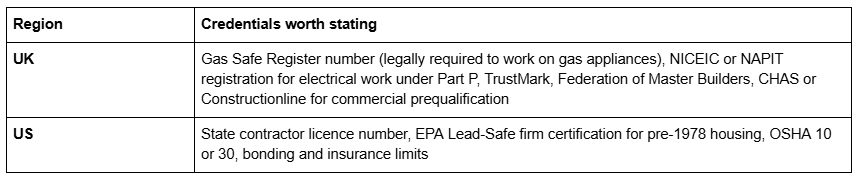
Two specifics worth knowing. In California, the Contractors State License Board requires your licence number in all business documents and advertising, including your website, under Business and Professions Code sections 7027, 7029.5 and 7030.5. And in the US, the EPA requires renovation, repair and painting firms working on pre-1978 housing to hold firm certification, valid for five years, with a certified renovator assigned to each job. If either applies to you, the number belongs in your footer.
Why mobile speed decides these leads
A homeowner with a leak does not wait. If your site takes six seconds to paint on 4G, they have already gone back to the results page and tapped the next result.
Across 54 Squareko-built client sites measured in August 2026 (Playwright/Chromium lab test, cloud datacentre, unthrottled, single run per site, load-only CLS — this is lab data, not field data), median mobile LCP was 2.01s, with 74% under Google's 2.5s "good" threshold and 96% under 4s. Median mobile CLS was 0.000, with 31 of the 54 sites recording exactly zero layout shift on load. Median page weight was 3.0 MB across 93 requests.
Two honest caveats. That is unthrottled lab measurement, so a real phone on a weak signal outdoors will be slower. And desktop CLS across the same set was weaker at a 0.029 median. But the direction holds: a small trades site with eight images and no video is at the light end of that range, and the platform is not what makes trades sites slow. Oversized uploads are. Squarespace's CDN serves WebP unconditionally regardless of source format, so the format is handled — the dimensions are not. Upload at 1500–2500px wide; 2500px is the maximum served.
Layout shift matters here more than it sounds. If your call button moves 200 milliseconds after the page paints, someone with a thumb already moving taps the wrong thing.
Which templates suit a single trade
The right template for a trades business is the one you will not have to gut.
Justify — nine pages, the smallest in the Squareko range, with a Case Study section and a Blog. Built for law firms, which means it is structured around credibility and a small page count, and that is exactly what a one-van trade needs. The Case Study format works well for "here is a job, here is what was wrong, here is what we did".
Cleanko — twelve pages with a Pricing page, a Service Details page and a Portfolio. The best fit for any trade that publishes rates: call-out charges, annual servicing, maintenance plans. The Service Details page duplicates per service, so a plumber can have separate pages for boiler servicing, bathroom installation and emergency call-outs.
BRIX Construction — thirteen pages including Service Details, Projects and FAQs. Larger than most single trades need, but the right choice for a trade that has grown into a small firm with several vans and a directly employed team. BRIX does not currently have a publicly viewable demo — its published demo URL returns a 401 — so ask for a walkthrough rather than judging it from thumbnails.
Harmony — eleven pages, gallery-forward, tagged Interior and Home Design. Best for finish trades where the photograph is the pitch: tilers, joiners, plasterers, bathroom fitters.
And the honest alternative: a free Squarespace template. If your site is six pages and you have twelve good photographs, a free template included with your subscription will do the job. Premium templates buy page architecture — repeatable service and project pages — and a six-page trades site does not need much of it. The free versus premium comparison sets out where the line is.
Building it
Order of work: get the phone number tappable in the header and footer, write the Areas Covered page, put your registration numbers in the footer, set up the Google Business Profile, and only then worry about which template. A fast six-page site with a working call button beats a beautiful fifteen-page site every time in this trade.
If you are running the business single-handed and the website has been on the list for two years, that is the situation where handing it over is worth the money — the premium Squarespace templates in our range are installed for you rather than delivered as files, including onto an existing live site in around 48 hours. Most trades reading this will get further faster by spending one Saturday on the six items above.
FAQ
-
Five to nine. Home, Services (split into individual pages if you offer more than three), Areas Covered, About with credentials, Reviews and Contact. A single-trade business with a fifteen-page site spends more time maintaining it than it earns from it.
-
Set any button or text link's destination to tel: followed by the number in full international format with no spaces — for example tel:+15551234567. Leave the "open in new window" option off; on some Android devices target="_blank" opens the link in a browser tab instead of the dialler.
-
Yes. Squarespace automatically generates structured data including a Local business type, along with Organization, Product, Event, Blog post and Website schemas. It cannot invent your service areas, so name the towns you cover in visible body text as well.
-
Settings → Selling → Business Information holds contact phone, contact email, physical location and business hours. Squarespace notes this only displays automatically on some version 7.0 templates, so on a 7.1 site also add your name, address and phone to the footer as text.
-
Usually, yes. Free templates come with every Squarespace subscription and a six-page trades site needs very little page architecture. Premium templates earn their price when you need repeatable service and project detail pages, which is a growing firm's problem rather than a sole trader's.
-
Because the visitor is usually on a phone with an urgent problem and three other results open. Across 54 Squareko-built client sites measured in August 2026 in lab conditions, median mobile LCP was 2.01s. A real phone outdoors will be slower, and every second costs calls.

Author Bio
I'm Walid Hasan, a Certified Squarespace Expert and Squarespace Circle Platinum Partner with over 12 years of hands-on experience designing and optimizing high-performing websites. Over the years, I've had the privilege of building more than 2,000 Squarespace websites for clients around the world, always focusing on clean design, strong user experience, and conversion-driven results.
