
Squarespace Templates for Builders and Developers
The short answer: Builders and developers do not sell services; they sell finished schemes and the confidence that you will still be trading at practical completion. The template you want has a repeatable project or development detail page and somewhere to put warranty, accreditation and finance information. A five-page brochure site cannot carry either.
This is also the longest sales cycle in the construction cluster apart from custom home building. A homeowner considering a two-storey rear extension will visit your site four or five times over three months, usually alongside two competitors. The site is not a lead capture device. It is a reassurance device that happens to have an enquiry form on it.
What a builder's website is actually being judged on
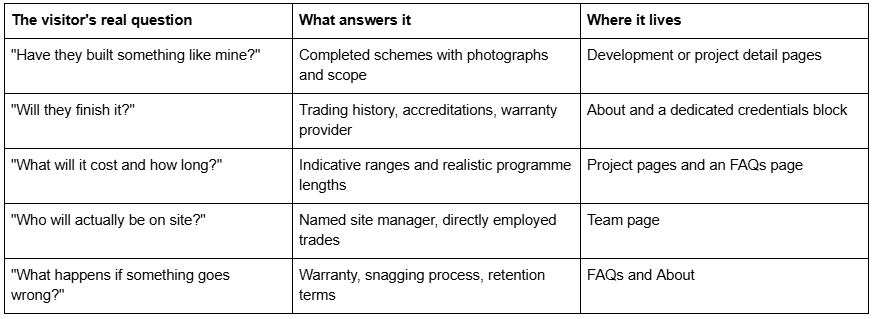
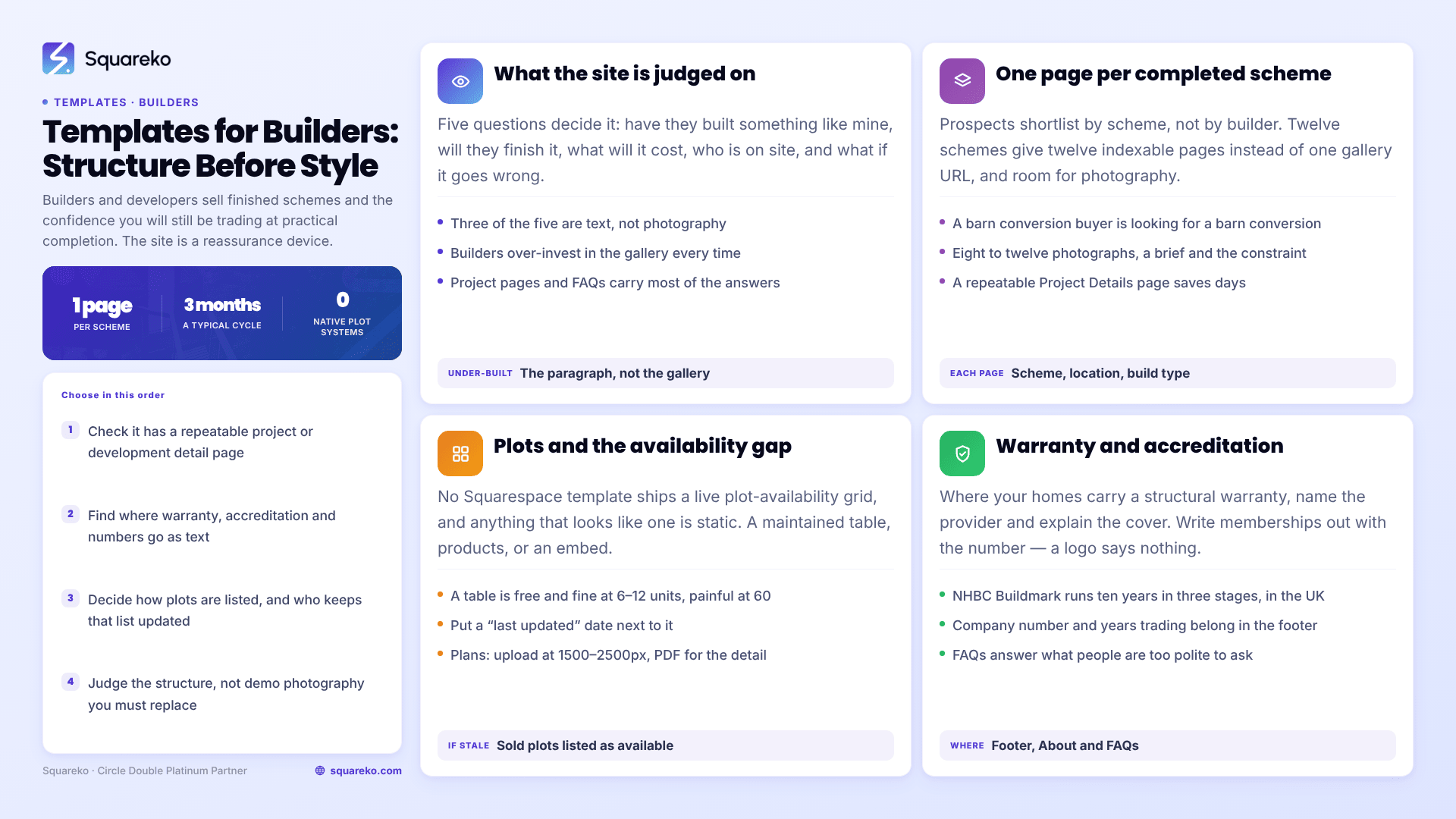
Three of those five are text, not photography. Builders consistently over-invest in the gallery and under-invest in the paragraph that says who supervises the site.
Development portfolios: one page per scheme
The single most important structural decision is whether each completed scheme gets its own page or shares a gallery grid with everything else.
Give each one its own page. Three reasons, in order of how much they matter:
Prospects shortlist by scheme, not by builder. Someone planning a barn conversion wants to see a barn conversion. If your barn conversion is four thumbnails inside a mixed gallery, they will not find it and will not know you can do it.
Each scheme becomes an indexable page. A page titled with the scheme, the location and the build type ranks for searches nobody else in your area is targeting. Twelve schemes is twelve pages of long-tail visibility rather than one gallery URL.
It gives the photography somewhere to breathe. A completed scheme deserves eight to twelve photographs, a short brief, the constraint you solved, the programme length and the outcome. That is a page, not a caption.
What each development page should carry. Scheme name and location. Build type and scale — number of units, floor area, storeys. The brief in two sentences. One genuine constraint and how it was resolved — a ground condition, a planning condition, a party wall, a listed elevation. Programme length from start on site to practical completion. Warranty provider. Photography. And a next-step link, because a visitor who has just finished reading about a scheme is the most likely to enquire.
The templates that ship this structure are WeDecorefy, at 15 pages with Projects and individual Project Details pages, and BRIX Construction, at 13 pages with Projects and a repeatable Service Details page. Both give you a layout to duplicate rather than a blank Fluid Engine section. BRIX does not currently have a publicly viewable demo — its published demo URL returns a 401 — so ask for a walkthrough instead of judging it from thumbnails.
Plots, plans and the availability problem
If you are selling individual plots or units on a live development, this is where Squarespace's limits become relevant.
There is no native availability system. No Squarespace template ships a live plot-availability grid. Anything in a template demo that looks like one is static content. You have three honest options:
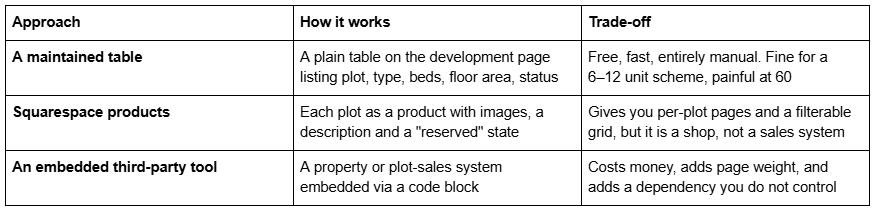
For most small residential developers the maintained table is the right answer, on the condition that someone actually maintains it. A plot listed as available that sold in March costs you more credibility than having no table at all. Put a "last updated" date next to it.
Floor plans and site plans. These are images, and they are the images most often uploaded wrong. Upload at 1500–2500px wide — 2500px is the maximum Squarespace serves — and remember that filenames cannot be changed after upload, so name them plot-4-ground-floor.jpg before you upload, not IMG_2231.jpg. Squarespace's CDN serves WebP unconditionally regardless of source format, so conversion is handled for you; sizing is not.
A plan that has to be readable at detail is better offered as a downloadable PDF alongside the on-page image. A file link on a button works, and it also gives you a reason to put a short form in front of it if you want the enquiry.
Warranty, accreditation and financial credibility
This is the section that separates a builder's website from a contractor's, and it is almost always the thinnest part of the site.
Warranty. If your new homes carry NHBC Buildmark, say so and explain it, because most buyers do not know what it covers. Buildmark runs for ten years in three stages: cover from exchange of contracts to legal completion against deposit loss if the builder becomes insolvent; a two-year builder warranty period in which you must put right reported defects, guaranteed by NHBC; and eight further years of insurance cover for damage caused by defects in specified parts of the home. Three sentences on your site explaining that is worth more than a logo.
Accreditation. Federation of Master Builders, TrustMark, the Considerate Constructors Scheme, CHAS, Constructionline and SafeContractor all mean something to a certain kind of buyer, and prequalification schemes like CHAS and Constructionline are effectively mandatory for public-sector and larger commercial work. Write them out as text with your membership number. A logo image is invisible to search engines and to anyone using a screen reader.
Trading history and structure. Company registration number, years trading, and — if you are comfortable — the fact that you are directly employing rather than subcontracting the whole job. For a homeowner about to hand over staged payments, this is the reassurance that closes it.
Where it goes. The footer for the registration numbers, an About page for the narrative, and an FAQs page for the questions people are too polite to ask: what happens if you go bust mid-build, who holds the retention, how snagging is handled, what the payment schedule looks like. BRIX Construction and Streamify both ship a dedicated FAQs page; Streamify also has a Team page and a Pricing page, which suits a builder whose pitch is a directly employed crew. Streamify's published demo link also returns a 401 and is not linked here.
Writing for a three-month buying cycle
A builder's website is visited repeatedly by the same person over weeks. That changes what belongs on it.
Depth beats brevity. The homeowner on visit four is not skimming. They are looking for the detail that either reassures them or does not. A 900-word development page with real specifics will hold them; a 200-word one will not.
A blog is a genuine asset here, if you write it. Planning conditions, party wall procedure, what a build actually costs per square metre in your area, why the programme slipped on a job and what you did about it. This is the content that gets shared between a couple deciding on a builder. One useful caveat on structure: Squarespace 7.1 blog pagination is cursor-based with a maximum of 20 posts per page, no numbered pages and no infinite scroll. Once you pass forty posts, plan for categories to do the navigating, because readers will not click "older posts" six times.
Publish indicative ranges rather than nothing. "Extensions typically £2,200–£2,800 per square metre depending on specification" is not a quote and nobody will hold you to it. It removes the enquiries you were never going to win and keeps the ones you were. Builders who publish nothing spend their evenings quoting jobs that were never funded.
Make the enquiry route obvious on every page. Not a single contact form at the end of the site. The quote form guidance in this cluster sets out which fields qualify a project enquiry without losing it — for builders the two that matter most are target start date and whether planning permission is already in place.
Which templates suit builders and developers
BRIX Construction — 13 pages: Home, Home 2, About, Service, Service Details, Projects, Blog, FAQs, Contact Us, two legal pages, 404 and a Style Guide. The closest structural fit in the Squareko range for a building company: repeatable service pages, a Projects section and a built FAQs page. No viewable demo currently.
WeDecorefy — 15 pages, the largest in the range, with Projects, Project Details, a Gallery, a Team page, a Blog, a Shop and a Freebie page. The best choice for a developer with several completed schemes, because the detail-page structure is already built and duplicating it is a five-minute job.
Vogue — 11 pages, tagged Real Estate and Interior, with a Shop, a Portfolio and a Gallery. Its property-marketing register suits a developer selling units to buyers rather than a builder selling services to homeowners, and the Shop can carry plots as products if you want per-plot pages.
Horizon — 13 pages. Tagged Real Estate but its actual page set is a photography site with an Inquire page, so judge it by its pages rather than its tag. Worth considering only if your photography is genuinely strong, because the layouts are large and unforgiving.
Click Crafter — 12 pages with a Portfolio, Gallery, Blog and a Freebie page. The Freebie page is where a capability statement or a development brochure goes, which matters for builders bidding commercial or housing association work.
Outside the Squareko range, KJRees Builders from PixelHaze Academy and Cornerstone Builders from SquareHero are both purpose-built builder templates and both worth looking at — Cornerstone in particular is a direct structural competitor to BRIX. Squarespace's own free templates remain a reasonable starting point if you have fewer than four completed schemes to show.
Choosing one
Pick on structure, not on the demo photography — the demo images are licensed to the template shop and you have to replace all of them before launch anyway. The question is whether the template gives you a repeatable development or project detail page, and somewhere to put warranty and accreditation text. Everything else is style, and style is the easy part in Squarespace 7.1.
If you have a site currently producing enquiries and cannot take it down for a fortnight mid-season, that is the case for handing the install over — the premium Squarespace templates in our range arrive as a Squarespace contributor invitation rather than a file download, and installation onto an existing live site is a manual process taking around 48 hours. Builders with no site to protect will usually be better served doing it themselves over a quiet week.
For a custom home builder rather than a developer, the cycle is longer again and the content is different — that is covered in Squarespace templates for custom home builders.
FAQ
-
Completed schemes on individual pages with photographs, scope and programme length; accreditations and warranty provider written out as text with membership numbers; a Team page naming who supervises the site; indicative cost ranges; and an FAQs page covering payment schedules, snagging and what happens if a build overruns.
-
Not natively. There is no live availability system in any Squarespace template. The workable options are a manually maintained table on the development page, listing each plot as a Squarespace product, or embedding a third-party plot-sales tool. Whichever you choose, publish a "last updated" date beside it.
-
As an on-page image at 1500–2500px wide plus a downloadable PDF for anyone who needs detail. Name the image files before uploading, because Squarespace filenames cannot be changed after upload. The CDN serves WebP automatically, so format conversion is handled but sizing is not.
-
Publish indicative ranges rather than fixed prices — for example a per-square-metre band for extensions, with a note that specification drives it. A range costs you the enquiries you were never going to win and keeps the ones you were. Builders who publish nothing spend evenings quoting unfunded projects.
-
In three sentences. NHBC Buildmark runs ten years: deposit protection from exchange to legal completion if the builder becomes insolvent, a two-year builder warranty period for reported defects guaranteed by NHBC, then eight years of insurance cover for damage from defects in specified parts of the home.
-
Yes, for two reasons. Prospects shortlist by scheme type, so a barn conversion buried in a mixed gallery is invisible to someone searching for one. And each scheme page is separately indexable, turning twelve completed developments into twelve long-tail pages rather than one gallery URL.

Author Bio
I'm Walid Hasan, a Certified Squarespace Expert and Squarespace Circle Platinum Partner with over 12 years of hands-on experience designing and optimizing high-performing websites. Over the years, I've had the privilege of building more than 2,000 Squarespace websites for clients around the world, always focusing on clean design, strong user experience, and conversion-driven results.
