
Squarespace Templates for Custom Home Builders
The short answer: A custom home builder's website is not a lead capture page; it is a reassurance document read repeatedly over months by two people who are about to spend more money than they ever have. It has to sell the process before it sells photography. The template you want has a repeatable project detail page, room for a long build-process page, and a blog you will actually write in.
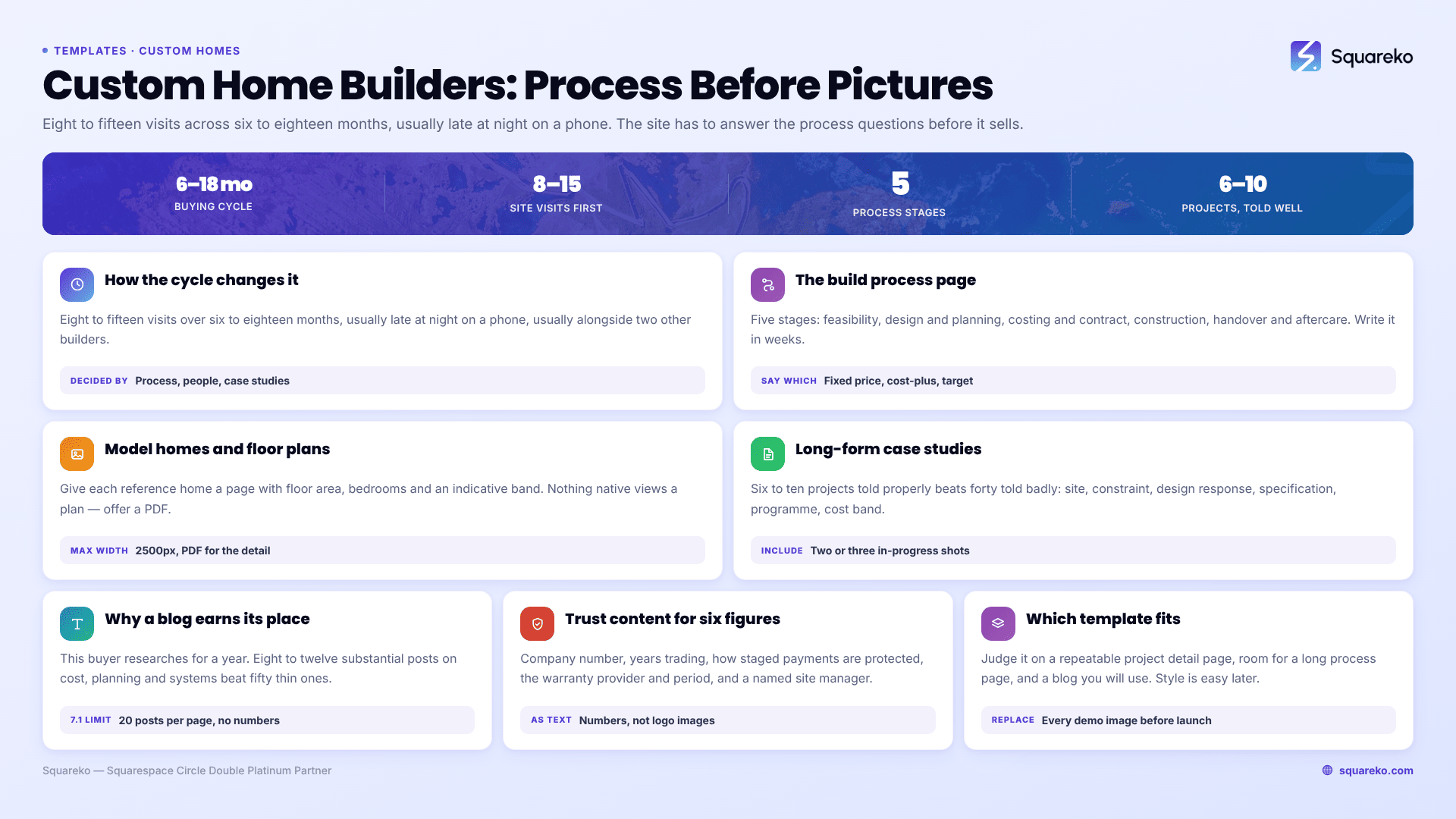
This is the longest and highest-value buying cycle in the construction cluster. A couple planning a custom build will typically visit your site a dozen times across six to eighteen months, often at 11 pm, often on a phone, usually while comparing you to two other builders. Everything below follows from that.
How the buying cycle changes the site
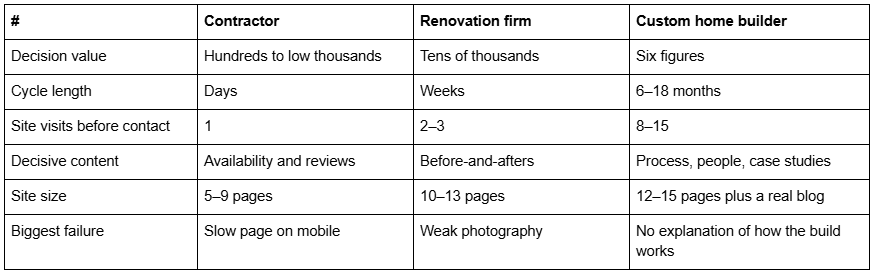
The last row is the one that matters. Most custom home builder websites are beautiful and say almost nothing about what happens between signing and moving in. That gap is where the anxiety lives, and the builder who fills it wins disproportionately.
The build process page is the highest-value page on the site
If you build one page properly, build this one.
A custom home client's real fear is not that the house will look wrong. It is that they will lose control of a process they do not understand, spend more than they planned, and discover halfway through that decisions were made without them. A build process page answers that before they ever call.
What it should contain, stage by stage:
1. First conversation and feasibility. What you look at, how long it takes, whether it costs anything.
2. Design and planning. Who does the architecture — you, their architect, or a partner practice. Who submits the planning application, what happens if it is refused, typical timescales in your area.
3. Costing and contract. How you price: fixed price, cost-plus, or a target cost. Say which. This is the single most searched-for and least published piece of information in custom home building, and being straight about it filters your enquiries better than anything else on the site.
4. Construction. Who is on site daily, who the client's single point of contact is, how often they will get an update, how variations and change orders are handled and priced.
5. Handover and aftercare. Snagging process, warranty provider and period, what happens twelve months later.
Write it in weeks and months, not adjectives. "Design and planning typically runs 16–24 weeks including determination" is worth more than "we guide you seamlessly through the process". The templates in the Squareko range that give you an obvious home for this are BRIX Construction (13 pages, with a Service Details page you can repurpose as a process page and a built FAQs page) and WeDecorefy (15 pages, the largest in the range). BRIX has no publicly viewable demo — its published demo URL returns a 401 — so ask for a walkthrough rather than judging it from thumbnails.
Model homes and floor plans
Custom home builders usually have two kinds of visual asset, and they need different treatment.
Model or reference homes. Houses you have built that a prospect can use as a starting point. Give each one its own page with a name, a floor area, a bedroom count, a photograph set and — critically — an indicative cost band. A model home page without a number is a picture; with a number it is a qualification tool.
Floor plans. This is where Squarespace's limits are worth knowing:
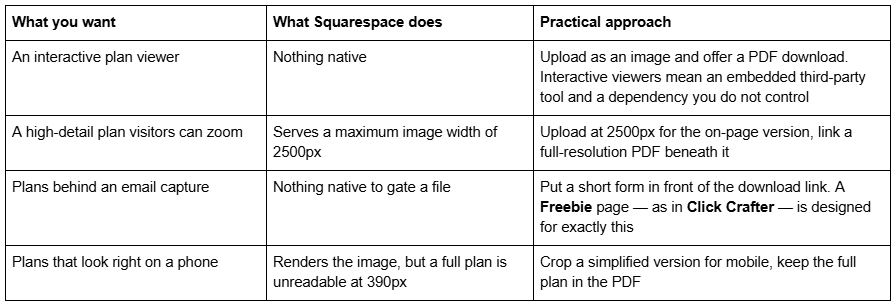
Two housekeeping points that apply to every image on the site: Squarespace's CDN serves WebP unconditionally regardless of source format, so you do not need to convert anything, and filenames cannot be changed after upload — name plans oakhouse-ground-floor-plan.jpg before you upload, because the filename becomes the alt text fallback where no description is set.
Long-form project case studies
A custom home builder's portfolio should be six to ten projects told properly, not forty told badly. At this value, depth beats volume decisively.
The structure that holds a reader for four minutes:
The site and the constraint — plot, orientation, ground conditions, planning context. What the clients wanted, in their words. The design response, including one decision that was genuinely difficult and how it was resolved. Specification highlights that matter to this buyer: structural system, insulation and airtightness approach, heating strategy, glazing. The programme, in weeks, from start on site to handover. The cost band. Photographs, including two or three of the build in progress — a timber frame going up or a steel being craned in is more persuasive to this buyer than another finished kitchen. And a short client quote if you can get one.
Where to put them. Two options, and the choice matters. Individual Project Details pages, as in WeDecorefy, keep case studies in the site's permanent architecture and out of a reverse-chronological feed. Blog posts get you a date, categories and easier ongoing publishing. My recommendation is project pages for the six flagship builds and the blog for everything else.
One structural note if you go the blog route: Squarespace 7.1 blog pagination is cursor-based, with a maximum of 20 posts per page, no numbered pages and no infinite scroll. A custom home builder with three years of posts will need categories doing the navigating, because nobody clicks "older posts" five times to find a case study.
Why a blog earns its place here specifically
I tell most trades businesses to skip the blog unless they will genuinely write. Custom home building is the exception, for a reason particular to this buyer.
Someone planning a custom home spends a year researching. They read about foundation types, about whether to go timber frame or masonry, about what a proper airtightness figure looks like, about what things actually cost per square metre in their region. If you are the builder who answered those questions clearly, you are the builder they call — and by then they have read fifteen of your pages and trust you before the first conversation.
Write eight to twelve substantial posts rather than fifty short ones. The topics that consistently produce enquiries: real cost-per-square-metre figures for your region with the caveats, what the planning process is like locally, the honest trade-offs between construction systems, what a fixed-price contract does and does not cover, and one post about a build that went wrong and what you did about it. The last one converts better than anything else on most builders' sites, because it is the only page on the internet that admits construction is difficult.
Trust content specific to a six-figure build
Custom home clients do due diligence that renovation clients do not.
Financial standing. Company registration number, years trading, and — if you can — how staged payments are protected. A client handing over £80,000 before a foundation exists wants to know what happens if you stop trading.
Warranty. Name the provider and the period. In the UK that is typically an NHBC or equivalent ten-year structural warranty; state which and explain what it covers rather than displaying a logo.
Accreditation, as text. Federation of Master Builders, TrustMark, the Considerate Constructors Scheme in the UK; state licence number, NAHB membership and bonding limits in the US. Written out with numbers, not as logo images — logos are invisible to search engines and to screen readers.
People. A named site manager with a photograph and a sentence of history is worth more than a stock team shot. Streamify ships a Team page alongside a Pricing page and an FAQs page, which is a good structural fit for a builder whose pitch is a directly employed crew. Streamify's published demo link returns a 401 and is not linked here.
Answers to the awkward questions, on an FAQs page: what happens if the build overruns, who absorbs material price increases, how variations are priced, what your retention terms are, whether you have ever been in dispute. A builder who answers those in public is a builder people believe. BRIX Construction ships an FAQs page; the native Accordion block renders question and answer text server-side, so it is crawlable rather than hidden behind JavaScript.
Which templates suit a custom home builder
BRIX Construction — 13 pages: Home, Home 2, About, Service, Service Details, Projects, Blog, FAQs, Contact Us, two legal pages, a 404 and a Style Guide. The construction-tagged template in the Squareko range, and the alternative Home 2 layout is genuinely useful if you want a different homepage for a model-home audience. No viewable demo currently.
WeDecorefy — 15 pages, the largest in the range, with Projects, individual Project Details pages, a Gallery, a Team page, a Blog, a Shop and a Freebie page. The best fit overall for a custom home builder, because case studies, team and a lead magnet all have built homes rather than needing to be constructed in Fluid Engine.
Horizon — 13 pages. Tagged Real Estate but its actual page set is a photography site including an Inquire page, so judge it by its pages. Worth it only if your photography is exceptional; the layouts are large and expose weak images.
Click Crafter — 12 pages with a Portfolio, Gallery, Blog and Freebie page. The Freebie page is the reason: a custom home builder's best lead magnet is a realistic cost guide or a planning checklist, and it needs somewhere to live.
Vogue — 11 pages tagged Real Estate and Interior, with a Shop, Portfolio and Gallery. Suits builders selling completed or nearly completed homes rather than a bespoke design-and-build service.
Outside the Squareko range, Sanctuary Homes from Katlyn Slocum Design and East Shore Designs from EngageTaste are both aimed directly at home builders, and Big Cat Creative carries the broadest general catalogue if you would rather adapt a high-end service template.
Choosing one
Decide on architecture first: does the template give you a repeatable project detail page, room for a genuinely long process page, and a blog structure you will use? Those three are hard to add later. Photography and colour are easy to change in Squarespace 7.1 and should not drive the decision — you are replacing every demo image anyway, since demo photography is licensed to the template shop rather than to you.
If you already have a site producing enquiries and cannot take it down for a fortnight while you rebuild, that is the situation where handing the install over makes sense — the premium Squarespace templates in our range arrive as a Squarespace contributor invitation rather than a file download, and installation onto an existing live site is a manual process taking around 48 hours. Custom home builders starting from nothing will usually be better off building it themselves over a few weeks, spending the saved money on photography and on writing the process page properly.
Related in this cluster: templates for builders and developers for schemes and plots, and templates for home renovation companies for transformation galleries.
FAQ
-
A build process page explaining every stage in weeks, six to ten long-form project case studies, model home pages with indicative cost bands, a named team, warranty and accreditation details written as text, an FAQs page covering overruns and variations, and a blog answering the research questions clients spend a year asking.
-
As an on-page image uploaded at up to 2500px — the maximum width Squarespace serves — with a full-resolution PDF linked beneath it for anyone who needs detail. There is no native interactive plan viewer. Name plan files before uploading, since Squarespace filenames cannot be changed afterwards.
-
Six to ten, told properly. At this value depth beats volume: a four-minute case study with the constraint, the difficult decision, the specification, the programme in weeks and the cost band is worth more than forty photo galleries. Include two or three in-progress construction photographs.
-
Yes, unusually for a trades business. Custom home clients research for a year before they commit, and the builder who answered their questions about costs, construction systems and planning is the one they call. Eight to twelve substantial posts beat fifty short ones.
-
Twelve to fifteen, plus an active blog. That is more than a contractor needs and roughly the size of the largest premium templates. The extra pages go into the build process, model homes, individual case studies and the trust content that a six-figure decision requires.
-
Publish bands and publish your pricing model. Saying whether you work fixed-price, cost-plus or to a target cost filters enquiries better than anything else on the site, and an indicative per-square-metre range on each case study lets a client work out whether they are in the right place before either of you spends a day on it.

Author Bio
I'm Walid Hasan, a Certified Squarespace Expert and Squarespace Circle Platinum Partner with over 12 years of hands-on experience designing and optimizing high-performing websites. Over the years, I've had the privilege of building more than 2,000 Squarespace websites for clients around the world, always focusing on clean design, strong user experience, and conversion-driven results.
