
Squarespace Templates for Home Renovation Companies
The short answer: A home renovation company sells one thing — the difference between the room someone has and the room they want. Everything on the website exists to show that difference. The template you want has a repeatable project detail page and gallery layouts that hold up under sixty real photographs, and you need to know upfront that Squarespace has no native before/after slider. Building one takes a plugin, custom code, or a simpler layout that works just as well.
Renovation is also the segment where image handling decides whether the site is any good. A transformation gallery is by definition twice as many photographs as a normal portfolio, and a renovation site that takes eight seconds on a phone loses to the one that does not.
How to show before and after
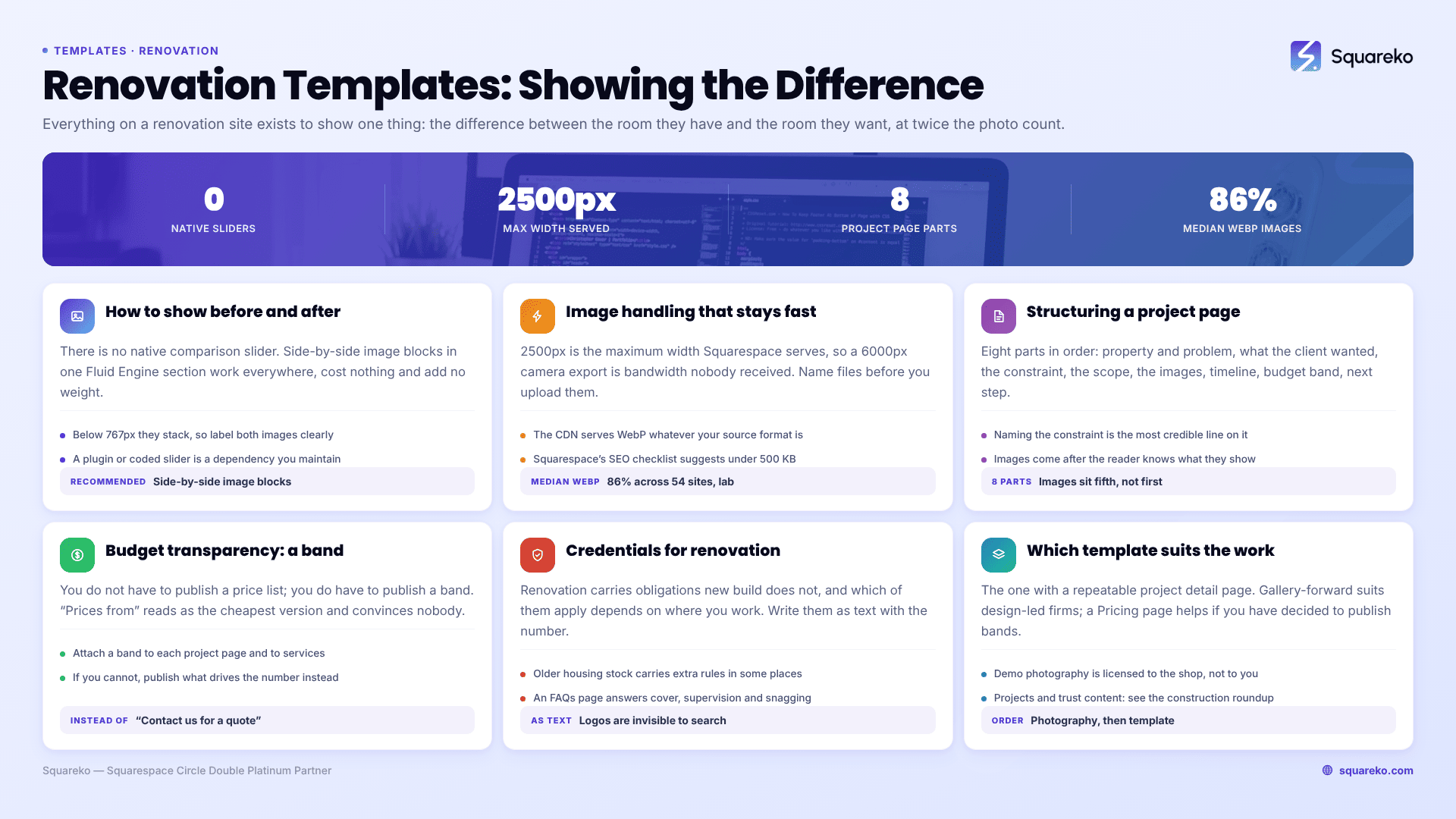
Squarespace does not include a comparison slider. This comes up constantly on the Squarespace Forum and the answer has been consistent for years: no native feature exists, so you either add code, buy a plugin, or use a layout that does the job without either.
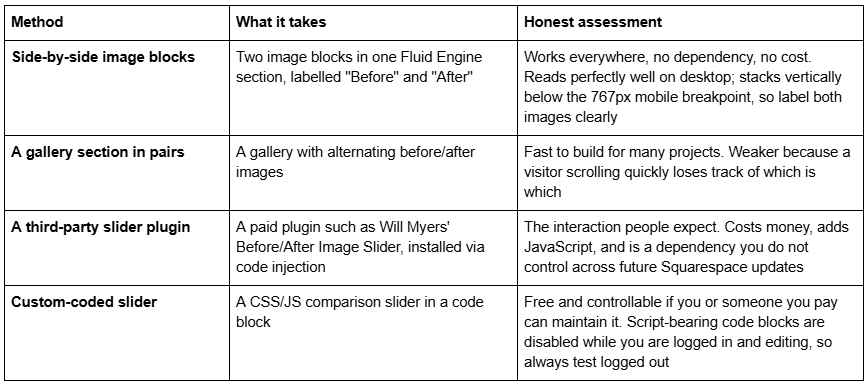
My recommendation for most renovation companies is side-by-side. It is not the flashiest option, but it works on every device, adds nothing to page weight, survives every platform update, and — the part people miss — it is what most visitors are actually doing anyway: looking at both images at once and comparing them. A slider forces them to look at one at a time.
If you do go with a slider, use it on your two or three strongest projects rather than on all twenty. The interaction is the novelty; twenty of them is a slow page.
One detail regardless of method: shoot the before and after from the same position, at the same focal length, in similar light. A dim phone snap of the old kitchen next to a professionally lit shot of the new one does not read as a transformation, it reads as a trick. The single cheapest improvement to most renovation websites is going back and reshooting the "before" pictures properly on the next job.
Image handling that keeps a transformation gallery fast
Renovation portfolios are the heaviest sites in this cluster and it is worth being precise about why.
Upload at 1500–2500px wide. 2500px is the maximum width Squarespace serves, so anything larger is bandwidth you paid for and nobody received. A 6000px camera export uploaded directly is the single most common cause of a slow renovation site.
Squarespace serves WebP unconditionally. The Squarespace CDN converts and serves WebP regardless of your source format and regardless of the browser's Accept header. You do not need to convert anything. Across 54 Squareko-built client sites measured in August 2026, a median of 86% of images were served as WebP, with 16 sites at 100%.
Name files before uploading. Filenames cannot be changed after upload, and Squarespace uses the filename as the alt attribute fallback where no description is set. victorian-terrace-kitchen-after.jpg is doing free work; IMG_4471.jpg is not.
Squarespace's own SEO checklist recommends keeping images under 500 KB. For a gallery of sixty photographs that is the difference between a fast page and a slow one.
What the numbers look like in practice. Across those same 54 client sites (Playwright/Chromium lab test, cloud datacentre, unthrottled, single run per site, load-only CLS — lab data, not field data), median mobile LCP was 2.01s with 74% under Google's 2.5s "good" threshold, and median page weight was 3.0 MB across 93 requests. Only 48% of the sites came in under 3 MB. An image-led renovation site sits at the heavier end of that unless you resize before upload. The platform is not the problem; the 4MB kitchen photograph is.
One more, because renovation sites are often browsed on a phone in a queue: median mobile CLS across that set was 0.000, with 31 of the 54 sites recording exactly zero layout shift on load. Desktop CLS was weaker at a 0.029 median, so this is not an unqualified claim — but on mobile, where these visitors are, images with defined dimensions do not push the page around.
Structuring a renovation project page
A gallery shows what happened. A project page explains why it was hard and why you were the right people to do it. The second is what wins the job.
The structure that works, in this order:
1. The property and the problem. "A 1930s semi in [town] with a galley kitchen cut off from a north-facing dining room." Specific enough that someone with the same house recognises it.
2. What the client wanted. Two sentences in their words, not yours.
3. The constraint. Every renovation has one — a load-bearing wall, a party wall agreement, a listed elevation, asbestos in the artex, a client living in the house throughout. Naming it is the most credible thing you can put on the page, because it shows you deal with reality rather than photographing showhouses.
4. What you did. Scope in plain terms. Structural work, services, finishes.
5. The before-and-after images. Placed here, after the reader understands what they are looking at.
6. Timeline. "Eleven weeks from start on site to handover" tells a homeowner more about your competence than any adjective.
7. Budget band. Covered below.
8. A next step. A short enquiry form or a call button at the foot of the page. Someone who has just read a project resembling their own house is the most likely person on your site to get in touch.
The templates that ship this as a repeatable page are WeDecorefy, at 15 pages with Projects and individual Project Details pages, and BRIX Construction, at 13 pages with Projects and a Service Details page. Duplicating an existing detail page takes minutes; building one from scratch in Fluid Engine and then rebuilding it twelve times does not. BRIX has no publicly viewable demo — its published demo URL returns a 401 — so ask for a walkthrough rather than judging it from thumbnails.
Budget transparency: say something
Renovation is the segment where price silence costs the most, because the range is enormous and the client has no reference point. A kitchen can be £8,000 or £80,000 and a homeowner genuinely does not know which one you are.
You do not have to publish a price list. You do have to publish a band.
What works: a range attached to each project page — "this project fell in our £45,000–£60,000 band" — and a general statement on the services page: "most full kitchen renovations we take on sit between £25,000 and £55,000 depending on specification and structural work." Add the caveat that specification drives it, because it does.
What that buys you. The enquiries you lose were never going to convert; you would have found that out after a two-hour site visit and a day writing a quote. The enquiries you keep arrive already knowing the order of magnitude, which changes the first conversation entirely.
What does not work: "prices from £X". Everyone knows it is the cheapest possible version of the job and nobody believes it. And a bare "contact us for a quote" on a renovation site in 2026 reads as evasive next to competitors who are being straight about it.
If you genuinely cannot publish bands — some firms cannot, for commercial reasons — publish the shape of the cost instead: what proportion typically goes to structural work versus finishes, what drives a project from one band to the next, what the three decisions are that move the number most. That is useful, honest, and still tells the reader whether they are in the right place.
Credentials specific to renovation
Renovation carries obligations that new build does not, and stating them is a differentiator because most competitors do not bother.
In the US, the EPA requires renovation, repair and painting firms working in housing built before 1978 to be certified. Firm certification lasts five years, and a certified renovator must be assigned to each job. Any company doing kitchen, bathroom or whole-house work on older stock needs this, and saying so on the website separates you from the firms that ignore it.
In the UK, the relevant ones are TrustMark, the Federation of Master Builders, and — where the work touches gas or electrics — Gas Safe Register and NICEIC or NAPIT registration. Write them as text with the registration number, not as logo images. Logos are invisible to search engines and to screen readers.
Alongside those, the things renovation clients actually worry about: whether you carry public liability cover and at what limit, who supervises the site day to day, how you handle living-in clients, and what your snagging process is. An FAQs page answers all four. BRIX Construction ships one; so does Streamify, which also has a Team page. Streamify's published demo link returns a 401 and is not linked here.
Which templates suit a renovation company
BRIX Construction — 13 pages: Home, Home 2, About, Service, Service Details, Projects, Blog, FAQs, Contact Us, two legal pages, a 404 and a Style Guide. The construction-tagged template in the Squareko range and the closest structural fit if your work spans several trades. No viewable demo currently.
WeDecorefy — 15 pages, the largest in the range, with Projects, Project Details, a Gallery, a Team page, a Blog, a Shop and a Freebie page. The strongest choice for a renovation company with a real body of completed work, because the detail-page structure is where transformation stories live.
Harmony — 11 pages, tagged Interior and Home Design, with a Portfolio, a Gallery, a Blog and a Store. Gallery-forward and visually softer than the construction templates, which suits a design-led renovation firm selling on taste rather than on structural capability.
Cleanko — 12 pages with a Pricing page, a Service Details page and a Portfolio. Worth considering specifically because of the Pricing page, if you have decided to publish bands and want a built page for them rather than a table wedged into a services page.
Vogue — 11 pages tagged Real Estate and Interior with a Shop, Portfolio and Gallery. Fits a renovation firm working for landlords and investors rather than homeowners.
Outside the range, ProBuilt from Imagiweb Design is a purpose-built remodel template, and Big Cat Creative and Applet Studio both carry interior and home-design templates that adapt well. Squarespace's own free templates are a reasonable start if you have fewer than four projects to show, and the free versus premium comparison covers where that stops being true.
Building it
The order that matters: sort the photography first, choose a template with a repeatable project detail page second, decide your budget bands third, and only then worry about whether you want a slider. A renovation site with twelve properly shot before-and-afters and honest price bands on side-by-side image blocks will out-earn a site with a beautiful slider and four projects on it.
If your current site is producing enquiries and you cannot afford to take it offline mid-season while you rebuild, that is the case for handing the install over — the premium Squarespace templates in our range are installed for you rather than delivered as files, including onto an existing live site as a manual process taking around 48 hours. Most renovation firms reading this will do it themselves, and the constraint will be photography rather than the template.
Related in this cluster: templates for builders and developers.
FAQ
-
No. There is no native comparison slider in any Squarespace 7.1 template. The options are side-by-side image blocks in a Fluid Engine section, a paid third-party plugin installed via code injection, or a custom-coded slider. Side-by-side works everywhere, costs nothing and adds no page weight.
-
1500–2500px wide. 2500px is the maximum width Squarespace serves, so anything larger is wasted. Squarespace's CDN converts and serves WebP unconditionally regardless of source format, so you do not need to convert anything — but it will not resize an oversized original for you.
-
Property and problem, what the client wanted, the constraint you solved, what you did, the before-and-after images, the timeline in weeks, the budget band, and an enquiry route. The constraint is the most credible part — it shows you deal with real houses rather than showhomes.
-
Publish bands, not a price list. A range attached to each project page and a general band on the services page removes the enquiries you were never going to win. "Prices from £X" does not work — everyone reads it as the cheapest possible version of the job.
-
If you work in the US on housing built before 1978, the EPA requires your firm to be certified, with certification valid five years and a certified renovator assigned to each job. Publishing it separates you from firms that ignore the rule, and it answers a question safety-conscious homeowners are already asking.
-
Eight to fifteen, each with six to ten photographs and a written story. Fewer than four looks like a new business; more than twenty is maintenance work. Quality of photography matters more than count — one properly shot transformation beats five phone snaps.

Author Bio
I'm Walid Hasan, a Certified Squarespace Expert and Squarespace Circle Platinum Partner with over 12 years of hands-on experience designing and optimizing high-performing websites. Over the years, I've had the privilege of building more than 2,000 Squarespace websites for clients around the world, always focusing on clean design, strong user experience, and conversion-driven results.
