
Videography Squarespace Templates That Load Fast
The short answer: No videography Squarespace template is fast or slow on its own. Every Squarespace 7.1 template runs the same engine and ships at roughly the same weight empty. What makes a video site slow is a decision you make after installing it — usually stacking two or three player embeds above the fold, or dropping a 60-second background video on the homepage with no mobile fallback. Fix those two things and almost any 7.1 template performs acceptably.
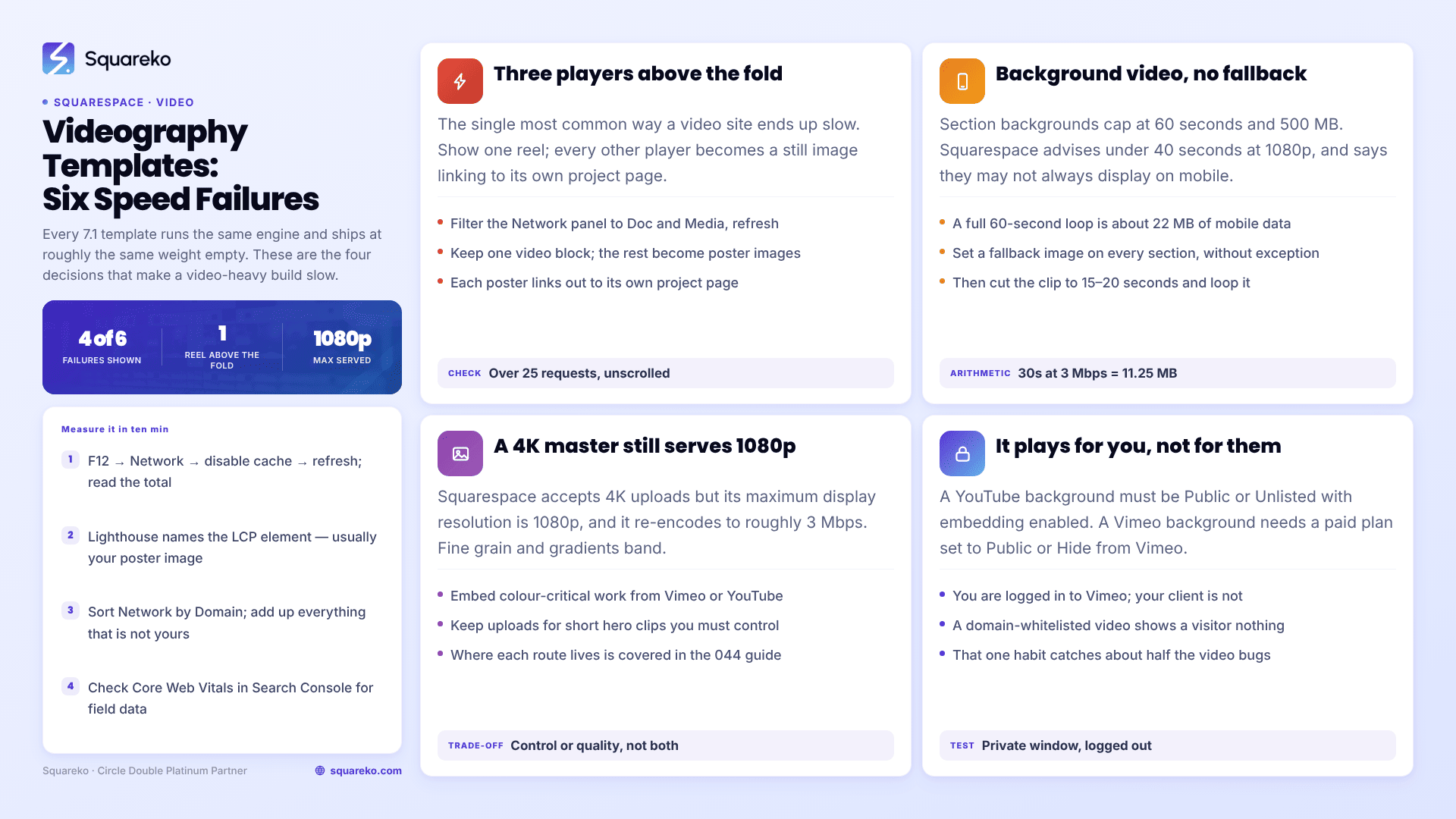
Here is what each hosting route actually costs, and the six things that break a video-heavy Squarespace build.
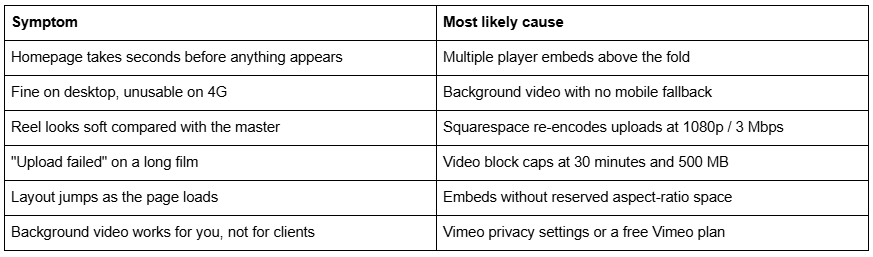
Quick diagnostic table
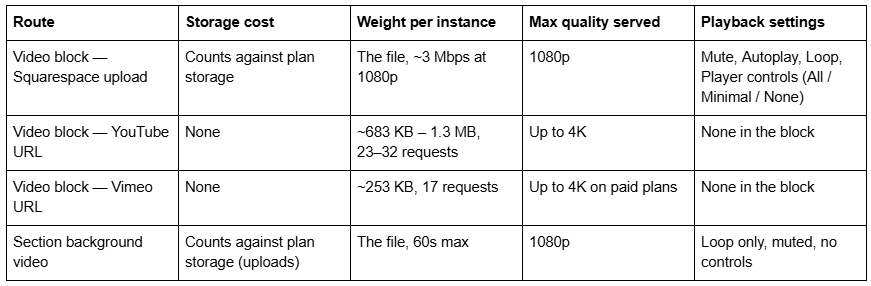
The four hosting routes, with the actual numbers
Squarespace 7.1 gives a videographer four places to put footage. They are not interchangeable.
Squarespace upload limits, verified. Every site on every plan includes 30 minutes of total video storage across video blocks, section backgrounds, Videos pages and Course pages. Beyond that it is plan-dependent: Basic 30 minutes, Core 5 hours, Plus 50 hours, Advanced unlimited. Accepted formats are .mp4, .m4v and .mov; everything is converted to .mp4 on upload at roughly 1.5 Mbps at 360p or 3 Mbps at 1080p, audio at 128k. Per-location caps: video block 30 minutes / 500 MB, section background 60 seconds / 500 MB, Videos page or Course lesson 3 hours / 5000 MB.
Embed weight, measured by others. WP Rocket's player comparison measured a YouTube embed at 683 KB across 23 requests and Vimeo at 253 KB across 17 requests. Frontend Masters measured a heavier YouTube case at 1.3 MB across 32 requests — and, more importantly, found that standard YouTube embeds do not share resources between instances: two embeds weighed 2.4 MB, three weighed 3.6 MB.
The benchmark to hold those numbers against. Squarespace's own guidance is to "keep each page on your site to 5 MB or less" and to "reduce the number of videos" because embedded YouTube and Vimeo content increases load times, especially on mobile. Across 54 Squareko-built client sites measured in August 2026 (Playwright/Chromium lab test, cloud datacentre, unthrottled, single run per site, load-only CLS) the median page weight was 3.0 MB across 93 requests, with median mobile LCP of 2.01s and 74% under Google's 2.5s "good" threshold. Only 48% of those sites were under 3 MB — image-led sites already sit at the heavy end.
Three YouTube embeds on a homepage is therefore roughly 3.6 MB and 96 requests of third-party player code alone, before your logo, fonts, stills or CSS. That is more than an entire median Squareko site, spent on nothing the visitor asked to watch.
Failure 1 — Three players above the fold
This is the single most common way a videography Squarespace template ends up slow, and it comes from a reasonable instinct: you make films, so the homepage should show films.
How to confirm it in 30 seconds. Open your homepage, press F12, go to the Network panel, filter to Doc and Media, and hard-refresh. Count the requests to youtube.com, ytimg.com, googlevideo.com, vimeo.com or vimeocdn.com. If that count is above about 25 before you have scrolled, you have more than one player loading.
The fix is a poster-first pattern. Show one reel. Everything else becomes a still image that links to a project page where the player lives. Concretely, on Squarespace 7.1:
Keep one video block above the fold, ideally an uploaded clip rather than an embed, since uploads are the only route where you control mute, autoplay and loop.
Replace the other players with image blocks linked to project pages. Grab a frame from the film, export it at 1500–2500px wide and under 500 KB, and let Squarespace's CDN serve it as WebP — which it does unconditionally, regardless of source format.
Put the actual embeds on the project pages, one per page, below the fold.
Video blocks accept a custom featured image that displays before playback, and Squarespace notes it "may not display for videos set to autoplay". Set the thumbnail and leave autoplay off. Then verify the important part yourself: with the thumbnail set, hard-refresh and watch the Network panel to see whether the player iframe loads before you click. If it does, the thumbnail is decoration rather than a genuine facade, and the poster-first pattern needs to be built with image blocks instead.
Failure 2 — Background video with no mobile fallback
A section background video in Squarespace 7.1 accepts an uploaded file capped at 60 seconds and 500 MB, a YouTube URL, or a Vimeo URL. Squarespace recommends keeping it under 40 seconds at 1080p with a minimum 3 Mbps bitrate.
Do that arithmetic. Three megabits per second across 30 seconds is 90 megabits, which is 11.25 MB. A full 60-second background clip at the same bitrate is about 22 MB — more than four times Squarespace's own 5 MB page recommendation, and seven times the 3.0 MB median across those 54 measured sites. It streams progressively rather than blocking render, so it does not delay LCP the way a 22 MB image would. It is still 22 MB of a visitor's mobile data.
Then there is what happens when it does not play at all. Squarespace's documentation states background videos "may not always display on mobile devices, depending on the visitor's connection speed and browser version", and that "devices in low-power or power-saving mode won't display background videos." If you have set no mobile fallback image, the visitor sees "a thumbnail from the video and an unresponsive play button."
The fix: set a mobile fallback image on every section that has a background video, without exception. Then cut the clip to 15–20 seconds and loop it. Nobody watches a homepage background video for 60 seconds, and you are paying full price for footage that is never seen.
Failure 3 — Uploading a 4K master and expecting 4K
Squarespace accepts uploads up to 4K but its maximum display resolution is 1080p, and it re-encodes on upload to roughly 3 Mbps at 1080p. For a wedding highlight film that is genuinely fine. For a colourist's reel, a VFX breakdown or anything with fine grain, gradients or heavy motion, 3 Mbps at 1080p will visibly band and smear.
The fix: embed that work from Vimeo or YouTube instead, where adaptive bitrate ladders go well beyond 3 Mbps and the platform will serve 4K to a capable connection. Keep Squarespace uploads for short hero clips where playback control matters more than fidelity.
This is the genuine trade-off at the centre of every videography Squarespace template decision: uploads buy you control, embeds buy you quality. Nothing on the platform gives you both.
Failure 4 — Hitting a cap mid-build
The caps are location-specific and people run into them in a predictable order.
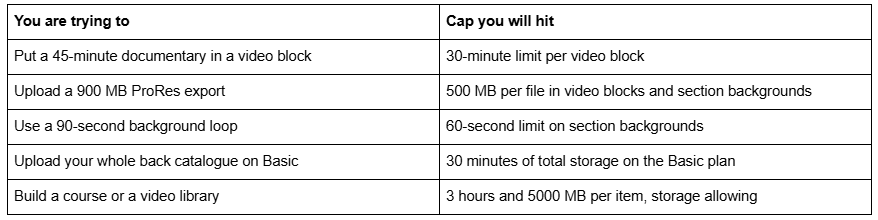
The fix for all of them is the same: long-form goes to YouTube or Vimeo and gets embedded. Squarespace's native video hosting is built for short clips, lessons and library items, not for a production company's archive. Treat the 30-minute base allowance as a hero-clip budget, not a media library.
Failure 5 — Layout shift while embeds settle
Cumulative Layout Shift is the metric a video-heavy page fails most quietly. An embed that loads without reserved space pushes everything below it down when the player finally initialises.
Across those 54 Squareko-built sites, median mobile CLS was 0.000 with 94% in the "good" band, and 31 of 54 recorded exactly zero shift. Desktop was weaker: median 0.029, with only 80% good. Third-party embeds are the usual reason for that gap, and a videography site is nothing but third-party embeds.
The fix: use native video blocks rather than raw <iframe> code in a code block wherever you can, because Squarespace's own block reserves aspect-ratio space. Where you must use an embed block for a player option the video block does not expose, wrap it so the container holds its ratio before the iframe arrives:
/* Reserve 16:9 space for an embedded player inside a code block so the page does not reflow when the iframe initialises */
.sqs-block-code .video-wrapper {
  position: relative;
  width: 100%;
  aspect-ratio: 16 / 9;
}
.sqs-block-code .video-wrapper iframe {
  position: absolute;
  inset: 0;
  width: 100%;
  height: 100%;
  border: 0;
}
Add that in Website → Website Tools → Custom CSS, which requires a Core plan or above.
Failure 6 — Vimeo privacy settings silently breaking playback
This one produces the worst kind of bug: it works perfectly for you and fails for everyone else, because you are logged into Vimeo and they are not.
Squarespace's published requirements are specific. A YouTube background video must be Public or Unlisted with embedding enabled. A Vimeo background video requires a paid Vimeo plan, with privacy set to Public or Hide from Vimeo. A Vimeo video set to "Private" or restricted by domain whitelist may play for the account owner and show nothing to a visitor.
How to confirm it in seconds: open the page in a private window while logged out of both Vimeo and Squarespace. That single habit catches this and about half the other video bugs on the platform.
Which videography Squarespace templates are actually the fast ones
Given that every 7.1 template runs the same engine, the honest answer is: the ones whose default homepage does not stack players.
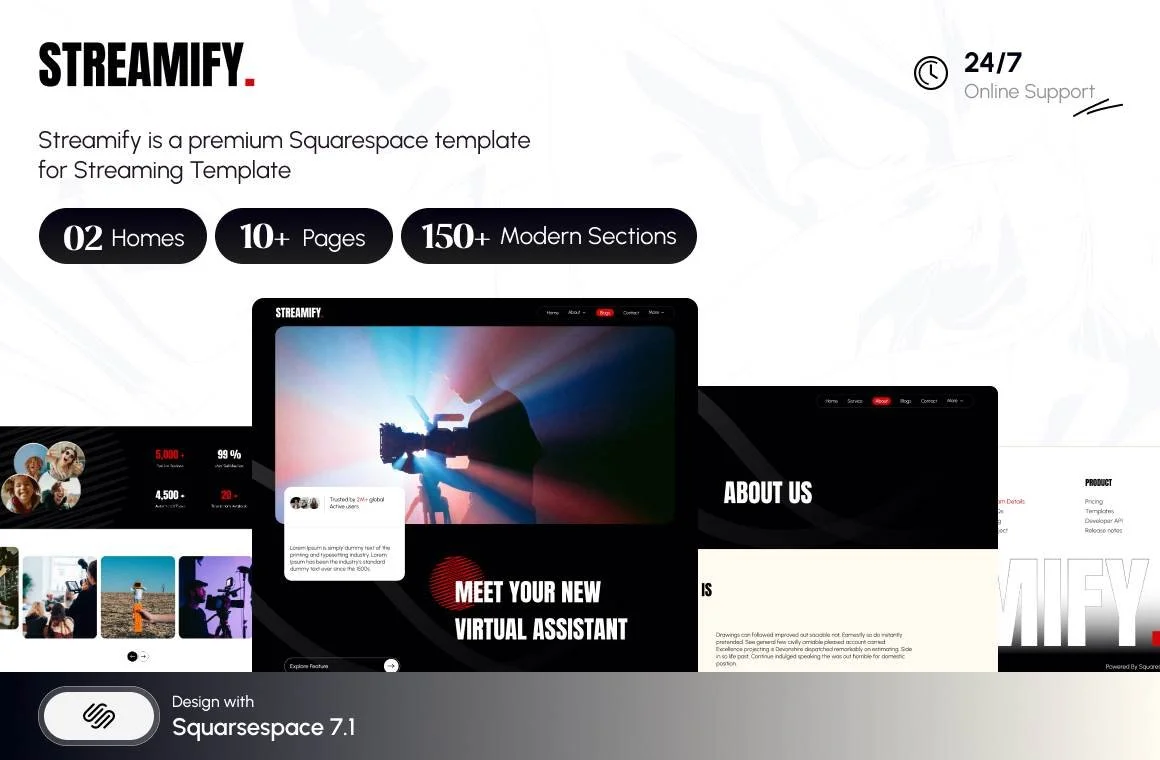
Streamify (Squareko, $249) is tagged Streaming and Videography and is shaped like a production company — 12 pages including two homepage variants, Team, Pricing, Project, FAQs and a Style Guide. The Project page is what keeps embeds off the homepage, which is the whole game here. Note that Streamify has no working public demo, so you are buying on the page list.
Click Crafter (Squareko, $249) suits a video agency: a Portfolio page, Gallery sections, a Shop, a Blog and a Freebie page across 12 pages. A Portfolio page gives every project its own URL, so every embed gets its own page to live on.
Mycelium (Squarespace, free) ships with a video background configured. It is a fine starting point provided you immediately set a mobile fallback image, which the default configuration does not do for you.

For the full segmented list, see the Squarespace templates for videographers roundup. For how to organise the work itself once the template is installed, see the video portfolio structure guide.
How to measure your own site in ten minutes
Page weight and requests. F12 → Network → disable cache → hard-refresh. Read the transferred total and request count at the bottom. Compare against Squarespace's 5 MB guidance and the 3.0 MB / 93-request median from the 54-site sample.
What the LCP element is. Lighthouse in Chrome DevTools names it directly under "Largest Contentful Paint element". On a videography site it is almost always a poster image or a hero still — so that image is the one to get under 500 KB and between 1500 and 2500px wide.
Third-party share. In the Network panel, sort by Domain. Add up everything that is not squarespace-cdn.com or your own domain. On a video site this routinely exceeds half the page.
Field data, not lab data. Lab tests on a fast connection flatter every site. Check the Core Web Vitals report in Google Search Console for what real visitors experience, and treat any single-run test — including ours — as a ceiling rather than a promise.
If you have cut the embeds, set fallback images and reserved aspect ratios and a video-heavy Squarespace site is still slow, the remaining causes are usually unoptimised stills or a third-party script that arrived with something else entirely, and finding them means reading a waterfall rather than guessing.
That is the kind of build we are usually handed, and it is why the premium Squarespace templates in our shop are documented by page structure rather than by hero screenshot — the structure is what keeps players off the homepage. Most videographers reading this will fix their own site with the six failure modes above; the arithmetic is the point, not the shop.
FAQ
-
Usually multiple player embeds above the fold. Standard YouTube embeds do not share resources between instances — independent testing found two weighed 2.4 MB and three weighed 3.6 MB. Squarespace's own guidance is to keep each page under 5 MB, so three players can exceed the whole page budget before your content loads.
-
Every site includes 30 minutes of total video storage across video blocks, section backgrounds, Videos pages and Course pages. Beyond that it is plan-dependent: Basic 30 minutes, Core 5 hours, Plus 50 hours, Advanced unlimited. Individual caps are 30 minutes per video block and 60 seconds per section background.
-
Upload short hero clips, because uploads are the only route giving you mute, autoplay, loop and player-control settings. Embed long-form work, because embeds cost no storage and preserve quality — Squarespace re-encodes uploads at roughly 3 Mbps at 1080p and will not serve 4K.
-
Bigger than most people expect. At Squarespace's recommended 1080p and 3 Mbps, a 30-second background clip is roughly 11 MB and a 60-second clip roughly 22 MB. Squarespace recommends keeping background videos under 40 seconds; cutting to 15–20 seconds and looping is usually indistinguishable to visitors.
-
Check Vimeo privacy. Squarespace requires a paid Vimeo plan with privacy set to Public or Hide from Vimeo, and YouTube videos must be Public or Unlisted with embedding enabled. A restricted video plays for the account owner and shows nothing to visitors. Always test in a private window, logged out.
-
Squarespace advises keeping each page to 5 MB or less. Across 54 Squareko-built client sites measured in August 2026 in a single-run Playwright lab test, median page weight was 3.0 MB across 93 requests, with median mobile LCP of 2.01s. Video-heavy pages sit well above that median.

Author Bio
I'm Walid Hasan, a Certified Squarespace Expert and Squarespace Circle Platinum Partner with over 12 years of hands-on experience designing and optimizing high-performing websites. Over the years, I've had the privilege of building more than 2,000 Squarespace websites for clients around the world, always focusing on clean design, strong user experience, and conversion-driven results.
