Does a Squarespace Template Affect Site Speed?
Barely, and not in the way people assume. Every Squarespace 7.1 template runs the same engine, the same markup and the same CDN, so the template itself contributes almost nothing measurable. What does differ is the content the template ships with — how many demo images the design assumes, how many sections a page is built from, and whether the hero is a background video. Keep the demo assets and you inherit its page weight. Replace them properly and two very different-looking templates load at almost identical speed.
Here is what we actually measured.
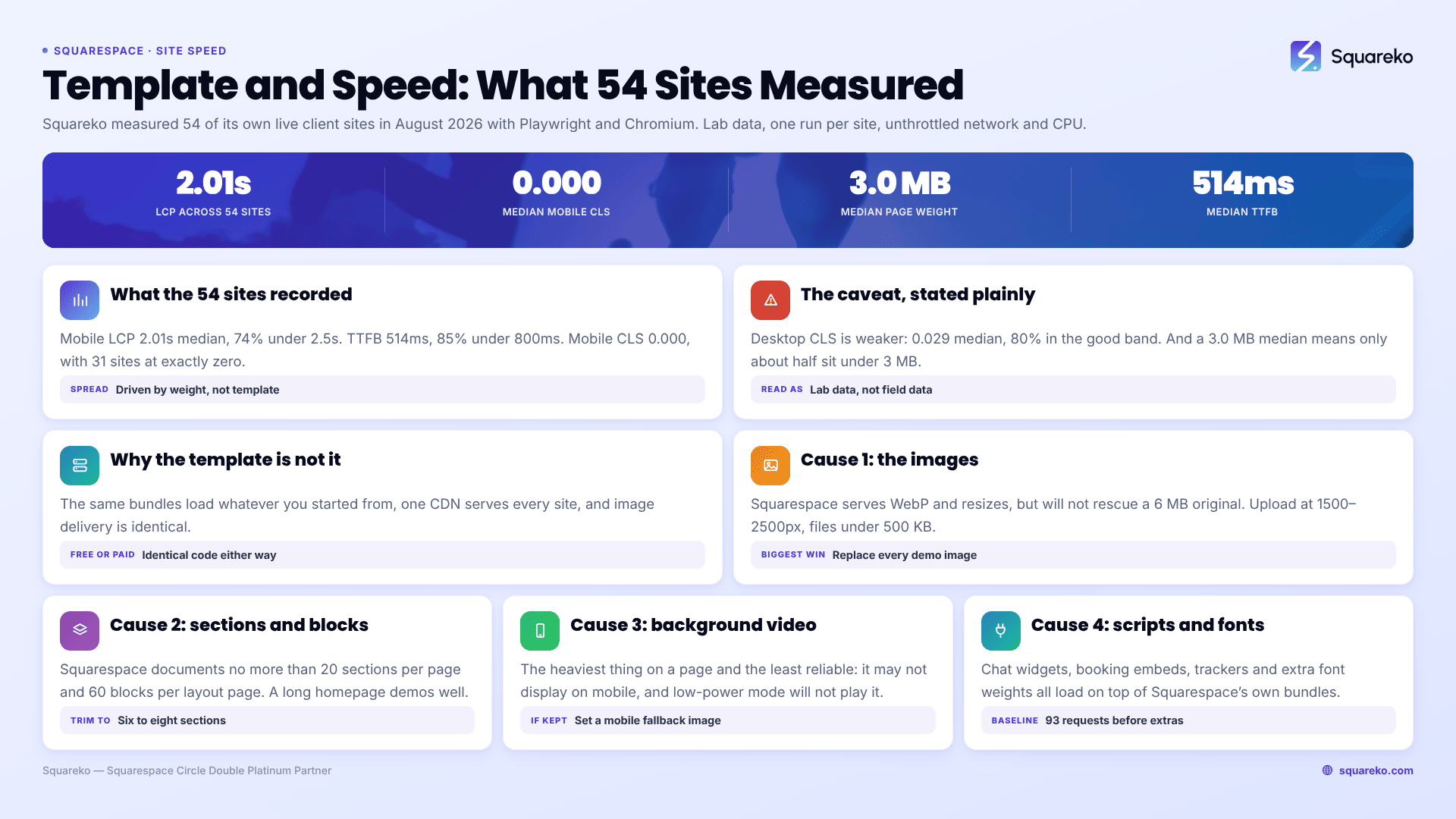
Measured across 54 Squarespace sites, August 2026
Squareko measured 54 of its own live client sites in August 2026 using Playwright and Chromium. This is lab data — single run per site, from a cloud datacentre, unthrottled network and CPU, load-only CLS. It is not field data from real visitors, and real-world figures on throttled mobile connections will be slower. Fifty-three of the 54 run Squarespace 7.1, built on a mix of templates.
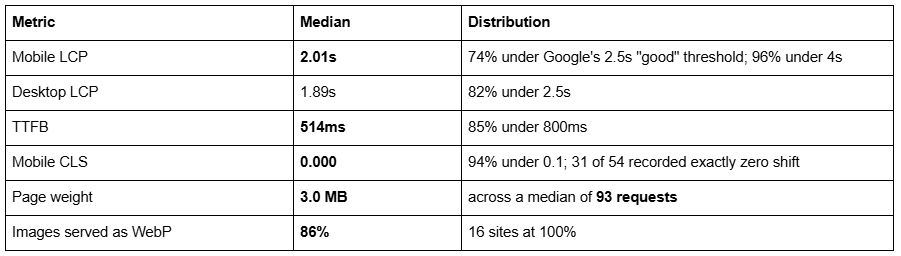
Two things are worth reading out of that table. First, the sites cluster — the spread between the fastest and slowest is driven by page weight, not by which template each one started from. Second, page weight is the loose variable: a 3.0 MB median means only about half these sites sit under 3 MB, and Squarespace's own recommendation is to keep a page under 5 MB, ideally near 1 MB for mobile. The templates are not the problem. The images are.
One honest caveat: desktop CLS across the same 54 sites is weaker — median 0.029, with 80% in the "good" band — so this is not a claim that Squarespace sites never shift.
Why the template is not the speed variable
In Squarespace 7.1, every site shares one template engine — templateId 5c5a519771c10ba3470d8101 is universal. A 7.1 template is a starting configuration of pages, fonts, colours and section layouts, not a separate codebase. That means:
The same CSS and JavaScript bundles load regardless of which template you started from. There is no per-template stylesheet to be heavier or lighter.
The same CDN serves every site, which is why the median TTFB above is consistent at 514ms across 54 different sites.
Image delivery is identical. Squarespace's CDN serves WebP unconditionally, regardless of what format you uploaded or what the visitor's browser asks for, and stores up to seven widths of each image to serve the right one per device.
So "is template A faster than template B" is close to a category error in 7.1. Free templates and premium templates run identical code. The only speed differences between two templates are differences in the content each one arrives with — which becomes your content the moment you keep it.
Squarespace 7.0 is a different story: there, template families were genuinely separate codebases with their own assets, and some heavy 7.0 families did load more than others. If you are on 7.0 and speed is the reason you are asking, the template genuinely might be a factor.
The four things that actually make a Squarespace site slow
1. Images — almost always the largest single factor
Images are the reason most Squarespace pages are slow, and demo images are the reason template-built sites start slow.
Squarespace serves WebP and resizes automatically, but it does not fix an image that was 4000px wide and 6 MB before you uploaded it. Its own guidance is clear: upload at 1500–2500px wide, keep individual files under 500 KB, and keep total page weight under 5 MB.
Three specific things to do:
Resize and compress before upload, not after. Squarespace will not re-compress a badly exported JPEG.
Replace every demo image. On a template, this is mandatory anyway — demo images are licensed for the demo, not for your live site — and it is also the single biggest speed win available.
Set the filename before uploading. Squarespace cannot rename an image file after upload, so brighton-clinic-reception.jpg has to be right the first time.
Squarespace's maximum served width is 2500px. Anything larger is wasted bytes at upload time and a slower editor for you.
2. Section count and block count on a single page
Every section adds markup, and most sections add at least one image. Squarespace's documented recommendations are no more than 20 sections per page and no more than 60 blocks per layout page, with galleries limited to 50 images each for performance purposes.
Templates ship with long, generous homepages because a long homepage demos well. A 14-section homepage with a background image on every section is not a template flaw — it is a showcase. Cut it to the sections your business actually needs. Most homepages work at six to eight. Deleting six sections you were never going to use is faster than optimising the images inside them.
3. Background video and autoplaying media
A background video section is the heaviest thing you can put on a Squarespace page, and it is also the least reliable. Squarespace states background videos "may not always display on mobile devices, depending on the visitor's connection speed and browser version", and devices in low-power mode will not play them at all.
So on a phone — where LCP matters most — you often pay a large download and still show the fallback image. If you keep a background video, set a mobile fallback image in the section's background settings and keep the clip short and heavily compressed. If speed is your priority, a single well-chosen still image is the faster and more dependable hero.
4. Third-party scripts and custom fonts
Everything you add through Settings → Advanced → Code Injection or a Code Block loads on top of Squarespace's own bundles: chat widgets, booking embeds, heatmap trackers, review carousels, multiple analytics tags. Each one is additional requests and additional main-thread work, and the median site above already makes 93 requests before you add anything.
Custom web fonts belong in the same category. Two families at two weights each is four font files; a design using five weights is not stylistically better and is measurably slower. Audit code injection once a quarter and delete what is no longer used — abandoned tracking scripts from tools you stopped paying for are extremely common on inherited sites.
Worth noting that some of these are platform ceilings rather than choices: the 20-section and 60-block recommendations, the 250-image gallery cap and the 60-project Portfolio cap all exist for performance reasons, and they are listed with the rest in Squarespace template limitations.
What to check before you buy a template
Every reputable premium Squarespace template demo is a live Squarespace site, so you can measure it yourself in about two minutes:
Run the demo URL through PageSpeed Insights and look at the lab LCP and total page weight.
Count the homepage sections. If it is 14, assume you will delete half.
Check whether the hero is a background video. If it is, plan for a still image instead.
Ignore the demo's image weight as a verdict on the template — you are replacing every one of those images anyway.
What you are testing is whether the template's structure is reasonable, not whether it is fast. A template with sensible section counts and no video hero starts you in a better place, but the finished speed of your site will be decided by the images you upload and the scripts you add, not by the template you bought. Mobile behaviour works the same way — Squarespace templates are responsive by default, and where mobile goes wrong it is custom code rather than the template.
If your Squarespace site is already slow and you have worked through images, section count, video and scripts without moving your numbers, the remaining causes are usually structural — render-blocking injected code, or a page doing too much work above the fold. That is the kind of diagnosis our Squarespace SEO work starts with. But for most sites the list above is the whole story: on the 54 sites we measured, the difference between a fast Squarespace site and a slow one was page weight, and page weight is something you control without help.
FAQ
-
Barely. All Squarespace 7.1 templates share one engine, one set of CSS and JavaScript bundles, and one CDN, so the template contributes almost nothing measurable. What differs is the demo content it ships with — image weight, section count, background video — and that becomes your content the moment you keep it.
-
No, not inherently. Free and premium Squarespace 7.1 templates run identical code. A premium template can start you in a better place if it uses fewer, better-structured sections, but the finished speed of your site is decided by the images you upload and the third-party scripts you add.
-
They can. Across 54 Squareko-built sites measured in August 2026 — lab data, single run, unthrottled — median mobile LCP was 2.01s with 74% under Google's 2.5s threshold, and median mobile CLS was 0.000. Field data on throttled mobile connections will be slower.
-
Squarespace recommends keeping each page under 5 MB, and closer to 1 MB for mobile visitors on cellular connections. Individual images should be under 500 KB and 1500–2500px wide. Across the 54 sites we measured, median page weight was 3.0 MB across 93 requests.
-
Partly. You can set a transparent header per page and change scroll behaviour in the header editor, and you can restyle or hide the header on one page with CSS on its collection ID. You cannot give one page a genuinely different navigation menu — that is site-wide.
-
In order of frequency: oversized images, too many sections on one page, background video, and third-party scripts added through Code Injection. Squarespace recommends no more than 20 sections and 60 blocks per page. Demo images left in place from a template are a common cause on new sites.

Author Bio
I'm Walid Hasan, a Certified Squarespace Expert and Squarespace Circle Platinum Partner with over 12 years of hands-on experience designing and optimizing high-performing websites. Over the years, I've had the privilege of building more than 2,000 Squarespace websites for clients around the world, always focusing on clean design, strong user experience, and conversion-driven results.