
Do Squarespace Templates Affect SEO?
No — not directly. Every Squarespace 7.1 site runs on one shared template engine, producing the same markup and served by the same CDN, so no template gives you a ranking advantage over another. Template choice does have one indirect effect worth taking seriously: the demo images and section count you keep decide your page weight, and page weight moves Core Web Vitals. That is the whole mechanism.
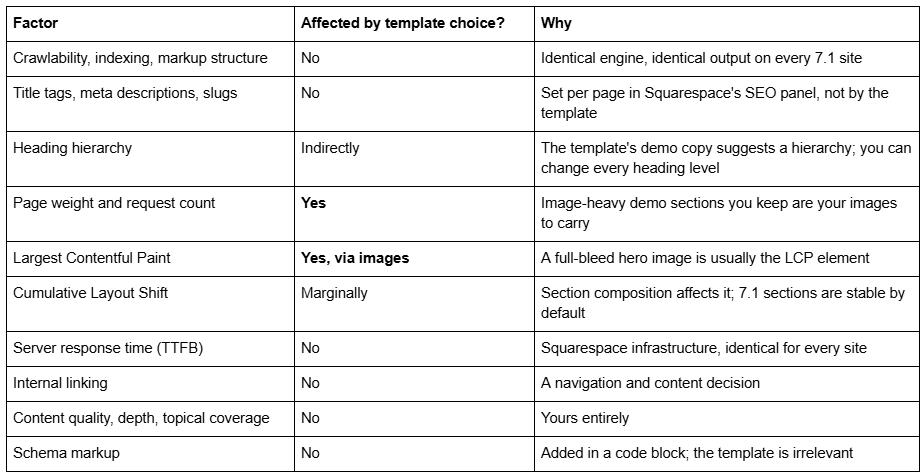
What template choice does and does not affect
Does Google know which Squarespace template you are using?
Not in any way that matters to ranking. Squarespace's own documentation states that all version 7.1 sites belong to the same template family and share the same features and style options, and internally the templateId 5c5a519771c10ba3470d8101 is universal across the platform.
There is a template identifier present in a 7.1 site's source, but it is the same identifier on every 7.1 site — free template, premium template or bespoke build. It carries no information that could distinguish one site's design from another's, and there is no ranking system that reads it.
What Google actually evaluates is the rendered page: its content, its headings, its internal links, its speed and its stability. All five of those are things you control after the template is installed.
Do premium Squarespace templates rank better than free ones?
No. A $249 template and a free Squarespace template produce identical markup on the same engine, and neither includes any ranking mechanism.
What a premium template can do is remove friction. More finished inner pages means more pages that are worth indexing and more places to put internal links, and a coherent design makes people stay on the page. Those are real second-order benefits, and they are also achievable on a free template with more of your own time. Anyone selling you a "SEO-optimised template" as a ranking product is selling a page structure, not an algorithm advantage — which is worth having, but is not what the phrase implies.
The functional case for premium templates is made properly in are premium Squarespace templates worth it, and the broader question of whether a template suits your business is in are Squarespace templates good.
What actually moves SEO on a Squarespace 7.1 site
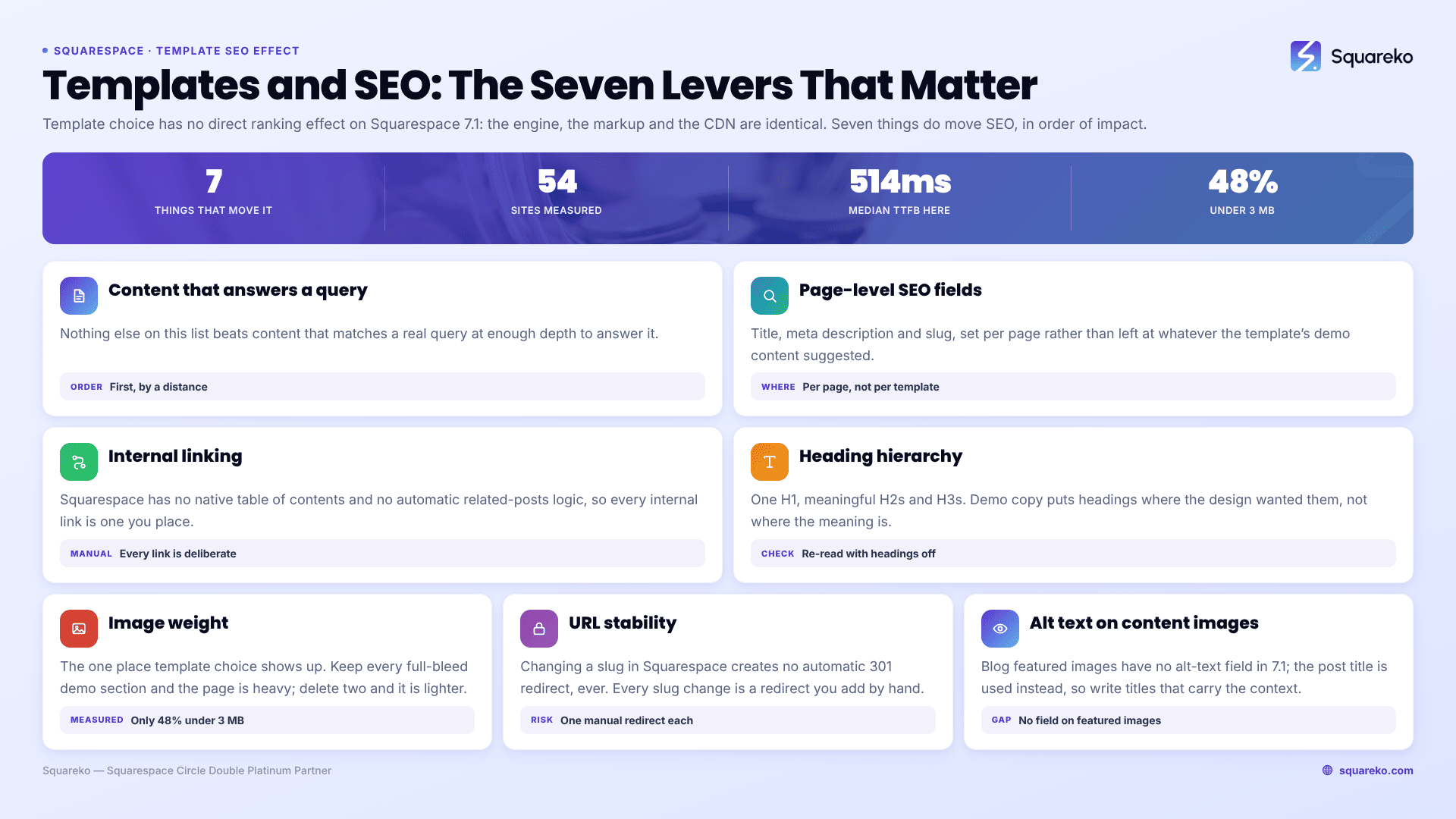
In rough order of impact for most sites:
Content that matches a real query, at enough depth to answer it. Nothing on this list beats it.
Page-level SEO fields — title, meta description and slug, set per page rather than left as defaults.
Internal linking. Squarespace has no native table of contents and no automatic related-posts logic, so every internal link is one you place deliberately.
Heading hierarchy — one H1, meaningful H2s and H3s. Template demo copy often puts headings where the design wanted them rather than where the meaning is, and it is worth re-reading with headings off.
Image weight. This is where template choice actually shows up, and it is covered in full below.
URL stability. Changing a slug in Squarespace creates no automatic 301 redirect, ever. Every slug change is a manual redirect you must add.
Alt text on content images. Note that blog featured images have no alt-text field in 7.1 — the post title is used instead, which is one more reason to write titles that describe the image's context.
Two platform limits worth knowing so you do not waste time hunting for them: robots.txt cannot be edited on Squarespace, and ?author=, ?tag=, ?month= and ?view= parameters are disallowed by default. Neither varies by template. The full working list is in the Squarespace SEO checklist.
Do Squarespace templates slow a site down?
The template does not, but the images it ships with can — and this is the one place where the answer to the headline question is not a flat no.
A template demo is built to look impressive, which usually means large full-bleed photography in several sections. Keep all of those sections, fill them with your own large images, and you have a heavy page. Delete two of them and the page is materially lighter. That is a content decision the template nudges you towards, not a property of the template's code.
Two things the platform handles for you: the Squarespace CDN serves WebP unconditionally, regardless of source format or the browser's Accept header, and images are resized for delivery. What it cannot do is invent a smaller page. Upload at 1500-2500px wide — 2500px is the maximum served — and set filenames before upload, because they cannot be changed afterwards.
The measured picture. Across 54 Squareko-built client sites measured in August 2026 — a Playwright and Chromium lab test, single run per site, cloud datacentre, unthrottled network and CPU, load-only CLS, and not field or CrUX data — median mobile LCP was 2.01s, with 74% under Google's 2.5s "good" threshold and 96% under 4s. Median mobile CLS was 0.000, with 31 of the 54 recording exactly zero layout shift on load and 94% under 0.1. Median TTFB was 514ms, with 85% under 800ms. Median page weight was 3.0 MB across 93 requests, and a median 86% of images were served as WebP. Fifty-three of the 54 sites run Squarespace 7.1, and the sample includes both template-based and custom builds.
The distribution is the useful part. Response time and layout stability were consistently good, because those are platform properties. Page weight was the variable — only 48% of sites came in under 3 MB — and page weight is decided by how many image-heavy sections a site keeps. Desktop CLS was weaker than mobile at a median of 0.029 with 80% good, so this is not a claim that Squarespace sites never shift.
Does changing your Squarespace template hurt SEO?
Restyling does not, by itself. What causes ranking losses in a redesign is changing URLs, cutting content, or losing headings and internal links along the way — and those are all avoidable.
Note that in Squarespace 7.1 you do not switch templates the way you could on 7.0; you restyle the site you have. The mechanics and the redirect checklist are in does changing your Squarespace template affect SEO.
Where the answer flips
The answer flips in exactly one scenario: you buy an image-heavy template, keep every demo section, replace the demo photography with your own unoptimised uploads, and never delete anything. Then the template has affected your SEO — through a page weight you chose to keep, not through anything in its markup.
If you want the feature-by-feature view of which SEO controls exist on a 7.1 template and where each one lives, that is are Squarespace templates SEO friendly. If you want the shorter version: pick the template you like, delete the sections you do not need, and spend the time you saved on the content.
Where a template genuinely is not the problem and rankings still are not moving, that is a diagnosis job rather than a design one — which is what our Squarespace SEO work covers. Most sites on this page do not need it; the seven-item list above is where the wins actually are.
FAQ
-
Start with your page inventory, not the designs. Confirm the plan tier your features need, confirm the template is 7.1, then judge the inner pages and the section composition rather than the homepage. Check you can supply the imagery the design assumes. Judge appearance last, because Site Styles changes it in minutes.
-
Less than most advice suggests. All Squarespace 7.1 sites share one template family with identical features and style options, so no template unlocks anything another lacks. What you are choosing is design labour: which pages arrive already designed and how they are composed.
-
Yes, and usually convincingly. Replace every demo image with your own photography, set your own type scale and colour themes in Site Styles, cut sections rather than adding them, and add scoped Custom CSS. What survives from the template is the section order, which almost no visitor perceives.
-
None is better than another at the platform level. If you want to choose with SEO in mind, choose the template with fewer, smaller image slots and fewer full-bleed sections, since page weight is the only lever template choice actually pulls.
-
Squareko's custom design work runs $2,500-$8,500 depending on page count, brand complexity and integration requirements. Published market ranges are wider — one long-running template shop quotes $1,000-$10,000. A Squarespace subscription is separate at $19-$99 per month on annual billing.
-
Not a template in the code sense — Squarespace 7.1 has one template engine and no theme layer. What a designer builds is a custom configuration: composed sections, a saved section library, Site Styles values and Custom CSS. The result is bespoke; the underlying template family is the same as everyone's.

Author Bio
I'm Walid Hasan, a Certified Squarespace Expert and Squarespace Circle Platinum Partner with over 12 years of hands-on experience designing and optimizing high-performing websites. Over the years, I've had the privilege of building more than 2,000 Squarespace websites for clients around the world, always focusing on clean design, strong user experience, and conversion-driven results.
