
Squarespace Template Customisation Service: What It Is and What It Costs
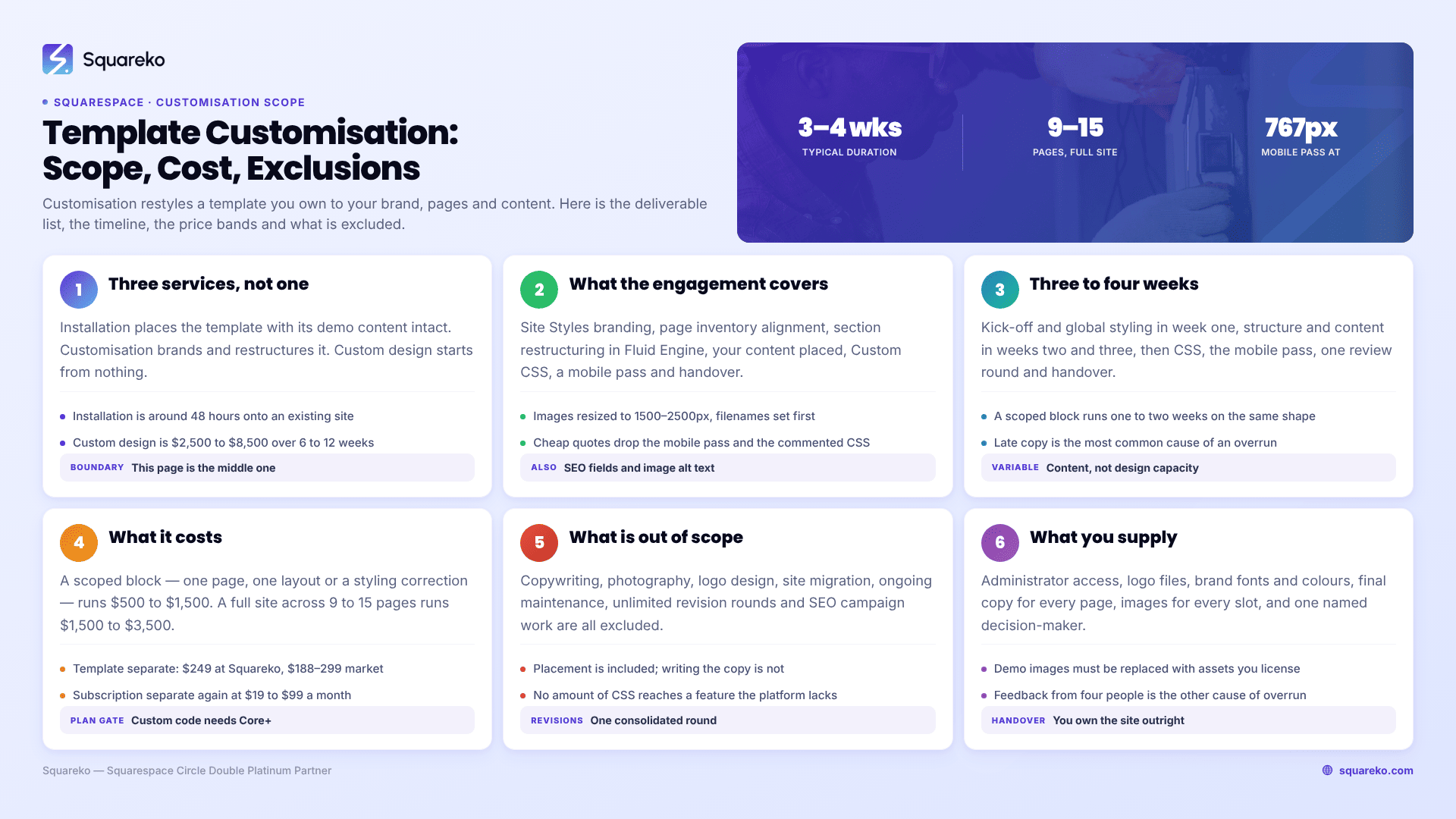
A Squarespace template customisation service takes a template you own and makes it yours — brand typography and colour applied through Site Styles, sections rebuilt or removed to match your real page inventory, your images and copy placed, and Custom CSS written for anything the panels cannot reach. It is not a rebuild and it is not installation. Typical range is $500 to $1,500 for a scoped block of work and $1,500 to $3,500 for a full site across 9 to 15 pages, over two to five weeks.
This page documents the engagement rather than pitching it, so you can compare it against any other provider on the same terms.
What customisation is, and what it is not
Three different services get sold under similar names. They are not interchangeable.
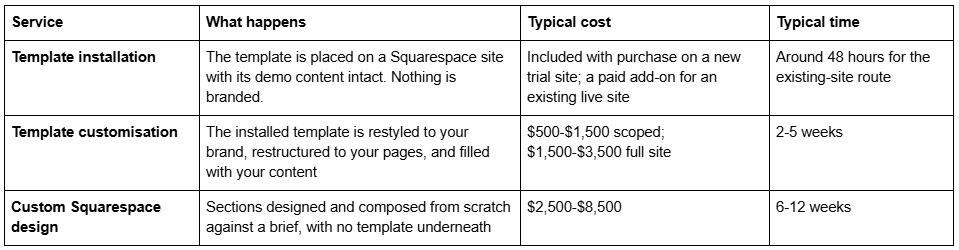
If you already have a template and it is broadly the right shape, customisation is the correct service. If you are still choosing, read how to choose a Squarespace template first — a template that fits reduces this engagement substantially. If the template's structure is wrong for your business, customisation is the expensive way to reach an outcome custom design would reach faster.
What a customisation engagement includes
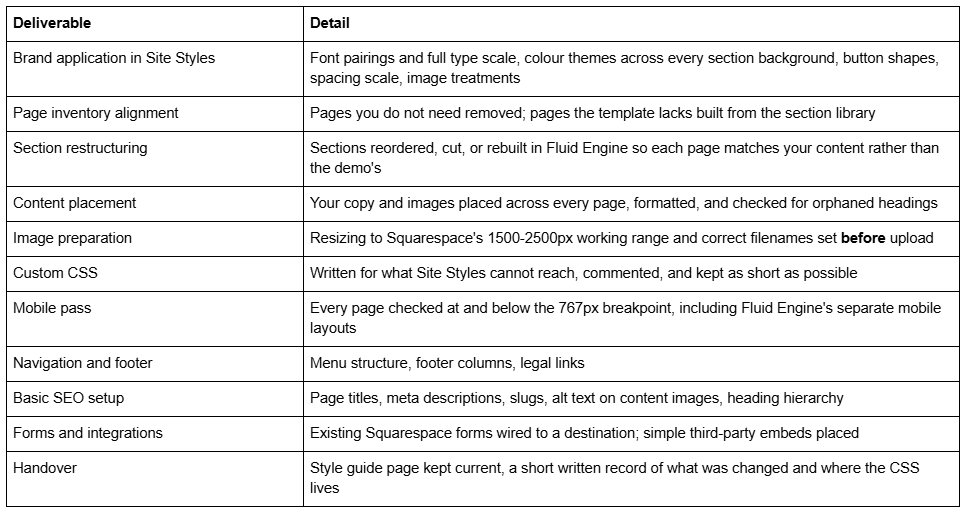
The mobile pass and the CSS commenting are the two items most commonly missing from cheaper quotes. Both are the difference between a site you can maintain and a site you have to hire someone to touch.
The timeline, week by week
A full-site customisation across 9 to 15 pages typically runs three to four weeks. The variable is almost never design capacity — it is content.
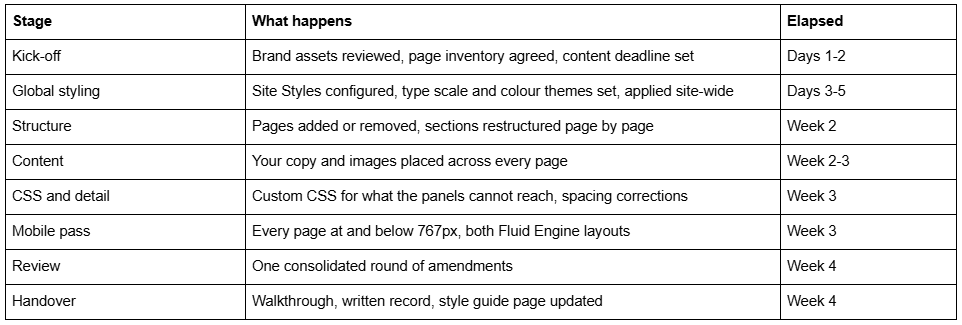
A scoped block — a single page reworked, a type scale corrected, a specific layout built — runs one to two weeks on the same shape.
The most common cause of an overrun is late copy. A project waiting on an about page is a project that has stopped, and it is worth agreeing a content deadline at kick-off rather than after week three.
What it costs

Two things to hold in mind on price. Code blocks and code injection require the Core plan or above, so a customisation that depends on custom code will not run on Basic — check the plan before agreeing scope. And most template shops treat digital sales as final: Squareko's policy is that digital products cannot be returned, exchanged or refunded under any circumstances. Use the demo properly before buying, because customisation cannot rescue a template whose structure is wrong.
What is out of scope
Stated plainly, because unstated exclusions are how these projects go wrong:
Copywriting. Placement is included; writing is not, unless separately agreed.
Photography, illustration and logo design. Not included. Demo images are licensed for the demo only and must be replaced with assets you own or license.
Custom functionality the platform does not have. Multi-parameter filtering, database-driven pages, conditional booking logic. No amount of CSS reaches these — the ceiling is Squarespace, not the template. See Squarespace template limitations.
Third-party plugin development. Squarespace has no plugin architecture; what the market calls plugins are injected CSS or JavaScript sold separately.
Migration of an existing site's content. A separate piece of work, priced on page count.
Ongoing maintenance after handover. Covered by a support arrangement, not by the build.
Unlimited revision rounds. One consolidated round is standard; further rounds are billed.
SEO campaign work. Technical setup is included; content strategy, link acquisition and ongoing optimisation are not.
What you need to supply
The engagement moves at the speed of this list. Have it ready at kick-off:
Squarespace access — a contributor invitation with Administrator permission, or account access.
The template, purchased and installed, or the go-ahead to purchase.
Logo files in vector format where possible, plus any alternative lockups.
Brand typefaces and colour values. If none exist, say so at kick-off — choosing them is a different conversation and adds time.
Final copy for every page, as plain text or a document. Not a list of bullet points to be expanded.
Images for every slot on your agreed page inventory, at 1500-2500px where possible. Filenames matter and cannot be changed after upload.
A page inventory confirming which pages launch and which come later.
Access to any third-party tools to be embedded — booking, email, analytics.
One named decision-maker. Feedback arriving from four people in three channels is the second most common cause of an overrun.
What you own at handover
You own the Squarespace site outright. Ownership of the site transfers to your Squarespace account, and the designer's access can be removed the day the project closes. There is no licence to renew, no hosted component that stops working, and no dependency on the person who built it.
What travels with the site: the Site Styles configuration, every page and section, the Custom CSS in Website → Website Tools → Custom CSS, any saved sections, and the style guide page. The one thing that does not transfer is the template licence itself, which stays tied to the buyer named on the original purchase — worth knowing if a designer buys the template on your behalf.
How to tell whether you need this or something else
Template already installed, structure is right, it just does not look like you → customisation.
Template bought, sitting in a folder, nothing installed → installation first, then customisation. See Squarespace template installation service.
Template broadly right, one page badly wrong → a scoped block, not a full engagement.
You keep listing things the template cannot do → the structure is wrong; read Squarespace template vs custom design before spending more.
Site is fine, you just cannot keep up with edits → a support arrangement, not a customisation project.
Still unsure whether a template suits the business at all → start at are Squarespace templates good, which names the three cases where the answer is no.
If you want this done for you
Most of what is described above is doable yourself if you have the time — how to customise a Squarespace template covers the mechanics, and Site Styles handles more than people expect.
Where handing it over makes sense is when the template is right but the calendar is not, or when the Custom CSS has started fighting the template's defaults and each fix breaks something else. That is what our custom Squarespace design work covers, scoped as either a single block or a full-site customisation on the terms set out above. If your situation is on the "something else" list, say so when you enquire and we will point you at the right one.
FAQ
-
A scoped block — one page, one layout, or a styling correction — typically runs $500 to $1,500. A full-site customisation across 9 to 15 pages runs $1,500 to $3,500. The template itself is separate at $188 to $299 across the market, and the Squarespace subscription is separate again at $19 to $99 per month.
-
Less than most advice suggests. All Squarespace 7.1 sites share one template family with identical features and style options, so no template unlocks anything another lacks. What you are choosing is design labour: which pages arrive already designed and how they are composed.
-
Three to four weeks for a full site of 9 to 15 pages; one to two weeks for a scoped block. The variable is almost always content rather than design capacity. Projects that overrun are usually waiting on copy, so agree a content deadline at kick-off.
-
Installation places the template on a Squarespace site with its demo content intact — around 48 hours for the existing-site route. Customisation is the branding, restructuring and content work that comes after. Buying a template usually includes installation on a new trial site; it never includes customisation.
-
Not necessarily, but the template must be chosen before scope can be agreed, because the amount of work depends entirely on how close its structure is to your page inventory. Choosing badly and customising heavily costs more than choosing well.
-
Squarespace access with Administrator permission, logo files, brand fonts and colours, final copy for every page, images for every slot at 1500 to 2500px, an agreed page inventory, access to any third-party tools, and one named decision-maker.

Author Bio
I'm Walid Hasan, a Certified Squarespace Expert and Squarespace Circle Platinum Partner with over 12 years of hands-on experience designing and optimizing high-performing websites. Over the years, I've had the privilege of building more than 2,000 Squarespace websites for clients around the world, always focusing on clean design, strong user experience, and conversion-driven results.
