
The Squarespace Vow Template: A Brine Wedding Site, Explained
Vow is a Squarespace version 7.0 template in the Brine family, and it has no wedding-specific features whatsoever. Its demo reports "templateVersion":"7" and template ID 55f0aac0e4b0f0a5b7e0b22e — the shared Brine ID — and Squarespace lists Vow among the 47 Brine templates. Everything that looks like a wedding feature is a standard Squarespace part: the RSVP is a form block, the story timeline is a stacked index page, and the registry is a link to somewhere else.
That is good news for anyone moving off it. Nothing bespoke has to be replaced.
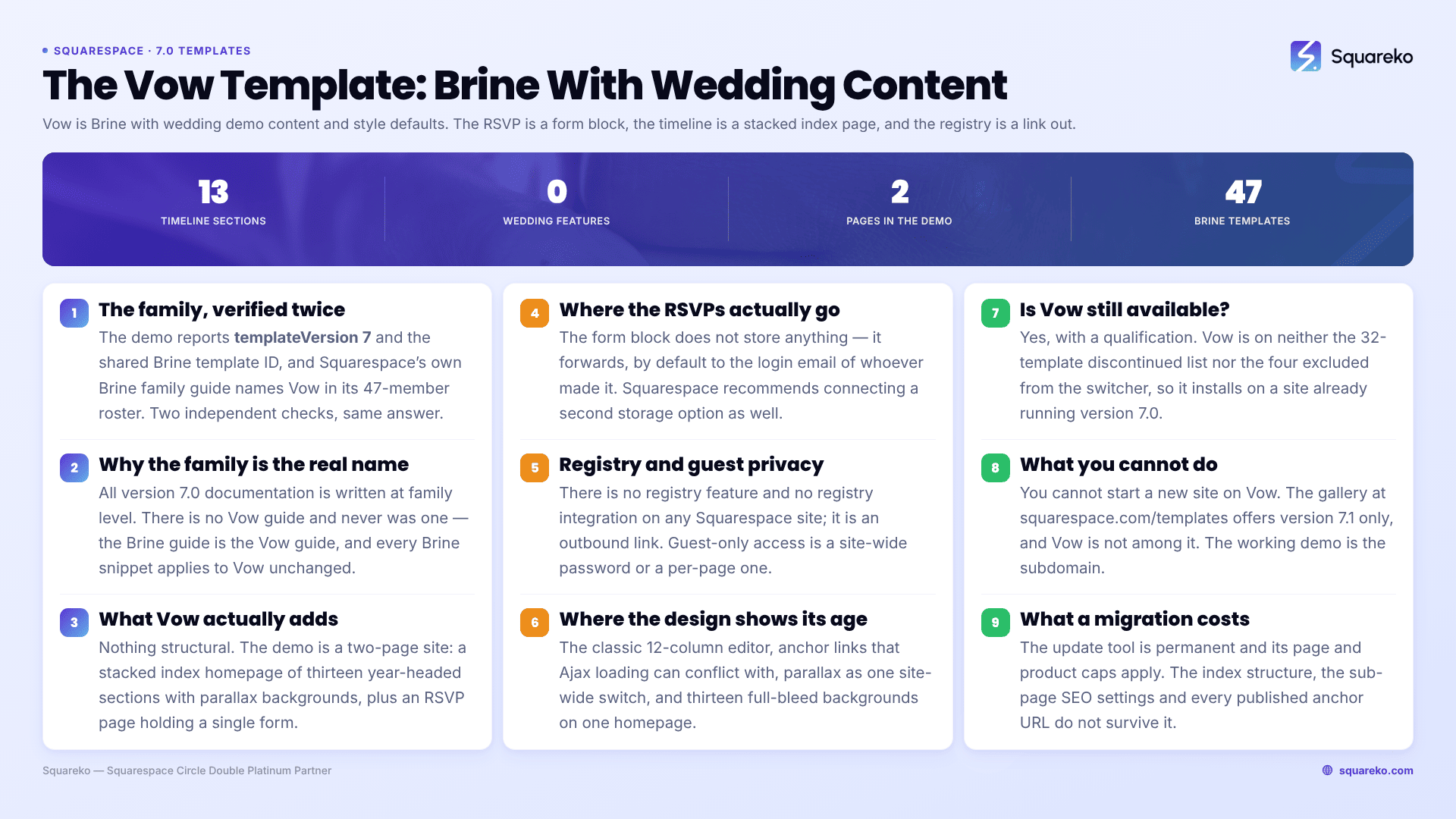
What builds each page of a Squarespace wedding site
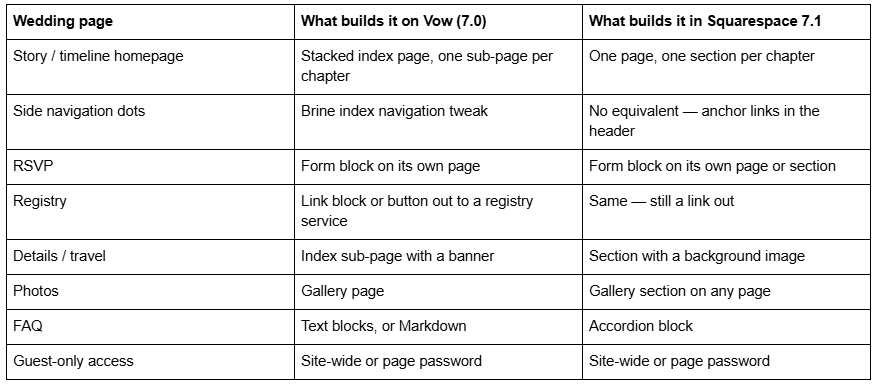
Which family the Squarespace Vow template belongs to — verified
Vow is in the Brine family. Two independent checks agree.
First, the page source. Fetching vow-demo.squarespace.com returns:
"templateVersion":"7"
"templateId":"55f0aac0e4b0f0a5b7e0b22e"
55f0aac0e4b0f0a5b7e0b22e is the Brine family ID. In version 7.0, template IDs identify the family, never the individual template, so Vow, Aria, Mojave, Rally and 43 others all report that same string. Note also that a 7.0 site reports "templateVersion":"7" — not "7.0".
Second, Squarespace's own Brine template family guide names Vow in its 47-member roster.
This matters more than it sounds. All Squarespace documentation for version 7.0 is written at family level. There is no Vow guide and never was one; the Brine guide is the Vow guide. Every CSS snippet, forum answer and tutorial written for Brine applies to Vow unchanged, which massively widens the pool of usable help. The full roster and what the 47 share is in the Brine family guide.
What the Squarespace Vow template actually adds
Nothing structural. Vow is Brine with wedding demo content and a set of style defaults.
The demo is a two-page site. The homepage is a stacked index page of thirteen sections, each headed with a year — 1999, 2000, 2002, 2004 and so on — building a relationship timeline down the page, with parallax background images and Brine's index navigation running down the right-hand edge as a set of horizontal lines. The only other item in the navigation is an RSVP page, which holds a single form.
That is the whole template. There is no guest list manager, no meal-choice logic, no plus-one handling, no seating chart, no save-the-date mailer and no registry integration. If a roundup implies Vow gives you those, it is describing a dedicated wedding platform, not a Squarespace template.
The practical consequence: choosing Vow over any other Brine template changes only fonts, colours and starting content. If you like Vow's look but want to keep an existing Brine site's styling work, you are not missing a feature by staying put.
RSVP: how it works, and where the submissions actually go
The RSVP page is a form block. This is the single most misunderstood part of running a Squarespace wedding site, because the form block does not store anything by itself — it forwards.
By default, a new form block sends submissions to the account email address of the site owner or contributor who created it. Squarespace's advice is blunt and worth following: "New form blocks automatically connect to your login email address, but we recommend connecting a second storage option in case there's ever an issue with one."
The storage options available in 2026 are:
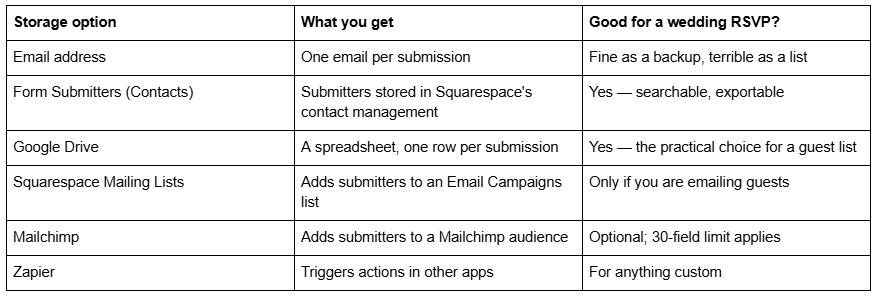
To find submissions after the fact, open the Lists & Segments panel, click Form Submitters, select a submitter and click Form Details. That is worth knowing before the invitations go out, not after — a form block whose only storage was an email address leaves you reconstructing a guest list from your inbox.
Meal choices, dietary requirements and plus-ones are all just extra form fields. Radio buttons for the menu, a checkbox for the plus-one, a text field for allergies. Squarespace will not do the arithmetic for you; the spreadsheet will.
Registry, guest privacy and the things Squarespace does not do
Registry. There is no Squarespace registry feature and no registry integration. Every Squarespace wedding site — on Vow, on 7.1, on anything — handles the registry as an outbound link or a set of buttons pointing at whichever registry service you are using. If you want the gifts on your own site instead, that is a store page and real transaction fees, which is almost never what couples want.
Guest-only access. Squarespace supports a site-wide password (a lock screen every visitor must pass) and per-page passwords set in a page's settings. A common pattern is a public homepage with the details and photos, and a password on the RSVP and address pages. Both mechanisms exist identically on 7.0 and 7.1, so nothing changes here if you migrate.
Search engines. A wedding site is one of the few cases where you may genuinely want less visibility, not more. Squarespace's robots.txt cannot be edited, so page-level noindex settings and the site-wide password are the levers you have.
What feels dated about the Squarespace Vow template in 2026
Vow is not broken. It is Brine, and Brine still works. But four things now cost real effort.
The editor. Vow runs the classic 12-column editor. Every layout decision routes through spacer blocks and stacked rows, and mobile layout is a consequence rather than a choice. Squarespace 7.1's Fluid Engine gives you a 24-column drag grid with a separate mobile layout per section, which is the single biggest quality-of-life difference for someone building a wedding site over a weekend.
Anchor links. Vow's index navigation is lovely and its anchor links are fragile. Squarespace itself warns that on Brine, Ajax loading can conflict with anchor link behaviour — which is why a Brine one-pager often scrolls to the right section on first click and the wrong one on the second. The fix on 7.0 is to disable Ajax loading in site styles and accept slower page transitions.
Parallax is site-wide. Brine's parallax is a single switch at Site styles → Main: overlay → Enable parallax. It applies to every banner on the site; there is no per-page control. Squarespace 7.1 puts parallax on individual section background images instead.
Mobile weight. Thirteen full-bleed parallax background images on one index page is a heavy homepage. Across 54 Squareko-built client sites measured in August 2026 (Playwright/Chromium lab test, cloud datacenter, unthrottled, single run per site, load-only CLS), median mobile LCP was 2.01s and median page weight 3.0 MB across 93 requests — those are 7.1 builds, 53 of the 54 on 7.1, and a stacked-parallax 7.0 homepage is routinely heavier than that. It is a lab figure from our own sites, not a platform benchmark, but the direction is consistent.
Is the Squarespace Vow template still available?
Yes, with one qualification.
Vow is not on Squarespace's list of 32 discontinued version 7.0 templates, and it is not one of the four templates excluded from the switcher (Encore, Lincoln, Bryler and Taylor). So on a site that is already on version 7.0, you can install Vow today at Design → Template → Install new template, preview it, and click Set as live template.
What you cannot do is start a new site on Vow. The gallery at squarespace.com/templates now returns 198 templates, all of them 7.1, and Vow is not among them. The old per-template demo URL under squarespace.com/templates/ serves that generic gallery too — several competitor pages still link it as though it were a live Vow page. The working demo is the subdomain, vow-demo.squarespace.com.
Whether staying on 7.0 is defensible is a separate question, and the answer is more relaxed than most pages suggest: there is no announced end-of-life for version 7.0, and Squarespace 5, from 2008, is still online. Squarespace's own position is that "fixing bugs or issues is a lower priority for us while we focus on our current platform, version 7.1." That is covered in full in are old Squarespace templates still supported?
Migrating a Vow wedding site to Squarespace 7.1
The version update tool is at Design → Update to Version 7.1 → Get Started, and it lets you preview the result before committing. Three things about it are non-negotiable: it is permanent, it caps at 150 pages and 200 products, and it refuses to run on a discontinued template. Vow is not discontinued, so the tool will run.
What does not survive, specifically for a Vow site:
The index page structure. Content from enabled sub-pages converts to layout or portfolio pages. Squarespace is explicit that "links to the former sub-pages won't work and any information in the settings of sub-pages, such as SEO descriptions and titles, won't transfer." On a thirteen-section timeline, that is thirteen sets of page settings to rebuild — and thirteen anchor URLs that stop resolving.
Anchor links. Every /index-slug/#section-slug URL you published dies. Rebuild them as 7.1 section anchors (Edit Section → Anchor Link, then /pageslug#anchorlinkslug) and add URL Mappings in the form /old -> /new 301. Squarespace creates no automatic redirect for a changed slug, ever.
Gallery pages. They convert to layout pages with gallery sections, but videos on gallery pages do not move. Save any video out first.
Album pages. They disappear entirely. Download the audio first if you used one.
Custom CSS. It comes across commented out and needs restoring by hand — and Brine class names largely do not exist in 7.1, so most of it will need rewriting rather than uncommenting.
Site styles. Fonts, colours and every Brine-specific tweak reset to 7.1 defaults.
What does survive: pages, blocks, blog posts, products, events, gallery images, SEO settings on ordinary pages, form blocks, code injection, domains, URL mappings and existing form submissions — which live in your Contacts and Google Drive, not in the block.
The order that works is: export the guest list, save the videos, screenshot the index structure, then run the tool. The wider checklist is in Squarespace 7.0 to 7.1, and if you are considering a sideways move to another Brine template instead, how to change a Squarespace template covers what that costs.
Where this leaves you
If your wedding is soon and the site works, leave it. Vow is Brine, Brine is supported, and nothing is going to switch off before the day.
If you are building now, build on 7.1. You get Fluid Engine, per-section mobile layouts, native accordion FAQs and section anchors that behave, and you lose nothing Vow ever had — because Vow never had anything a form block and an index page did not.
The case for handing it over is narrower: a Vow site with a long index page, published anchor URLs and years of Custom CSS is where a migration turns into a rebuild, and that is what our premium Squarespace templates and migration work exist for. Most two-page wedding sites do not need us, and the steps above are the same ones we would follow. For the wider context on the family Vow sits inside — what all 47 templates share and what any of them cost to leave — start with The Squarespace Brine template guide.
FAQ
-
Vow is in the Brine family. Its demo reports the Brine template ID 55f0aac0e4b0f0a5b7e0b22e, and Squarespace names Vow in its 47-member Brine roster. Because 7.0 documentation is written at family level, the Brine template family guide is the Vow guide — there has never been a separate one.
-
Version 7.0. The demo at vow-demo.squarespace.com reports "templateVersion":"7" — version 7.0 sites report a bare 7, not 7.0. Vow is not in the 198-template 7.1 gallery and cannot be used to start a new Squarespace site.
-
Add a form block to a page and set its fields — name, attending, meal choice, dietary notes. Then connect storage: Google Drive gives you a spreadsheet with one row per submission, and the Form Submitters list in Contacts keeps them searchable. Connect two storage options, not one.
-
By default to the account email of whoever created the form. To see stored submissions, open Lists & Segments, click Form Submitters, select a submitter and click Form Details. Other storage options are Google Drive, Squarespace Mailing Lists, Mailchimp and Zapier.
-
Not natively. Squarespace has no registry feature and no registry integration on any version or plan. Every Squarespace wedding site links out to a registry service using buttons or link blocks. The alternative — selling gifts through a store page — carries real transaction fees.
-
On an existing version 7.0 site, yes. Vow is not among the 32 discontinued 7.0 templates and not one of the four excluded from the switcher, so it installs via Design → Template → Install new template. You cannot start a new site on Vow; the live gallery is 7.1 only.

Author Bio
I'm Walid Hasan, a Certified Squarespace Expert and Squarespace Circle Platinum Partner with over 12 years of hands-on experience designing and optimizing high-performing websites. Over the years, I've had the privilege of building more than 2,000 Squarespace websites for clients around the world, always focusing on clean design, strong user experience, and conversion-driven results.
