
Squarespace Nueva Template: Still Available, and What Switching Away Costs
Nueva is a Squarespace version 7.0 template in the Brine family, and it is still available — on an existing version 7.0 site. We fetched nueva-demo.squarespace.com in August 2026: HTTP 200, "templateVersion":"7", template ID 55f0aac0e4b0f0a5b7e0b22e, the Brine family ID. Squarespace's Brine family guide lists Nueva among its members. What you cannot do is start a new site on Nueva, and the reason so many people assume it has been withdrawn is that squarespace.com/templates/nueva-demo now serves the generic version 7.1 gallery instead of a Nueva demo.
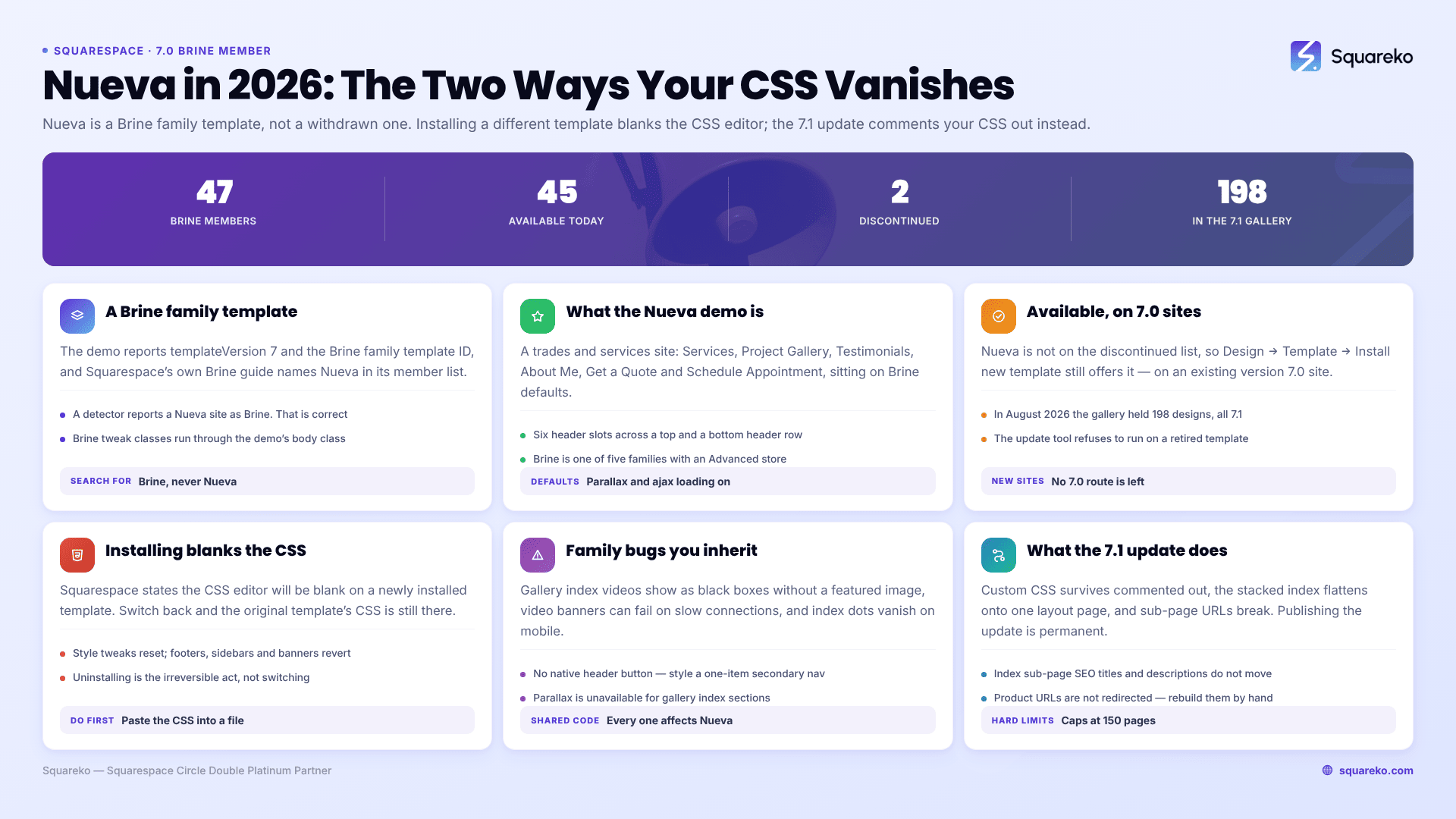
Should you stay on Nueva, switch templates, or update to 7.1?
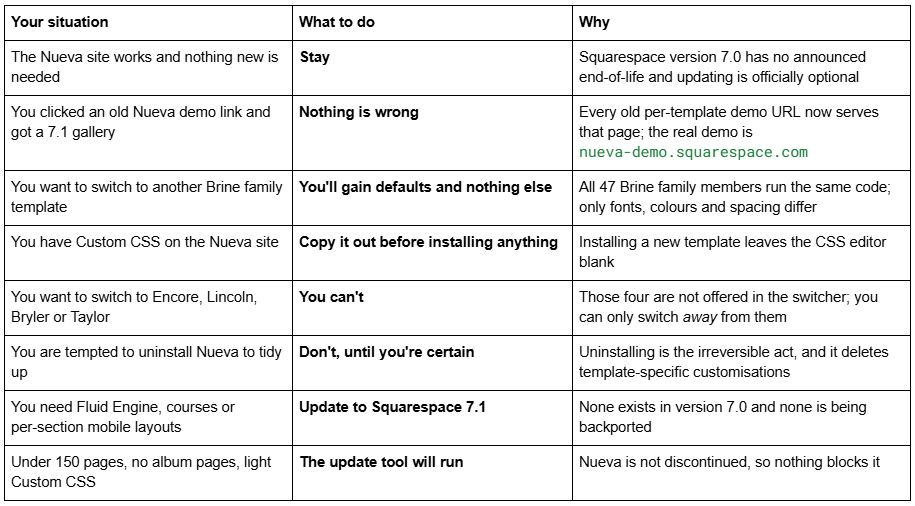
The Squarespace Nueva template is a Brine family template
We verified it two ways in August 2026.
First, the page source. nueva-demo.squarespace.com returned HTTP 200 and reports "templateVersion":"7" with template ID 55f0aac0e4b0f0a5b7e0b22e — the Brine family ID, shared with Rally and every other member. Note that version 7.0 reports "7", never "7.0", which is why version checks confuse people. And templateId identifies the family, never the individual template, so a detector tool will report a Nueva site as "Brine". That is correct, not a bug.
Second, Squarespace's own Brine family guide names Nueva in its member list. The Brine family is the largest in version 7.0 — 47 members, of which 45 are still available and two, Lincoln and Custom Template, are discontinued.
The Nueva demo's live page source also carries the Brine tweak signature, which is the fastest confirmation if you are looking at a site rather than a demo. The body class list on nueva-demo.squarespace.com includes tweak-site-width-option-full-background, tweak-site-border-show, tweak-site-ajax-loading-enable, tweak-overlay-parallax-enabled and the full six-slot ancillary-header-* set. Those tweaks exist in the Brine family and nowhere else in version 7.0.
The practical consequence is the useful one: search "Brine", not "Nueva". Class names, tweaks and CSS selectors are family-level, so a Brine header snippet works unchanged on Nueva, and there are hundreds of them. There is no Squarespace guide for Nueva; there is a Brine family guide, and it is the correct documentation for your site. The Squarespace Brine family templates guide lists all 47 members.
What the Squarespace Nueva template does well
The Nueva demo is a trades and services site — a handyman business, headline "Generations of Craftsmanship", with Services, a Project Gallery, Testimonials, About Me, Get a Quote and Schedule Appointment pages. That is a useful signal about what the design is tuned for: a local service business that needs to show work and capture enquiries, rather than a shop or a magazine.
Reading the demo's live tweak values in August 2026, Nueva's defaults are:
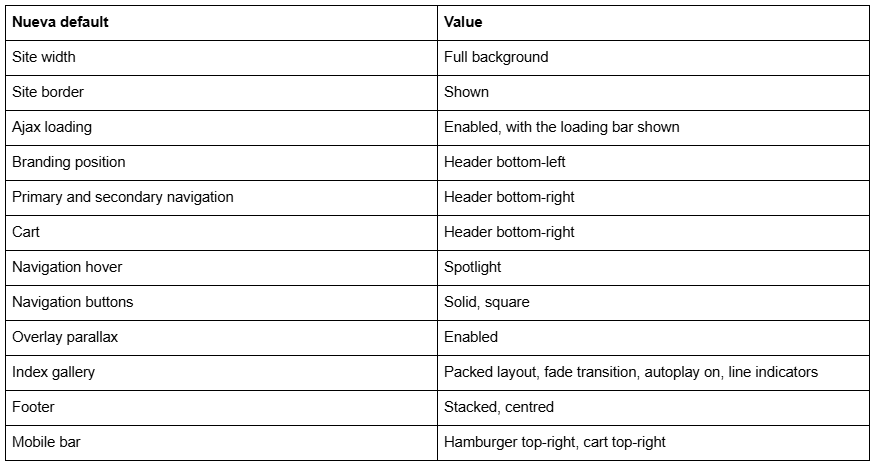
Everything in that table is a Brine family tweak, not a Nueva feature, which is exactly the point. Underneath the styling, Nueva gives you what every Brine template gives you: six header slots across a top and bottom header row, full-bleed banner images and videos with parallax, editable intro areas, a three-block footer, index pages with stacked content and gallery sections, content inset for narrower text, a site-wide border, ajax loading, and three site-width options. Brine is also one of only five version 7.0 families with the Advanced store page — the others being Farro, Skye, Tremont and York — which adds Quick View, image zoom and waitlists over the Classic store page most families have.
Is the Squarespace Nueva template still available in 2026?
Yes, on an existing version 7.0 site. Install it at Design → Template → Install new template, then click Start with on Nueva. It is not on Squarespace's discontinued list, which names Adversary, Alex, Amelie, Atelier, Beatrice, Boutique, Bricktop, Bryler, Custom Template, Devlin, Dovetail, Eamon, Encore, Faye, Frontrow, Fulton, Ginger, Hudson, Jensen, Jirick, Jones, Lincoln, Marquee, Metro, Minsk, Mint, Particle, Peak, Qubert, Shift, Takk and Taylor.
No, on a new site. The live gallery at squarespace.com/templates returned 198 templates in August 2026, every one of them version 7.1. Nueva is not there and cannot be. The only version 7.0 sites in existence are ones that already existed.
No, at the old demo URL. squarespace.com/templates/nueva-demo serves the generic 7.1 gallery now, as do all the old per-template demo paths. Several competitor pages still link to it. The working Nueva demo is nueva-demo.squarespace.com.
Being on the available list also matters for a second reason. The version 7.0 to 7.1 update tool refuses to run on a discontinued template, so owners of Bryler, Fulton, Taylor and Jones have to switch to a supported sibling before they can update at all. Nueva owners have no such block.
Version 7.0 has no announced end-of-life. Squarespace calls the update optional, and Squarespace 5 — launched in 2008 — is still online and supported. What Squarespace does say is: "fixing bugs or issues is a lower priority for us while we focus on our current platform, version 7.1." Whether old Squarespace templates are still supported covers that position in detail.
The switch path: exactly what happens when you install a different template
This is where Nueva owners get hurt, because template switching and the 7.1 update are two completely different operations with two different consequences for your code.
The steps, from Squarespace's switching documentation:
Open the Design panel and click Template.
Click Install new template.
Browse, then click Start with on the one you want.
The new template appears in your Template panel below the live one. "The template that's currently live on your site will be at the top of the panel with a Live label next to its name."
Preview it. "Your preview template is only visible to you when logged in" and "Visitors won't see your preview template."
Publish it when you are satisfied.
What survives and what does not:
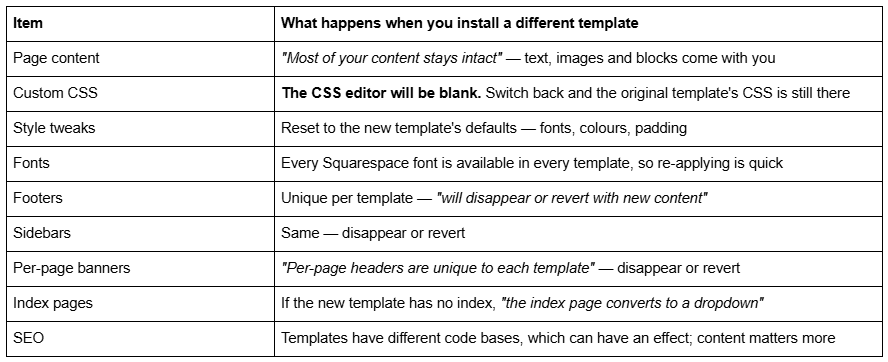
Read the Custom CSS row twice. Installing a new template blanks the CSS editor. Updating from version 7.0 to 7.1 does something different — it leaves your Custom CSS in place but commented out, and you remove the comment tags in the CSS editor to restore it. People confuse the two constantly, then panic. In both cases the fix is the same: copy the entire contents of Website → Website Tools → Custom CSS into a text file before you start.
Two more rules worth knowing. Encore, Lincoln, Bryler and Taylor cannot be switched to — they are not offered in the switcher, though you can switch away from them. And uninstalling is the irreversible act: Squarespace's wording is "Before you uninstall a template, ensure it isn't discontinued. If it's discontinued, you won't be able to reinstall it." Template-specific customisations are deleted on uninstall regardless. Since Nueva is not discontinued you could reinstall it, but you would not get your CSS back. Changing your Squarespace template walks the whole process through screen by screen.
One last thing specific to Nueva: switching from Nueva to Mercer, Rally, Hyde or any other Brine family member changes defaults only. The underlying code is identical across all 47 members. You will lose your CSS and gain a different set of fonts, colours and demo images. That is rarely a trade worth making — restyling Nueva in site styles gets you the same result with nothing lost.
What breaks or feels dated on a Nueva site in 2026
No Fluid Engine. Version 7.0 editing is the classic block editor — a 12-column grid, no drag-anywhere canvas, no overlapping elements without Custom CSS.
Documented Brine family bugs that will not be fixed. Videos in gallery index sections show as black boxes if no featured image is uploaded. Video banners may fail to load on slow connections or older browsers. Parallax scrolling is unavailable for gallery index sections. Index navigation dots disappear on mobile. All four affect Nueva, because all four are family-level.
Mobile is one inherited layout with its own styling controls, not a genuinely independent per-section layout. Squarespace 7.1 with Fluid Engine gives you the latter, at a 767px breakpoint.
No header button. Brine renders no call-to-action button in the header natively; the usual workaround is styling a single-item secondary navigation. On a trades site whose whole purpose is "Get a Quote", that is a real gap — and it is one the Bedford family solved and Brine never did.
Moving a Squarespace Nueva site to version 7.1
The tool is at Design → Update to Version 7.1. It is permanent — "After you click Publish update, your site will update to version 7.1 permanently" — caps at 150 pages, errors above 200 products, and requires developer mode off.
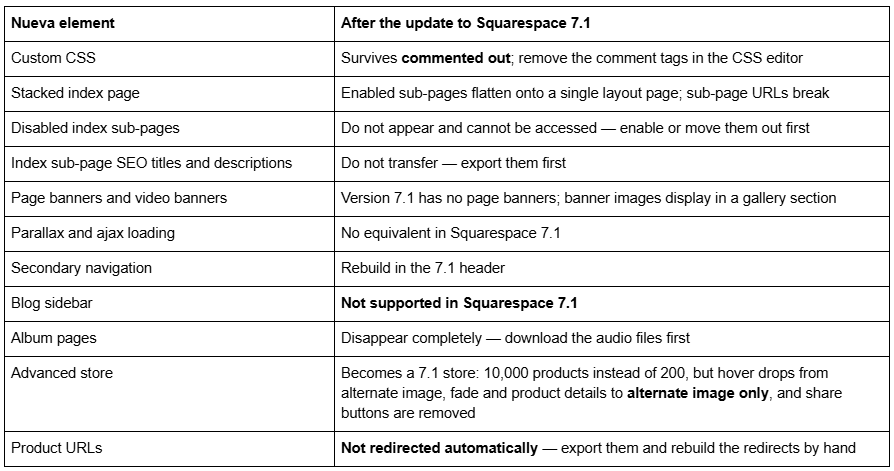
Changing a page slug on Squarespace creates no automatic 301 redirect, ever. Every orphaned sub-page and product URL goes into Settings → Advanced → URL Mappings using the /old -> /new 301 format. The Squarespace 7.0 to 7.1 guide covers the full sequence.
So: stay on Nueva, switch, or update?
Stay if the Nueva site is doing its job. It is available, it is not discontinued, version 7.0 has no announced end-of-life, and nothing is going to switch it off.
Do not switch to another Brine family template. All 47 share the same code, so you would trade your Custom CSS for a different set of default fonts and colours. Restyle Nueva in site styles instead — that is where every difference between Brine family members lives anyway.
Update to Squarespace 7.1 if you need Fluid Engine, courses, video pages, a store past 200 products, or an independently editable mobile layout — and treat it as a project with a redirect plan attached. Across 54 Squareko-built client sites measured in August 2026 (Playwright/Chromium lab test, cloud datacenter, unthrottled, single run per site), 53 of 54 run Squarespace 7.1. Version 7.0 is the minority now, but a working Nueva site is not an emergency.
The Nueva sites we get sent are usually service businesses whose whole site is one long stacked index with the services, the gallery and the quote form living as index sub-pages. The update tool flattens that into a single layout page and breaks every sub-page URL, which on a local business with years of Google Business Profile links and directory citations pointing at /services/plumbing is the part that actually costs money. If that describes your site, starting from a premium Squarespace template built for 7.1 with the redirects mapped up front is usually the shorter path. If your Nueva site is five pages and nobody links to the sub-pages, the update tool and an afternoon will do it. The Squarespace Brine template guide works through the same decision for the family as a whole.
FAQ
-
Yes, on an existing version 7.0 site, via Design → Template → Install new template. Nueva is not on Squarespace's discontinued list. You cannot start a new site on it — the live gallery returned 198 templates in August 2026, all version 7.1 — and squarespace.com/templates/nueva-demo now serves that generic gallery rather than a Nueva demo.
-
The Brine family, the largest in version 7.0 with 47 members. We fetched nueva-demo.squarespace.com in August 2026 and it returned HTTP 200 with "templateVersion":"7" and template ID 55f0aac0e4b0f0a5b7e0b22e, the Brine family ID. Because templateId identifies the family, a detector will report a Nueva site as Brine.
-
It blanks the CSS editor. Squarespace's wording is that when you install a new template the CSS editor will be blank, and that switching back to the previous template restores the CSS you added to it. Copy the contents of Website → Website Tools → Custom CSS into a text file before installing anything.
-
Yes, as long as you have not uninstalled it. Uninstalling is the irreversible act — Squarespace warns that a discontinued template cannot be reinstalled once uninstalled, and template-specific customisations are deleted on uninstall regardless. Nueva is not discontinued, so it can be reinstalled, but the CSS does not come back.
-
Encore, Lincoln, Bryler and Taylor are not offered in the version 7.0 switcher. You can switch away from them but not to them. Every other available version 7.0 template, including Nueva, appears in Design → Template → Install new template on an existing 7.0 site.
-
Most of it stays intact — text, images and blocks carry across. Style tweaks reset to the new template's defaults, and footers, sidebars and per-page banners are unique to each template, so they disappear or revert with new content. If the new template has no index page, an index converts to a dropdown.

Author Bio
I'm Walid Hasan, a Certified Squarespace Expert and Squarespace Circle Platinum Partner with over 12 years of hands-on experience designing and optimizing high-performing websites. Over the years, I've had the privilege of building more than 2,000 Squarespace websites for clients around the world, always focusing on clean design, strong user experience, and conversion-driven results.
